Creating POI lists with MRA
-

When I plan a motorbike trip, I first make a list of POIs that I (probably) want to visit.
In the second step, I plan individual routes in which I add the corresponding POIs as Viapoints. In the process, of course, I sometimes discover more POIs that I want to add to my list.However, I cannot create a POI list within MRA Route Planner.
The only way I can think of is to plan a dummy route in which I collect the various POIs together. If a certain point is already included in an existing POI collection (either the lists included in MRA or one of my own uploaded list), I can add it as a POI to the route. I can then split or copy the dummy route into individual routes to plan my day trips.
If I want to add POIs that are not already in a collection, I have to create favourites instead - which I don't want to do because I use favourites for a different purpose.
All in all, it's not really a smooth way.Alternatively, I could create my POI list with another app and then load it into MRA. That works fine - but of course I would like to do everything with MRA

Any ideas for a better workflow?
-
When I plan a motorbike trip, I first make a list of POIs that I (probably) want to visit.
In the second step, I plan individual routes in which I add the corresponding POIs as Viapoints. In the process, of course, I sometimes discover more POIs that I want to add to my list.However, I cannot create a POI list within MRA Route Planner.
The only way I can think of is to plan a dummy route in which I collect the various POIs together. If a certain point is already included in an existing POI collection (either the lists included in MRA or one of my own uploaded list), I can add it as a POI to the route. I can then split or copy the dummy route into individual routes to plan my day trips.
If I want to add POIs that are not already in a collection, I have to create favourites instead - which I don't want to do because I use favourites for a different purpose.
All in all, it's not really a smooth way.Alternatively, I could create my POI list with another app and then load it into MRA. That works fine - but of course I would like to do everything with MRA
Any ideas for a better workflow?

@Martin-W or add the poi after you created a route
Honda Goldwing GL1500,
Honda Silverwing GL 650
DMD2 T865X 8 inch Android tablet using MRA next for navigation
Garmin XT sold
Samsung S24FE mounted on a Quadlock and using Android Auto in my car -
@Martin-W or add the poi after you created a route
@Marinus-van-Deudekom
I would like to create a POI list and have these POIs displayed on the map so that I can plan my routes along the POIs and set Viapoints (as close as possible to a POI but always on the road).
To be able to transfer the POIs together with the route as waypoints to my Garmin Zumo XT would be a nice add-on, but not my main goal. -
When I plan a motorbike trip, I first make a list of POIs that I (probably) want to visit.
In the second step, I plan individual routes in which I add the corresponding POIs as Viapoints. In the process, of course, I sometimes discover more POIs that I want to add to my list.However, I cannot create a POI list within MRA Route Planner.
The only way I can think of is to plan a dummy route in which I collect the various POIs together. If a certain point is already included in an existing POI collection (either the lists included in MRA or one of my own uploaded list), I can add it as a POI to the route. I can then split or copy the dummy route into individual routes to plan my day trips.
If I want to add POIs that are not already in a collection, I have to create favourites instead - which I don't want to do because I use favourites for a different purpose.
All in all, it's not really a smooth way.Alternatively, I could create my POI list with another app and then load it into MRA. That works fine - but of course I would like to do everything with MRA
Any ideas for a better workflow?

@Martin-W
You can create your own POI list. It is laborious.
Open a new route - go to <Points of interest> in the left column and choose the middle tab <Manage> - Click "Add" and place your POI, name it. Repeat with all the POIs you want to create.
Then go to the menu at the top of the screen and choose <Save as>. There you will find the option for POI.
Then go to <Routlab> and choose <Upload> and in the next window "POI". Follow the clue.
Your POI list is now listed under the "Library" tab -
@Martin-W
You can create your own POI list. It is laborious.
Open a new route - go to <Points of interest> in the left column and choose the middle tab <Manage> - Click "Add" and place your POI, name it. Repeat with all the POIs you want to create.
Then go to the menu at the top of the screen and choose <Save as>. There you will find the option for POI.
Then go to <Routlab> and choose <Upload> and in the next window "POI". Follow the clue.
Your POI list is now listed under the "Library" tab
@Jack-van-Tilburg
wow - all thumbs up!choose the middle tab <Manage> - Click "Add" and place your POI, name it.
I hadn't discovered that yet - a good way to define your own POIs. Thanks for the tip!
The option to save the result as POIs and upload works well, but is indeed complicated.
In the meantime, I like the way via a "dummy route" as a copy template a bit. One advantage is that POIs contained in a route (tab <manage>) are always visible on the map, regardless of the zoom level. This is different for POIs from an existing collection (<Search>, <Library>). -

@Jack-van-Tilburg @Jack-van-Tilburg I have been following this with interest. I opened a route that had POI's that I created. I followed the procedure as described.
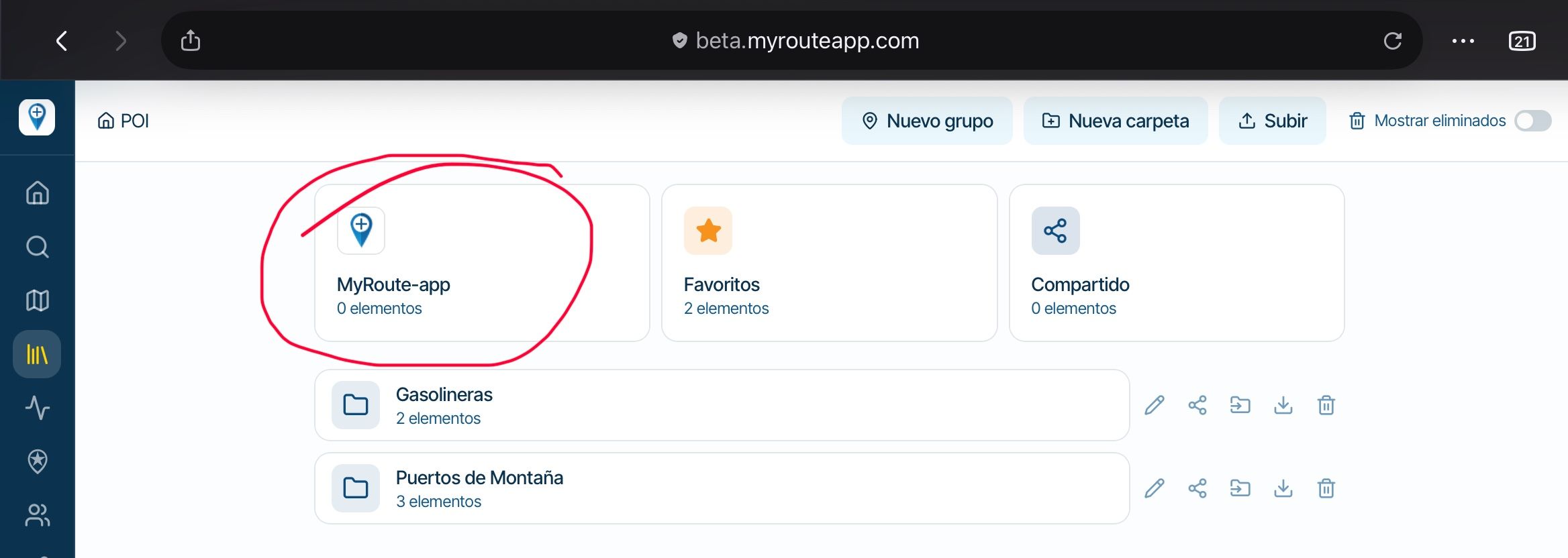
I then created a new route, and I was able to upload my POI file (CSV), and see the POI group listed in POI Library.
However, I do not see the saved POIs on my new, empty route. I set the check mark in the Library tab, but I see nothing on the map, and the Manage tab is empty.
I was expecting a reusable library of user POIs that could be used on any route.
Perhaps I am misunderstanding the use of the POI library, or perhaps I am missing a step.
I would appreciate clarification on the POI Library feature.
Thank You!
-
@Jack-van-Tilburg @Jack-van-Tilburg I have been following this with interest. I opened a route that had POI's that I created. I followed the procedure as described.
I then created a new route, and I was able to upload my POI file (CSV), and see the POI group listed in POI Library.
However, I do not see the saved POIs on my new, empty route. I set the check mark in the Library tab, but I see nothing on the map, and the Manage tab is empty.
I was expecting a reusable library of user POIs that could be used on any route.
Perhaps I am misunderstanding the use of the POI library, or perhaps I am missing a step.
I would appreciate clarification on the POI Library feature.
Thank You!
@Don-Stauffer
My understanding so far:-
POI collections in <Search> are available for all users in all new (and existing) routes.
-
POIs in <Library> are also available in all routes, but only for the user who added the collection with upload.
-
POIs in <Manage>, on the other hand, are bound to exactly this route.
So when you create a new route, you can access the POIs in 1. and 2. but not in 3. (from other routes)
Therefore my idea: I create a route as a template for a trip and add all POIs there that I want to visit and that are not included in 1. or 2. When I then plan individual routes, I do not create new routes but always copy the template.
The way you described should work and the POIs in <Library> should be visible. Maybe you have to zoom in a bit more.
-
-
@Don-Stauffer
My understanding so far:-
POI collections in <Search> are available for all users in all new (and existing) routes.
-
POIs in <Library> are also available in all routes, but only for the user who added the collection with upload.
-
POIs in <Manage>, on the other hand, are bound to exactly this route.
So when you create a new route, you can access the POIs in 1. and 2. but not in 3. (from other routes)
Therefore my idea: I create a route as a template for a trip and add all POIs there that I want to visit and that are not included in 1. or 2. When I then plan individual routes, I do not create new routes but always copy the template.
The way you described should work and the POIs in <Library> should be visible. Maybe you have to zoom in a bit more.
@Martin-W
In general you are right.
Additional information can be found in this support article.
Manual POI's
I don't think my description to make your own POI list is included -
-
When I plan a motorbike trip, I first make a list of POIs that I (probably) want to visit.
In the second step, I plan individual routes in which I add the corresponding POIs as Viapoints. In the process, of course, I sometimes discover more POIs that I want to add to my list.However, I cannot create a POI list within MRA Route Planner.
The only way I can think of is to plan a dummy route in which I collect the various POIs together. If a certain point is already included in an existing POI collection (either the lists included in MRA or one of my own uploaded list), I can add it as a POI to the route. I can then split or copy the dummy route into individual routes to plan my day trips.
If I want to add POIs that are not already in a collection, I have to create favourites instead - which I don't want to do because I use favourites for a different purpose.
All in all, it's not really a smooth way.Alternatively, I could create my POI list with another app and then load it into MRA. That works fine - but of course I would like to do everything with MRA
Any ideas for a better workflow?

@Martin-W
I think that the whole POI/Favorites aspect in the routeplanner could use a serious update. And now that we have Next, the limitations of other GPS devices are less important.
In myview, POI and Favorites are largely the same.
Maybe I write a "suggestion" on this topic
It is not difficult, it is easy, it's a hobby
-
@Martin-W
I think that the whole POI/Favorites aspect in the routeplanner could use a serious update. And now that we have Next, the limitations of other GPS devices are less important.
In myview, POI and Favorites are largely the same.
Maybe I write a "suggestion" on this topic
@Drabslab said in Creating POI lists with MRA:
In myview, POI and Favorites are largely the same.
This can lead to long and endless discussions
But I agree. If I had a way to manage "my own POIs" well, I would not need "favorites".
After all, the topic is already on the MRA Routeplanner roadmap. I am a new user, so my question is: Is there typically information available in advance about a planned new or changed feature, so that users can contribute their ideas?
-
@Drabslab said in Creating POI lists with MRA:
In myview, POI and Favorites are largely the same.
This can lead to long and endless discussions
But I agree. If I had a way to manage "my own POIs" well, I would not need "favorites".
After all, the topic is already on the MRA Routeplanner roadmap. I am a new user, so my question is: Is there typically information available in advance about a planned new or changed feature, so that users can contribute their ideas?
@Martin-W said in Creating POI lists with MRA:
my question is: Is there typically information available in advance about a planned new or changed feature, so that users can contribute their ideas?
You can take a look at the The road to MRA Routeplanner point 1.9
-
@Martin-W
You can create your own POI list. It is laborious.
Open a new route - go to <Points of interest> in the left column and choose the middle tab <Manage> - Click "Add" and place your POI, name it. Repeat with all the POIs you want to create.
Then go to the menu at the top of the screen and choose <Save as>. There you will find the option for POI.
Then go to <Routlab> and choose <Upload> and in the next window "POI". Follow the clue.
Your POI list is now listed under the "Library" tab
@Jack-van-Tilburg said in Creating POI lists with MRA:
Open a new route - go to <Points of interest> in the left column and choose the middle tab <Manage> - Click "Add" and place your POI, name it. Repeat with all the POIs you want to create.
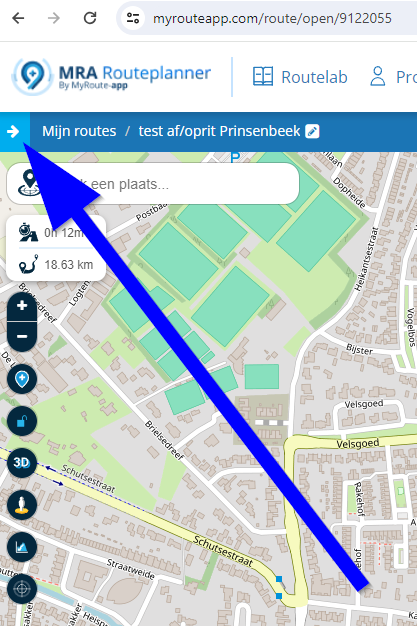
Hi, this may sound stupid but I cant find <Points of interest> in the left column. In fact, I cant see a left column on my screen.
-
@Jack-van-Tilburg said in Creating POI lists with MRA:
Open a new route - go to <Points of interest> in the left column and choose the middle tab <Manage> - Click "Add" and place your POI, name it. Repeat with all the POIs you want to create.
Hi, this may sound stupid but I cant find <Points of interest> in the left column. In fact, I cant see a left column on my screen.

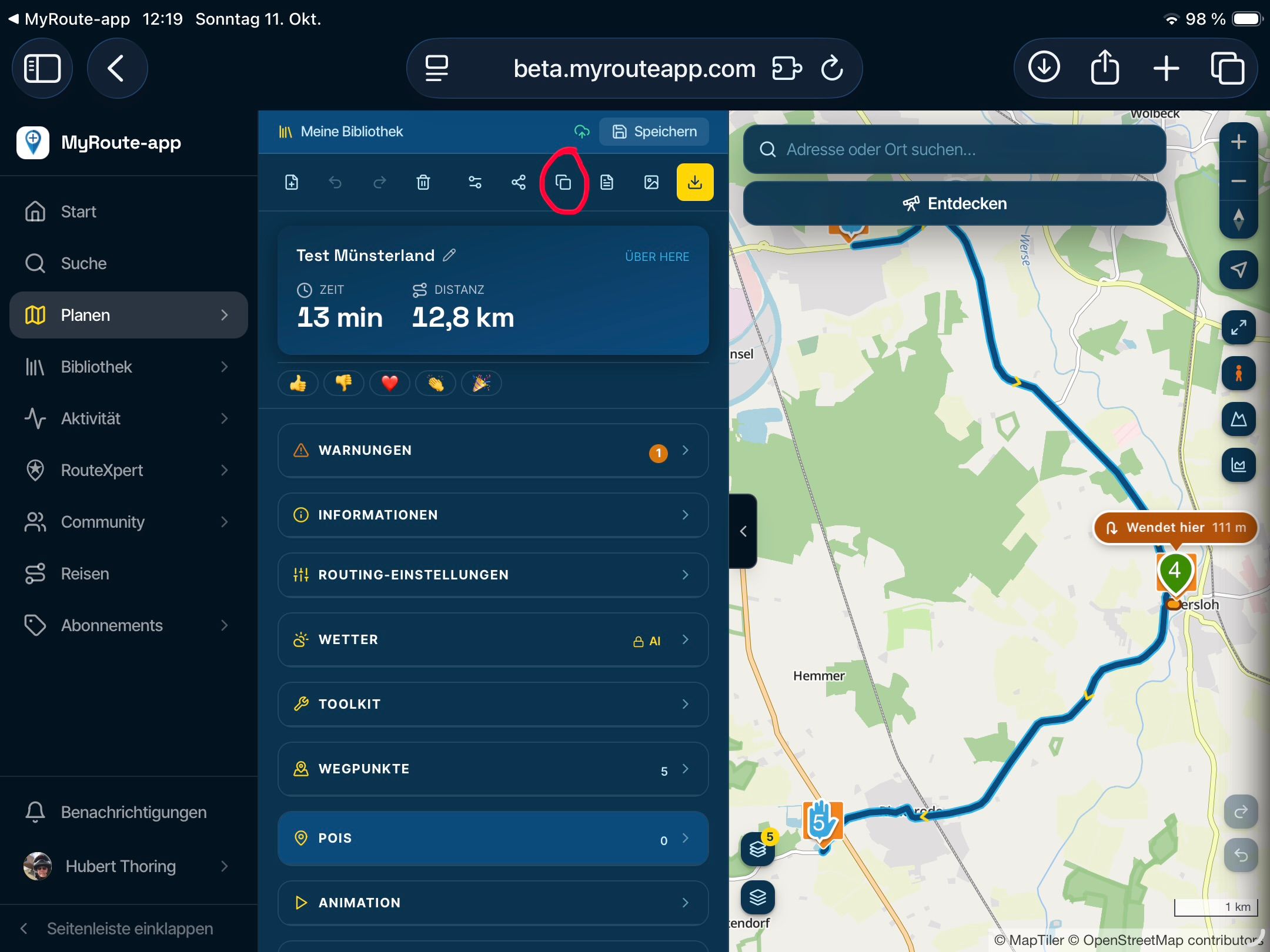
@Nigel-Ralphson, click this arrow:
I am just an enthusiastic MRA user, and hope you will be one too!
Most motorcycle problems are caused by the nut that connects the handlebar to the saddle.
Check out RideSleepRepeat.eu, a biker community for sharing stays across Europe
-
@Nigel-Ralphson, click this arrow:
@Con-Hennekens Aaahhhh thank you!! Told you I was stupid!!

-
@Con-Hennekens Aaahhhh thank you!! Told you I was stupid!!

@Nigel-Ralphson said in Creating POI lists with MRA:
@Con-Hennekens Aaahhhh thank you!! Told you I was stupid!!
No, you’re not stupid, a stupid person wouldn’t ask for help

Always willing to help if I can.
Triumph Tiger 1200 XRT called Tina.
MRA Navigation Next and SilverFox BJ8 -
@Nigel-Ralphson said in Creating POI lists with MRA:
@Con-Hennekens Aaahhhh thank you!! Told you I was stupid!!
No, you’re not stupid, a stupid person wouldn’t ask for help
@Nick-Carthew said in Creating POI lists with MRA:
a stupid person wouldn’t ask for help
Exactly!
@Nigel-Ralphson, I wish all questions were this easy to answer
-
When I plan a motorbike trip, I first make a list of POIs that I (probably) want to visit.
In the second step, I plan individual routes in which I add the corresponding POIs as Viapoints. In the process, of course, I sometimes discover more POIs that I want to add to my list.However, I cannot create a POI list within MRA Route Planner.
The only way I can think of is to plan a dummy route in which I collect the various POIs together. If a certain point is already included in an existing POI collection (either the lists included in MRA or one of my own uploaded list), I can add it as a POI to the route. I can then split or copy the dummy route into individual routes to plan my day trips.
If I want to add POIs that are not already in a collection, I have to create favourites instead - which I don't want to do because I use favourites for a different purpose.
All in all, it's not really a smooth way.Alternatively, I could create my POI list with another app and then load it into MRA. That works fine - but of course I would like to do everything with MRA
Any ideas for a better workflow?
@Martin-Wilcke I browsed the forum to see if others already suggested enabling a more natural way in MRA for planning multiday trips. You suggestion comes close to my wish:
I create a new folder and would like it to contain the POI's and routes for a series of days. I first want to enter all overnight stays as POI's, so I can use them as endpoint for a day trip and use it again as a starting point the next day.
A workaround is to define all trip POI's as Favourites but this means various multiday trips share alle POI's, unless you remove them from the list again afterwards.I read here that new POI functionality is coming. My suggestion is enable POI's for a series of routes to be put in a folder just like the routes itself.
Hello! It looks like you're interested in this conversation, but you don't have an account yet.
Getting fed up of having to scroll through the same posts each visit? When you register for an account, you'll always come back to exactly where you were before, and choose to be notified of new replies (either via email, or push notification). You'll also be able to save bookmarks and upvote posts to show your appreciation to other community members.
With your input, this post could be even better 💗
Register Login-
 01248
01248
-
 0415
0415
-
039
-
 1323
1323
-
 0427
0427
-
0320
-
 0457
0457
-
0298