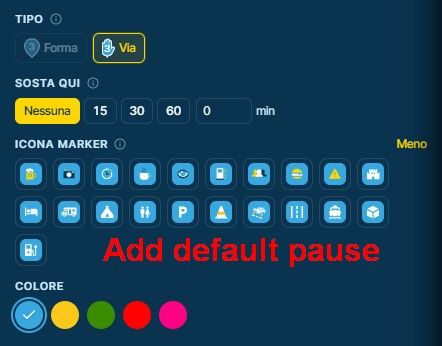
sorry @2dehans-0 Ik denk dat je het verkeerd doet, het systeem doet precies wat je zegt dat het moet doen
eerst wanneer je het nieuwe punt 60 aan het "toevoegt" is dit toegevoegd aan het einde van de route
de route gaat nu van 1, 2, 3, > 58, 59, 60
wanneer u start bij 60 selecteert gaat de route 60, 1, 2, 3, > 58, 59
dit is het systeem dat precies werkt zoals je het vroeg
wat je wilt doen is geen punt 60 toevoegen
een nieuw exemplaar van de route nemen
selecteer een van de bestaande punten die zich in de buurt van de locatie bevindt waar u wilt beginnen
stel dit punt op het startpunt,
sleep het dan naar waar je echt wilt dat het startpunt is
OF
Neem een nieuwe kopie van de route
plaats een nieuw punt op de bestaande route, in de buurt waar u zich bij de route wilt aansluiten
het nieuwe punt zal worden genummerd als een tussennummer, niet aan het begin of het einde
sleep dit nieuwe punt naar de plaats die je wilt beginnen
=============
sorry @2dehans-0 I think you are doing it wrong, the system is doing exactly what you are telling it to do
first when you are "adding" the new point 60 this is added to the end of the route
the route now goes from 1, 2, 3, > 58, 59, 60
when you select start at 60 the route goes 60, 1, 2, 3, > 58, 59
this is the system working exactly as you asked it to do
what you want to do is NOT add a point 60
take a new copy of the route, select one of the existing points that is near to the location where you want to start
set this point to be the start point & then drag it to where you really want the start point to be
OR
take a new copy of the route & place a new point on the existing route near where you would like to join the route
the new point will be numbered as some intermediate number
set this new point to be the start then drag the new point to the place you want to start











 01349
01349 01165
01165 011228
 0848
0848 0832
0832 0650
0650 11077
11077