Skip to content
  • Categories
  • Recent
  • Popular
  • Support
  • MyRoute-app
Collapse
Brand Logo

MRA Community Forum

  1. Home
  2. The MyRoute-app
  3. [App] Problems, Bugs and other Issues
  4. Many problems navigating my route

Many problems navigating my route

Scheduled Pinned Locked Moved [App] Problems, Bugs and other Issues
23 Posts 9 Posters 1.8k Views 3 Watching
  • Oldest to Newest
  • Newest to Oldest
  • Most Votes
Reply
  • Reply as topic
Log in to reply
This topic has been deleted. Only users with topic management privileges can see it.
  • Hubert Thoring Hubert Thoring

    @Gianluca-0

    Question: to your own basic settings!

    • has it ever worked well without Android Auto (AA)?

    • has it already worked well on the mobile phone itself without any problems?

    • Was there a change between offline and online?

    Often it is due to the coupling between MRA and AA or also to the settings for navigation !!

    Gianluca 0 Offline
    Gianluca 0 Offline
    Gianluca 0
    wrote last edited by
    #4

    @Hubert-Thoring thank you
    I always used it with AA, 'couse the goal is not to leave the phone on bike's steer, keeping it dry and always with me, see bigger and brighter, use the stick present on my bike to use device without taking away hands while driving.
    But other times, also if in shorter tours, I used to navigate my routes without issues. Just phone became quite hot and visible battery draining. But nont so evident as this time: it was so hot to be bothering and the battery usage was huge.
    I belive I alwayse used it online.

    The route is public and is this:
    https://www.myrouteapp.com/it/social/route/13852451?mode=share

    Thank you

    Gianluca

    You can check out anytime you like, but you can never leave.

    Currently BMW R1200 RS "Gertrud", TomTom Ride, Carpuride 602BS, Vivo V50 5G.

    1 Reply Last reply
    0
    • Christian Feurstein Offline
      Christian Feurstein Offline
      Christian Feurstein
      wrote last edited by
      #5

      @gianluca-0

      wondering which setting you have used during your route planning? Standard or TomTom or HERE?

      2026-07-21 14_03_25-Einstellungen.jpg

      1 Reply Last reply
      1
      • Gianluca 0 Offline
        Gianluca 0 Offline
        Gianluca 0
        wrote last edited by
        #6

        Tom tom or Here, I don't remember.
        I can't reply quickly 'cause I have to wait one hour between a post and another. How can I earn reputation points? Do it depends by number of posts?

        You can check out anytime you like, but you can never leave.

        Currently BMW R1200 RS "Gertrud", TomTom Ride, Carpuride 602BS, Vivo V50 5G.

        1 Reply Last reply
        4
        • Marinus van Deudekom Do not disturb
          Marinus van Deudekom Do not disturb
          Marinus van Deudekom
          RouteXpert
          wrote last edited by
          #7

          Of the export gpx worked well with Osmand its probably the case that you've planned the route using the OSM map. Could you check that. And like already stated please the route's url here and make shure it's set to public so we can help you

          Honda Goldwing GL1500,
          Honda Silverwing GL 650
          DMD2 T865X 8 inch Android tablet using MRA next for navigation
          Garmin XT sold
          Samsung S24FE mounted on a Quadlock and using Android Auto in my car

          1 Reply Last reply
          1
          • Leike Lodiers Offline
            Leike Lodiers Offline
            Leike Lodiers
            wrote last edited by Leike Lodiers
            #8

            Do you use the free version of MRA or the gold version?? When using the free version you only have access to the OSM card. When i lock at you're route lots of waypoints are not placed on the road but next to the road or even further. When planning check you're waypoint if they are placed correct. Don't put you're start and finish point so close together. Put you're starting point further up the road so you ride to you're starting point and the gps makes no mistakes in seeing the wrong point or missing it and keeps sending you back.

            03d68ea7-6130-40b7-a7f0-01077beb2317-image.jpeg

            dd818d4e-379e-425d-85dd-ae3c1b420b8a-image.jpeg

            1b11f1de-f0eb-4cc1-8681-cc1bfe93f755-image.jpeg

            ce366e00-3891-4634-82ae-179be7dc4b09-image.jpeg

            R1250GS. Started with a Zumo 550, BMW nav IV, Carpe-iter and now Chigee met MRA app.

            Gianluca 0 1 Reply Last reply
            0
            • Hubert Thoring Offline
              Hubert Thoring Offline
              Hubert Thoring
              Valued contributor
              wrote last edited by Hubert Thoring
              #9

              @gianluca-0
              What @leike-lodiers writes is very important and should definitely be taken into account.

              The route is planned in TomTom algorithms, the window s. Image comes when starting the navigation on my mobile phone, so it leads to the fact that it is actively navigated as a route track, traffic data is also missing.

              Please switch to Here algorithm, then it will be navigated correctly.

              And please do not let the route navigate over such a long distance, divide it into 3-4 sections.
              IMG_0412.jpeg

              From experience, I would basically divide such a long route. I think on 3-4 sections especially in the mountains 300km a day is enough.

              • In my planning, the routes at 300km have approx. 50 -70 waypoints (WP) or Sharping Point (SP)

              • It helps to always set a point safely in the direction of travel at certain turns

              • Check WP on the Here map, should always be on a road !!

              IMG_0409.png

              VG Hubert
              Beta Test "Next App" dazu die Hardware .
              iPad 9. Gen iOS 26.6/ iPhone 16e iOS 26.6/ Navi iPhone Xr iOS 18.7.9 / PC mit MS Win11 /❗️MyRoute-App im Cradel und Remotek-One❗️ Info zu MRA & Remotek One

              Gianluca 0 1 Reply Last reply
              0
              • Leike Lodiers Leike Lodiers

                Do you use the free version of MRA or the gold version?? When using the free version you only have access to the OSM card. When i lock at you're route lots of waypoints are not placed on the road but next to the road or even further. When planning check you're waypoint if they are placed correct. Don't put you're start and finish point so close together. Put you're starting point further up the road so you ride to you're starting point and the gps makes no mistakes in seeing the wrong point or missing it and keeps sending you back.

                03d68ea7-6130-40b7-a7f0-01077beb2317-image.jpeg

                dd818d4e-379e-425d-85dd-ae3c1b420b8a-image.jpeg

                1b11f1de-f0eb-4cc1-8681-cc1bfe93f755-image.jpeg

                ce366e00-3891-4634-82ae-179be7dc4b09-image.jpeg

                Gianluca 0 Offline
                Gianluca 0 Offline
                Gianluca 0
                wrote last edited by
                #10

                @Leike-Lodiers thank you for answer.
                I have gold subscription.
                The problems I had were far away from start/finish point. The fact is that te route planned at a certain point, became different from the one saved, with some deviations kilometers away and then back on the same (wrong) road. Sorry, I didn't screenshot them. Yesterday I tried again to put in navigation mode and the problem did't appear.
                Next time I will look at with attention where waypoint are placed, surely. And i will be sure to use Here maps in planning.

                PS: what about Cheegee on your BMW bike?

                You can check out anytime you like, but you can never leave.

                Currently BMW R1200 RS "Gertrud", TomTom Ride, Carpuride 602BS, Vivo V50 5G.

                Leike Lodiers 1 Reply Last reply
                0
                • Hubert Thoring Hubert Thoring

                  @gianluca-0
                  What @leike-lodiers writes is very important and should definitely be taken into account.

                  The route is planned in TomTom algorithms, the window s. Image comes when starting the navigation on my mobile phone, so it leads to the fact that it is actively navigated as a route track, traffic data is also missing.

                  Please switch to Here algorithm, then it will be navigated correctly.

                  And please do not let the route navigate over such a long distance, divide it into 3-4 sections.
                  IMG_0412.jpeg

                  From experience, I would basically divide such a long route. I think on 3-4 sections especially in the mountains 300km a day is enough.

                  • In my planning, the routes at 300km have approx. 50 -70 waypoints (WP) or Sharping Point (SP)

                  • It helps to always set a point safely in the direction of travel at certain turns

                  • Check WP on the Here map, should always be on a road !!

                  IMG_0409.png

                  Gianluca 0 Offline
                  Gianluca 0 Offline
                  Gianluca 0
                  wrote last edited by
                  #11

                  Hi, thanks for answering.
                  "And please do not let the route navigate over such a long distance, divide it into 3-4 sections." -> ok, I will do this way. But may I know the technical reason? Is it lighter to elaborate for the phone?

                  "Please switch to Here algorithm, then it will be navigated correctly." -> you mean when I plan or also navigating? When I open "Route Lab" to plan, I receive the message that the route creation mode works only with Tomtom or Here maps, maybe I choosed Tomtom this time. On the phone I can't choose the map on which navigate, just the theme of it, is it right?
                  I never used shaping points, I didn't ever know them existence... I have to search something about.

                  Thank you again

                  You can check out anytime you like, but you can never leave.

                  Currently BMW R1200 RS "Gertrud", TomTom Ride, Carpuride 602BS, Vivo V50 5G.

                  Nick Carthew 1 Reply Last reply
                  0
                  • Gianluca 0 Gianluca 0

                    Hi, thanks for answering.
                    "And please do not let the route navigate over such a long distance, divide it into 3-4 sections." -> ok, I will do this way. But may I know the technical reason? Is it lighter to elaborate for the phone?

                    "Please switch to Here algorithm, then it will be navigated correctly." -> you mean when I plan or also navigating? When I open "Route Lab" to plan, I receive the message that the route creation mode works only with Tomtom or Here maps, maybe I choosed Tomtom this time. On the phone I can't choose the map on which navigate, just the theme of it, is it right?
                    I never used shaping points, I didn't ever know them existence... I have to search something about.

                    Thank you again

                    Nick Carthew Offline
                    Nick Carthew Offline
                    Nick Carthew
                    RouteXpert
                    wrote last edited by Nick Carthew
                    #12

                    @Gianluca-0
                    It is important to use the correct planning map for your navigation device.

                    Each planning map comes with its own set of algorithms embedded within the map data to calculate which roads to use.

                    The algorithms are unique to each planning map.

                    So if you use MRA Navigation Next you should use the HERE planning map.

                    After choosing the HERE planning map you can also click Always use this map for new routes to set the HERE map as your default planning map.

                    From now on all new routes will be created using the HERE planning map.

                    My screenshot below shows the planning map from HERE is selected and also the option to Always use this map for new routes.

                    The overlay maps are separate to the planning maps and have no effect on route calculations.

                    Think of them as clear sheets with extra information that you place over the top of the planning map.

                    The planning map underneath does all of the route calculations.

                    So with the HERE planning map selected you can then use any of the overlay maps.

                    If you do not see the same blue menu bar with the planning maps that is shown in my screenshot, click Page menu first and then all of the same options will be available to you.

                    bce75500-eac2-40f2-9b52-91d3d10b3807-image.jpeg

                    Always willing to help if I can.
                    Triumph Tiger 1200 XRT called Tina.
                    MRA Navigation Next and SilverFox BJ8

                    Gianluca 0 1 Reply Last reply
                    2
                    • Nick Carthew Nick Carthew

                      @Gianluca-0
                      It is important to use the correct planning map for your navigation device.

                      Each planning map comes with its own set of algorithms embedded within the map data to calculate which roads to use.

                      The algorithms are unique to each planning map.

                      So if you use MRA Navigation Next you should use the HERE planning map.

                      After choosing the HERE planning map you can also click Always use this map for new routes to set the HERE map as your default planning map.

                      From now on all new routes will be created using the HERE planning map.

                      My screenshot below shows the planning map from HERE is selected and also the option to Always use this map for new routes.

                      The overlay maps are separate to the planning maps and have no effect on route calculations.

                      Think of them as clear sheets with extra information that you place over the top of the planning map.

                      The planning map underneath does all of the route calculations.

                      So with the HERE planning map selected you can then use any of the overlay maps.

                      If you do not see the same blue menu bar with the planning maps that is shown in my screenshot, click Page menu first and then all of the same options will be available to you.

                      bce75500-eac2-40f2-9b52-91d3d10b3807-image.jpeg

                      Gianluca 0 Offline
                      Gianluca 0 Offline
                      Gianluca 0
                      wrote last edited by Gianluca 0
                      #13

                      @Nick-Carthew sooooo clear!
                      Thank you!

                      I imagine that "Tomtom" option is to be used if you are going to export the route to a tomtom navigator.

                      You can check out anytime you like, but you can never leave.

                      Currently BMW R1200 RS "Gertrud", TomTom Ride, Carpuride 602BS, Vivo V50 5G.

                      Nick Carthew 1 Reply Last reply
                      0
                      • Gianluca 0 Gianluca 0

                        @Leike-Lodiers thank you for answer.
                        I have gold subscription.
                        The problems I had were far away from start/finish point. The fact is that te route planned at a certain point, became different from the one saved, with some deviations kilometers away and then back on the same (wrong) road. Sorry, I didn't screenshot them. Yesterday I tried again to put in navigation mode and the problem did't appear.
                        Next time I will look at with attention where waypoint are placed, surely. And i will be sure to use Here maps in planning.

                        PS: what about Cheegee on your BMW bike?

                        Leike Lodiers Offline
                        Leike Lodiers Offline
                        Leike Lodiers
                        wrote last edited by
                        #14

                        @Gianluca-0 what about chigee? Works fine for me until now. Have it about 1000km now. Have to get used to handle the bmw wheel for operating chigee.

                        R1250GS. Started with a Zumo 550, BMW nav IV, Carpe-iter and now Chigee met MRA app.

                        1 Reply Last reply
                        1
                        • Gianluca 0 Gianluca 0

                          @Nick-Carthew sooooo clear!
                          Thank you!

                          I imagine that "Tomtom" option is to be used if you are going to export the route to a tomtom navigator.

                          Nick Carthew Offline
                          Nick Carthew Offline
                          Nick Carthew
                          RouteXpert
                          wrote last edited by
                          #15

                          @Gianluca-0 [said](/post/

                          I imagine that "Tomtom" option is to be used if you are going to export the route to a tomtom navigator.

                          Correct, also some BMW navigation devices use the TomTom map.

                          Always willing to help if I can.
                          Triumph Tiger 1200 XRT called Tina.
                          MRA Navigation Next and SilverFox BJ8

                          1 Reply Last reply
                          0
                          • Mzokk Online
                            Mzokk Online
                            Mzokk
                            wrote last edited by
                            #16

                            The MRA route planner and OSMand do indeed work very well together. I use MyRoute app most of the time for navigation, but do occasionally use OSMand for motorcycle navigation using Android Auto on my Africa Twin. OSMand follows the track of the route not the route itself so rarely goes "wrong". However, the track does not include "Via Points" on a route designed using MRA and provides no option to skip a portion of the route automatically or otherwise as it is following the track not a series of waypoints. I'd imagine you've maybe gone astray in your route planning somewhere or there are specific issues with the mix of hardware in use? I've been using the navigation app with AA on my Africa twin for over a year now in preference to my Garmin Zumo XT with very few navigation issues.

                            1 Reply Last reply
                            1
                            • paul69 Online
                              paul69 Online
                              paul69
                              wrote last edited by
                              #17

                              hi @gianluca-0
                              this looks like a very nice route, albeit very long for single route.
                              as a small example I looked at the Trieste area of your map and if you look at the screen shot you will observe the many different routes available with Here, OSM and Tom Tom,
                              when I plan a long route I always use the compare tool to see of there are any other possible ways I could be routed. I would then add more shaping points to force the route to the way I want, some will say this is excessive, but it works for me and I very rarely if at all stray from my original planned route, except for the dreaded umleitung of course.

                              Screenshot 2026-07-21 at 18.45.08.png

                              to achieve, we must first attempt ✌️
                              K1600 GTL
                              Oukitel RT3
                              iPhone 13 Pro, carpuride 702b

                              Gianluca 0 1 Reply Last reply
                              2
                              • LennyO Offline
                                LennyO Offline
                                LennyO
                                RouteXpert
                                wrote last edited by
                                #18

                                And do no forget to test "disable seasonal closures" to see if it changes the route mileage and takes a different pass...

                                Positive emotions are worth every penny ;)

                                Gianluca 0 1 Reply Last reply
                                1
                                • paul69 paul69

                                  hi @gianluca-0
                                  this looks like a very nice route, albeit very long for single route.
                                  as a small example I looked at the Trieste area of your map and if you look at the screen shot you will observe the many different routes available with Here, OSM and Tom Tom,
                                  when I plan a long route I always use the compare tool to see of there are any other possible ways I could be routed. I would then add more shaping points to force the route to the way I want, some will say this is excessive, but it works for me and I very rarely if at all stray from my original planned route, except for the dreaded umleitung of course.

                                  Screenshot 2026-07-21 at 18.45.08.png

                                  Gianluca 0 Offline
                                  Gianluca 0 Offline
                                  Gianluca 0
                                  wrote last edited by Gianluca 0
                                  #19

                                  @paul69 I never userd before shaping points, I hava to try.
                                  What's the issue about too long tracks?
                                  Good advice, thank you

                                  You can check out anytime you like, but you can never leave.

                                  Currently BMW R1200 RS "Gertrud", TomTom Ride, Carpuride 602BS, Vivo V50 5G.

                                  paul69 1 Reply Last reply
                                  0
                                  • LennyO LennyO

                                    And do no forget to test "disable seasonal closures" to see if it changes the route mileage and takes a different pass...

                                    Gianluca 0 Offline
                                    Gianluca 0 Offline
                                    Gianluca 0
                                    wrote last edited by
                                    #20

                                    @Lenny-O Uh... I'll sure give a try to this feature
                                    Thank you

                                    You can check out anytime you like, but you can never leave.

                                    Currently BMW R1200 RS "Gertrud", TomTom Ride, Carpuride 602BS, Vivo V50 5G.

                                    1 Reply Last reply
                                    1
                                    • Gianluca 0 Offline
                                      Gianluca 0 Offline
                                      Gianluca 0
                                      wrote last edited by
                                      #21

                                      Well, raeading your precious indications, I have replicated the issue and understand why it happened.
                                      The track was made with Tomtom map and reading it with MRA navigator gave this crazy result.
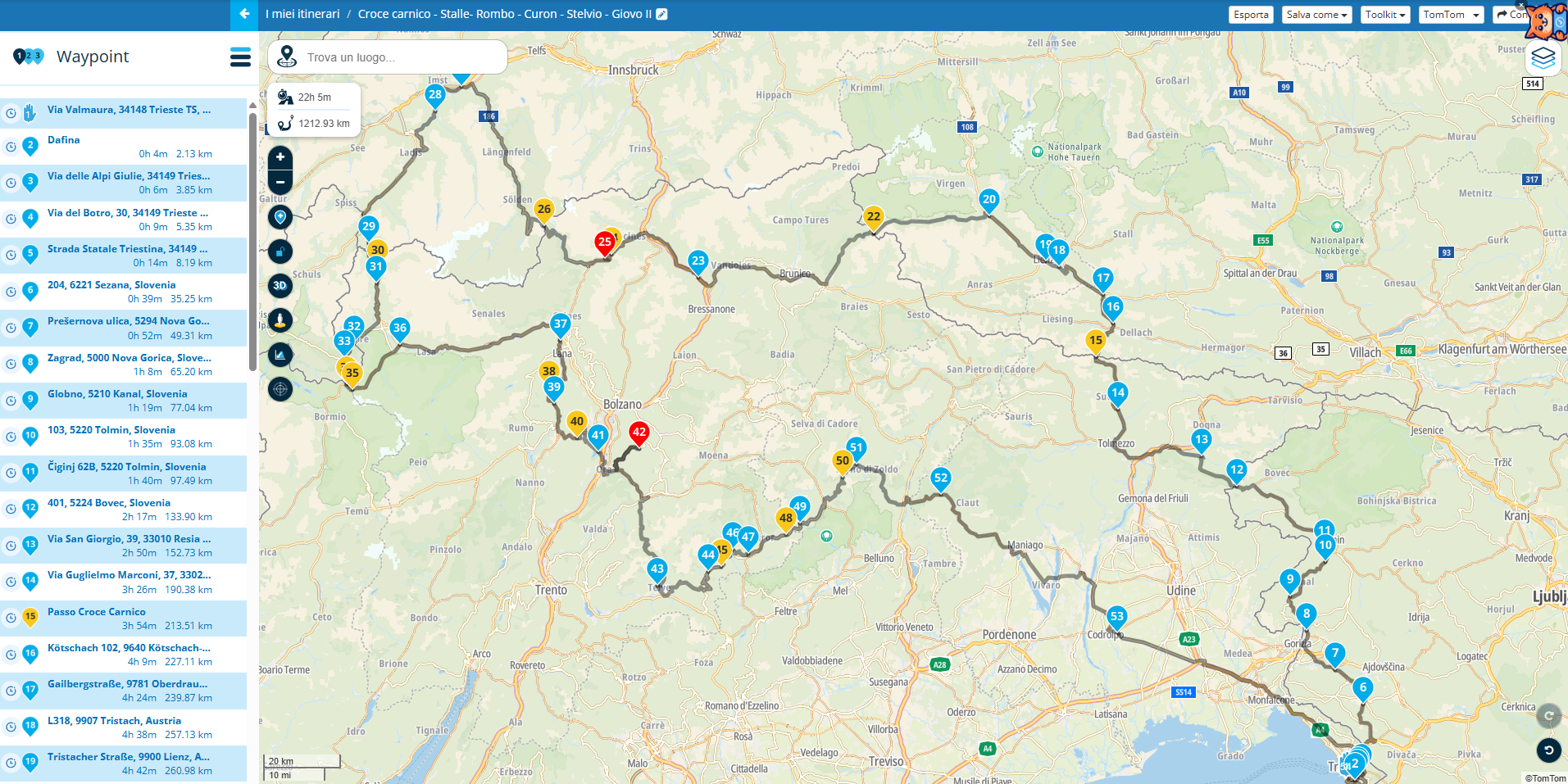
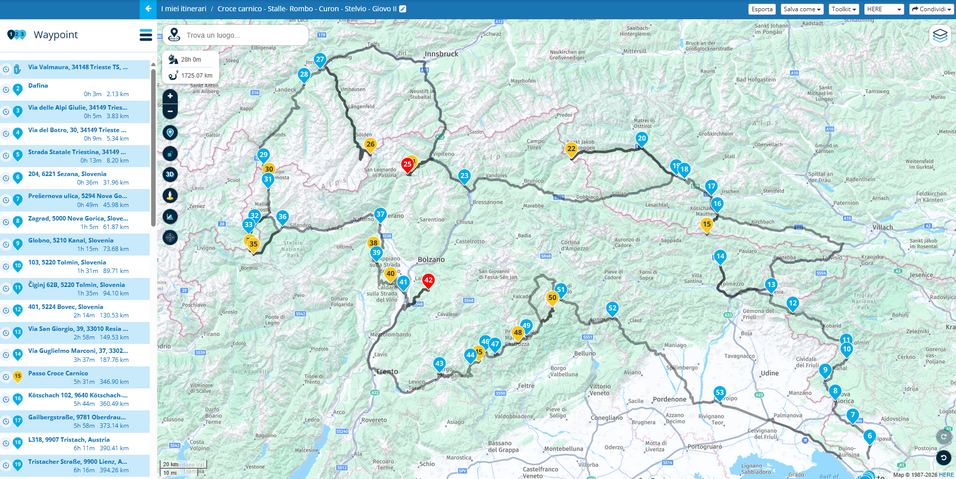
                                      Screenshot 2026-07-23 090200.png

                                      Screenshot 2026-07-23 090041_half.png

                                      Many of you understood the snag.

                                      Thank you all a lot, my next trip (last August week, about 2500 km in Romania) will be smooth ! I'll cut it in daily tracks of 3/400 km and use the correct map to plan !

                                      You can check out anytime you like, but you can never leave.

                                      Currently BMW R1200 RS "Gertrud", TomTom Ride, Carpuride 602BS, Vivo V50 5G.

                                      1 Reply Last reply
                                      0
                                      • Gianluca 0 Gianluca 0

                                        @paul69 I never userd before shaping points, I hava to try.
                                        What's the issue about too long tracks?
                                        Good advice, thank you

                                        paul69 Online
                                        paul69 Online
                                        paul69
                                        wrote last edited by
                                        #22

                                        @Gianluca-0 said:

                                        What's the issue about too long tracks?

                                        hi,
                                        there is nothing wrong with long routes, if I were to ride this route it would be split into 2/3 separate routes and start and finish at the hotels✌️

                                        to achieve, we must first attempt ✌️
                                        K1600 GTL
                                        Oukitel RT3
                                        iPhone 13 Pro, carpuride 702b

                                        1 Reply Last reply
                                        1
                                        • Gianluca 0 Offline
                                          Gianluca 0 Offline
                                          Gianluca 0
                                          wrote last edited by
                                          #23

                                          ✌ ✌ ✌ ✌ ✌ ✌ ✌

                                          You can check out anytime you like, but you can never leave.

                                          Currently BMW R1200 RS "Gertrud", TomTom Ride, Carpuride 602BS, Vivo V50 5G.

                                          1 Reply Last reply
                                          0

                                          Hello! It looks like you're interested in this conversation, but you don't have an account yet.

                                          Getting fed up of having to scroll through the same posts each visit? When you register for an account, you'll always come back to exactly where you were before, and choose to be notified of new replies (either via email, or push notification). You'll also be able to save bookmarks and upvote posts to show your appreciation to other community members.

                                          With your input, this post could be even better 💗

                                          Register Login


                                          Reply
                                          • Reply as topic
                                          Log in to reply
                                          • Oldest to Newest
                                          • Newest to Oldest
                                          • Most Votes


                                          • 1
                                          • 2
                                          ACTIVE USERS
                                          Marinus van Deudekom
                                          Marinus van Deudekom
                                          Hubert Thoring
                                          Hubert Thoring
                                          paul69
                                          paul69
                                          Nick Carthew
                                          Nick Carthew
                                          LennyO
                                          LennyO
                                          Mzokk
                                          Mzokk
                                          Gianluca 0
                                          Gianluca 0
                                          Leike Lodiers
                                          Leike Lodiers
                                          Christian Feurstein
                                          Christian Feurstein
                                          POPULAR TOPICS
                                          • MRA groups
                                            Steve Standing
                                            Steve Standing
                                            0
                                            7
                                            81

                                          • POI naming/text display
                                            Marinus van Deudekom
                                            Marinus van Deudekom
                                            1
                                            5
                                            63

                                          • Giving folders its own color
                                            CD130
                                            CD130
                                            0
                                            14
                                            388

                                          • scenic routes maken werkt niet
                                            Marinus van Deudekom
                                            Marinus van Deudekom
                                            0
                                            2
                                            14

                                          • Folders that can store tracks and waypoints
                                            martin-phogel.de
                                            martin-phogel.de
                                            3
                                            5
                                            144

                                          • Onbegrijpelijke afslagen
                                            Travellexxie
                                            Travellexxie
                                            0
                                            5
                                            142

                                          • Er gaat hier iets mis melding
                                            Travellexxie
                                            Travellexxie
                                            0
                                            22
                                            465

                                          • Stemgeluid sterker bij afspelen muziek
                                            superg
                                            superg
                                            0
                                            4
                                            61

                                          MY GROUPS
                                          • Login

                                          • Login or register to search.
                                          • First post
                                            Last post
                                          0
                                          • Categories
                                          • Recent
                                          • Popular
                                          • Support
                                          • MyRoute-app