Skip to content
  • Categories
  • Recent
  • Popular
  • Support
  • MyRoute-app
Collapse
Brand Logo

MRA Community Forum

  1. Home
  2. The MyRoute-app
  3. [App] Problems, Bugs and other Issues
  4. Some routes opening slow and some fast

Some routes opening slow and some fast

Scheduled Pinned Locked Moved [App] Problems, Bugs and other Issues
16 Posts 6 Posters 1.1k Views 3 Watching
  • Oldest to Newest
  • Newest to Oldest
  • Most Votes
Reply
  • Reply as topic
Log in to reply
This topic has been deleted. Only users with topic management privileges can see it.
  • ConiKostundefined ConiKost

    @Nomko-Nomden said in Some routes opening slow and some fast:

    Diifers as in..... longer route? More waypoints/viapoints/shaping points? More POI's? Different map to be loaded?

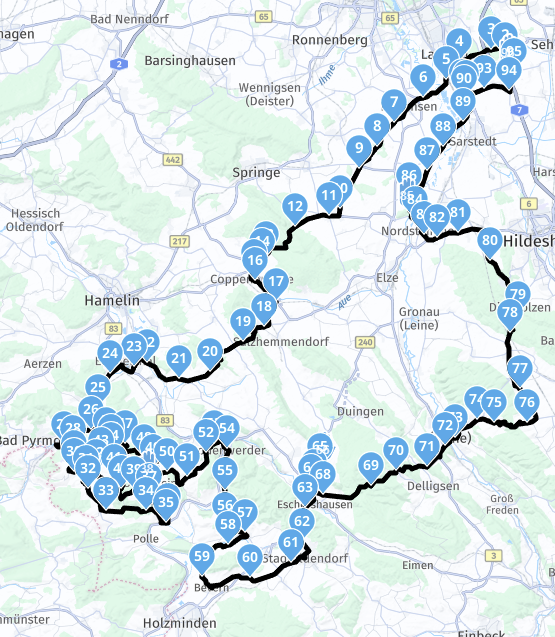
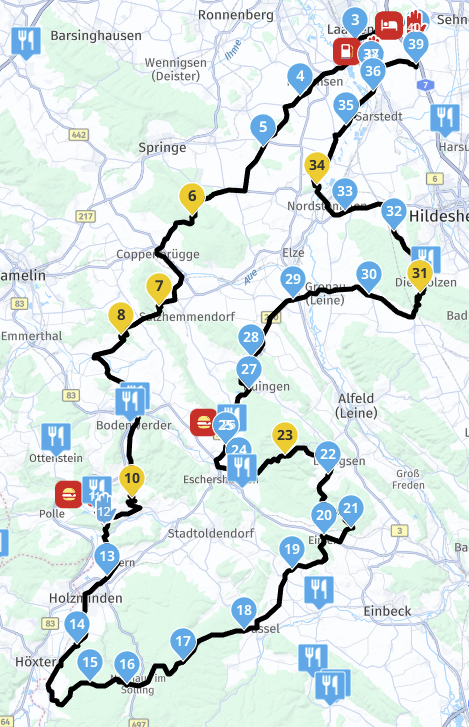
    Lets take those two routes as example.
    Route1: 272,68km, 5 Via points (including start and end), 91 shaping points.
    -> Loads about 2-3 seconds when opening in app
    Image: clickme

    Route2: 250.57km, 5 Via points (including start and end), 35 shaping points.
    -> Loads about 15 seconds when opening in app
    Image: clickme

    Both routes go into the same direction.

    @Nomko-Nomden said in Some routes opening slow and some fast:

    It could also be a bad recipient between your phone and the nearest transmission tower(s).

    Surely not, since this happens on WiFi too. And WiFi speedtests are > 600mbps.

    Corjan Meijerinkundefined Offline
    Corjan Meijerinkundefined Offline
    Corjan Meijerink
    Developer
    wrote on last edited by
    #6

    @ConiKost do you have the link to the route of image 2?

    I see POIs displayed, do you by any chance have a massive POI library selected to load / display on the map?

    ConiKostundefined 1 Reply Last reply
    0
    • Hubert Thoringundefined Offline
      Hubert Thoringundefined Offline
      Hubert Thoring
      Valued contributor
      wrote on last edited by Hubert Thoring
      #7

      @ConiKost
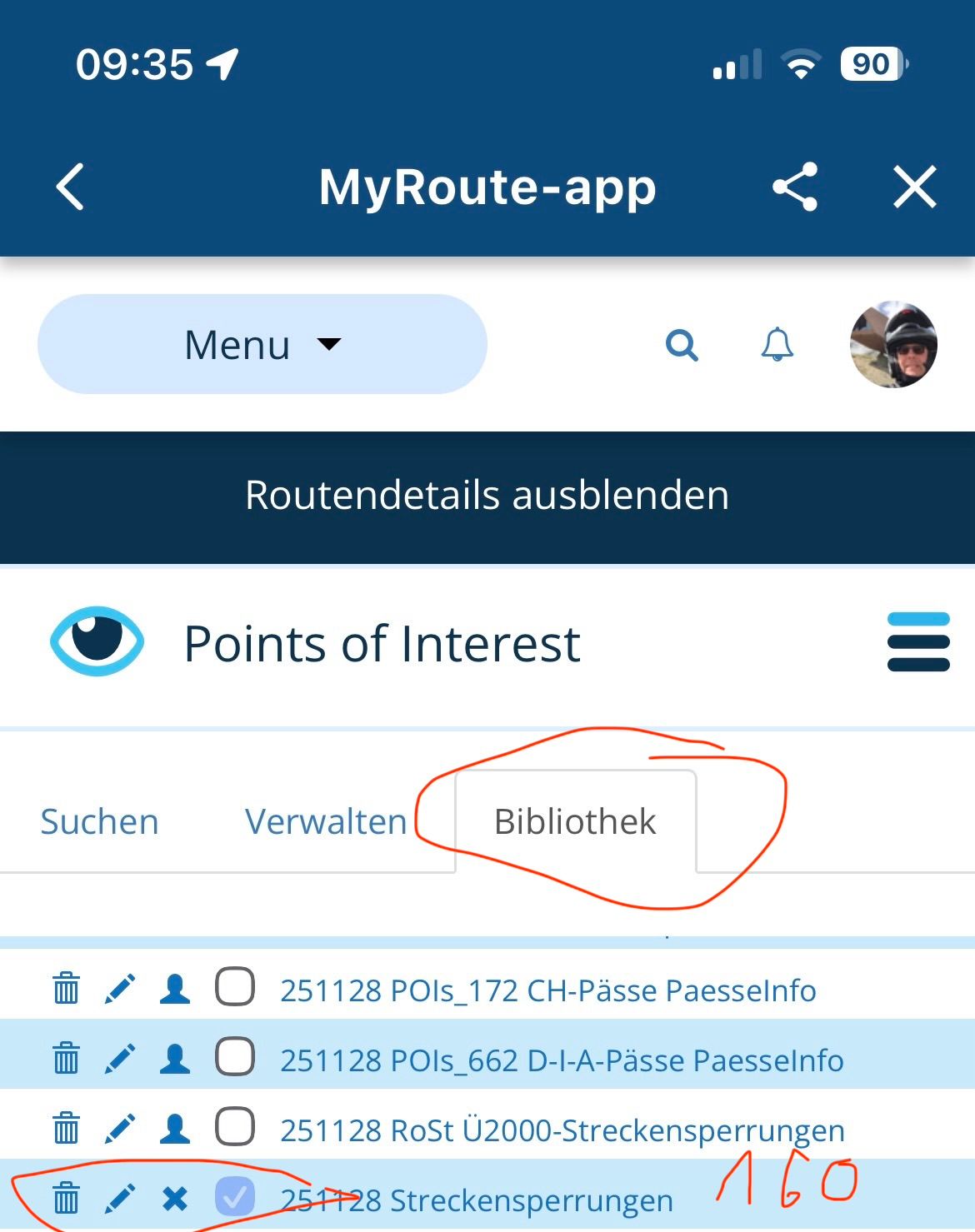
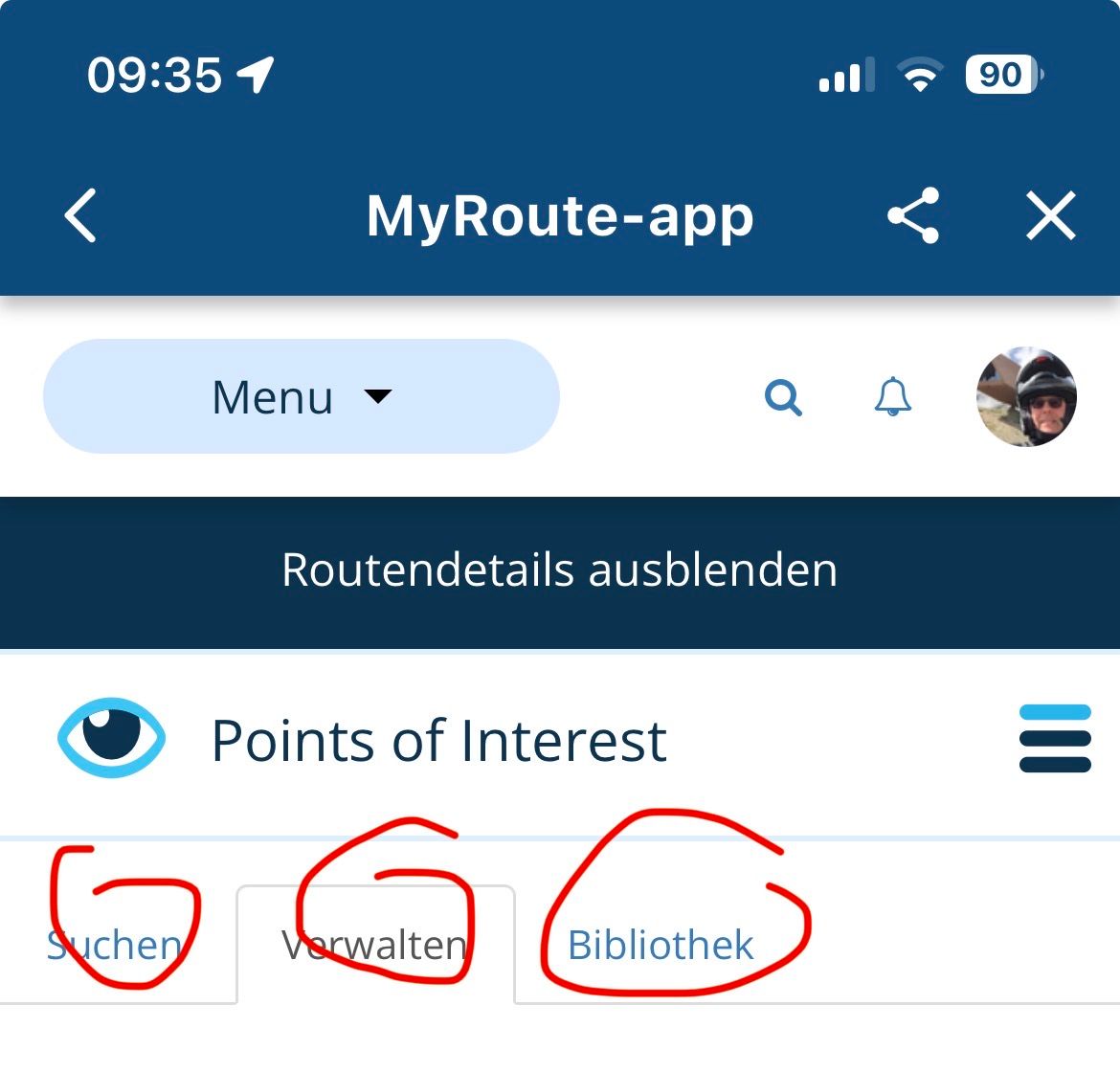
      What Corjan writes can be found here in the POI settings.

      If too much is selected, everything is always loaded and transferred, limited to 2000 POI ..
      IMG_7056.jpeg

      IMG_7055.jpeg

      VG Hubert
      Beta Test "Next App" dazu die Hardware .
      iPad 9. Gen iOS 26.4.2/ iPhone 16e iOS 26.4.2/ Navi iPhone Xr iOS 18.7.8 / PC mit MS Win11 /❗️MyRoute-App im Cradel und Remotek-One❗️ Info zu MRA & Remotek One

      1 Reply Last reply
      0
      • Corjan Meijerinkundefined Corjan Meijerink

        @ConiKost do you have the link to the route of image 2?

        I see POIs displayed, do you by any chance have a massive POI library selected to load / display on the map?

        ConiKostundefined Offline
        ConiKostundefined Offline
        ConiKost
        wrote on last edited by
        #8

        @Corjan-Meijerink said in Some routes opening slow and some fast:

        @ConiKost do you have the link to the route of image 2?

        See PN.

        @Corjan-Meijerink said in Some routes opening slow and some fast:

        I see POIs displayed, do you by any chance have a massive POI library selected to load / display on the map?

        I have multiple POIs library uploaded, but only one is active on the route, which opens slow. The active one contains about ~80-120 POIs at max, that shouldn't be the cause?

        Shiny!

        Corjan Meijerinkundefined 1 Reply Last reply
        0
        • ConiKostundefined ConiKost

          @Corjan-Meijerink said in Some routes opening slow and some fast:

          @ConiKost do you have the link to the route of image 2?

          See PN.

          @Corjan-Meijerink said in Some routes opening slow and some fast:

          I see POIs displayed, do you by any chance have a massive POI library selected to load / display on the map?

          I have multiple POIs library uploaded, but only one is active on the route, which opens slow. The active one contains about ~80-120 POIs at max, that shouldn't be the cause?

          Corjan Meijerinkundefined Offline
          Corjan Meijerinkundefined Offline
          Corjan Meijerink
          Developer
          wrote on last edited by
          #9

          @ConiKost Sounds like something you can test yourself quite easily! 🙂
          If you turn the POIs off, does it load quickly?

          1 Reply Last reply
          0
          • ConiKostundefined Offline
            ConiKostundefined Offline
            ConiKost
            wrote on last edited by ConiKost
            #10

            @Corjan-Meijerink I did give a try and indeed it's faster. I this correct, that I need always to disable those POIs in web planer, as app does not seem to have an option for this per route? Or am I just blind and don't see it? Because that would be already very helpful, when you want to disable it.

            Regarding the number, I had it wrong in mind. My POI category has ~270 points in it. Still I would not expect that much slow down? I mean, those are not relevant when loading the route initially? Maybe they could be just loaded later in the process?

            Shiny!

            1 Reply Last reply
            0
            • Corjan Meijerinkundefined Offline
              Corjan Meijerinkundefined Offline
              Corjan Meijerink
              Developer
              wrote on last edited by
              #11

              Thanks for confirming the POI's being a factor.
              I will investigate this later but definitely not soon.

              See this manual for showing / hiding certain POI groups for your entire profile / route: https://support.myrouteapp.com/en/support/solutions/articles/12000103938-manual-pois-

              ConiKostundefined 1 Reply Last reply
              0
              • Corjan Meijerinkundefined Corjan Meijerink

                Thanks for confirming the POI's being a factor.
                I will investigate this later but definitely not soon.

                See this manual for showing / hiding certain POI groups for your entire profile / route: https://support.myrouteapp.com/en/support/solutions/articles/12000103938-manual-pois-

                ConiKostundefined Offline
                ConiKostundefined Offline
                ConiKost
                wrote on last edited by ConiKost
                #12

                @Corjan-Meijerink said in Some routes opening slow and some fast:

                Thanks for confirming the POI's being a factor.
                I will investigate this later but definitely not soon.

                Thanks! 👍

                @Corjan-Meijerink said in Some routes opening slow and some fast:

                See this manual for showing / hiding certain POI groups for your entire profile / route: https://support.myrouteapp.com/en/support/solutions/articles/12000103938-manual-pois-

                I am confused. This is the procedere, how to do it website aka MRA webplanner, which I also did. I meant the Android/iOS navigation app. Or I am missunderstand here?

                Shiny!

                1 Reply Last reply
                0
                • Hubert Thoringundefined Offline
                  Hubert Thoringundefined Offline
                  Hubert Thoring
                  Valued contributor
                  wrote on last edited by
                  #13

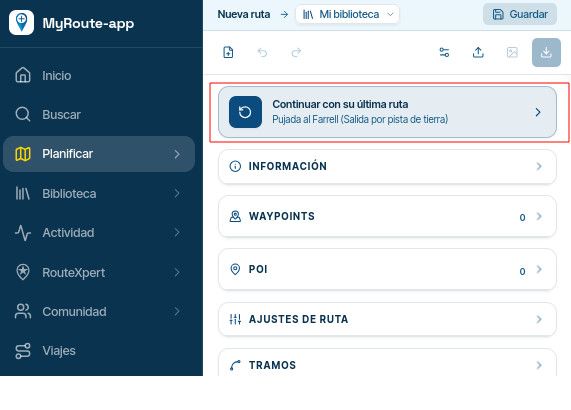
                  Switching on and off is only possible in the route lab, there is no function in the app

                  In the route lab:
                  IMG_7146.jpeg

                  VG Hubert
                  Beta Test "Next App" dazu die Hardware .
                  iPad 9. Gen iOS 26.4.2/ iPhone 16e iOS 26.4.2/ Navi iPhone Xr iOS 18.7.8 / PC mit MS Win11 /❗️MyRoute-App im Cradel und Remotek-One❗️ Info zu MRA & Remotek One

                  1 Reply Last reply
                  0
                  • ConiKostundefined Offline
                    ConiKostundefined Offline
                    ConiKost
                    wrote on last edited by ConiKost
                    #14

                    Thanks for confirming. That was my question, that I need to use the web planner and cannot use the app for that, to switch it on or off. So an option in app would be very handy 🙂

                    Shiny!

                    Nick Carthewundefined 1 Reply Last reply
                    0
                    • ConiKostundefined ConiKost

                      Thanks for confirming. That was my question, that I need to use the web planner and cannot use the app for that, to switch it on or off. So an option in app would be very handy 🙂

                      Nick Carthewundefined Online
                      Nick Carthewundefined Online
                      Nick Carthew
                      RouteXpert
                      wrote on last edited by
                      #15

                      @ConiKost said in Some routes opening slow and some fast:

                      Thanks for confirming. That was my question, that I need to use the web planner and cannot use the app for that, to switch it on or off. So an option in app would be very handy 🙂

                      There is an option in app. Tap Route lab from the mobile app to access the website.

                      Always willing to help if I can.
                      Triumph Tiger 1200 XRT called Tina.
                      MRA Navigation Next and SilverFox BJ8

                      ConiKostundefined 1 Reply Last reply
                      0
                      • Nick Carthewundefined Nick Carthew

                        @ConiKost said in Some routes opening slow and some fast:

                        Thanks for confirming. That was my question, that I need to use the web planner and cannot use the app for that, to switch it on or off. So an option in app would be very handy 🙂

                        There is an option in app. Tap Route lab from the mobile app to access the website.

                        ConiKostundefined Offline
                        ConiKostundefined Offline
                        ConiKost
                        wrote on last edited by
                        #16

                        @Nick-Carthew said in Some routes opening slow and some fast:

                        @ConiKost said in Some routes opening slow and some fast:

                        Thanks for confirming. That was my question, that I need to use the web planner and cannot use the app for that, to switch it on or off. So an option in app would be very handy 🙂

                        There is an option in app. Tap Route lab from the mobile app to access the website.

                        Sure, but it's still the website, not a native app function 😉

                        Shiny!

                        1 Reply Last reply
                        1
                        Reply
                        • Reply as topic
                        Log in to reply
                        • Oldest to Newest
                        • Newest to Oldest
                        • Most Votes


                        ACTIVE USERS
                        Hubert Thoringundefined
                        Hubert Thoring
                        Corjan Meijerinkundefined
                        Corjan Meijerink
                        Nick Carthewundefined
                        Nick Carthew
                        Marinus van Deudekomundefined
                        Marinus van Deudekom
                        Nomko Nomdenundefined
                        Nomko Nomden
                        ConiKostundefined
                        ConiKost
                        POPULAR TOPICS
                        • New beta! 5.1 (457)
                          Hubert Thoringundefined
                          Hubert Thoring
                          13
                          50
                          292

                        • Use GPX Format 1.1 for export
                          Hubert Thoringundefined
                          Hubert Thoring
                          0
                          6
                          275

                        • V5.1.0 - 458 Same Point in Route Cycles to First Instance if Later Point Selected - CarPlay
                          Dave J 0undefined
                          Dave J 0
                          0
                          3
                          23

                        • Joining a planned route from a differant position.
                          supergundefined
                          superg
                          0
                          3
                          69

                        • Snelste route vergelijken met de kortste route.
                          M. Schrijverundefined
                          M. Schrijver
                          0
                          3
                          40

                        • Clearing existing text in dialogue when editiing
                          Marinus van Deudekomundefined
                          Marinus van Deudekom
                          0
                          2
                          62

                        • "Resume navigation?" message appears frequently
                          Sven De Rockerundefined
                          Sven De Rocker
                          0
                          5
                          374

                        • Random routes.
                          undefined
                          0
                          1
                          9
                        MY GROUPS
                        • Login

                        • Login or register to search.
                        • First post
                          Last post
                        0
                        • Categories
                        • Recent
                        • Popular
                        • Support
                        • MyRoute-app