GPX Versions 1.1 vs 1.2 for Garmin Visually Explained
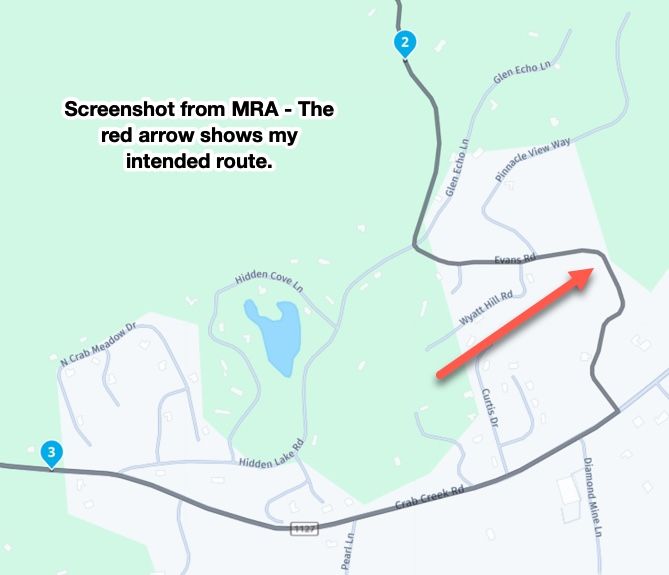
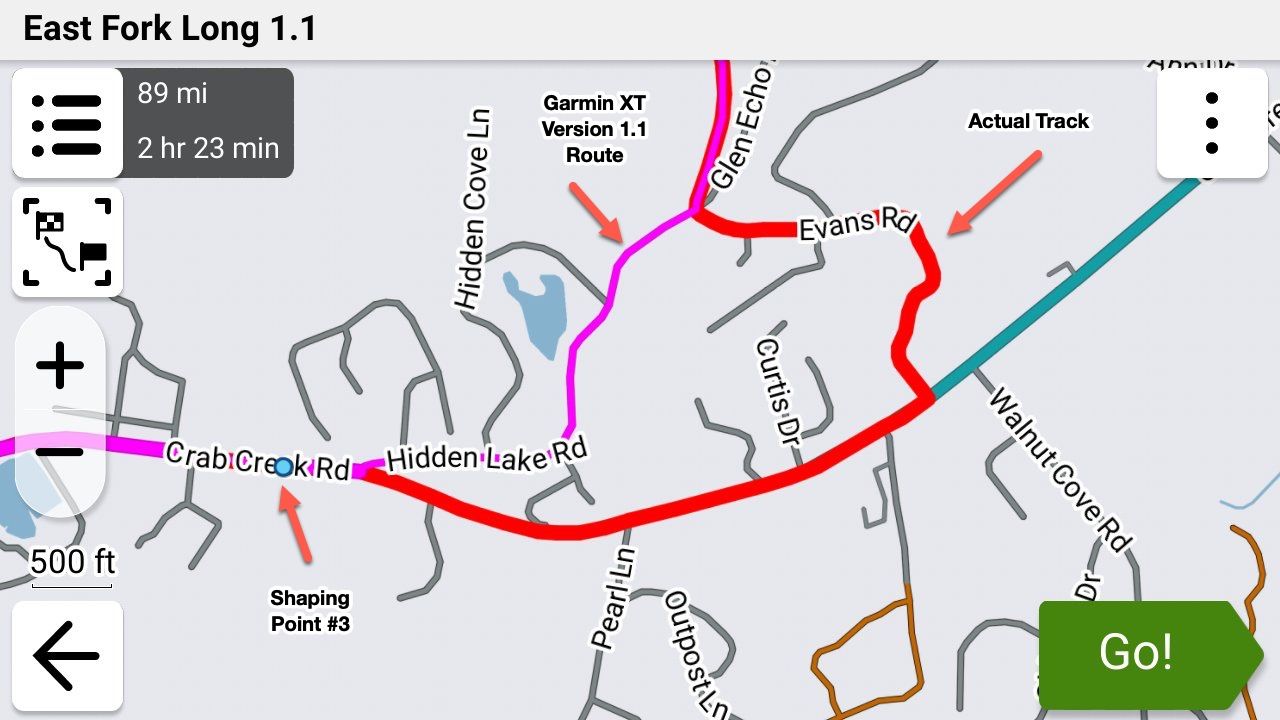
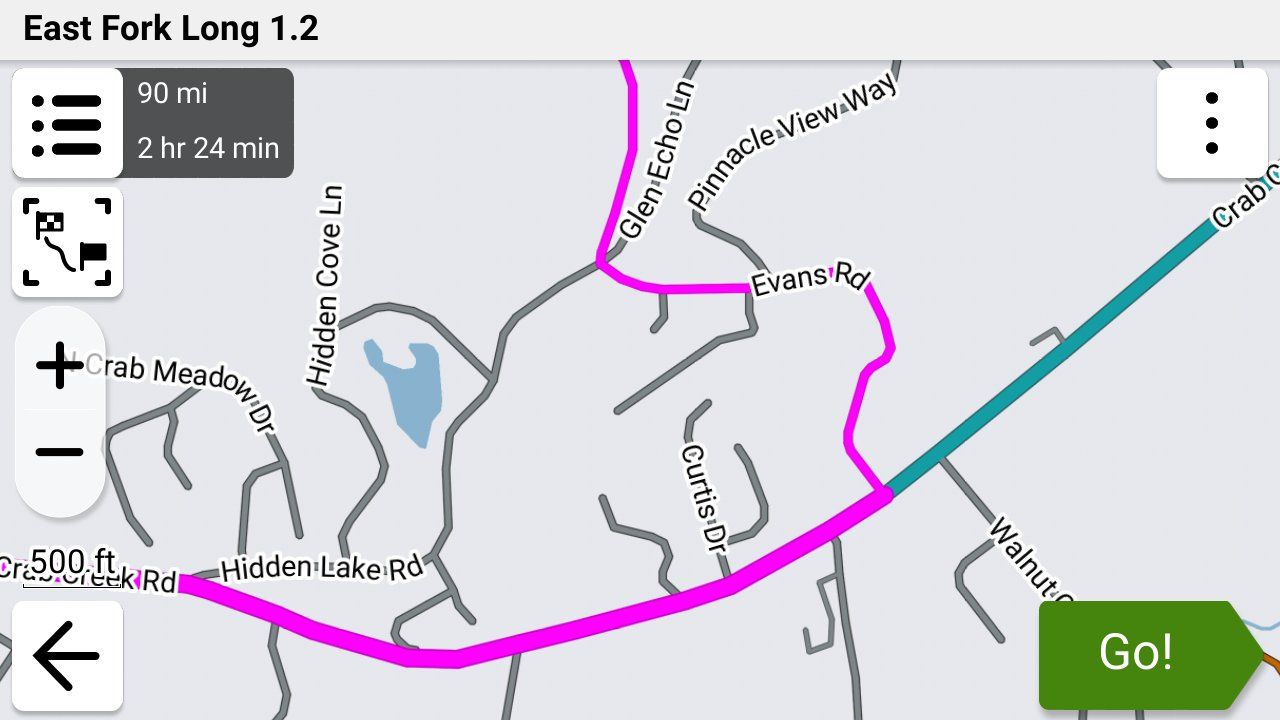
-

Road Closures.
I’m not sure when I’ll get to test this but has anyone found out what happens to a GPX1.2 route when you come across one? That would be with ‘Traffic’ enabled. I’m not sure whether auto-recalculate would make any difference here or not.
I have Traffic enabled but not on auto re-route so I just get the info. Road closures are independent of that setting though and divert anyway. Historically, on older Zumos, a closure would catastrophically destroy a route but with the XT2 and GPX1.1, a nice route around it was what I have experienced.
Would a road closure diversion trigger a full route recalculation? Would Traffic need to be disabled to avoid that?
I did hazard a guess and it was 50/50 (aka I don’t know).
-
When I save a route created in My Route planner website using shape points and save it as 1.2 the route appears on my routes page as only a route and not a route and track. Is this normal?
-

Good question. I honestly don't know as well. The problem also is that there's no guarantee that the results are going to be the same between the XT, XT2, XT3 or any of the previous units!
-
When I save a route created in My Route planner website using shape points and save it as 1.2 the route appears on my routes page as only a route and not a route and track. Is this normal?
@Simon-James-Hancock Yes. The route that shows in MRA will also be your track when it's exported.
-
I thought so, I just wanted to make sure.
Again I want to thank everyone who has helped. -
I thought so, I just wanted to make sure.
Again I want to thank everyone who has helped.
@Simon-James-Hancock You're very welcome. Everyone has been extremely helpful in this thread and I'm grateful as well!
-
Just to summarize what I have learned.
Make a route in MRA with Here map using shape points.
Making sure to have the first point when leaving a bit further down the road to make sure that the route starts.
Widen the and colour the track with the garmin settings.
Save as 1.2
Question: When using shaping points and I place one next to a petrol station and name it Petrol and add a symbol of a petrol station, will it appear and can I select it when navigating or do I have to make a via point? -
@simon-james-hancock I think with your petrol station, the symbol you have added on MRA will only appear there and not on your Zumo. If you want a symbol on the Zumo, you can add a POI on MRA and that will appear - but it will only show as a flag and with the name you have given it (default is POI) so further editing is required on the Zumo if you want to see a petrol pump. If you want a mileage and/or time countdown to the petrol station, change the shaping point to a via point which you can name and that will be retained on the Zumo (also as a flag).
Just to recap, shaping points will not show on your Zumo using GPX1.2 but via points will.
I'm happy to be corrected and to learn if there is a different way.
-
Has anyone tried the trip repair tool by FrankB
Here is the link
https://www.javawa.nl/triprepair.html -
Just to summarize what I have learned.
Make a route in MRA with Here map using shape points.
Making sure to have the first point when leaving a bit further down the road to make sure that the route starts.
Widen the and colour the track with the garmin settings.
Save as 1.2
Question: When using shaping points and I place one next to a petrol station and name it Petrol and add a symbol of a petrol station, will it appear and can I select it when navigating or do I have to make a via point?
@Simon-James-Hancock You would have to make it a via point. Shaping points simply shape the route. There are no shaping points in the route section of a 1.2 .gpx file. There are just gpx lat/lon coordinates.
-
As I understand it if I make it a via point I will have to stop there otherwise will be rerouted back.
I just want to add the location of petrol stations for referance when I might need them along the route. -
Has anyone tried the trip repair tool by FrankB
Here is the link
https://www.javawa.nl/triprepair.html
Trip Manager by FrankB is brilliant. Too much to go into detail here. Best bet is to go to https://zumouserforums.co.uk/viewtopic.php?t=3150 which has a full discussion on the features, functions, links, documentation etc. for Trip Manager.
-
Just to summarize what I have learned.
Make a route in MRA with Here map using shape points.
Making sure to have the first point when leaving a bit further down the road to make sure that the route starts.
Widen the and colour the track with the garmin settings.
Save as 1.2
Question: When using shaping points and I place one next to a petrol station and name it Petrol and add a symbol of a petrol station, will it appear and can I select it when navigating or do I have to make a via point?
Just to summarize what I have learned.
Make a route in MRA with Here map using shape points.
Making sure to have the first point when leaving a bit further down the road to make sure that the route starts.
Widen the and colour the track with the garmin settings.
Save as 1.2
Question: When using shaping points and I place one next to a petrol station and name it Petrol and add a symbol of a petrol station, will it appear and can I select it when navigating or do I have to make a via point?There is no specific need for using HERE as the base map when creating a GPX. It doesn't matter at all for 1.2, and if you have enough shaping points, it shouldn't make a difference using 1.1.
HERE can be troublesome unless you actually need it for the NN app, where it's required. I've been using OSM exclusively for some time now, and it's a solid choice.
-
Just to summarize what I have learned.
Make a route in MRA with Here map using shape points.
Making sure to have the first point when leaving a bit further down the road to make sure that the route starts.
Widen the and colour the track with the garmin settings.
Save as 1.2
Question: When using shaping points and I place one next to a petrol station and name it Petrol and add a symbol of a petrol station, will it appear and can I select it when navigating or do I have to make a via point?There is no specific need for using HERE as the base map when creating a GPX. It doesn't matter at all for 1.2, and if you have enough shaping points, it shouldn't make a difference using 1.1.
HERE can be troublesome unless you actually need it for the NN app, where it's required. I've been using OSM exclusively for some time now, and it's a solid choice.

There is no specific need for using HERE as the base map when creating a GPX. It doesn't matter at all for 1.2, and if you have enough shaping points, it shouldn't make a difference using 1.1.
That's not true. If you want to use the 1.2 file Here map is mandatory.
Since there is quite a difference between Here and TomTom you will certainly have a bad route using OSM of TomTom for you planning.
On top of that all Garmin systems are Here basedHonda Goldwing GL1500,
Honda Silverwing GL 650
DMD2 T865X 8 inch Android tablet using MRA next for navigation
Garmin XT sold
Samsung S24FE mounted on a Quadlock and using Android Auto in my car -
There is no specific need for using HERE as the base map when creating a GPX. It doesn't matter at all for 1.2, and if you have enough shaping points, it shouldn't make a difference using 1.1.
That's not true. If you want to use the 1.2 file Here map is mandatory.
Since there is quite a difference between Here and TomTom you will certainly have a bad route using OSM of TomTom for you planning.
On top of that all Garmin systems are Here based
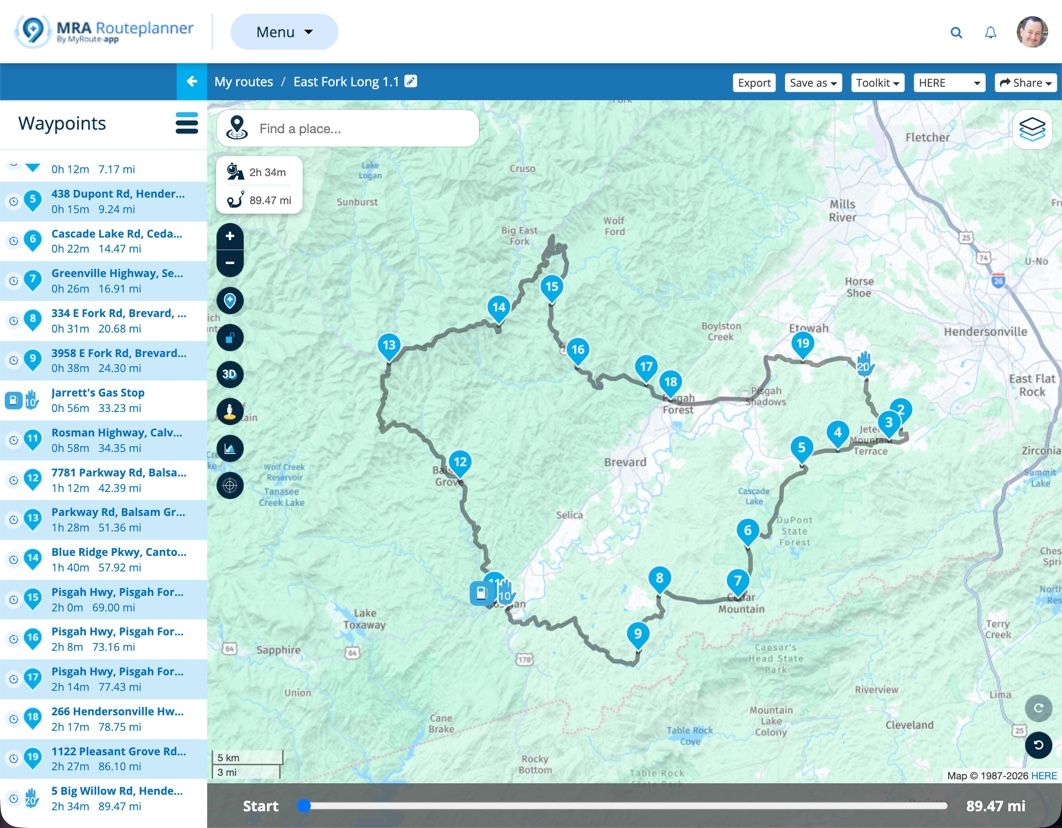
@Marinus-van-Deudekom Interesting. Here is an OSM route I just put together:
https://www.myrouteapp.com/route/open/14123994
I exported this GPX in 1.2 format. I then Imported the 1.2 route into my Garmin XT3. No problems. I verified that the route in the XT3 exactly mirrored the original MRA Routplanner route in every way. To no surprise, an exact match.
Finally, I started the route on my XT3. No issues whasoever.
The only difference between base maps how they calculate in their respective environments. If you have enough shaping points defined, any map can be imported into a Garmin device and recalculate as you into intend.
Please explain how you came to your conclusions.
-
As I understand it if I make it a via point I will have to stop there otherwise will be rerouted back.
I just want to add the location of petrol stations for referance when I might need them along the route.
@Simon-James-Hancock Good question. When you add a via point your don't have to stop there, you just have to go past that position.
If you add the petrol stations along your route where you may want to stop and you just ride past them you'll be fine. If you do get off of your route the Garmin will try to route you back to them, and as we've discussed, when you skip the via point then the Garmin recalculates your route based on it's own logic and not your shaping points.
If you want to follow your original route, your only option at that point is stop the route, restart it and select "Closest Entry Point" and it will put you back on your route past the petrol station via point that you bypassed and it will preserve your original route.
I typically only put via points for petrol (gas over here) stations in my route if they're going to be scarce where I'm going to be so I rarely skip them. Otherwise for me they're more hassle than what they're worth.
There are other workarounds using Points of Interest but frankly they're way more trouble than what they're worth. The MRA app doesn't have this (or other) limitation but that an entirely different conversation!

-
As I understand it if I make it a via point I will have to stop there otherwise will be rerouted back.
I just want to add the location of petrol stations for referance when I might need them along the route.
@Simon-James-Hancock said:
I just want to add the location of petrol stations for referance when I might need them along the route.As I previously mentioned, try placing a POI on MRA. You can give it a petrol pump symbol and call it Fuel. No need for a via point if you don't need to be prompted and it will display on your Zumo.
Edit: I've just read your post @steve-jarrell - I use MRA POIs regularly and find them really useful. Easy to place and a visual reminder on the Zumo map. And yes you're right, so long as you ride through them, a via point will not turn you back.@john-s-parry @marinus-van-deudekom I've found 1.2 to be way more forgiving of route point placement when calculating. And I would have it the other way round - HERE is probably more necessary using 1.1 when poor route point placement often results in "cannot calculate the route".
My experience anyway.
-
@Simon-James-Hancock said:
I just want to add the location of petrol stations for referance when I might need them along the route.As I previously mentioned, try placing a POI on MRA. You can give it a petrol pump symbol and call it Fuel. No need for a via point if you don't need to be prompted and it will display on your Zumo.
Edit: I've just read your post @steve-jarrell - I use MRA POIs regularly and find them really useful. Easy to place and a visual reminder on the Zumo map. And yes you're right, so long as you ride through them, a via point will not turn you back.@john-s-parry @marinus-van-deudekom I've found 1.2 to be way more forgiving of route point placement when calculating. And I would have it the other way round - HERE is probably more necessary using 1.1 when poor route point placement often results in "cannot calculate the route".
My experience anyway.
I've found 1.2 to be way more forgiving of route point placement when calculating. And I would have it the other way round - HERE is probably more necessary using 1.1 when poor route point placement often results in "cannot calculate the route".
@carl-lee Im not sure I understand the above. Why is HERE any more necessary than OSM or TomTom when using 1.1 ??
Poor route point placement is going to be a problem regardless of underlying base map. Again, I want to understand why HERE in particular is being inserted into the discussion.
-
I've found 1.2 to be way more forgiving of route point placement when calculating. And I would have it the other way round - HERE is probably more necessary using 1.1 when poor route point placement often results in "cannot calculate the route".
@carl-lee Im not sure I understand the above. Why is HERE any more necessary than OSM or TomTom when using 1.1 ??
Poor route point placement is going to be a problem regardless of underlying base map. Again, I want to understand why HERE in particular is being inserted into the discussion.
@John-S-Parry The general consensus is for the most compatibility between MRA and Garmin devices you should use the HERE maps when you're saving your .gpx files from MRA to be used by the Garmin. This is discussed in a number of threads including this one.
A search in this forum for Here Maps should turn up a lot of information.
Steve Jarrell
Western North Carolina USLifetime Routeplanner Gold & Navigation Next
2025 BMW R1300GS
2025 Can-Am Spyder
DMD T865-X 8" Tablet
Garmin XT3 -
@John-S-Parry The general consensus is for the most compatibility between MRA and Garmin devices you should use the HERE maps when you're saving your .gpx files from MRA to be used by the Garmin. This is discussed in a number of threads including this one.
A search in this forum for Here Maps should turn up a lot of information.
@John-S-Parry The general consensus is for the most compatibility between MRA and Garmin devices you should use the HERE maps when you're saving your .gpx files from MRA to be used by the Garmin. This is discussed in a number of threads including this one.
Many moons ago withe the earlier Garmin GPS devices, there was a more-or-less a direct compatibly between Basecamp and the GPS units. With the XTs, that HERE route calculation Equivalency has slowly degraded. In the years I used the XT, it wasn’t unusual to find my route to recalculate slightly different from what I developed in BC. It happened enough where I had to always double check after route transfer, and then adjust shaping points to get the platforms in sync.
The fact is that MRA HERE and Garmin HERE are not identical, and suffer the same occasional calculation differences. It’s not a debatable point. I can show you several routes I’ve developed in Routeplanner HERE that needed required additional shaping points to calculate correctly on the XT side.
So, you can argue that MRA HERE is closer, but this isn’t horseshoes or hand grenades. The development platform (MRA Routeplanner) either calculates 100% the same as the GPS device, or it doesn’t.
The forum is littered with endless problems associated with HERE. If you like the search function, check that out yourself.
With route creation, it comes down to taking responsibility for overloading shaping points so that the calculation routines have no choice but to calculate the way you want. I think you understand that from what I read in your posts. In Routeplanner, I have found OSM to be a terrific base map for route creation. Dozens of complex routes successfully created and executed tells me so. Overload with shaping points, and it simply works without the drama that sometimes gets inserted by MRA HERE.
I hope this explains where I’m coming from.
Hello! It looks like you're interested in this conversation, but you don't have an account yet.
Getting fed up of having to scroll through the same posts each visit? When you register for an account, you'll always come back to exactly where you were before, and choose to be notified of new replies (either via email, or push notification). You'll also be able to save bookmarks and upvote posts to show your appreciation to other community members.
With your input, this post could be even better 💗
Register Login







-
 0520
0520
-
 0521
0521
-
1370
-
 0311
0311
-
0312
-
 0746
0746
-
0311
-
036