GPX Versions 1.1 vs 1.2 for Garmin Visually Explained
-

@steve-jarrell I lead rides regularly. We're all on MRA so riders can load there route however they like on all the different Garmins that we have. So long as the track is available (which it is) and visible, everyone can see where we are going. None of this "my satnav says down there" anymore. The track don't lie.
If I'm leading, I'm keen to have the best and quickest option available. 1.2 routes load really quickly and don't make their own minds up.
Another con I had found when planning away from home is that plotting a shaping point exactly on the road on either a phone or tablet can be tricky and with GPX1.1 there must be many of them to pin your route. This can often lead to your track being sent over correctly but the route not calculating on the Zumo. The answer is to convert the track to a route but with all the pitfalls. 1.2 seems to calculate through Tread quite easily.
There's probably more to find out but so far, so reasonable.
-

@carl-lee Whether it's 1.1 or 1.2 if you realize their limitations AND you supplement them with the track (that never changes...) you're in good shape.
With 1.2 it is FAR easier to initially create a route in MRA that goes exactly where you intend for it to go on the Garmin. There's absolutely no question about that.
-
Ok, I've been having another play.
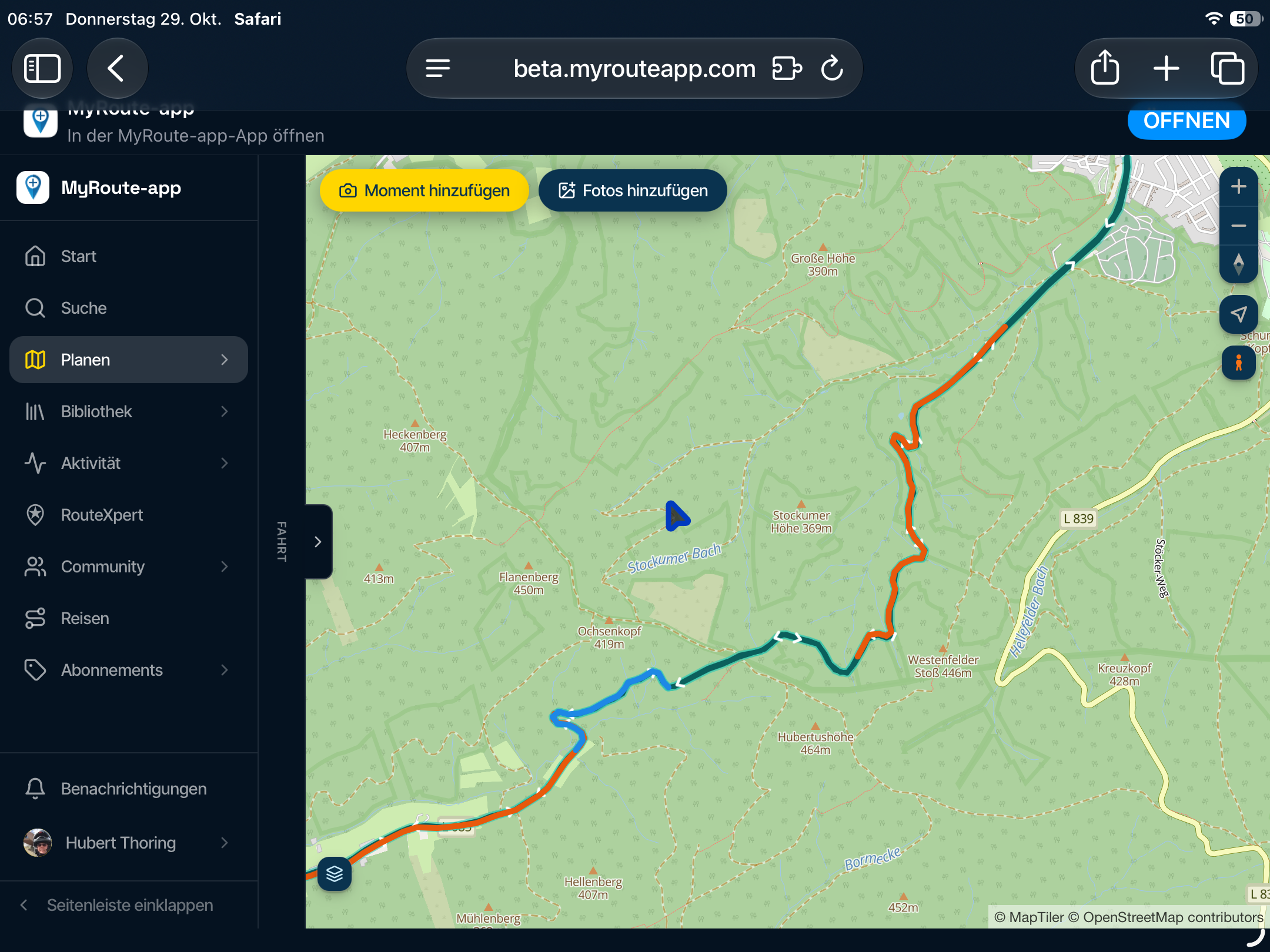
I loaded my local GPX1.2 test route through Tread and with it syncing all the way. I then started a simulation and let it run a little. After a while, I edited the route by adding a couple of shaping points. I was issued with a warning that "editing will discard the route settings and calculate a standard route". Nevertheless, I did it to see what occurred.
This:
It both did and did not destroy the original route. Yes, it went by my new shaping point diversions and then headed for the next via point, discarding the rest of the planned convoluted route to get me there. But - both the original track (obviously) and the original route overlaying it are still there on the XT2 map screen. What I was unable to do on the simulation was to ignore the new route to the via point and rejoin my original just by riding to it. However, what I could do was to stop the route and restart with CEP. Success, the route was still there and it navigated me back to it and onto the rest of my original MRA planned route.I did try adding another shaping point after my diversion ones, this time back onto the original route but it still wanted to route around and back after it to take me to the next via point. Just a thought but it still gets you onto the route where you can restart with CEP.
I had to know as even though a quick replan with MRA on my iPhone would do the trick easily, there may be that time with no phone signal so it won't open. All worst-case scenario stuff that I've not needed before and it does prove that a replan on the Garmin stops your planned route but it's still there. Schrodinger's route!
@Carl-Lee You are a real glutton for punishment!
 I assume that it recalculated the entire route as well beyond the next via point. That's the behavior that I've notice while doing my testing.
 -
@Mzokk Excellent points. In an ideal world everyone on a group ride would have the exact same GPS with the current maps and most current sw version. Since that's never going to be the case the lowest common denominator is the track file and that's what I see being distributed most often for these rides.
If you're leading a ride I can see where your 1.1 gpx file route combined with the track file would be a better option than a 1.2 file. I hadn't thought of that before.
Thanks!!
@Mzokk Excellent points. In an ideal world everyone on a group ride would have the exact same GPS with the current maps and most current sw version. Since that's never going to be the case the lowest common denominator is the track file and that's what I see being distributed most often for these rides.
If you're leading a ride I can see where your 1.1 gpx file route combined with the track file would be a better option than a 1.2 file. I hadn't thought of that before.
Thanks!!
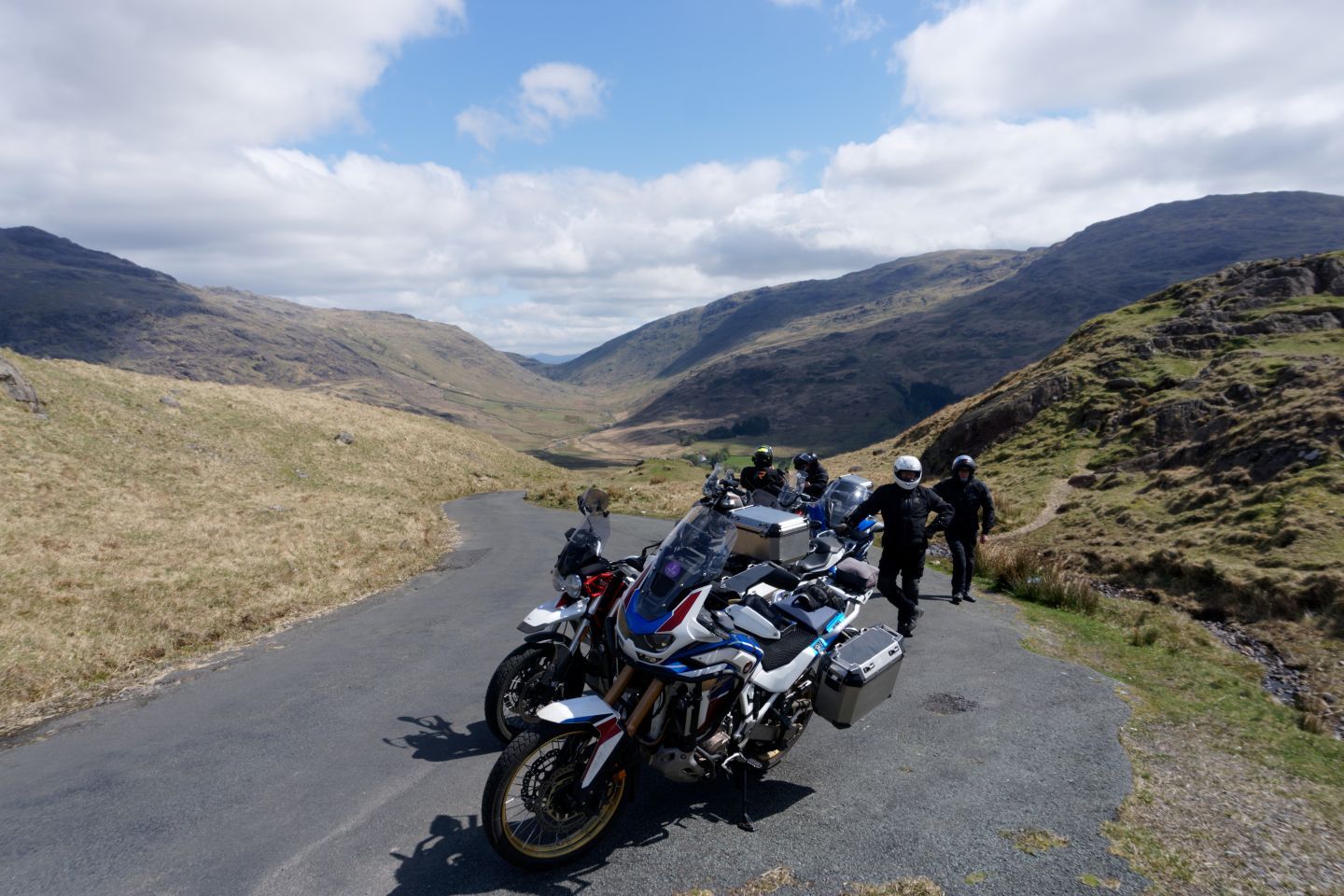
Keeping this lot to a time schedule can be a bit of a challenge, punctures, pees stops long lunches etc>
-
@Mzokk Excellent points. In an ideal world everyone on a group ride would have the exact same GPS with the current maps and most current sw version. Since that's never going to be the case the lowest common denominator is the track file and that's what I see being distributed most often for these rides.
If you're leading a ride I can see where your 1.1 gpx file route combined with the track file would be a better option than a 1.2 file. I hadn't thought of that before.
Thanks!!
Keeping this lot to a time schedule can be a bit of a challenge, punctures, pees stops long lunches etc>
@Mzokk As you get older you'll have to factor in long pee stops as well as long lunches!

-
@Carl-Lee You are a real glutton for punishment!
I assume that it recalculated the entire route as well beyond the next via point. That's the behavior that I've notice while doing my testing.
@Carl-Lee You are a real glutton for punishment!
I assume that it recalculated the entire route as well beyond the next via point. That's the behavior that I've notice while doing my testing.I only had the one via point then all I was concerned with, after the extra shaping point diversion, was getting back on to my original route which as mentioned was still there and looking as if it was ready to be navigated (which it wasn't until I performed the CEP magic).
If I'm glutton enough, I might do some more testing but it seems like I've got it where I want it right now. Certainly enough to set off and replan if and where necessary.
-
I use the app. I do not see an option to export routes created via the app in any particular gpx version. Am I missing something?? FYI I believe all Garmin Zumo units can run tracks unlike car units like the Drive units. That said I much prefer the Drive units especially those with free built in traffic updates. As well I would recommend using BaseCamp for these reasons (versus connecting directly via USB). First it is not more difficult. Either way you are connecting the GPS unit to a computer. Second if you make sure the base map in your computer is the same as the base map in your GPS you can then inspect the route. Want to tweak it now you can. Third you can change waypoints to poi’s as an edit. Forth you can see the track and the route and DELETE the route just sending the track to your motorcycle GPS. Or you can delete and then tell BaseCamp to create a route using the track. That is very handy if you choose to use google MyMaps to create a route and save it as a kml file. Open that in BaseCamp and convert it to a route and off you go. Back to question number 1. What am I missing using the app when it comes to exporting your recommended gpx file type??
-
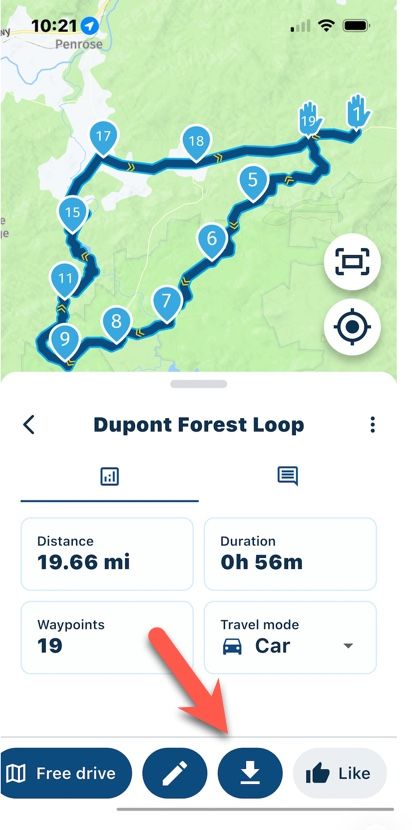
Yes you are missing something. Click the down arrow bottom right.
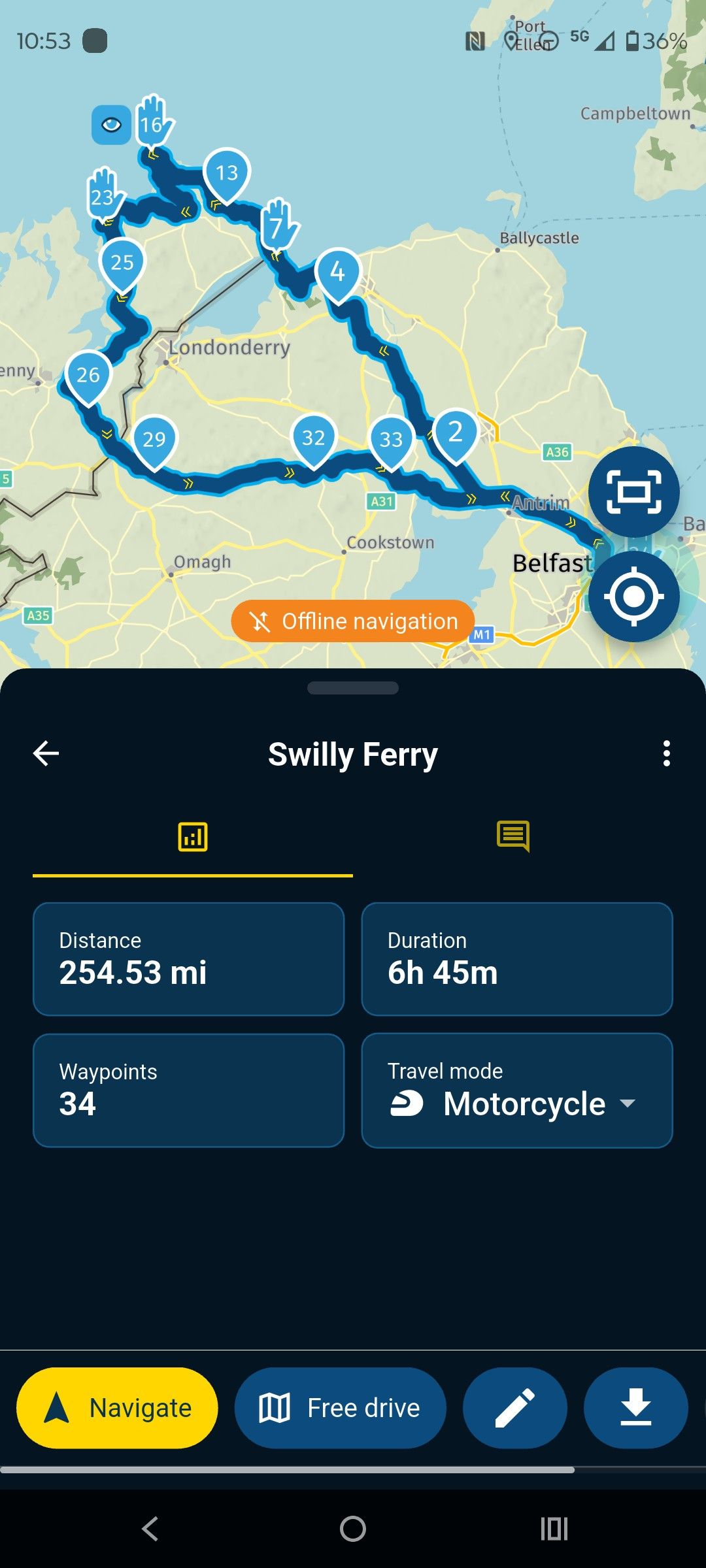
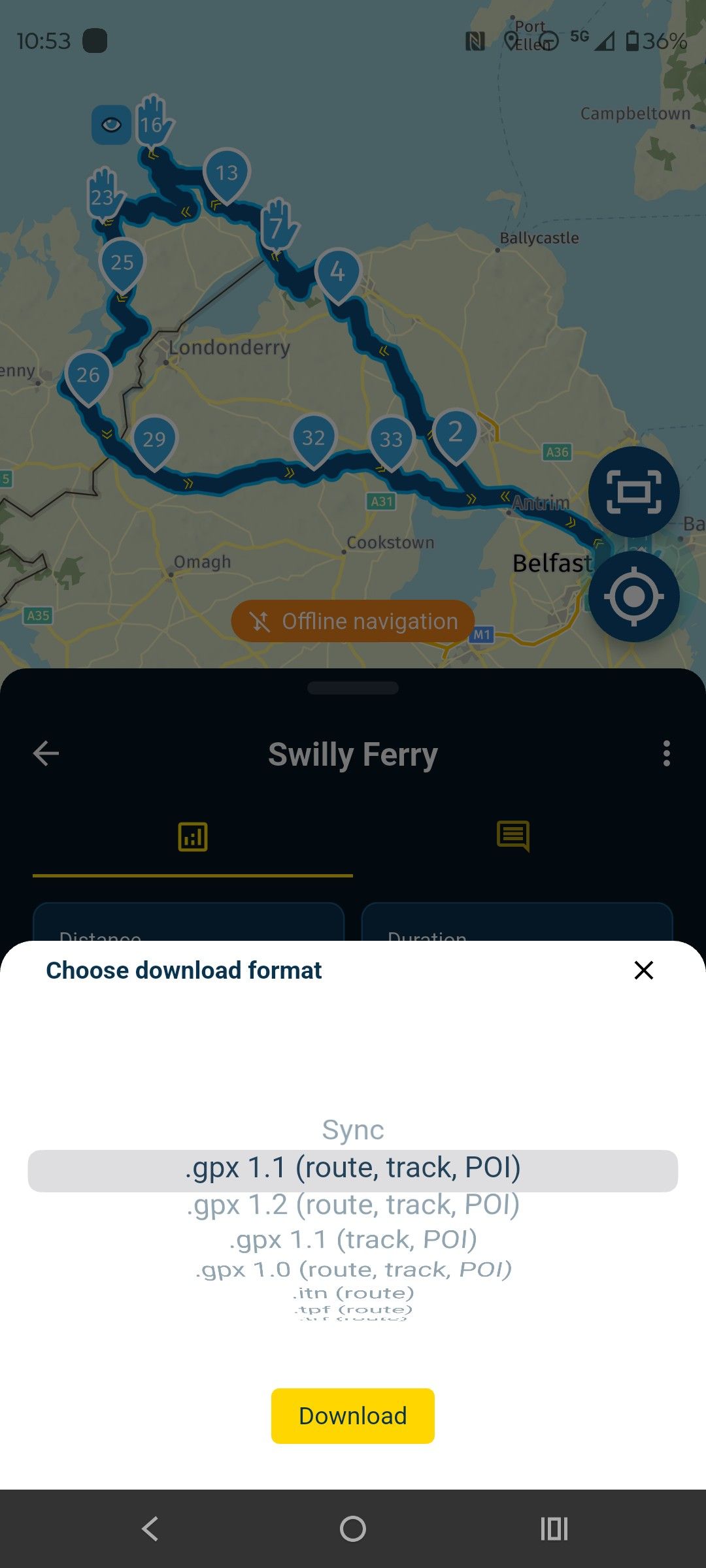
the Myroute app online navigation website is a good replacement for Basecamp. I like basecamp and still use it for POI handling and Tracks BUT Myroute app is much more useful for a number of reasons.
-
The most important reason for me is I'm not required to carry a device capable of running basecamp with me on tour to create modify routes. I use a Ipad or my phone and paper maps. I have modified routes over a coffee to get out of the rain for example while on tour.
-
Because all of my routes are in the cloud, my phone, Ipad, either of my laptops or desktop machine, have access to the same routes. You can sort of do this with basecamp using google drive or other cloud services but only with machines capable of running a version of basecamp, so not your phone or Ipad.
-
For my Zumo XT I can send routes to it using Garmin drive from my phone (No cable required) for my old units I can use cable to connect them to my phone and transfer routes.
-
If you make a route from a track in basecamp you only get a start and finish waypoint and cannot let the Zumo recalculate or you will be going straight to the end. You can circumvent this a bit by calculating the Track using the "Direct" option selecting the number of waypoints then recalculating using the "Motorcycle" option but it's a bit of a faff.
As i is I now use MyRoute app for navigation as a 22 year user of garmin products. For me the only thing lacking in the Web app is POI and track handling. For everything else, the advantages to me of using the app and the Web planner are huge.
-
-
@jim-foster what @mzokk said. Surely you’ve not come on here to tell us MRA is rubbish and we should all be using Basecamp? Many of us here will have previously used Basecamp extensively - and now are here!
-
I use the app. I do not see an option to export routes created via the app in any particular gpx version. Am I missing something?? FYI I believe all Garmin Zumo units can run tracks unlike car units like the Drive units. That said I much prefer the Drive units especially those with free built in traffic updates. As well I would recommend using BaseCamp for these reasons (versus connecting directly via USB). First it is not more difficult. Either way you are connecting the GPS unit to a computer. Second if you make sure the base map in your computer is the same as the base map in your GPS you can then inspect the route. Want to tweak it now you can. Third you can change waypoints to poi’s as an edit. Forth you can see the track and the route and DELETE the route just sending the track to your motorcycle GPS. Or you can delete and then tell BaseCamp to create a route using the track. That is very handy if you choose to use google MyMaps to create a route and save it as a kml file. Open that in BaseCamp and convert it to a route and off you go. Back to question number 1. What am I missing using the app when it comes to exporting your recommended gpx file type??
@Jim-Foster On my iPhone I have to scroll to the right at the bottom of the screen after choosing a route but before selecting "Navigate" in order to see the download button.
@mzokk did a great job of outlining why most of us much prefer MRA over Basecamp. I personally have used MANY navigation apps over the years and for me I find Basecamp to be one of the most unintuitive apps of any type that I have ever used, while I find MRA to be extremely intuitive.
Basecamp does have a couple of advantages, and I do still use it from time to time, but 99% of the time I use MRA.
-
I'm an intermediate level user of Basecamp (BC). I have riding friends who are die hard BC people, so when I lead routes with them, I still use BC to create routes for their comfort, and max flexibility to make alterations as they see fit.
I prefer the MRA Web Routplanner. For me it's more intuitive and easier to make major modifications to routes after the fact. Beyond that I love the ability to work with different maps and overlays. But a few of my friends are wizards with BC and can perform magic with routing very quick. I'm not going to pass judgement on anyone who chooses to stay with BC for whatever reasons they have.
-
I haven't found any clear explanation that made sense to me regarding the differences and pros and cons of the gpx 1.1 and 1.2 export formats. I'll outline what I have found after hours of testing and hopefully it will be of some help.
I'll start off with the basics for anyone that's totally new to .gpx files to lay the groundwork, then I'll include screenshot examples that clearly show the differences. I know the first part of this will be unnecessary for most of you, but for any new users I think it will be helpful.
THE BASICS
Bear in mind these examples are for the Garmin XT series of GPS devices. 1.2 may or may not work the same on other gps units (it probably doesn't) but even so the limitations of the 1.1 format will be the same regardless of what type of unit that you may have and it's important know how to work around them.
A .gpx file is a simple text file. You can open it with any text editor and inspect it. The file basically has three sections... 1) the header, 2) the route information, and 3) the track information.
The header section tells the GPS the general information about the file, the route section gives the GPS the information that it needs to create the turn-by-turn route when it imports the .gpx file, and the track is simple gps latitude and longitude coordinates (breadcrumbs) that form a simple path. A track doesn't know if it's on-road or off-road, or in the middle of a lake or the ocean. It's simply a series of coordinates (many times thousands of them in a file).
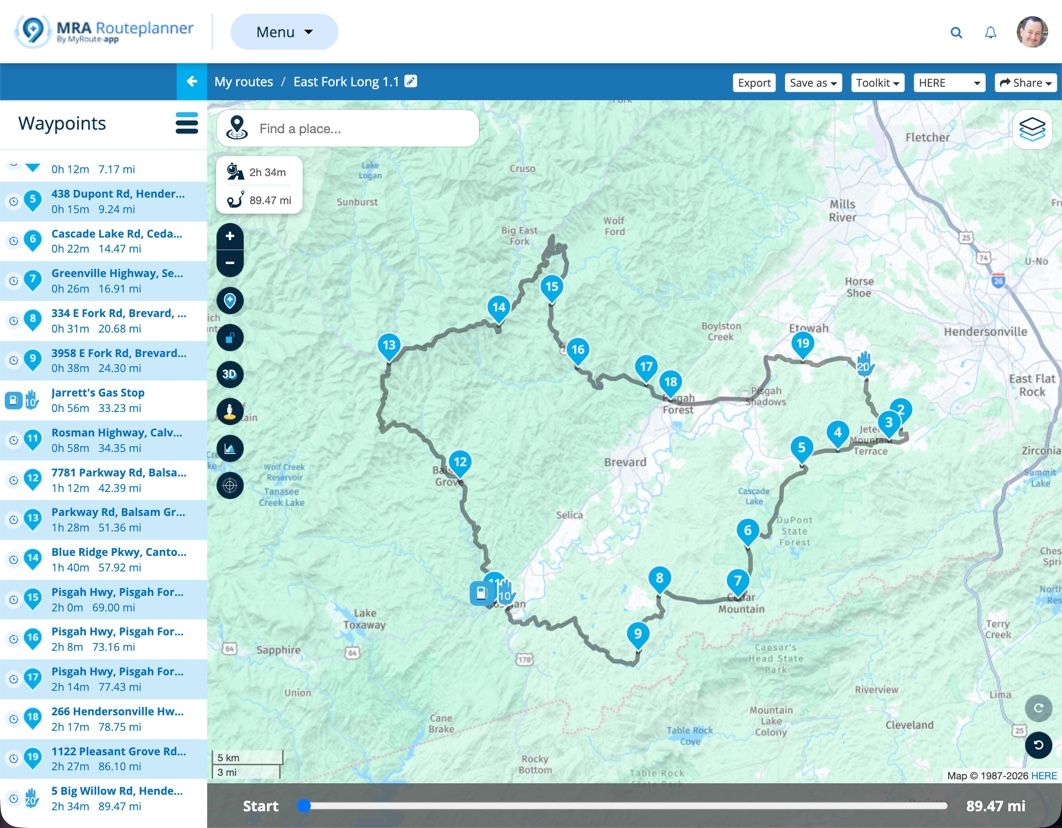
In MRA, or pretty much any route creation program, you create two basic elements that will form the route and track. You have waypoint (aka via points, but we'll just ) and shaping points. Waypoint you must go to (either a stop or pass through it) unless you purposely choose to skip it, and shaping points are just that, their purpose is to solely shape the route. Here's an example of a simple route in MRA showing 3 waypoints (Start, Finish and a gas stop) and 17 shaping points that (try to) force the route to go where I wanted it to.
When you export the route (save as and upload) to your GPS, whether it's in 1.1 or 1.2 format, the GPS takes the .gpx file, reads it and creates a route based on the information in the route section apply its own logic (shortest route, fastest route, etc) and that's the route that you see on your GPS. The track is also imported from the .gpx file, and it should always look exactly the same on your GPS as the route looked in MRA.
SO, ENOUGH OF THE BASICS... WHAT'S THE PRACTICAL DIFFERENCE IN THE GPX 1.1 AND 1.2 FORMATS???
The primary difference between the two formats is quite simple, but the difference in now they create a route is significant! Both formats are basically the same except for what's in the Routes section, but this is a BIG difference.
1.1 Route
In our example MRA screenshot above, when the route is exported in (saved as) gpx 1.1 format it contains the 3 waypoints and the 17 shaping points. When the 1.1 file is imported into the Garmin XT GPS, the GPS begins at the first waypoint, then finds the shortest or fastest route (depending on your navigation settings) to shaping point #1, then to shaping point #2 until it gets to the gas stop waypoint (#10), then it continues by finding the shortest or fastest route to the next shaping point (#11 in our example) and so on until it reaches the next waypoint (which, in our case is the end of the route.1.2 Route
When the MRA route is exported in (saved as) .gpx 1.2 format the route section DOES NOT include any shaping points! Instead, it includes gps latitude and longitude coordinates in its route section just like those that are included in its track section. When the gpx 1.2 file is imported into the Garmin XT GPS, it starts at the beginning waypoint, then follows the GPS latitude and longitude coordinates to the gas stop waypoint (#10) then it continues following the GPS coordinates to the next waypoint (the end of the route in our simple example).Summary
Finally! The 1.1 format contains route shaping points that the Garmin XT GPS uses when it creates its route based on the criteria in its navigation settings, and the 1.2 format uses route gps coordinates (just like a track) that isn't affected by the Garmin's route creation logic when the route is created.So, What Does This Look Like VISUALLY?
Ok, here's a section of the route above shown in a screenshot from MRA. As you can see the route I planned goes down Evans Road until it meets Crab Creek Road.
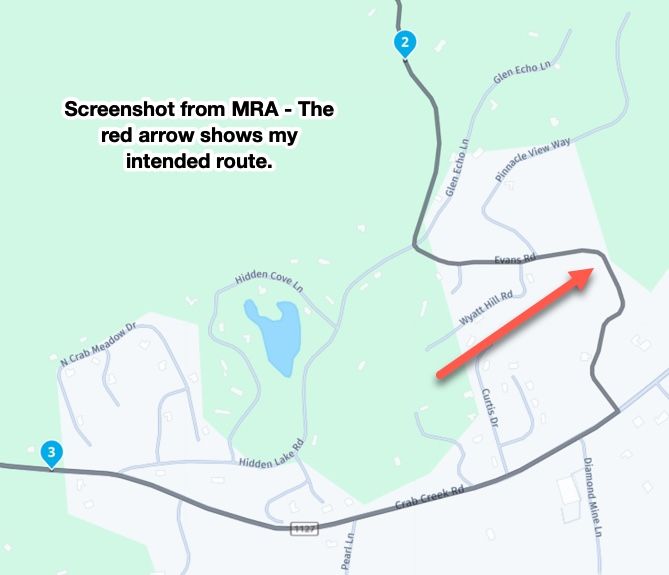
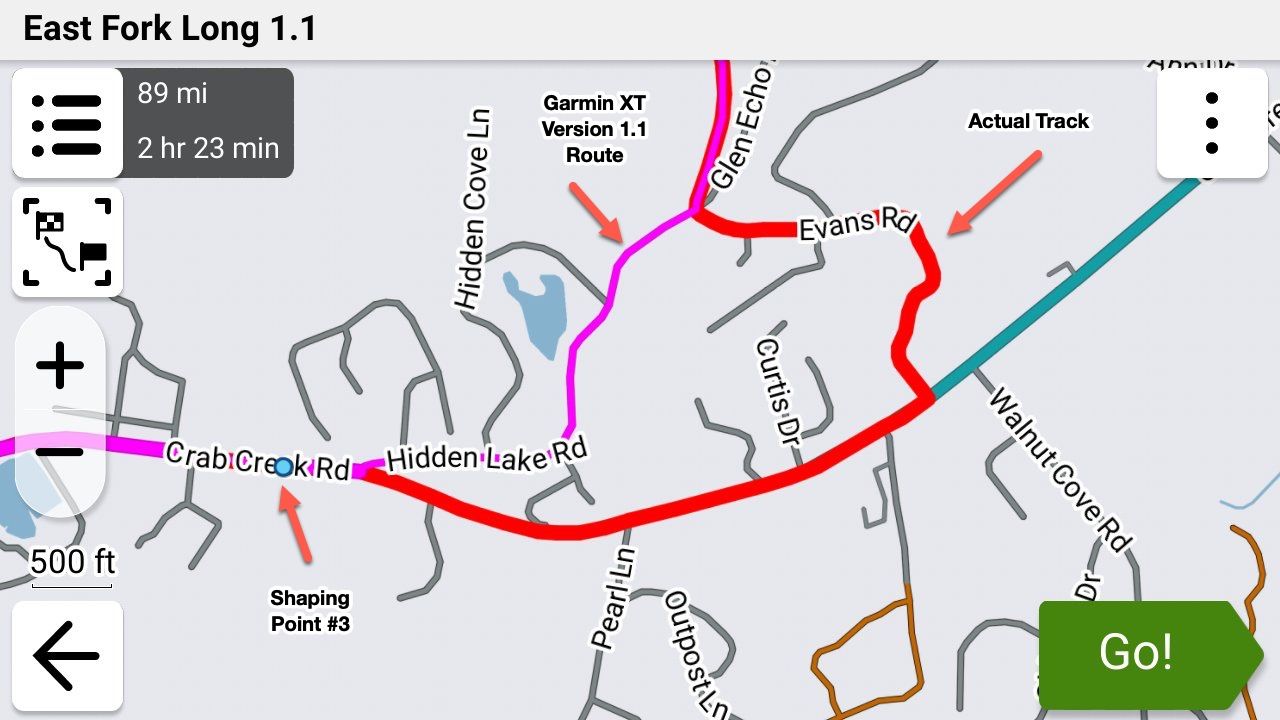
So I exported this route in 1.1 format and imported into my Garmin XT3 and my navigation setting was set to "Fastest". The XT decided that "Fastest" (and it did the same when I set it to "Shortest") way between to take Hidden Lake Road instead (purple line) even though the track clearly showed that I intended to go down Evans Road (you can show the track and route simultaneously with the XT3 which I did here for clarity).
Next, I exported this EXACT same route from MRA in gpx 1.2 format and imported it into my Garmin XT3. Notice two important things - the route followed what I was seeing in MRA, and there are NO shaping points.
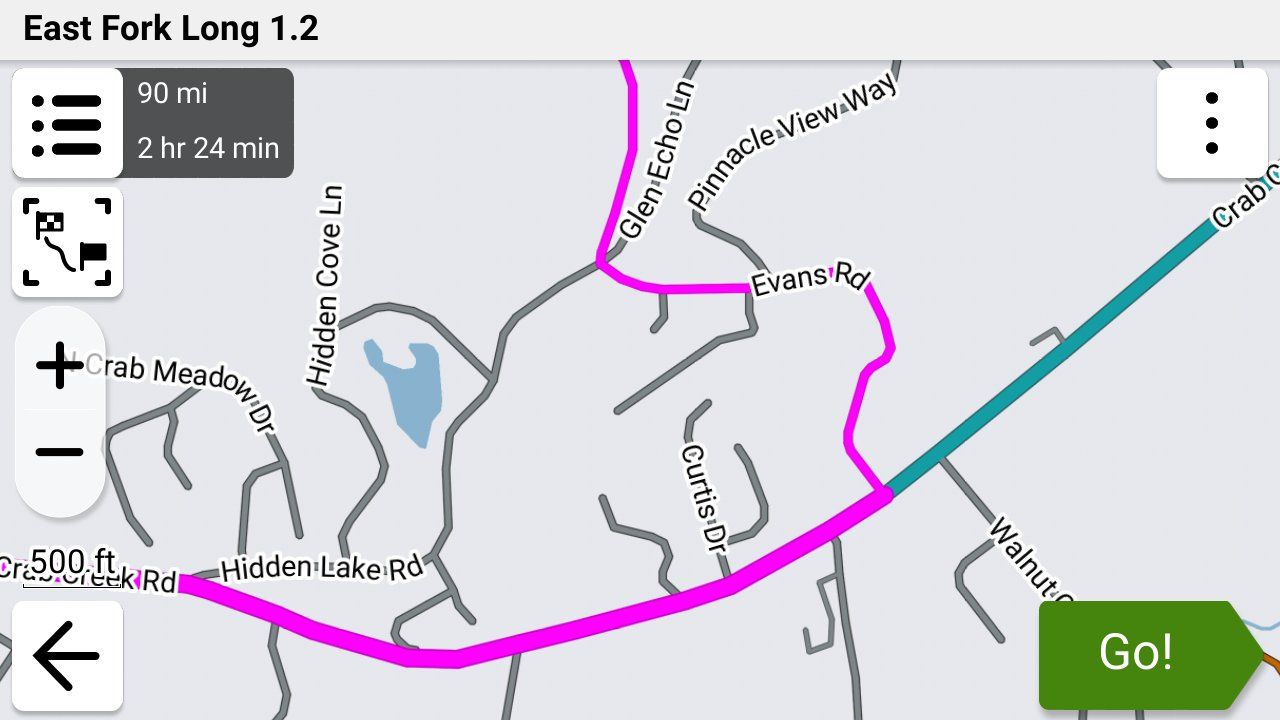
While this is a very small example of what happens during the Garmin's route creation with a gpx 1.1 file, on a large, complex route the Garmin can make a LOT of unintended changes. I have wound up on nasty gravel roads on a Goldwing, down back alleys, missed curvy sections that I wanted to ride, etc. etc. because of this issue.
I'm exclusively using the gpx 1.2 format using the "Save As" feature and uploading the file manually to my XT3 using a USB cable as I described in detail earlier today in this post.
So What if My GPS Doesn't Support the 1.2 Format?
Use a LOT of shaping points to force the GPS not to "cut corners". Then export it (or "save as") in the 1.1 format and import it into your GPS. Show the route and the track simultaneously (you'll have to figure out how do this on your own.... your owner's manual is a good place to start).
You can normally spot the differences in the route and track (which was your intended route) fairly easily by looking for where their paths diverge. This is much easier if you can set your track to a color that's completely different from your route color.
You can also compare the mileage shown for the route in your GPS and MRA and they should be very close.
If you see any issues, go back into MRA and add shaping points to fix the problem(s). Delete the route and track from your GPS, export it again from MRA then import it into your GPS and check it again. It may take several tries if you want your GPS route and the route that you see in MRA to match exactly.
Steve
p.s. Here's a link to the example MRA route that I used above. Ignore the 1.1 in the filename as I had 2 identical MRA routes, on with a 1 in the filename and 1 with a 2 just so that I could test quickly and tell them apart. This file can be exported as gpx 1.1 or 1.2 to achieve the same results as I did above.
 This post is deleted!
 -
Road Closures.
I’m not sure when I’ll get to test this but has anyone found out what happens to a GPX1.2 route when you come across one? That would be with ‘Traffic’ enabled. I’m not sure whether auto-recalculate would make any difference here or not.
I have Traffic enabled but not on auto re-route so I just get the info. Road closures are independent of that setting though and divert anyway. Historically, on older Zumos, a closure would catastrophically destroy a route but with the XT2 and GPX1.1, a nice route around it was what I have experienced.
Would a road closure diversion trigger a full route recalculation? Would Traffic need to be disabled to avoid that?
I did hazard a guess and it was 50/50 (aka I don’t know).
-
When I save a route created in My Route planner website using shape points and save it as 1.2 the route appears on my routes page as only a route and not a route and track. Is this normal?
-
Good question. I honestly don't know as well. The problem also is that there's no guarantee that the results are going to be the same between the XT, XT2, XT3 or any of the previous units!
-
When I save a route created in My Route planner website using shape points and save it as 1.2 the route appears on my routes page as only a route and not a route and track. Is this normal?
@Simon-James-Hancock Yes. The route that shows in MRA will also be your track when it's exported.
-
I thought so, I just wanted to make sure.
Again I want to thank everyone who has helped. -
I thought so, I just wanted to make sure.
Again I want to thank everyone who has helped.
@Simon-James-Hancock You're very welcome. Everyone has been extremely helpful in this thread and I'm grateful as well!
-
Just to summarize what I have learned.
Make a route in MRA with Here map using shape points.
Making sure to have the first point when leaving a bit further down the road to make sure that the route starts.
Widen the and colour the track with the garmin settings.
Save as 1.2
Question: When using shaping points and I place one next to a petrol station and name it Petrol and add a symbol of a petrol station, will it appear and can I select it when navigating or do I have to make a via point? -
@simon-james-hancock I think with your petrol station, the symbol you have added on MRA will only appear there and not on your Zumo. If you want a symbol on the Zumo, you can add a POI on MRA and that will appear - but it will only show as a flag and with the name you have given it (default is POI) so further editing is required on the Zumo if you want to see a petrol pump. If you want a mileage and/or time countdown to the petrol station, change the shaping point to a via point which you can name and that will be retained on the Zumo (also as a flag).
Just to recap, shaping points will not show on your Zumo using GPX1.2 but via points will.
I'm happy to be corrected and to learn if there is a different way.
Hello! It looks like you're interested in this conversation, but you don't have an account yet.
Getting fed up of having to scroll through the same posts each visit? When you register for an account, you'll always come back to exactly where you were before, and choose to be notified of new replies (either via email, or push notification). You'll also be able to save bookmarks and upvote posts to show your appreciation to other community members.
With your input, this post could be even better 💗
Register Login







-
 014270
-
 0827
0827
-
 115132
-
0521
-
0753
-
 0497
0497
-
 18424
18424
-
09696