Update 5.0.3 - Device management
-
is there a way to access the page that shows which devices I have registered or do I need to exceed the limit before this information is available?

@Brian-McG from the account page in the app. There is a button to view your devices (near the bottom)
-
Hi everyone!

It is time for a new update!
Device management
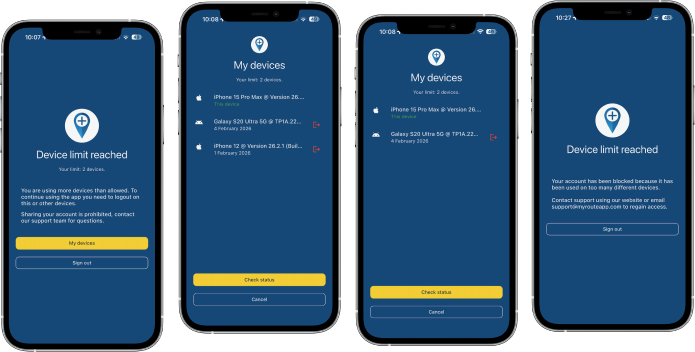
This is the core aspect of this update.
Unfortunately we are seeing a massive amount of account sharing going on.
At MyRoute-app we try our hardest every single day to be customer oriented and keeping our prices low. As of this year our base prices for subscriptions had to be increased (for the first time since 2021) and because of new contracts with our suppliers we also have to implement a device limit per subscription.As we now pay per active phone we cannot (ignorantly) allow users to use our app on an unlimited amount of phones. As of this update we allow a maximum of 2 devices to be used at the same time. When exceeding this limit (3 devices) you will be presented a beautiful interface in which you can deregister another device. After doing so, you can use your current phone again

Some important notes:
- Excessively switching between multiple phones will lead to an automatic warning
- Attempts to use way too many devices (4) at once will lead to an automatic block
Our terms & conditions will be updated appropriately.
Simply put: times of sharing your account with big groups of friends or your club are over, sharing with your partner / personal use on a few devices is still allowed.A full announcement can be read here: https://info.myrouteapp.com/limit-of-2-devices/
SSO fixed
Signing into the app using a SSO authentication method (such as Apple or Google) was broken. Luckily this has now been fixed!

Link and file opening
Opening links and files with the app has always been possible.
In this update the stability of these features has been improved to ensure it works as expected when the app is in any state (such as terminated / in the background / opened).Audio stability Android
In some rare cases a clean install of the app would not output any audio while navigating - this now seems fixed.Minor fixes and stability improvements
Many small issues that are not relevant to mention here have been fixed.
Also we fixed a few errors that would result in route calculations failing.
Finally a few critical CarPlay / Android Auto errors have been solved and we added a bit more logging to investigate some persistent issues a few users have.What's next
Slowly but surely we are transitioning to a more focused dedication on the website.
In the next update 5.1 we will:- Aim for solving all stability issues CarPlay and Android Auto
- Add highly requested features to CarPlay and Android Auto
- Major technical internal updates
Cheers,
Corjan
@Corjan-Meijerink said in Update 5.0.3 - Device management:
Finally a few critical CarPlay / Android Auto errors have been solved and we added a bit more logging to investigate some persistent issues a few users have.
Is the "map spinning when stopped" issue also adressed (maybe even fixed) here?
BMW F 450 GS: AA with Carpuride W702BS Pro (via Samsung S22 Ultra)
VOGE DS 900 X: AA with Carpuride W702 (via Samsung S22 Ultra)
Skoda Citigo: AA with Carpuride W903 (via Samsung S22 Ultra) -
@Corjan-Meijerink said in Update 5.0.3 - Device management:
Finally a few critical CarPlay / Android Auto errors have been solved and we added a bit more logging to investigate some persistent issues a few users have.
Is the "map spinning when stopped" issue also adressed (maybe even fixed) here?
@peha haven’t worked on this explicitly
5.1 is fully dedicated to AA / CP
-
@peha haven’t worked on this explicitly
5.1 is fully dedicated to AA / CP
@Corjan-Meijerink Thanks for your reply. I will contact support via e-mail rather than discuss this further here, then, regarding this.
-

As long as you don’t restrict the app to a single device, it sounds perfect.
The reason is that some of us take two phones on longer trips as a backup, in case the main phone gets stolen, damaged, or lost.
Other than that, I’m looking forward to version 5.1.Best regards,
Adrian📱Samsung S24 Ultra with MyRoute-APP (GOLD Lifetime)
🏍️Honda NC750X (2021) with AA/CarPlay by CHIGEE Aio-5
🚙Renault Duster with onboard AA/CarPlay Unit -
As long as you don’t restrict the app to a single device, it sounds perfect.
The reason is that some of us take two phones on longer trips as a backup, in case the main phone gets stolen, damaged, or lost.
Other than that, I’m looking forward to version 5.1.
@Adrian-Avram no definitely not.
2 is totally allowed
3 is with the required unlisting of another device (very smooth experience)
4 results in an issue
-
@Adrian-Avram no definitely not.
2 is totally allowed
3 is with the required unlisting of another device (very smooth experience)
4 results in an issue
@Corjan-Meijerink thanks for the confirmation !
-
@Adrian-Avram no definitely not.
2 is totally allowed
3 is with the required unlisting of another device (very smooth experience)
4 results in an issue
@Corjan-Meijerink said in Update 5.0.3 - Device management:
@Adrian-Avram no definitely not.
2 is totally allowed
3 is with the required unlisting of another device (very smooth experience)
4 results in an issueDoes 4 mean that the heavy mob will be knocking on the door

-

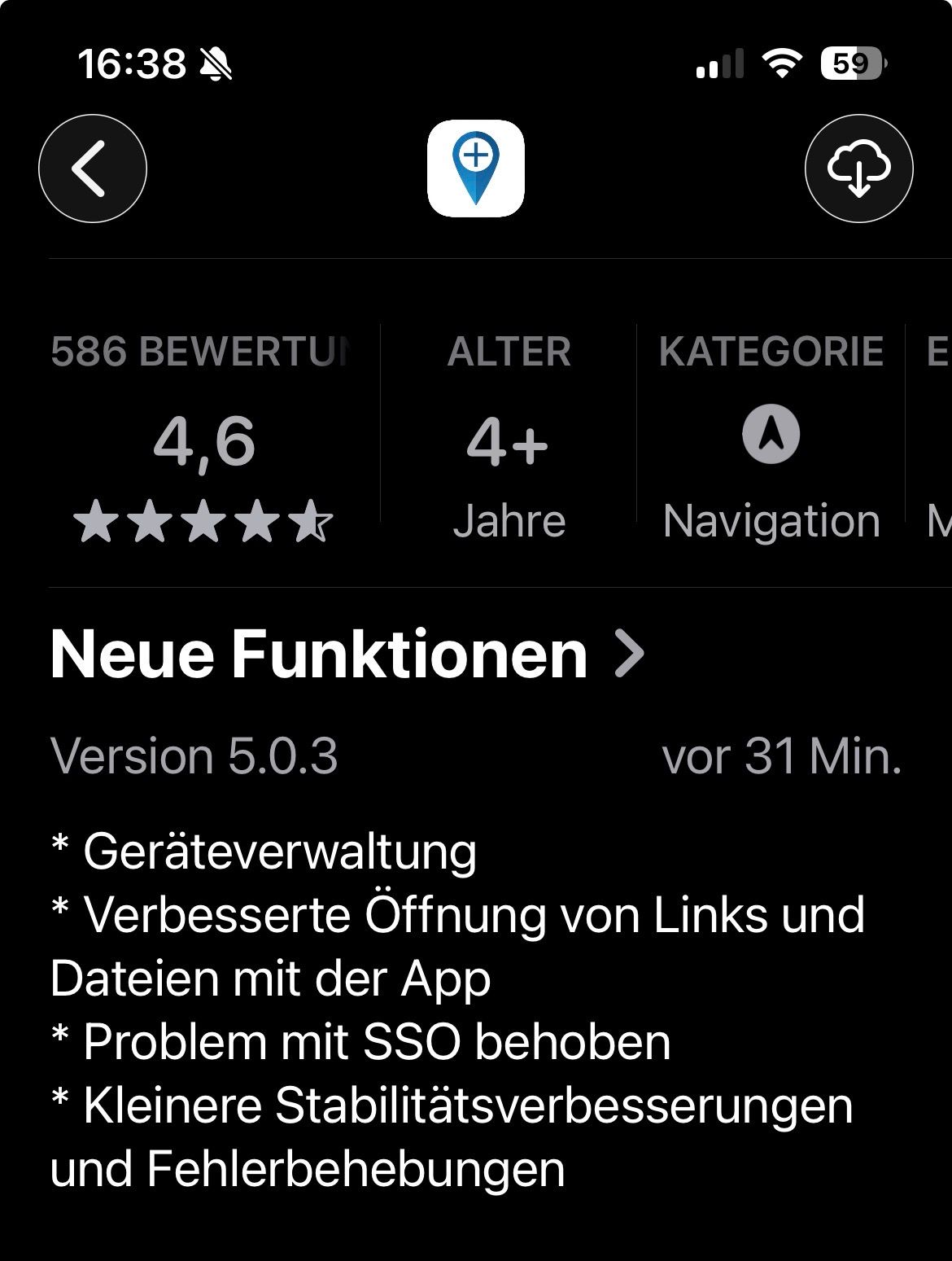
V5.0.3 is available for iOS in the store

-

Sorry for asking, but I want to be sure that I understood the new handling. Using the navigation app on two devices and planning in the browser on my Mac/PC is still possible?
If you think everything is under control you are driving to slow!
-
Sorry for asking, but I want to be sure that I understood the new handling. Using the navigation app on two devices and planning in the browser on my Mac/PC is still possible?
@silberfuchs67 100%!
-
Thanks, exactly what is fine for me

If you think everything is under control you are driving to slow!
-
Thanks, exactly what is fine for me
@silberfuchs67 that’s why we’ve chosen the limits as is
That said, the restriction only applies for the app anyway
-

I tried the new app yesterday on my bike. Even in this version of Android Auto, there's a bug where starting a route from Android Auto while you're already on the route takes you back to the starting point. I wonder what the point is of reporting bugs if they aren't fixed.
Otherwise, everything works as usual. -
I tried the new app yesterday on my bike. Even in this version of Android Auto, there's a bug where starting a route from Android Auto while you're already on the route takes you back to the starting point. I wonder what the point is of reporting bugs if they aren't fixed.
Otherwise, everything works as usual.
@ginogino thats not a bug !
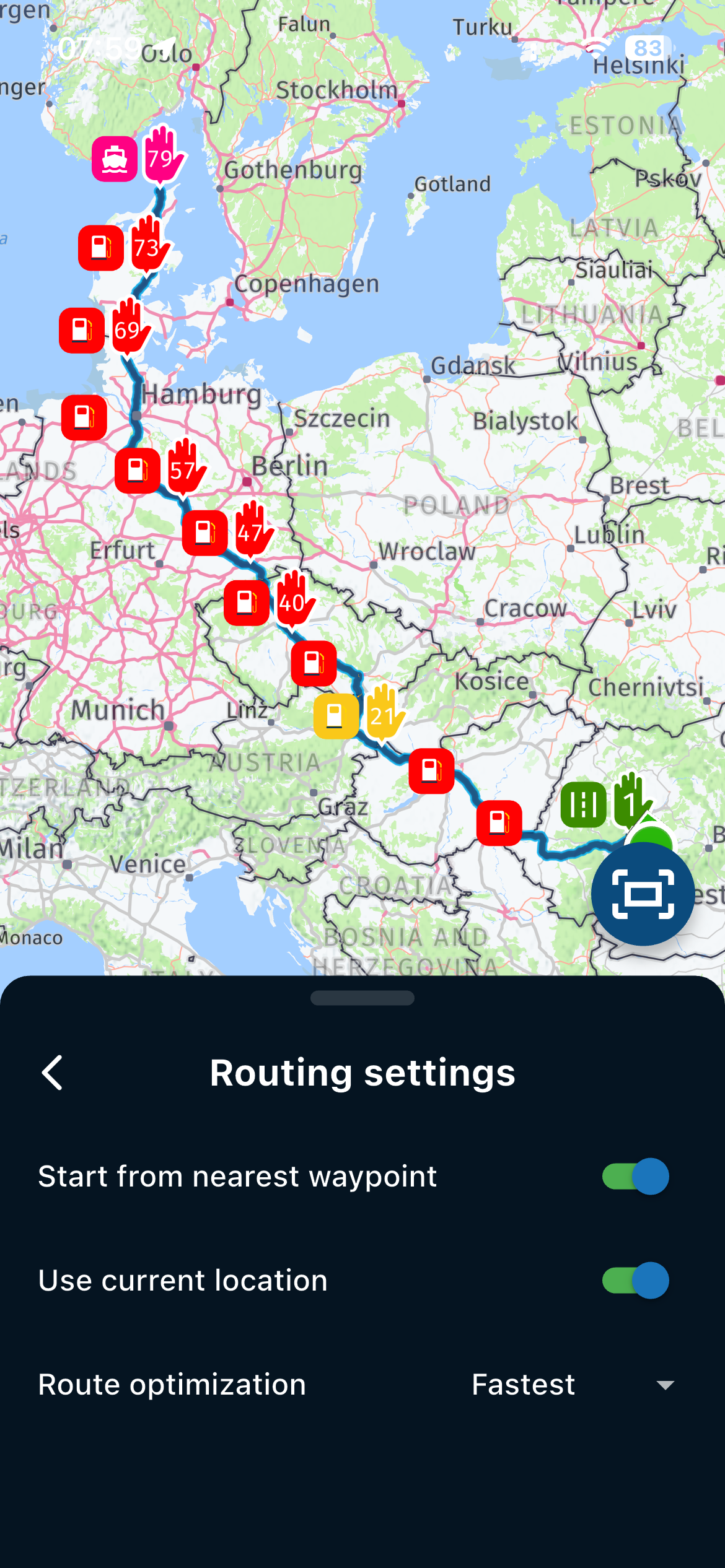
Before starting a route, go to Routing Settings and choose whether you want to begin from the nearest point on the route.
If this option is enabled, when you are already on the route, navigation will no longer direct you to the first waypoint.
As I know, on Android Auto/Car Play, when starting a route, it automatically takes you to the the beginning of the route.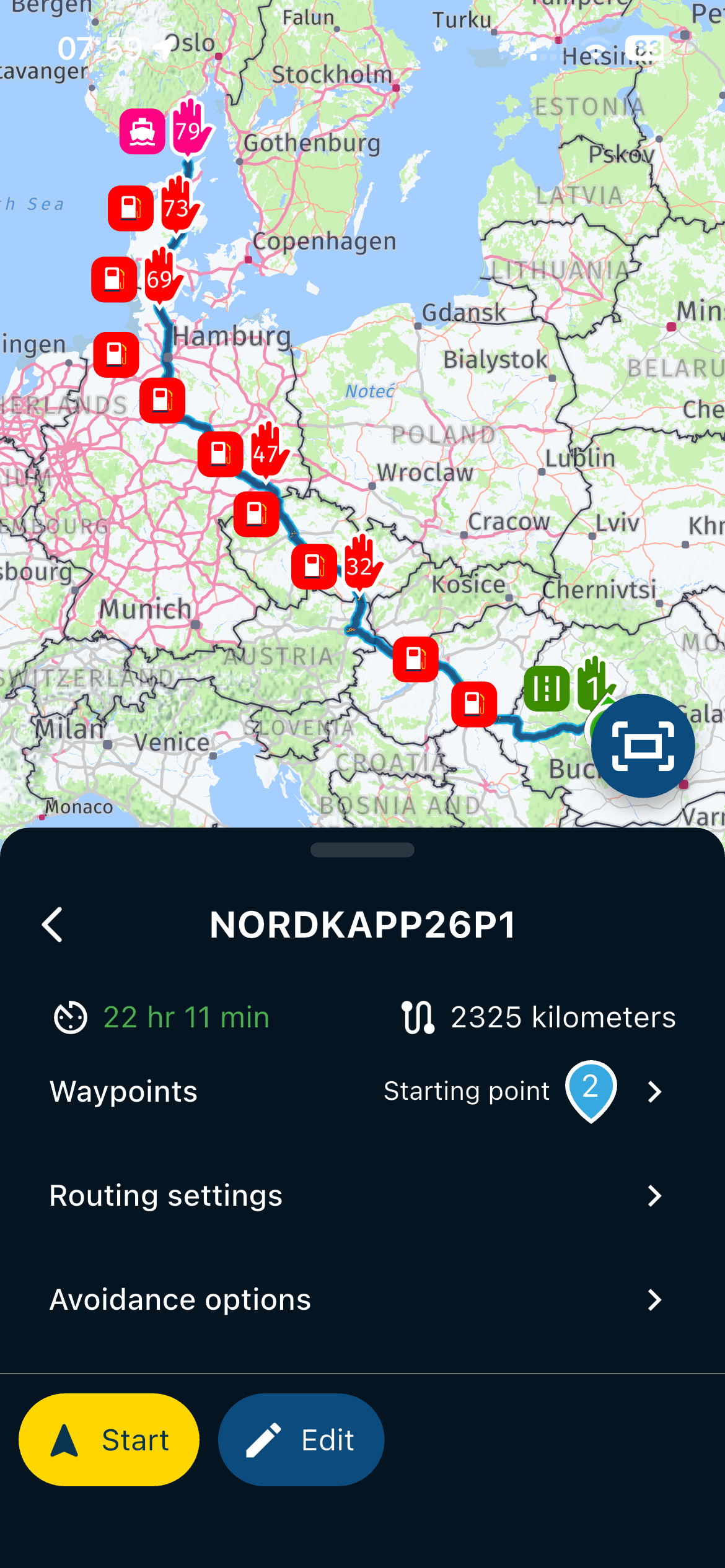
-

I agree with the policy, except it caught me out just before a trip.
I did have the app installed on:
My personal phone
My personal travel phone
My personal tablet
And My work phoneSo I decided to update them all before my trip and I'm locked out of my mobile app account.
Lock me out of them all but let me delete what devices I want / have to via the web page / account instead of annoying support and now waiting for a resolution before I leave in 10 hours.
-

Misschien een optie om in een evt. sw update van de app te zorgen dat de gebruiker in de account settings - Mijn Apparaten evt. zelf de mogelijkheid heeft om een apparaat te activeren / deactiveren.
Zie bv TiviMate -
I agree with the policy, except it caught me out just before a trip.
I did have the app installed on:
My personal phone
My personal travel phone
My personal tablet
And My work phoneSo I decided to update them all before my trip and I'm locked out of my mobile app account.
Lock me out of them all but let me delete what devices I want / have to via the web page / account instead of annoying support and now waiting for a resolution before I leave in 10 hours.
said in Update 5.0.3 - Device management:
I agree with the policy, except it caught me out just before a trip.
I did have the app installed on:
My personal phone
My personal travel phone
My personal tablet
And My work phoneSo I decided to update them all before my trip and I'm locked out of my mobile app account.
Lock me out of them all but let me delete what devices I want / have to via the web page / account instead of annoying support and now waiting for a resolution before I leave in 10 hours.
I received an email about the update and restrictions about an hour after I posted this. I wish I received the email a day ago.
But still, it would be good to remove devices via the web interface. I lose my phone it's gone, get a new one, break my limit, seek support.
-

Hi.
A wee bit confused here.- In the email I received, it says "For €4.95 per month, you can continue to use our premium navigation app on two devices.." Does this apply to Routeplanner Gold and Navigation Next Lifetime members?
- Presumably the two device limit doesn't include the Routeplanning webpage accessible via PC?
Thanks.
-
Misschien een optie om in een evt. sw update van de app te zorgen dat de gebruiker in de account settings - Mijn Apparaten evt. zelf de mogelijkheid heeft om een apparaat te activeren / deactiveren.
Zie bv TiviMate
Hello! It looks like you're interested in this conversation, but you don't have an account yet.
Getting fed up of having to scroll through the same posts each visit? When you register for an account, you'll always come back to exactly where you were before, and choose to be notified of new replies (either via email, or push notification). You'll also be able to save bookmarks and upvote posts to show your appreciation to other community members.
With your input, this post could be even better 💗
Register Login






-
06130
-
 05107
05107
-
 057
057
-
 110412
-
06135
-
0367
-
03131
-