Skip to content
  • Categories
  • Recent
  • Popular
  • Support
  • MyRoute-app
Collapse
Brand Logo

MRA Community Forum

  1. Home
  2. The MyRoute-app
  3. [App] Problems, Bugs and other Issues
  4. Waypoints being skipped - not what I want to happen

Waypoints being skipped - not what I want to happen

Scheduled Pinned Locked Moved [App] Problems, Bugs and other Issues
10 Posts 6 Posters 154 Views 3 Watching
  • Oldest to Newest
  • Newest to Oldest
  • Most Votes
Reply
  • Reply as topic
Log in to reply
This topic has been deleted. Only users with topic management privileges can see it.
  • David 38
    David 38
    David 38
    wrote last edited by
    #1

    I have been using the MRA web site to create routes for almost 10 years. I've used these routes successfully for my Garmin Zumo 550 and Harley-Davidson Boom (2015).

    I recently started using the MRA navigation app. I've been creating very simple routes on the MRA web site to verify my understanding of the app. Unfortunately I have not yet figured out how to use waypoints or via points or shaping points such that MRA nav redirects me to them if I miss the calculated turn to reach them.

    I've got the MRA nav app setting for 'auto skip of waypoints' turned OFF. But regardless of whether I've created a waypoint as 'via' ('hand') or 'shaping' (sort of a balloon), every time I miss a turn to take me to them, they get skipped.

    Do I need to update a setting in the app ? Create my routes differently ? Other ?

    Thanks.

    Guzzist 1 Reply Last reply
    0
    • MotoCon
      MotoCon
      MotoCon
      Alpha tester
      wrote last edited by
      #2

      This strikes me as odd. Skipping waypoints if that setting is off is never mentioned here. Especially skipping VIA points automatically is something that can't (should not) happen.

      However version 6 of the app is going to be released soon, and the skipping algorithm has been extensively improved, so I would wait for that.

      I am just an enthusiastic MRA user, and hope you will be one too!

      Most motorcycle problems are caused by the nut that connects the handlebar to the saddle.

      Check out RideSleepRepeat.eu, a biker community for sharing stays across Europe

      Dave J 0 David 38 2 Replies Last reply
      0
      • MotoCon MotoCon

        This strikes me as odd. Skipping waypoints if that setting is off is never mentioned here. Especially skipping VIA points automatically is something that can't (should not) happen.

        However version 6 of the app is going to be released soon, and the skipping algorithm has been extensively improved, so I would wait for that.

        Dave J 0
        Dave J 0
        Dave J 0
        Valued contributor
        wrote last edited by
        #3

        @MotoCon I have had this happen to me with V5 but also with V6 on occasion. I have not been able to determine if there is a trigger apart from being near the destination with a final via point before. I need to do some more testing.

        Kind Regards. Help where I can.
        Ducati Multistrada V4 Rally
        iPhone 18 Pro
        CHIGEE AIO-6 LTE
        Google Pixel 6 Pro - mounted on SP Connect Plus
        Ex Garmin XT2 and XT1 as well as Ex TomTom Rider User

        1 Reply Last reply
        0
        • MotoCon MotoCon

          This strikes me as odd. Skipping waypoints if that setting is off is never mentioned here. Especially skipping VIA points automatically is something that can't (should not) happen.

          However version 6 of the app is going to be released soon, and the skipping algorithm has been extensively improved, so I would wait for that.

          David 38
          David 38
          David 38
          wrote last edited by
          #4

          @MotoCon

          Here is a picture of my route. I purposefully put via points 3,5, and 7 on the route just to test being re-routed to them after passing them. Does the fact that they are somewhat close to the 'main route' contribute to them getting skipped ?
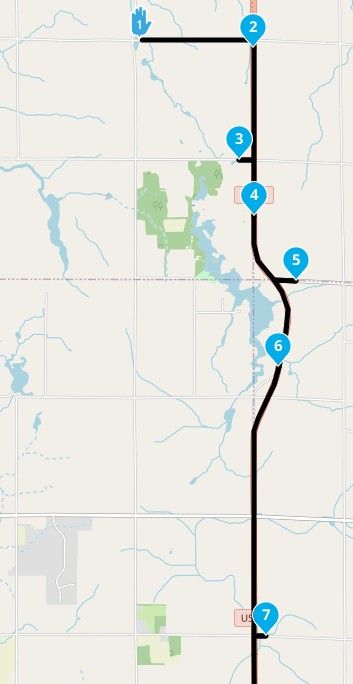
          image.jpeg

          And here is and example showing 3 is a via point
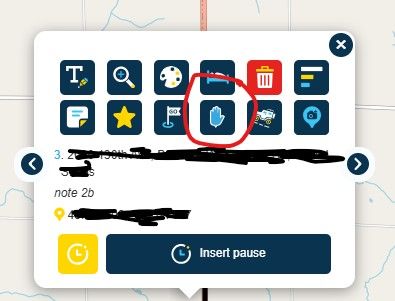
          image.jpeg

          Is it possible that the points are not being stored as Via points ? I'm using the free Basic MRA web site account to create routes. Is there something I could be looking for by creating a GPX file of the route and view the XML tags ?

          Here are the settings I've got in the MRA app:
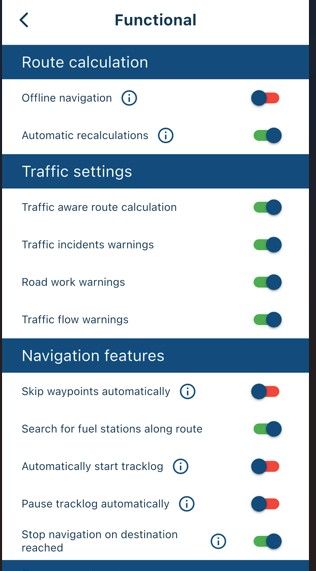
          image.jpeg

          image.jpeg

          There must be something I'm doing or wouldn't a LOT of people be reporting this ?

          Should I create a ticket for support ?

          Thanks everyone

          Nick Carthew RouteXpert Senior 1 Reply Last reply
          0
          • David 38 David 38

            @MotoCon

            Here is a picture of my route. I purposefully put via points 3,5, and 7 on the route just to test being re-routed to them after passing them. Does the fact that they are somewhat close to the 'main route' contribute to them getting skipped ?

            image.jpeg

            And here is and example showing 3 is a via point

            image.jpeg

            Is it possible that the points are not being stored as Via points ? I'm using the free Basic MRA web site account to create routes. Is there something I could be looking for by creating a GPX file of the route and view the XML tags ?

            Here are the settings I've got in the MRA app:
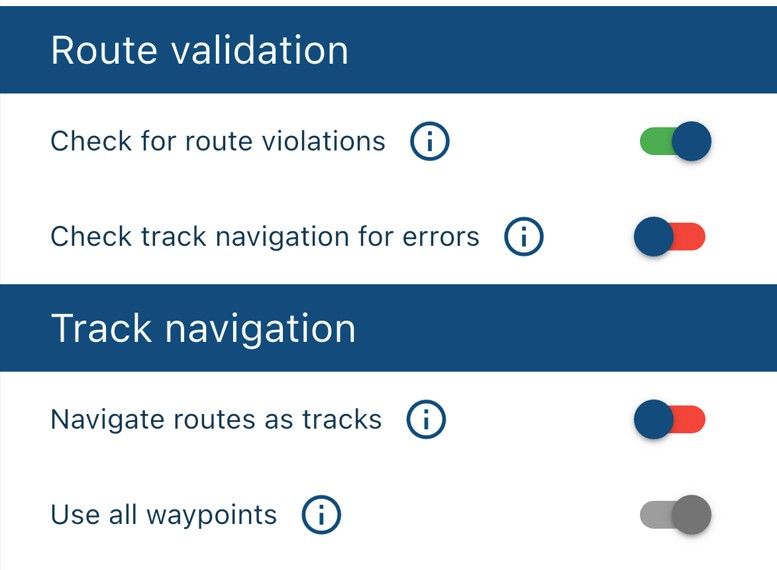
            image.jpeg

            image.jpeg

            There must be something I'm doing or wouldn't a LOT of people be reporting this ?

            Should I create a ticket for support ?

            Thanks everyone

            Nick Carthew RouteXpert Senior
            Nick Carthew RouteXpert Senior
            Nick Carthew RouteXpert Senior
            wrote last edited by
            #5

            @David-38 Jus to be clear, 3 is not a via point as can be clearly seen on your screenshot of the map. The route point menu screenshot that you shared shows how to select a via point, if the via point is selected the icon would show a shaping point.
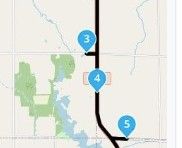
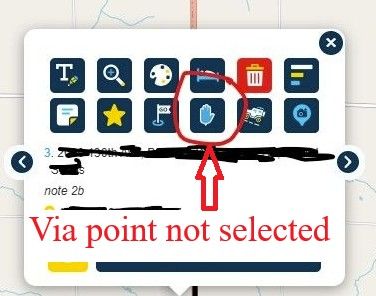
            image.jpeg

            image.jpeg

            David 38 1 Reply Last reply
            0
            • Marinus van Deudekom
              Marinus van Deudekom
              Marinus van Deudekom
              RouteXpert
              wrote last edited by
              #6

              That 3,5 and 7 are being skipped automatically is exactly how it is supposed to be

              Honda Goldwing GL1500,
              Honda Silverwing GL 650
              DMD2 T865X 8 inch Android tablet using MRA next for navigation
              Garmin XT sold
              Samsung S24FE mounted on a Quadlock and using Android Auto in my car

              1 Reply Last reply
              0
              • Nick Carthew RouteXpert Senior Nick Carthew RouteXpert Senior

                @David-38 Jus to be clear, 3 is not a via point as can be clearly seen on your screenshot of the map. The route point menu screenshot that you shared shows how to select a via point, if the via point is selected the icon would show a shaping point.

                image.jpeg

                image.jpeg

                David 38
                David 38
                David 38
                wrote last edited by
                #7

                @Nick-Carthew-RouteXpert-Senior

                Ahh, seeing the 'hand' gave me the impression it was already a via point .............. I'll update my route accordingly and re-test.

                Thanks everyone who pointed this out.

                David 38 1 Reply Last reply
                0
                • David 38 David 38

                  I have been using the MRA web site to create routes for almost 10 years. I've used these routes successfully for my Garmin Zumo 550 and Harley-Davidson Boom (2015).

                  I recently started using the MRA navigation app. I've been creating very simple routes on the MRA web site to verify my understanding of the app. Unfortunately I have not yet figured out how to use waypoints or via points or shaping points such that MRA nav redirects me to them if I miss the calculated turn to reach them.

                  I've got the MRA nav app setting for 'auto skip of waypoints' turned OFF. But regardless of whether I've created a waypoint as 'via' ('hand') or 'shaping' (sort of a balloon), every time I miss a turn to take me to them, they get skipped.

                  Do I need to update a setting in the app ? Create my routes differently ? Other ?

                  Thanks.

                  Guzzist
                  Guzzist
                  Guzzist
                  Valued contributor
                  wrote last edited by
                  #8

                  @David-38 ...to make it clear: Via-Points must be reached exactly. For Shaping-Points it's good enough if you drive by in some distance. So, your Routepoibts 3,5,7 are very close by the road you are driving.
                  If you still drive on the road, the close by Shaping-Point has been accepted as reached. And there will no re-routing happen.

                  Nothing is impossible ;-)
                  In past: GARMIN Zumo 210->GARMIN Zumo 395->GARMIN XT=> now: DMD T865-X + MyRoute-App, LocusMaps, OsmAnd.
                  In past: GARMIN MapSource ->GARMIN BaseCamp->Tyre->Kurviger->Calimoto=> now: MRA-Routplanner.

                  1 Reply Last reply
                  0
                  • David 38
                    David 38
                    David 38
                    wrote last edited by
                    #9

                    Thanks for clarifying SP (close enough) vs VP (exactly reached).

                    1 Reply Last reply
                    0
                    • David 38 David 38

                      @Nick-Carthew-RouteXpert-Senior

                      Ahh, seeing the 'hand' gave me the impression it was already a via point .............. I'll update my route accordingly and re-test.

                      Thanks everyone who pointed this out.

                      David 38
                      David 38
                      David 38
                      wrote last edited by
                      #10

                      I converted the Shaping Points to Via Points (see pic)
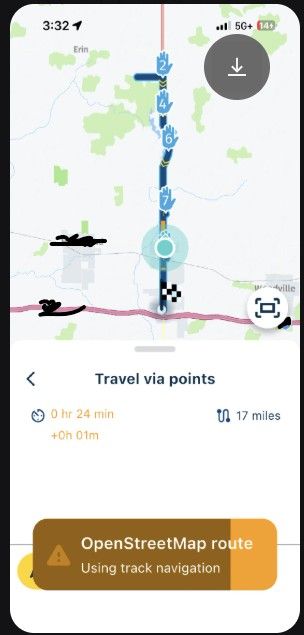
                      image.jpeg

                      But as I drove past the turns to each of them, I did NOT get directed back to them.

                      But notice the message about using track navigation ......... is that ( track navigation) essentially preventing me from getting directed back to the Via Points ?

                      How do I stop track navigation / navigate as a route ? (As shown in an earlier post, I have the 'navigate routes as tracks' setting turned OFF)

                      1 Reply Last reply
                      0

                      Hello! It looks like you're interested in this conversation, but you don't have an account yet.

                      Getting fed up of having to scroll through the same posts each visit? When you register for an account, you'll always come back to exactly where you were before, and choose to be notified of new replies (either via email, or push notification). You'll also be able to save bookmarks and upvote posts to show your appreciation to other community members.

                      With your input, this post could be even better 💗

                      Register Login
                      Reply
                      • Reply as topic
                      Log in to reply
                      • Oldest to Newest
                      • Newest to Oldest
                      • Most Votes


                      ACTIVE USERS
                      David 38
                      David 38
                      Guzzist
                      Guzzist
                      Marinus van Deudekom
                      Marinus van Deudekom
                      Nick Carthew RouteXpert Senior
                      Nick Carthew RouteXpert Senior
                      MotoCon
                      MotoCon
                      Dave J 0
                      Dave J 0
                      POPULAR TOPICS
                      • Waypoints being skipped - not what I want to happen
                        David 38
                        David 38
                        0
                        10
                        154

                      • Download club route folders
                        Òscar
                        Òscar
                        2
                        8
                        72

                      • Passwords
                        Captain Haddock
                        Captain Haddock
                        0
                        6
                        62

                      • Routepunten niet zichtbaar op kaart
                        Ed Lauwerens 0
                        Ed Lauwerens 0
                        0
                        12
                        245

                      • Approximately how long should it take to synchronize all routes?
                        Corjan Meijerink
                        Corjan Meijerink
                        0
                        15
                        385

                      • what is the best way to view navigation from app?
                        John S Parry
                        John S Parry
                        0
                        18
                        972

                      • F011 Save Tracklog - Create Text Issue - Save
                        Jörgen
                        Jörgen
                        0
                        6
                        30

                      • Copy tracks into tracklog folder
                        Guzzist
                        Guzzist
                        4
                        11
                        151

                      MY GROUPS
                      • Login

                      • Login or register to search.
                      • First post
                        Last post
                      0
                      • Categories
                      • Recent
                      • Popular
                      • Support
                      • MyRoute-app