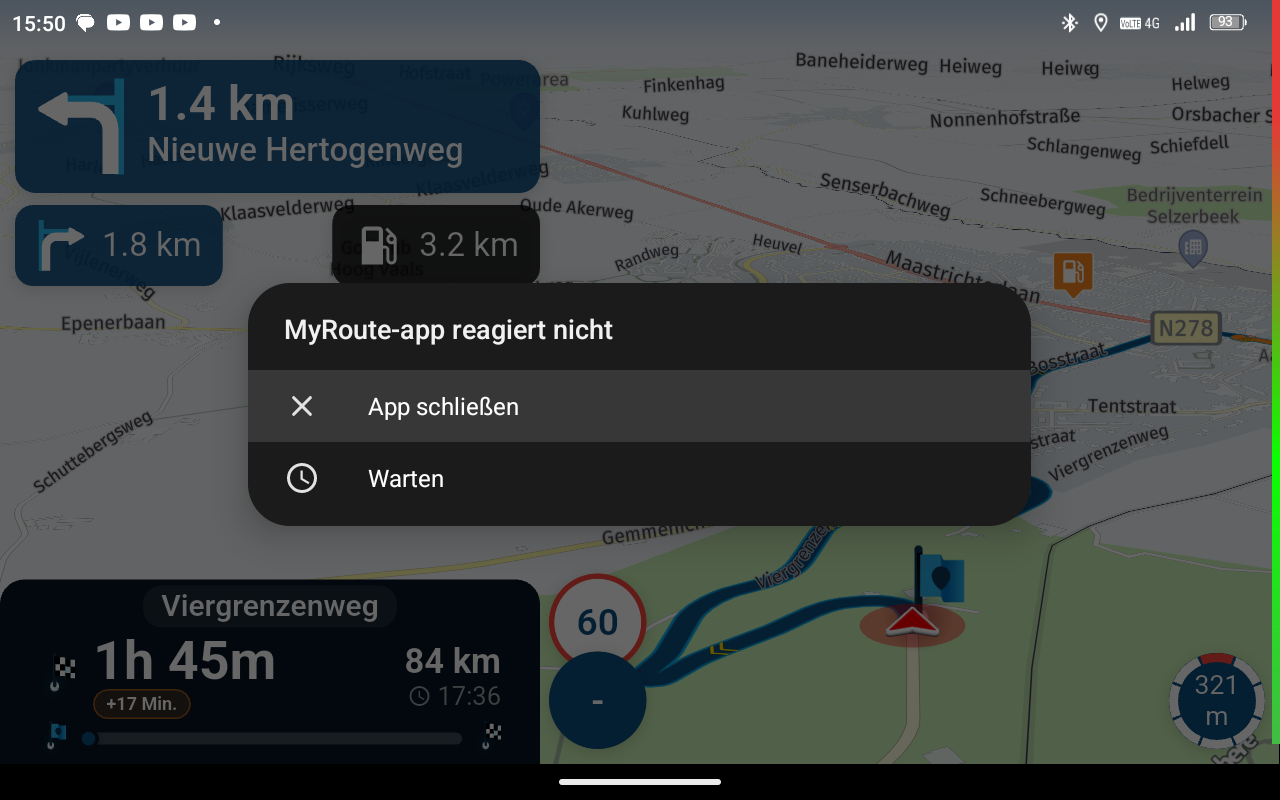
Auto skip many waypoints by itself while I was on route. [5.2.0 - 474]
-

There is a simple solution to these issues!
Turn off auto skip waypoints!
We had similar issues where it would randomly skip waypoints. There is 7 of us that sometimes we all had the problem and other times it was two or three of us.
We have all turned off auto skip waypoints and we skip them as and when we need to manually.
The next issue we need to figure out is why sometimes 2 people in the group end up with a different route than the one that was planned! coincidentally its the two who are using offline maps but that's for a different thread
-
There is a simple solution to these issues!
Turn off auto skip waypoints!
We had similar issues where it would randomly skip waypoints. There is 7 of us that sometimes we all had the problem and other times it was two or three of us.
We have all turned off auto skip waypoints and we skip them as and when we need to manually.
The next issue we need to figure out is why sometimes 2 people in the group end up with a different route than the one that was planned! coincidentally its the two who are using offline maps but that's for a different thread

hi @stuart-marritt said:
The next issue we need to figure out is why sometimes 2 people in the group end up with a different route than the one that was planned!
sorry this has nothing to do with the OP, just thought I'd comment on the above.
funnily enough, I had this issue during the last weekend. me and a ridding buddy spent two days in lakes, I planned the routes on my computer, and as usual I always use the compare tool to make sure there are no nasty surprises.
My friend accessed the routes through the friends tab, both our devices are set up the same way in settings, although mine does not have internet as no SIM card, so obviously offline navigation. Android on rugged tablet.
He uses his phone iPhone 16 using NN also with offline navigation enabled.
when we compared the routes on our devices, both of the routes had changed on his, not a huge amount, but enough to make it like the red arrows at some junctions. some of the waypoints for him were skipped and others tried to get him to go back, did not happen on mine.
I could not understand the reason for this, I checked all settings and everything was exactly the same.
I think it might be something to do with internet access even tho offline nav is enabled, this is the only difference in our set up, save for android and IOS.
it did not spoil the rides as we were aware of the parts where NN would try to send him a different way. -
There is a simple solution to these issues!
Turn off auto skip waypoints!
We had similar issues where it would randomly skip waypoints. There is 7 of us that sometimes we all had the problem and other times it was two or three of us.
We have all turned off auto skip waypoints and we skip them as and when we need to manually.
The next issue we need to figure out is why sometimes 2 people in the group end up with a different route than the one that was planned! coincidentally its the two who are using offline maps but that's for a different thread
There is a simple solution to these issues!
Turn off auto skip waypoints!
A better solution. Use no points at all.
-

Went out for a 400km ride today. Everything worked great. Did a detour manually due to construction. MRA attempted to reroute me 4 times and then skipped a waypoint and I was back on route. Maybe next time I'll try the new feature for devouring around construction.
-
hi @stuart-marritt said:
The next issue we need to figure out is why sometimes 2 people in the group end up with a different route than the one that was planned!
sorry this has nothing to do with the OP, just thought I'd comment on the above.
funnily enough, I had this issue during the last weekend. me and a ridding buddy spent two days in lakes, I planned the routes on my computer, and as usual I always use the compare tool to make sure there are no nasty surprises.
My friend accessed the routes through the friends tab, both our devices are set up the same way in settings, although mine does not have internet as no SIM card, so obviously offline navigation. Android on rugged tablet.
He uses his phone iPhone 16 using NN also with offline navigation enabled.
when we compared the routes on our devices, both of the routes had changed on his, not a huge amount, but enough to make it like the red arrows at some junctions. some of the waypoints for him were skipped and others tried to get him to go back, did not happen on mine.
I could not understand the reason for this, I checked all settings and everything was exactly the same.
I think it might be something to do with internet access even tho offline nav is enabled, this is the only difference in our set up, save for android and IOS.
it did not spoil the rides as we were aware of the parts where NN would try to send him a different way.
@paul69 did you both have the same version of offline maps loaded?
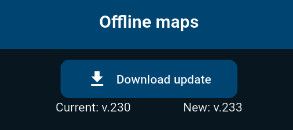
if the underlying map data is different then the routing calculation between points could calculate differentlywhat happens if you set both devices to ride the paths as a track?
BlackView BV7100, Android 12
Navigate "Routes as Tracks" in Offline mode with Offline Maps
No Wifi, no internet, no interruptions, works well -
@paul69 did you both have the same version of offline maps loaded?
if the underlying map data is different then the routing calculation between points could calculate differentlywhat happens if you set both devices to ride the paths as a track?
hi @Brian-McG
thanks for the map tip, TBH that was the one thing I did not check, but the roads we were on are well established and have never changed in many years.
We were riding routes as routes.
I had thought of changing it to "as tracks" although as I wrote it did not cause any riding issues, as we were aware of the discrepancies.It was more about pointing out the issue, as the one which had changed had Internet access, but offline nav enabled.
it may be a useful point for anyone else if they come across this issue when riding in groups, which I guess would be better for everyone to use tracks.
One point on that, when I select this option, I always get the "go online for better track navigation" or words to that effect, can't remember off hand. My NN is on a tablet with no SIM card, therefore never any internet access.
 ️
️ -
hi @Brian-McG
thanks for the map tip, TBH that was the one thing I did not check, but the roads we were on are well established and have never changed in many years.
We were riding routes as routes.
I had thought of changing it to "as tracks" although as I wrote it did not cause any riding issues, as we were aware of the discrepancies.It was more about pointing out the issue, as the one which had changed had Internet access, but offline nav enabled.
it may be a useful point for anyone else if they come across this issue when riding in groups, which I guess would be better for everyone to use tracks.
One point on that, when I select this option, I always get the "go online for better track navigation" or words to that effect, can't remember off hand. My NN is on a tablet with no SIM card, therefore never any internet access.
️
@paul69 By definition, calculated route when offline, may not be exactly the same as you planned.
And the fact that the only people who had it different are the ones using the offline navigation kind of proves it.
Also, did they have "Navigate routes as tracks" selected?
Thx! -
There is a simple solution to these issues!
Turn off auto skip waypoints!
A better solution. Use no points at all.
There is a simple solution to these issues!
Turn off auto skip waypoints!
A better solution. Use no points at all.
Well its not!
You plan a route to go where you want to go and not let the navigation decide
-
hi @Brian-McG
thanks for the map tip, TBH that was the one thing I did not check, but the roads we were on are well established and have never changed in many years.
We were riding routes as routes.
I had thought of changing it to "as tracks" although as I wrote it did not cause any riding issues, as we were aware of the discrepancies.It was more about pointing out the issue, as the one which had changed had Internet access, but offline nav enabled.
it may be a useful point for anyone else if they come across this issue when riding in groups, which I guess would be better for everyone to use tracks.
One point on that, when I select this option, I always get the "go online for better track navigation" or words to that effect, can't remember off hand. My NN is on a tablet with no SIM card, therefore never any internet access.
️
@paul69 the roads may well be established but if one of the sets of map data contains data about a road being impassable i.e. closed for construction or if the map data weights a road with a different average speed then the calculation of route could possibly result in a different being calculated
-
@paul69 By definition, calculated route when offline, may not be exactly the same as you planned.
And the fact that the only people who had it different are the ones using the offline navigation kind of proves it.
Also, did they have "Navigate routes as tracks" selected?
Thx!
hi @LennyO
calculated route when offline, may not be exactly the same as you planned.
not entirely sure what you mean here. Why would it calculate an already planned route. The routes are planned on the MRA website and automatically sync to the devices when NN opened, my routes do not change when I use NN, (lets not discuss seasonal closures etc)
And the fact that the only people who had it different are the ones using the offline navigation kind of proves it.
the one with internet access had the route changed on their device, not mine (without Internet), for me the route remained as we had planned on the laptop, we both had offline navigation enabled in settings
did not have routes as tracks.
-
@paul69 the roads may well be established but if one of the sets of map data contains data about a road being impassable i.e. closed for construction or if the map data weights a road with a different average speed then the calculation of route could possibly result in a different being calculated
hi @Brian-McG said:
the roads may well be established but if one of the sets of map data contains data about a road being impassable i.e. closed for construction or if the map data weights a road with a different average speed then the calculation of route could possibly result in a different being calculated
suppose that's a fair point, one to remember for the future when arranging rides with others.
TBF this can be the only explanation as nothing else would explain it.Take note all who read this, forget about the online, offline, internet or no internet, debacle, check your maps, obviously before you leave home on your trips with your mates

️ -
hi @brian-mcg
just thought I'd give you a quick update. I checked with my riding buddy and yes you are correct, his version was quite a few updates behind. It did not occur to me to even check if he had done this.
I thought I was quite an experienced user of MRA, but it shows there is always something to learn.
Complete School boy error but not too proud to admit itI imagine this will be a good reminder for people to check the map versions.
️ -
hi @LennyO
calculated route when offline, may not be exactly the same as you planned.
not entirely sure what you mean here. Why would it calculate an already planned route. The routes are planned on the MRA website and automatically sync to the devices when NN opened, my routes do not change when I use NN, (lets not discuss seasonal closures etc)
And the fact that the only people who had it different are the ones using the offline navigation kind of proves it.
the one with internet access had the route changed on their device, not mine (without Internet), for me the route remained as we had planned on the laptop, we both had offline navigation enabled in settings
did not have routes as tracks.
hi @LennyO
calculated route when offline, may not be exactly the same as you planned.
not entirely sure what you mean here. Why would it calculate an already planned route. The routes are planned on the MRA website and automatically sync to the devices when NN opened, my routes do not change when I use NN, (lets not discuss seasonal closures etc)
@paul69 I say that because you or your friends may have options selected in the Functional preferences that adjust the route based on the real time road work or traffic conditions.
That also answers the second half of my previous post. -
hi @brian-mcg
just thought I'd give you a quick update. I checked with my riding buddy and yes you are correct, his version was quite a few updates behind. It did not occur to me to even check if he had done this.
I thought I was quite an experienced user of MRA, but it shows there is always something to learn.
Complete School boy error but not too proud to admit itI imagine this will be a good reminder for people to check the map versions.
️
@paul69 the idea of it being the maps is only a guess not a fact
you would need to do some testing before & after updating the maps to prove itBlackView BV7100, Android 12
Navigate "Routes as Tracks" in Offline mode with Offline Maps
No Wifi, no internet, no interruptions, works well -
@paul69 the idea of it being the maps is only a guess not a fact
you would need to do some testing before & after updating the maps to prove it
the idea of it being the maps is only a guess not a fact
you would need to do some testing before & after updating the maps to prove ithi @brian-mcg
if I had the time to ride those routes again, I absolutely would especially given the weather here at the moment, but we live 200 miles apart and work gets in the way
Personally I believe it was probably the maps, I agree, as as you wrote, it would need to be properly evidenced, (but TBF I am not really that bothered, this was just a chat to highlight the issue for others)
As I wrote previously, every single one of the functional settings were exactly the same, these were checked and double checked. There is no other explanation except perhaps IOS and android work differently with regard to navigation, -
So, as of now it seems we have no explanation of the core issue or any solution...
Is somebody working on resolving it or I have missed something?
Thanks, all!Positive emotions are worth every penny ;)
-
So, as of now it seems we have no explanation of the core issue or any solution...
Is somebody working on resolving it or I have missed something?
Thanks, all!
@LennyO
so it would seem, but if you are aware of it then you can pre-plan.think the lesson for me is, (when riding in group)
- ensure all have same map version
- ensure all settings the same
- compare the routes before riding off
- might consider all to use offline nav. (I do anyway)
to achieve, we must first attempt✌️
K1600 GTL
Oukitel RT3 for multi day tours
iPhone 13 Pro, carpuride 702b -
@LennyO
so it would seem, but if you are aware of it then you can pre-plan.think the lesson for me is, (when riding in group)
- ensure all have same map version
- ensure all settings the same
- compare the routes before riding off
- might consider all to use offline nav. (I do anyway)
@paul69 regards your point 3)
a simple check I do is to check the total mileage for the trip is exactly as expected
to do this I include the total mileage in the trip name somewhere near the start of the file name
when I open the file, the planned mileage should equal the file name mileage
when I start the navigation & the route is recalculated, if all is well the mileage should still be same / correctits not infallible as you could get a route change that adds mileage in one area, then a second route change that takes a shortcut & reduces mileage, so you end up with the 2 changes cancelling each other out
however the odds on that are low & a mileage check should alert you to any signifiant deviationsan advantage of thi8s mileage check is it works across devices, no matter what navigation device you are using
if the mileages for the route do not match, at least reasonably closely, you know that the calculated route you are looking at is going to deviate somewhere along the path from the planned routeBlackView BV7100, Android 12
Navigate "Routes as Tracks" in Offline mode with Offline Maps
No Wifi, no internet, no interruptions, works well -
@paul69 regards your point 3)
a simple check I do is to check the total mileage for the trip is exactly as expected
to do this I include the total mileage in the trip name somewhere near the start of the file name
when I open the file, the planned mileage should equal the file name mileage
when I start the navigation & the route is recalculated, if all is well the mileage should still be same / correctits not infallible as you could get a route change that adds mileage in one area, then a second route change that takes a shortcut & reduces mileage, so you end up with the 2 changes cancelling each other out
however the odds on that are low & a mileage check should alert you to any signifiant deviationsan advantage of thi8s mileage check is it works across devices, no matter what navigation device you are using
if the mileages for the route do not match, at least reasonably closely, you know that the calculated route you are looking at is going to deviate somewhere along the path from the planned route
hi @Brian-McG
I used to use that tip when I had an XT after transferring routes from MRA to the XT2.
but it's a good reminder
-
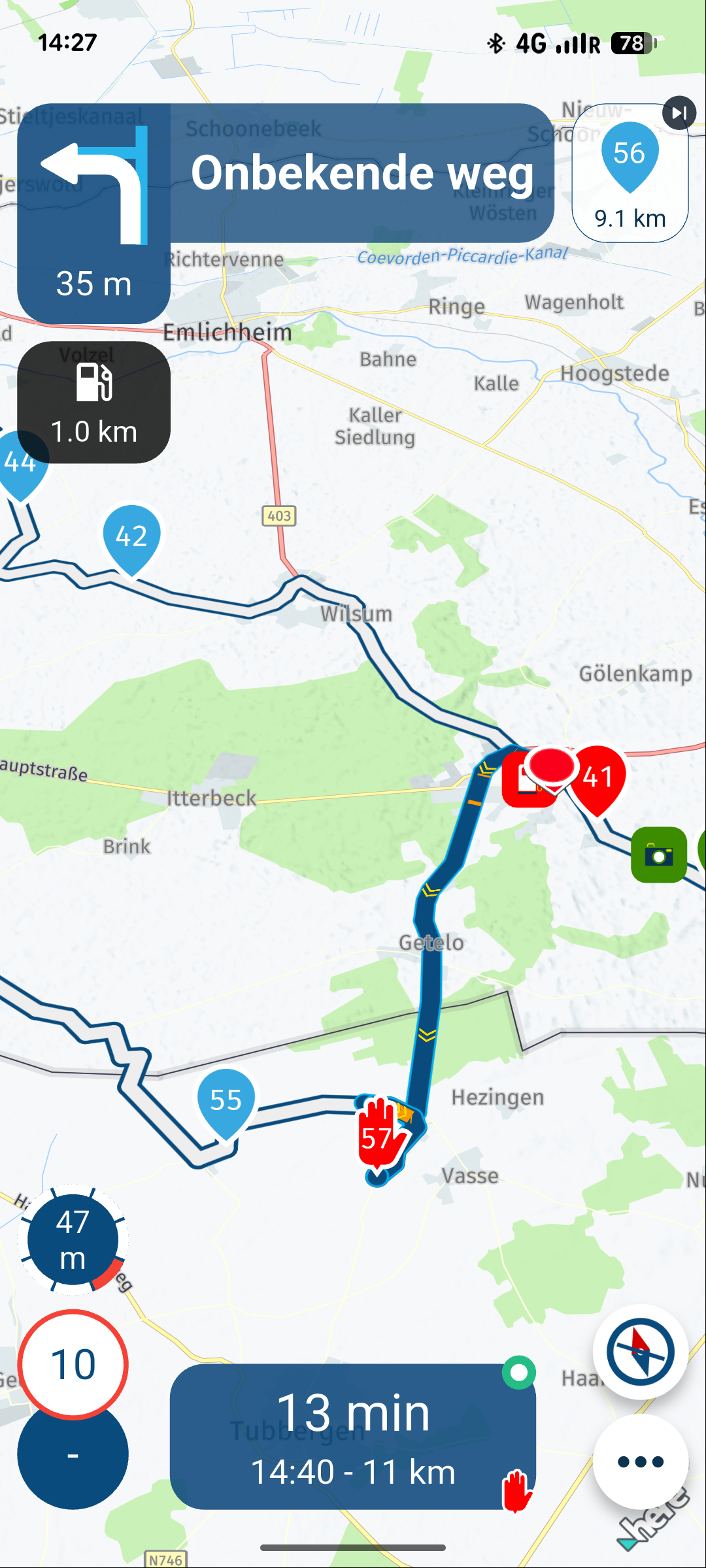
Today i rode the route again. Just to see if the same problem happens again. And it did. Same place same result.
I lost cell coverage and approx 500 meters later, point 42 was skipped to point 56.See the result in the screenshot below
(I use MRA Next only on Android Auto. Every comment, suggestion, etc will be based on my usage with Android Auto)
Hello! It looks like you're interested in this conversation, but you don't have an account yet.
Getting fed up of having to scroll through the same posts each visit? When you register for an account, you'll always come back to exactly where you were before, and choose to be notified of new replies (either via email, or push notification). You'll also be able to save bookmarks and upvote posts to show your appreciation to other community members.
With your input, this post could be even better 💗
Register Login

-
 17335.6k
-
 0773
0773
-
 0486
0486
-
 216135
-
 712127
-
0350
-
 125295
-
 07206
07206