Move blocks of routepoints
-

When creating a route that stays in a singular area, or creating off-road tracks, and you want to re-arrange things, it can get pretty messy pretty quickly when you need to move each point at a time. It would be awesome if you could re-arrange a complete block of multiple points in a single go.
Either via a multi-select and drag or a little like how the split function works, select start and end-point and select where you want to push the selected block to.
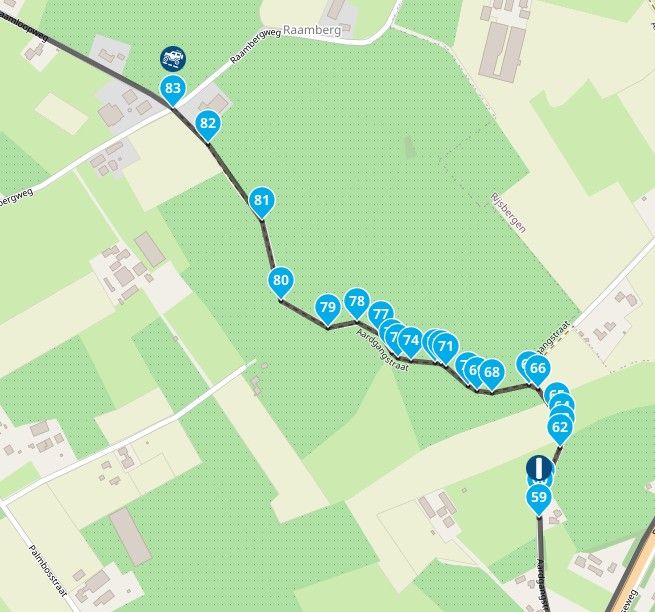
For example, this block are basically all 'skipped' points, this works to create a track on unpaved roads that are ignored by the algorithms, but now I want those 24 points in another 'section' of my complete track/route.
-
When creating a route that stays in a singular area, or creating off-road tracks, and you want to re-arrange things, it can get pretty messy pretty quickly when you need to move each point at a time. It would be awesome if you could re-arrange a complete block of multiple points in a single go.
Either via a multi-select and drag or a little like how the split function works, select start and end-point and select where you want to push the selected block to.
For example, this block are basically all 'skipped' points, this works to create a track on unpaved roads that are ignored by the algorithms, but now I want those 24 points in another 'section' of my complete track/route.

@Yannick_van_Vugt what you're asking is pretty much impossible given the position of all those shaping points in your example
Honda Goldwing GL1500,
Honda Silverwing GL 650
DMD2 T865X 8 inch Android tablet using MRA next for navigation
Garmin XT sold
Samsung S24FE mounted on a Quadlock and using Android Auto in my car -
@Yannick_van_Vugt what you're asking is pretty much impossible given the position of all those shaping points in your example
@Marinus-van-Deudekom It's the recommended way to create tracks on unpaved roads. Not my idea.

📷: YannickvanVugt | 🏍️: DutchTransalp
-
@Marinus-van-Deudekom It's the recommended way to create tracks on unpaved roads. Not my idea.

@Yannick_van_Vugt that's true.
 But it creates a problem when you want to replace you're route to a other road. I think to help you're self, don't place to many way point to follow the offroad way. Choose the most critical point on the way so when you see a crossing or split of the way place one there . You don't need to follow the whole way with waypoint.
R1250GS. Started with a Zumo 550, BMW nav IV, Carpe-iter and now Chigee met MRA app.
-
@Yannick_van_Vugt that's true.
But it creates a problem when you want to replace you're route to a other road. I think to help you're self, don't place to many way point to follow the offroad way. Choose the most critical point on the way so when you see a crossing or split of the way place one there . You don't need to follow the whole way with waypoint.
@Leike-Lodiers It is nice to have and there is no reason not to. Except for the fact that if you want to move a whole block of routepoints.
Same could be said if you have a lot of little towns and you want to change that order by a block of points. It is not really an unnecessary feature, I called it "move" in my primary post, but it would also be great if a multi-select could be done to delete a big part of the route.
-

Yes, that last suggestion does seem like a good option to me. Selecting multiple points to delete them all at once. At the moment, if I want to change part of the route, I have to delete each point in that section individually. It would be easier if I could delete those route points all at once. And it would be even better if you could then see the selected section with the route points on the map as well!
-

I'd like to see a way to work on a group of waypoints too. Some of my routes are figure 8 or cloverleaf and I like to reverse (or remove) sections of the route to keep it interesting. If we could select a group of waypoints in the list, then delete / reverse / move them, I'd be very happy
-
I'd like to see a way to work on a group of waypoints too. Some of my routes are figure 8 or cloverleaf and I like to reverse (or remove) sections of the route to keep it interesting. If we could select a group of waypoints in the list, then delete / reverse / move them, I'd be very happy
I'd like to see a way to work on a group of waypoints too. Some of my routes are figure 8 or cloverleaf and I like to reverse (or remove) sections of the route to keep it interesting. If we could select a group of waypoints in the list, then delete / reverse / move them, I'd be very happy
You get my exact idea.


Feels like a basic feature that should’ve always been there. -

Hi,
I don't quite understand the point of moving multiple waypoints. That would cause all the geographic coordinates to shift at the same time, which would result in an uncontrolled track.Just a copy/paste sample
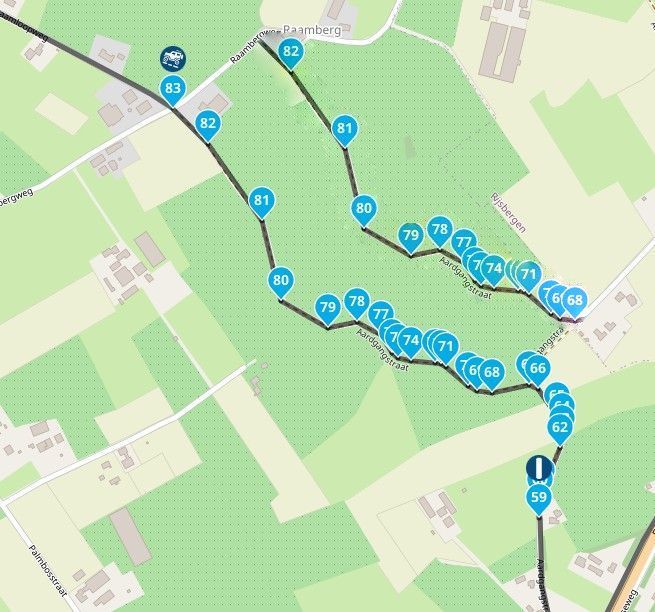
Copying multiple waypoints to use them in a new route makes more sense.
Hardware
iPhone 12 pro (iOS 26.2.1)
iPad (7.Gen.) 18.7.3
Oukitel RT3 Pro (Andr. 14)
Wireless CarPlay mit (Elebest C650)
Wired CarPlay (SEAT Arona - 2021)
MRA Workshops in Deutsch sind hier zu finden -
I think group delete will be fine.
Moving will indeed be not possible. -
I agree, copy and delete.
-
Hi,
I don't quite understand the point of moving multiple waypoints. That would cause all the geographic coordinates to shift at the same time, which would result in an uncontrolled track.Just a copy/paste sample
Copying multiple waypoints to use them in a new route makes more sense.
Hi,
I don't quite understand the point of moving multiple waypoints. That would cause all the geographic coordinates to shift at the same time, which would result in an uncontrolled track.Just a copy/paste sample
Copying multiple waypoints to use them in a new route makes more sense.
@white.mouse said:
I think group delete will be fine.
Moving will indeed be not possible.It’s not about moving them physically, it’s about moving them in order in the list of routepoints. Have you guys even read the thread properly? Change them from 59-84 to let’s say 20-45 in a single go.
📷: YannickvanVugt | 🏍️: DutchTransalp
-
Hi,
I don't quite understand the point of moving multiple waypoints. That would cause all the geographic coordinates to shift at the same time, which would result in an uncontrolled track.Just a copy/paste sample
Copying multiple waypoints to use them in a new route makes more sense.
@white.mouse said:
I think group delete will be fine.
Moving will indeed be not possible.It’s not about moving them physically, it’s about moving them in order in the list of routepoints. Have you guys even read the thread properly? Change them from 59-84 to let’s say 20-45 in a single go.
@Yannick_van_Vugt Yes I have but want you want is not possible at all
-
It shouldn't be too difficult? We can do it now, one-by-one (but it is slow and can be confusing, and MRA recalculates for each waypoint), I'd just like to work on several adjacent points at the same time.
-
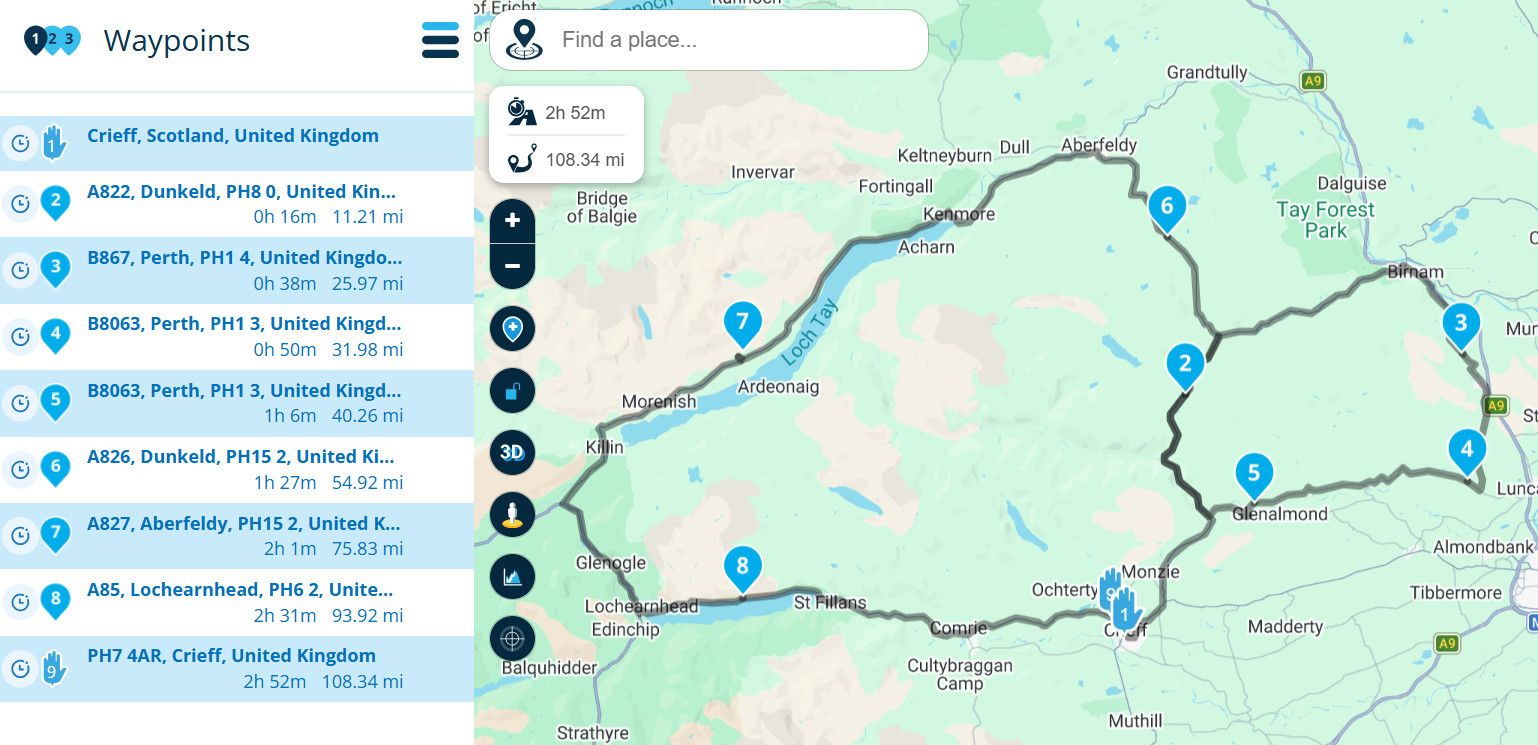
Simple example of the request (hoping the image uploads OK): I want to do waypoints 6-7-8-9 before 2-3-4-5. Secondly, I'd like to reverse 6-7-8-9 (only) without changing the rest of the route.
Reason: I do some routes twice a year, wonderful roads, I like to vary the sequence / direction to keep it interesting -
When creating a route that stays in a singular area, or creating off-road tracks, and you want to re-arrange things, it can get pretty messy pretty quickly when you need to move each point at a time. It would be awesome if you could re-arrange a complete block of multiple points in a single go.
Either via a multi-select and drag or a little like how the split function works, select start and end-point and select where you want to push the selected block to.
For example, this block are basically all 'skipped' points, this works to create a track on unpaved roads that are ignored by the algorithms, but now I want those 24 points in another 'section' of my complete track/route.
-
@Yannick_van_Vugt Yes I have but want you want is not possible at all
@Marinus-van-Deudekom Currently it isn't, that's why I brought it on as a suggestion. Right?
Other see the value of my request, I understand you don't, but if it ain't valuable to you, or you don't use the tool in a certain way, doesn't mean it's not for someone else.@Brian-McG Yes, possible, but that shouldn't be needed and is devious work. It also floods the database and back-end with splits and merges, that will later be deleted. This feature is will prevent that as well.
-
@Marinus-van-Deudekom Currently it isn't, that's why I brought it on as a suggestion. Right?
Other see the value of my request, I understand you don't, but if it ain't valuable to you, or you don't use the tool in a certain way, doesn't mean it's not for someone else.@Brian-McG Yes, possible, but that shouldn't be needed and is devious work. It also floods the database and back-end with splits and merges, that will later be deleted. This feature is will prevent that as well.
-
@Marinus-van-Deudekom Currently it isn't, that's why I brought it on as a suggestion. Right?
Other see the value of my request, I understand you don't, but if it ain't valuable to you, or you don't use the tool in a certain way, doesn't mean it's not for someone else.@Brian-McG Yes, possible, but that shouldn't be needed and is devious work. It also floods the database and back-end with splits and merges, that will later be deleted. This feature is will prevent that as well.
Other see the value of my request, I understand you don't, but if it ain't valuable to you, or you don't use the tool in a certain way, doesn't mean it's not for someone else.
Its not that I dont want to use such a tool. I just think that its just impossible
-
@yannick_van_vugt , even in the translation, your suggestion isn't 100% clear; it's only after David's explanation that things become clear. (lost in translation)

Now I understand the suggestion. You kept talking about moving multiple waypoints. I always thought you were referring to the map.
Saying “moving within the ‘Waypoint List’” would have helped me understand it right away.
If, perhaps, there’s a feature in the future to delete or copy multiple waypoints, it should also be possible to move multiple waypoints (within the waypoint list). I vote for this.Hardware
iPhone 12 pro (iOS 26.2.1)
iPad (7.Gen.) 18.7.3
Oukitel RT3 Pro (Andr. 14)
Wireless CarPlay mit (Elebest C650)
Wired CarPlay (SEAT Arona - 2021)
MRA Workshops in Deutsch sind hier zu finden

Hello! It looks like you're interested in this conversation, but you don't have an account yet.
Getting fed up of having to scroll through the same posts each visit? When you register for an account, you'll always come back to exactly where you were before, and choose to be notified of new replies (either via email, or push notification). You'll also be able to save bookmarks and upvote posts to show your appreciation to other community members.
With your input, this post could be even better 💗
Register Login-
 08184
08184
-
 0518
0518
-
 010278
-
 0745
0745
-
0310
-
 0336
0336
-
 016812
-
0211