Joining a planned route from a differant position.
-
@Nick-Carthew said in Joining a planned route from a differant position.:
If you open a route the app will guide you to the start from your location. If you do not want to join at the start, long press any waypoint to skip all previous waypoints and you’ll be directed from your location to your chosen waypoint.
Yes absolutely.
What annoys me: If I start riding a route, passing the start waypoint before the navigation starts, the app keeps directing me back to the starting point. This happens even if I pass the second, third, fourth shaping points etc, at which point it would be nice if the app would starts realizing, that this guy is actually following the route, so no need to go back and start over.
That's right, exactly what you're describing is happening to me, and I've been asking about it these past few days... obviously, the solution other users have suggested is manually re-entering points already passed (we all know that). The idea is to suggest in the forum that it be implemented automatically so the navigator knows you're following the route correctly and automatically guides you to the next point (without having to manually re-enter previous points).
-
the other thing I noticed is that the app never sends you to the last point, which I find confusing. In @Nick-Carthew case : if point 4 was the last point the app would send you to 3.
-
the other thing I noticed is that the app never sends you to the last point, which I find confusing. In @Nick-Carthew case : if point 4 was the last point the app would send you to 3.
@Herman-Veldhuizen said in Joining a planned route from a differant position.:
the other thing I noticed is that the app never sends you to the last point, which I find confusing. In @Nick-Carthew case : if point 4 was the last point the app would send you to 3.
Waypoint 4 is not the last waypoint and even if it was the app would not send me to waypoint 3. My example shows that I have decided to start this route from somewhere that is not the start point. I have selected Start from nearest waypoint in Routing settings. Waypoint 3 is behind my location, this can be seen by the white line, if the app sent me to waypoint 3 I would have to travel back on the same road to reach the next waypoint number 4.
-
Nick Carthew, that's right, I totally agree with what you've described as help, but it simply doesn't work for me and several others like it does for you. It sends me back to the previous point (which we've already passed), and we don't know why. That's why we're asking here, since it should work for us like it does for you, Nick, but it doesn't! Is it something in our configuration? Or is it a bug in the app? That's the question...
-
Nick Carthew, that's right, I totally agree with what you've described as help, but it simply doesn't work for me and several others like it does for you. It sends me back to the previous point (which we've already passed), and we don't know why. That's why we're asking here, since it should work for us like it does for you, Nick, but it doesn't! Is it something in our configuration? Or is it a bug in the app? That's the question...
@Jose-antonio-marin-segura It may be because I am using the new 5.1.0 updated version from BETA testing. I will ask and come back to this topic with the answer.
-
i see the same as @Jose-antonio-marin-segura . The app sends me back. I suspect that the app skips a point when you are very close to it and that this is why it works in @Nick-Carthew case (point 3 very close)
@Herman-Veldhuizen said in Joining a planned route from a differant position.:
I suspect that the app skips a point when you are very close to it and that this is why it works
That is exactly the case

It works because when you are very close to the nearest waypoint, it will go to the next nearest.
When the real nearest waypoint is slightly further, it will just use that one. If it it might be slightly behind you. -
@Herman-Veldhuizen said in Joining a planned route from a differant position.:
I suspect that the app skips a point when you are very close to it and that this is why it works
That is exactly the case
It works because when you are very close to the nearest waypoint, it will go to the next nearest.
When the real nearest waypoint is slightly further, it will just use that one. If it it might be slightly behind you.@Corjan-Meijerink Thanks for the confirmation of how the algorithm works

-
Here are photos from today showing that I've passed point 5 and am heading for point 6, but it sends me back to point 5 instead of the next point 6... Next navigation on iOS 2.6. I've tried both online and offline with downloaded maps and the same error occurs.
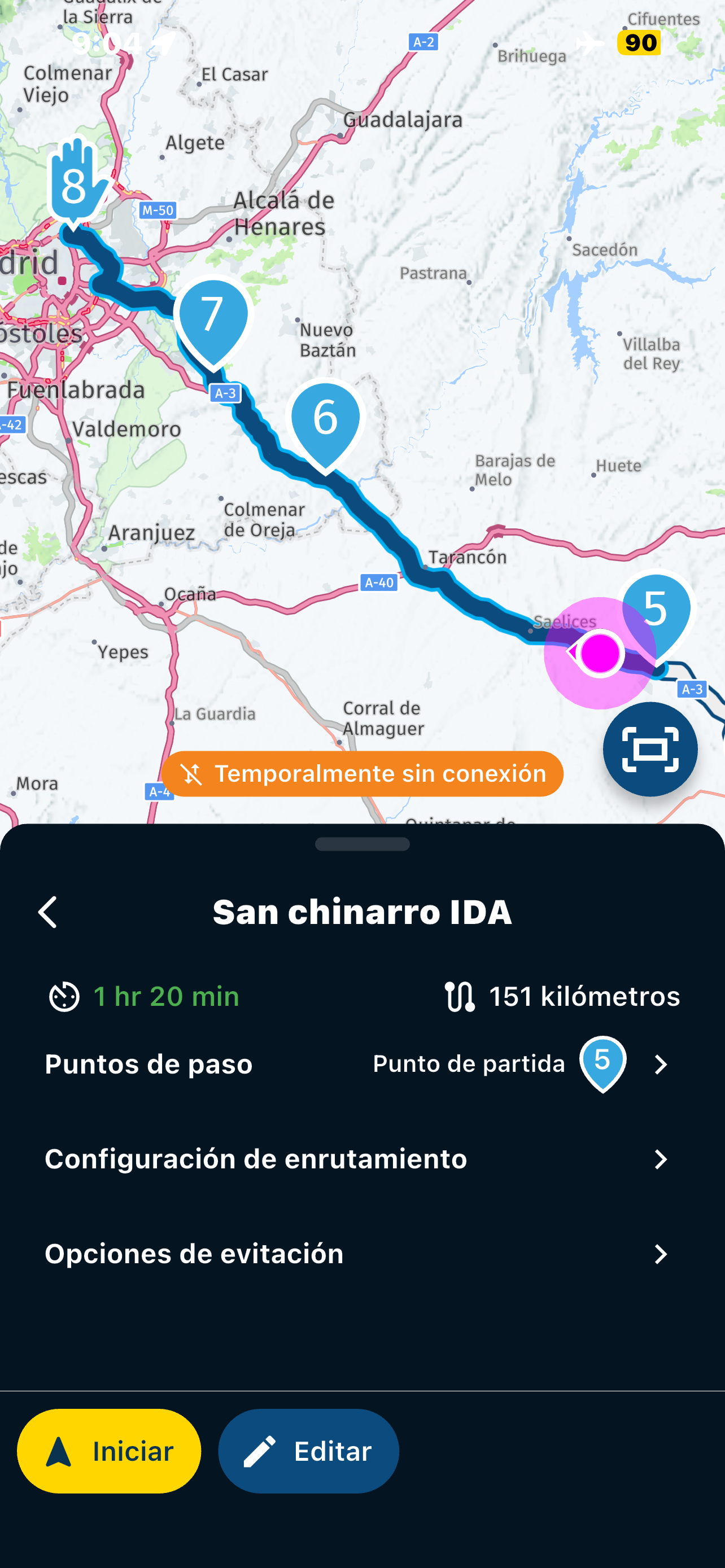
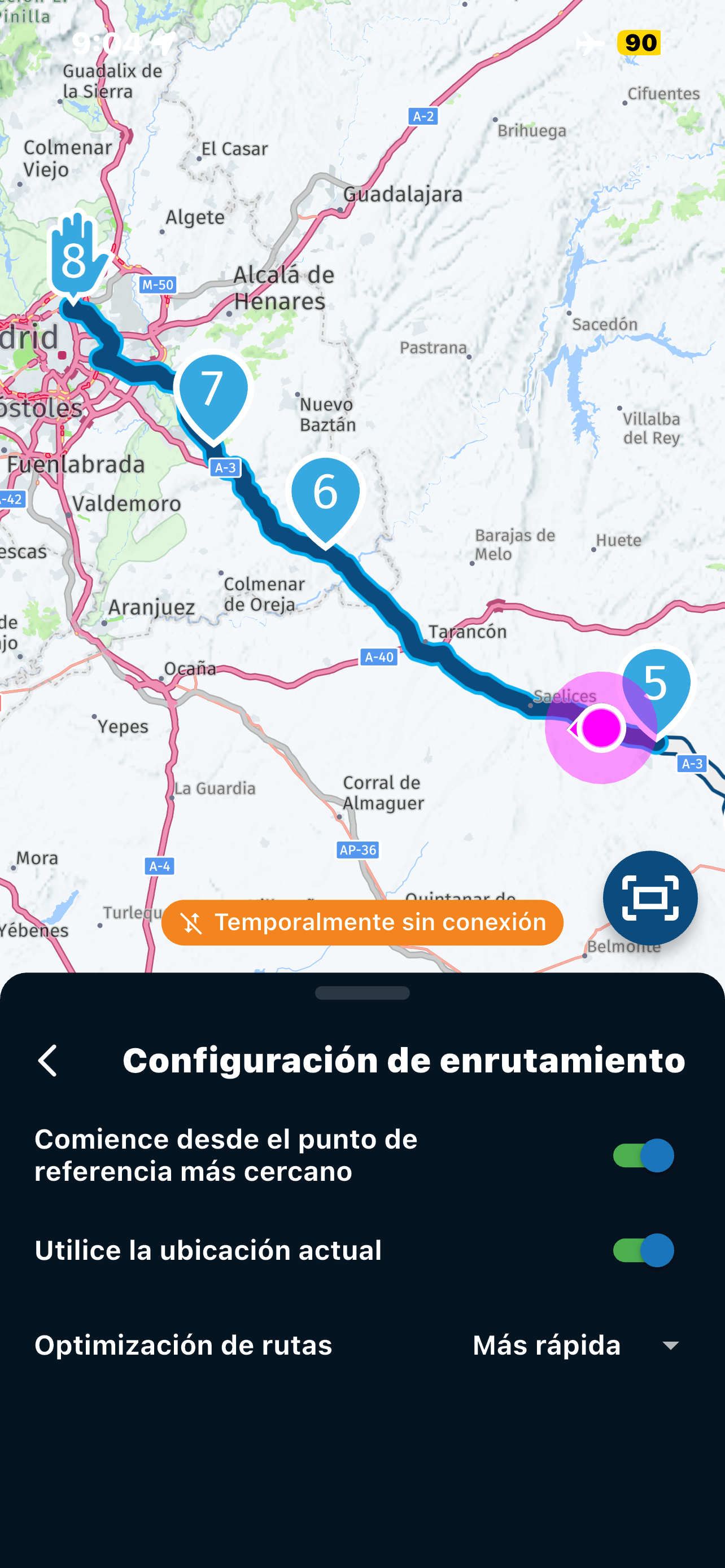
@Jose-antonio-marin-segura Now that Corjan has explained how the algorithm works, in the situation that you described, long press on waypoint 6 is the best option for you.
-
This is my example. Straight line distance is smallest to point 4 but it would send me back when entering the route. Point 5 should be the nearest point. This is with the latest version 5.0.4 on Android.
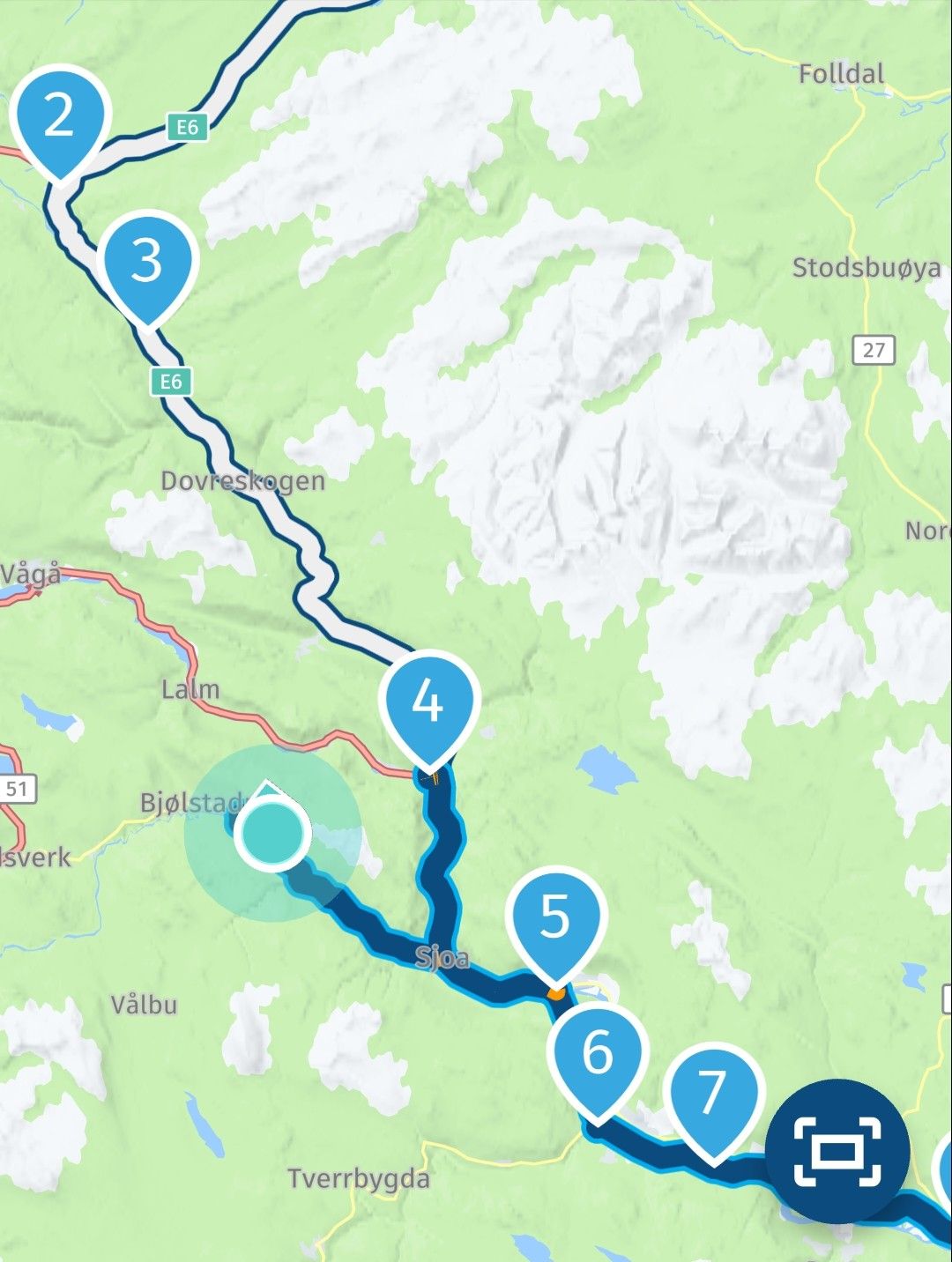
-
Nick Carthew, that's right, I totally agree with what you've described as help, but it simply doesn't work for me and several others like it does for you. It sends me back to the previous point (which we've already passed), and we don't know why. That's why we're asking here, since it should work for us like it does for you, Nick, but it doesn't! Is it something in our configuration? Or is it a bug in the app? That's the question...
@Jose-antonio-marin-segura of you keep following the route the shaping points that you've already passed will be skipped, just keep following the route. The system must try to get you back 3 times and then will finally give in
Honda Goldwing GL1500,
Honda Silverwing GL 650
DMD2 T865X 8 inch Android tablet using MRA next for navigation
Garmin XT sold
Samsung S24FE mounted on a Quadlock and using Android Auto in my car -
Ah, okay, that's possible. We'll wait here with your answer... Greetings and thanks.
-
@Jose-antonio-marin-segura You’re not correct with your scenario. If you start a route and you are not at the beginning, the app knows your location and will therefore start from the nearest location that is in front of you not behind you. My two screenshots demonstrate this. The first screenshot is an overview of the whole route. The second screenshot shows my location, the white line and waypoints 4 and 5 are behind me, the app will start navigation from waypoint 6.
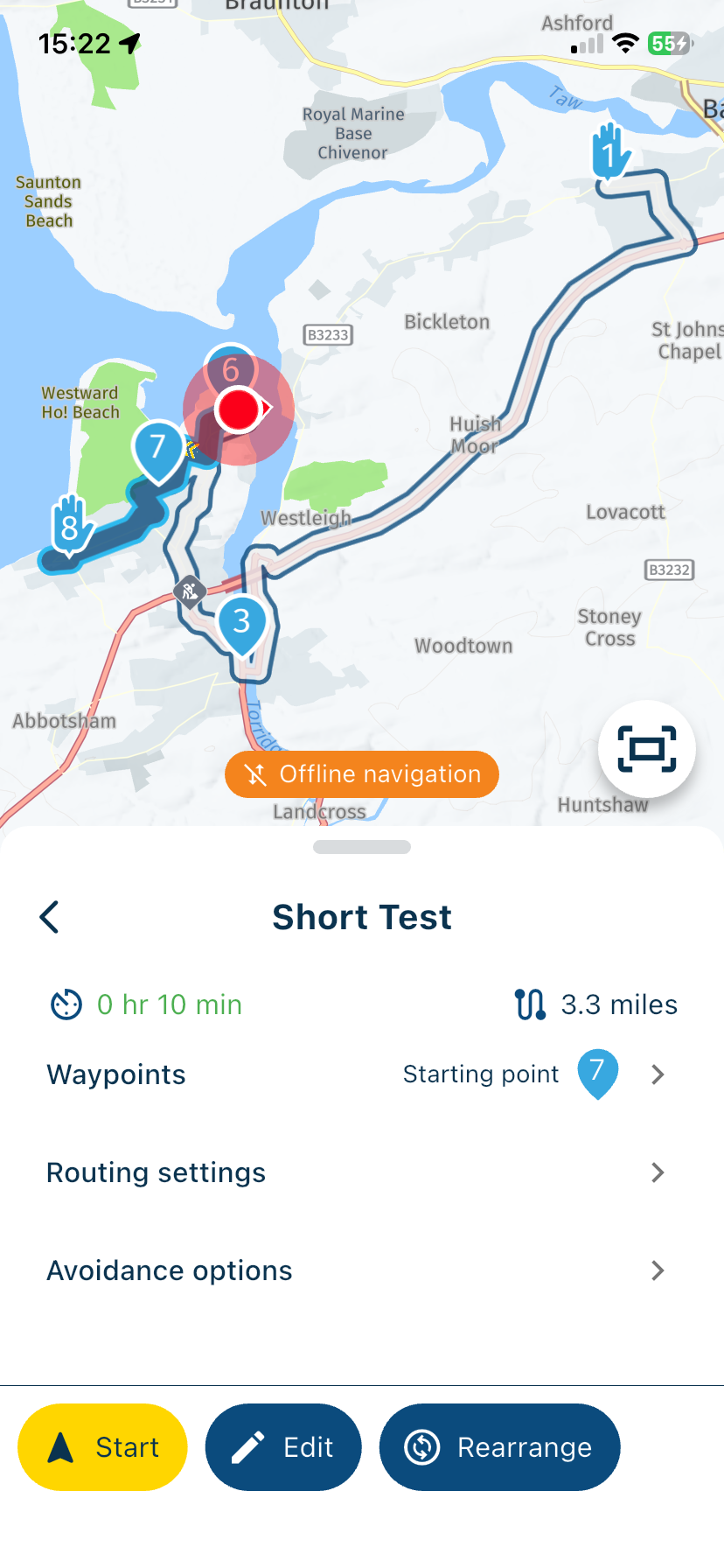
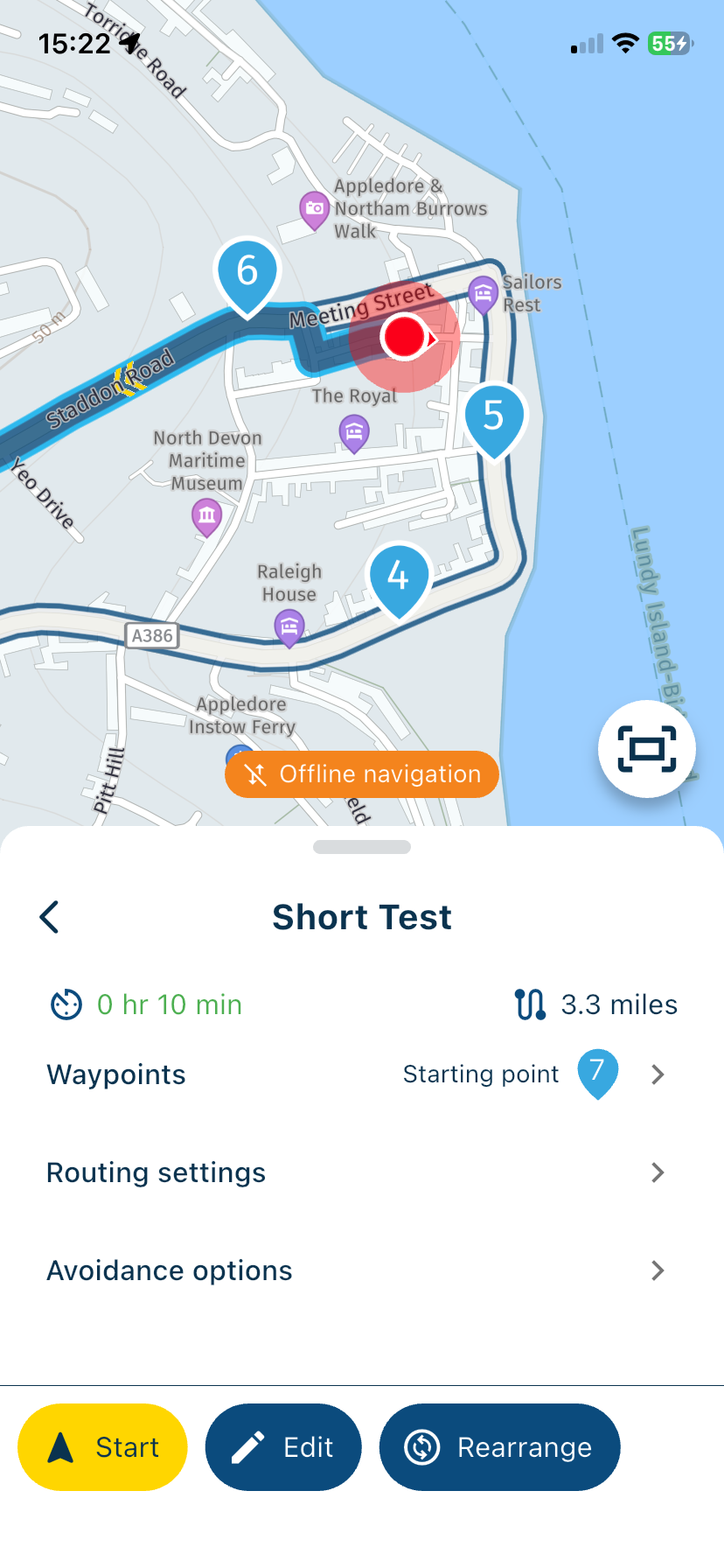
@Nick-Carthew so now we know where your house lives

Met andere apps maak je een route, met MRA componeer je een route!
Ducati Monster 1200 met Garmin Zümo XT
Fiat 124 Spider/Camper Dethleffs met Navigation-App op Samsung Tab Active4 Pro
MRA Lifetime Gold -
@Nick-Carthew so now we know where your house lives
@Lex.Kloet.RX It has never been a secret, ask any policeman

-
@Jose-antonio-marin-segura of you keep following the route the shaping points that you've already passed will be skipped, just keep following the route. The system must try to get you back 3 times and then will finally give in
@Marinus-van-Deudekom said in Joining a planned route from a differant position.:
@Jose-antonio-marin-segura of you keep following the route the shaping points that you've already passed will be skipped, just keep following the route. The system must try to get you back 3 times and then will finally give in
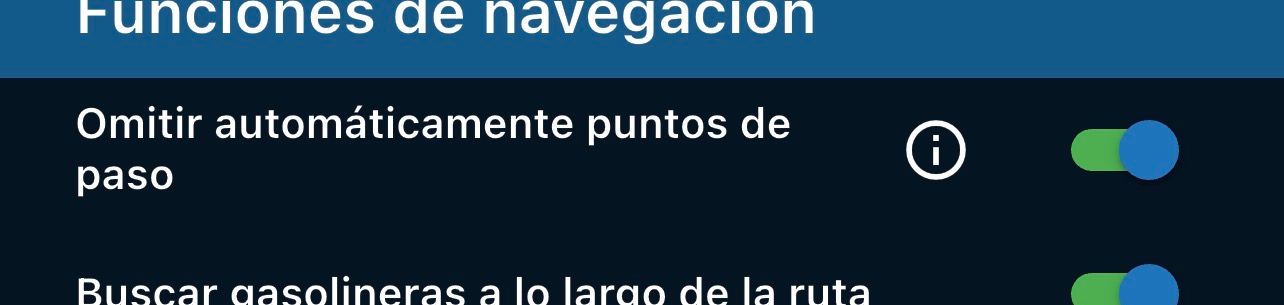
Only if you have selected Automatically skip waypoints
Always willing to help if I can.
Triumph Tiger 1200 XRT called Tina.
MRA Navigation Next and SilverFox BJ8 -
@Marinus-van-Deudekom said in Joining a planned route from a differant position.:
@Jose-antonio-marin-segura of you keep following the route the shaping points that you've already passed will be skipped, just keep following the route. The system must try to get you back 3 times and then will finally give in
Only if you have selected Automatically skip waypoints
No, I have "skip automatic points" ON and pressing it three times or even more keeps sending me back to the previous point (which I've already passed)... I'm using iOS 26, the latest version, and also the latest version of the official app (NOT BETA
-