Skip to content
  • Categories
  • Recent
  • Popular
  • Support
  • MyRoute-app
Collapse
Brand Logo

MRA Community Forum

  1. Home
  2. MyRoute-app Routeplanner
  3. [Web] Problems, Bugs and other Issues
  4. Expand

Expand

Scheduled Pinned Locked Moved [Web] Problems, Bugs and other Issues
23 Posts 5 Posters 346 Views 2 Watching
  • Oldest to Newest
  • Newest to Oldest
  • Most Votes
Reply
  • Reply as topic
Log in to reply
This topic has been deleted. Only users with topic management privileges can see it.
  • Don Staufferundefined Don Stauffer

    I just encountered this issue today, and it caused me some grief. I double checked my route, then used the Expand feature to create 20 shaping points to keep my Garmin on track. I loaded the track into my GPS, and did not notice the issue until after the lunch break, which I was tracking on my Garmin. After lunch, I discovered that it was 6 hours to my final destination, instead of 2 hours. Fortunately, I had saved the hotel address in my Zumo XT as a 'saved place' as a safeguard against this kind of problem. After my ride ended, I saw that indeed I had a higher numbered waypoint inserted in the list of lower numbered waypoints. In the future I will check the route AFTER expanding, but I wish that this kind of error could be eliminated by the software.

    Brian McGundefined Offline
    Brian McGundefined Offline
    Brian McG
    wrote last edited by
    #8

    Hi @Don-Stauffer yes unfortunately the "Expand" function is not perfect, it is useful but you do need to check what it has done

    Not only do you need to check that the overall mileage for the route has not changed (normally an increase)
    but you should check the location of EVERY point it has added, 😖 tiresome I know

    If you blindly assume it has put the added points in the perfect location you will be sadly mistaken
    The "Expand" function often places points on or very near too junctions
    If an MRA route with a point located on or near to a junction is transferred to another navigation system, it is highly likely that the poorly placed points will lead the other navigation system to take a different path from that junction

    as you suggest it would be nice if these types of errors could be eliminated but with the present system if you don't check then the error is yours

    When transferring routes from MRA to any other navigation system it is always wise to check that the overall mileage of a route has not changed

    I include the MRA mileage in the route name so that when I open a route to navigate I can check that it has been calculated for navigation correctly
    I still do this even when I am using MRA Navigation just out of habit from many years of routes going wrong
    this is crude check, it is not infallible but at least it is a check

    BlackView BV7100, Android 12
    Navigate "Routes as Tracks" in Offline mode with Offline Maps
    No Wifi, no internet, no interruptions, works well

    1 Reply Last reply
    0
    • Martin Woodfordundefined Online
      Martin Woodfordundefined Online
      Martin Woodford
      wrote last edited by
      #9

      It would be nice if someone from MRA would comment on this. In particular what they're doing to fix it.

      Marinus van Deudekomundefined 1 Reply Last reply
      0
      • Martin Woodfordundefined Martin Woodford

        It would be nice if someone from MRA would comment on this. In particular what they're doing to fix it.

        Marinus van Deudekomundefined Offline
        Marinus van Deudekomundefined Offline
        Marinus van Deudekom
        RouteXpert
        wrote last edited by
        #10

        @Martin-Woodford looking at your original post you asked how it is possible that shaping points added to the route where placed in a wrong order.
        That can only happen if your route contained some faults like your shaping points not put in the correct order. This happens when you double a piece of the route. That can ben seen by the darker black line in your route.
        Please share the url from one of those routes so we can help you. Make sure it's set to public.
        The expand function only puts extra points between points from the original

        Honda Goldwing GL1500,
        Honda Silverwing GL 650
        DMD2 T865X 8 inch Android tablet using MRA next for navigation
        Garmin XT sold
        Samsung S24FE mounted on a Quadlock and using Android Auto in my car

        Brian McGundefined 1 Reply Last reply
        0
        • Marinus van Deudekomundefined Marinus van Deudekom

          @Martin-Woodford looking at your original post you asked how it is possible that shaping points added to the route where placed in a wrong order.
          That can only happen if your route contained some faults like your shaping points not put in the correct order. This happens when you double a piece of the route. That can ben seen by the darker black line in your route.
          Please share the url from one of those routes so we can help you. Make sure it's set to public.
          The expand function only puts extra points between points from the original

          Brian McGundefined Offline
          Brian McGundefined Offline
          Brian McG
          wrote last edited by
          #11

          @Marinus-van-Deudekom said:
          That can only happen if your route contained some faults like your shaping points not put in the correct order.

          Sorry @marinus-van-deudekom this is not true, when using the expand function it can incorrectly place a point, possibly on top of a bridge / overpass or on the wrong side of a divider on the exit of a round about
          These errors will lead to the route changing, sometimes quite significantly

          BlackView BV7100, Android 12
          Navigate "Routes as Tracks" in Offline mode with Offline Maps
          No Wifi, no internet, no interruptions, works well

          1 Reply Last reply
          0
          • Martin Woodfordundefined Online
            Martin Woodfordundefined Online
            Martin Woodford
            wrote last edited by
            #12

            OK. So here's my original route, (377.32 miles) I hope it's public
            https://www.myrouteapp.com/route/open/13569227
            When I use expand to add just one more point (15, up from 14) it becomes 480.85 miles and point 8 has been added between poins 5 and 6, both of which are on the correct side of the road.

            Brian McGundefined Marinus van Deudekomundefined 2 Replies Last reply
            0
            • Martin Woodfordundefined Martin Woodford

              OK. So here's my original route, (377.32 miles) I hope it's public
              https://www.myrouteapp.com/route/open/13569227
              When I use expand to add just one more point (15, up from 14) it becomes 480.85 miles and point 8 has been added between poins 5 and 6, both of which are on the correct side of the road.

              Brian McGundefined Offline
              Brian McGundefined Offline
              Brian McG
              wrote last edited by
              #13

              @Martin-Woodford try deleting the 2 points on the UK side of the channel then use the expand function
              I think the ferry / tunnel maybe has something to do with the order / timing in this example getting really mixed up
              after I did that then it was just the usual overpass errors

              BlackView BV7100, Android 12
              Navigate "Routes as Tracks" in Offline mode with Offline Maps
              No Wifi, no internet, no interruptions, works well

              1 Reply Last reply
              0
              • Martin Woodfordundefined Online
                Martin Woodfordundefined Online
                Martin Woodford
                wrote last edited by
                #14

                Hi @brian-mcg
                Thank you. Yes, that works. I very much appreciate the experience you've shared in this thread.
                However - to the MRA team, the expand function is part of what we pay for. I don't expect to have to rely on the knowledge and goodwill of forum members to make something work properly.

                Marinus van Deudekomundefined 1 Reply Last reply
                1
                • Martin Woodfordundefined Martin Woodford

                  OK. So here's my original route, (377.32 miles) I hope it's public
                  https://www.myrouteapp.com/route/open/13569227
                  When I use expand to add just one more point (15, up from 14) it becomes 480.85 miles and point 8 has been added between poins 5 and 6, both of which are on the correct side of the road.

                  Marinus van Deudekomundefined Offline
                  Marinus van Deudekomundefined Offline
                  Marinus van Deudekom
                  RouteXpert
                  wrote last edited by
                  #15

                  @Martin-Woodford The first impression on opening your route
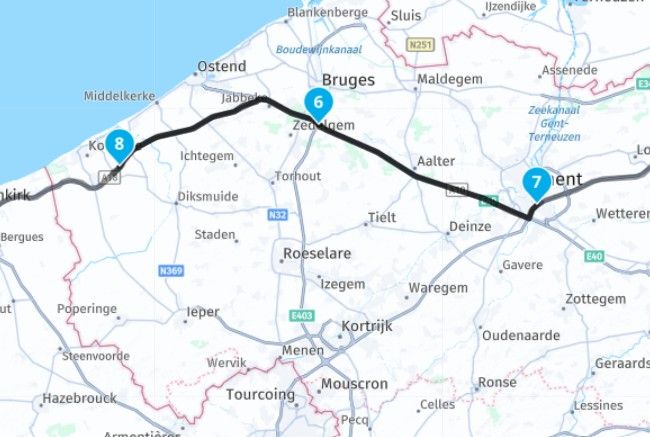
                  babfcb71-2c84-41f6-9410-0dd12eb48fbc-image.jpeg

                  You can see that the point 6, 7 and 8 are not in a logical order resulting in a dark black line as I suspected

                  next problem is indeed like @brian-mcg suspected the starting point on the other end off the tunnel / ferry witch resulted in the route being verry long. Deleting the first 2 points will result in the route being expanded like you want. In my case I expanded to 20 points.
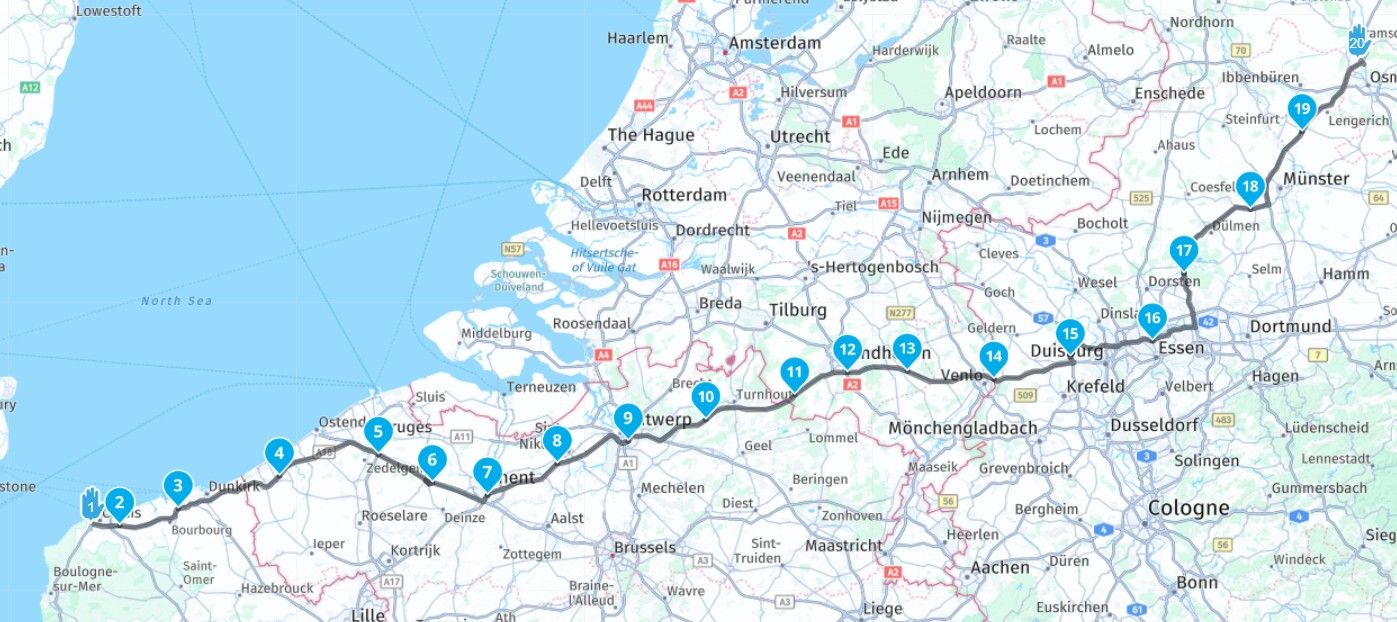
                  3123e3d1-a437-403f-bb45-17cdff02af61-image.jpeg

                  Honda Goldwing GL1500,
                  Honda Silverwing GL 650
                  DMD2 T865X 8 inch Android tablet using MRA next for navigation
                  Garmin XT sold
                  Samsung S24FE mounted on a Quadlock and using Android Auto in my car

                  1 Reply Last reply
                  0
                  • Martin Woodfordundefined Martin Woodford

                    Hi @brian-mcg
                    Thank you. Yes, that works. I very much appreciate the experience you've shared in this thread.
                    However - to the MRA team, the expand function is part of what we pay for. I don't expect to have to rely on the knowledge and goodwill of forum members to make something work properly.

                    Marinus van Deudekomundefined Offline
                    Marinus van Deudekomundefined Offline
                    Marinus van Deudekom
                    RouteXpert
                    wrote last edited by
                    #16

                    @Martin-Woodford I have to put in a good word for the team. As you can see part of the failure was due to a mistake in your route. The other part is that you didn't know that expanding a route in witch a tunnel or Ferry plays a roll, you"ll get strange results. So no mistake by MRA.
                    Beeing a RouteXpert myself I must confess, witch rarely happens, that I didn't know the Ferry bit myself.

                    Honda Goldwing GL1500,
                    Honda Silverwing GL 650
                    DMD2 T865X 8 inch Android tablet using MRA next for navigation
                    Garmin XT sold
                    Samsung S24FE mounted on a Quadlock and using Android Auto in my car

                    1 Reply Last reply
                    0
                    • Martin Woodfordundefined Online
                      Martin Woodfordundefined Online
                      Martin Woodford
                      wrote last edited by
                      #17

                      Absolutely not. This is my original 14 point route
                      https://www.myrouteapp.com/route/open/13569227

                      1 Reply Last reply
                      0
                      • Martin Woodfordundefined Online
                        Martin Woodfordundefined Online
                        Martin Woodford
                        wrote last edited by
                        #18

                        The new point number 8 can be identified as an MRA expand point because it's labelled "waypoint" the ones I manually placed have road numbers

                        1 Reply Last reply
                        0
                        • Martin Woodfordundefined Online
                          Martin Woodfordundefined Online
                          Martin Woodford
                          wrote last edited by
                          #19

                          I don't see how "expanding a route in witch a tunnel or Ferry plays a roll, you"ll get strange results. So no mistake by MRA" can be the case. Why should a tunnel or ferry mean the results are strange ? I'm in Norway at the moment, there are hundreds of tunnels and ferries should I expect strange results everytime one is on my route ?

                          1 Reply Last reply
                          1
                          • Marinus van Deudekomundefined Offline
                            Marinus van Deudekomundefined Offline
                            Marinus van Deudekom
                            RouteXpert
                            wrote last edited by
                            #20

                            The problem occurs when you expansie the route.
                            In your original route you can see that the order of the shapingpoints is not logical. See my screenshot.

                            Honda Goldwing GL1500,
                            Honda Silverwing GL 650
                            DMD2 T865X 8 inch Android tablet using MRA next for navigation
                            Garmin XT sold
                            Samsung S24FE mounted on a Quadlock and using Android Auto in my car

                            1 Reply Last reply
                            0
                            • Martin Woodfordundefined Online
                              Martin Woodfordundefined Online
                              Martin Woodford
                              wrote last edited by
                              #21

                              Hi @marinus-van-deudekom
                              Thanks for your comments. The screenshot you show is from the expanded route. This is my original 14 point, 377.32 mile route. In a moment I'll expand it in MRA and screenshot it again (MRA makes the changes in realtime and I don't know how to save versions of the original and expanded route)
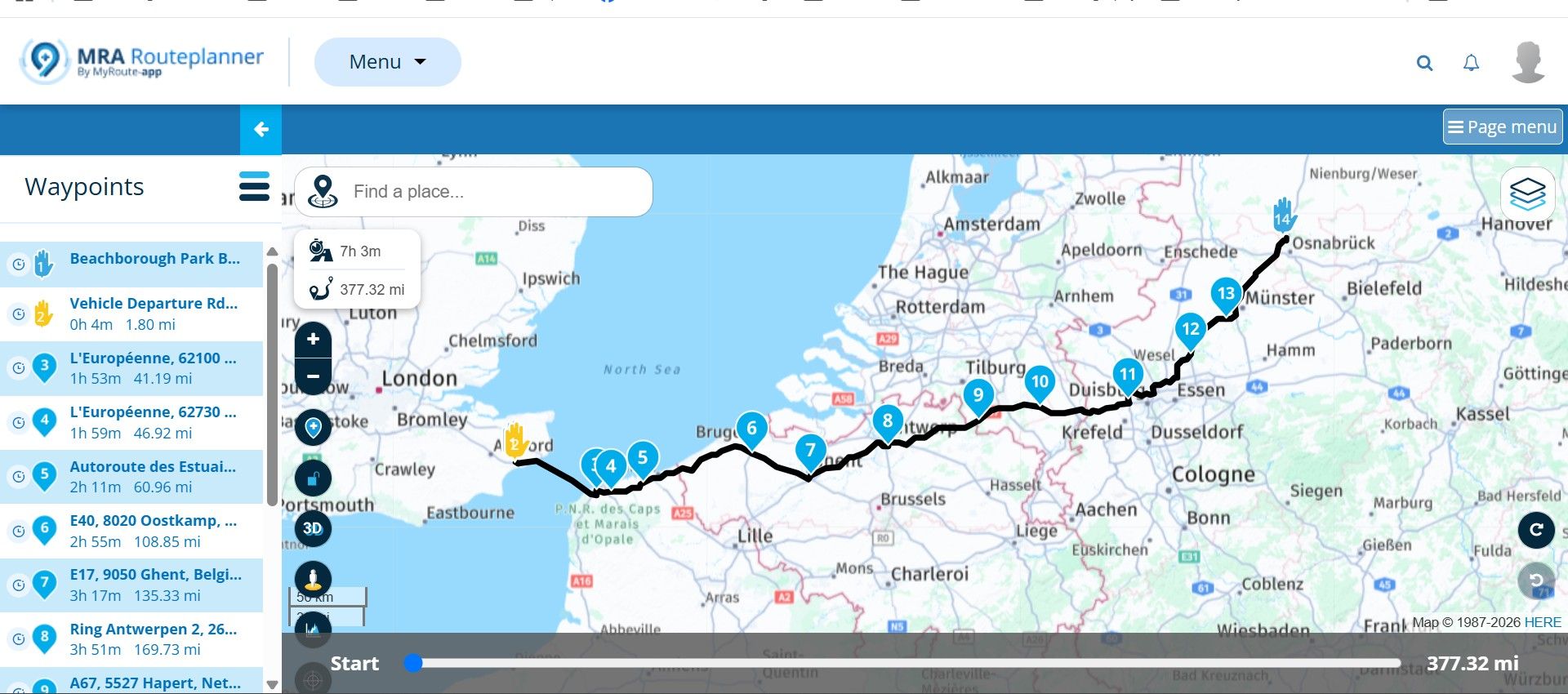
                              d038782e-0608-4663-b674-ed58506e8abe-image.jpeg

                              1 Reply Last reply
                              0
                              • Martin Woodfordundefined Online
                                Martin Woodfordundefined Online
                                Martin Woodford
                                wrote last edited by
                                #22

                                Hi @marinus-van-deudekom
                                This is the expanded version. Please note the location of the new waypoint 8 and it's description.
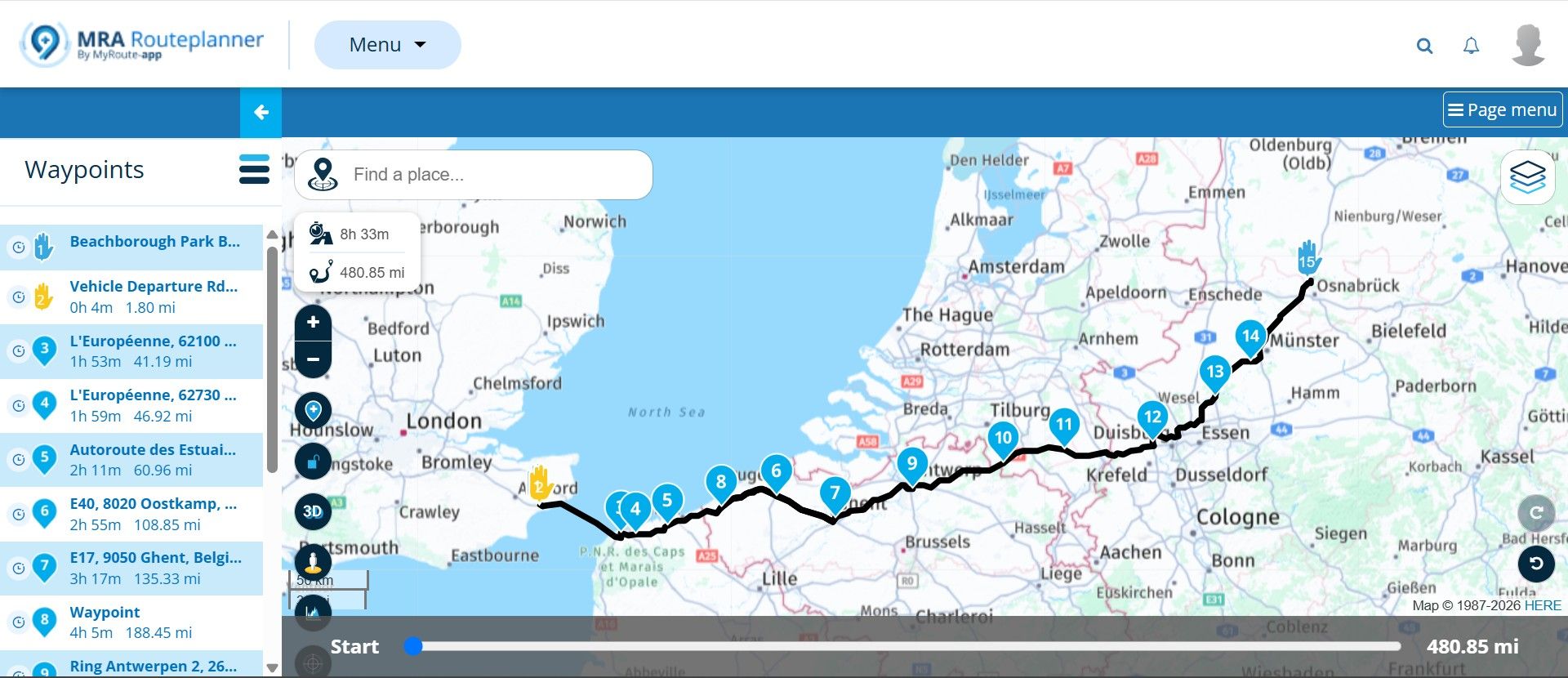
                                2c8ebac9-332b-4bd4-9c8b-e5832b561328-image.jpeg

                                1 Reply Last reply
                                0
                                • Martin Woodfordundefined Online
                                  Martin Woodfordundefined Online
                                  Martin Woodford
                                  wrote last edited by
                                  #23

                                  I will now reset the original in MRA

                                  1 Reply Last reply
                                  0

                                  Hello! It looks like you're interested in this conversation, but you don't have an account yet.

                                  Getting fed up of having to scroll through the same posts each visit? When you register for an account, you'll always come back to exactly where you were before, and choose to be notified of new replies (either via email, or push notification). You'll also be able to save bookmarks and upvote posts to show your appreciation to other community members.

                                  With your input, this post could be even better 💗

                                  Register Login
                                  Reply
                                  • Reply as topic
                                  Log in to reply
                                  • Oldest to Newest
                                  • Newest to Oldest
                                  • Most Votes


                                  • 1
                                  • 2
                                  ACTIVE USERS
                                  Martin Woodfordundefined
                                  Martin Woodford
                                  Marinus van Deudekomundefined
                                  Marinus van Deudekom
                                  Brian McGundefined
                                  Brian McG
                                  Don Staufferundefined
                                  Don Stauffer
                                  Peter Zehentreiterundefined
                                  Peter Zehentreiter
                                  POPULAR TOPICS
                                  • Expand
                                    Martin Woodfordundefined
                                    Martin Woodford
                                    0
                                    23
                                    346

                                  • Sealevel
                                    Christian Feursteinundefined
                                    Christian Feurstein
                                    0
                                    6
                                    106

                                  • Routepunten
                                    Arie Boerundefined
                                    Arie Boer
                                    0
                                    11
                                    223

                                  • Default Map Layer in Animate
                                    Brian McGundefined
                                    Brian McG
                                    1
                                    9
                                    213

                                  • New update 5.2 - Avoid roadblocks, persistent map items, POI management and share
                                    Jörgenundefined
                                    Jörgen
                                    27
                                    37
                                    1.8k

                                  • New enlarge fuelstation icon gone to soon or not?
                                    M. Schrijverundefined
                                    M. Schrijver
                                    1
                                    11
                                    631

                                  • Account blocking issue
                                    b0hd1undefined
                                    b0hd1
                                    1
                                    23
                                    437

                                  • MRA V5.2, Navigation alters the route
                                    RideToPortugal.comundefined
                                    RideToPortugal.com
                                    1
                                    16
                                    100

                                  MY GROUPS
                                  • Login

                                  • Login or register to search.
                                  • First post
                                    Last post
                                  0
                                  • Categories
                                  • Recent
                                  • Popular
                                  • Support
                                  • MyRoute-app