
How to exclude short time road blocks during navigation
-

last minute closures (caused by accidents typically) never have diversion signs. tomtomgo expert has indeed a useful feature to deal with such cases and it would be a useful addition to MRA. But if you ask me wether implementing it should get priority over some other issues my answer would be no.
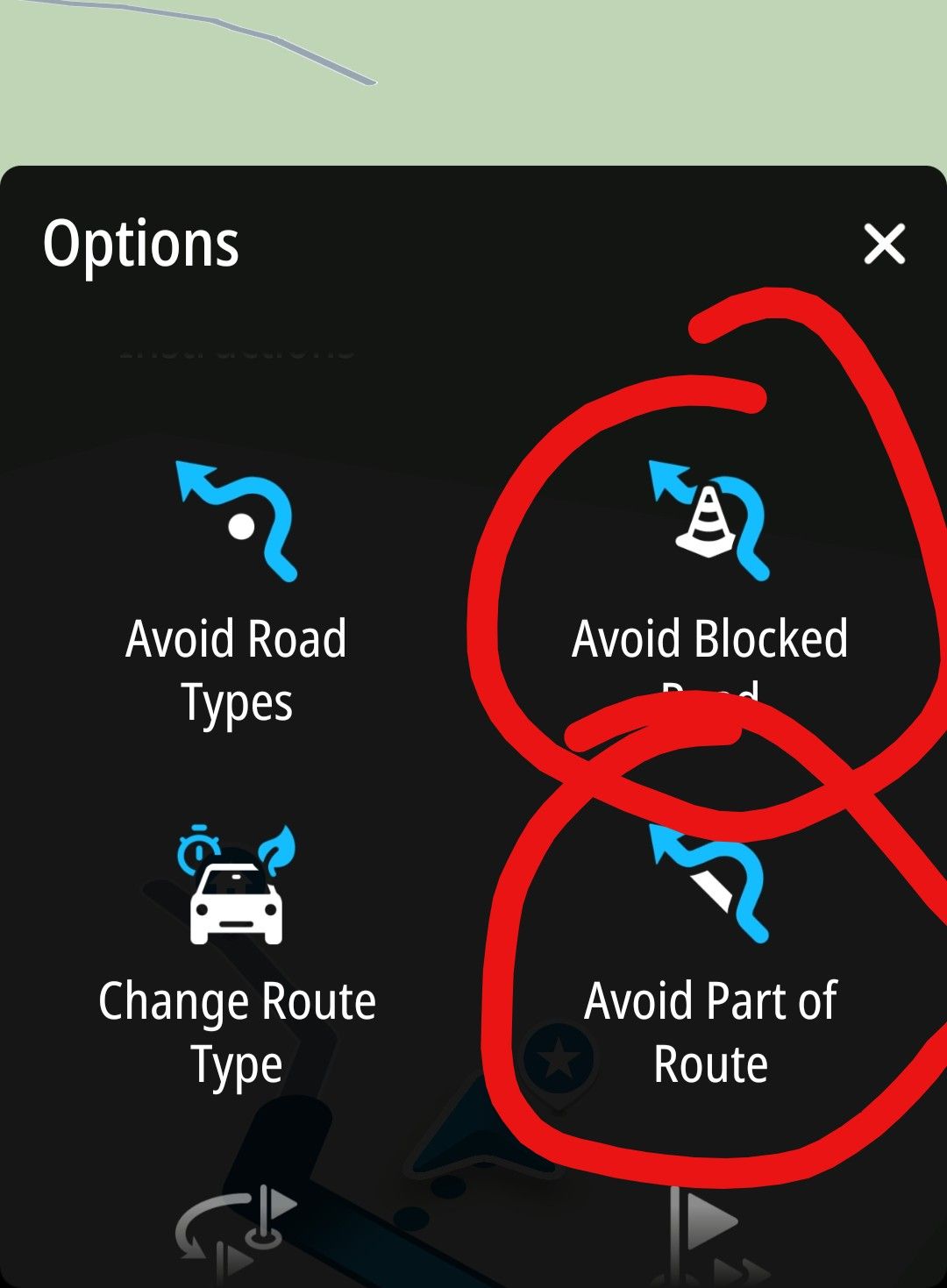
-
I would also like to see better technical support in the event of sudden road closures. Unfortunately, I very often find that motorway exits are closed. This means you’re forced to drive past them. As a result, you’re directed in the opposite direction at the next junction, only to be led back to the closed exit after another U-turn. Especially when the closure is announced at very short notice, there are (as yet) no diversion signs. The advice to ‘navigate by sight’ back to the route is not helpful to me, particularly when you are in a completely unfamiliar area and have a poor sense of direction. Technical support that eventually guides you back onto the route would be the most useful improvement to the MRA NN app for me.

@BMWBiker58 said in How to exclude short time road blocks during navigation:
I would also like to see better technical support in the event of sudden road closures.
The app is very good but it cannot foresee sudden road closures. If you have to go past your intended motorway exit the app can recalculate your route, this has to be used alongside some common sense, therefore don’t take the next exit and go back in the opposite direction. You may need to skip some route points but if you use the “Show original route” option, when you have to leave your planned route and there are no local diversion signs, the white line of the original routes gives you a target to aim for.
I would urge everyone to test and practice this method before a real situation comes along, this way you know what to expect and how to deal with it.
-
@Con-Hennekens
Hm, I understand what you are saying. Your are right - the lengh of the blockage is not known a priori. So the software has to deal with that uncertainty (see my point #2 below).
1: If there are detour signs, following those is definitely the best choice. Of course some shaping, or - more important - via points have to be deleted.
-a: when are I back on the original route?
-b: which via points did I miss and have to delete them? (Assuming that shaping points are skipped automatically.)You see - pretty much to do. Not very user friendly.
2: The algorithms of Calimoto and friends don't guide you back towards the detour you just took. Once you're back on the original route, the software continues to guide you in the direction of your original destination. That means, that the estimation of the length of the blockage is not crucial. If you choose a too long blockage, the detour will be longer. That's it.
So I keep my question open: why not a similar philosophy in MRA as in comparable navigation systems (of course, MRA is not comparable to any other system.

 )
)Best, Axel

@Axel-Härtl said in How to exclude short time road blocks during navigation:
You see - pretty much to do. Not very user friendly.
No you don't... The only thing you need to do when you get back on th route, is long-press the next route point. That's it.
I understand your wish for detection when you are back in the route, and I share that wish with you. But it simply cannot be done because of lack of support for such feature in the HERE platform. Maybe some time it will be possible, but don't hold your breath.
I am just an enthusiastic MRA user, and hope you will be one too!
Most motorcycle problems are caused by the nut that connects the handlebar to the saddle.
Check out RideSleepRepeat.eu, a biker community for sharing stays across Europe
-
@Axel-Härtl said in How to exclude short time road blocks during navigation:
You see - pretty much to do. Not very user friendly.
No you don't... The only thing you need to do when you get back on th route, is long-press the next route point. That's it.
I understand your wish for detection when you are back in the route, and I share that wish with you. But it simply cannot be done because of lack of support for such feature in the HERE platform. Maybe some time it will be possible, but don't hold your breath.
@Con-Hennekens
Thanks for your anwer.
I more and more get the impression, that MRA can do a lot for users. Much more than I knew prior to this discussion.
But on the other hand you need an IT exam to know all the tricks and features (short or long pressing a waypoint - difference during planning and navigating). But I'm keen to learn all features of MRA.
Best, Axel
-
@BMWBiker58 said in How to exclude short time road blocks during navigation:
I would also like to see better technical support in the event of sudden road closures.
The app is very good but it cannot foresee sudden road closures. If you have to go past your intended motorway exit the app can recalculate your route, this has to be used alongside some common sense, therefore don’t take the next exit and go back in the opposite direction. You may need to skip some route points but if you use the “Show original route” option, when you have to leave your planned route and there are no local diversion signs, the white line of the original routes gives you a target to aim for.
I would urge everyone to test and practice this method before a real situation comes along, this way you know what to expect and how to deal with it.
Just a short comment. Tomtom navigation also doesn't know a sudden blocking in advance. It is not in the basic map.
But they found a way to deal with it as Herman showed.
BMW R 1200 RT
Tourenorientiert
MRA lifetime member -
Just a short comment. Tomtom navigation also doesn't know a sudden blocking in advance. It is not in the basic map.
But they found a way to deal with it as Herman showed.
@Axel-Härtl Herman’s post is misleading, the blocked road is unknown therefore TomTom cannot avoid what is unknown. Also TomTom does not know how much of the route to avoid, so it isn’t a solution for your scenario
Always willing to help if I can.
Triumph Tiger 1200 XRT called Tina.
MRA Navigation Next and SilverFox BJ8 -
@Axel-Härtl Herman’s post is misleading, the blocked road is unknown therefore TomTom cannot avoid what is unknown. Also TomTom does not know how much of the route to avoid, so it isn’t a solution for your scenario
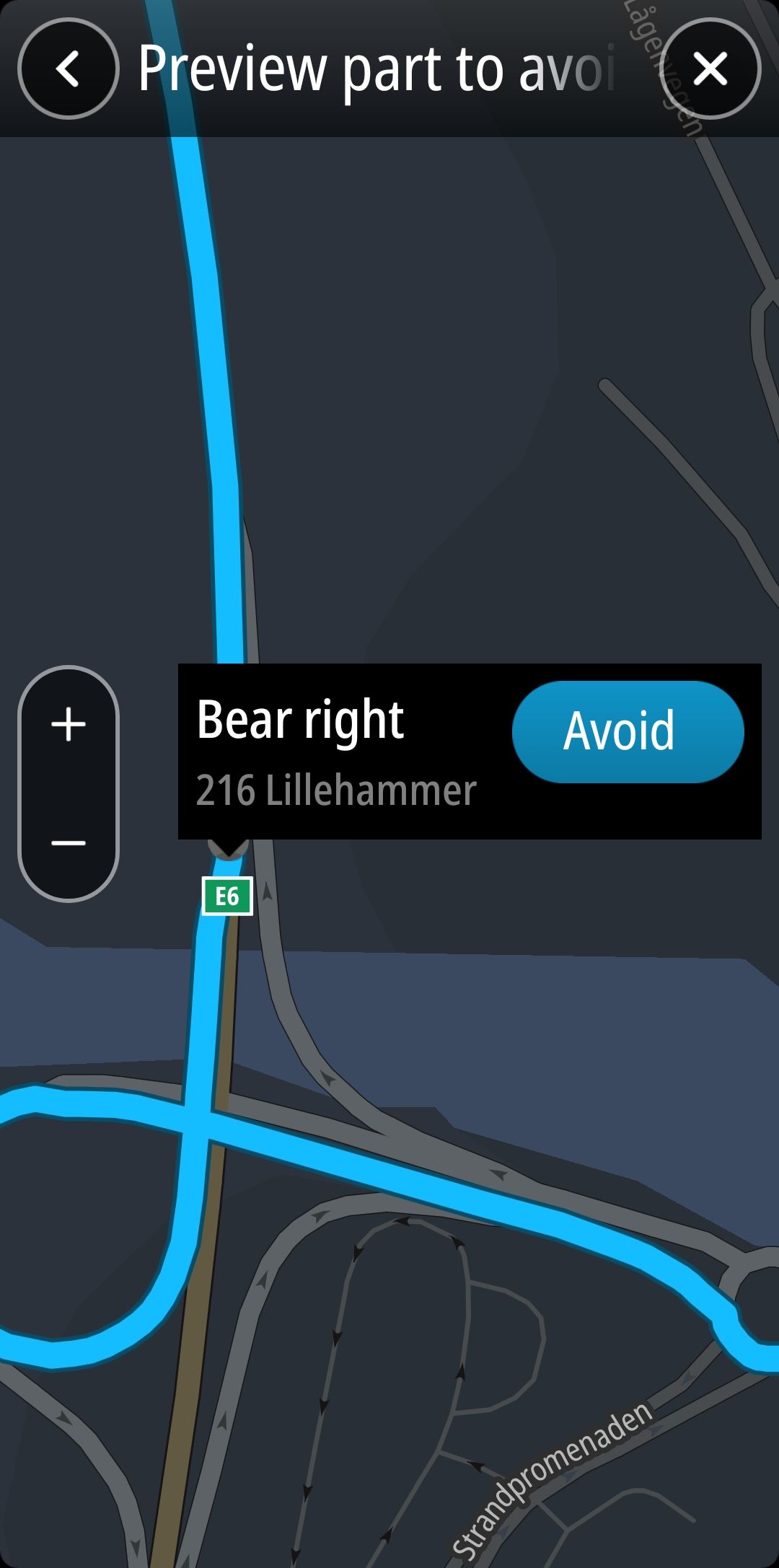
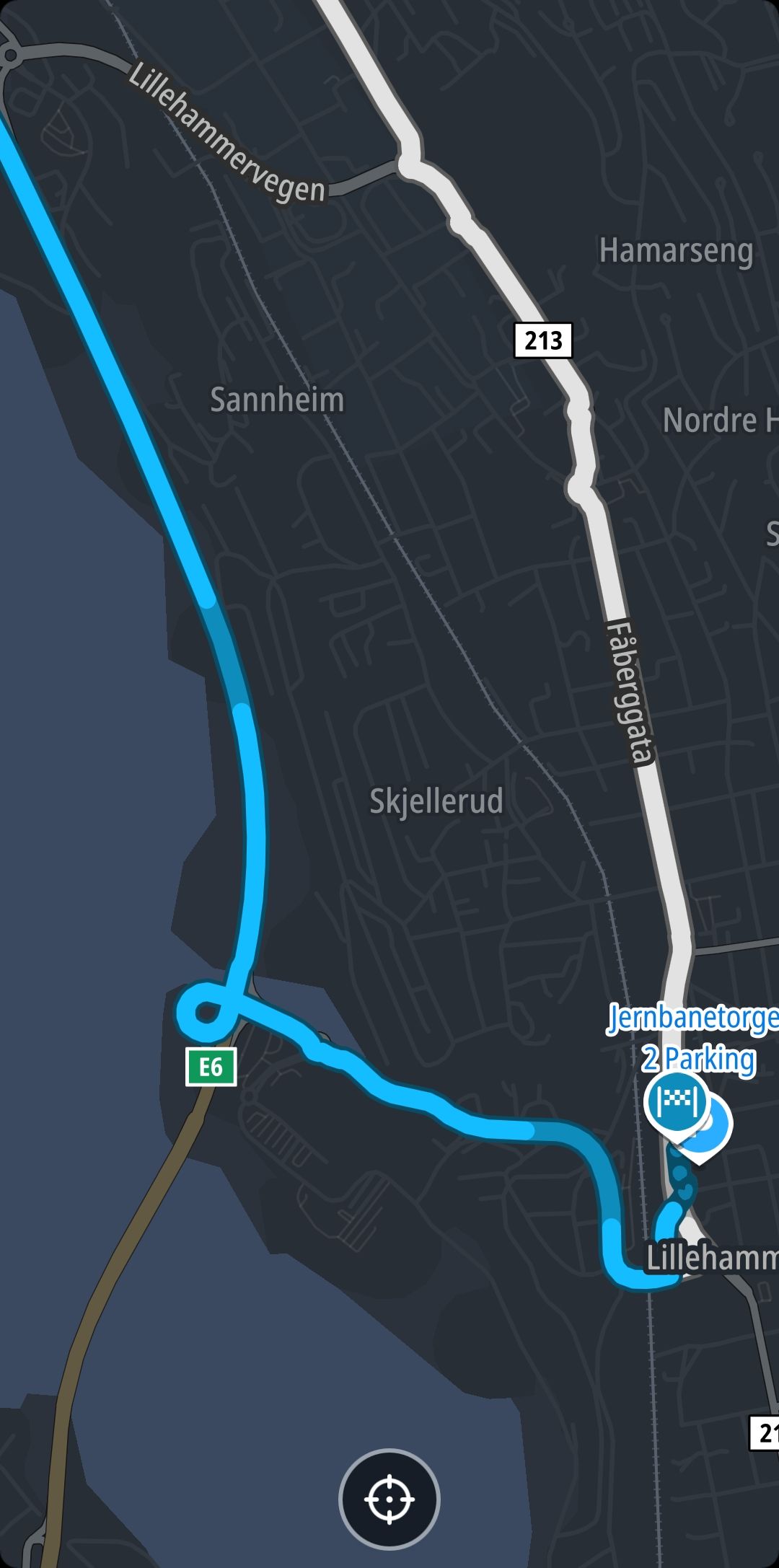
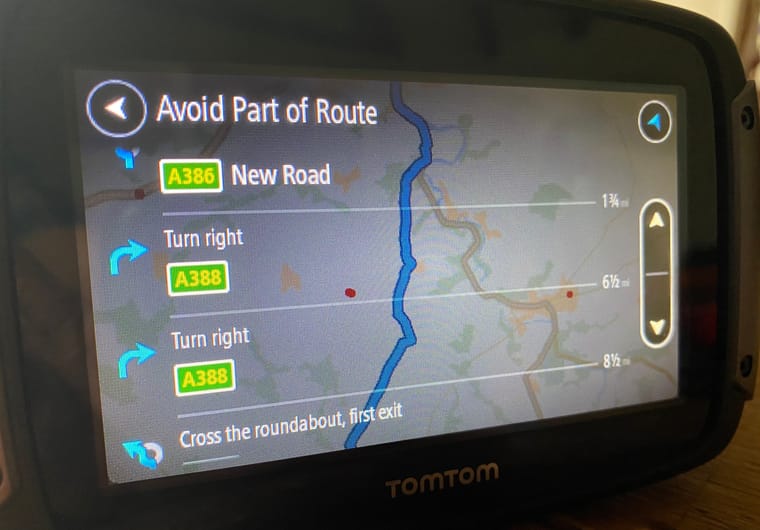
@Nick-Carthew I recommend to try it. With tomtom you can mark any instruction on your route (like take the next exit) as to be avoided and tomtom will find another way to your destination. It then shows a white route representing the new way to your destination (in addition to the original blue route). And you will get navigation instructions on how to follow this new way.
-
@Nick-Carthew I recommend to try it. With tomtom you can mark any instruction on your route (like take the next exit) as to be avoided and tomtom will find another way to your destination. It then shows a white route representing the new way to your destination (in addition to the original blue route). And you will get navigation instructions on how to follow this new way.
@Herman-Veldhuizen Thank you, I am fully aware of how the avoid part of the route works, I have it on my Rider 500 so I know it isn’t an ideal solution. You not only need to stop to make any adjustments but you also need knowledge of the name or the number of the roads or the next instruction on the list is before choosing to avoid it.
-

I think you have to distinguish between two scenarios when faced with sudden road closures.
On minor roads, you can try to bypass the closure ‘by sight’. It’s not the most elegant solution, but it’s doable.
On the motorway, this is more difficult, as the map showing the route scrolls off the small display. If the app now wants to divert me at the next exit, I don’t know whether it’s trying to take me back or whether that’s a way back onto the route (somewhere past the closure).
That’s why I think it’s so important to be able to mark a closure in some way (e.g. by pressing a button), so that the app definitely doesn’t try to take that exit again. -
Axel Härtl referenced this topic on
-
 Corjan Meijerink referenced this topic on
-
Hello @Corjan-Meijerink,
I’ve been an enthusiastic user of MRA for years (including as a Lifetime Member).
There’s one issue I keep running into, and I’d like to clarify it.
It happened to me many times that I suddenly come across a last-minute road closure that isn’t shown on the maps and therefore not accounted for in the planning.
With Calimoto (yes, yes, that was a long time ago), I could dynamically block the section of road ahead of me (1 km, 5 km, ...) so that the navigation would route me around the blocked section.
With MRA, I don’t know how to do that. If I simply take a different route, MRA guides me back to the exact spot that’s blocked after a few minutes. Then I have to switch to Google Maps, which I’d really try to avoid.
What is MRA’s approach to roads that are blocked at short notice? What should the user do to avoid being directed into the roadblock over and over again? Just deleting one or two shaping points ahead doesn't help.
Thanks for your answer.
Best, Axel

Calimoto and Kurviger using the TomTom data for this also in their planner
Hello! It looks like you're interested in this conversation, but you don't have an account yet.
Getting fed up of having to scroll through the same posts each visit? When you register for an account, you'll always come back to exactly where you were before, and choose to be notified of new replies (either via email, or push notification). You'll also be able to save bookmarks and upvote posts to show your appreciation to other community members.
With your input, this post could be even better 💗
Register Login-
 0751
0751
-
07289
-
 1516
1516
-
0524
-
 06249
06249
-
04152
-
 17230
17230
-
0376