Skip to content
  • Categories
  • Recent
  • Popular
  • Support
  • MyRoute-app
Collapse
Brand Logo

MRA Community Forum

  1. Home
  2. Routes & Tracks
  3. Incorrect mapversion of HERE in MRA

Incorrect mapversion of HERE in MRA

Scheduled Pinned Locked Moved Routes & Tracks
29 Posts 6 Posters 16.1k Views 2 Watching
  • Oldest to Newest
  • Newest to Oldest
  • Most Votes
Reply
  • Reply as topic
Log in to reply
This topic has been deleted. Only users with topic management privileges can see it.
  • Rob Veerman Rob Veerman

    @Reinhard-32
    Hello Reinhardt. That now explains why that part of the road is not present in Basecamp, because that TOPOActive map is not present in Basecamp.
    I have the Topo Active Map installed and active on my Zumo XT.
    I have now checked the situation again after having 'unticked' the TopoActive map and yes, that particular part then disappears on the map. Ticking the boxes again, the road is back. Thanks for letting me know the source of the problem. Riddle solved. Still; HERE has to make that correction for their regular map. Thanks a lot!

    Reinhard-32
    Reinhard-32
    Reinhard-32
    wrote on last edited by Reinhard-32
    #20

    @Rob-Veerman
    Rob, connect your Zumo via USB with BaseCamp and wait for a while. Then you can select the TopoActive Map from the Map drop down menu. On my Maschine the south west part oft this map is visible only. That includes the Netherlands but not Germany.

    Rob Veerman 1 Reply Last reply
    0
    • Rob Veerman Rob Veerman

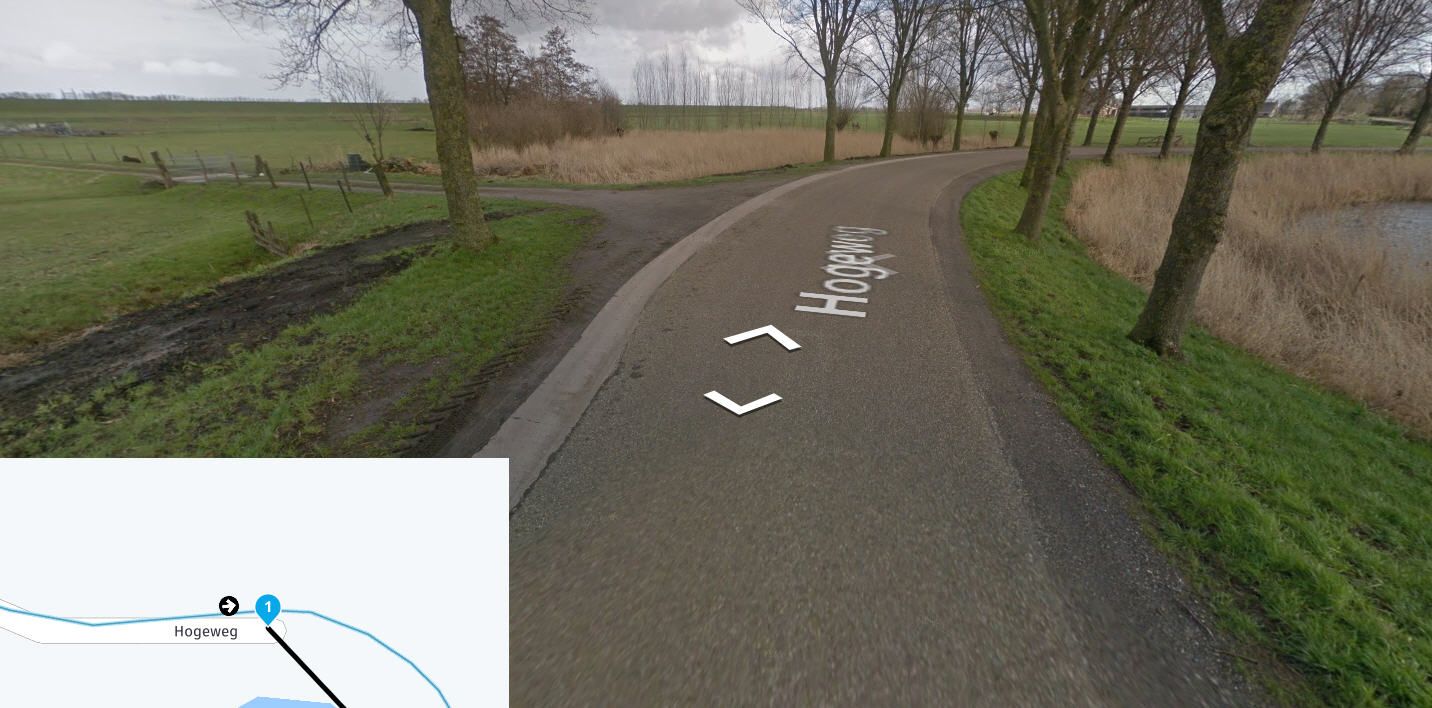
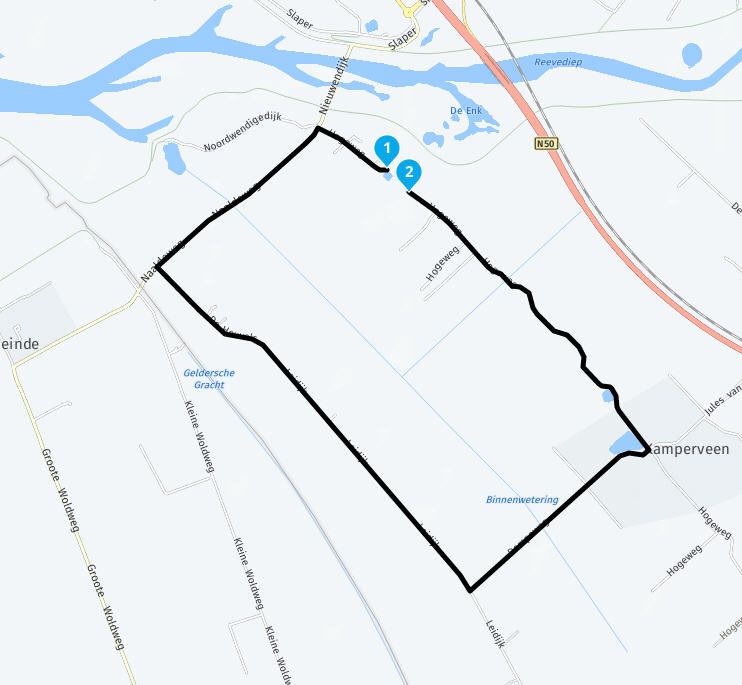
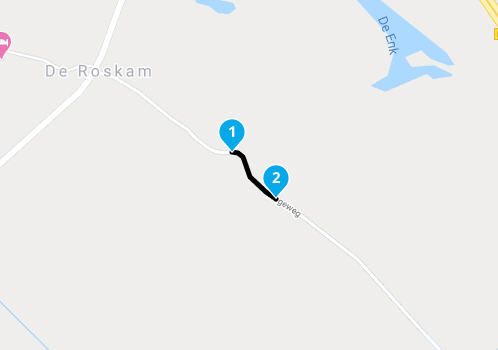
      Using the HERE map in MRA (or in Basecamp) for crossing de 'Hogeweg' in Kamperveen (8278BA) tells us that that road is not an through road.
      Using the HERE map in my Garmin Zumo XT shows the correct version of the ongoing road. The OSM map and the TomTom map in MRA also show the correct situation.

      Why is the HERE map that MRA uses not correct and not the same as on the Zumo XT? It looks different versions are being distributed.

      HABVEN aka MrMRA
      HABVEN aka MrMRA
      HABVEN aka MrMRA
      Valued contributor
      wrote on last edited by
      #21

      @Rob-Veerman

      Hi Rob, this piece of road has already been mentioned on the forum once, it is true that there are several Here cards ...
      What you can do is use the "skip route point" option
      The different maps:
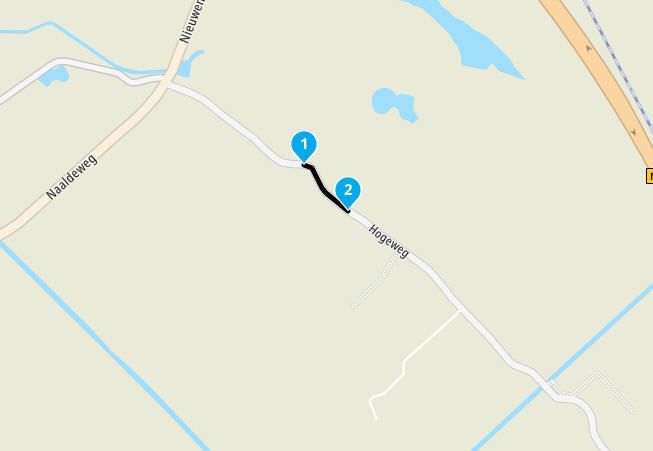
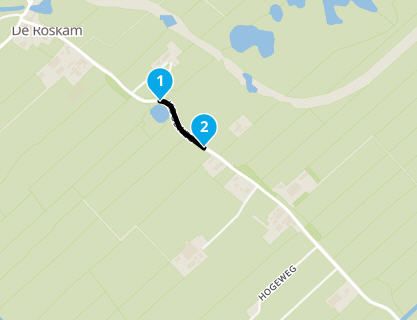
      Hogeweg_TomTom_1.jpg
      Hogeweg_OSM_1.jpg
      Hogeweg_here_Overslaan_1.jpg
      Hogeweg_here_2.jpg
      Hogeweg_here_1.jpg
      Hogeweg_GoogleMaps_1.jpg

      BMW BMW Connected Ride Navigator/Garmin Zumo XT3/XT2/XT//Tourstart/ MyRouteapp (The App)/...
      Een dag niet gelachen is een dag niet geleefd / Een route is net zo goed als deze uitgezet is.

      Rob Veerman 1 Reply Last reply
      0
      • Reinhard-32 Reinhard-32

        @Rob-Veerman
        Rob, connect your Zumo via USB with BaseCamp and wait for a while. Then you can select the TopoActive Map from the Map drop down menu. On my Maschine the south west part oft this map is visible only. That includes the Netherlands but not Germany.

        Rob Veerman
        Rob Veerman
        Rob Veerman
        wrote on last edited by
        #22

        @Reinhard-32
        Is there a way to download (copy) the TopoActive Map from the XT into Basecamp? Garmin Express doesn't show that (unlike the CityNavigator Map). I am using a MacBook

        HABVEN aka MrMRA Reinhard-32 2 Replies Last reply
        0
        • Rob Veerman Rob Veerman

          @Reinhard-32
          Is there a way to download (copy) the TopoActive Map from the XT into Basecamp? Garmin Express doesn't show that (unlike the CityNavigator Map). I am using a MacBook

          HABVEN aka MrMRA
          HABVEN aka MrMRA
          HABVEN aka MrMRA
          Valued contributor
          wrote on last edited by
          #23

          @Rob-Veerman

          Did you looked at the Garmin website?

          BMW BMW Connected Ride Navigator/Garmin Zumo XT3/XT2/XT//Tourstart/ MyRouteapp (The App)/...
          Een dag niet gelachen is een dag niet geleefd / Een route is net zo goed als deze uitgezet is.

          Rob Veerman 2 Replies Last reply
          0
          • HABVEN aka MrMRA HABVEN aka MrMRA

            @Rob-Veerman

            Did you looked at the Garmin website?

            Rob Veerman
            Rob Veerman
            Rob Veerman
            wrote on last edited by Rob Veerman
            #24
            This post is deleted!
            1 Reply Last reply
            0
            • HABVEN aka MrMRA HABVEN aka MrMRA

              @Rob-Veerman

              Did you looked at the Garmin website?

              Rob Veerman
              Rob Veerman
              Rob Veerman
              wrote on last edited by
              #25

              @Hans-van-de-Ven-MRA-Master
              Not yet, but I will (and post my findings here).

              1 Reply Last reply
              0
              • HABVEN aka MrMRA HABVEN aka MrMRA

                @Rob-Veerman

                Hi Rob, this piece of road has already been mentioned on the forum once, it is true that there are several Here cards ...
                What you can do is use the "skip route point" option
                The different maps:
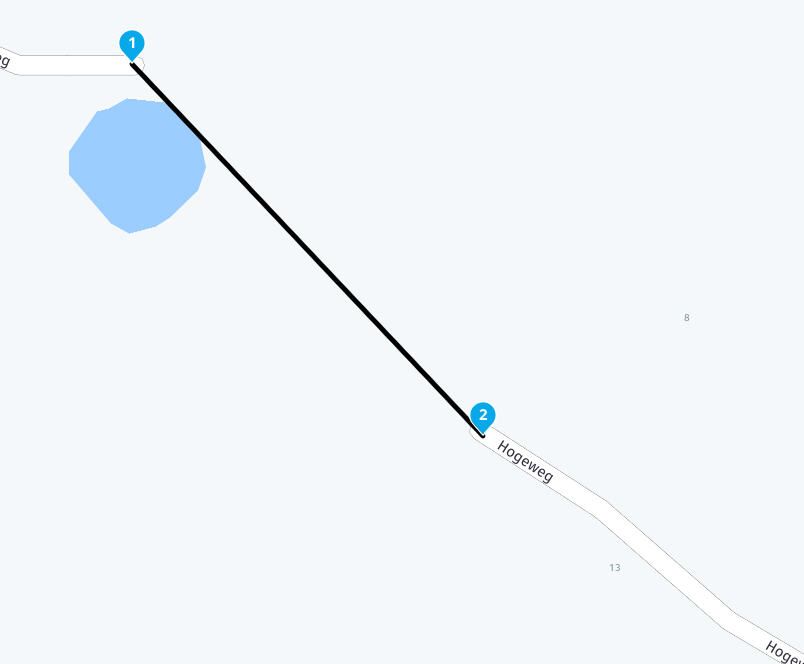
                Hogeweg_TomTom_1.jpg
                Hogeweg_OSM_1.jpg
                Hogeweg_here_Overslaan_1.jpg
                Hogeweg_here_2.jpg
                Hogeweg_here_1.jpg
                Hogeweg_GoogleMaps_1.jpg

                Rob Veerman
                Rob Veerman
                Rob Veerman
                wrote on last edited by
                #26

                @Hans-van-de-Ven-MRA-Master
                Hans,
                Thanks for the tip, I know that one and used it to connect the 2 roads together (because I constructed a route taking this 'winding' road and that route will also be used by other members of an accompanying group I am making a day trip with) and do use that option regularly, mostly in case of ferries in case of not being part of the MRA-database. Anyhow, bedankt voor het meedenken.

                1 Reply Last reply
                0
                • Rob Veerman Rob Veerman

                  @Reinhard-32
                  Is there a way to download (copy) the TopoActive Map from the XT into Basecamp? Garmin Express doesn't show that (unlike the CityNavigator Map). I am using a MacBook
                  Reinhard-32
                  Reinhard-32
                  Reinhard-32
                  wrote on last edited by Reinhard-32
                  #27
                  This post is deleted!
                  1 Reply Last reply
                  0
                  • Rob Veerman
                    Rob Veerman
                    Rob Veerman
                    wrote on last edited by Rob Veerman
                    #28

                    Hi Reinhardt,
                    I was about 10 seconds too late to copy your deleted posting. I think you will understand what I mean. Could you send me the text by email:
                    rob.veerman@icloud.com

                    Reinhard-32 1 Reply Last reply
                    0
                    • Rob Veerman Rob Veerman

                      Hi Reinhardt,
                      I was about 10 seconds too late to copy your deleted posting. I think you will understand what I mean. Could you send me the text by email:
                      rob.veerman@icloud.com

                      Reinhard-32
                      Reinhard-32
                      Reinhard-32
                      wrote on last edited by
                      #29

                      @Rob-Veerman
                      Rob, I deleted this because it was not working correctly for the moment. I did this procedure with other Garmins and it worked well but with the XT there was a problem. I know there is a problem with BaseCamp in combination with the ZumoXT. When you connect your zumo to BaseCamp only one of the two ToPoMaps Parts are shown. Garmin will fix this with one of the next updates.
                      I will send you an E- Mail tomorrow with the instructions anyway.

                      1 Reply Last reply
                      0

                      Hello! It looks like you're interested in this conversation, but you don't have an account yet.

                      Getting fed up of having to scroll through the same posts each visit? When you register for an account, you'll always come back to exactly where you were before, and choose to be notified of new replies (either via email, or push notification). You'll also be able to save bookmarks and upvote posts to show your appreciation to other community members.

                      With your input, this post could be even better 💗

                      Register Login

                      Reply
                      • Reply as topic
                      Log in to reply
                      • Oldest to Newest
                      • Newest to Oldest
                      • Most Votes


                      • 1
                      • 2
                      ACTIVE USERS
                      HABVEN aka MrMRA
                      HABVEN aka MrMRA
                      Rob Veerman
                      Rob Veerman
                      Nick Carthew
                      Nick Carthew
                      Drabslab
                      Drabslab
                      Reinhard-32
                      Reinhard-32
                      MyRoute-app community
                      MyRoute-app community
                      POPULAR TOPICS
                      • Animation
                        LennyO
                        LennyO
                        0
                        13
                        31

                      • How to export GPX files to Zumo XT without recalculation
                        John S Parry
                        John S Parry
                        0
                        9
                        188

                      • Route line transparency
                        Jörgen
                        Jörgen
                        1
                        5
                        30

                      • A04 Menu - Waypoints on the mobile phone
                        Corjan Meijerink
                        Corjan Meijerink
                        0
                        5
                        22

                      • How to get GROUPS into the new planner?
                        Con Hennekens
                        Con Hennekens
                        0
                        5
                        11

                      • Issues about using planner in tablet
                        Corjan Meijerink
                        Corjan Meijerink
                        0
                        4
                        25

                      • In attesa di caricamento 0 tracklog e 6 elementi
                        Peter Zehentreiter
                        Peter Zehentreiter
                        0
                        3
                        60

                      • Problem Switching App to Beta RoutePlanner
                        Lluis Arasanz
                        Lluis Arasanz
                        0
                        3
                        18

                      MY GROUPS
                      • Login

                      • Login or register to search.
                      • First post
                        Last post
                      0
                      • Categories
                      • Recent
                      • Popular
                      • Support
                      • MyRoute-app