Skip to content
  • Categories
  • Recent
  • Popular
  • Support
  • MyRoute-app
Collapse
Brand Logo

MRA Community Forum

  1. Home
  2. MyRoute-app Routeplanner
  3. [Web] Suggestions and Discussion
  4. Select multiple routes

Select multiple routes

Scheduled Pinned Locked Moved [Web] Suggestions and Discussion
11 Posts 7 Posters 3.0k Views 4 Watching
  • Oldest to Newest
  • Newest to Oldest
  • Most Votes
Reply
  • Reply as topic
Log in to reply
This topic has been deleted. Only users with topic management privileges can see it.
  • Makro Makro

    I have imported a bunch of routes. Now I want to clean up.
    Is there a way to easily select multiple routes in the Routeplanner?

    In PC programs we can select multiple objects using SHIFT + scroll and click, or SHIFT + arrow, so I am looking for something similar.

    Marinus van Deudekom Offline
    Marinus van Deudekom Offline
    Marinus van Deudekom
    RouteXpert
    wrote on last edited by
    #2

    @Makro I'm nog sure that I understand your question so could you give us some background on what you're trying to find

    Honda Goldwing GL1500,
    Honda Silverwing GL 650
    DMD2 T865X 8 inch Android tablet using MRA next for navigation
    Garmin XT sold
    Samsung S24FE mounted on a Quadlock and using Android Auto in my car

    1 Reply Last reply
    0
    • Makro Makro

      I have imported a bunch of routes. Now I want to clean up.
      Is there a way to easily select multiple routes in the Routeplanner?

      In PC programs we can select multiple objects using SHIFT + scroll and click, or SHIFT + arrow, so I am looking for something similar.

      Nick Carthew Online
      Nick Carthew Online
      Nick Carthew
      RouteXpert
      wrote on last edited by
      #3

      @Makro Go to the Support section and type in: Manual display and merge routes.

      Always willing to help if I can.
      Triumph Tiger 1200 XRT called Tina.
      MRA Navigation Next and SilverFox BJ8

      1 Reply Last reply
      0
      • Makro Offline
        Makro Offline
        Makro
        wrote on last edited by
        #4

        I don't want to make add a number of routes manually.

        In the Route Lab -> Routes I have a number of routes listed, that I don't want anymore.
        I can tick each one, but not all of them at once, and afterwards click delete.

        What I want is to click the first one, hold down shift as I would do on a PC, click the last one, and then click delete.

        It's quite tedious to have to tick many routes manually, so I really miss this multi select capability, that has been common o n PCs for years.

        Best regards, Makro

        Nick Carthew 1 Reply Last reply
        0
        • Makro Makro

          I don't want to make add a number of routes manually.

          In the Route Lab -> Routes I have a number of routes listed, that I don't want anymore.
          I can tick each one, but not all of them at once, and afterwards click delete.

          What I want is to click the first one, hold down shift as I would do on a PC, click the last one, and then click delete.

          It's quite tedious to have to tick many routes manually, so I really miss this multi select capability, that has been common o n PCs for years.

          Nick Carthew Online
          Nick Carthew Online
          Nick Carthew
          RouteXpert
          wrote on last edited by
          #5

          @Makro Now I understand, thank you for your further explanation.
          But I do not think it would be very often that you would need to delete more than a few routes at a time. If it was something that was used each time you used the route planner, I think it would attract some attention from the developers.
          Just my thoughts.

          Always willing to help if I can.
          Triumph Tiger 1200 XRT called Tina.
          MRA Navigation Next and SilverFox BJ8

          Makro 1 Reply Last reply
          0
          • Nick Carthew Nick Carthew

            @Makro Now I understand, thank you for your further explanation.
            But I do not think it would be very often that you would need to delete more than a few routes at a time. If it was something that was used each time you used the route planner, I think it would attract some attention from the developers.
            Just my thoughts.

            Makro Offline
            Makro Offline
            Makro
            wrote on last edited by
            #6

            Hi Nick.
            Well I sometimes import downloaded routes to check them out. Sometimes I keep them, other times I modify them a bit and save them, but most often I end up deleting them.

            Yesterday I imported a few GPX files, appearing as many routes in the route planner. Now I want to delete most of them.

            So this seems to be feature request πŸ˜ƒ

            Best regards, Makro

            ErikMatthezing 1 Reply Last reply
            0
            • Makro Makro

              Hi Nick.
              Well I sometimes import downloaded routes to check them out. Sometimes I keep them, other times I modify them a bit and save them, but most often I end up deleting them.

              Yesterday I imported a few GPX files, appearing as many routes in the route planner. Now I want to delete most of them.

              So this seems to be feature request πŸ˜ƒ

              ErikMatthezing Offline
              ErikMatthezing Offline
              ErikMatthezing
              wrote on last edited by
              #7

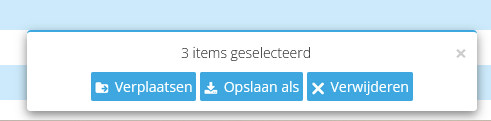
              @Makro You want to do this from the myroute-app in the browser i assume? If so, you can click in front of the route(s) you want to delete, then they will be selected, if you have selected the files, there will be a little screen at the center buttom of the screen. You have the option to move, save or delete.
              82f07d49-adbd-4df3-ac68-9b08162e0ee1-image.png

              1 Reply Last reply
              0
              • Makro Makro

                I have imported a bunch of routes. Now I want to clean up.
                Is there a way to easily select multiple routes in the Routeplanner?

                In PC programs we can select multiple objects using SHIFT + scroll and click, or SHIFT + arrow, so I am looking for something similar.

                Guzzist Offline
                Guzzist Offline
                Guzzist
                Valued contributor
                wrote on last edited by
                #8

                @Makro as @ErikMatthezing wrote:
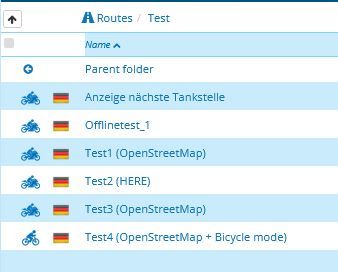
                at MRA-Routeplanner (web page), in the list of your routes, there is a tick box in front of each row, By ticking this box(es) you can select several routes, then you will see at the bottom of the page, the context menue (as shown above).

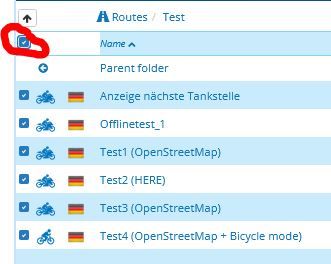
                But there is also a tick box in front of the headline of list (it's not easy to see - you need to mousover to make it visible). But if you tick this tick box - all list itel will be ticked in one bunch. Then you may deselct some of, if needed).
                That makes clean up work easy πŸ˜‰
                screenshot5.JPG
                screenshot4.JPG

                Nothing is impossible ;-)
                In past: GARMIN Zumo 210->GARMIN Zumo 395->GARMIN XT=> now: DMD T865-X + MyRoute-App, LocusMaps, OsmAnd.
                In past: GARMIN MapSource ->GARMIN BaseCamp->Tyre->Kurviger->Calimoto=> now: MRA-Routplanner.

                white.mouse Makro 2 Replies Last reply
                0
                • Guzzist Guzzist

                  @Makro as @ErikMatthezing wrote:
                  at MRA-Routeplanner (web page), in the list of your routes, there is a tick box in front of each row, By ticking this box(es) you can select several routes, then you will see at the bottom of the page, the context menue (as shown above).

                  But there is also a tick box in front of the headline of list (it's not easy to see - you need to mousover to make it visible). But if you tick this tick box - all list itel will be ticked in one bunch. Then you may deselct some of, if needed).
                  That makes clean up work easy πŸ˜‰
                  screenshot5.JPG
                  screenshot4.JPG

                  white.mouse Offline
                  white.mouse Offline
                  white.mouse
                  Valued contributor
                  wrote on last edited by
                  #9

                  @Guzzist ScreenShot-001.jpg

                  met een R1250RT met TFT en BMW Connected Ride App (die dus nog steeds niet voldoet!) ;
                  de Garmin Zumo XT en M.R.A. in combinatie met de Carpuride W702 (voor Android op de Motor!) en een Samsung Galaxy S24

                  1 Reply Last reply
                  0
                  • Guzzist Guzzist

                    @Makro as @ErikMatthezing wrote:
                    at MRA-Routeplanner (web page), in the list of your routes, there is a tick box in front of each row, By ticking this box(es) you can select several routes, then you will see at the bottom of the page, the context menue (as shown above).

                    But there is also a tick box in front of the headline of list (it's not easy to see - you need to mousover to make it visible). But if you tick this tick box - all list itel will be ticked in one bunch. Then you may deselct some of, if needed).
                    That makes clean up work easy πŸ˜‰

                    screenshot5.JPG
                    screenshot4.JPG

                    Makro Offline
                    Makro Offline
                    Makro
                    wrote on last edited by
                    #10

                    @Guzzist said in Select multiple routes:

                    But there is also a tick box in front of the headline of list (it's not easy to see - you need to mousover to make it visible). But if you tick this tick box - all list itel will be ticked in one bunch. Then you may deselct some of, if needed).
                    That makes clean up work easy πŸ˜‰

                    Oh yes you're right, I didn't know about that "hidden" check box πŸ‘ πŸ™‚
                    It works, thanks.

                    Best regards, Makro

                    F Nick 1 Reply Last reply
                    0
                    • Makro Makro

                      @Guzzist said in Select multiple routes:

                      But there is also a tick box in front of the headline of list (it's not easy to see - you need to mousover to make it visible). But if you tick this tick box - all list itel will be ticked in one bunch. Then you may deselct some of, if needed).
                      That makes clean up work easy πŸ˜‰

                      Oh yes you're right, I didn't know about that "hidden" check box πŸ‘ πŸ™‚
                      It works, thanks.

                      F Nick Offline
                      F Nick Offline
                      F Nick
                      wrote on last edited by
                      #11

                      @Makro yep - too hidden if you ask me...

                      1 Reply Last reply
                      0

                      Hello! It looks like you're interested in this conversation, but you don't have an account yet.

                      Getting fed up of having to scroll through the same posts each visit? When you register for an account, you'll always come back to exactly where you were before, and choose to be notified of new replies (either via email, or push notification). You'll also be able to save bookmarks and upvote posts to show your appreciation to other community members.

                      With your input, this post could be even better πŸ’—

                      Register Login
                      Reply
                      • Reply as topic
                      Log in to reply
                      • Oldest to Newest
                      • Newest to Oldest
                      • Most Votes


                      ACTIVE USERS
                      Marinus van Deudekom
                      Marinus van Deudekom
                      white.mouse
                      white.mouse
                      Nick Carthew
                      Nick Carthew
                      Guzzist
                      Guzzist
                      ErikMatthezing
                      ErikMatthezing
                      Makro
                      Makro
                      F Nick
                      F Nick
                      POPULAR TOPICS
                      • Is there a way to put a Home button in the program
                        Travellexxie
                        Travellexxie
                        0
                        8
                        108

                      • routepunten overslaan gebeurd niet zoals verwacht
                        g.bolijn 1 0
                        g.bolijn 1 0
                        1
                        23
                        678

                      • Route doesn’t recalculate to my destination
                        Stevedo 6 0
                        Stevedo 6 0
                        0
                        8
                        293

                      • Google maps and Streetview
                        Stevedo 6 0
                        Stevedo 6 0
                        1
                        13
                        620

                      • Is there a way to re-order the routes in your routes folder?
                        superg
                        superg
                        0
                        3
                        61

                      • MRA 5.2.2 (489) Route time is calculated incorrectly /// Strecken Zeit wird falsch berechnet
                        Nick Carthew
                        Nick Carthew
                        0
                        4
                        32

                      • Opening Route Direct from Android Auto Screen
                        LennyO
                        LennyO
                        0
                        7
                        285

                      • MRA In the BMW - Cradel vertically and horizontally /// MRA im BMW - Cradel senkrecht und waagerecht nutzen
                        Hubert Thoring
                        Hubert Thoring
                        0
                        2
                        52

                      MY GROUPS
                      • Login

                      • Login or register to search.
                      • First post
                        Last post
                      0
                      • Categories
                      • Recent
                      • Popular
                      • Support
                      • MyRoute-app