
What's the point of your route planner?
-

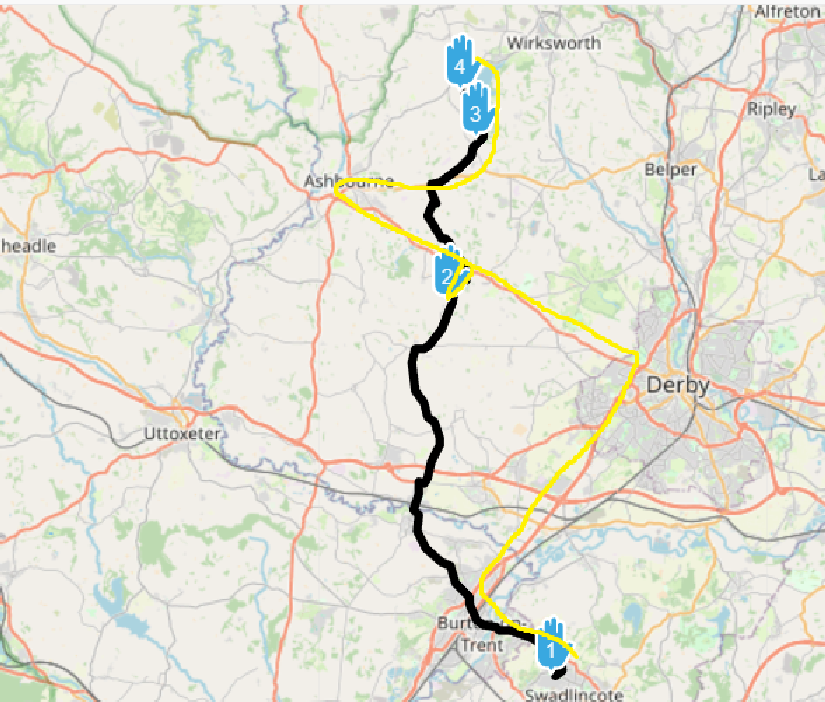
Foolishly, after all the issues I encounter using MRA, I decided to give it another go yesterday. I plotted a route then told the app to navigate the route. In the picture below you can see the route plotted, and the yellow line shows the approximate route it took me on. WTF???
I do not understand why plotting a route and navigating the same route are done using different maps with such widely varying results. It makes the combination of your route planner and navigation app absolutely useless!!!! I know there is a warning that it may give different results, but come on..... this is ludicrous! And I also understand that I could use a "track" but then all the waypoint information is lost, so if you need the waypoint info then a track is no good.
Before I finally delete this app from my phone (never to be installed again as long as I live), can someone explain to me how I can make this combined app work as I would expect it to work, i.e. plan a route then navigate THAT EXACT ROUTE? Or am I just completely wasting my time with this?
Thanks -
Foolishly, after all the issues I encounter using MRA, I decided to give it another go yesterday. I plotted a route then told the app to navigate the route. In the picture below you can see the route plotted, and the yellow line shows the approximate route it took me on. WTF???
I do not understand why plotting a route and navigating the same route are done using different maps with such widely varying results. It makes the combination of your route planner and navigation app absolutely useless!!!! I know there is a warning that it may give different results, but come on..... this is ludicrous! And I also understand that I could use a "track" but then all the waypoint information is lost, so if you need the waypoint info then a track is no good.
Before I finally delete this app from my phone (never to be installed again as long as I live), can someone explain to me how I can make this combined app work as I would expect it to work, i.e. plan a route then navigate THAT EXACT ROUTE? Or am I just completely wasting my time with this?
Thanks
@Gordon-Lawson did you plan the route using the Here maps? Perhaps if you share the route here someone can have a look to what the issue may be.
-
@RetiredWingMan The route was plotted in whatever the default map for plotting is.
-
Foolishly, after all the issues I encounter using MRA, I decided to give it another go yesterday. I plotted a route then told the app to navigate the route. In the picture below you can see the route plotted, and the yellow line shows the approximate route it took me on. WTF???
I do not understand why plotting a route and navigating the same route are done using different maps with such widely varying results. It makes the combination of your route planner and navigation app absolutely useless!!!! I know there is a warning that it may give different results, but come on..... this is ludicrous! And I also understand that I could use a "track" but then all the waypoint information is lost, so if you need the waypoint info then a track is no good.
Before I finally delete this app from my phone (never to be installed again as long as I live), can someone explain to me how I can make this combined app work as I would expect it to work, i.e. plan a route then navigate THAT EXACT ROUTE? Or am I just completely wasting my time with this?
Thanks
@Gordon-Lawson use more waypoints
-
@RetiredWingMan The route was plotted in whatever the default map for plotting is.
@Gordon-Lawson the initial planning map is Openstreetmaps. This uses a different routing algorithm than Here. The Navigation Next app uses Here. Change your default to use the Here map and if you want a proper answer to your issue share the route.
2010 GL1800 Goldwing using Samsung Galaxy S20 5G Android 13.
-
@Gordon-Lawson the initial planning map is Openstreetmaps. This uses a different routing algorithm than Here. The Navigation Next app uses Here. Change your default to use the Here map and if you want a proper answer to your issue share the route.
@RetiredWingMan said in What's the point of your route planner?:
@Gordon-Lawson the initial planning map is Openstreetmaps. This uses a different routing algorithm than Here. The Navigation Next app uses Here.
This is part of my question - why do this? Why use a completely different system to navigate from the one used to plan the route? It just seems stupid!
I have no idea how to upload the route.
-
@RetiredWingMan said in What's the point of your route planner?:
@Gordon-Lawson the initial planning map is Openstreetmaps. This uses a different routing algorithm than Here. The Navigation Next app uses Here.
This is part of my question - why do this? Why use a completely different system to navigate from the one used to plan the route? It just seems stupid!
I have no idea how to upload the route.

copy the url form the route and paste it here.
-
@RetiredWingMan said in What's the point of your route planner?:
@Gordon-Lawson the initial planning map is Openstreetmaps. This uses a different routing algorithm than Here. The Navigation Next app uses Here.
This is part of my question - why do this? Why use a completely different system to navigate from the one used to plan the route? It just seems stupid!
I have no idea how to upload the route.

@Gordon-Lawson In short the answer could be RTFM but that might not help you.
It looks like you did a couple basic things wrong but before we can help you it is necessary that you share the route in the way Hans explained.
If you want to use an app it's already usefull to get to know how it works. There's plenty of tutorials and videos on that. All there to help you and have fun instead of frustration things go different than you wanted them to be.
So let us help you -
-
@RetiredWingMan said in What's the point of your route planner?:
@Gordon-Lawson the initial planning map is Openstreetmaps. This uses a different routing algorithm than Here. The Navigation Next app uses Here.
This is part of my question - why do this? Why use a completely different system to navigate from the one used to plan the route? It just seems stupid!
I have no idea how to upload the route.
@Gordon-Lawson that's what we are trying to tell you. Change the planning map to Here. That way you will be using the same maps and algorithms for planning that the navigation software uses. You should take some time to view some introductory videos and read the user manuals. It will save you a lot of grief.
-

Unless explicitly turned off, the app will even warn about navigating routes not created in HERE

-

@Gordon-Lawson said in What's the point of your route planner?:
You need to make the route 'public', so we can see it.
-
@RetiredWingMan said in What's the point of your route planner?:
@Gordon-Lawson that's what we are trying to tell you. Change the planning map to Here. That way you will be using the same maps and algorithms for planning that the navigation software uses. You should take some time to view some introductory videos and read the user manuals. It will save you a lot of grief.
I did. Here’s what the manual says:
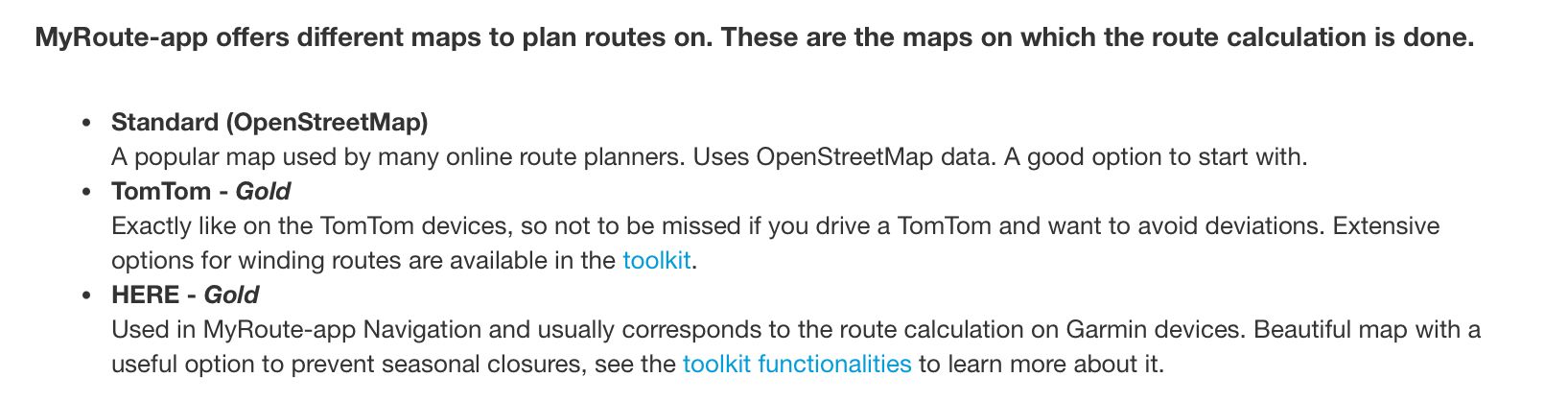
As I don’t have “Gold” I assumed I was stuck with Openstreetmap.https://www.myrouteapp.com/route/open/10175395/mobile#52.920647448131;-1.6127693653106492;10/
This will be slow as I am only allowed to post once per hour!
-
@RetiredWingMan said in What's the point of your route planner?:
@Gordon-Lawson that's what we are trying to tell you. Change the planning map to Here. That way you will be using the same maps and algorithms for planning that the navigation software uses. You should take some time to view some introductory videos and read the user manuals. It will save you a lot of grief.
I did. Here’s what the manual says:
As I don’t have “Gold” I assumed I was stuck with Openstreetmap.https://www.myrouteapp.com/route/open/10175395/mobile#52.920647448131;-1.6127693653106492;10/
This will be slow as I am only allowed to post once per hour!

@Gordon-Lawson Your MRA Navigation Next subscription gives you access to the HERE planning map.
-
Once you've swapped from OpenStreetMap to HERE in the planner (which is the main fix), you get this route, which is pretty much where the app took you:
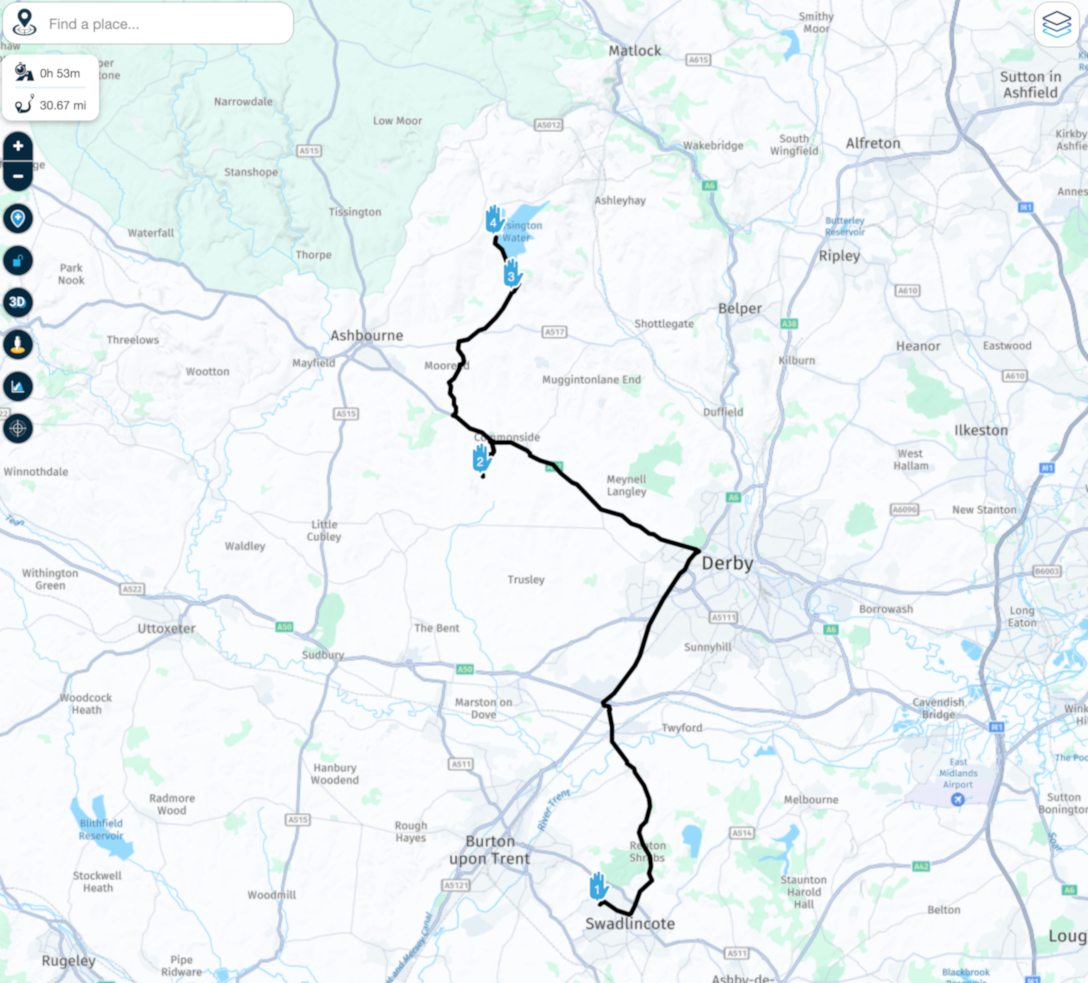
The solution is only two steps:
- Use HERE if you're using the MRA Nav app or Garmin
- Once you've done that, add a couple more waypoints to get the route to go where you really want it to go.
It's just practice, I promise. Don't be put off!
-
@RetiredWingMan said in What's the point of your route planner?:
@Gordon-Lawson that's what we are trying to tell you. Change the planning map to Here. That way you will be using the same maps and algorithms for planning that the navigation software uses. You should take some time to view some introductory videos and read the user manuals. It will save you a lot of grief.
I did. Here’s what the manual says:
As I don’t have “Gold” I assumed I was stuck with Openstreetmap.https://www.myrouteapp.com/route/open/10175395/mobile#52.920647448131;-1.6127693653106492;10/
This will be slow as I am only allowed to post once per hour!
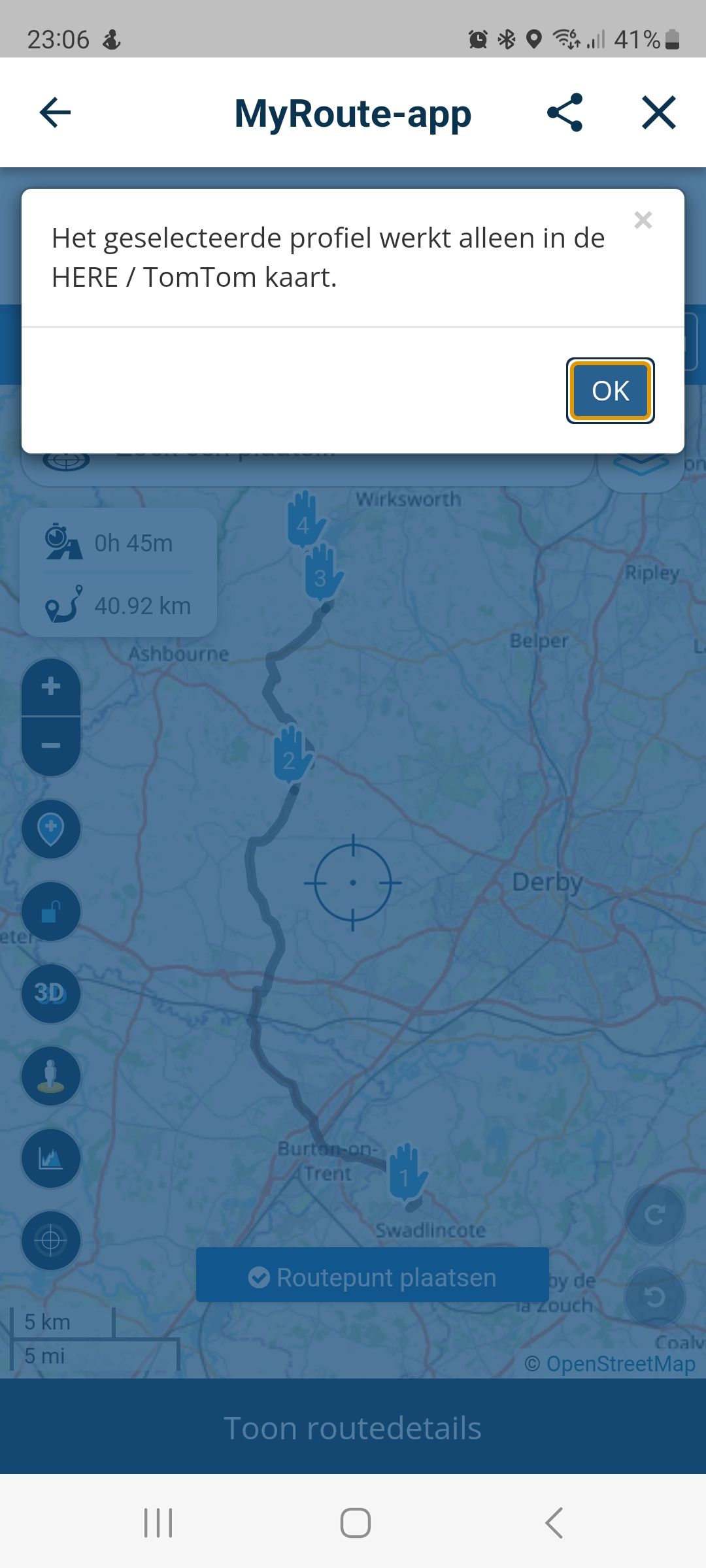
@Gordon-Lawson besides the remarks of the others you've selected the bike profile witch only works in the Here map and TomTom map. Use the car profile instead
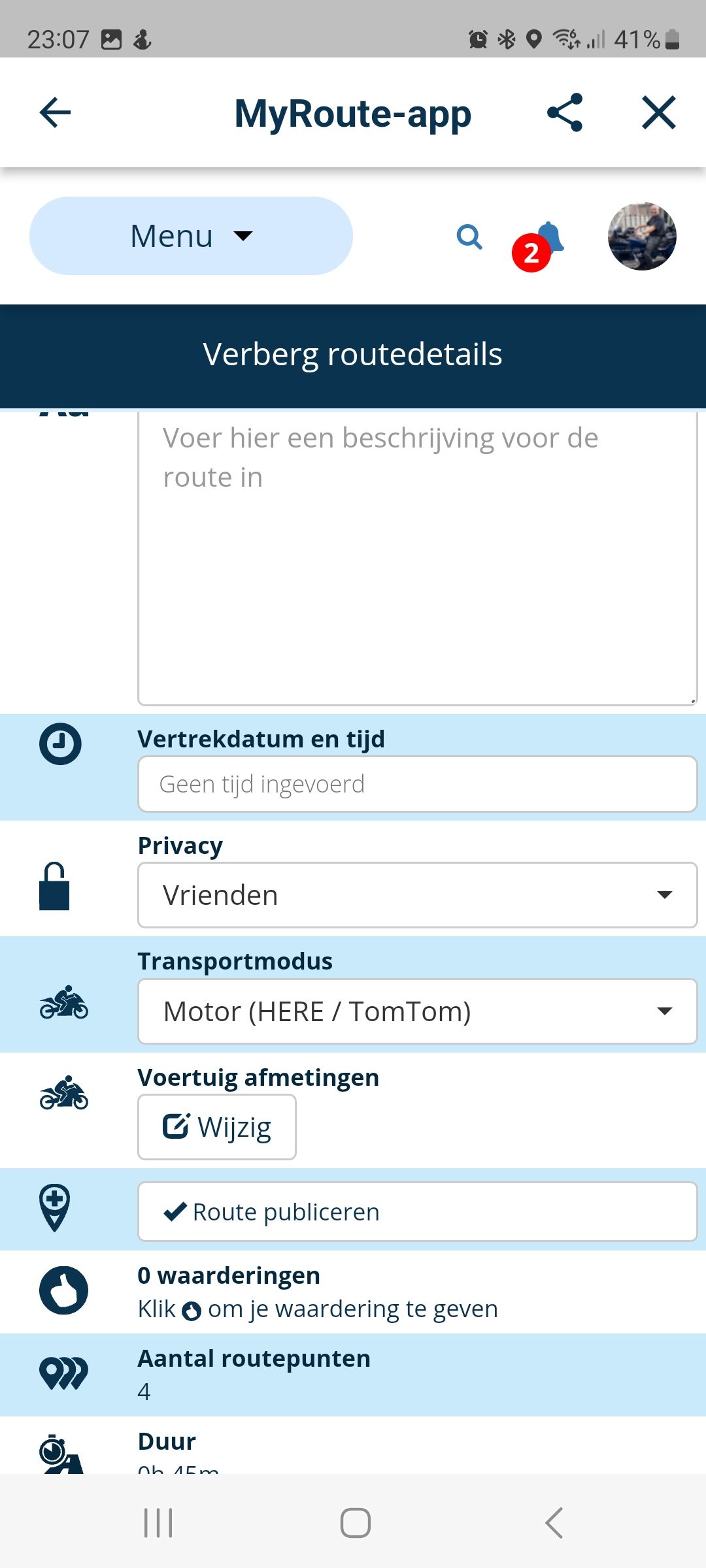
-
I'd love to RTFM - where is it? All I can find is a knowledge base with a selection of articles.

I never understood what this message meant.Now I have set my maps to "Here" as default then maybe I will have more luck. I'll try another route and see what happens before heading for TomTom.
My original question still remains - why use one mapping system to plan routes then a completely different one for navigation?
-
I'd love to RTFM - where is it? All I can find is a knowledge base with a selection of articles.
I never understood what this message meant.Now I have set my maps to "Here" as default then maybe I will have more luck. I'll try another route and see what happens before heading for TomTom.
My original question still remains - why use one mapping system to plan routes then a completely different one for navigation?
@Gordon-Lawson said in What's the point of your route planner?:
My original question still remains - why use one mapping system to plan routes then a completely different one for navigation?
Simple answer, you don’t.
Plan your route using the HERE map for navigation using MRA Navigation Next.If you have a TomTom you would plan your routes using the TomTom planning map.
Calimoto uses the OpenStreetMap, therefore anyone using this app would plan their routes on the OSM planning map.
-
I'd love to RTFM - where is it? All I can find is a knowledge base with a selection of articles.
I never understood what this message meant.Now I have set my maps to "Here" as default then maybe I will have more luck. I'll try another route and see what happens before heading for TomTom.
My original question still remains - why use one mapping system to plan routes then a completely different one for navigation?

@Gordon-Lawson said in What's the point of your route planner?:
My original question still remains - why use one mapping system to plan routes then a completely different one for navigation?
You choose that yourself...
You must realise that the MRA planner is not intended solely for use with the MRA Navigation app. It is also intended for users of TomTom, Garmin and other navigation systems. -
Foolishly, after all the issues I encounter using MRA, I decided to give it another go yesterday. I plotted a route then told the app to navigate the route. In the picture below you can see the route plotted, and the yellow line shows the approximate route it took me on. WTF???
I do not understand why plotting a route and navigating the same route are done using different maps with such widely varying results. It makes the combination of your route planner and navigation app absolutely useless!!!! I know there is a warning that it may give different results, but come on..... this is ludicrous! And I also understand that I could use a "track" but then all the waypoint information is lost, so if you need the waypoint info then a track is no good.
Before I finally delete this app from my phone (never to be installed again as long as I live), can someone explain to me how I can make this combined app work as I would expect it to work, i.e. plan a route then navigate THAT EXACT ROUTE? Or am I just completely wasting my time with this?
Thanks
@Gordon-Lawson Using the HERE map, changing 2 via points (hands) to shaping points and adding one shaping point to make sure you pass through your point No 2 (rather than drive down a branch to get there), you get this....You need to spend a little time learning to use the planner properly before criticising it
https://www.myrouteapp.com/route/open/10183131#
Hello! It looks like you're interested in this conversation, but you don't have an account yet.
Getting fed up of having to scroll through the same posts each visit? When you register for an account, you'll always come back to exactly where you were before, and choose to be notified of new replies (either via email, or push notification). You'll also be able to save bookmarks and upvote posts to show your appreciation to other community members.
With your input, this post could be even better 💗
Register Login
-
 054
054
-
 18331
18331
-
 0386
0386
-
0341
-
 0873
0873
-
 0213
0213
-
0295
-
1232

