Skip to content
  • Categories
  • Recent
  • Popular
  • Support
  • MyRoute-app
Collapse
Brand Logo

MRA Community Forum

  1. Home
  2. The MyRoute-app
  3. [App] Suggestions and Discussion
  4. Offline gpx file storage folder

Offline gpx file storage folder

Scheduled Pinned Locked Moved [App] Suggestions and Discussion
19 Posts 5 Posters 5.5k Views 1 Watching
  • Oldest to Newest
  • Newest to Oldest
  • Most Votes
Reply
  • Reply as topic
Log in to reply
This topic has been deleted. Only users with topic management privileges can see it.
  • Corrado Miniati 0 Corrado Miniati 0

    @Con-Hennekens
    Hi Con and thanks for the feedback.
    I thought so too but my "Download" folder does not contain the MRA gpx files.

    Con Hennekens
    Con Hennekens
    Con Hennekens
    Alpha tester
    wrote on last edited by
    #5

    @Corrado-Miniati-0 said in Offline gpx file storage folder:

    but my "Download" folder does not contain the MRA gpx files.

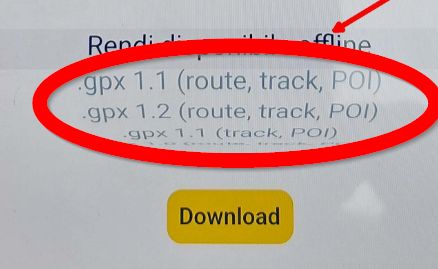
    Did you choose a GPX version from the download menu, or did you keep the default "Make available for offline use" option? The latter does not export a GPX file.

    @Nomko-Nomden said in Offline gpx file storage folder:

    Did Android showed you where the file is going to be downloaded?

    My Android also does not show where you want the file to be downloaded. It immediately goes to the systems download folder.

    I am just an enthusiastic MRA user, and hope you will be one too!

    Most motorcycle problems are caused by the nut that connects the handlebar to the saddle.

    Check out RideSleepRepeat.eu, a biker community for sharing stays across Europe

    Corrado Miniati 0 1 Reply Last reply
    0
    • Con Hennekens Con Hennekens

      @Corrado-Miniati-0 said in Offline gpx file storage folder:

      but my "Download" folder does not contain the MRA gpx files.

      Did you choose a GPX version from the download menu, or did you keep the default "Make available for offline use" option? The latter does not export a GPX file.

      @Nomko-Nomden said in Offline gpx file storage folder:

      Did Android showed you where the file is going to be downloaded?

      My Android also does not show where you want the file to be downloaded. It immediately goes to the systems download folder.

      Corrado Miniati 0
      Corrado Miniati 0
      Corrado Miniati 0
      wrote on last edited by
      #6

      @Con-Hennekens
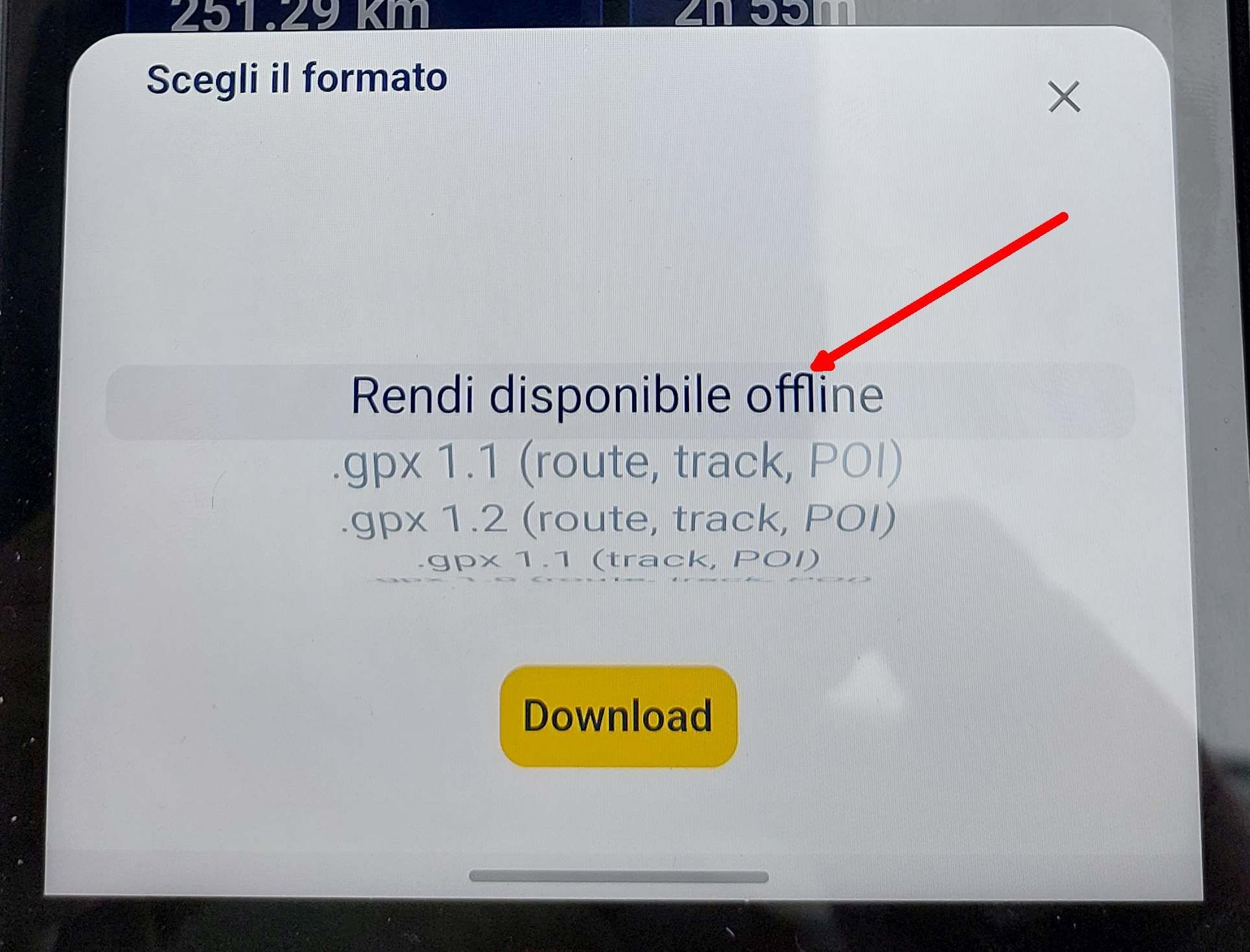
      I performed these operations in sequence:
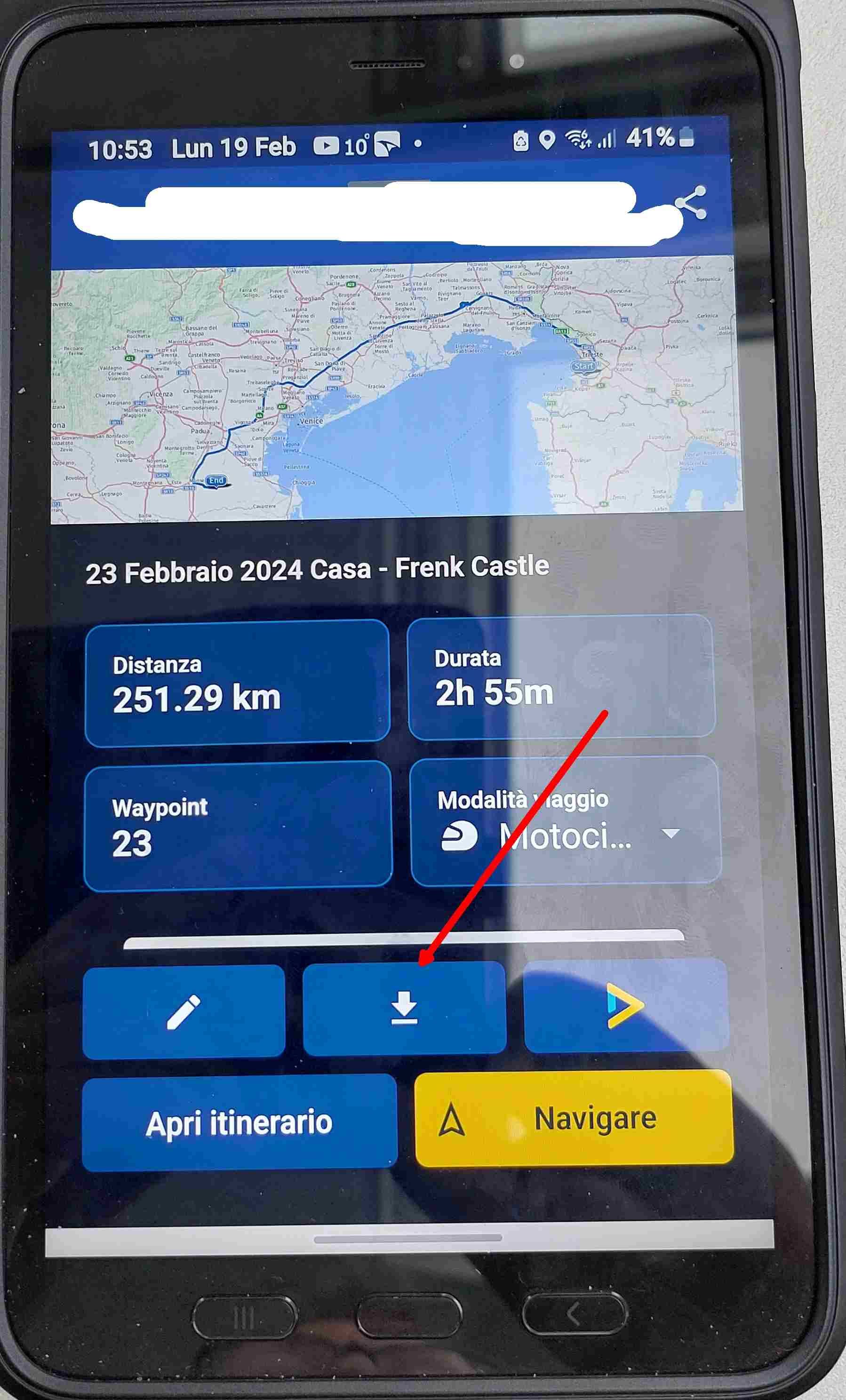
      1.jpg
      2.jpg
      3.jpg
      4.jpg

      but in the system folder "Download" I can't find the gpx files.

      Con Hennekens 2 Replies Last reply
      0
      • richtea999
        richtea999
        richtea999
        Valued contributor
        wrote on last edited by richtea999
        #7

        Agreed with Con - they are saved in the Internal Storage -> Download directory (on a Samsung, at least).

        The app doesn't give an option of another place to store them - it's using the default given by the operating system.

        If it's still a problem, you could try Download (successfully but you don't know where) -> Export - > Share (Apri Itinerario) -> email yourself, and then you'll have the GPX as an email attachment, and that may give you better options to save it on your phone.

        1 Reply Last reply
        0
        • Corrado Miniati 0 Corrado Miniati 0

          @Con-Hennekens
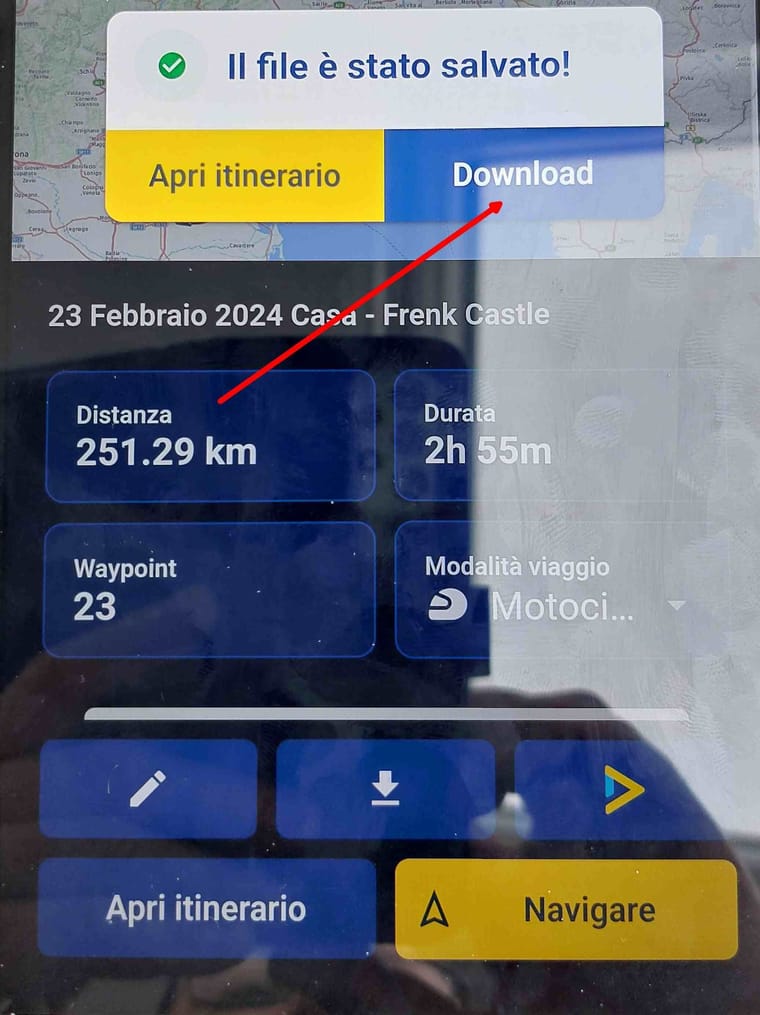
          I performed these operations in sequence:
          1.jpg
          2.jpg
          3.jpg
          4.jpg

          but in the system folder "Download" I can't find the gpx files.

          Con Hennekens
          Con Hennekens
          Con Hennekens
          Alpha tester
          wrote on last edited by Con Hennekens
          #8

          @Corrado-Miniati-0, That is strange, because for me that works as it should. However, that is not the way the get a GPX file. You should use one of these options:

          9581297f-ea78-45bd-b8a6-fd537977834e-image.png

          And then open the FILES app on your android phone, and go to the download folder from there (instead of the download folder within the MRA app).

          I am just an enthusiastic MRA user, and hope you will be one too!

          Most motorcycle problems are caused by the nut that connects the handlebar to the saddle.

          Check out RideSleepRepeat.eu, a biker community for sharing stays across Europe

          1 Reply Last reply
          1
          • richtea999
            richtea999
            richtea999
            Valued contributor
            wrote on last edited by richtea999
            #9

            Ah - Con is right again! You have to select a format.

            If you select the top one (which is just an instruction) nothing gets saved, even though the Downloads section in the app says it has downloaded.

            I'd call that a bug.

            Select GPX 1.1 or similar and I think it will work OK for you.

            Con Hennekens 1 Reply Last reply
            0
            • Corrado Miniati 0 Corrado Miniati 0

              @Con-Hennekens
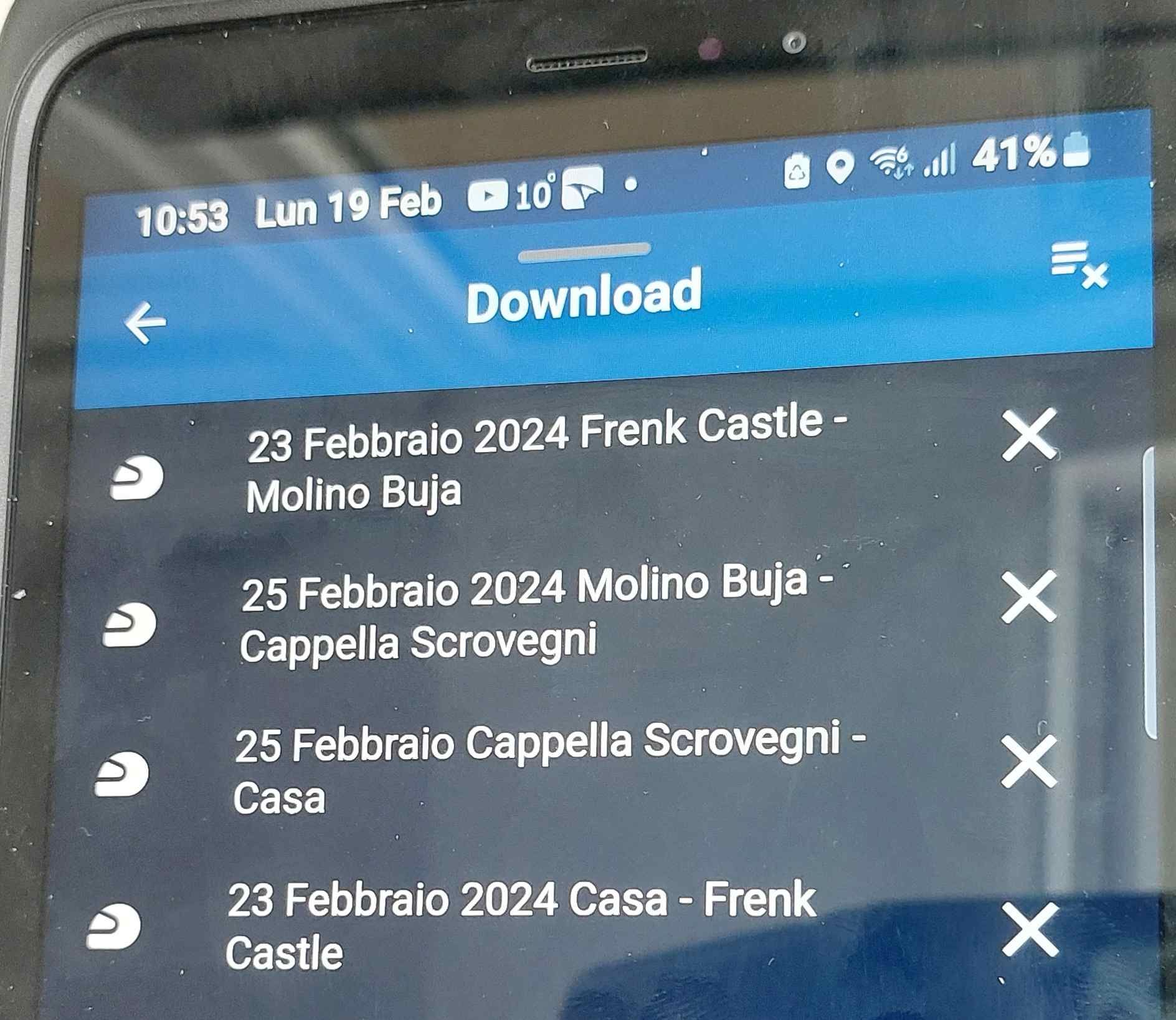
              I performed these operations in sequence:
              1.jpg
              2.jpg
              3.jpg
              4.jpg

              but in the system folder "Download" I can't find the gpx files.

              Con Hennekens
              Con Hennekens
              Con Hennekens
              Alpha tester
              wrote on last edited by
              #10

              @Corrado-Miniati-0, I have to correct myself...

              I now see that the downloaded GPX files are shown in the MRA app's own download folder as well:
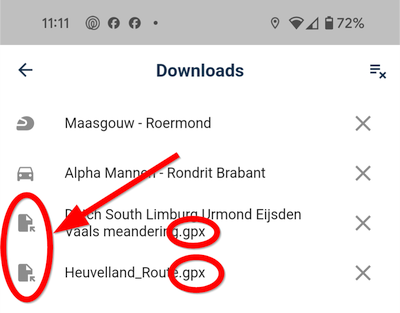
              8015efa8-c6bf-4b6f-b04c-faedc5fbf460-image.png

              Did you realize that list is scrollable? you will need to scroll down, because it is sorted alphabetically.

              Pressing a GPX file gives you this:
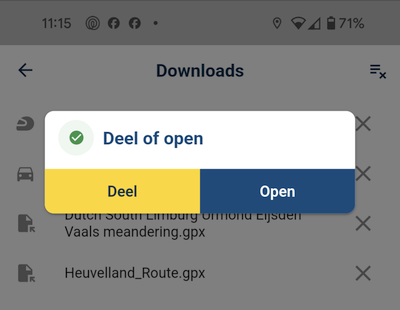
              2e621d78-a215-4759-afd2-f0d9bdd4f5b4-image.png

              Pressing Open let's you choose the app in which you want to open the GPX:
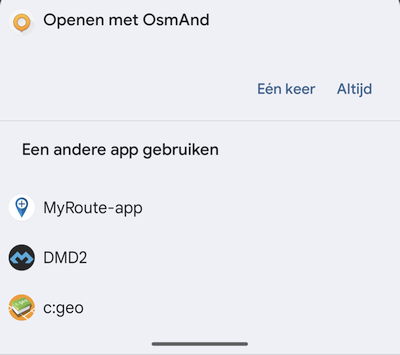
              b7c429d3-4abb-43c3-9ae1-de183ca33709-image.png

              I am just an enthusiastic MRA user, and hope you will be one too!

              Most motorcycle problems are caused by the nut that connects the handlebar to the saddle.

              Check out RideSleepRepeat.eu, a biker community for sharing stays across Europe

              1 Reply Last reply
              0
              • richtea999 richtea999

                Ah - Con is right again! You have to select a format.

                If you select the top one (which is just an instruction) nothing gets saved, even though the Downloads section in the app says it has downloaded.

                I'd call that a bug.

                Select GPX 1.1 or similar and I think it will work OK for you.

                Con Hennekens
                Con Hennekens
                Con Hennekens
                Alpha tester
                wrote on last edited by
                #11

                @richtea999 said in Offline gpx file storage folder:

                I'd call that a bug.

                I don't think that's a bug πŸ˜‰
                That option probably leads to an entry in an internal database instead of a file download. Just like on the webplanner.

                I am just an enthusiastic MRA user, and hope you will be one too!

                Most motorcycle problems are caused by the nut that connects the handlebar to the saddle.

                Check out RideSleepRepeat.eu, a biker community for sharing stays across Europe

                Corrado Miniati 0 1 Reply Last reply
                0
                • Con Hennekens Con Hennekens

                  @richtea999 said in Offline gpx file storage folder:

                  I'd call that a bug.

                  I don't think that's a bug πŸ˜‰
                  That option probably leads to an entry in an internal database instead of a file download. Just like on the webplanner.

                  Corrado Miniati 0
                  Corrado Miniati 0
                  Corrado Miniati 0
                  wrote on last edited by Corrado Miniati 0
                  #12

                  @Con-Hennekens
                  By downloading the itinerary in gpx 1.1 format it is saved both in the MRA and Android download folders and can now also be used to navigate it with other apps.
                  But then what is the "make available offline" function for?
                  Wouldn't it be more useful to put the download in gpx 1.1 format as the first item in the list since it is the most used one?
                  In MRA can I change the file download folder and for example download to a folder named "GPX" created by me?

                  Thanks a lot for the support

                  richtea999 Con Hennekens 2 Replies Last reply
                  0
                  • Corrado Miniati 0 Corrado Miniati 0

                    @Con-Hennekens
                    By downloading the itinerary in gpx 1.1 format it is saved both in the MRA and Android download folders and can now also be used to navigate it with other apps.
                    But then what is the "make available offline" function for?
                    Wouldn't it be more useful to put the download in gpx 1.1 format as the first item in the list since it is the most used one?
                    In MRA can I change the file download folder and for example download to a folder named "GPX" created by me?

                    Thanks a lot for the support

                    richtea999
                    richtea999
                    richtea999
                    Valued contributor
                    wrote on last edited by richtea999
                    #13

                    @Corrado-Miniati-0 said in Offline gpx file storage folder:

                    @Con-Hennekens
                    By downloading the itinerary in gpx 1.1 format it is saved both in the MRA and Android download folders and can now also be used to navigate it with other apps.
                    But then what is the "make available offline" function for?

                    Make available offline for the app to use in offline mode (i.e. not for the user to play around with!).

                    @Con-Hennekens said in Offline gpx file storage folder:

                    That option probably leads to an entry in an internal database instead of a file download. Just like on the webplanner.

                    Damn - he's right again. πŸ‘

                    Con Hennekens 1 Reply Last reply
                    0
                    • Corrado Miniati 0 Corrado Miniati 0

                      @Con-Hennekens
                      By downloading the itinerary in gpx 1.1 format it is saved both in the MRA and Android download folders and can now also be used to navigate it with other apps.
                      But then what is the "make available offline" function for?
                      Wouldn't it be more useful to put the download in gpx 1.1 format as the first item in the list since it is the most used one?
                      In MRA can I change the file download folder and for example download to a folder named "GPX" created by me?

                      Thanks a lot for the support

                      Con Hennekens
                      Con Hennekens
                      Con Hennekens
                      Alpha tester
                      wrote on last edited by
                      #14

                      @Corrado-Miniati-0 said in Offline gpx file storage folder:

                      But then what is the "make available offline" function for?
                      Wouldn't it be more useful to put the download in gpx 1.1 format as the first item in the list since it is the most used one?

                      I don't think it is the most used one πŸ˜‰
                      That option is default, because it makes the route navigationable offline with the MRA app itself. It contains more information than a GPX. Think POI notes, color and descriptions of the waypoints, navigational settings which were chosen in the planner, things like that. It is a proprietary format.

                      I am just an enthusiastic MRA user, and hope you will be one too!

                      Most motorcycle problems are caused by the nut that connects the handlebar to the saddle.

                      Check out RideSleepRepeat.eu, a biker community for sharing stays across Europe

                      1 Reply Last reply
                      0
                      • richtea999 richtea999

                        @Corrado-Miniati-0 said in Offline gpx file storage folder:

                        @Con-Hennekens
                        By downloading the itinerary in gpx 1.1 format it is saved both in the MRA and Android download folders and can now also be used to navigate it with other apps.
                        But then what is the "make available offline" function for?

                        Make available offline for the app to use in offline mode (i.e. not for the user to play around with!).

                        @Con-Hennekens said in Offline gpx file storage folder:

                        That option probably leads to an entry in an internal database instead of a file download. Just like on the webplanner.

                        Damn - he's right again. πŸ‘

                        Con Hennekens
                        Con Hennekens
                        Con Hennekens
                        Alpha tester
                        wrote on last edited by Con Hennekens
                        #15

                        @richtea999 said in Offline gpx file storage folder:

                        Damn - he's right again.

                        Haha, not always though, I had to correct myself above too πŸ˜‰
                        And besides, you are often right too, and with a lot more in depth knowledge too πŸ‘

                        I am just an enthusiastic MRA user, and hope you will be one too!

                        Most motorcycle problems are caused by the nut that connects the handlebar to the saddle.

                        Check out RideSleepRepeat.eu, a biker community for sharing stays across Europe

                        Corrado Miniati 0 1 Reply Last reply
                        0
                        • Con Hennekens
                          Con Hennekens
                          Con Hennekens
                          Alpha tester
                          wrote on last edited by
                          #16

                          I think this thread should be moved to the self help forum?

                          I am just an enthusiastic MRA user, and hope you will be one too!

                          Most motorcycle problems are caused by the nut that connects the handlebar to the saddle.

                          Check out RideSleepRepeat.eu, a biker community for sharing stays across Europe

                          1 Reply Last reply
                          0
                          • Con Hennekens Con Hennekens

                            @richtea999 said in Offline gpx file storage folder:

                            Damn - he's right again.

                            Haha, not always though, I had to correct myself above too πŸ˜‰
                            And besides, you are often right too, and with a lot more in depth knowledge too πŸ‘

                            Corrado Miniati 0
                            Corrado Miniati 0
                            Corrado Miniati 0
                            wrote on last edited by Corrado Miniati 0
                            #17

                            @Con-Hennekens
                            I understand, so before a trip it is best to perform a double task to have the possibility of using other navigation apps if MRA does not work:

                            1- in MRA download the routes using the "make available offline" function because it contains more information

                            2- in MRA download the routes using the "gpx 1.1" function to find it in the Android "Download" folder and be able to use them with other apps

                            It's correct?

                            Is it possible to perform a multiple download by selecting all routes?

                            Con Hennekens Herko ter Horst 2 Replies Last reply
                            0
                            • Corrado Miniati 0 Corrado Miniati 0

                              @Con-Hennekens
                              I understand, so before a trip it is best to perform a double task to have the possibility of using other navigation apps if MRA does not work:

                              1- in MRA download the routes using the "make available offline" function because it contains more information

                              2- in MRA download the routes using the "gpx 1.1" function to find it in the Android "Download" folder and be able to use them with other apps

                              It's correct?

                              Is it possible to perform a multiple download by selecting all routes?

                              Con Hennekens
                              Con Hennekens
                              Con Hennekens
                              Alpha tester
                              wrote on last edited by Con Hennekens
                              #18

                              @Corrado-Miniati-0, Yes, if you want to able to use GPX for another app, it is indeed necessary to download it beforehand, but that seems quite logical, isn't it?

                              In the MRA App settings, under functional, there is an option to make routes automatically available for offline use once you start them. With that option all routes you start form the routes menu, become available for offline use immediately. My habit is that I always check routes in the app itself before leaving. Then you don't need to think about downloading them, they just appear in the downloads folder (of the MRA app).

                              @Corrado-Miniati-0 said in Offline gpx file storage folder:

                              Is it possible to perform a multiple download by selecting all routes?

                              Not at the moment. Instead of that it would likely be possible to program an export routine so that one can export a GPX file offline from the downloads folder. That would make it possible to make that export only on a "need to have" basis, even when you are offline. But to be honest, I don't think that this suggestion would get any priority. I guess the app at the moment is pretty "feature freezed", to be able to move development attention to the webplanner in due time.

                              I am just an enthusiastic MRA user, and hope you will be one too!

                              Most motorcycle problems are caused by the nut that connects the handlebar to the saddle.

                              Check out RideSleepRepeat.eu, a biker community for sharing stays across Europe

                              1 Reply Last reply
                              1
                              • Corrado Miniati 0 Corrado Miniati 0

                                @Con-Hennekens
                                I understand, so before a trip it is best to perform a double task to have the possibility of using other navigation apps if MRA does not work:

                                1- in MRA download the routes using the "make available offline" function because it contains more information

                                2- in MRA download the routes using the "gpx 1.1" function to find it in the Android "Download" folder and be able to use them with other apps

                                It's correct?

                                Is it possible to perform a multiple download by selecting all routes?

                                Herko ter Horst
                                Herko ter Horst
                                Herko ter Horst
                                wrote on last edited by
                                #19

                                @Corrado-Miniati-0 said in Offline gpx file storage folder:

                                Is it possible to perform a multiple download by selecting all routes?

                                Not in the app, but this functionality is available in the planner. You can select multiple routes and download them in a zip-file.

                                1 Reply Last reply
                                0

                                Hello! It looks like you're interested in this conversation, but you don't have an account yet.

                                Getting fed up of having to scroll through the same posts each visit? When you register for an account, you'll always come back to exactly where you were before, and choose to be notified of new replies (either via email, or push notification). You'll also be able to save bookmarks and upvote posts to show your appreciation to other community members.

                                With your input, this post could be even better πŸ’—

                                Register Login
                                Reply
                                • Reply as topic
                                Log in to reply
                                • Oldest to Newest
                                • Newest to Oldest
                                • Most Votes


                                ACTIVE USERS
                                Con Hennekens
                                Con Hennekens
                                richtea999
                                richtea999
                                nomko
                                nomko
                                Corrado Miniati 0
                                Corrado Miniati 0
                                Herko ter Horst
                                Herko ter Horst
                                POPULAR TOPICS
                                • How to import gpx - via Route or Route-Track?
                                  Marinus van Deudekom
                                  Marinus van Deudekom
                                  0
                                  7
                                  176

                                • Upgrading from Zumo XT to XT2
                                  Thomas Neumeyer
                                  Thomas Neumeyer
                                  0
                                  48
                                  3.7k

                                • Drive restriction for vehicle
                                  Robineke
                                  Robineke
                                  0
                                  28
                                  225

                                • No tracklog on Android phone
                                  Con Hennekens
                                  Con Hennekens
                                  0
                                  11
                                  283

                                • How to plan correctly
                                  Marinus van Deudekom
                                  Marinus van Deudekom
                                  0
                                  2
                                  71

                                • Brittany routes
                                  Tony 13
                                  Tony 13
                                  0
                                  2
                                  72

                                • Overlay Routes like the App does and waypoints without routes
                                  Rob Kelley
                                  Rob Kelley
                                  0
                                  3
                                  64

                                • Offline Mode function
                                  0
                                  1
                                  2

                                MY GROUPS
                                • Login

                                • Login or register to search.
                                • First post
                                  Last post
                                0
                                • Categories
                                • Recent
                                • Popular
                                • Support
                                • MyRoute-app