Skip to content
  • Categories
  • Recent
  • Popular
  • Support
  • MyRoute-app
Collapse
Brand Logo

MRA Community Forum

  1. Home
  2. The MyRoute-app
  3. [App] Suggestions and Discussion
  4. Skipping shaping points automatically

Skipping shaping points automatically

Scheduled Pinned Locked Moved [App] Suggestions and Discussion
21 Posts 8 Posters 11.7k Views 3 Watching
  • Oldest to Newest
  • Newest to Oldest
  • Most Votes
Reply
  • Reply as topic
Log in to reply
This topic has been deleted. Only users with topic management privileges can see it.
  • Jörgen Offline
    Jörgen Offline
    Jörgen
    Valued contributor
    wrote on last edited by
    #6

    I think just beta-tester can follow the link.
    Hardware
    iPhone 12 pro (iOS 26.2.1)
    iPad (7.Gen.) 18.7.3
    Oukitel RT3 Pro (Andr. 14)
    Wireless CarPlay mit (Elebest C650)
    Wired CarPlay (SEAT Arona - 2021)
    MRA Workshops in Deutsch sind hier zu finden

    martin-phogel.de 1 Reply Last reply
    0
    • Jörgen Jörgen

      I think just beta-tester can follow the link.

      martin-phogel.de Offline
      martin-phogel.de Offline
      martin-phogel.de
      wrote on last edited by
      #7

      @Jörgen Danke!

      1 Reply Last reply
      0
      • Rob Verhoeff Offline
        Rob Verhoeff Offline
        Rob Verhoeff
        Alpha tester
        wrote on last edited by Rob Verhoeff
        #8

        For those who can't acces the beta section of the forum. Automated skipping of waypoints explained:
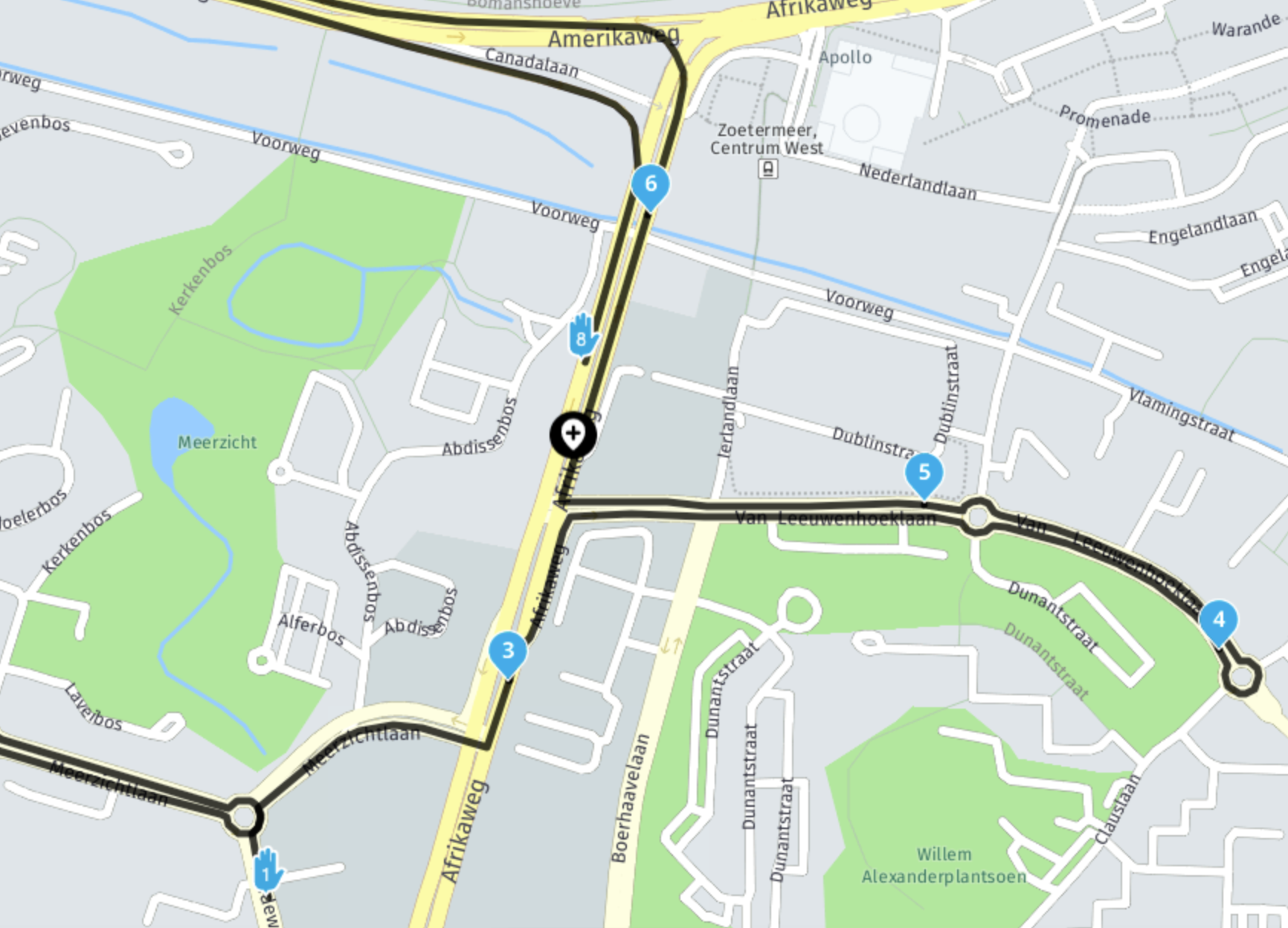
        Scherm­afbeelding 2023-08-19 om 19.29.09.png

        In the above image:

        • you pass waypoint 3
        • you continue straight (ignore 4 & 5)
        • you currently are at the black waypoint add icon
          algorithm triggered
        • distance to 4 (from position) has length x
        • distance to 5 (from position) has length y which is shorter than x
        • distance to 6 (from position) has length z which is shorter than y
        • distance to 7 (from position) is longer! (not even visible on map) then the algorithm will choose waypoint 6 as next waypoint.
        • it won't ever choose 8 as next one! Yes, that one has a shortest distance from the current position if you draw a straight line 😉 But we take the actual route calculation into account.

        🏍️ BMW K1600GT-P (2013) | Nolan N100-5 with Sena 30K
        📱 iOS on iPhone 13 & 16 (mounted on Quadlock or AliExpress extention on BMW-cradle)
        🚙 Apple CarPlay in VW T-Roc
        💻 Routelab on MacBook Air & iMac (Tahoe & Ventura)

        martin-phogel.de 1 Reply Last reply
        1
        • Rob Verhoeff Rob Verhoeff

          For those who can't acces the beta section of the forum. Automated skipping of waypoints explained:

          Scherm­afbeelding 2023-08-19 om 19.29.09.png

          In the above image:

          • you pass waypoint 3
          • you continue straight (ignore 4 & 5)
          • you currently are at the black waypoint add icon
            algorithm triggered
          • distance to 4 (from position) has length x
          • distance to 5 (from position) has length y which is shorter than x
          • distance to 6 (from position) has length z which is shorter than y
          • distance to 7 (from position) is longer! (not even visible on map) then the algorithm will choose waypoint 6 as next waypoint.
          • it won't ever choose 8 as next one! Yes, that one has a shortest distance from the current position if you draw a straight line 😉 But we take the actual route calculation into account.
          martin-phogel.de Offline
          martin-phogel.de Offline
          martin-phogel.de
          wrote on last edited by
          #9

          @Rob-Verhoeff
          ok, got it!
          This also explains my situation today:
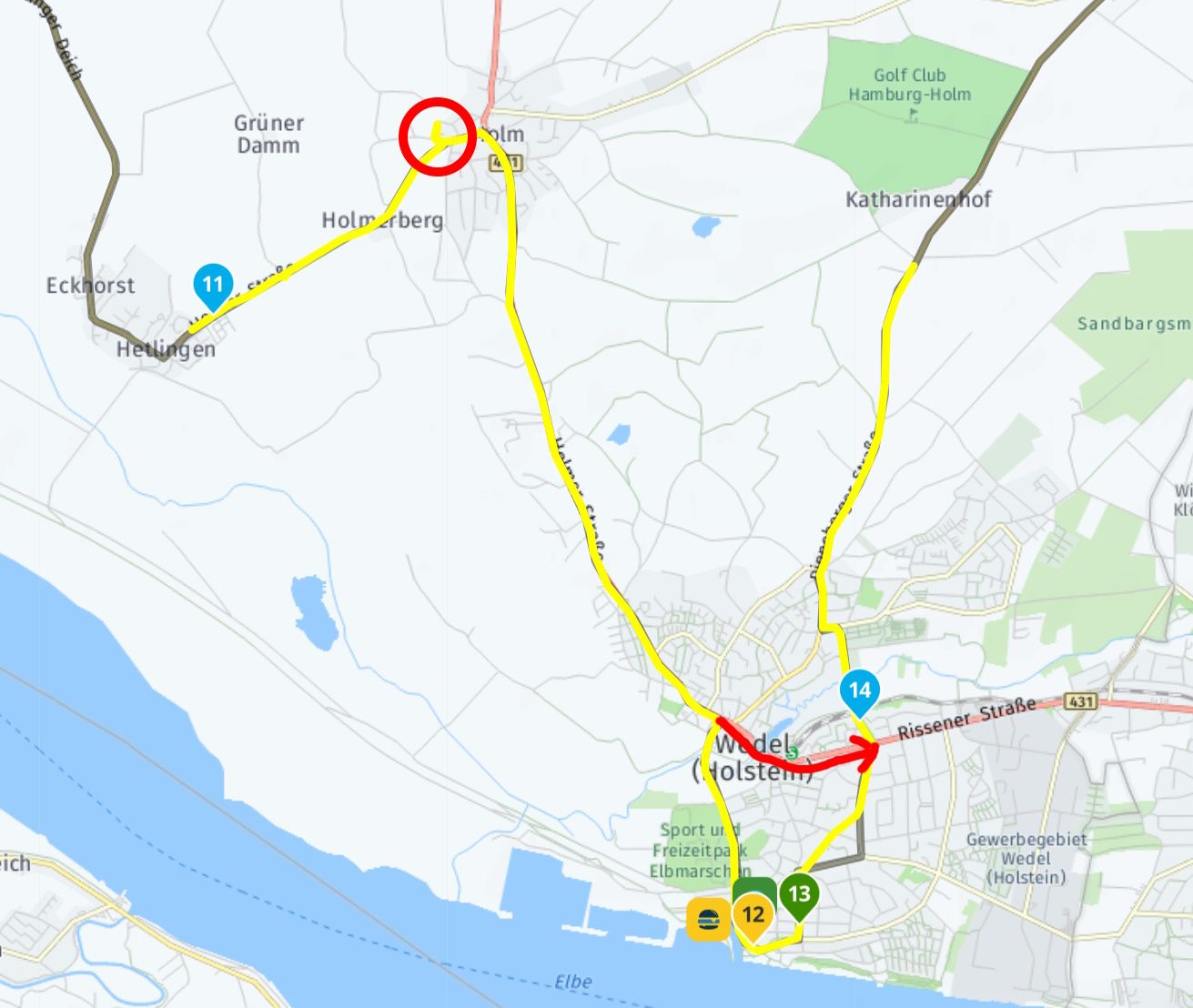
          MRA1.jpg
          I briefly deviated from the planned route (black), as can be seen in the track log (yellow, red circle). During the recalculation, shaping points 12 and 13 were skipped.
          However, I had not noticed that the route was recalculated several times, which probably happened too quickly on the short stretch 🙂 But now it is clear.

          Jörgen 1 Reply Last reply
          0
          • martin-phogel.de martin-phogel.de

            @Rob-Verhoeff
            ok, got it!
            This also explains my situation today:
            MRA1.jpg
            I briefly deviated from the planned route (black), as can be seen in the track log (yellow, red circle). During the recalculation, shaping points 12 and 13 were skipped.
            However, I had not noticed that the route was recalculated several times, which probably happened too quickly on the short stretch 🙂 But now it is clear.

            Jörgen Offline
            Jörgen Offline
            Jörgen
            Valued contributor
            wrote on last edited by
            #10

            @Martin-Wilcke Make WP 12, 13, next time a Via-Point, that will not be skipped.
            I had a similar situation in Frankfurt, I had to pick up something before the Hotel, for some reason (traffic, or?) the pickup Shaping point was skipped, and I was guided direct to the Hotel. Next time I will make it a Via-Point to prevent this.

            Hardware
            iPhone 12 pro (iOS 26.2.1)
            iPad (7.Gen.) 18.7.3
            Oukitel RT3 Pro (Andr. 14)
            Wireless CarPlay mit (Elebest C650)
            Wired CarPlay (SEAT Arona - 2021)
            MRA Workshops in Deutsch sind hier zu finden

            Con Hennekens 1 Reply Last reply
            0
            • Jörgen Jörgen

              @Martin-Wilcke Make WP 12, 13, next time a Via-Point, that will not be skipped.
              I had a similar situation in Frankfurt, I had to pick up something before the Hotel, for some reason (traffic, or?) the pickup Shaping point was skipped, and I was guided direct to the Hotel. Next time I will make it a Via-Point to prevent this.

              Con Hennekens Offline
              Con Hennekens Offline
              Con Hennekens
              Alpha tester
              wrote on last edited by
              #11

              @Jörgen, that is exactly the purpose of VIA points: Waypoints that you don't want to auto-skip, no matter what 😉

              I am just an enthusiastic MRA user, and hope you will be one too!

              Most motorcycle problems are caused by the nut that connects the handlebar to the saddle.

              Check out RideSleepRepeat.eu, a biker community for sharing stays across Europe

              martin-phogel.de 1 Reply Last reply
              0
              • Con Hennekens Con Hennekens

                @Jörgen, that is exactly the purpose of VIA points: Waypoints that you don't want to auto-skip, no matter what 😉

                martin-phogel.de Offline
                martin-phogel.de Offline
                martin-phogel.de
                wrote on last edited by
                #12

                @Con-Hennekens @Jörgen :

                I absolutely agree with you about the different meaning of via and shaping points. I also like the algorithm according to which shaping points are automatically skipped.

                In this specific case, of course, I didn't want to skip route points 12 and 13, and the interesting question is how to prevent this.

                I looked at a few routes from the MRA library to get an understanding of whether there is a kind of "standard" for dealing with route points that relate to POIs / favourites or should otherwise be given a special meaning. It seems that such route points (in addition to being coloured other than blue) are then set as via points if the author recommends a "mandatory" stop here. However, if it is more of an "opportunity", a shaping point is set. From my point of view, this approach is correct and good and I have adopted it in the same way when creating my own routes.

                That is why I would not set one of the points 12/13 as a viapoint (because they are "opportunities"), but instead add another (blue) shaping point and/or move point 14 a little. What do you think about this?
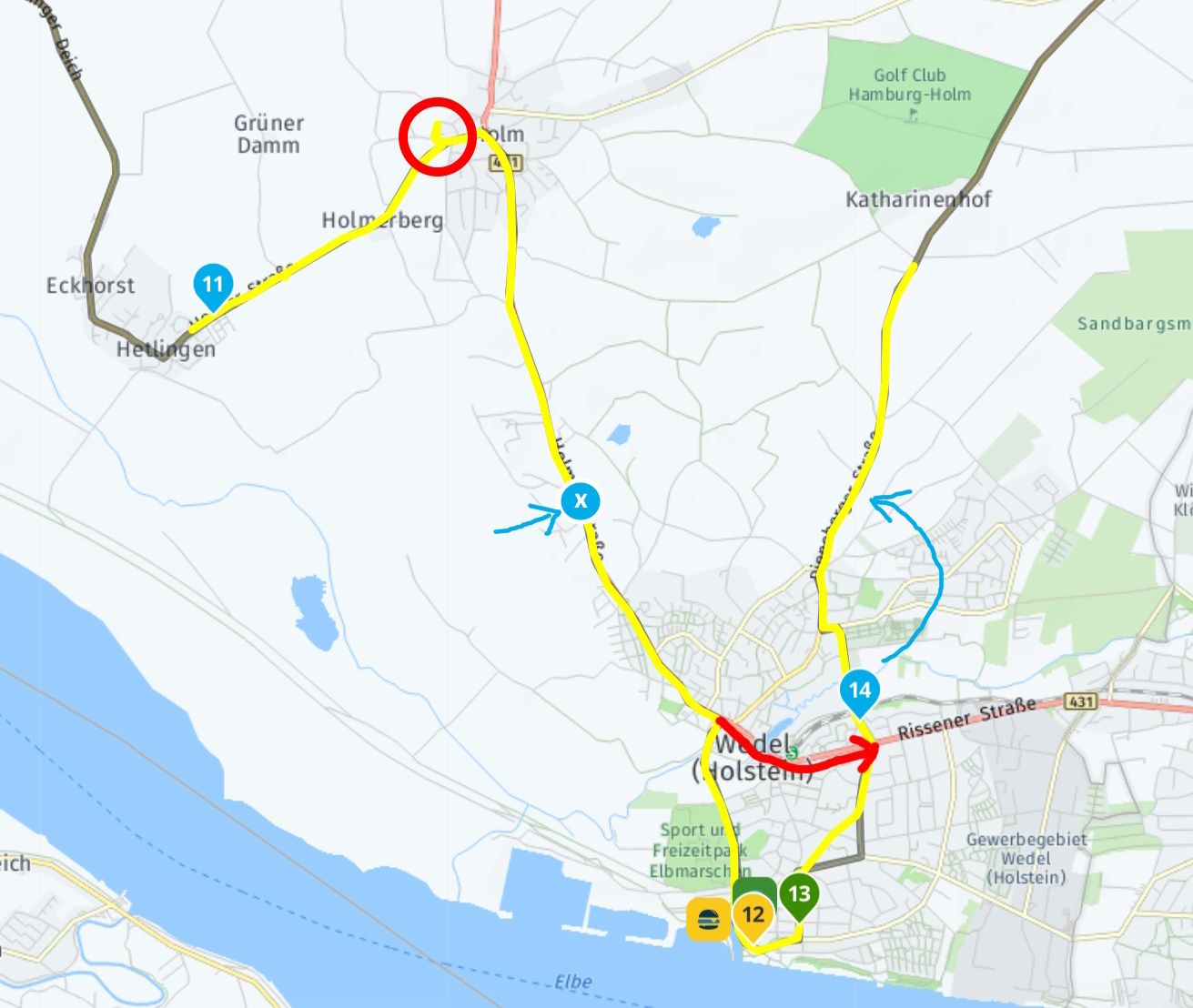
                MRA2.jpg

                In any case, it is good to know that with such loops in a route, a "shortcut" can arise in the event of an auto skip, which one may not want at all.

                Nick Carthew 1 Reply Last reply
                0
                • martin-phogel.de martin-phogel.de

                  @Con-Hennekens @Jörgen :

                  I absolutely agree with you about the different meaning of via and shaping points. I also like the algorithm according to which shaping points are automatically skipped.

                  In this specific case, of course, I didn't want to skip route points 12 and 13, and the interesting question is how to prevent this.

                  I looked at a few routes from the MRA library to get an understanding of whether there is a kind of "standard" for dealing with route points that relate to POIs / favourites or should otherwise be given a special meaning. It seems that such route points (in addition to being coloured other than blue) are then set as via points if the author recommends a "mandatory" stop here. However, if it is more of an "opportunity", a shaping point is set. From my point of view, this approach is correct and good and I have adopted it in the same way when creating my own routes.

                  That is why I would not set one of the points 12/13 as a viapoint (because they are "opportunities"), but instead add another (blue) shaping point and/or move point 14 a little. What do you think about this?

                  MRA2.jpg

                  In any case, it is good to know that with such loops in a route, a "shortcut" can arise in the event of an auto skip, which one may not want at all.

                  Nick Carthew Offline
                  Nick Carthew Offline
                  Nick Carthew
                  RouteXpert
                  wrote on last edited by
                  #13

                  @Martin-Wilcke
                  Here’s how I would do it:
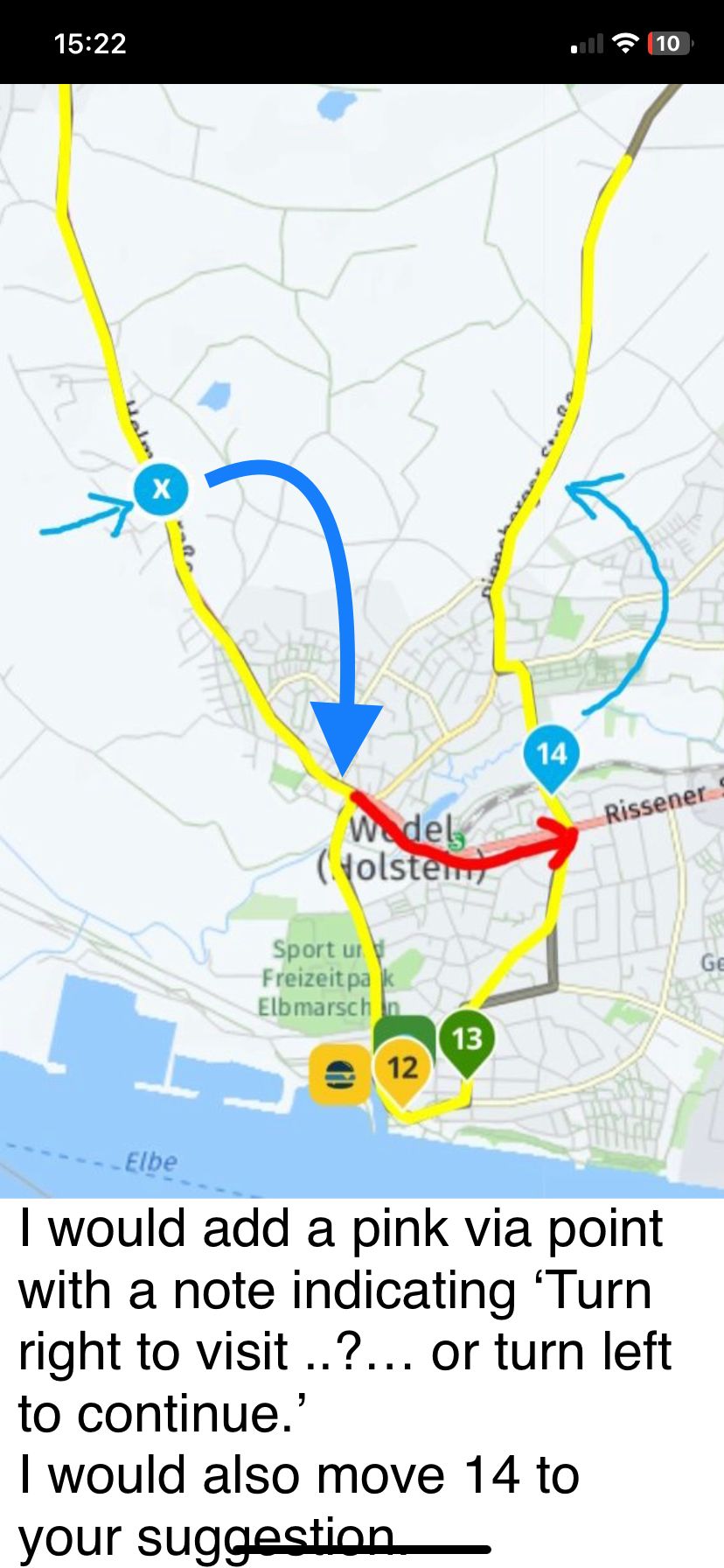
                  IMG_2494.jpeg

                  Always willing to help if I can.
                  Triumph Tiger 1200 XRT called Tina.
                  MRA Navigation Next and SilverFox BJ8

                  martin-phogel.de RetiredWingMan 2 Replies Last reply
                  0
                  • Nick Carthew Nick Carthew

                    @Martin-Wilcke
                    Here’s how I would do it:

                    IMG_2494.jpeg

                    martin-phogel.de Offline
                    martin-phogel.de Offline
                    martin-phogel.de
                    wrote on last edited by
                    #14

                    @Nick-Carthew said in Skipping shaping points automatically:

                    I would add a pink via point with a note...

                    A clever solution!
                    Do you really mean via point? Not shaping point?

                    Nick Carthew 1 Reply Last reply
                    0
                    • martin-phogel.de martin-phogel.de

                      @Nick-Carthew said in Skipping shaping points automatically:

                      I would add a pink via point with a note...

                      A clever solution!
                      Do you really mean via point? Not shaping point?

                      Nick Carthew Offline
                      Nick Carthew Offline
                      Nick Carthew
                      RouteXpert
                      wrote on last edited by
                      #15

                      @Martin-Wilcke yes, a via point to ensure that you have the option to visit to 12/13.

                      Always willing to help if I can.
                      Triumph Tiger 1200 XRT called Tina.
                      MRA Navigation Next and SilverFox BJ8

                      martin-phogel.de 1 Reply Last reply
                      0
                      • Nick Carthew Nick Carthew

                        @Martin-Wilcke
                        Here’s how I would do it:

                        IMG_2494.jpeg

                        RetiredWingMan Offline
                        RetiredWingMan Offline
                        RetiredWingMan
                        Valued contributor
                        wrote on last edited by
                        #16

                        @Nick-Carthew if you add a pink viapoint with a message, how do you display the message during navigation?

                        2010 GL1800 Goldwing using Samsung Galaxy S20 5G Android 13.

                        Rob Verhoeff 1 Reply Last reply
                        0
                        • Nick Carthew Nick Carthew

                          @Martin-Wilcke yes, a via point to ensure that you have the option to visit to 12/13.

                          martin-phogel.de Offline
                          martin-phogel.de Offline
                          martin-phogel.de
                          wrote on last edited by
                          #17

                          @Nick-Carthew said in Skipping shaping points automatically:

                          @Martin-Wilcke yes, a via point to ensure that you have the option to visit to 12/13.

                          Right, that makes sense. Via point simply means "pass here" but not necessarily "stop (have a break) here".

                          1 Reply Last reply
                          0
                          • RetiredWingMan RetiredWingMan

                            @Nick-Carthew if you add a pink viapoint with a message, how do you display the message during navigation?

                            Rob Verhoeff Offline
                            Rob Verhoeff Offline
                            Rob Verhoeff
                            Alpha tester
                            wrote on last edited by Rob Verhoeff
                            #18

                            @Doug-Robinson said in Skipping shaping points automatically:

                            if you add a pink viapoint with a message, how do you display the message during navigation?

                            In the app while navigating: shortly press the viapoint. Then you will see the text you typed in the viapoint-menu under 'Note'. When you added a photo, it will also apear.

                            🏍️ BMW K1600GT-P (2013) | Nolan N100-5 with Sena 30K
                            📱 iOS on iPhone 13 & 16 (mounted on Quadlock or AliExpress extention on BMW-cradle)
                            🚙 Apple CarPlay in VW T-Roc
                            💻 Routelab on MacBook Air & iMac (Tahoe & Ventura)

                            Nick Carthew 1 Reply Last reply
                            0
                            • Rob Verhoeff Rob Verhoeff

                              @Doug-Robinson said in Skipping shaping points automatically:

                              if you add a pink viapoint with a message, how do you display the message during navigation?

                              In the app while navigating: shortly press the viapoint. Then you will see the text you typed in the viapoint-menu under 'Note'. When you added a photo, it will also apear.

                              Nick Carthew Offline
                              Nick Carthew Offline
                              Nick Carthew
                              RouteXpert
                              wrote on last edited by
                              #19

                              @Rob-Verhoeff @Doug-Robinson
                              No need to long press the route point if you select the option in Screen layout to show waypoint information. The information that you have added is displayed as scrolling text as you navigate.
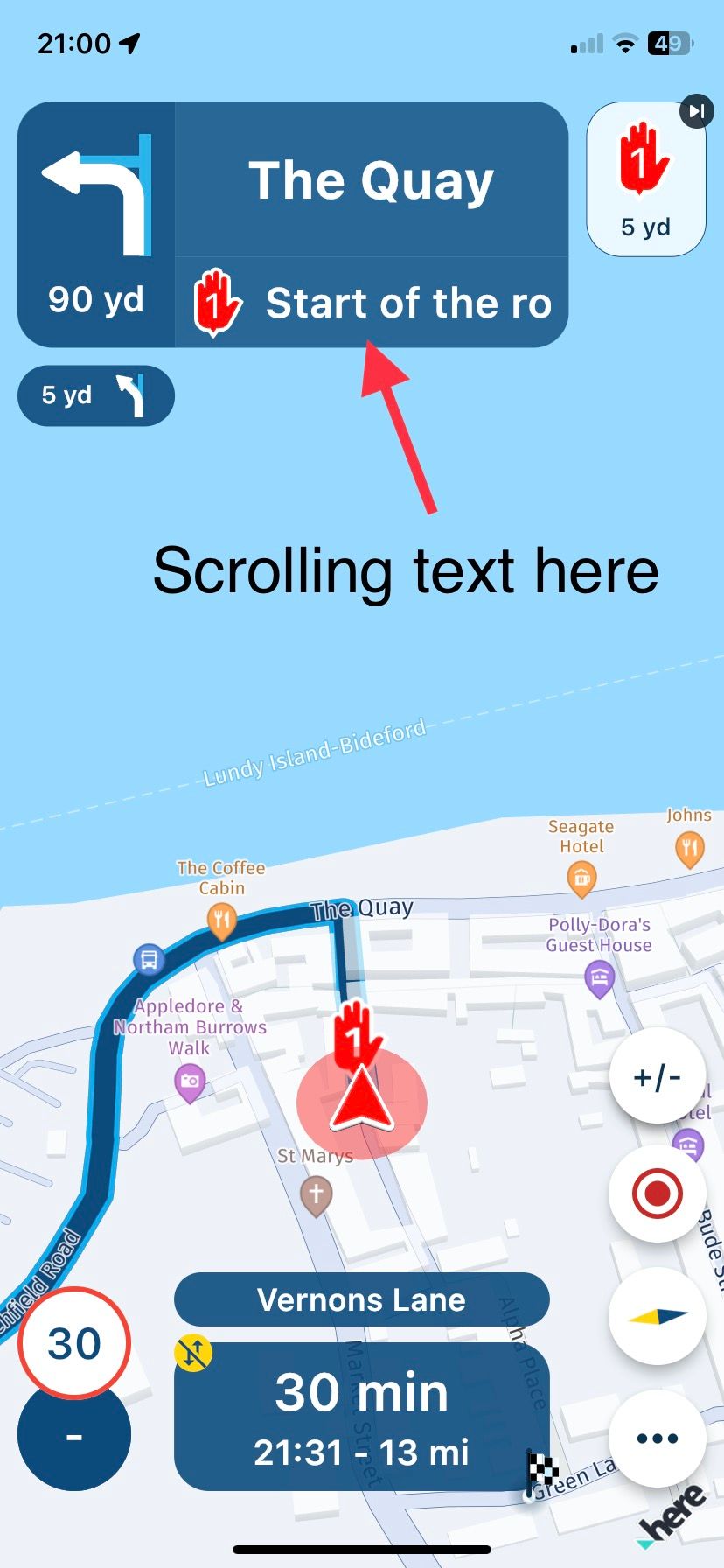
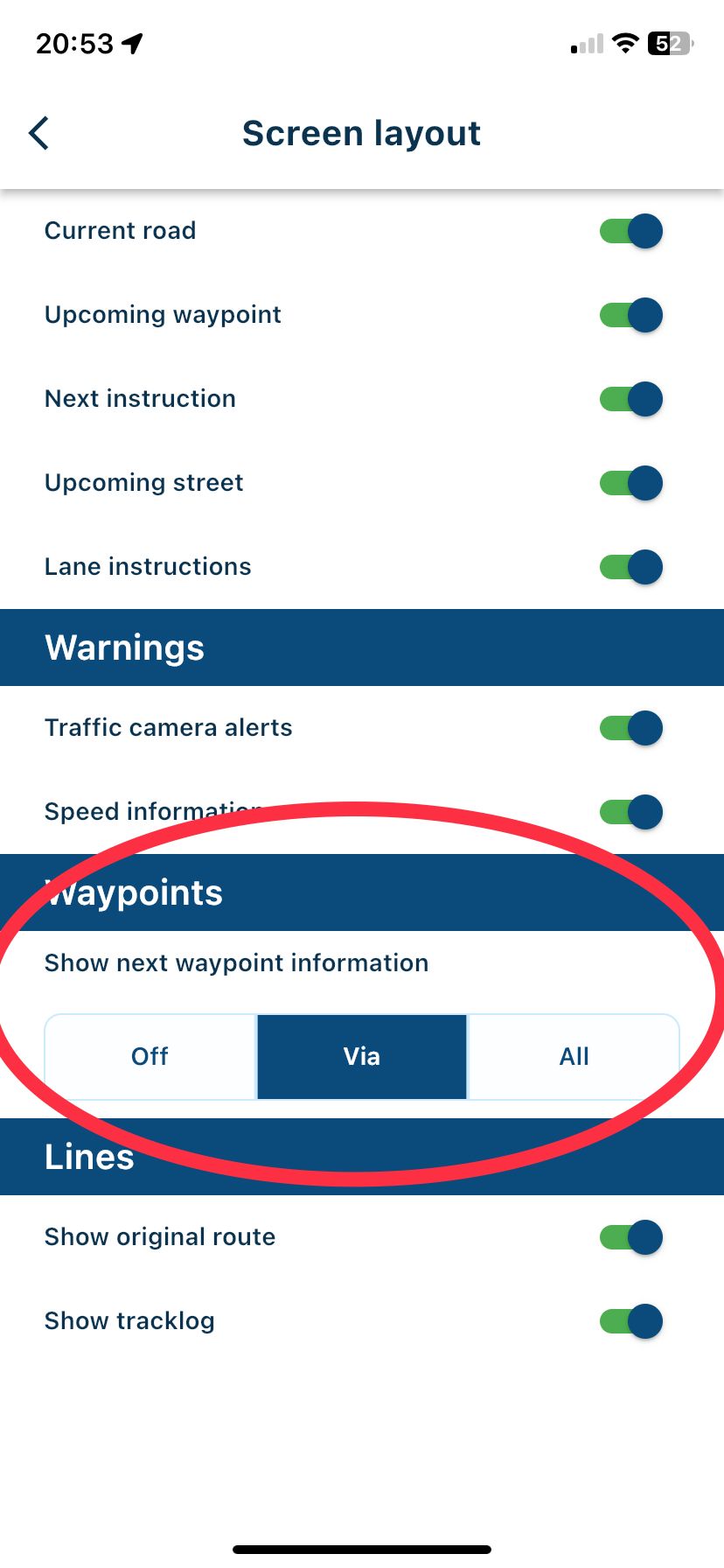
                              IMG_2496.jpeg

                              IMG_2495.jpeg

                              Always willing to help if I can.
                              Triumph Tiger 1200 XRT called Tina.
                              MRA Navigation Next and SilverFox BJ8

                              Rob Verhoeff RetiredWingMan 2 Replies Last reply
                              0
                              • Nick Carthew Nick Carthew

                                @Rob-Verhoeff @Doug-Robinson
                                No need to long press the route point if you select the option in Screen layout to show waypoint information. The information that you have added is displayed as scrolling text as you navigate.

                                IMG_2496.jpeg

                                IMG_2495.jpeg

                                Rob Verhoeff Offline
                                Rob Verhoeff Offline
                                Rob Verhoeff
                                Alpha tester
                                wrote on last edited by Rob Verhoeff
                                #20

                                @Nick-Carthew said in Skipping shaping points automatically:

                                No need to long press the route point

                                You're right, but that takes forever when you have a long text! Simply press SHORT (not long, because that skips the waypoint 😉
                                The text will be presented in a textbox on the bottom of your screen. In CP the extra text presents itself on the left of the screen (in my car).

                                🏍️ BMW K1600GT-P (2013) | Nolan N100-5 with Sena 30K
                                📱 iOS on iPhone 13 & 16 (mounted on Quadlock or AliExpress extention on BMW-cradle)
                                🚙 Apple CarPlay in VW T-Roc
                                💻 Routelab on MacBook Air & iMac (Tahoe & Ventura)

                                1 Reply Last reply
                                0
                                • Nick Carthew Nick Carthew

                                  @Rob-Verhoeff @Doug-Robinson
                                  No need to long press the route point if you select the option in Screen layout to show waypoint information. The information that you have added is displayed as scrolling text as you navigate.

                                  IMG_2496.jpeg

                                  IMG_2495.jpeg

                                  RetiredWingMan Offline
                                  RetiredWingMan Offline
                                  RetiredWingMan
                                  Valued contributor
                                  wrote on last edited by
                                  #21

                                  @Nick-Carthew thanks for the info, I was not aware of that recent change. The app is starting to get very complicated with all these features and options.

                                  2010 GL1800 Goldwing using Samsung Galaxy S20 5G Android 13.

                                  1 Reply Last reply
                                  0
                                  • Rob Verhoeff Rob Verhoeff referenced this topic on

                                  Hello! It looks like you're interested in this conversation, but you don't have an account yet.

                                  Getting fed up of having to scroll through the same posts each visit? When you register for an account, you'll always come back to exactly where you were before, and choose to be notified of new replies (either via email, or push notification). You'll also be able to save bookmarks and upvote posts to show your appreciation to other community members.

                                  With your input, this post could be even better 💗

                                  Register Login


                                  Reply
                                  • Reply as topic
                                  Log in to reply
                                  • Oldest to Newest
                                  • Newest to Oldest
                                  • Most Votes


                                  • 1
                                  • 2
                                  ACTIVE USERS
                                  Rob Verhoeff
                                  Rob Verhoeff
                                  Con Hennekens
                                  Con Hennekens
                                  Nick Carthew
                                  Nick Carthew
                                  Jörgen
                                  Jörgen
                                  RetiredWingMan
                                  RetiredWingMan
                                  martin-phogel.de
                                  martin-phogel.de
                                  Marco 7v
                                  Marco 7v
                                  nano
                                  nano
                                  POPULAR TOPICS
                                  • opslaan naar plantomtom
                                    chris 18
                                    chris 18
                                    0
                                    9
                                    199

                                  • brug bij Nijkerk in de A1
                                    white.mouse.on.the.motorbikegmail.com
                                    white.mouse.on.the.motorbikegmail.com
                                    0
                                    3
                                    108

                                  • Tracklog save failure (489)
                                    0
                                    1
                                    7

                                  • Garmin Drive app update route fail
                                    jmbprinceton.edu
                                    jmbprinceton.edu
                                    0
                                    4
                                    158

                                  • nieuwe Belgische gebruiker
                                    AWDC LAO
                                    AWDC LAO
                                    1
                                    7
                                    275

                                  • Update 5.2.2 - Quick fix
                                    Emanuele 5
                                    Emanuele 5
                                    6
                                    34
                                    1.6k

                                  MY GROUPS
                                  • Login

                                  • Login or register to search.
                                  • First post
                                    Last post
                                  0
                                  • Categories
                                  • Recent
                                  • Popular
                                  • Support
                                  • MyRoute-app