
Skipping shaping points automatically
-

Hi, I tried the new app on Monday the first time. It was more like a test, because I knew the road and didn't really need navigation.
At one point I took another road than planned and skipped a shaping point by accident. It seems the shaping point did not get skipped automatically after I reached the planned route again and also not when I reached the next shaping point.
Is this by design or something you are still fixing?
When I noticed I had reached multiple shaping points already and had to skip all of them manually while driving. Was not the savest approach.

-
Hi, I tried the new app on Monday the first time. It was more like a test, because I knew the road and didn't really need navigation.
At one point I took another road than planned and skipped a shaping point by accident. It seems the shaping point did not get skipped automatically after I reached the planned route again and also not when I reached the next shaping point.
Is this by design or something you are still fixing?
When I noticed I had reached multiple shaping points already and had to skip all of them manually while driving. Was not the savest approach.

@nano, at the first recalculation the WP will not be skipped, and you will be lead back to that WP. After a second (or more) recalculation the auto-skip kicks in, and it should lead you to the closest WP, which can still be the same WP depending on how the route has been made.
Check this thread and the thread mentioned there for further explanation of the skipping algorithm:
https://forum.myrouteapp.com/post/28863I am just an enthusiastic MRA user, and hope you will be one too!
Most motorcycle problems are caused by the nut that connects the handlebar to the saddle.
Check out RideSleepRepeat.eu, a biker community for sharing stays across Europe
-
@nano, at the first recalculation the WP will not be skipped, and you will be lead back to that WP. After a second (or more) recalculation the auto-skip kicks in, and it should lead you to the closest WP, which can still be the same WP depending on how the route has been made.
Check this thread and the thread mentioned there for further explanation of the skipping algorithm:
https://forum.myrouteapp.com/post/28863
@Con-Hennekens said in Skipping shaping points automatically:
Check this thread and the thread mentioned there for further explanation of the skipping algorithm:
https://forum.myrouteapp.com/post/28863I cannot open the specified link, I get a "restricted" message.
Can I still view the thread behind it somehow? -
@Con-Hennekens said in Skipping shaping points automatically:
Check this thread and the thread mentioned there for further explanation of the skipping algorithm:
https://forum.myrouteapp.com/post/28863I cannot open the specified link, I get a "restricted" message.
Can I still view the thread behind it somehow? -

This was behind the link: (written from Corjan)
Missing waypoints can occur if GPS signal wasn't available or inaccurate for a longer period while approaching the waypoint.
Skipping waypoints automatically is only triggered at the second (or more) deviation. Then the first next nearest waypoint is chosen but that can very well be the waypoint that's behind you. If you seem to continuously ignore it, the app will skip it anyway after 6 recalculations. On highways it takes quite a long time before you can turn around (which you ignore) and thus before a recalculation is triggered. It might indeed then be a good suggestion to alter the algorithm to be more aggressive in skipping waypoints on the highway.
See above
Hope this helps! -
I think just beta-tester can follow the link.
Hardware
iPhone 12 pro (iOS 26.2.1)
iPad (7.Gen.) 18.7.3
Oukitel RT3 Pro (Andr. 14)
Wireless CarPlay mit (Elebest C650)
Wired CarPlay (SEAT Arona - 2021)
MRA Workshops in Deutsch sind hier zu finden -
I think just beta-tester can follow the link.
@Jörgen Danke!
-

For those who can't acces the beta section of the forum. Automated skipping of waypoints explained:
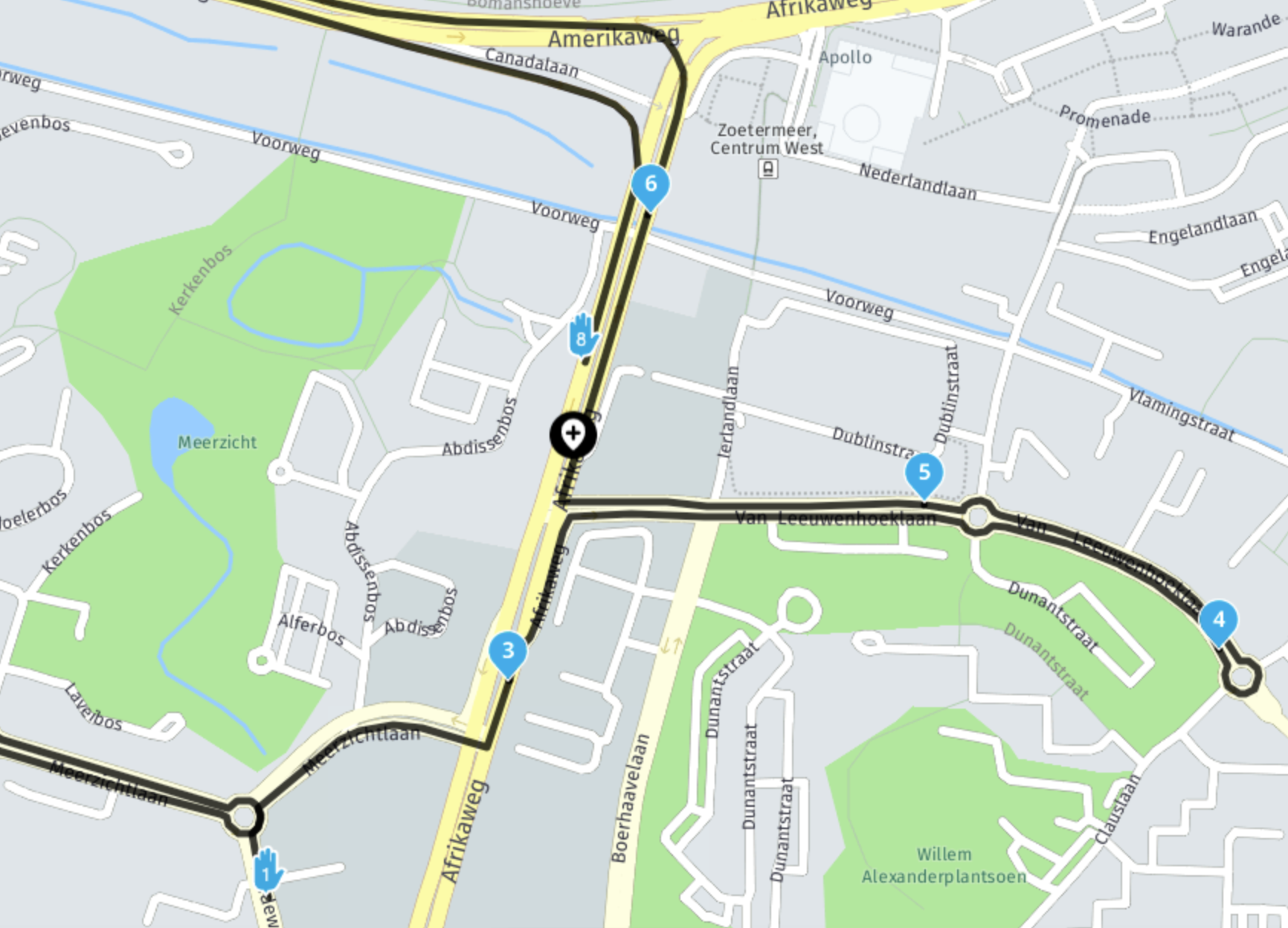
In the above image:
- you pass waypoint 3
- you continue straight (ignore 4 & 5)
- you currently are at the black waypoint add icon
algorithm triggered - distance to 4 (from position) has length x
- distance to 5 (from position) has length y which is shorter than x
- distance to 6 (from position) has length z which is shorter than y
- distance to 7 (from position) is longer! (not even visible on map) then the algorithm will choose waypoint 6 as next waypoint.
- it won't ever choose 8 as next one! Yes, that one has a shortest distance from the current position if you draw a straight line
 But we take the actual route calculation into account.
🏍️ BMW K1600GT-P (2013) | Nolan N100-5 with Sena 30K
📱 iOS on iPhone 13 & 16 (mounted on Quadlock or AliExpress extention on BMW-cradle)
🚙 Apple CarPlay in VW T-Roc
💻 Routelab on MacBook Air & iMac (Golden Gate & Ventura) -
For those who can't acces the beta section of the forum. Automated skipping of waypoints explained:
In the above image:
- you pass waypoint 3
- you continue straight (ignore 4 & 5)
- you currently are at the black waypoint add icon
algorithm triggered - distance to 4 (from position) has length x
- distance to 5 (from position) has length y which is shorter than x
- distance to 6 (from position) has length z which is shorter than y
- distance to 7 (from position) is longer! (not even visible on map) then the algorithm will choose waypoint 6 as next waypoint.
- it won't ever choose 8 as next one! Yes, that one has a shortest distance from the current position if you draw a straight line But we take the actual route calculation into account.
@Rob-Verhoeff
ok, got it!
This also explains my situation today:
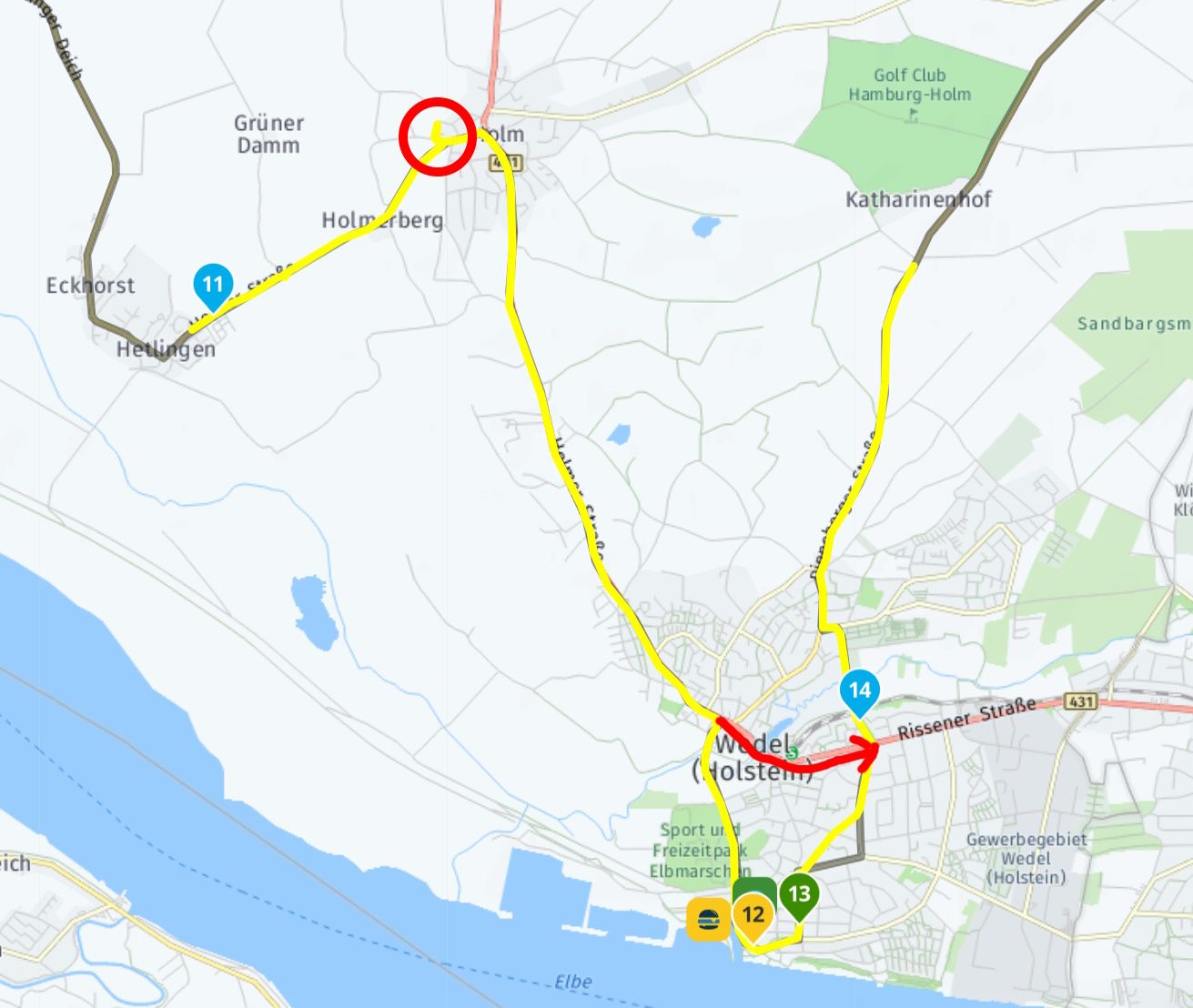
I briefly deviated from the planned route (black), as can be seen in the track log (yellow, red circle). During the recalculation, shaping points 12 and 13 were skipped.
However, I had not noticed that the route was recalculated several times, which probably happened too quickly on the short stretch But now it is clear. -
@Rob-Verhoeff
ok, got it!
This also explains my situation today:
I briefly deviated from the planned route (black), as can be seen in the track log (yellow, red circle). During the recalculation, shaping points 12 and 13 were skipped.
However, I had not noticed that the route was recalculated several times, which probably happened too quickly on the short stretch But now it is clear.
@Martin-Wilcke Make WP 12, 13, next time a Via-Point, that will not be skipped.
I had a similar situation in Frankfurt, I had to pick up something before the Hotel, for some reason (traffic, or?) the pickup Shaping point was skipped, and I was guided direct to the Hotel. Next time I will make it a Via-Point to prevent this.Hardware
iPhone 12 pro (iOS 26.2.1)
iPad (7.Gen.) 18.7.3
Oukitel RT3 Pro (Andr. 14)
Wireless CarPlay mit (Elebest C650)
Wired CarPlay (SEAT Arona - 2021)
MRA Workshops in Deutsch sind hier zu finden -
@Martin-Wilcke Make WP 12, 13, next time a Via-Point, that will not be skipped.
I had a similar situation in Frankfurt, I had to pick up something before the Hotel, for some reason (traffic, or?) the pickup Shaping point was skipped, and I was guided direct to the Hotel. Next time I will make it a Via-Point to prevent this.
@Jörgen, that is exactly the purpose of VIA points: Waypoints that you don't want to auto-skip, no matter what
I am just an enthusiastic MRA user, and hope you will be one too!
Most motorcycle problems are caused by the nut that connects the handlebar to the saddle.
Check out RideSleepRepeat.eu, a biker community for sharing stays across Europe
-
@Jörgen, that is exactly the purpose of VIA points: Waypoints that you don't want to auto-skip, no matter what
@Con-Hennekens @Jörgen :
I absolutely agree with you about the different meaning of via and shaping points. I also like the algorithm according to which shaping points are automatically skipped.
In this specific case, of course, I didn't want to skip route points 12 and 13, and the interesting question is how to prevent this.
I looked at a few routes from the MRA library to get an understanding of whether there is a kind of "standard" for dealing with route points that relate to POIs / favourites or should otherwise be given a special meaning. It seems that such route points (in addition to being coloured other than blue) are then set as via points if the author recommends a "mandatory" stop here. However, if it is more of an "opportunity", a shaping point is set. From my point of view, this approach is correct and good and I have adopted it in the same way when creating my own routes.
That is why I would not set one of the points 12/13 as a viapoint (because they are "opportunities"), but instead add another (blue) shaping point and/or move point 14 a little. What do you think about this?
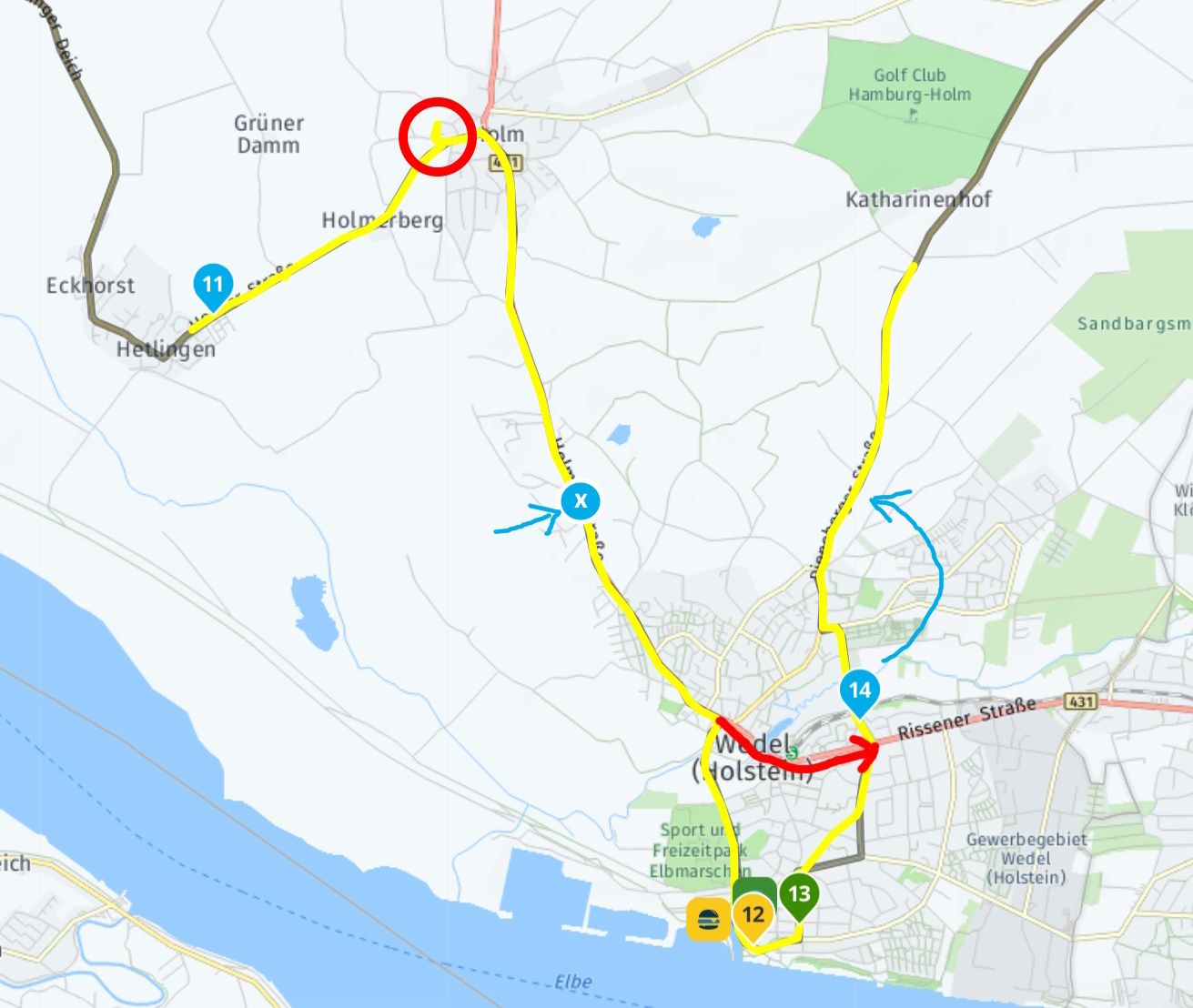
In any case, it is good to know that with such loops in a route, a "shortcut" can arise in the event of an auto skip, which one may not want at all.
-
@Con-Hennekens @Jörgen :
I absolutely agree with you about the different meaning of via and shaping points. I also like the algorithm according to which shaping points are automatically skipped.
In this specific case, of course, I didn't want to skip route points 12 and 13, and the interesting question is how to prevent this.
I looked at a few routes from the MRA library to get an understanding of whether there is a kind of "standard" for dealing with route points that relate to POIs / favourites or should otherwise be given a special meaning. It seems that such route points (in addition to being coloured other than blue) are then set as via points if the author recommends a "mandatory" stop here. However, if it is more of an "opportunity", a shaping point is set. From my point of view, this approach is correct and good and I have adopted it in the same way when creating my own routes.
That is why I would not set one of the points 12/13 as a viapoint (because they are "opportunities"), but instead add another (blue) shaping point and/or move point 14 a little. What do you think about this?
In any case, it is good to know that with such loops in a route, a "shortcut" can arise in the event of an auto skip, which one may not want at all.

@Martin-Wilcke
Here’s how I would do it: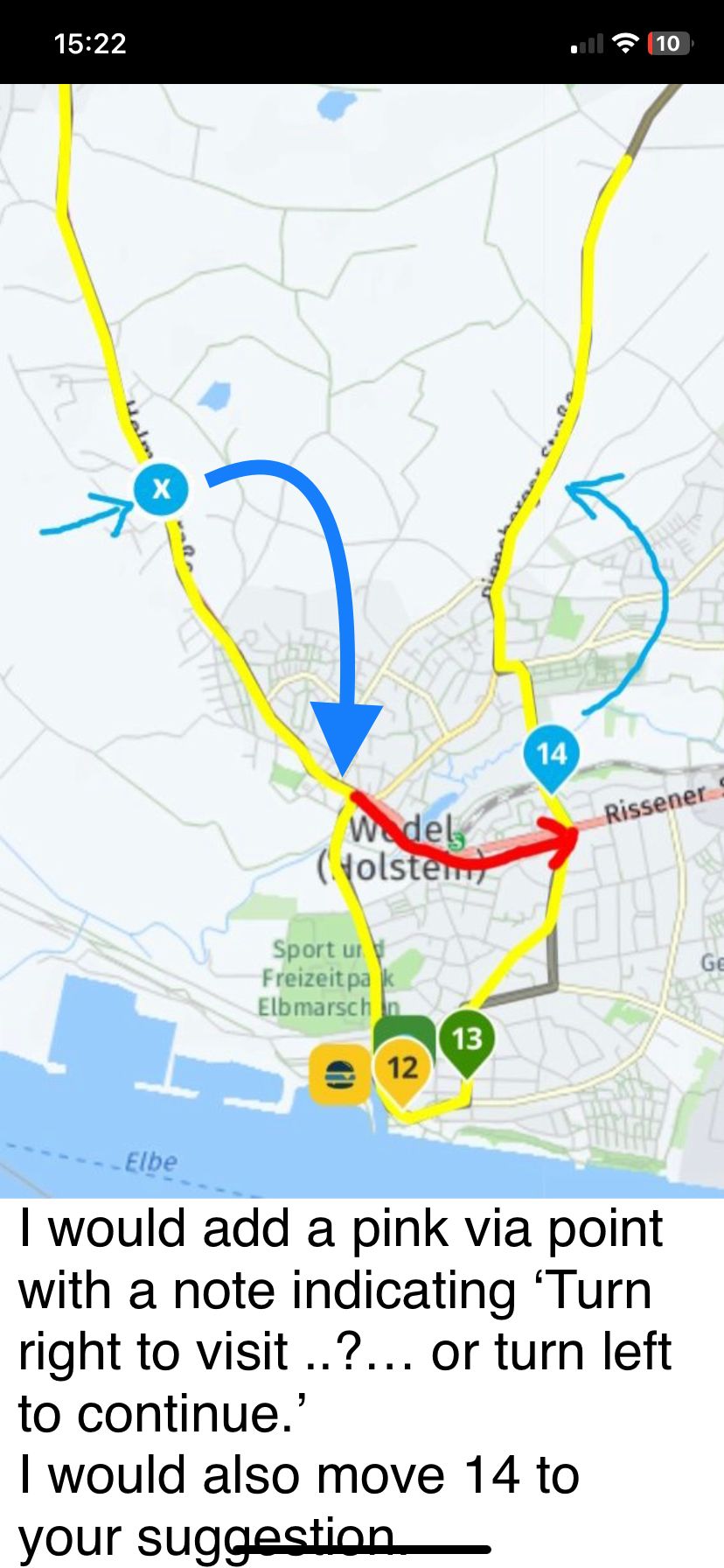
-
@Martin-Wilcke
Here’s how I would do it:
@Nick-Carthew said in Skipping shaping points automatically:
I would add a pink via point with a note...
A clever solution!
Do you really mean via point? Not shaping point? -
@Nick-Carthew said in Skipping shaping points automatically:
I would add a pink via point with a note...
A clever solution!
Do you really mean via point? Not shaping point?
@Martin-Wilcke yes, a via point to ensure that you have the option to visit to 12/13.
-
@Martin-Wilcke
Here’s how I would do it:
@Nick-Carthew if you add a pink viapoint with a message, how do you display the message during navigation?
-
@Martin-Wilcke yes, a via point to ensure that you have the option to visit to 12/13.
@Nick-Carthew said in Skipping shaping points automatically:
@Martin-Wilcke yes, a via point to ensure that you have the option to visit to 12/13.
Right, that makes sense. Via point simply means "pass here" but not necessarily "stop (have a break) here".
-
@Nick-Carthew if you add a pink viapoint with a message, how do you display the message during navigation?
@Doug-Robinson said in Skipping shaping points automatically:
if you add a pink viapoint with a message, how do you display the message during navigation?
In the app while navigating: shortly press the viapoint. Then you will see the text you typed in the viapoint-menu under 'Note'. When you added a photo, it will also apear.
🏍️ BMW K1600GT-P (2013) | Nolan N100-5 with Sena 30K
📱 iOS on iPhone 13 & 16 (mounted on Quadlock or AliExpress extention on BMW-cradle)
🚙 Apple CarPlay in VW T-Roc
💻 Routelab on MacBook Air & iMac (Golden Gate & Ventura) -
@Doug-Robinson said in Skipping shaping points automatically:
if you add a pink viapoint with a message, how do you display the message during navigation?
In the app while navigating: shortly press the viapoint. Then you will see the text you typed in the viapoint-menu under 'Note'. When you added a photo, it will also apear.
@Rob-Verhoeff @Doug-Robinson
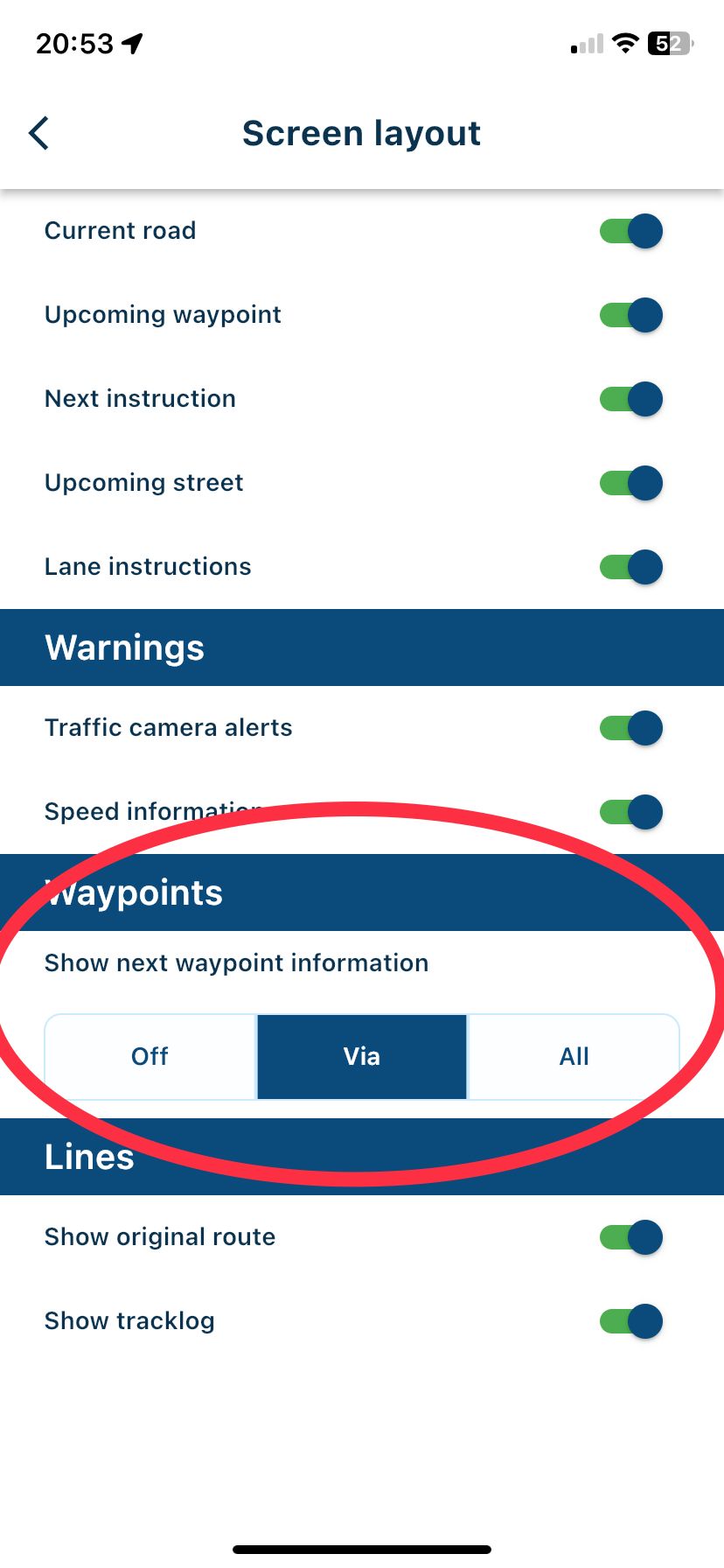
No need to long press the route point if you select the option in Screen layout to show waypoint information. The information that you have added is displayed as scrolling text as you navigate.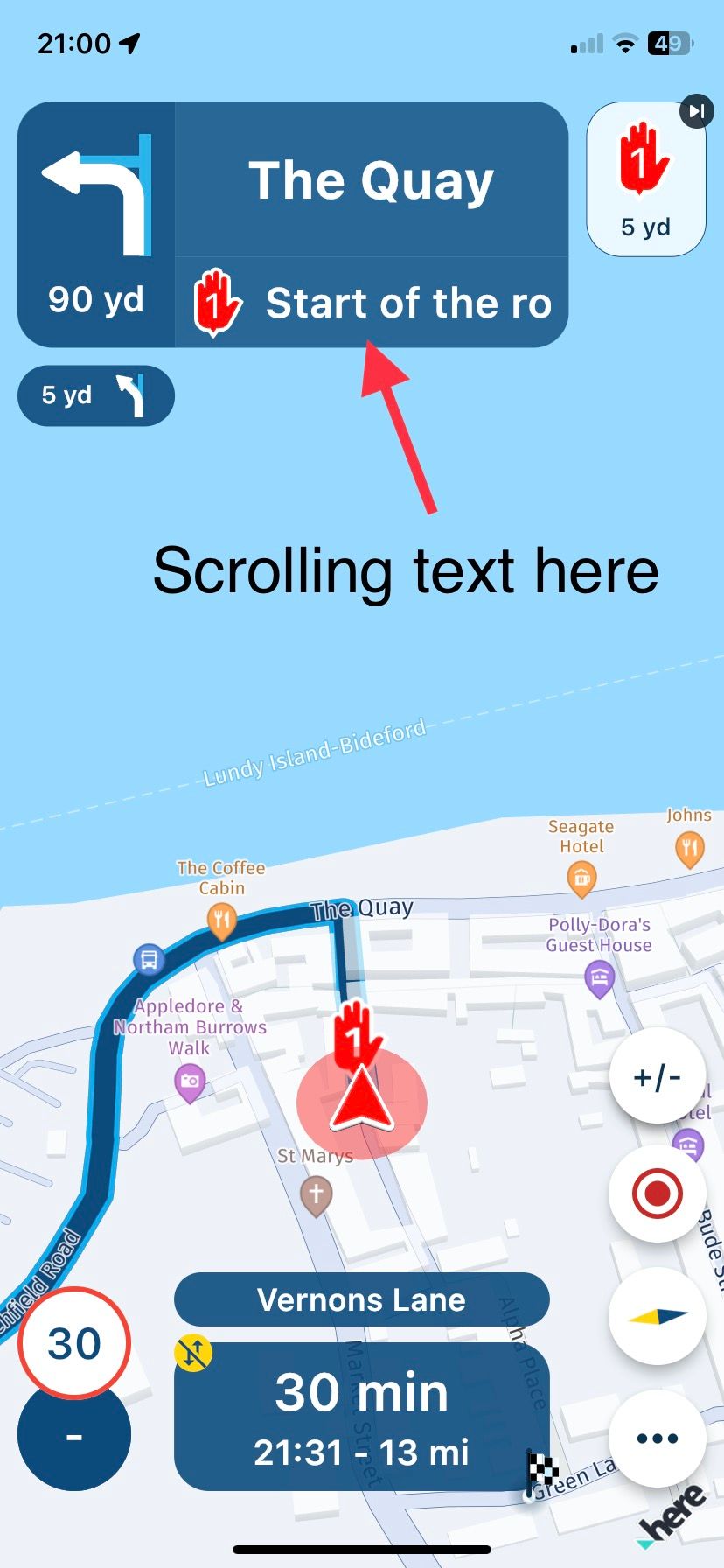
-
@Rob-Verhoeff @Doug-Robinson
No need to long press the route point if you select the option in Screen layout to show waypoint information. The information that you have added is displayed as scrolling text as you navigate.
@Nick-Carthew said in Skipping shaping points automatically:
No need to long press the route point
You're right, but that takes forever when you have a long text! Simply press SHORT (not long, because that skips the waypoint
The text will be presented in a textbox on the bottom of your screen. In CP the extra text presents itself on the left of the screen (in my car).

Hello! It looks like you're interested in this conversation, but you don't have an account yet.
Getting fed up of having to scroll through the same posts each visit? When you register for an account, you'll always come back to exactly where you were before, and choose to be notified of new replies (either via email, or push notification). You'll also be able to save bookmarks and upvote posts to show your appreciation to other community members.
With your input, this post could be even better 💗
Register Login-
 0728
0728
-
0867
-
 81655.4k
-
0345
-
 01089
01089
-
0579
-
1833
-
0260

