Why Won't MRA Follow the Beartooth Highway
-

I can't figure out why MRA is not allowing me to make a direct route entirely along the Beartooth Highway from Red Lodge, MT, to Cooke City, MT, and including the portion in Wyoming. I can only guess that MRA knows there is a road closure which doesn't allow the direct path. I created this route about two months ago, and back then, MRA did follow the Beartooth Highway, but today it does not.
I can not find any road closure information on the MT or WY DOT websites.
Any ideas?
Sam
-
I can't figure out why MRA is not allowing me to make a direct route entirely along the Beartooth Highway from Red Lodge, MT, to Cooke City, MT, and including the portion in Wyoming. I can only guess that MRA knows there is a road closure which doesn't allow the direct path. I created this route about two months ago, and back then, MRA did follow the Beartooth Highway, but today it does not.
I can not find any road closure information on the MT or WY DOT websites.
Any ideas?
Sam

@Sam-Kramer In the overlay maps select the traffic overlay and zoom into the area of road that the map will not route on. If there is a red/white line this indicates a road closure. You could try turning on the Disable seasonal closure tool in the toolkit if you are using the planning map from HERE.
Always willing to help if I can.
Triumph Tiger 1200 XRT called Tina.
MRA Navigation Next and SilverFox BJ8 -
@Sam-Kramer In the overlay maps select the traffic overlay and zoom into the area of road that the map will not route on. If there is a red/white line this indicates a road closure. You could try turning on the Disable seasonal closure tool in the toolkit if you are using the planning map from HERE.

@Sam-Kramer In the overlay maps select the traffic overlay and zoom into the area of road that the map will not route on. If there is a red/white line this indicates a road closure. You could try turning on the Disable seasonal closure tool in the toolkit if you are using the planning map from HERE.
I just tried the suggestions. There are no road closures indicated. Neither the Montana (https://www.511mt.net/#zoom=7.550255906688425&lon=-109.13842246235015&lat=45.015493985482095&events&road-cond&rwis) or Wyoming (https://map.wyoroad.info/511-map/) departments of transport report closures on Beartooth Pass (US Highway 212). Turning on Disable seasonal closures does allow routing along the Beartooth Pass which is confusing because the road is usually open from the end of May to some time in October. I assume that this is a HERE maps issue.
-
@Sam-Kramer In the overlay maps select the traffic overlay and zoom into the area of road that the map will not route on. If there is a red/white line this indicates a road closure. You could try turning on the Disable seasonal closure tool in the toolkit if you are using the planning map from HERE.
I just tried the suggestions. There are no road closures indicated. Neither the Montana (https://www.511mt.net/#zoom=7.550255906688425&lon=-109.13842246235015&lat=45.015493985482095&events&road-cond&rwis) or Wyoming (https://map.wyoroad.info/511-map/) departments of transport report closures on Beartooth Pass (US Highway 212). Turning on Disable seasonal closures does allow routing along the Beartooth Pass which is confusing because the road is usually open from the end of May to some time in October. I assume that this is a HERE maps issue.
@Stevedo-6-0
I was able to route on the Beartooth Highway without using the Disable seasonal closure tool, I just added some extra route points.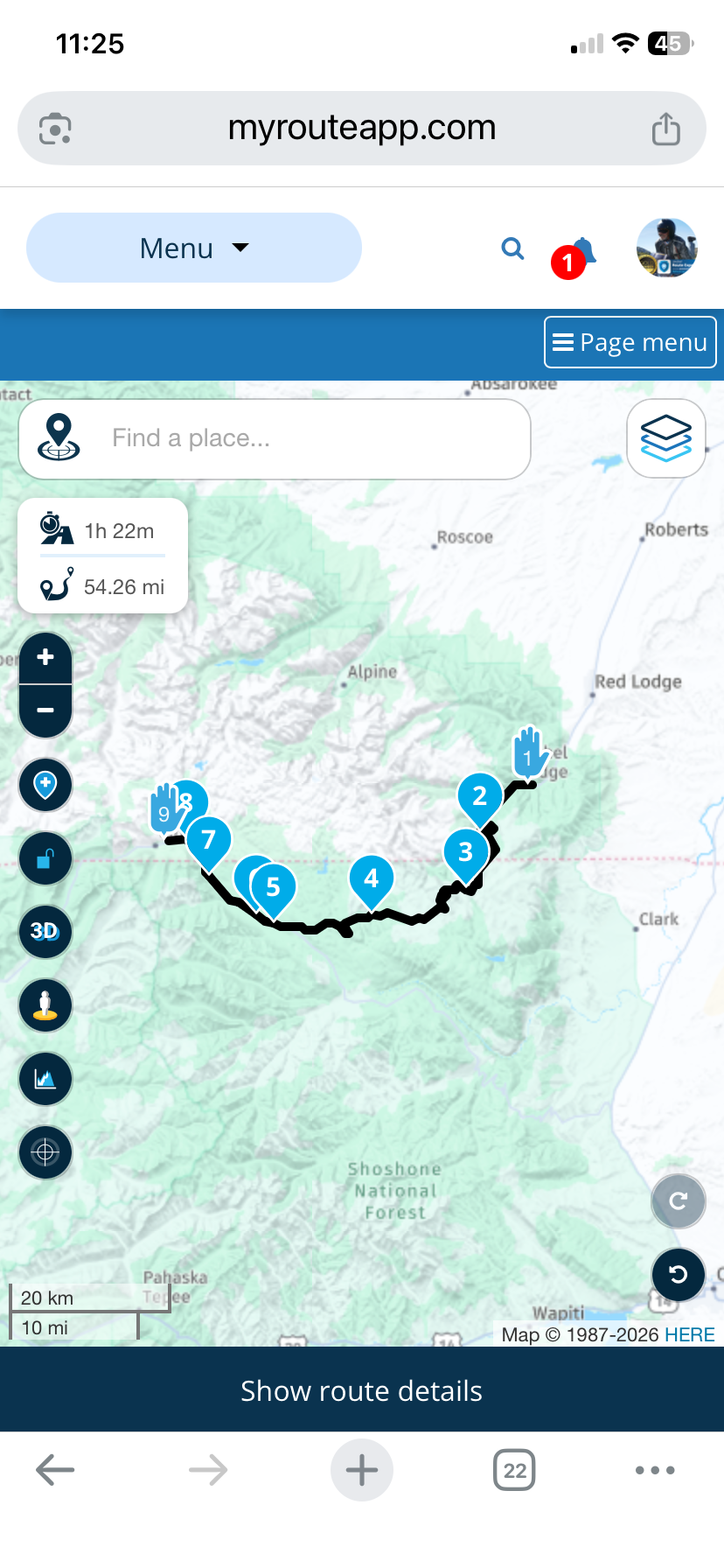
-
@Sam-Kramer In the overlay maps select the traffic overlay and zoom into the area of road that the map will not route on. If there is a red/white line this indicates a road closure. You could try turning on the Disable seasonal closure tool in the toolkit if you are using the planning map from HERE.
I just tried the suggestions. There are no road closures indicated. Neither the Montana (https://www.511mt.net/#zoom=7.550255906688425&lon=-109.13842246235015&lat=45.015493985482095&events&road-cond&rwis) or Wyoming (https://map.wyoroad.info/511-map/) departments of transport report closures on Beartooth Pass (US Highway 212). Turning on Disable seasonal closures does allow routing along the Beartooth Pass which is confusing because the road is usually open from the end of May to some time in October. I assume that this is a HERE maps issue.

@Stevedo-6-0 said: I assume that this is a HERE maps issue.
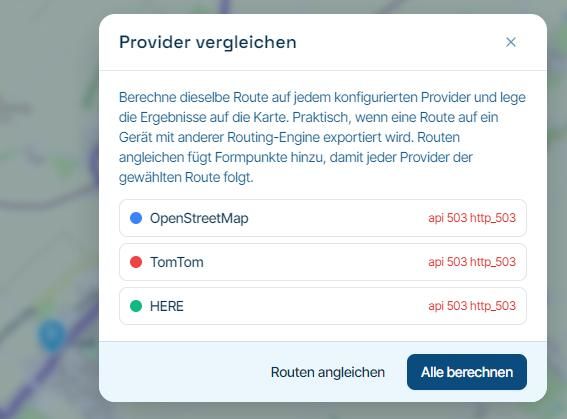
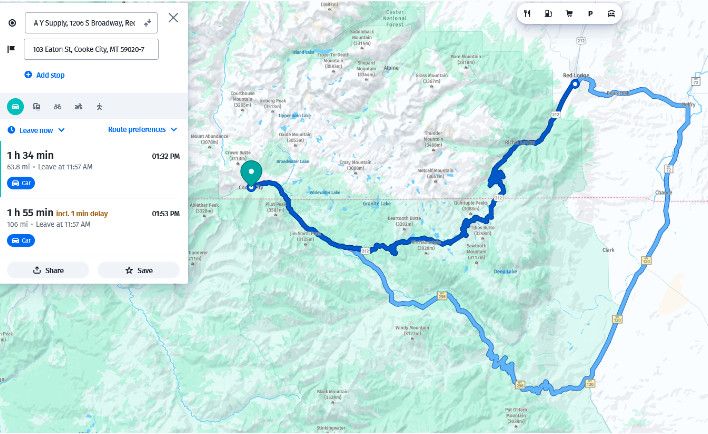
Use the "Compare" tool & you will see that TomTom & OpenStreetMap route without a problem
I would then go to Google maps & simply try to route from Red Lodge to Cooke City
If Google, TomTom & OpenStreetMap say its passable, then you can be pretty confident you are correct in saying yet again the Here map data is badIn this case the Here map data seems to only be bad / out of date for MRA as the HereWeGo site seems to route through with no issue
-
@Stevedo-6-0
I was able to route on the Beartooth Highway without using the Disable seasonal closure tool, I just added some extra route points.
@Nick-Carthew Nick, that's interesting...
As soon as I saw the post come out, I tried to create the same route and it would not let me. I started adding waypoints and found 2 spots where it wanted to create a bypass. (WP6-WP7 and WP8-WP9)
One of the roads to be used as a bypass was seen as blocked by the gate on Street View (WP8-WP9).
I did not disable seasonal closures, of course and no avoidances selected.
I also searched the Internet and was not able to find any closures posted anywhere.TomTom and OSM Navigate straight thru the bypasses on HERE.
https://www.myrouteapp.com/route/open/14020487
So, I wonder what made you able to do ut without a problem...???
You must have this thing in total submission to you!
I noticed that you did your route on the phone, so I thought hmmm... maybe that's where it is somehow different. So, I just tried my phone and encountered the same issue as on the Route Planner.
Positive emotions are worth every penny ;)
-
@Nick-Carthew Nick, that's interesting...
As soon as I saw the post come out, I tried to create the same route and it would not let me. I started adding waypoints and found 2 spots where it wanted to create a bypass. (WP6-WP7 and WP8-WP9)
One of the roads to be used as a bypass was seen as blocked by the gate on Street View (WP8-WP9).
I did not disable seasonal closures, of course and no avoidances selected.
I also searched the Internet and was not able to find any closures posted anywhere.TomTom and OSM Navigate straight thru the bypasses on HERE.
https://www.myrouteapp.com/route/open/14020487
So, I wonder what made you able to do ut without a problem...???
You must have this thing in total submission to you!I noticed that you did your route on the phone, so I thought hmmm... maybe that's where it is somehow different. So, I just tried my phone and encountered the same issue as on the Route Planner.
Hi @Lenny-O it is not magic, it is just old / out of date map data
I think the Here map data that MRA is using for this road still has its winter setting, so it set as closedif you try to route along this road it will always try & look for an alternative that is not set as closed
at your points WP6-WP7 and WP8-WP9 there are alternatives, even if they are not practical because of gates etc, & the Here routing opts for the alternative that is not closed rather than the closed roadyou can make it route along the closed road between WP6-WP7 and WP8-WP9 just by adding additional points
BlackView BV7100, Android 12
Navigate "Routes as Tracks" in Offline mode with Offline Maps
No Wifi, no internet, no interruptions, works well -
Hi @Lenny-O it is not magic, it is just old / out of date map data
I think the Here map data that MRA is using for this road still has its winter setting, so it set as closedif you try to route along this road it will always try & look for an alternative that is not set as closed
at your points WP6-WP7 and WP8-WP9 there are alternatives, even if they are not practical because of gates etc, & the Here routing opts for the alternative that is not closed rather than the closed roadyou can make it route along the closed road between WP6-WP7 and WP8-WP9 just by adding additional points
@Brian-McG You are correct!
I was able to force it to go straight thru by adding waypoints!But that brings in another interesting point.
I know for sure that when HERE knows some road as "closed", there is no way you can force it to use it, no matter how many waypoints you try and add, unless you activate "disable seasonal closures".
So, the fact that by adding more points I am able to force it to stay on tells me that these spots are NOT designated as "closed" on HERE maps.Then, in this example Bear Tooth is the main road and with no avoidances selected why in the world would the HERE algorythm start taking you off the main road?
What am I missing here? -
@Brian-McG You are correct!
I was able to force it to go straight thru by adding waypoints!But that brings in another interesting point.
I know for sure that when HERE knows some road as "closed", there is no way you can force it to use it, no matter how many waypoints you try and add, unless you activate "disable seasonal closures".
So, the fact that by adding more points I am able to force it to stay on tells me that these spots are NOT designated as "closed" on HERE maps.Then, in this example Bear Tooth is the main road and with no avoidances selected why in the world would the HERE algorythm start taking you off the main road?
What am I missing here?
@Lenny-O-R-Xpert I think it depends on how the closure is set in the map data
sometimes a closure can be set as a single point on the road like a waypoint, other times it can be set as hundreds of points more similar to a trackthe routing algorithms are not that clever, it is just a case of is this path greater than or equal to the alternative path
if a closure is set as a single point you can fool the algorithm into routing through the closure by placing your waypoints near/close to the single closure point so the calculation becomes approximately equal to or shorter than the alternative path
if the closure is set like a track you would need to add hundreds of waypoints to overcome each & all of the closure points
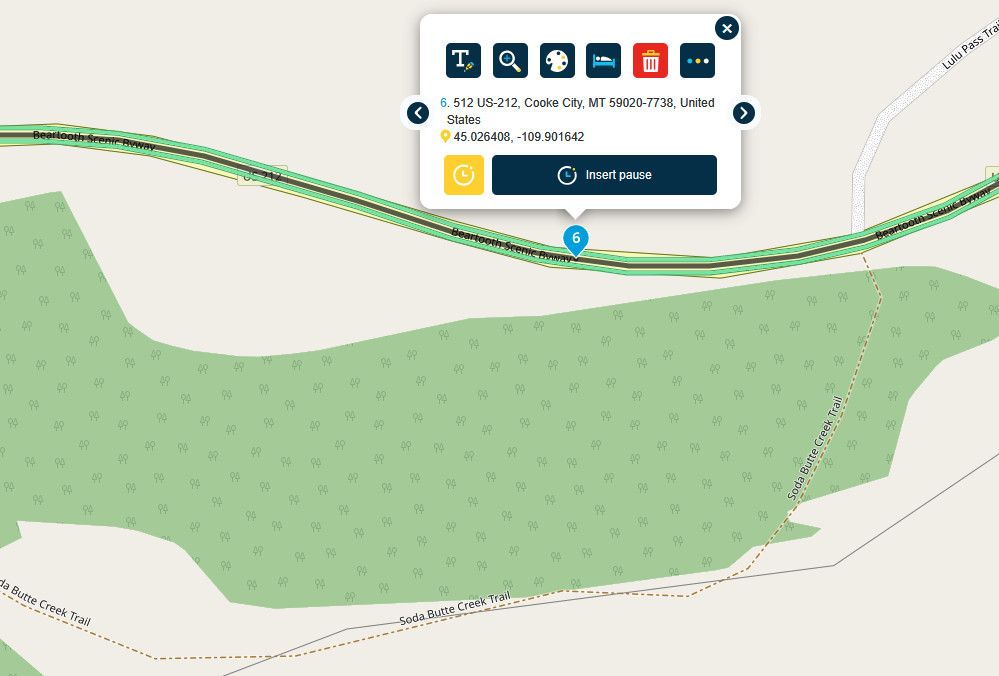
another way to confirm if a route is actually passable & prove that the Here map data is poor/bad is to turn on the "Traffic" data & zoom close in, you get a nice green confirmation that the route is open / flowing
-
@Brian-McG You are correct!
I was able to force it to go straight thru by adding waypoints!But that brings in another interesting point.
I know for sure that when HERE knows some road as "closed", there is no way you can force it to use it, no matter how many waypoints you try and add, unless you activate "disable seasonal closures".
So, the fact that by adding more points I am able to force it to stay on tells me that these spots are NOT designated as "closed" on HERE maps.Then, in this example Bear Tooth is the main road and with no avoidances selected why in the world would the HERE algorythm start taking you off the main road?
What am I missing here?
@Lenny-O-R-Xpert Lenny, I think it's simply a difference between how the respective MRA HERE and other base maps calculate the route. HERE has a preference for calculating across a more major route when available. You can see the same bias in a calculated route crossing the Southern Sierra in California:
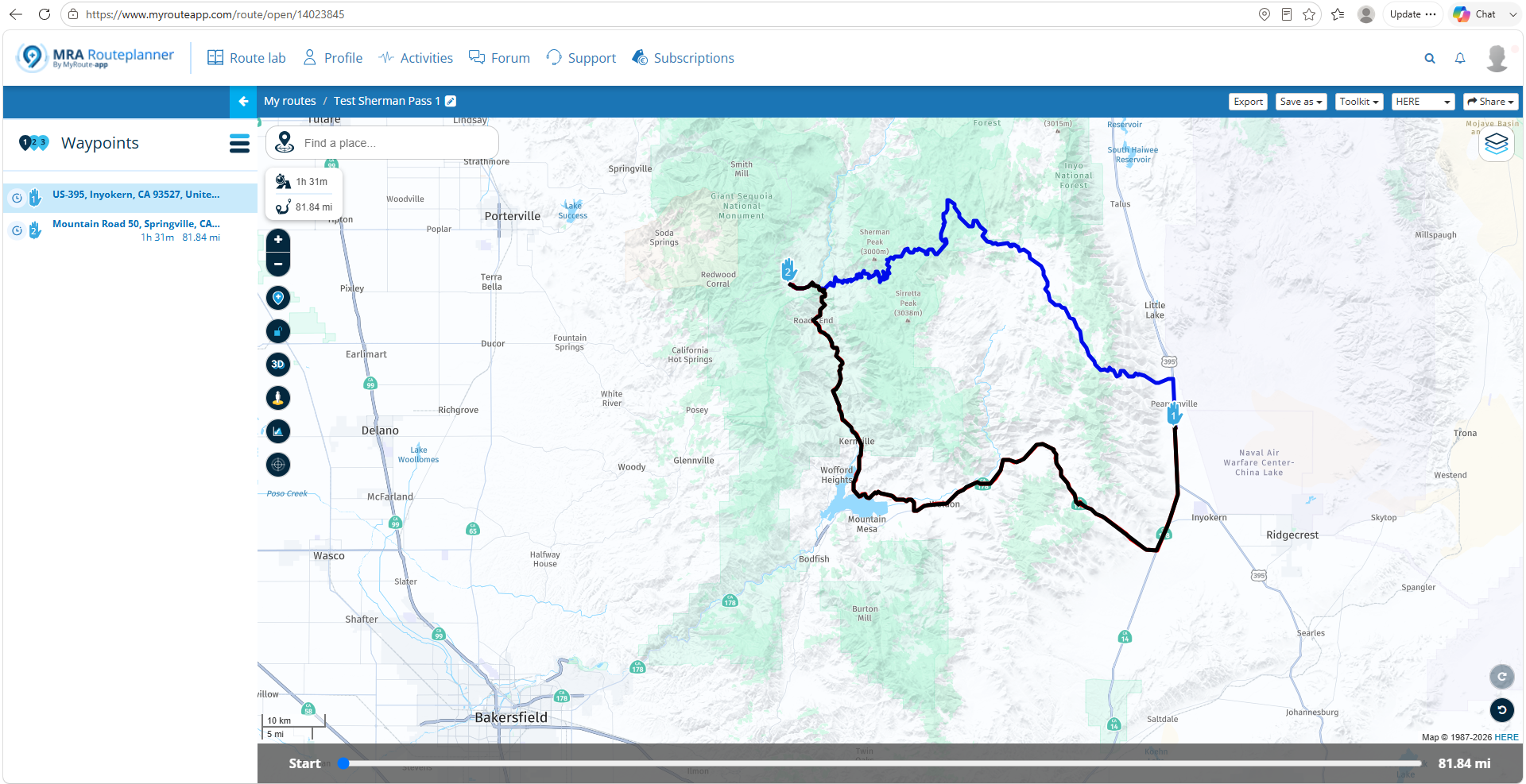
Adding additional shaping points gets you the desired results:
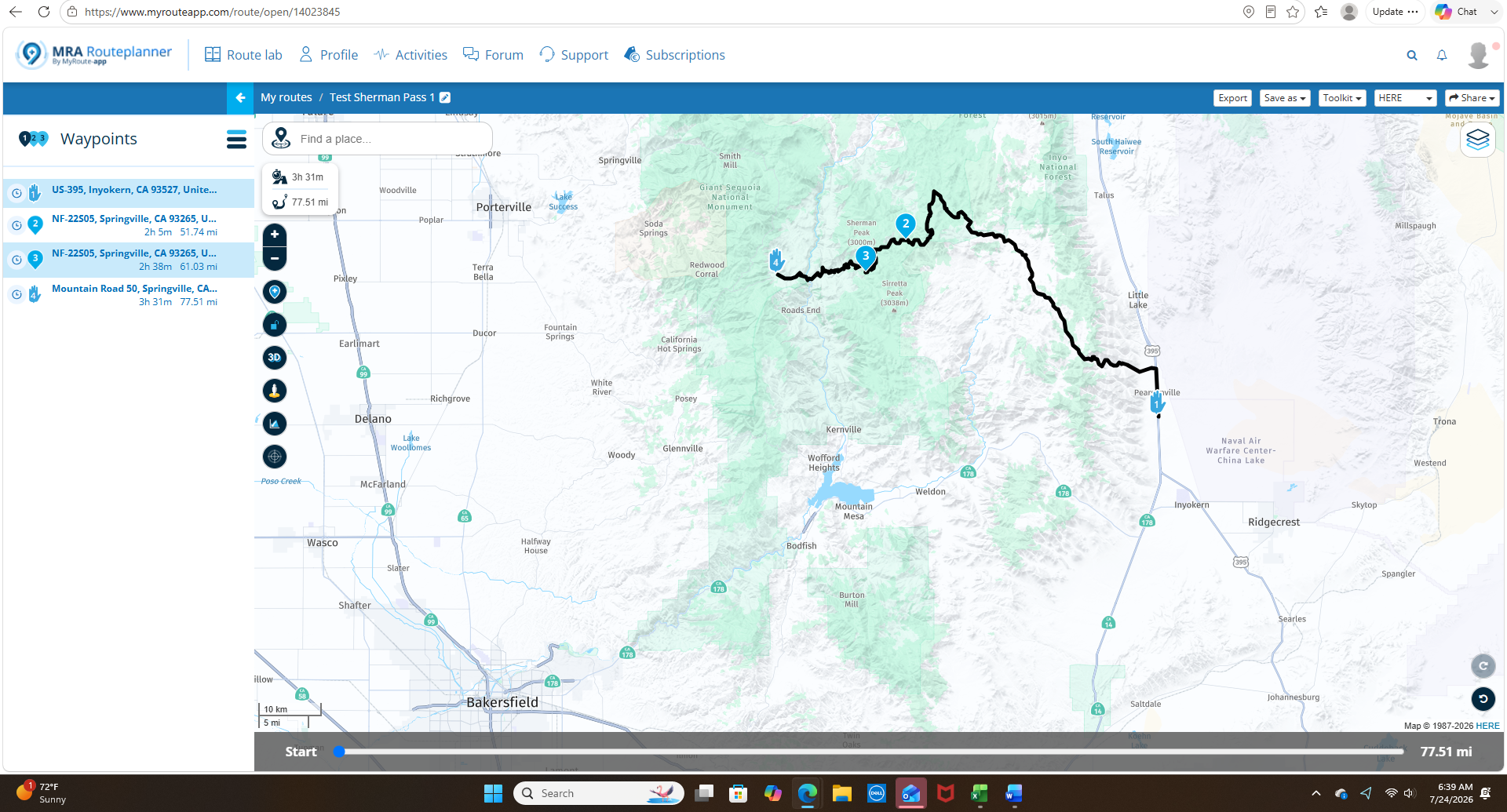
In general, it's always best practice to overload shaping points in more rural areas. Especially if the route is going to be exported to a Garmin device that has completely different calculation algorithms.
-
@Lenny-O-R-Xpert I think it depends on how the closure is set in the map data
sometimes a closure can be set as a single point on the road like a waypoint, other times it can be set as hundreds of points more similar to a trackthe routing algorithms are not that clever, it is just a case of is this path greater than or equal to the alternative path
if a closure is set as a single point you can fool the algorithm into routing through the closure by placing your waypoints near/close to the single closure point so the calculation becomes approximately equal to or shorter than the alternative path
if the closure is set like a track you would need to add hundreds of waypoints to overcome each & all of the closure points
another way to confirm if a route is actually passable & prove that the Here map data is poor/bad is to turn on the "Traffic" data & zoom close in, you get a nice green confirmation that the route is open / flowing
@Brian-McG So, assuming that you are correct about how HERE works their maps (I, personally have no idea about that) it's safe to say that the HERE somehow screwed up and we are at the mercy
of their work "under the hood" in designating closures and being up to date, making them not 100% reliable.
That's pretty sad, considering that it is our preferred MRA engine. -
@Lenny-O-R-Xpert Lenny, I think it's simply a difference between how the respective MRA HERE and other base maps calculate the route. HERE has a preference for calculating across a more major route when available. You can see the same bias in a calculated route crossing the Southern Sierra in California:
Adding additional shaping points gets you the desired results:
In general, it's always best practice to overload shaping points in more rural areas. Especially if the route is going to be exported to a Garmin device that has completely different calculation algorithms.
@John-S-Parry Yes, you are correct! I am totally aware of that.
Positive emotions are worth every penny ;)
-
@John-S-Parry Yes, you are correct! I am totally aware of that.
@LennyO OK, so do you still believe your previous statement that "HERE somehow screwed up and we are at the mercy"?
If the MRA version of HERE, in many cases, has a different routing algorithm than OSM/TomTom that simply favors more major roads, where is the screw up? I'm asking from the position of understand/learning.
-
@Brian-McG So, assuming that you are correct about how HERE works their maps (I, personally have no idea about that) it's safe to say that the HERE somehow screwed up and we are at the mercy
of their work "under the hood" in designating closures and being up to date, making them not 100% reliable.
That's pretty sad, considering that it is our preferred MRA engine.
@LennyO no Here have not screwed up the world is round & we are all ok

the only issue here
is that the map data that MRA is using for the Beartooth Highway is a little bit out of date
the Beartooth highway normally has a closure for the winter & this closure is in the set of map data that MRA is currently using in the planner & app
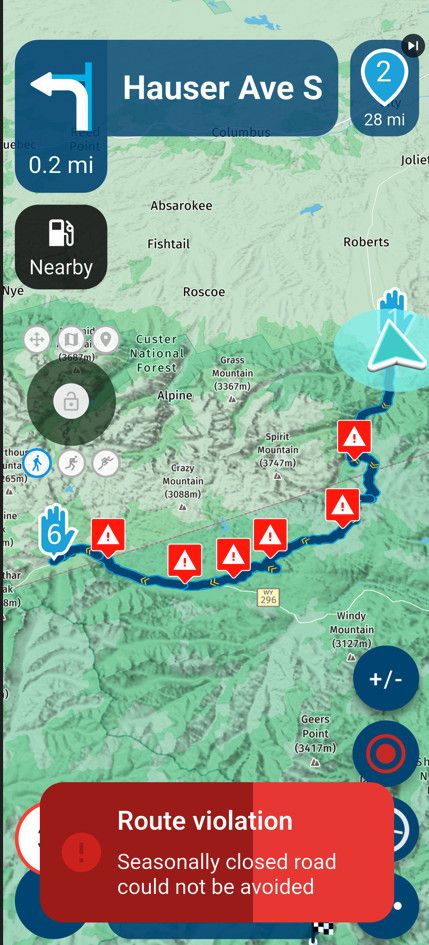
it is the nature of maps & has been since they were invented, as soon as they are printed they are out of date
I believe MRA takes a snapshot of the Here map data every time they do an MRA update
occasionally you will get cases like this where the map data is a little bit behind & this is why the "Disable Seasonal Closure" option is part of the toolkitBlackView BV7100, Android 12
Navigate "Routes as Tracks" in Offline mode with Offline Maps
No Wifi, no internet, no interruptions, works well -
@LennyO no Here have not screwed up the world is round & we are all ok
the only issue here
is that the map data that MRA is using for the Beartooth Highway is a little bit out of date
the Beartooth highway normally has a closure for the winter & this closure is in the set of map data that MRA is currently using in the planner & app
it is the nature of maps & has been since they were invented, as soon as they are printed they are out of date
I believe MRA takes a snapshot of the Here map data every time they do an MRA update
occasionally you will get cases like this where the map data is a little bit behind & this is why the "Disable Seasonal Closure" option is part of the toolkit
@Brian-McG That makes sense, absolutely!
So then, HERE-MRA map updates communication should be improved!
I know from some of the previous discussions that HERE is not the fastest to deal with and we all are sort of at their mercy.
I am sure the mothership reads this and will correct the situation! -
@lennyo It's too much of a diversion to address in this thread, but HERE is HERE. Their maps traditionally have issues with timeliness of updates, accurate road closure information, and even accurately placing roads where they actually should be. It's a simple reality that the MRA developers have to deal with, and that they are forced to deflect from in the various forums.
I mostly use MRA Routeplanner to create routes for GPX export into my Garmin devices. I've given up using HERE as the base map (for the above reasons) and use OSM instead. I've created dozens of critical routes used OSM as the base, and they import correctly into Garmin devices without issue. I'm comfortable that OSM a 100% GPX export solution, and I don't hesitate to use it.
Unfortunately, using NN requires development on the HERE map. It's one of life's inconveniences you'll have to work around. There are many creative (but awkward) solutions that have been presented in the forums for moving forward in most scenarios.
-
@lennyo It's too much of a diversion to address in this thread, but HERE is HERE. Their maps traditionally have issues with timeliness of updates, accurate road closure information, and even accurately placing roads where they actually should be. It's a simple reality that the MRA developers have to deal with, and that they are forced to deflect from in the various forums.
I mostly use MRA Routeplanner to create routes for GPX export into my Garmin devices. I've given up using HERE as the base map (for the above reasons) and use OSM instead. I've created dozens of critical routes used OSM as the base, and they import correctly into Garmin devices without issue. I'm comfortable that OSM a 100% GPX export solution, and I don't hesitate to use it.
Unfortunately, using NN requires development on the HERE map. It's one of life's inconveniences you'll have to work around. There are many creative (but awkward) solutions that have been presented in the forums for moving forward in most scenarios.
@John-S-Parry i agree.
Hello! It looks like you're interested in this conversation, but you don't have an account yet.
Getting fed up of having to scroll through the same posts each visit? When you register for an account, you'll always come back to exactly where you were before, and choose to be notified of new replies (either via email, or push notification). You'll also be able to save bookmarks and upvote posts to show your appreciation to other community members.
With your input, this post could be even better 💗
Register Login-
1217117
-
 01119
01119
-
1433886
-
 8640
8640
-
 2946
2946
-
 0413
0413
-
 037
037
-
0316