Skip to content
  • Categories
  • Recent
  • Popular
  • Support
  • MyRoute-app
Collapse
Brand Logo

MRA Community Forum

  1. Home
  2. The MyRoute-app
  3. [App] Announcements
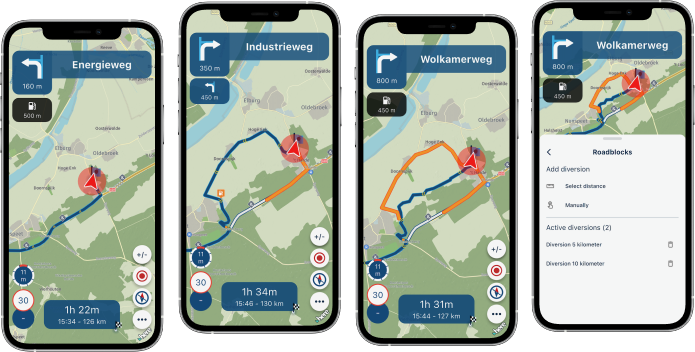
  4. New update 5.2 - Avoid roadblocks, persistent map items, POI management and share

New update 5.2 - Avoid roadblocks, persistent map items, POI management and share
Scheduled Pinned Locked Moved [App] Announcements
61 Posts 32 Posters 8.8k Views 13 Watching
  • Oldest to Newest
  • Newest to Oldest
  • Most Votes
Reply
  • Reply as topic
Log in to reply
This topic has been deleted. Only users with topic management privileges can see it.
  • KeesV Offline
    KeesV Offline
    KeesV
    wrote on last edited by
    #40

    When driving tracks the "Roadblock" feature is not available. Will this become available later?
    Axel Härtl 1 Reply Last reply
    0
    • KeesV KeesV

      When driving tracks the "Roadblock" feature is not available. Will this become available later?

      Axel Härtl Offline
      Axel Härtl Offline
      Axel Härtl
      wrote on last edited by Axel Härtl
      #41

      @KeesV

      Hi Kees,

      By definition, tracks (unlike routes) are followed exactly as specified. A deviation—in this case, a detour due to a road closure—is therefore generally not provided for.

      Best, Axel

      BMW R 1200 RT
      Tourenorientiert
      MRA lifetime member

      1 Reply Last reply
      0
      • Marinus van Deudekom Offline
        Marinus van Deudekom Offline
        Marinus van Deudekom
        RouteXpert
        wrote on last edited by
        #42

        It's on the wishlist

        Honda Goldwing GL1500,
        Honda Silverwing GL 650
        DMD2 T865X 8 inch Android tablet using MRA next for navigation
        Garmin XT sold
        Samsung S24FE mounted on a Quadlock and using Android Auto in my car

        KeesV 1 Reply Last reply
        0
        • Marinus van Deudekom Marinus van Deudekom

          It's on the wishlist

          KeesV Offline
          KeesV Offline
          KeesV
          wrote on last edited by
          #43

          @Marinus-van-Deudekom
          Thanks, that's good to know!

          1 Reply Last reply
          0
          • Aiello antonino Offline
            Aiello antonino Offline
            Aiello antonino
            wrote on last edited by Aiello antonino
            #44

            I can't figure out how to change the settings for for example, AVOID HIGHWAY, without having to restart everything... thanks!

            Peter Zehentreiter 1 Reply Last reply
            0
            • Aiello antonino Aiello antonino

              I can't figure out how to change the settings for for example, AVOID HIGHWAY, without having to restart everything... thanks!

              Peter Zehentreiter Online
              Peter Zehentreiter Online
              Peter Zehentreiter
              wrote on last edited by
              #45

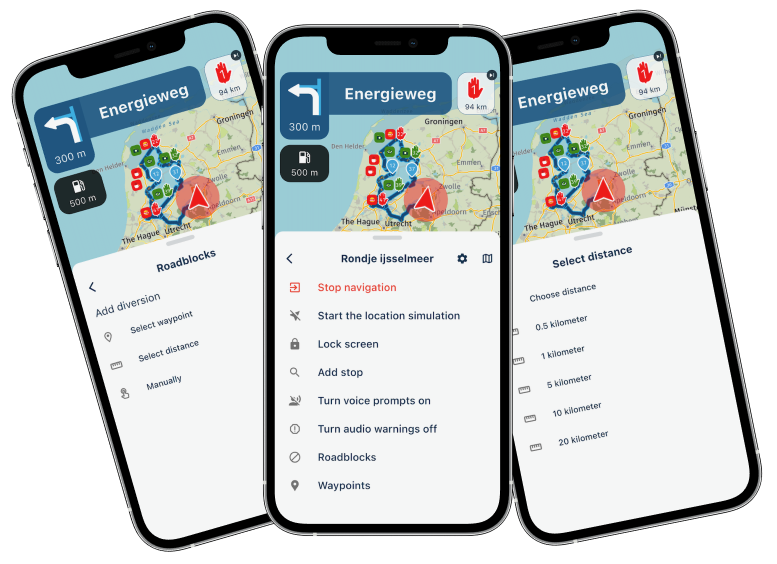
              @Aiello-antonino Whilst the navigation is running... click on the three dots in the bottom right-hand corner, then go to ‘Avoidance options’ and enable the desired settings.

              The system will recalculate immediately.

              BMW R 1250 GS
              MRA Navigation & SilverFox C1 Controller
              DMD-NOR7E 7"
              SPC Universal mount
              Motorola Edge 40 "offline"
              Sena SLR 3
              Sena 50 R

              1 Reply Last reply
              3
              • Aiello antonino Offline
                Aiello antonino Offline
                Aiello antonino
                wrote on last edited by
                #46

                Thanks! I didn't see there were other options on the menu! Excellent!

                1 Reply Last reply
                0
                • Kirsten De Weerd Offline
                  Kirsten De Weerd Offline
                  Kirsten De Weerd
                  wrote on last edited by
                  #47

                  Any plans on making the Roadblock feature available on CarPlay?
                  Or is it hidden somewhere and haven't I found it yet?

                  Corjan Meijerink 1 Reply Last reply
                  0
                  • Kirsten De Weerd Kirsten De Weerd

                    Any plans on making the Roadblock feature available on CarPlay?
                    Or is it hidden somewhere and haven't I found it yet?

                    Corjan Meijerink Online
                    Corjan Meijerink Online
                    Corjan Meijerink
                    Developer
                    wrote on last edited by
                    #48

                    @Kirsten-De-Weerd needs to be added later!

                    1 Reply Last reply
                    1
                    • Sigurður Pétursson 0 Offline
                      Sigurður Pétursson 0 Offline
                      Sigurður Pétursson 0
                      wrote last edited by
                      #49

                      I'm on 5.2.1 on iPhone and I can't see the new featured, like RoadBlock and changing avoidance while navigating a route?

                      Nick Carthew 1 Reply Last reply
                      0
                      • Sigurður Pétursson 0 Sigurður Pétursson 0

                        I'm on 5.2.1 on iPhone and I can't see the new featured, like RoadBlock and changing avoidance while navigating a route?

                        Nick Carthew Offline
                        Nick Carthew Offline
                        Nick Carthew
                        RouteXpert
                        wrote last edited by
                        #50

                        @Sigurður-Pétursson-0 While navigating a route open the navigation menu, three dots bottom right of the screen.

                        Always willing to help if I can.
                        Triumph Tiger 1200 XRT called Tina.
                        MRA Navigation Next and SilverFox BJ8

                        Sigurður Pétursson 0 1 Reply Last reply
                        0
                        • Nick Carthew Nick Carthew

                          @Sigurður-Pétursson-0 While navigating a route open the navigation menu, three dots bottom right of the screen.

                          Sigurður Pétursson 0 Offline
                          Sigurður Pétursson 0 Offline
                          Sigurður Pétursson 0
                          wrote last edited by
                          #51

                          @Nick-Carthew I tried that, however, if I select a single destination and Navigate, I have all the options, RoadBlock and Avoidance, just not when I select one of the routes from my library!

                          Nick Carthew 1 Reply Last reply
                          0
                          • Sigurður Pétursson 0 Sigurður Pétursson 0

                            @Nick-Carthew I tried that, however, if I select a single destination and Navigate, I have all the options, RoadBlock and Avoidance, just not when I select one of the routes from my library!

                            Nick Carthew Offline
                            Nick Carthew Offline
                            Nick Carthew
                            RouteXpert
                            wrote last edited by
                            #52

                            @Sigurður-Pétursson-0 That is because you have Navigate routes as tracks selected. Go to Navigation settings > Functional > Track navigation and turn off Navigate routes as tracks

                            Always willing to help if I can.
                            Triumph Tiger 1200 XRT called Tina.
                            MRA Navigation Next and SilverFox BJ8

                            Stevedo 6 0 1 Reply Last reply
                            0
                            • Nick Carthew Nick Carthew

                              @Sigurður-Pétursson-0 That is because you have Navigate routes as tracks selected. Go to Navigation settings > Functional > Track navigation and turn off Navigate routes as tracks

                              Stevedo 6 0 Offline
                              Stevedo 6 0 Offline
                              Stevedo 6 0
                              wrote last edited by
                              #53

                              @Nick-Carthew said:

                              @Sigurður-Pétursson-0 That is because you have Navigate routes as tracks selected. Go to Navigation settings > Functional > Track navigation and turn off Navigate routes as tracks

                              Hi @nick-carthew, I've checked but I'm struggling to find this important point documented in the manual anywhere! Perhaps I missed it.

                              Nick Carthew Sigurður Pétursson 0 2 Replies Last reply
                              0
                              • Stevedo 6 0 Stevedo 6 0

                                @Nick-Carthew said:

                                @Sigurður-Pétursson-0 That is because you have Navigate routes as tracks selected. Go to Navigation settings > Functional > Track navigation and turn off Navigate routes as tracks

                                Hi @nick-carthew, I've checked but I'm struggling to find this important point documented in the manual anywhere! Perhaps I missed it.

                                Nick Carthew Offline
                                Nick Carthew Offline
                                Nick Carthew
                                RouteXpert
                                wrote last edited by
                                #54

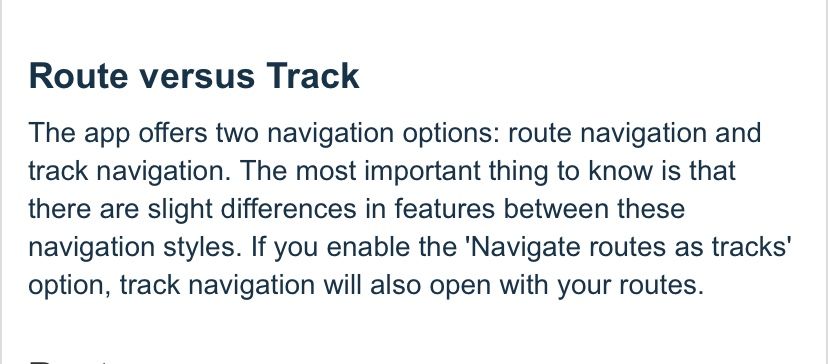
                                @Stevedo-6-0 A track cannot be manipulated the same way that a route can, hence the Roadblock option is not an option for track navigation. There is a mention that route and track navigation have their differences in section 7 - Navigation of the Mobile app manual.
                                17ef63d1-b485-483f-9213-ed09e9d608f4-image.jpeg

                                Always willing to help if I can.
                                Triumph Tiger 1200 XRT called Tina.
                                MRA Navigation Next and SilverFox BJ8

                                Stevedo 6 0 1 Reply Last reply
                                0
                                • Nick Carthew Nick Carthew

                                  @Stevedo-6-0 A track cannot be manipulated the same way that a route can, hence the Roadblock option is not an option for track navigation. There is a mention that route and track navigation have their differences in section 7 - Navigation of the Mobile app manual.

                                  17ef63d1-b485-483f-9213-ed09e9d608f4-image.jpeg

                                  Stevedo 6 0 Offline
                                  Stevedo 6 0 Offline
                                  Stevedo 6 0
                                  wrote last edited by
                                  #55

                                  @Nick-Carthew said:

                                  @Stevedo-6-0 A track cannot be manipulated the same way that a route can, hence the Roadblock option is not an option for track navigation. There is a mention that route and track navigation have their differences in section 7 - Navigation of the Mobile app manual.

                                  17ef63d1-b485-483f-9213-ed09e9d608f4-image.jpeg

                                  Hi @nick-carthew, I already understood everything you just wrote. The issue that @sigurður-pétursson-0 has is that he does not have all (some?) of the roadblock options when he navigates routes as tracks. Clearly that was something he was expecting to work. You suggested that he needs to turn off the option Navigate routes as tracks for the roadblock function to work. I'm sure you are correct here.

                                  My point is, this important point is not documented. Why not add a single sentence to the Roadblock section of the manual clearly identifying this difference.

                                  Please don't insult me by suggesting that the text you copied i.e. "The most important thing to know is that there are slight differences between these navigation styles." in any way covers it. What am I supposed to do, guess what these differences are?

                                  Nick Carthew Guzzist Con Hennekens 3 Replies Last reply
                                  0
                                  • Stevedo 6 0 Stevedo 6 0

                                    @Nick-Carthew said:

                                    @Stevedo-6-0 A track cannot be manipulated the same way that a route can, hence the Roadblock option is not an option for track navigation. There is a mention that route and track navigation have their differences in section 7 - Navigation of the Mobile app manual.

                                    17ef63d1-b485-483f-9213-ed09e9d608f4-image.jpeg

                                    Hi @nick-carthew, I already understood everything you just wrote. The issue that @sigurður-pétursson-0 has is that he does not have all (some?) of the roadblock options when he navigates routes as tracks. Clearly that was something he was expecting to work. You suggested that he needs to turn off the option Navigate routes as tracks for the roadblock function to work. I'm sure you are correct here.

                                    My point is, this important point is not documented. Why not add a single sentence to the Roadblock section of the manual clearly identifying this difference.

                                    Please don't insult me by suggesting that the text you copied i.e. "The most important thing to know is that there are slight differences between these navigation styles." in any way covers it. What am I supposed to do, guess what these differences are?

                                    Nick Carthew Offline
                                    Nick Carthew Offline
                                    Nick Carthew
                                    RouteXpert
                                    wrote last edited by Nick Carthew
                                    #56

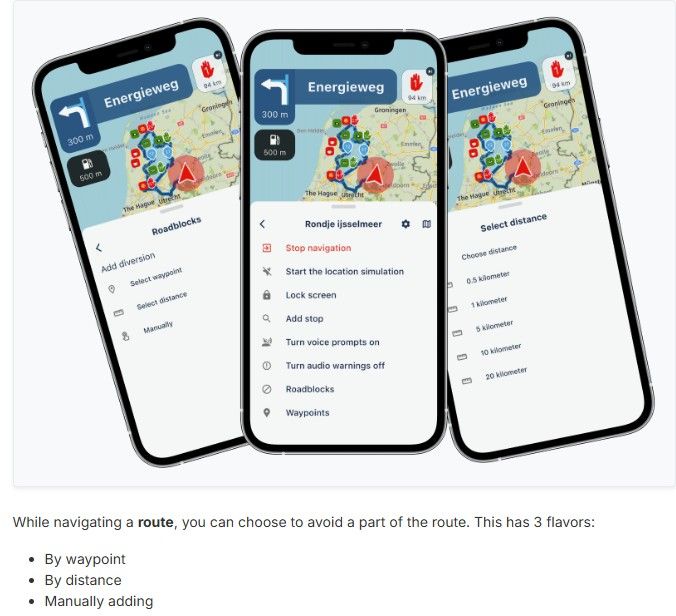
                                    @Stevedo-6-0 When the Roadblock feature was introduced, the text in the announcement clearly states 'While navigating a route' and the word route is emphasised by using bold text.
                                    fa370b15-48d6-4a06-8750-19c80e3b866c-image.jpeg

                                    Without fear of insulting you, I will use another screenshot from the manual that shows the instructions for Roadblocks. The word route is used 3 times.
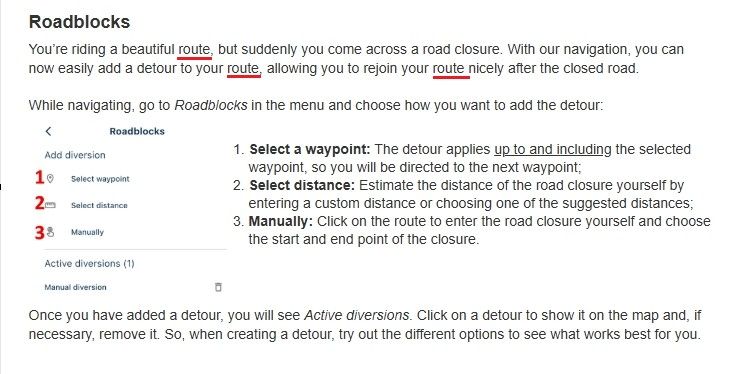
                                    7082e39f-8648-45c2-abfb-19729433619a-image.jpeg

                                    I see you have just created another topic in this forum" https://forum.myrouteapp.com/topic/11455/missing-functionality-in-mra-next

                                    Why not make a list of your criticisms/suggestions and put them in a support ticket.

                                    Always willing to help if I can.
                                    Triumph Tiger 1200 XRT called Tina.
                                    MRA Navigation Next and SilverFox BJ8

                                    1 Reply Last reply
                                    1
                                    • Stevedo 6 0 Stevedo 6 0

                                      @Nick-Carthew said:

                                      @Stevedo-6-0 A track cannot be manipulated the same way that a route can, hence the Roadblock option is not an option for track navigation. There is a mention that route and track navigation have their differences in section 7 - Navigation of the Mobile app manual.

                                      17ef63d1-b485-483f-9213-ed09e9d608f4-image.jpeg

                                      Hi @nick-carthew, I already understood everything you just wrote. The issue that @sigurður-pétursson-0 has is that he does not have all (some?) of the roadblock options when he navigates routes as tracks. Clearly that was something he was expecting to work. You suggested that he needs to turn off the option Navigate routes as tracks for the roadblock function to work. I'm sure you are correct here.

                                      My point is, this important point is not documented. Why not add a single sentence to the Roadblock section of the manual clearly identifying this difference.

                                      Please don't insult me by suggesting that the text you copied i.e. "The most important thing to know is that there are slight differences between these navigation styles." in any way covers it. What am I supposed to do, guess what these differences are?

                                      Guzzist Offline
                                      Guzzist Offline
                                      Guzzist
                                      Valued contributor
                                      wrote last edited by
                                      #57

                                      @Stevedo-6-0 ...I will not blame you, but let me kindly ask: are you sure you do understand clearly the difference about route and track?
                                      In a route, you have only a couple of route points, and each Navi device/app calculate the possible way from one point to the next. There is space for different interpretation in case, several streets could be used to reach the next point.

                                      In a track, you have thousands of tracks points, and usually no Navi device/app calculates and guides you. You simply have to follow the drawn line on the map. Except: MyRoute-App Navigation Next is able to navigate you also by a track.
                                      But because of the thousands of track points, there is no space for different interpretation by different Navi devices/apps. In consequence: there is no space to suggest detours in case of road blocks.

                                      You are right: it should be clearly described in focus for beginners. But if you have learned about tracks, routes, gpx data - it's clear without very detailed descriptions. 😉

                                      Nothing is impossible ;-)
                                      In past: GARMIN Zumo 210->GARMIN Zumo 395->GARMIN XT=> now: DMD T865-X + MyRoute-App, LocusMaps, OsmAnd.
                                      In past: GARMIN MapSource ->GARMIN BaseCamp->Tyre->Kurviger->Calimoto=> now: MRA-Routplanner.

                                      1 Reply Last reply
                                      1
                                      • Stevedo 6 0 Stevedo 6 0

                                        @Nick-Carthew said:

                                        @Stevedo-6-0 A track cannot be manipulated the same way that a route can, hence the Roadblock option is not an option for track navigation. There is a mention that route and track navigation have their differences in section 7 - Navigation of the Mobile app manual.

                                        17ef63d1-b485-483f-9213-ed09e9d608f4-image.jpeg

                                        Hi @nick-carthew, I already understood everything you just wrote. The issue that @sigurður-pétursson-0 has is that he does not have all (some?) of the roadblock options when he navigates routes as tracks. Clearly that was something he was expecting to work. You suggested that he needs to turn off the option Navigate routes as tracks for the roadblock function to work. I'm sure you are correct here.

                                        My point is, this important point is not documented. Why not add a single sentence to the Roadblock section of the manual clearly identifying this difference.

                                        Please don't insult me by suggesting that the text you copied i.e. "The most important thing to know is that there are slight differences between these navigation styles." in any way covers it. What am I supposed to do, guess what these differences are?

                                        Con Hennekens Offline
                                        Con Hennekens Offline
                                        Con Hennekens
                                        Alpha tester
                                        wrote last edited by
                                        #58

                                        @Stevedo-6-0, no one is here to insult anybody, please keep this in mind.
                                        I really wish everyone would take the effort of reading the manual as carefully as you, that would certainly be visible in the amount of questions in this forum. On the other hand, if all those people would trip over the same small issues, we would have an explosion of topics 😉

                                        I think @nick-carthew did a good suggestion of gathering your findings. It would make a nice guideline for support to attack and refine the manual. Remember, MRA is a very small team, which makes it a challenge to have everything correct at the right time.

                                        I am just an enthusiastic MRA user, and hope you will be one too!

                                        Most motorcycle problems are caused by the nut that connects the handlebar to the saddle.

                                        Check out RideSleepRepeat.eu, a biker community for sharing stays across Europe

                                        1 Reply Last reply
                                        2
                                        • Stevedo 6 0 Stevedo 6 0

                                          @Nick-Carthew said:

                                          @Sigurður-Pétursson-0 That is because you have Navigate routes as tracks selected. Go to Navigation settings > Functional > Track navigation and turn off Navigate routes as tracks

                                          Hi @nick-carthew, I've checked but I'm struggling to find this important point documented in the manual anywhere! Perhaps I missed it.

                                          Sigurður Pétursson 0 Offline
                                          Sigurður Pétursson 0 Offline
                                          Sigurður Pétursson 0
                                          wrote last edited by
                                          #59

                                          @Nick-Carthew Thank you, that was exactly that. I've turned of Navigate as Track and got all the features in every route. The reason it was on in the first place was to prevent the Navigator to take shortcuts between my way/shaping points. If that happens again, I guess I just need more way/shaping points.
                                          Thank you for your help

                                          Nick Carthew 1 Reply Last reply
                                          0

                                          Hello! It looks like you're interested in this conversation, but you don't have an account yet.

                                          Getting fed up of having to scroll through the same posts each visit? When you register for an account, you'll always come back to exactly where you were before, and choose to be notified of new replies (either via email, or push notification). You'll also be able to save bookmarks and upvote posts to show your appreciation to other community members.

                                          With your input, this post could be even better 💗

                                          Register Login

                                          Reply
                                          • Reply as topic
                                          Log in to reply
                                          • Oldest to Newest
                                          • Newest to Oldest
                                          • Most Votes


                                          • 1
                                          • 2
                                          • 3
                                          • 4
                                          ACTIVE USERS
                                          Nick Carthew
                                          Nick Carthew
                                          Marinus van Deudekom
                                          Marinus van Deudekom
                                          M. Schrijver
                                          M. Schrijver
                                          Guzzist
                                          Guzzist
                                          Hubert Thoring
                                          Hubert Thoring
                                          Jörgen
                                          Jörgen
                                          CD130
                                          CD130
                                          Corjan Meijerink
                                          Corjan Meijerink
                                          white.mouse
                                          white.mouse
                                          Stevedo 6 0
                                          Stevedo 6 0
                                          Peter Zehentreiter
                                          Peter Zehentreiter
                                          Aiello antonino
                                          Aiello antonino
                                          BertM
                                          BertM
                                          Con Hennekens
                                          Con Hennekens
                                          Sigurður Pétursson 0
                                          Sigurður Pétursson 0
                                          Dave J 0
                                          Dave J 0
                                          Edwin_M
                                          Edwin_M
                                          LE DIZES Freddy
                                          LE DIZES Freddy
                                          Jon Hye-Knudsen
                                          Jon Hye-Knudsen
                                          KeesV
                                          KeesV
                                          Axel Härtl
                                          Axel Härtl
                                          Cookie On Tour
                                          Cookie On Tour
                                          Rae Sewell
                                          Rae Sewell
                                          Garry Davis
                                          Garry Davis
                                          POPULAR TOPICS
                                          • Feature Request: Multi-Day Tour Planning Engine with Time, Rest & Routing Constraints
                                            Michele Skipper
                                            Michele Skipper
                                            3
                                            12
                                            210

                                          • Tracklog correction
                                            Guzzist
                                            Guzzist
                                            0
                                            9
                                            185

                                          • NC500 glitch
                                            Tenmill 0
                                            Tenmill 0
                                            0
                                            3
                                            34

                                          • Feature Request: Map Contrast & Road Visibility in Navigation⁠
                                            Rezzonico Mauro
                                            Rezzonico Mauro
                                            0
                                            3
                                            78

                                          • File informatie in Myrouteapp lijkt onbetrouwbaar
                                            Marinus van Deudekom
                                            Marinus van Deudekom
                                            0
                                            7
                                            289

                                          • Android TTS question
                                            LennyO
                                            LennyO
                                            0
                                            4
                                            120

                                          • New Zealand Routes
                                            Bull Tahr
                                            Bull Tahr
                                            1
                                            3
                                            103

                                          • Sena 30K Headset with MESH and navigation instructions
                                            M. Schrijver
                                            M. Schrijver
                                            0
                                            5
                                            161

                                          MY GROUPS
                                          • Login

                                          • Login or register to search.
                                          • First post
                                            Last post
                                          0
                                          • Categories
                                          • Recent
                                          • Popular
                                          • Support
                                          • MyRoute-app