
Navigation stopped working during Tour
-

Hi
Yesterday I made a tour ~200km.
After a short coffee-break the navigation stopped working.The position marking did not move from the last place.
No navigation prompts, no distance updates.So I stopped navigation. Closed MRA and restarted the App + the route.
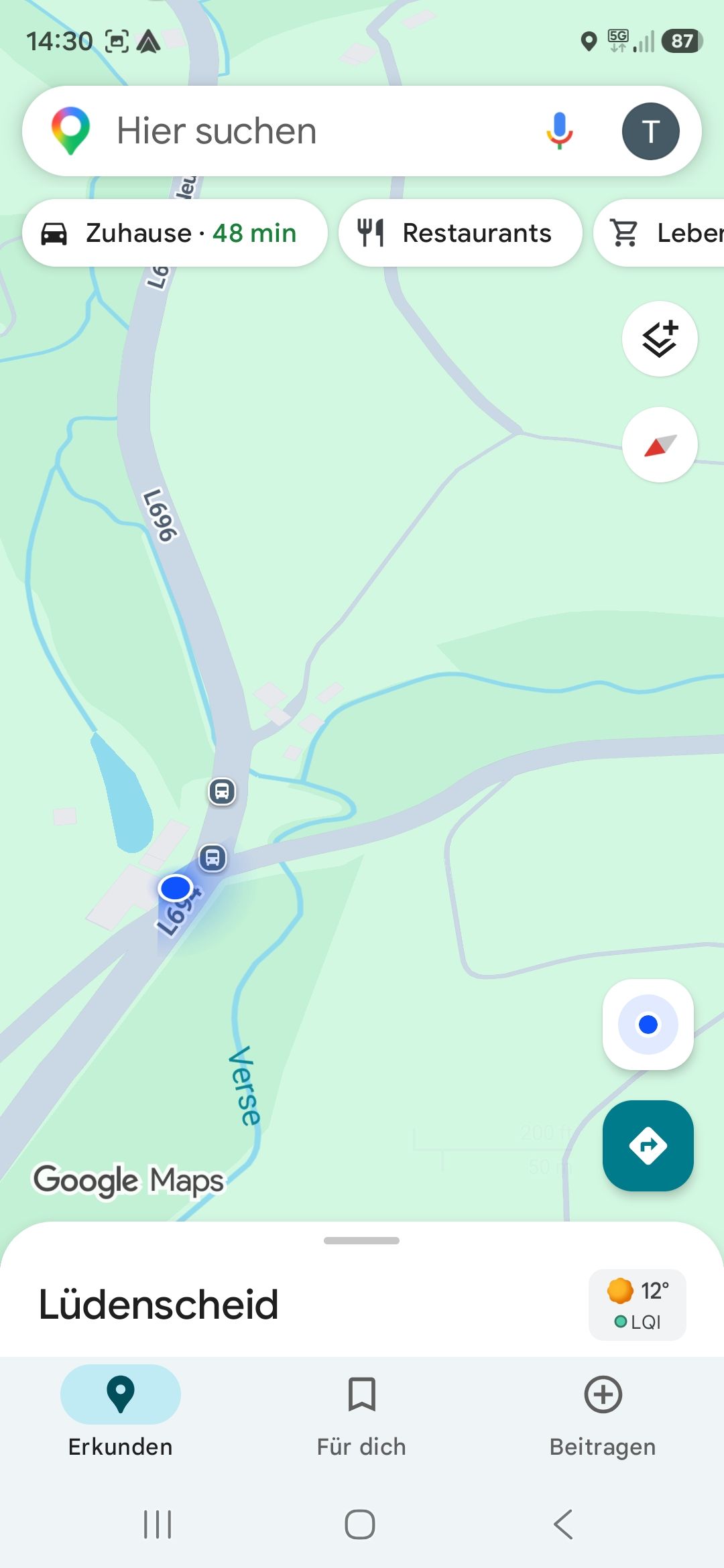
But the position arrow still was at the same (outdated) place. However MRA seemed to recognize that I was at a different position in the meantime (see screenshot), but navigation still was not possible.I switched to Google Maps and my GPS position was accurate (see 2nd screenshot).
This happend twice yesterday.
I have given the relevant permissions in Android (always) for GPS.
Also the Battery optimization is off.Clearing the App cache also had no effect.
The only solution was to deinstall and reinstall the App.
After thisbist was working again (temporarily).Am I doing anything wrong here?
Phone is a new Samsung Galaxy S26 Ultra.
Cheers
Thomas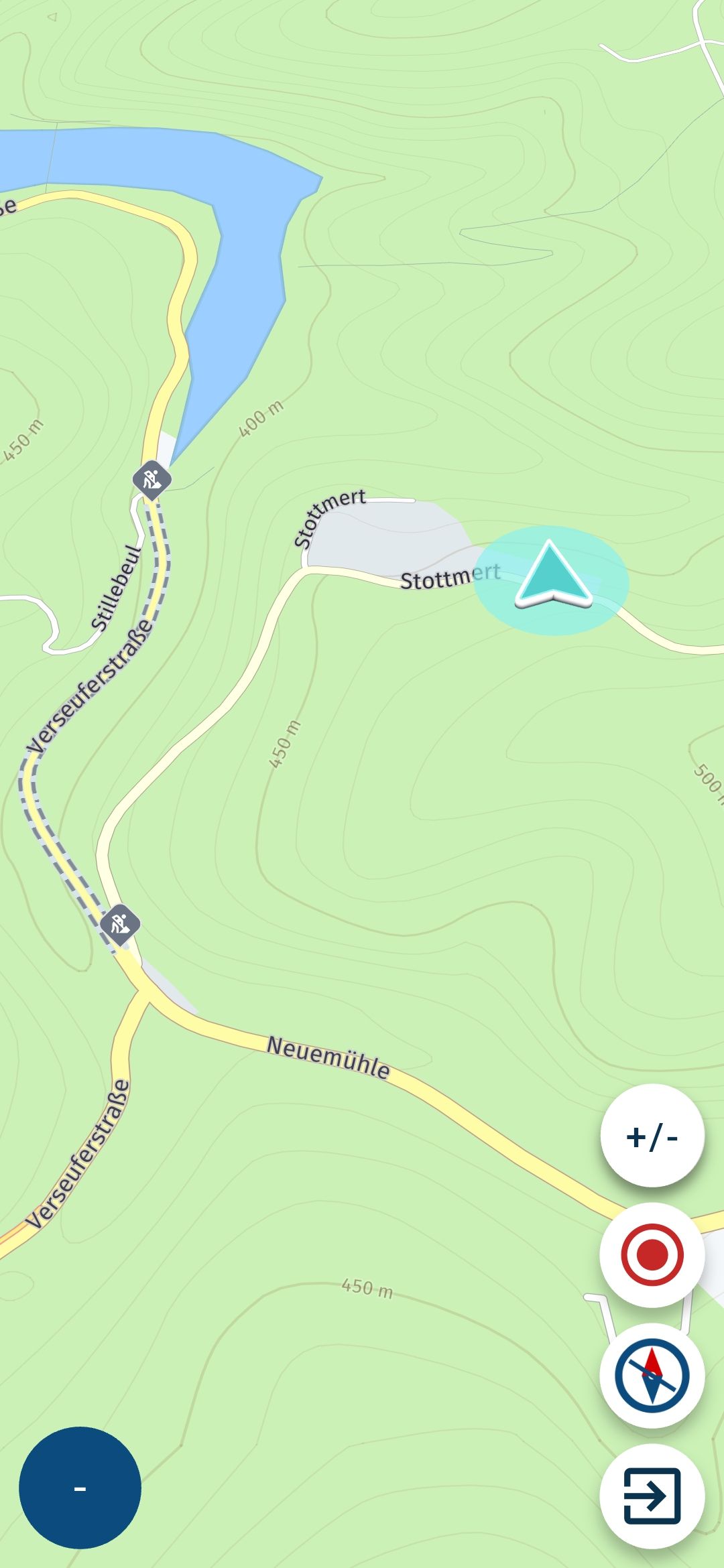
-
Hi
Yesterday I made a tour ~200km.
After a short coffee-break the navigation stopped working.The position marking did not move from the last place.
No navigation prompts, no distance updates.So I stopped navigation. Closed MRA and restarted the App + the route.
But the position arrow still was at the same (outdated) place. However MRA seemed to recognize that I was at a different position in the meantime (see screenshot), but navigation still was not possible.I switched to Google Maps and my GPS position was accurate (see 2nd screenshot).
This happend twice yesterday.
I have given the relevant permissions in Android (always) for GPS.
Also the Battery optimization is off.Clearing the App cache also had no effect.
The only solution was to deinstall and reinstall the App.
After thisbist was working again (temporarily).Am I doing anything wrong here?
Phone is a new Samsung Galaxy S26 Ultra.
Cheers
Thomas
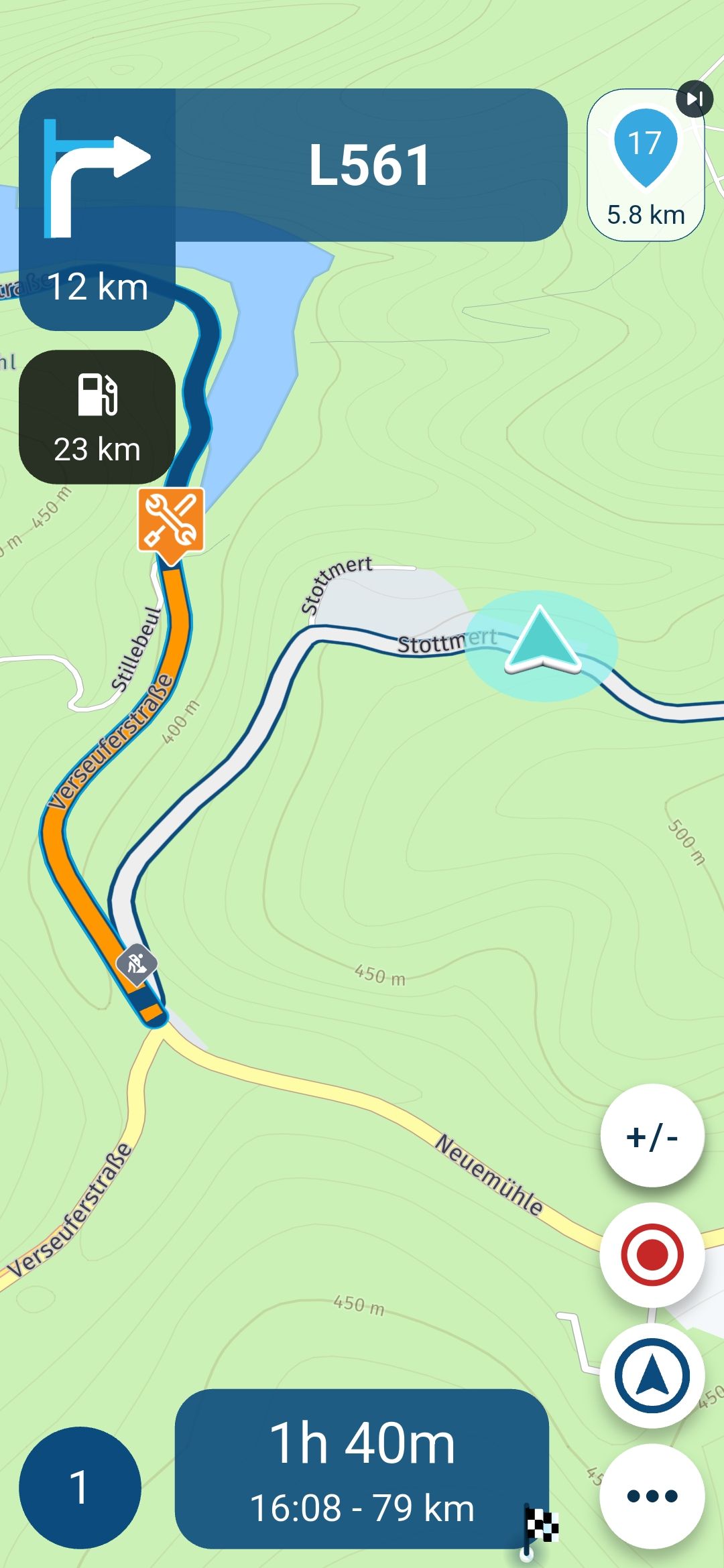
Selected the wrong screenshot in the first post.
This is what MRA showed me:
-

Hi, it looks like on the first picture that you are using free ride without navigation.
-
Hi
Thanks for your reply.
I had added an additional screenshot. Please refer the 2nd post.
As new member my input is reviewed first and published with a delay, actually.In this 2nd screenshot you can see, what I was referring to.
The position arrow is still at the old position (where we had a coffee break).
My actual position already was at the junction, exactly where the route is starting with the blue line again.As mentioned, ending navigation, closing the App (also from the background) and restarting, the position was shown as in my 1st posting (wrong position).
Starting the navigation then, resulted in the situation you can see in my 2nd posting.Any idea what I was doing wrong?
My friend was also using MRA, but without any issues.I have the full lifetime subscription for navigation and planning, if this information is relevant.
-
Hi
Thanks for your reply.
I had added an additional screenshot. Please refer the 2nd post.
As new member my input is reviewed first and published with a delay, actually.In this 2nd screenshot you can see, what I was referring to.
The position arrow is still at the old position (where we had a coffee break).
My actual position already was at the junction, exactly where the route is starting with the blue line again.As mentioned, ending navigation, closing the App (also from the background) and restarting, the position was shown as in my 1st posting (wrong position).
Starting the navigation then, resulted in the situation you can see in my 2nd posting.Any idea what I was doing wrong?
My friend was also using MRA, but without any issues.I have the full lifetime subscription for navigation and planning, if this information is relevant.

@guenniguenzelsen Could you please make the route public and post the link here...
So that we can better understand the errors you’ve mentioned. -
Sure
Here we go:https://www.myrouteapp.com/route/open/12984712
The coffee-break was at #17
I do not remember the position where this issue happened the first time already during the ride.Me and my mate (with DMD2 device) used the same route with MRA, but the issue only occurred on my device (new Samsung S26 Ultra).
Actually I just can answer every 60 minutes and my answer then is qeued for review.
So there my be a delay in my reaction -
Sure
Here we go:https://www.myrouteapp.com/route/open/12984712
The coffee-break was at #17
I do not remember the position where this issue happened the first time already during the ride.Me and my mate (with DMD2 device) used the same route with MRA, but the issue only occurred on my device (new Samsung S26 Ultra).
Actually I just can answer every 60 minutes and my answer then is qeued for review.
So there my be a delay in my reaction
@guenniguenzelsen You need some ^ votes, mine will help your posts.
-
Sure
Here we go:https://www.myrouteapp.com/route/open/12984712
The coffee-break was at #17
I do not remember the position where this issue happened the first time already during the ride.Me and my mate (with DMD2 device) used the same route with MRA, but the issue only occurred on my device (new Samsung S26 Ultra).
Actually I just can answer every 60 minutes and my answer then is qeued for review.
So there my be a delay in my reaction
@guenniguenzelsen I've looked at your route.
At point 17 there's nothing that could have caused your fault. Its just a little of route but that's well within the margins of the app.
Could it be that your internet connection was a bit low. When riding in Germany I usually drive using the offline methode because of the poor coverage in your country. (Compaired to mine)
Maybe that could be a solution for you -
Hi Marinus
You are right - mobile internet coverage in Germany sometimes still is poor.But for the situation above, the connection was good and available.
During the coffee break I surfed the internet and it was good and stable 5G connection.
Same at the junction ~1km later where I tried to get the App working again. There was good an stable connection - and the re-download of MRA from the Playstore was finished in the blink of an eye.Btw: Thanks for the received likes. I can now answer directly

-
Sounds a bit like this well known issue (?)
-
I am having the same issues.. no correct gps position. Strange behavior like thinking I am on a side road.. changing direction and so forth.. this is only using the app and not AA ..
-

I once had a similar problem. After trying many times, I finally reset my phone and . . . the problem was gone!
-
My (new) phone was just installed the day before...
-

Had the same problem yesterday. Never had it before. When I started the navigation I noticed that the app had problems to go online (message that it switched to offline mode appeared). I was on data and had just entered a wifi zone. So I expect that it is related to this.
The problem didnt go away until I switched off both data and wifi , stopped the app, restarted wifi and the app. -
I'm coming back from my 2nd bike-tour with MRA this year.
Same issue happened again.
After the coffe-break MRA stopped working.
Only a complete re-start of the smartphone brought it back to life.Is there any support or feedback on that topic from MRA in the meantime for us?
-
Is there any reaction from thr MRA team available? Is this bug at least known/recognized?
Actually I can not use the APP, as it stops working after every disconnect from my Android Auto Screen.
And it stops working on the Smartphone, not only the Android Auto Screen.Only way to bring it back to live is a full re-start of the phone.
But after every break, photo-stop, railway crossing.....it's simply not usable.I purchased the APP for a 3 digit amount of Euros this season, but cannot use it, nor receive any help.
Maybe this community is simply not the correct platform to adress my issue?
I'm ready to provide any Informationen, log, whatsoever to fix the bug.
-
Is there any reaction from thr MRA team available? Is this bug at least known/recognized?
Actually I can not use the APP, as it stops working after every disconnect from my Android Auto Screen.
And it stops working on the Smartphone, not only the Android Auto Screen.Only way to bring it back to live is a full re-start of the phone.
But after every break, photo-stop, railway crossing.....it's simply not usable.I purchased the APP for a 3 digit amount of Euros this season, but cannot use it, nor receive any help.
Maybe this community is simply not the correct platform to adress my issue?
I'm ready to provide any Informationen, log, whatsoever to fix the bug.
Quite often I had the same experience when using MRA NN on my AA device. Because of this I always have a second nav-app installed: TomTom Go or OSMAND. Lately I always stop the navigation when I have a break/stop. You do get a small window which asks if you want to cancel or proceed with the navigation. I leave that window open and before driving off I select the proceed option. Until now I didn't have the issue anymore. But I must say that I haven't done an extensive test yet.
-
Hi Léon
Thanks for your workaround. Actually, I try to do it that way.
But honestly, sometimes I just forget (last weekend when I had to wait at a railway-crossing for example).I'm looking for any response from the team now, if this issue is known and worked on, or if I can contribute anything.
The season is starting full steam ahead and I want to use MRA. For this reason I've purchased the full lifetime for Navigation and Routeplanning.
-
Yeah, that's why I hope that the new app version will arrive soon, since it should also have a lot of CP/AA improvements. Last news I have is that it should be available at the end of this month.
Hello! It looks like you're interested in this conversation, but you don't have an account yet.
Getting fed up of having to scroll through the same posts each visit? When you register for an account, you'll always come back to exactly where you were before, and choose to be notified of new replies (either via email, or push notification). You'll also be able to save bookmarks and upvote posts to show your appreciation to other community members.
With your input, this post could be even better 💗
Register Login






-
 0742
0742
-
0524
-
06220
-
06225
-
04126
-
 81354.8k
-
 17190
17190
-
0349