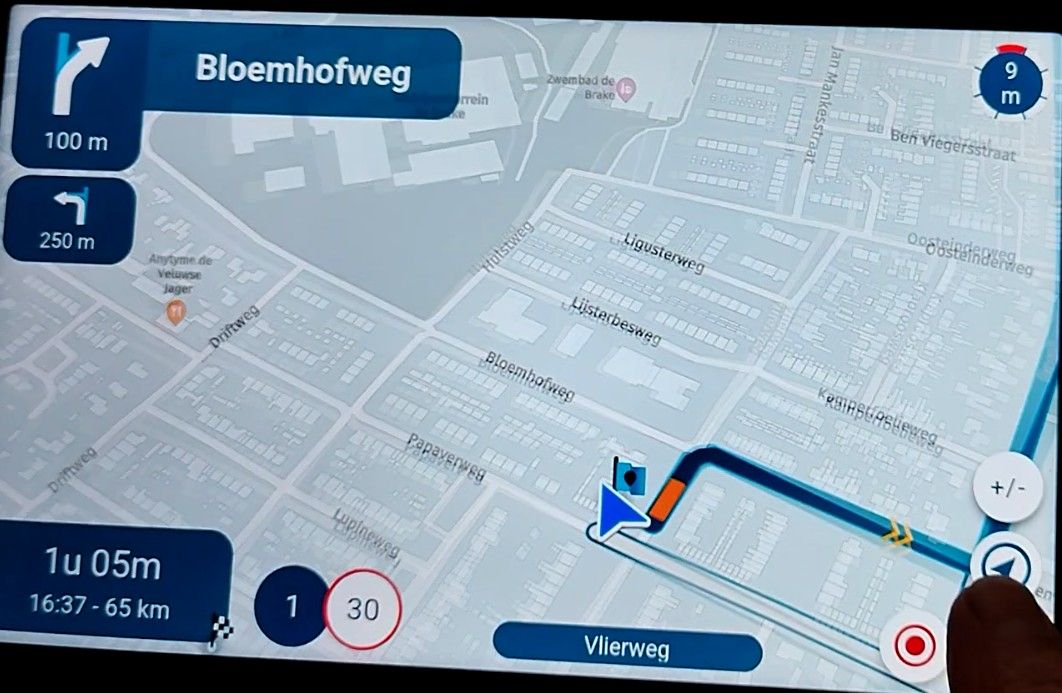
Map "spinning" when standing still
-

Yeah, that’s the annoying thing of these issues. It’s definitely device related so some have it, others do not. GPS positioning and especially on Android devices is not always as accurate as you’d hope.
-

With my Samsung S22 Ultra, it is reproducibly a problem that occurs with MyRouteApp, but not with Google Maps: Sitting on my couch at home, phone laying on a table (i.e., not moving at all, not being touched), after I have opened MRA on the phone, the "view direction" (map orientation) changes several times for about 90 or 180 degrees, the movement pauses some seconds and then moves again. When it finally settles, it doesn't point in the actual direction the phone faces. Moving the phone after it has "settled", the map doesn't react any longer (map not moving). The compass needle symbol changes from "triangle shape" (map rotation follows phone) to a "strike-through compass needle" (?). No AA device involved at this point. This happens only with MRA, Google Maps doesn't show any problems, and another navigation app I had (but have uninstalled a few days ago), Magic Earth, didn't either show this problem. For me, it's clearly isolated with MRA, and while I may have seen an occasional map spin in earlier versions, it is now a constant problem (as soon as the device doesn't move) and, unfortunately, dramatically reduces the actual usefulness of the app for navigation. Phone is the same; the only thing that has changed is, there have been security/firmware updates by Samsung over the years.
-

It is also MRA related. Why?
At least on my phones, only MRA has this problem. Maybe Here is the cause. I don't know
But just like i wrote in other topics. There are other GPS related things which only occur in MRA and not in other navigation apps -

Some phone have not only GPS but also a hardware compass. These are able to "see" in which direction they are held. Phones that don't have a compass, extrapolate direction from movement. That gets very inaccurate while standing still. Then there are apps that that rely on location services only (I don't know if direction is taken from compass if available), and there are apps that have different methods of approaching hardware. It all is a little more complicated then one might think...
-
same with me on i phone. not touching phone or anything. It flips and then flips back. doesn't happen every time but sometimes even when riding
-
I don't doubt that it's complicated. I also didn't mean to "blame", should it have come across like this, stating that Google Maps doesn't show this phenomenon, but rather point out that it is possible to somehow avoid this problem (i.e., there's hope). I do, however, wonder why (for my setup at least) the severity/frequency of the spinning has increased to a level where it occurs at practically every stop.
 Something must have changed.
 -
Corjan Meijerink referenced this topic on
-
Some phone have not only GPS but also a hardware compass. These are able to "see" in which direction they are held. Phones that don't have a compass, extrapolate direction from movement. That gets very inaccurate while standing still. Then there are apps that that rely on location services only (I don't know if direction is taken from compass if available), and there are apps that have different methods of approaching hardware. It all is a little more complicated then one might think...
@Con-Hennekens said in Map "spinning" when standing still:
Some phone have not only GPS but also a hardware compass. These are able to "see" in which direction they are held. Phones that don't have a compass, extrapolate direction from movement. That gets very inaccurate while standing still. Then there are apps that that rely on location services only (I don't know if direction is taken from compass if available), and there are apps that have different methods of approaching hardware. It all is a little more complicated then one might think...
It is true what you say but when you have multiple navigation apps on your phone and use all of them also. And only one app have issues. Than it is pretty obvious that this app is the one which needs to fix it.
I know it not easy to fix this. As @Corjan-Meijerink wrote. There so many different phones and not all have these issues.
(I use MRA Next only on Android Auto. Every comment, suggestion, etc will be based on my usage with Android Auto)
-
@Con-Hennekens said in Map "spinning" when standing still:
Some phone have not only GPS but also a hardware compass. These are able to "see" in which direction they are held. Phones that don't have a compass, extrapolate direction from movement. That gets very inaccurate while standing still. Then there are apps that that rely on location services only (I don't know if direction is taken from compass if available), and there are apps that have different methods of approaching hardware. It all is a little more complicated then one might think...
It is true what you say but when you have multiple navigation apps on your phone and use all of them also. And only one app have issues. Than it is pretty obvious that this app is the one which needs to fix it.
I know it not easy to fix this. As @Corjan-Meijerink wrote. There so many different phones and not all have these issues.

@M.-Schrijver When version 5.0.2 is released you may see an improvement.
-

I just tried version 5.02 and the problem with the map spinning while stopped is still there.
Happy holidays to everyone!
-
I just tried version 5.02 and the problem with the map spinning while stopped is still there.
Happy holidays to everyone!
@LE-DIZES-Freddy said in Map "spinning" when standing still:
I just tried version 5.02 and the problem with the map spinning while stopped is still there.
Happy holidays to everyone!
Are you one of the BETA testers?
Always willing to help if I can.
Triumph Tiger 1200 XRT called Tina.
MRA Navigation Next and SilverFox BJ8 -
@LE-DIZES-Freddy said in Map "spinning" when standing still:
I just tried version 5.02 and the problem with the map spinning while stopped is still there.
Happy holidays to everyone!
Are you one of the BETA testers?
@Nick-Carthew oui
-
I just tried version 5.02 and the problem with the map spinning while stopped is still there.
Happy holidays to everyone!
@LE-DIZES-Freddy is that on Android itself or in Android Auto?
A big part of my fix for the map spinning caused a major issue on some Android Auto devices leading to the position not updating al all

-
@LE-DIZES-Freddy is that on Android itself or in Android Auto?
A big part of my fix for the map spinning caused a major issue on some Android Auto devices leading to the position not updating al all
@Corjan-Meijerink bonsoir Cojan
sur Android , Crossacall Action X5 MRA 5.0.2-441
-
I won't make any further changes regarding this issue for now.
To resolve the true core of the issue - which I attempted - another solution needs to be designed. My fix resulted in major Android Auto issues.In short: some GPS information (regarding accuracy) is missing on certain devices causing the spinning. However some Android Auto devices never report this information as the GPS is often very cheap (no offence). So I simply cannot say something like "if accuracy is missing, ignore the position update" which in reality is exactly what we'd need to do. When I tested this with simulations the spinning was indeed completely gone while when driving everything still worked as designed. But because those Android Auto devices never report certain GPS metadata, this solution cannot be used.
Now why do other apps possibly not show this issue? We completely rely on GPS data and their accuracy while other apps (especially native ones) might use extra device information from internal accelerometers etc.
-
I won't make any further changes regarding this issue for now.
To resolve the true core of the issue - which I attempted - another solution needs to be designed. My fix resulted in major Android Auto issues.In short: some GPS information (regarding accuracy) is missing on certain devices causing the spinning. However some Android Auto devices never report this information as the GPS is often very cheap (no offence). So I simply cannot say something like "if accuracy is missing, ignore the position update" which in reality is exactly what we'd need to do. When I tested this with simulations the spinning was indeed completely gone while when driving everything still worked as designed. But because those Android Auto devices never report certain GPS metadata, this solution cannot be used.
Now why do other apps possibly not show this issue? We completely rely on GPS data and their accuracy while other apps (especially native ones) might use extra device information from internal accelerometers etc.
@Corjan-Meijerink I use two android devices to navigate with MRA. One a Samsung S25+ and the other is the T865 from ThorkRacing. Both devices are only having a spinning map at a stand still, not while driving.
Don't know if this information is useful, i didn't read this in this topic so thought the problem was a spinning map while driving. This never happend to my devices only at a complete stand still.
BMW R1250 GSA Ultimate Edition
Garmin XT3
Samsung S25+
Enthousiast MRA/MRA Next gebruiker -
@Corjan-Meijerink I use two android devices to navigate with MRA. One a Samsung S25+ and the other is the T865 from ThorkRacing. Both devices are only having a spinning map at a stand still, not while driving.
Don't know if this information is useful, i didn't read this in this topic so thought the problem was a spinning map while driving. This never happend to my devices only at a complete stand still.
said in Map "spinning" when standing still:
@Corjan-Meijerink I use two android devices to navigate with MRA. One a Samsung S25+ and the other is the T865 from ThorkRacing. Both devices are only having a spinning map at a stand still, not while driving.
Don't know if this information is useful, i didn't read this in this topic so thought the problem was a spinning map while driving. This never happend to my devices only at a complete stand still.
Yesterday i drove a route A2B and the only time the "spinned" was at a complete stand still. The map turnend about 180 degrees, the minute i started moving the map turned in the correct position. This kept on happening everytime i stopped for a turn or trafficlight.
BMW R1250 GSA Ultimate Edition
Garmin XT3
Samsung S25+
Enthousiast MRA/MRA Next gebruiker -
said in Map "spinning" when standing still:
@Corjan-Meijerink I use two android devices to navigate with MRA. One a Samsung S25+ and the other is the T865 from ThorkRacing. Both devices are only having a spinning map at a stand still, not while driving.
Don't know if this information is useful, i didn't read this in this topic so thought the problem was a spinning map while driving. This never happend to my devices only at a complete stand still.
Yesterday i drove a route A2B and the only time the "spinned" was at a complete stand still. The map turnend about 180 degrees, the minute i started moving the map turned in the correct position. This kept on happening everytime i stopped for a turn or trafficlight.

@Erik-Plaggenborg when the 441 update was rekeased I did a test with the T865X and for me the map didn’t spin at a complete stop. Are you using the T865 or like me the T865X. As fas as I know the difference those twi is the better screen and more interval memory
Honda Goldwing GL1500,
Honda Silverwing GL 650
DMD2 T865X 8 inch Android tablet using MRA next for navigation
Garmin XT sold
Samsung S24FE mounted on a Quadlock and using Android Auto in my car -
@Erik-Plaggenborg when the 441 update was rekeased I did a test with the T865X and for me the map didn’t spin at a complete stop. Are you using the T865 or like me the T865X. As fas as I know the difference those twi is the better screen and more interval memory
The thread (at least how I meant it) is about the spinning when at a standstill; for me, there is no problem while moving. Unfortunately, the difficulties also occur on my phone (Samsung S22 Ultra) alone, without any Android Auto device involved, and they keep occurring with 5.02 as well. It happens at practically every stop, and almost every time the map then turns 180 degrees (facing the direction from where I came), causing the navigation to recalculate. Something must have changed compared to earlier versions-be it the app, the phone, or hardware conditions-because I did not have the problem this massively in the past. It drastically reduces the usefulness of the app, and it is not good news that seemingly not much can be done to solve this.
I do, however, appreciate the attempts to fix it, and I am hopeful that a new solution can be found and designed over time. I like the app a lot; it's been my everyday navigation app (and especially now, with free drive, even more so)-I believe in the team's ability to eventually find a fix for the phenomenon. 
-
I’ll definitely spend some more time!
Hello! It looks like you're interested in this conversation, but you don't have an account yet.
Getting fed up of having to scroll through the same posts each visit? When you register for an account, you'll always come back to exactly where you were before, and choose to be notified of new replies (either via email, or push notification). You'll also be able to save bookmarks and upvote posts to show your appreciation to other community members.
With your input, this post could be even better 💗
Register Login












-
 0443.5k
-
025192
-
 010180
-
 0316
0316
-
16332
-
09193
-
026
-
0227