Uitspreken adressen en notities
-

Ik ben een aantal routes aan het maken voor de vakantie en loop tegen wat vragen aan. Het gaat om de teksten die in het "adres" vlak staan en in de "notitie" gezet kunnen worden.
De instelling in de app is dat ik informatie uitgesproken wil hebben.
Wanneer ik tekst invoer in het notitievlak bij een via punt, dan wordt het adres uitgesproken en daarna de tekst die in de notitie is geplaatst. Wanneer ik het adresvlak leeg maak (extra inspanning bij ieder punt waar ik tekst invoer) dan wordt alleen de notitie voorgelezen. Dat is op zich prima.
Het gaat sneller wanneer ik het adresvak leegmaak, en hier de notitie plaats. Dan gaat dat in 1 handeling goed.
Het probleem ontstaat wanneer ik de route nog een keer goed controleer en ik de viapunten net even een klein stukje verplaats. Op dat moment wordt mijn tekst in het adresvak overschreven, en wordt het nieuwe adres in het adresvak geplaatst en uitgesproken. Dit gaat ook zo bij het leeghalen van het adresvak en de tekst plaats in het notitievak. Hoe doen jullie dit of is er een betere manier? -
Ik ben een aantal routes aan het maken voor de vakantie en loop tegen wat vragen aan. Het gaat om de teksten die in het "adres" vlak staan en in de "notitie" gezet kunnen worden.
De instelling in de app is dat ik informatie uitgesproken wil hebben.
Wanneer ik tekst invoer in het notitievlak bij een via punt, dan wordt het adres uitgesproken en daarna de tekst die in de notitie is geplaatst. Wanneer ik het adresvlak leeg maak (extra inspanning bij ieder punt waar ik tekst invoer) dan wordt alleen de notitie voorgelezen. Dat is op zich prima.
Het gaat sneller wanneer ik het adresvak leegmaak, en hier de notitie plaats. Dan gaat dat in 1 handeling goed.
Het probleem ontstaat wanneer ik de route nog een keer goed controleer en ik de viapunten net even een klein stukje verplaats. Op dat moment wordt mijn tekst in het adresvak overschreven, en wordt het nieuwe adres in het adresvak geplaatst en uitgesproken. Dit gaat ook zo bij het leeghalen van het adresvak en de tekst plaats in het notitievak. Hoe doen jullie dit of is er een betere manier?
@Huibertus sorry als ik het verkeerd begrijp, Google Translate is maar een beetje goed
Ik denk dat je bedoelt dat je je aantekeningen in het adresveld van het punt plaatst en dat dit voor jou werkt
Het probleem ontstaat wanneer je het punt verplaatst en de notitie-informatie die je in het adresveld hebt geplaatst verloren gaat / overschrijdt wordtAls het bovenstaande klopt, kun je proberen "Ask for waypoint name" in te schakelen.
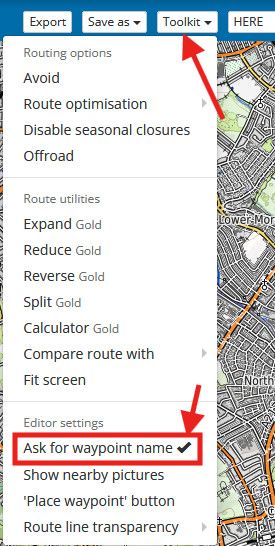
Wanneer je het punt verplaatst, wordt je gevraagd te bevestigen dat je de tekst in het adresveld wilt wijzigen naar het adres van de nieuwe locatie
selecteer "Annuleren" en het punt behoudt de oude informatie / notities die je eerder had ingevoerd
sorry if I am misunderstanding, google translate is only a little good
I think what you are saying is you are placing your notes in the address field of the point & this works for you
the problem comes when you move the point & the note information you have placed in the address field is lost / overwrittenif the above is correct you can try enabling "Ask for waypoint name"
when you move the point it will ask you to confirm that you want to change the text in the address field to the address of the new location
select "Cancel" & the point will keep the old information / notes that you had previously entered -

Ik snap je workaround maar daardoor breng het jezelf wel wat in de problemen.
Alleen de tekst bij het adres stuk wordt vervangen dus ik zou je aanraden om alleen tekst te zetten in het notitie veld. Die tekst blijft nl wel staan wanneer je een shaping point verplaatst. -

Mijn handelswijze is om namen van routepunten in het naamvak te zetten. Inderdaad veranderd dat wanneer je een punt verplaatst. Ik ga dus pas namen geven wanneer alle punten correct staan. Alleen uitgebreidere tekst zet ik in het notitievak, en dan geef ik dat punt alsnog een zinvolle naam, zodat het adres niet wordt uitgesproken.
-
@Huibertus sorry als ik het verkeerd begrijp, Google Translate is maar een beetje goed
Ik denk dat je bedoelt dat je je aantekeningen in het adresveld van het punt plaatst en dat dit voor jou werkt
Het probleem ontstaat wanneer je het punt verplaatst en de notitie-informatie die je in het adresveld hebt geplaatst verloren gaat / overschrijdt wordtAls het bovenstaande klopt, kun je proberen "Ask for waypoint name" in te schakelen.
Wanneer je het punt verplaatst, wordt je gevraagd te bevestigen dat je de tekst in het adresveld wilt wijzigen naar het adres van de nieuwe locatie
selecteer "Annuleren" en het punt behoudt de oude informatie / notities die je eerder had ingevoerd
sorry if I am misunderstanding, google translate is only a little good
I think what you are saying is you are placing your notes in the address field of the point & this works for you
the problem comes when you move the point & the note information you have placed in the address field is lost / overwrittenif the above is correct you can try enabling "Ask for waypoint name"
when you move the point it will ask you to confirm that you want to change the text in the address field to the address of the new location
select "Cancel" & the point will keep the old information / notes that you had previously entered
-
Ik snap je workaround maar daardoor breng het jezelf wel wat in de problemen.
Alleen de tekst bij het adres stuk wordt vervangen dus ik zou je aanraden om alleen tekst te zetten in het notitie veld. Die tekst blijft nl wel staan wanneer je een shaping point verplaatst.
@Marinus-van-Deudekom Ja dat kan, maar wanneer je het punt verplaatst wordt het adresvak weer gevuld met het nieuwe adres dat je weer weg moet halen.
-
Mijn handelswijze is om namen van routepunten in het naamvak te zetten. Inderdaad veranderd dat wanneer je een punt verplaatst. Ik ga dus pas namen geven wanneer alle punten correct staan. Alleen uitgebreidere tekst zet ik in het notitievak, en dan geef ik dat punt alsnog een zinvolle naam, zodat het adres niet wordt uitgesproken.
@Con-Hennekens Hoi Con, dat zou in een ideale situatie natuurlijk prima gaan, maar ik heb wel eens dat wanneer ik de route klaar heb en alles heb ingevuld, ik toch nog de route aan wil passen, en dan ben ik de tekst uit het adresvak gewoon kwijt.
Ik zie trouwens helemaal geen voordelen dat het adres automatisch gevuld wordt. Zou het niet mogelijk zijn dat je deze optie aan kan vinken? -
@Brian-McG THnx, I am going to try that solution.
-
@Marinus-van-Deudekom Ja dat kan, maar wanneer je het punt verplaatst wordt het adresvak weer gevuld met het nieuwe adres dat je weer weg moet halen.
@Huibertus correct en tevens juist.
Misschien dat het bij de nieuwe webplanner meegenomen gaat worden. Tot die tijd ff wegvegen -
@Con-Hennekens Hoi Con, dat zou in een ideale situatie natuurlijk prima gaan, maar ik heb wel eens dat wanneer ik de route klaar heb en alles heb ingevuld, ik toch nog de route aan wil passen, en dan ben ik de tekst uit het adresvak gewoon kwijt.
Ik zie trouwens helemaal geen voordelen dat het adres automatisch gevuld wordt. Zou het niet mogelijk zijn dat je deze optie aan kan vinken?
@Huibertus, ja dat klopt. Maar je ziet in de routepunt kolom links al dat de betreffende routepunt een naam heeft. Die copy paste ik dan gewoon even.
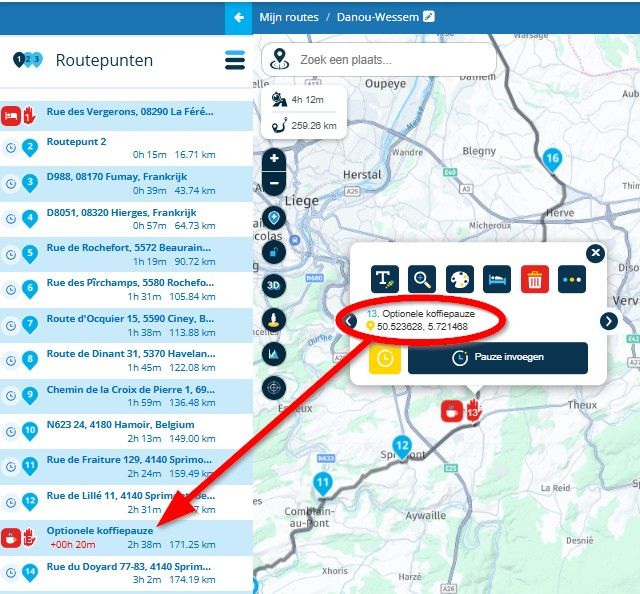
Uiteraard hoop ik ook dat er een optie komt om een zelf gekozen naam vast te houden. Maar heel eerlijk, ik zou er ook geen moeite mee hebben om alleen de notitie voorgelezen te krijgen. Voor nu is het zoals het is

-
Wat @con-hennekens heeft uitgelegd is inderdaad eigenlijk de enige manier om ermee om te gaan maar van tijd tot tijd loop ik ook tegen het probleem aan de naam van het waypoint gewijzigd wordt, als je deze verplaatst.
Maar als je de werkwijze eenmaal weet, is het nog steeds geen prettige manier maar het is werkbaar en het scheelt dan dubbel werk. -
Mijn handelswijze is om namen van routepunten in het naamvak te zetten. Inderdaad veranderd dat wanneer je een punt verplaatst. Ik ga dus pas namen geven wanneer alle punten correct staan. Alleen uitgebreidere tekst zet ik in het notitievak, en dan geef ik dat punt alsnog een zinvolle naam, zodat het adres niet wordt uitgesproken.

@Con-Hennekens said:
Mijn handelswijze is om namen van routepunten in het naamvak te zetten. Inderdaad veranderd dat wanneer je een punt verplaatst. Ik ga dus pas namen geven wanneer alle punten correct staan. Alleen uitgebreidere tekst zet ik in het notitievak, en dan geef ik dat punt alsnog een zinvolle naam, zodat het adres niet wordt uitgesproken.
Het zou mooi zijn als je de routepunt naam kunt vergrendelen
-
Ja het is misschien een idee voor de ontwikkelaars om dit deel nog eens tegen het licht te houden. Ik kan mij bijna niet voorstellen dat de straatnamen bij elk punt zinvol is.
Ik kan mij bijna niet voorstellen dat de straatnamen bij elk punt zinvol is.
Zeker niet, maar ALS er dan een adres staat, zou het wel ultiem dom zijn als die niet mee veranderd als je hem verplaatst
Het zou mooi zijn als je de routepunt naam kunt vergrendelen
Nòg mooier zou het zijn als een handmatig veranderde naam alleen nog handmatig veranderd kan worden
. Scheelt weer een vinkje. -
En dan terug naar de topic van de start.
Het zou helemaal geweldig zijn dat wanneer het notitie veld gevuld is dat dan alleen dat notitie veld wordt uitgesproken.
Dan is direct ook het bijkomende probleem van het hernoemen van het shaping point bij verplaatsing opgelost. Dat is dan niet meer zo belangrijk -
Dat is idd DE oplossing

Dat is idd DE oplossing
Niet helemaal, want dan moet je alles dubbel invoeren als je ook de naam netjes in de routepuntlijst wilt hebben, zoals in mijn eerder screenshot
-
Dat is idd DE oplossing
Niet helemaal, want dan moet je alles dubbel invoeren als je ook de naam netjes in de routepuntlijst wilt hebben, zoals in mijn eerder screenshot
@Con-Hennekens misschien dat onze devs het zo kunnen maken dat alleen de eerste regel van het notitieveld in de routepunten lijst kan komen te staan. Er zijn altijd meerdere wegen naar Rome
-
En dan terug naar de topic van de start.
Het zou helemaal geweldig zijn dat wanneer het notitie veld gevuld is dat dan alleen dat notitie veld wordt uitgesproken.
Dan is direct ook het bijkomende probleem van het hernoemen van het shaping point bij verplaatsing opgelost. Dat is dan niet meer zo belangrijk
Het zou helemaal geweldig zijn dat wanneer het notitie veld gevuld is dat dan alleen dat notitie veld wordt uitgesproken.
Zeker geen goede oplossing
in het waypoint-naamveld voer ik nuttige informatie in die ik wil aankondigen, zoals 15 mijl tot het volgende tankstation, een gevaarlijke bocht van 90 voet direct na de Hump Back Bridge, de naam van de koffiestop, enzovoort
Door deze informatie in de naam van het waypoint te zetten, is het ook beschikbaar voor gebruik in andere navigatiesystemenDoor de domme 'No Announcement' als de puntnaam een nummer bevat, is de enige manier om ervoor te zorgen dat een puntnaam wordt aangekondigd iets in het notitieveld te plaatsen, ik gebruik gewoon een simpele punt: "."
Met jouw voorgestelde oplossing zou ik dezelfde informatie moeten invoeren in zowel de puntnaam als de notitievelden, dus dat verdubbelt de inspanning, dus voor mij is dit geen goed idee
#########
definitely not a good solution
in the waypoint name field I enter useful information that I want announced such as 15 miles to next fuel station, dangerous 90' bend immediately after hump back bridge, the name of the coffee stop etc
putting this info in the waypoint name means it is also available for use in other navigation systemsbecause of the dumb no announcement if the point name has a number in it the only way to ensure a point name is announced is to place something in the notes field, I just use a simple full stop "."
with your proposed solution I would have to enter the same information in both the point name & the note fields, so doubling the effort, so for me this is a bad idea
Hello! It looks like you're interested in this conversation, but you don't have an account yet.
Getting fed up of having to scroll through the same posts each visit? When you register for an account, you'll always come back to exactly where you were before, and choose to be notified of new replies (either via email, or push notification). You'll also be able to save bookmarks and upvote posts to show your appreciation to other community members.
With your input, this post could be even better 💗
Register Login
-
 17335.5k
-
 0762
0762
-
 0447
0447
-
 125271
-
216132
-
 07199
07199
-
711115
-
0212