
Check a road using Google Maps street view.
-

When I am planning a new route, sometimes I want to check the road 'condition' using Google street view which I do separately using Google maps for example; so would it be possible to have an option added to the waypoints which would allow you to do a quick street view check of the location please?
-
 Nick Carthew moved this topic from [App] Suggestions and Discussion on
-
When I am planning a new route, sometimes I want to check the road 'condition' using Google street view which I do separately using Google maps for example; so would it be possible to have an option added to the waypoints which would allow you to do a quick street view check of the location please?
@Alun-Piggott If you have a Gold subscription, access to Google Street View is direct in the route planner. Click the Street View icon and then click on the road close to the waypoint.
-
When I am planning a new route, sometimes I want to check the road 'condition' using Google street view which I do separately using Google maps for example; so would it be possible to have an option added to the waypoints which would allow you to do a quick street view check of the location please?

@Alun-Piggott as @nick-carthew suggests this option already exists in MRA if you have access to a Gold subscription
first click the google street view icon ( the stick figure man ) to show all the road available with a streetview image
then click the highlighted blue road you want to inspect & voila you get the streetview image
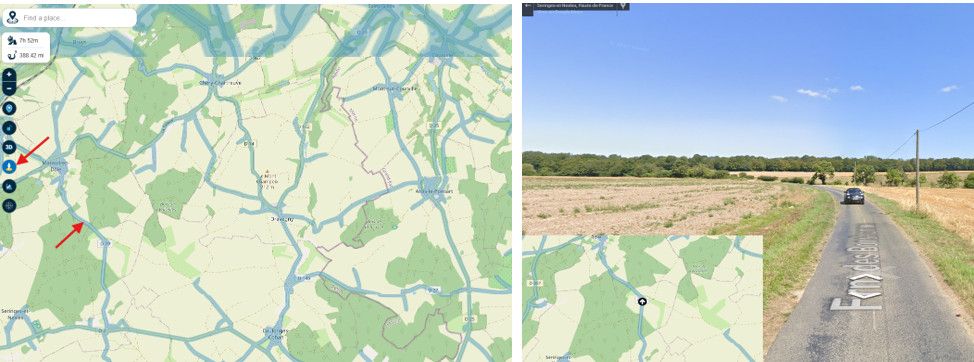
BlackView BV7100, Android 12
Navigate "Routes as Tracks" in Offline mode with Offline Maps
No Wifi, no internet, no interruptions, works well -
@Alun-Piggott as @nick-carthew suggests this option already exists in MRA if you have access to a Gold subscription
first click the google street view icon ( the stick figure man ) to show all the road available with a streetview image
then click the highlighted blue road you want to inspect & voila you get the streetview image
@Alun-Piggott as @nick-carthew suggests this option already exists in MRA if you have access to a Gold subscription
first click the google street view icon ( the stick figure man ) to show all the road available with a streetview image
then click the highlighted blue road you want to inspect & voila you get the streetview image
Thanks Brian and Nick this is definitely one of MRA's best features which is very useful when planning a new route using unfamiliar roads and locations.
Hello! It looks like you're interested in this conversation, but you don't have an account yet.
Getting fed up of having to scroll through the same posts each visit? When you register for an account, you'll always come back to exactly where you were before, and choose to be notified of new replies (either via email, or push notification). You'll also be able to save bookmarks and upvote posts to show your appreciation to other community members.
With your input, this post could be even better 💗
Register Login-
 0730
0730
-
 18305
18305
-
 0321
0321
-
0871
-
 81655.5k
-
0288
-
0352
-
 0282
0282


