Using Folders
-

How do you save a new route into an existing folder.
Is it possible to move a saved route to a folder?
-

MRA works like a database; you do not save anything. As soon as you open a new route, space for any changes is reserved for it. If you move a waypoint, it is already changed in the data. It's important to know, if you want to change something or want to try something, make a copy first and then edit the copy.
-
You can select one and more routes and then on the bottom of your screen you can select move.
@superg thanks… is this using an android device as I can’t seem to ‘select’ multiple files. Once I click on it, it opens the route.
-
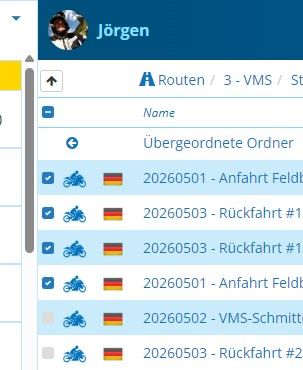
You need to select in front of the file.
-
It is a bit hidden.
-
@superg thanks… is this using an android device as I can’t seem to ‘select’ multiple files. Once I click on it, it opens the route.

@Keith-Hofgartner You need to be in the website to move routes to folders. From your Android phone, tap Route lab which is a portal to the website. Moving routes into folders is not possible from the Routes and Tracklogs section of the app.
-
Thanks..
Hello! It looks like you're interested in this conversation, but you don't have an account yet.
Getting fed up of having to scroll through the same posts each visit? When you register for an account, you'll always come back to exactly where you were before, and choose to be notified of new replies (either via email, or push notification). You'll also be able to save bookmarks and upvote posts to show your appreciation to other community members.
With your input, this post could be even better 💗
Register Login-
 0520
0520
-
 0521
0521
-
 0311
0311
-
0312
-
 0746
0746
-
0311
-
036
-
1266