
Add existing POI to a route?
-

I searched for an answer but can't find it so here is my question:
How can I add a POI that I added earlier into a route (after not chosing this when adding the POI...)
-
I searched for an answer but can't find it so here is my question:
How can I add a POI that I added earlier into a route (after not chosing this when adding the POI...)

@infoevertkuiken.nl uh, I would like to help, but unfortunatelly I don't understand your question.
You imported or created a route?
And you selected a POI out of the big POI list and added it to the route?
And what do you want to do next? -
I searched for an answer but can't find it so here is my question:
How can I add a POI that I added earlier into a route (after not chosing this when adding the POI...)

@infoevertkuiken.nl, The formulation of your question is indeed not very clear. I hope to get you started here:
Considering your name I linked the Dutch support page

-

I think it's really simple.
Create a waypoint somewhere along the route near the POI. It will automatically be assigned a number between the previous and next waypoints.
Drag this newly created waypoint to the POI's location (assuming it's located along a road), and the route will adjust accordingly!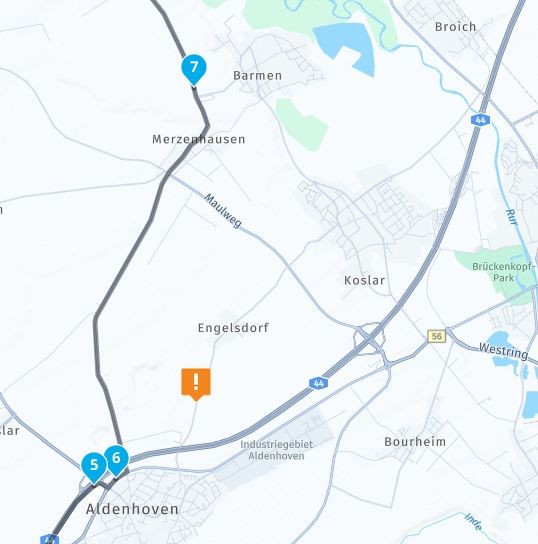
So: First, add a new waypoint to the route (which will be point 7)!
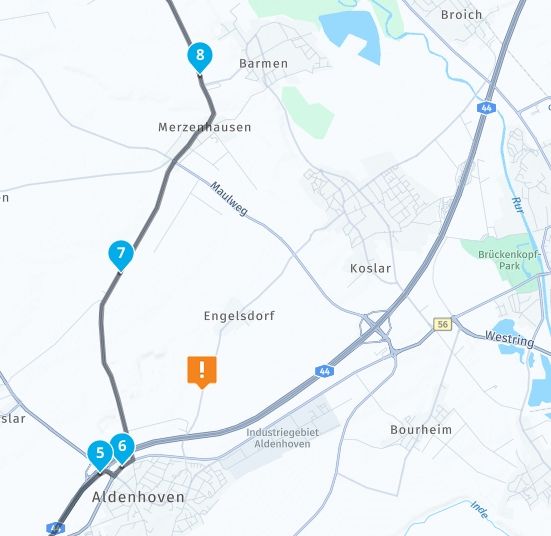
Now move waypoint 7 to the desired POI!
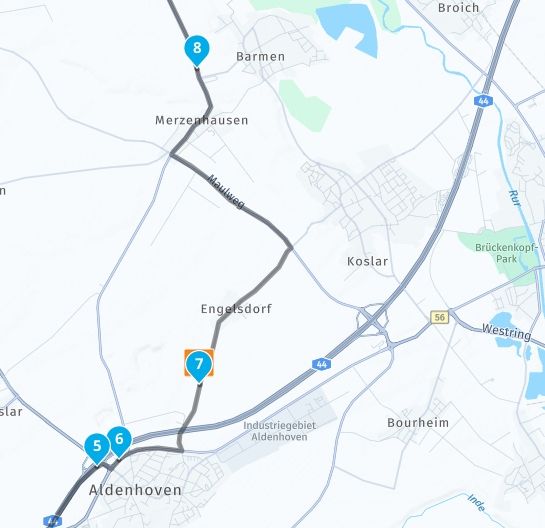
And there you go—the POI has been added to the route!
-
I searched for an answer but can't find it so here is my question:
How can I add a POI that I added earlier into a route (after not chosing this when adding the POI...)

-
Let me clarify: I have a route and some self created POI in it. I want to add the self created POI to a route. Like what you can do when creating the POI ("Add as waypoint"). When I created a POI just as POI and not (also) as a waypoint, there does not seem to be a way to add the created POI to the route. Of course I can add a waypoint on the position of the POI and call it the same.
-
Let me clarify: I have a route and some self created POI in it. I want to add the self created POI to a route. Like what you can do when creating the POI ("Add as waypoint"). When I created a POI just as POI and not (also) as a waypoint, there does not seem to be a way to add the created POI to the route. Of course I can add a waypoint on the position of the POI and call it the same.
@infoevertkuiken.nl said in Add existing POI to a route?:
When I created a POI just as POI and not (also) as a waypoint, there does not seem to be a way to add the created POI to the route
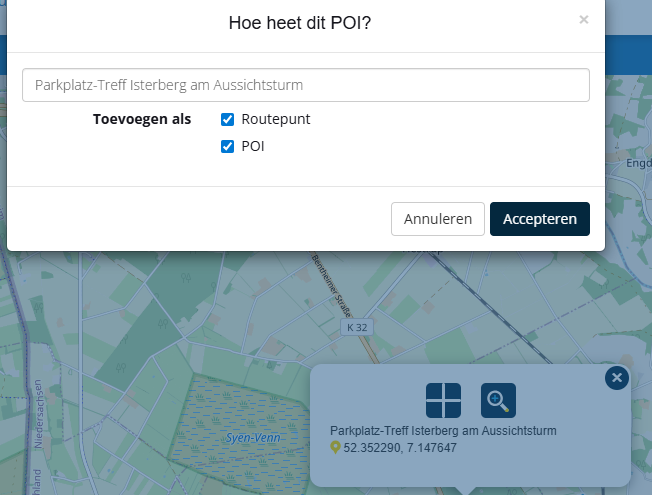
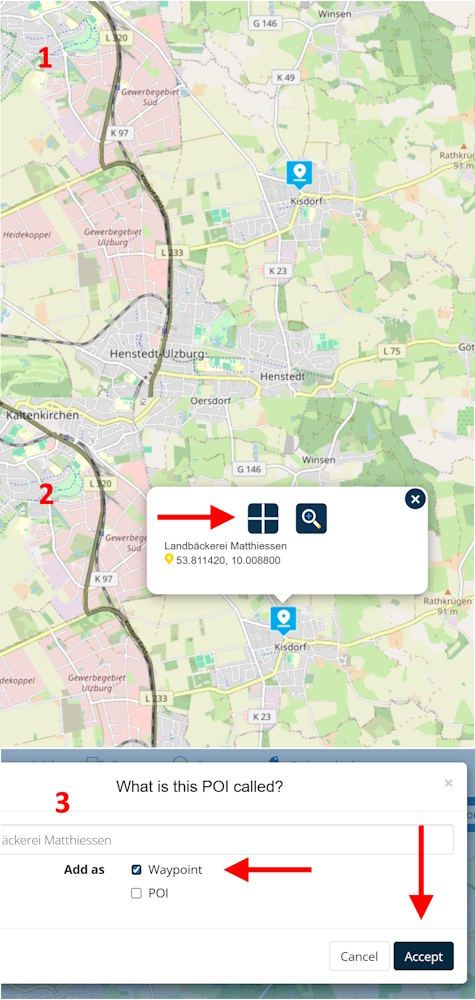
That's exactly what you can do following the steps shown in the screenshot above:
(1) tap on the POI's icon
(2) tap the crosshair
(3) select "add as Waypoint" and accept -
Let me clarify: I have a route and some self created POI in it. I want to add the self created POI to a route. Like what you can do when creating the POI ("Add as waypoint"). When I created a POI just as POI and not (also) as a waypoint, there does not seem to be a way to add the created POI to the route. Of course I can add a waypoint on the position of the POI and call it the same.

@infoevertkuiken.nl said in Add existing POI to a route?:
Let me clarify: I have a route and some self created POI in it. I want to add the self created POI to a route. Like what you can do when creating the POI ("Add as waypoint"). When I created a POI just as POI and not (also) as a waypoint, there does not seem to be a way to add the created POI to the route. Of course I can add a waypoint on the position of the POI and call it the same.
That only works when you have the POI in your libary ( I think you want to add the POI to another route..)
changing a POI into a routepoint in the existing route seems odd.
you can export the POI of the route and then inport them to your libary to use. -
@infoevertkuiken.nl said in Add existing POI to a route?:
When I created a POI just as POI and not (also) as a waypoint, there does not seem to be a way to add the created POI to the route
That's exactly what you can do following the steps shown in the screenshot above:
(1) tap on the POI's icon
(2) tap the crosshair
(3) select "add as Waypoint" and accept
@Martin-Wilcke But I already added the POI to the route but not as a waypoint. And then you get this menu. No option to add it as a waypoint.
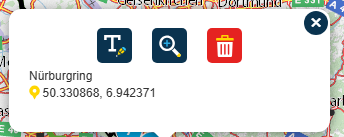
-
@infoevertkuiken.nl said in Add existing POI to a route?:
Let me clarify: I have a route and some self created POI in it. I want to add the self created POI to a route. Like what you can do when creating the POI ("Add as waypoint"). When I created a POI just as POI and not (also) as a waypoint, there does not seem to be a way to add the created POI to the route. Of course I can add a waypoint on the position of the POI and call it the same.
That only works when you have the POI in your libary ( I think you want to add the POI to another route..)
changing a POI into a routepoint in the existing route seems odd.
you can export the POI of the route and then inport them to your libary to use.
@BertM I want to add the POI in the route as a waypoint in the same route.
-
@BertM I want to add the POI in the route as a waypoint in the same route.
@infoevertkuiken.nl said in Add existing POI to a route?:
@BertM I want to add the POI in the route as a waypoint in the same route.
Add a waypoint and delete the POI is the only option
-
@infoevertkuiken.nl said in Add existing POI to a route?:
@BertM I want to add the POI in the route as a waypoint in the same route.
Add a waypoint and delete the POI is the only option
said in Add existing POI to a route?:
@infoevertkuiken.nl said in Add existing POI to a route?:
@BertM I want to add the POI in the route as a waypoint in the same route.
Add a waypoint and delete the POI is the only option
( btw MRA calls it a shaping point, not a waypoint) -
I searched for an answer but can't find it so here is my question:
How can I add a POI that I added earlier into a route (after not chosing this when adding the POI...)
@infoevertkuiken.nl said in Add existing POI to a route?:
I searched for an answer but can't find it so here is my question:
How can I add a POI that I added earlier into a route (after not chosing this when adding the POI...)
...there is currently no way! If you have added a POI into a route - just as POI only - then there is afterwards no option to make it additionally as a route point too. This option is only available in the beginning of that procedure.
Now you can do only:
- goto section "Points Of Interest" / tab "Manage", tip your added POI
- or
- tip in the map with your route on your added POI
- to get the options menue to delete this POI - delete it
- then add this waypoint again - and be carfull to select now the right (or both) options to get it as POI (and) as route point
-
@Martin-Wilcke But I already added the POI to the route but not as a waypoint. And then you get this menu. No option to add it as a waypoint.
@infoevertkuiken.nl said in Add existing POI to a route?:
But I already added the POI to the route but not as a waypoint.
Ahhh - you mean, you added the POI to your route so that it appears under "manage", right? I imagined you meant a POI that you added to a personal library.
Sorry for my misunderstanding - yes, I agree with @BertM : that doesn't work this way.
-
Just like I already have shown, follow the steps in the screenshots above. At the moment it's as far as I know, the only way!
Hello! It looks like you're interested in this conversation, but you don't have an account yet.
Getting fed up of having to scroll through the same posts each visit? When you register for an account, you'll always come back to exactly where you were before, and choose to be notified of new replies (either via email, or push notification). You'll also be able to save bookmarks and upvote posts to show your appreciation to other community members.
With your input, this post could be even better 💗
Register Login-
011750
-
06173
-
09102
-
 05191
05191
-
06161
-
111535
-
05153
-
027


