Skip to content
  • Categories
  • Recent
  • Popular
  • Support
  • MyRoute-app
Collapse
Brand Logo

MRA Community Forum

  1. Home
  2. MyRoute-app Routeplanner
  3. [Web] Problems, Bugs and other Issues
  4. Add existing POI to a route?

Add existing POI to a route?

Scheduled Pinned Locked Moved [Web] Problems, Bugs and other Issues
15 Posts 6 Posters 1.1k Views 4 Watching
  • Oldest to Newest
  • Newest to Oldest
  • Most Votes
Reply
  • Reply as topic
Log in to reply
This topic has been deleted. Only users with topic management privileges can see it.
  • infoevertkuiken.nlundefined Offline
    infoevertkuiken.nlundefined Offline
    infoevertkuiken.nl
    wrote on last edited by
    #6

    Let me clarify: I have a route and some self created POI in it. I want to add the self created POI to a route. Like what you can do when creating the POI ("Add as waypoint"). When I created a POI just as POI and not (also) as a waypoint, there does not seem to be a way to add the created POI to the route. Of course I can add a waypoint on the position of the POI and call it the same.
    martin-phogel.deundefined BertMundefined 2 Replies Last reply
    0
    • infoevertkuiken.nlundefined infoevertkuiken.nl

      Let me clarify: I have a route and some self created POI in it. I want to add the self created POI to a route. Like what you can do when creating the POI ("Add as waypoint"). When I created a POI just as POI and not (also) as a waypoint, there does not seem to be a way to add the created POI to the route. Of course I can add a waypoint on the position of the POI and call it the same.

      martin-phogel.deundefined Offline
      martin-phogel.deundefined Offline
      martin-phogel.de
      wrote on last edited by
      #7

      @infoevertkuiken.nl said in Add existing POI to a route?:

      When I created a POI just as POI and not (also) as a waypoint, there does not seem to be a way to add the created POI to the route

      That's exactly what you can do following the steps shown in the screenshot above:

      (1) tap on the POI's icon
      (2) tap the crosshair
      (3) select "add as Waypoint" and accept

      infoevertkuiken.nlundefined 1 Reply Last reply
      0
      • infoevertkuiken.nlundefined infoevertkuiken.nl

        Let me clarify: I have a route and some self created POI in it. I want to add the self created POI to a route. Like what you can do when creating the POI ("Add as waypoint"). When I created a POI just as POI and not (also) as a waypoint, there does not seem to be a way to add the created POI to the route. Of course I can add a waypoint on the position of the POI and call it the same.

        BertMundefined Offline
        BertMundefined Offline
        BertM
        wrote on last edited by
        #8

        @infoevertkuiken.nl said in Add existing POI to a route?:

        Let me clarify: I have a route and some self created POI in it. I want to add the self created POI to a route. Like what you can do when creating the POI ("Add as waypoint"). When I created a POI just as POI and not (also) as a waypoint, there does not seem to be a way to add the created POI to the route. Of course I can add a waypoint on the position of the POI and call it the same.

        That only works when you have the POI in your libary ( I think you want to add the POI to another route..)
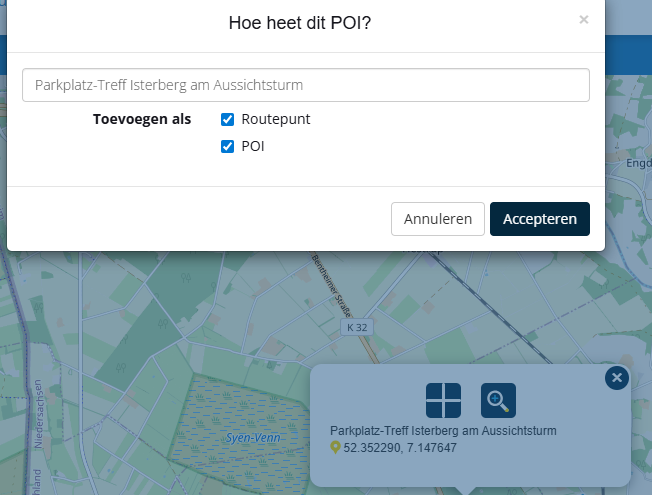
        533f1280-0805-4a95-986d-13edf117de06-image.png

        changing a POI into a routepoint in the existing route seems odd.
        you can export the POI of the route and then inport them to your libary to use.

        infoevertkuiken.nlundefined 1 Reply Last reply
        0
        • martin-phogel.deundefined martin-phogel.de

          @infoevertkuiken.nl said in Add existing POI to a route?:

          When I created a POI just as POI and not (also) as a waypoint, there does not seem to be a way to add the created POI to the route

          That's exactly what you can do following the steps shown in the screenshot above:

          (1) tap on the POI's icon
          (2) tap the crosshair
          (3) select "add as Waypoint" and accept

          infoevertkuiken.nlundefined Offline
          infoevertkuiken.nlundefined Offline
          infoevertkuiken.nl
          wrote on last edited by
          #9

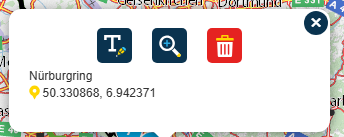
          @Martin-Wilcke But I already added the POI to the route but not as a waypoint. And then you get this menu. No option to add it as a waypoint.
          24fbdfd2-2734-4b0a-8180-ea2215c98a71-image.png

          martin-phogel.deundefined 1 Reply Last reply
          0
          • BertMundefined BertM

            @infoevertkuiken.nl said in Add existing POI to a route?:

            Let me clarify: I have a route and some self created POI in it. I want to add the self created POI to a route. Like what you can do when creating the POI ("Add as waypoint"). When I created a POI just as POI and not (also) as a waypoint, there does not seem to be a way to add the created POI to the route. Of course I can add a waypoint on the position of the POI and call it the same.

            That only works when you have the POI in your libary ( I think you want to add the POI to another route..)

            533f1280-0805-4a95-986d-13edf117de06-image.png

            changing a POI into a routepoint in the existing route seems odd.
            you can export the POI of the route and then inport them to your libary to use.

            infoevertkuiken.nlundefined Offline
            infoevertkuiken.nlundefined Offline
            infoevertkuiken.nl
            wrote on last edited by
            #10

            @BertM I want to add the POI in the route as a waypoint in the same route.

            BertMundefined 1 Reply Last reply
            0
            • infoevertkuiken.nlundefined infoevertkuiken.nl

              @BertM I want to add the POI in the route as a waypoint in the same route.

              BertMundefined Offline
              BertMundefined Offline
              BertM
              wrote on last edited by
              #11

              @infoevertkuiken.nl said in Add existing POI to a route?:

              @BertM I want to add the POI in the route as a waypoint in the same route.

              Add a waypoint and delete the POI is the only option

              BertMundefined 1 Reply Last reply
              0
              • BertMundefined BertM

                @infoevertkuiken.nl said in Add existing POI to a route?:

                @BertM I want to add the POI in the route as a waypoint in the same route.

                Add a waypoint and delete the POI is the only option

                BertMundefined Offline
                BertMundefined Offline
                BertM
                wrote on last edited by
                #12

                said in Add existing POI to a route?:

                @infoevertkuiken.nl said in Add existing POI to a route?:

                @BertM I want to add the POI in the route as a waypoint in the same route.

                Add a waypoint and delete the POI is the only option
                ( btw MRA calls it a shaping point, not a waypoint)

                1 Reply Last reply
                0
                • infoevertkuiken.nlundefined infoevertkuiken.nl

                  I searched for an answer but can't find it so here is my question:

                  How can I add a POI that I added earlier into a route (after not chosing this when adding the POI...)

                  Guzzistundefined Offline
                  Guzzistundefined Offline
                  Guzzist
                  Valued contributor
                  wrote on last edited by
                  #13

                  @infoevertkuiken.nl said in Add existing POI to a route?:

                  I searched for an answer but can't find it so here is my question:

                  How can I add a POI that I added earlier into a route (after not chosing this when adding the POI...)

                  ...there is currently no way! If you have added a POI into a route - just as POI only - then there is afterwards no option to make it additionally as a route point too. This option is only available in the beginning of that procedure.

                  Now you can do only:

                  • goto section "Points Of Interest" / tab "Manage", tip your added POI
                  • or
                  • tip in the map with your route on your added POI
                  • to get the options menue to delete this POI - delete it
                  • then add this waypoint again - and be carfull to select now the right (or both) options to get it as POI (and) as route point

                  Nothing is impossible ;-)
                  In past: GARMIN Zumo 210->GARMIN Zumo 395->GARMIN XT=> now: DMD T865-X + MyRoute-App, LocusMaps, OsmAnd.
                  In past: GARMIN MapSource ->GARMIN BaseCamp->Tyre->Kurviger->Calimoto=> now: MRA-Routplanner.

                  1 Reply Last reply
                  0
                  • infoevertkuiken.nlundefined infoevertkuiken.nl

                    @Martin-Wilcke But I already added the POI to the route but not as a waypoint. And then you get this menu. No option to add it as a waypoint.
                    24fbdfd2-2734-4b0a-8180-ea2215c98a71-image.png

                    martin-phogel.deundefined Offline
                    martin-phogel.deundefined Offline
                    martin-phogel.de
                    wrote on last edited by
                    #14

                    @infoevertkuiken.nl said in Add existing POI to a route?:

                    But I already added the POI to the route but not as a waypoint.

                    Ahhh - you mean, you added the POI to your route so that it appears under "manage", right? I imagined you meant a POI that you added to a personal library.

                    Sorry for my misunderstanding - yes, I agree with @BertM : that doesn't work this way.

                    1 Reply Last reply
                    0
                    • white.mouseundefined Offline
                      white.mouseundefined Offline
                      white.mouse
                      Valued contributor
                      wrote on last edited by white.mouse
                      #15

                      Just like I already have shown, follow the steps in the screenshots above. At the moment it's as far as I know, the only way!

                      met een R1250RT met TFT en BMW Connected Ride App (die dus nog steeds niet voldoet!) ;
                      de Garmin Zumo XT en M.R.A. in combinatie met de Carpuride W702 (voor Android op de Motor!)

                      1 Reply Last reply
                      0

                      Hello! It looks like you're interested in this conversation, but you don't have an account yet.

                      Getting fed up of having to scroll through the same posts each visit? When you register for an account, you'll always come back to exactly where you were before, and choose to be notified of new replies (either via email, or push notification). You'll also be able to save bookmarks and upvote posts to show your appreciation to other community members.

                      With your input, this post could be even better 💗

                      Register Login

                      Reply
                      • Reply as topic
                      Log in to reply
                      • Oldest to Newest
                      • Newest to Oldest
                      • Most Votes


                      ACTIVE USERS
                      white.mouseundefined
                      white.mouse
                      Guzzistundefined
                      Guzzist
                      Con Hennekensundefined
                      Con Hennekens
                      BertMundefined
                      BertM
                      infoevertkuiken.nlundefined
                      infoevertkuiken.nl
                      martin-phogel.deundefined
                      martin-phogel.de
                      POPULAR TOPICS
                      • Coordinaten
                        white.mouseundefined
                        white.mouse
                        0
                        7
                        101

                      • Schuberth SC1
                        white.mouseundefined
                        white.mouse
                        0
                        20
                        552

                      • Blocked Account
                        TelBoy 0undefined
                        TelBoy 0
                        0
                        5
                        134

                      • Blue haze on top of screen in free drive
                        stuart marrittundefined
                        stuart marritt
                        0
                        10
                        251

                      • birdsview android auto
                        M. Schrijverundefined
                        M. Schrijver
                        0
                        4
                        132

                      • Route name column width
                        Rob Verhoeffundefined
                        Rob Verhoeff
                        0
                        5
                        273

                      • Audio van Navigatie scheiden van muziek in Android Auto
                        Benstewundefined
                        Benstew
                        1
                        3
                        118

                      • iPhone wordt veel te heet tijdens navigeren
                        Bouke Entundefined
                        Bouke Ent
                        1
                        33
                        1.4k

                      MY GROUPS
                      • Login

                      • Login or register to search.
                      • First post
                        Last post
                      0
                      • Categories
                      • Recent
                      • Popular
                      • Support
                      • MyRoute-app