Skip to content
  • Categories
  • Recent
  • Popular
  • Support
  • MyRoute-app
Collapse
Brand Logo

MRA Community Forum

  1. Home
  2. MyRoute-app Routeplanner
  3. [Web] Problems, Bugs and other Issues
  4. Add existing POI to a route?

Add existing POI to a route?

Scheduled Pinned Locked Moved [Web] Problems, Bugs and other Issues
14 Posts 6 Posters 426 Views 4 Watching
  • Oldest to Newest
  • Newest to Oldest
  • Most Votes
Reply
  • Reply as topic
Log in to reply
This topic has been deleted. Only users with topic management privileges can see it.
  • infoevertkuiken.nlundefined Offline
    infoevertkuiken.nlundefined Offline
    infoevertkuiken.nl
    wrote last edited by
    #1

    I searched for an answer but can't find it so here is my question:

    How can I add a POI that I added earlier into a route (after not chosing this when adding the POI...)

    Guzzistundefined Con Hennekensundefined Martin Wilckeundefined 4 Replies Last reply
    0
    • infoevertkuiken.nlundefined infoevertkuiken.nl

      I searched for an answer but can't find it so here is my question:

      How can I add a POI that I added earlier into a route (after not chosing this when adding the POI...)

      Guzzistundefined Offline
      Guzzistundefined Offline
      Guzzist
      Valued contributor
      wrote last edited by
      #2

      @infoevertkuiken.nl uh, I would like to help, but unfortunatelly I don't understand your question.
      You imported or created a route?
      And you selected a POI out of the big POI list and added it to the route?
      And what do you want to do next?

      Nothing is impossible ;-)
      In past: GARMIN Zumo 210->GARMIN Zumo 395->GARMIN XT=> now: DMD T865-X + MyRoute-App, LocusMaps, OsmAnd.
      In past: GARMIN MapSource ->GARMIN BaseCamp->Tyre->Kurviger->Calimoto=> now: MRA-Routplanner.

      1 Reply Last reply
      0
      • infoevertkuiken.nlundefined infoevertkuiken.nl

        I searched for an answer but can't find it so here is my question:

        How can I add a POI that I added earlier into a route (after not chosing this when adding the POI...)

        Con Hennekensundefined Offline
        Con Hennekensundefined Offline
        Con Hennekens
        Alpha tester
        wrote last edited by
        #3

        @infoevertkuiken.nl, The formulation of your question is indeed not very clear. I hope to get you started here:

        Handleiding 'POIs'

        Considering your name I linked the Dutch support page 😉

        I am just an enthusiastic MRA user, and hope you will be one too!

        Most motorcycle problems are caused by the nut that connects the handlebar to the saddle.

        Streetpilot 2610 / Zumo 660 / Zumo 395 / Motorola Thinkphone + MRA app

        1 Reply Last reply
        0
        • white.mouseundefined Offline
          white.mouseundefined Offline
          white.mouse
          Valued contributor
          wrote last edited by white.mouse
          #4

          I think it's really simple.
          Create a waypoint somewhere along the route near the POI. It will automatically be assigned a number between the previous and next waypoints.
          Drag this newly created waypoint to the POI's location (assuming it's located along a road), and the route will adjust accordingly!
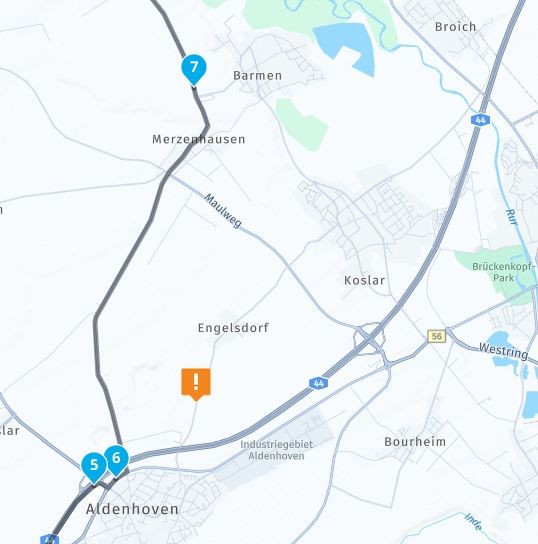
          ScreenShot-001.jpg

          So: First, add a new waypoint to the route (which will be point 7)!
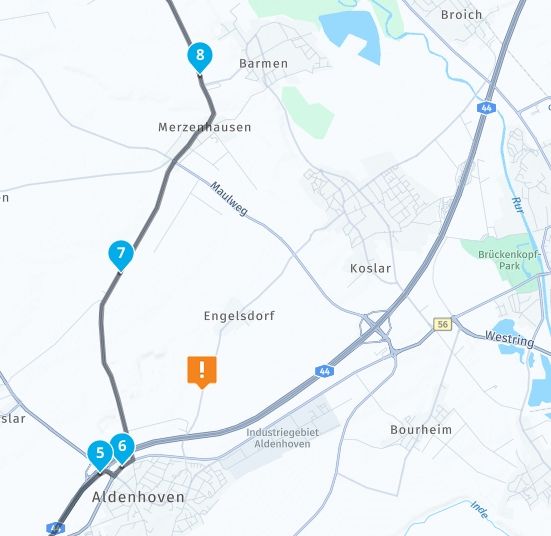
          ScreenShot-002.jpg

          Now move waypoint 7 to the desired POI!
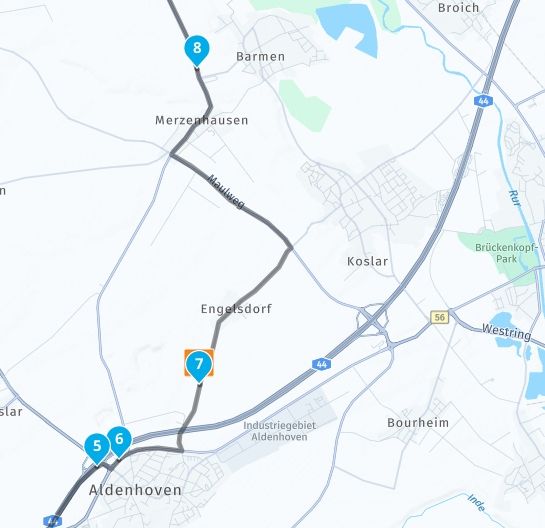
          ScreenShot-003.jpg

          And there you go—the POI has been added to the route!

          met een R1250RT met TFT en BMW Connected Ride App (die dus nog steeds niet voldoet!) ;
          de Garmin Zumo XT en M.R.A. in combinatie met de Carpuride W702 (voor Android op de Motor!)

          1 Reply Last reply
          0
          • infoevertkuiken.nlundefined infoevertkuiken.nl

            I searched for an answer but can't find it so here is my question:

            How can I add a POI that I added earlier into a route (after not chosing this when adding the POI...)

            Martin Wilckeundefined Online
            Martin Wilckeundefined Online
            Martin Wilcke
            wrote last edited by Martin Wilcke
            #5

            @infoevertkuiken.nl

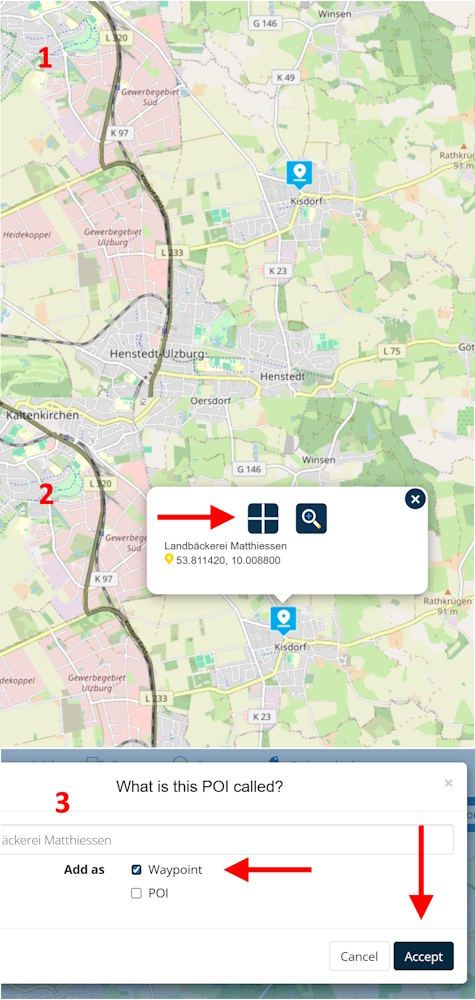
            Maybe this is what you're looking for?

            addPOI.jpg

            1 Reply Last reply
            0
            • infoevertkuiken.nlundefined Offline
              infoevertkuiken.nlundefined Offline
              infoevertkuiken.nl
              wrote last edited by
              #6

              Let me clarify: I have a route and some self created POI in it. I want to add the self created POI to a route. Like what you can do when creating the POI ("Add as waypoint"). When I created a POI just as POI and not (also) as a waypoint, there does not seem to be a way to add the created POI to the route. Of course I can add a waypoint on the position of the POI and call it the same.

              Martin Wilckeundefined BertMundefined 2 Replies Last reply
              0
              • infoevertkuiken.nlundefined infoevertkuiken.nl

                Let me clarify: I have a route and some self created POI in it. I want to add the self created POI to a route. Like what you can do when creating the POI ("Add as waypoint"). When I created a POI just as POI and not (also) as a waypoint, there does not seem to be a way to add the created POI to the route. Of course I can add a waypoint on the position of the POI and call it the same.

                Martin Wilckeundefined Online
                Martin Wilckeundefined Online
                Martin Wilcke
                wrote last edited by
                #7

                @infoevertkuiken.nl said in Add existing POI to a route?:

                When I created a POI just as POI and not (also) as a waypoint, there does not seem to be a way to add the created POI to the route

                That's exactly what you can do following the steps shown in the screenshot above:

                (1) tap on the POI's icon
                (2) tap the crosshair
                (3) select "add as Waypoint" and accept

                infoevertkuiken.nlundefined 1 Reply Last reply
                0
                • infoevertkuiken.nlundefined infoevertkuiken.nl

                  Let me clarify: I have a route and some self created POI in it. I want to add the self created POI to a route. Like what you can do when creating the POI ("Add as waypoint"). When I created a POI just as POI and not (also) as a waypoint, there does not seem to be a way to add the created POI to the route. Of course I can add a waypoint on the position of the POI and call it the same.

                  BertMundefined Online
                  BertMundefined Online
                  BertM
                  wrote last edited by
                  #8

                  @infoevertkuiken.nl said in Add existing POI to a route?:

                  Let me clarify: I have a route and some self created POI in it. I want to add the self created POI to a route. Like what you can do when creating the POI ("Add as waypoint"). When I created a POI just as POI and not (also) as a waypoint, there does not seem to be a way to add the created POI to the route. Of course I can add a waypoint on the position of the POI and call it the same.

                  That only works when you have the POI in your libary ( I think you want to add the POI to another route..)
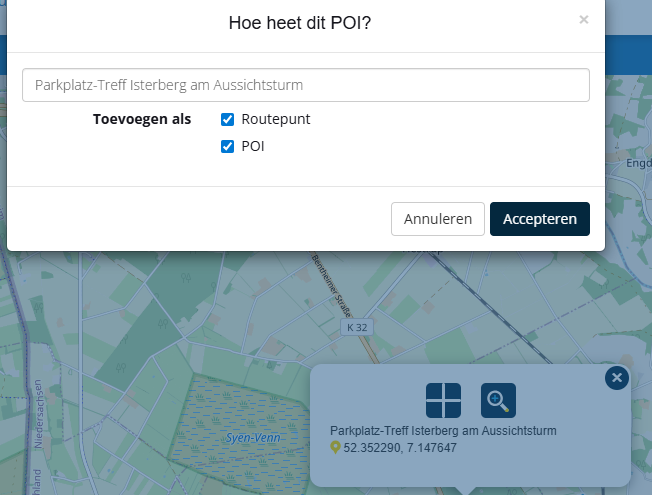
                  533f1280-0805-4a95-986d-13edf117de06-image.png

                  changing a POI into a routepoint in the existing route seems odd.
                  you can export the POI of the route and then inport them to your libary to use.

                  infoevertkuiken.nlundefined 1 Reply Last reply
                  0
                  • Martin Wilckeundefined Martin Wilcke

                    @infoevertkuiken.nl said in Add existing POI to a route?:

                    When I created a POI just as POI and not (also) as a waypoint, there does not seem to be a way to add the created POI to the route

                    That's exactly what you can do following the steps shown in the screenshot above:

                    (1) tap on the POI's icon
                    (2) tap the crosshair
                    (3) select "add as Waypoint" and accept

                    infoevertkuiken.nlundefined Offline
                    infoevertkuiken.nlundefined Offline
                    infoevertkuiken.nl
                    wrote last edited by
                    #9

                    @Martin-Wilcke But I already added the POI to the route but not as a waypoint. And then you get this menu. No option to add it as a waypoint.
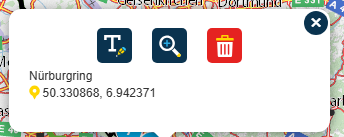
                    24fbdfd2-2734-4b0a-8180-ea2215c98a71-image.png

                    Martin Wilckeundefined 1 Reply Last reply
                    0
                    • BertMundefined BertM

                      @infoevertkuiken.nl said in Add existing POI to a route?:

                      Let me clarify: I have a route and some self created POI in it. I want to add the self created POI to a route. Like what you can do when creating the POI ("Add as waypoint"). When I created a POI just as POI and not (also) as a waypoint, there does not seem to be a way to add the created POI to the route. Of course I can add a waypoint on the position of the POI and call it the same.

                      That only works when you have the POI in your libary ( I think you want to add the POI to another route..)

                      533f1280-0805-4a95-986d-13edf117de06-image.png

                      changing a POI into a routepoint in the existing route seems odd.
                      you can export the POI of the route and then inport them to your libary to use.

                      infoevertkuiken.nlundefined Offline
                      infoevertkuiken.nlundefined Offline
                      infoevertkuiken.nl
                      wrote last edited by
                      #10

                      @BertM I want to add the POI in the route as a waypoint in the same route.

                      BertMundefined 1 Reply Last reply
                      0
                      • infoevertkuiken.nlundefined infoevertkuiken.nl

                        @BertM I want to add the POI in the route as a waypoint in the same route.

                        BertMundefined Online
                        BertMundefined Online
                        BertM
                        wrote last edited by
                        #11

                        @infoevertkuiken.nl said in Add existing POI to a route?:

                        @BertM I want to add the POI in the route as a waypoint in the same route.

                        Add a waypoint and delete the POI is the only option

                        BertMundefined 1 Reply Last reply
                        0
                        • BertMundefined BertM

                          @infoevertkuiken.nl said in Add existing POI to a route?:

                          @BertM I want to add the POI in the route as a waypoint in the same route.

                          Add a waypoint and delete the POI is the only option

                          BertMundefined Online
                          BertMundefined Online
                          BertM
                          wrote last edited by
                          #12

                          said in Add existing POI to a route?:

                          @infoevertkuiken.nl said in Add existing POI to a route?:

                          @BertM I want to add the POI in the route as a waypoint in the same route.

                          Add a waypoint and delete the POI is the only option
                          ( btw MRA calls it a shaping point, not a waypoint)

                          1 Reply Last reply
                          0
                          • infoevertkuiken.nlundefined infoevertkuiken.nl

                            I searched for an answer but can't find it so here is my question:

                            How can I add a POI that I added earlier into a route (after not chosing this when adding the POI...)

                            Guzzistundefined Offline
                            Guzzistundefined Offline
                            Guzzist
                            Valued contributor
                            wrote last edited by
                            #13

                            @infoevertkuiken.nl said in Add existing POI to a route?:

                            I searched for an answer but can't find it so here is my question:

                            How can I add a POI that I added earlier into a route (after not chosing this when adding the POI...)

                            ...there is currently no way! If you have added a POI into a route - just as POI only - then there is afterwards no option to make it additionally as a route point too. This option is only available in the beginning of that procedure.

                            Now you can do only:

                            • goto section "Points Of Interest" / tab "Manage", tip your added POI
                            • or
                            • tip in the map with your route on your added POI
                            • to get the options menue to delete this POI - delete it
                            • then add this waypoint again - and be carfull to select now the right (or both) options to get it as POI (and) as route point

                            Nothing is impossible ;-)
                            In past: GARMIN Zumo 210->GARMIN Zumo 395->GARMIN XT=> now: DMD T865-X + MyRoute-App, LocusMaps, OsmAnd.
                            In past: GARMIN MapSource ->GARMIN BaseCamp->Tyre->Kurviger->Calimoto=> now: MRA-Routplanner.

                            1 Reply Last reply
                            0
                            • infoevertkuiken.nlundefined infoevertkuiken.nl

                              @Martin-Wilcke But I already added the POI to the route but not as a waypoint. And then you get this menu. No option to add it as a waypoint.
                              24fbdfd2-2734-4b0a-8180-ea2215c98a71-image.png

                              Martin Wilckeundefined Online
                              Martin Wilckeundefined Online
                              Martin Wilcke
                              wrote last edited by
                              #14

                              @infoevertkuiken.nl said in Add existing POI to a route?:

                              But I already added the POI to the route but not as a waypoint.

                              Ahhh - you mean, you added the POI to your route so that it appears under "manage", right? I imagined you meant a POI that you added to a personal library.

                              Sorry for my misunderstanding - yes, I agree with @BertM : that doesn't work this way.

                              1 Reply Last reply
                              0
                              Reply
                              • Reply as topic
                              Log in to reply
                              • Oldest to Newest
                              • Newest to Oldest
                              • Most Votes


                              ACTIVE USERS
                              Guzzistundefined
                              Guzzist
                              Martin Wilckeundefined
                              Martin Wilcke
                              BertMundefined
                              BertM
                              infoevertkuiken.nlundefined
                              infoevertkuiken.nl
                              Con Hennekensundefined
                              Con Hennekens
                              white.mouseundefined
                              white.mouse
                              POPULAR TOPICS
                              • Add existing POI to a route?
                                Martin Wilckeundefined
                                Martin Wilcke
                                0
                                14
                                426

                              • Shaping points and Via points
                                Martin Wilckeundefined
                                Martin Wilcke
                                0
                                27
                                811

                              • Viewing waypoint detail in “foot” mode
                                Anonymouseundefined
                                Anonymouse
                                0
                                8
                                118

                              • Correct sound settings?
                                Aiello antoninoundefined
                                Aiello antonino
                                0
                                9
                                138

                              • Kruisje soms wit soms zwart
                                Rob Verhoeffundefined
                                Rob Verhoeff
                                0
                                2
                                29

                              • MyRoute-App on the TomTom Rider
                                M. Schrijverundefined
                                M. Schrijver
                                3
                                9
                                344

                              • RiderNav & BMW Control Wheel
                                undefined
                                0
                                1
                                49

                              • Protect pinch-zoom from destroying the user interface (iPad)
                                undefined
                                1
                                1
                                60
                              MY GROUPS
                              • Login

                              • Login or register to search.
                              • First post
                                Last post
                              0
                              • Categories
                              • Recent
                              • Popular
                              • Support
                              • MyRoute-app