
New beta! 5.0.3 (447)
-

hopelijk krijg ik nu niet tig meldingen. op een aantal tablets geinstalleerd zowel ios als android en op aantal telefoons ios en android. hopelijk word bij upgrade van app status gelijk offline gemaakt zodat ik alleen met 2 items kan inloggen op app. we gaan het ervaren. op android trouwens beta en op ios gewoon.
-
Hi everyone!

It is time for a lovely new beta.
Not the most exciting update for you but definitely for us
Device management
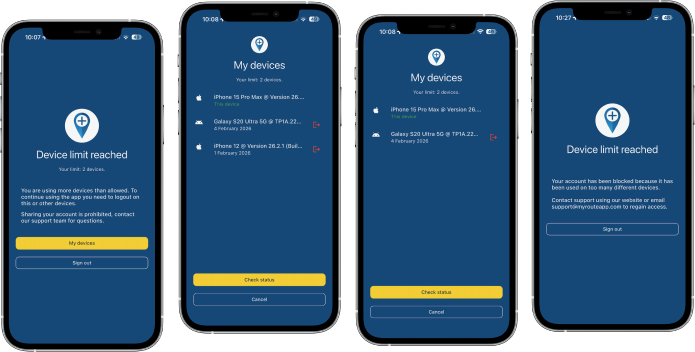
This is the core aspect of this update.
Unfortunately we are seeing a massive amount of account sharing going on.
At MyRoute-app we try our hardest every single day to be customer oriented and keeping our prices low. As of this year our base prices for subscriptions had to be increased (for the first time since 2021) and because of new contracts with our suppliers we also have to implement a device limit per subscription.As we now pay per active phone we cannot (ignorantly) allow users to use our app on an unlimited amount of phones. As of this update we allow a maximum of 2 devices to be used at the same time. When exceeding this limit (3 devices) you will be presented a beautiful interface in which you can logoff another device. After doing so, you can use your current phone again

Some important notes:
- Excessively switching between multiple phones will lead to an automatic warning
- Attempts to use way too many devices (4) at once will lead to an automatic block
Our terms & conditions will be updated appropriately.
Simply put: times of sharing your account with big groups of friends or your club are over, sharing with your partner / personal use on a few devices is still allowed.Note for beta testers: being a beta testers does not mean you are allowed to share your account but if for (proven) testing you wish to use more devices, simply contact our support department.
SSO fixed
Signing into the app using a SSO authentication method (such as Apple or Google) was broken. Luckily this has now been fixed!

Link and file opening
Opening links and files with the app has always been possible.
In this update the stability of these features has been improved to ensure it works as expected when the app is in any state (such as terminated / in the background / opened).Minor fixes and stability improvements
Many small issues that are not relevant to mention here have been fixed.
Also we fixed a few errors that would result in route calculations failing.
Finally a few critical CarPlay / Android Auto errors have been solved and we added a bit more logging to investigate some persistent issues a few users have.What's next
Slowly but surely we are transitioning to a more focused dedication on the website.
In the next update 5.1 we will:- Aim for solving all stability issues CarPlay and Android Auto
- Add highly requested features to CarPlay and Android Auto
- Major technical internal updates
Cheers,
Corjan
@Corjan-Meijerink Did Some testing of the new Beta.
I saw that the spinning map issue is not yet solved. In both navigating a route and the free drive mode there’s still a problem. When I comes to a complete stop the map turns in the north direction and the position marker moves direction north. If I was on a road with separated lanes the position marker will move to the lane that is heading north. The north direction of the dynamic mode camera view will then turn witch will be actually not north. I haven’t seen that in the previous versions. So the spin of the map is actually turning the map facing north.Another thing that I’ve noticed was when the notification of a speed camera pops up and your speed is over the Max speed the pop-up turns red, great feature. Maybe it was already like this but I haven’t noticed it before
-

Ein Vorschlag: s. Bild, so war das da gemeint, denn ich finden den Hinweis das beim abmelden Dinge gelöscht werden schon sehr wichtig !
Vorschlag:
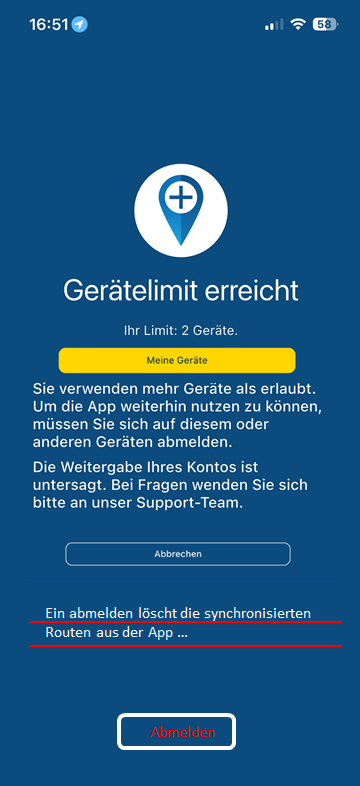
Original, hier ist die Auswahl zwischen "Meine Geräte" und "Abmelden" zu dicht beieinander. Ein Hinweis das was gelöscht wird fehlt auch !
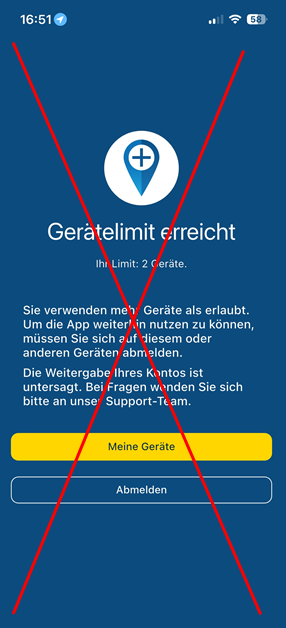
-
hopelijk krijg ik nu niet tig meldingen. op een aantal tablets geinstalleerd zowel ios als android en op aantal telefoons ios en android. hopelijk word bij upgrade van app status gelijk offline gemaakt zodat ik alleen met 2 items kan inloggen op app. we gaan het ervaren. op android trouwens beta en op ios gewoon.

@Bouke-Ent said in New beta! 5.0.3 (447):
hopelijk krijg ik nu niet tig meldingen.
Je heb een limiet van drie apparaten waarvan er twee tegelijkertijd ingelogd kunnen zijn. Wissel jij vaker van toestel dan van sokken? Pas als je met het derde apparaat wilt navigeren dan krijg je op dat apparaat de melding om je af te melden van één van je andere apparaten. En dat vergt bijna geen extra handelingen...
-

@Corjan-Meijerink may I ask the question: what is the background for simultaneously use of 2, but not 3 devices?
And may it is misunderstood: if someone is using 2 mobile phones for navigation at same time - and uses a tablet at night in hotel room - this is not counted as third device? I believe the first 2 devices are used for navigation during the ride. And the third device is just in use in the hotel at evening - while the app at the 2 navigation devices is switched off. Then there are not 3 devices in count, or? I mean in the hotel, no one is going to navigate...?
-
@Bouke-Ent said in New beta! 5.0.3 (447):
hopelijk krijg ik nu niet tig meldingen.
Je heb een limiet van drie apparaten waarvan er twee tegelijkertijd ingelogd kunnen zijn. Wissel jij vaker van toestel dan van sokken? Pas als je met het derde apparaat wilt navigeren dan krijg je op dat apparaat de melding om je af te melden van één van je andere apparaten. En dat vergt bijna geen extra handelingen...
@Rob-Verhoeff said in New beta! 5.0.3 (447):
@Bouke-Ent said in New beta! 5.0.3 (447):
hopelijk krijg ik nu niet tig meldingen.
Je heb een limiet van drie apparaten waarvan er twee tegelijkertijd ingelogd kunnen zijn. Wissel jij vaker van toestel dan van sokken? Pas als je met het derde apparaat wilt navigeren dan krijg je op dat apparaat de melding om je af te melden van één van je andere apparaten. En dat vergt bijna geen extra handelingen...
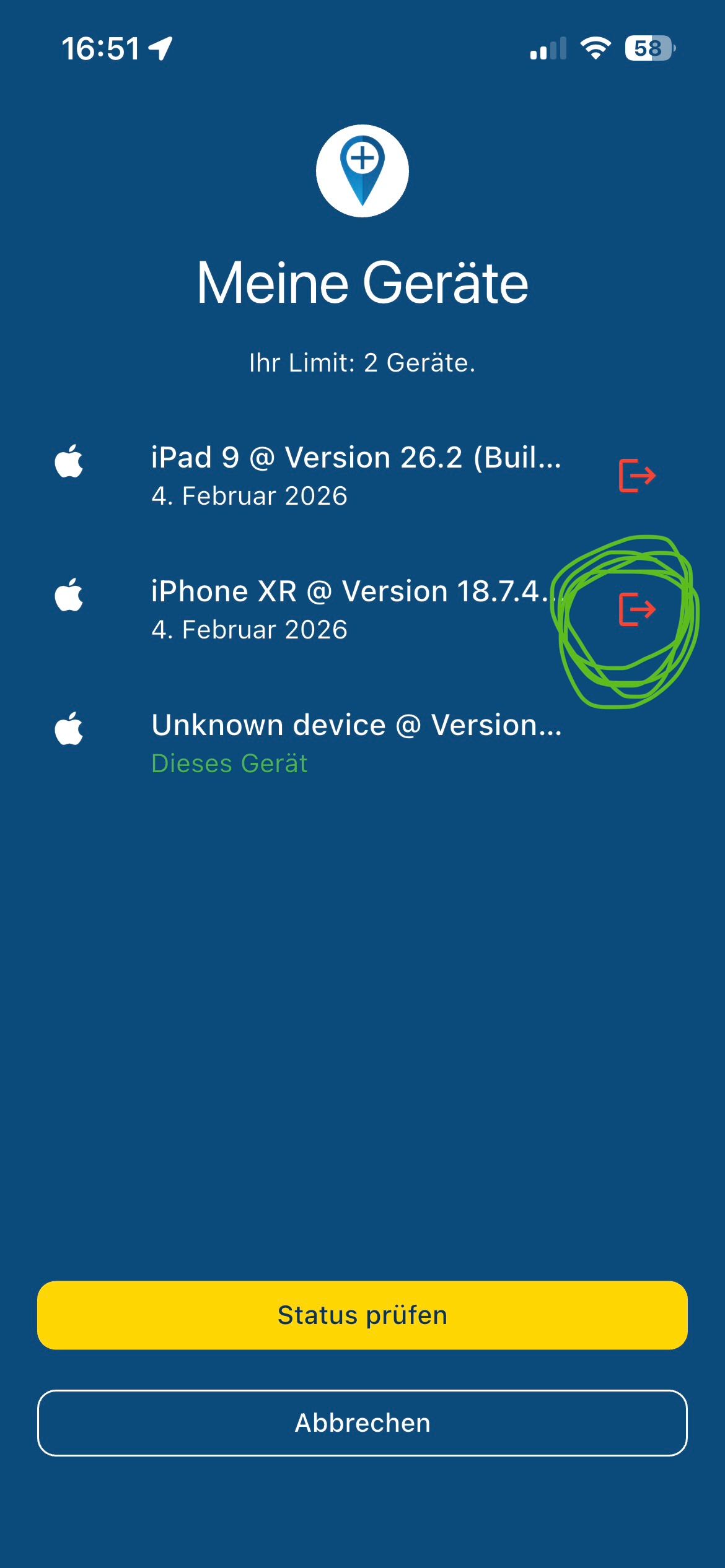
Der Begriff „Abmelden“ ist irreführend, denn mit der einen Funktion „s.Bild“ Symbol rechts wie ein „Ausgang“ wird nicht abgemeldet sondern nur das Gerät ausgetragen und damit auf das 3. Gerät gewechselt…
Wenn man dann den Status abfragt ist die App an diesem Gerät freigegeben!!!The term "log out" is misleading, because with the one function "s.picture" symbol on the right like an "output" is not logged out but only the device is logged out and thus on the 3rd Device changed...
If you then ask for the status, the app is released on this device!!!
VG Hubert
Beta Test "Next App" dazu die Hardware .
iPad 9. Gen iOS 27.0.1/ iPhone 16e iOS 27.0.1/ Navi iPhone Xr iOS 18.7.10 / PC mit MS Win11 /❗️MyRoute-App im Cradel und Remotek-One❗️ Info zu MRA & Remotek One -
@Rob-Verhoeff said in New beta! 5.0.3 (447):
@Bouke-Ent said in New beta! 5.0.3 (447):
hopelijk krijg ik nu niet tig meldingen.
Je heb een limiet van drie apparaten waarvan er twee tegelijkertijd ingelogd kunnen zijn. Wissel jij vaker van toestel dan van sokken? Pas als je met het derde apparaat wilt navigeren dan krijg je op dat apparaat de melding om je af te melden van één van je andere apparaten. En dat vergt bijna geen extra handelingen...
Der Begriff „Abmelden“ ist irreführend, denn mit der einen Funktion „s.Bild“ Symbol rechts wie ein „Ausgang“ wird nicht abgemeldet sondern nur das Gerät ausgetragen und damit auf das 3. Gerät gewechselt…
Wenn man dann den Status abfragt ist die App an diesem Gerät freigegeben!!!The term "log out" is misleading, because with the one function "s.picture" symbol on the right like an "output" is not logged out but only the device is logged out and thus on the 3rd Device changed...
If you then ask for the status, the app is released on this device!!!
@Hubert-Thoring said in New beta! 5.0.3 (447):
The term "log out" is misleading, because with the one function "s.picture" symbol on the right like an "output" is not logged out but only the device is logged out and thus on the 3rd Device changed...
And that's where translating Dutch to English to German goes wrong! I didn't use the term "Log out" in Dutch!!! So thank you for your comment that is not saying anything.
-

La verdad, lo que no entenderé nunca es no respetar el idioma original del post.
No todo el mundo habla alemán o neerlandés o, como en mi caso, castellano.
Tan difícil es mantener el mismo idioma?The truth is, what I will never understand is not respecting the original language of the post.
Not everyone speaks German or Dutch or, as in my case, Spanish.
Is it so difficult to maintain the same language?Die Wahrheit ist, dass ich nie verstehen werde, dass die Originalsprache des Beitrags nicht respektiert wird.
Nicht jeder spricht Deutsch oder Niederländisch oder, wie in meinem Fall, Spanisch.
Ist es so schwierig, die gleiche Sprache beizubehalten?De waarheid is dat ik nooit zal begrijpen dat ik de oorspronkelijke taal van de post niet respecteer.
Niet iedereen spreekt Duits of Nederlands of, zoals in mijn geval, Spaans.
Is het zo moeilijk om dezelfde taal te behouden? -
@Bouke-Ent said in New beta! 5.0.3 (447):
hopelijk krijg ik nu niet tig meldingen.
Je heb een limiet van drie apparaten waarvan er twee tegelijkertijd ingelogd kunnen zijn. Wissel jij vaker van toestel dan van sokken? Pas als je met het derde apparaat wilt navigeren dan krijg je op dat apparaat de melding om je af te melden van één van je andere apparaten. En dat vergt bijna geen extra handelingen...
@Rob-Verhoeff ik ga terug naar max 2. maar ik heb nog een paar oude telefoons en tablets waar mra nog op staat. ik ga ze wel eerst deinstalleren omdat ze in theorie al ingelogd zijn. ik gebruikte voor kleine aanpassingen van routes een tablet met app in planner omdat menu op klein scherm in app iets handiger is dan webplanner in chrome. daar springen menus nog wel eens naar vreemde plaatsen en touch is minder handig.
optie blijft dan in en uitloggen..... maar dat is niet mijn voorkeur.op telefoon route aanpassen is me iets te klein.
Bouke
-
@Rob-Verhoeff ik ga terug naar max 2. maar ik heb nog een paar oude telefoons en tablets waar mra nog op staat. ik ga ze wel eerst deinstalleren omdat ze in theorie al ingelogd zijn. ik gebruikte voor kleine aanpassingen van routes een tablet met app in planner omdat menu op klein scherm in app iets handiger is dan webplanner in chrome. daar springen menus nog wel eens naar vreemde plaatsen en touch is minder handig.
optie blijft dan in en uitloggen..... maar dat is niet mijn voorkeur.op telefoon route aanpassen is me iets te klein.
Bouke
@Bouke-Ent said in New beta! 5.0.3 (447):
@Rob-Verhoeff ik ga terug naar max 2. maar ik heb nog een paar oude telefoons en tablets waar mra nog op staat. ik ga ze wel eerst deinstalleren omdat ze in theorie al ingelogd zijn.
Houd er rekening mee dat je met max 3 apparaten mag werken! Als je inlogt met de 4e dan blokkeert je account
-
Just noticed the devices issue. I’m lifetime member, MRA in iPhone 16 and iPad. Connected to my Harley, I received message that I need a navigation next subscription to use it. Now I try to disconnect from iPad… anyway they are only TWO devices!! (If web browser connections from PC are allowed)
Update: after deleted app from iPad, so I have only on iPhone, the CarPlay connected with iPhone goes well. Tried connecting to Audi and to Harley.
So… problem is when I have app logged on 2 devices? -
@Rob-Verhoeff said in New beta! 5.0.3 (447):
@Bouke-Ent said in New beta! 5.0.3 (447):
hopelijk krijg ik nu niet tig meldingen.
Je heb een limiet van drie apparaten waarvan er twee tegelijkertijd ingelogd kunnen zijn. Wissel jij vaker van toestel dan van sokken? Pas als je met het derde apparaat wilt navigeren dan krijg je op dat apparaat de melding om je af te melden van één van je andere apparaten. En dat vergt bijna geen extra handelingen...
Der Begriff „Abmelden“ ist irreführend, denn mit der einen Funktion „s.Bild“ Symbol rechts wie ein „Ausgang“ wird nicht abgemeldet sondern nur das Gerät ausgetragen und damit auf das 3. Gerät gewechselt…
Wenn man dann den Status abfragt ist die App an diesem Gerät freigegeben!!!The term "log out" is misleading, because with the one function "s.picture" symbol on the right like an "output" is not logged out but only the device is logged out and thus on the 3rd Device changed...
If you then ask for the status, the app is released on this device!!!
@Hubert-Thoring where may I see this screen?? I’m looking out from app but I cannot find where to see my devices logged…
-
@Hubert-Thoring where may I see this screen?? I’m looking out from app but I cannot find where to see my devices logged…
@Cristiano-Repetti said in New beta! 5.0.3 (447):
@Hubert-Thoring where may I see this screen?? I’m looking out from app but I cannot find where to see my devices logged…
This only comes with the second / third device in the app application...
It's not possible to check, but it would be helpful...
-

If you open the app on your phone and you don’t see a warning about the devices, that’s definitely not the issue.
Try restarting the app completely and reconnecting again to CarPlay.
-

could someone answer a query for me. the answer may be obvious, but thought i would ask.
as I have previously mentioned earlier in the thread, I am a supporter of device restriction, as it stops freeloaders.That said, it doesn’t really affect me personally. I only use an iPhone with a CarPlay device, plus a rugged Android tablet for multi-day tours, and I only ever use one or the other, never both at same time, anyhow,
my question is.
does a CarPlay unit (specifically a Carpuride 702) count as an extra device? My understanding is that you’re only logged in on the phone itself, not the CarPlay device. -
@paul69 : It only affects the devices on which the app is installed, so your CarPlay device is not affected because the content of the phone is played on the CarPlay device. Have fun!
-
Een groepsabonnement zou natuurlijk welkom zijn.

@AWDC-LAO zou daar niet op rekenen

-
could someone answer a query for me. the answer may be obvious, but thought i would ask.
as I have previously mentioned earlier in the thread, I am a supporter of device restriction, as it stops freeloaders.That said, it doesn’t really affect me personally. I only use an iPhone with a CarPlay device, plus a rugged Android tablet for multi-day tours, and I only ever use one or the other, never both at same time, anyhow,
my question is.
does a CarPlay unit (specifically a Carpuride 702) count as an extra device? My understanding is that you’re only logged in on the phone itself, not the CarPlay device.
@paul69 what @Hubert-Thoring says is correct.
CarPlay / Android Auto is not an extra device. -
I'm a bit irritated, be ause I'm not familiar enough with AA/CP. Until now, I thought that these devices merely "mirror the monitor" of the connected mobile phone (wireless or wired). So, Corjan's last answer faces into my understanding.
But currently @Con-Hennekens replies to me, I should not call such devices as "mirror".
So, does this mean, on some AA/CP models apps can be installed?
Or in other words: is my understanding correct - does the new rule only counts a device, if "Navigation Next" is really installed on a device?


Hello! It looks like you're interested in this conversation, but you don't have an account yet.
Getting fed up of having to scroll through the same posts each visit? When you register for an account, you'll always come back to exactly where you were before, and choose to be notified of new replies (either via email, or push notification). You'll also be able to save bookmarks and upvote posts to show your appreciation to other community members.
With your input, this post could be even better 💗
Register Login




-
 0745
0745
-
 1514
1514
-
 0524
0524
-
06262
-
06238
-
04139
-
 17214
17214
-
0361