Issues & request
-

Hi,
I used the app yesterday with my bike’s CarPlay unit. Route creation and editing are a clear improvement—much better, thanks.
I did, however, encounter two issues:
1. While navigating, a mobile data warning box appeared on my phone and stayed on screen (see attached). It did not appear on the CarPlay display, but I would expect this type of warning to auto-dismiss after a short period. Having to stop, remove gloves, and manually clear it is not practical when riding.
2. I was unable to increase the navigation volume while connected to CarPlay. The app directed me to adjust the volume via the “car unit,” but my CarPlay unit does not provide any volume control. As a result, I was stuck with low volume and had to switch the bike off, wait for the unit to shut down, and then restart the app to recover.Both feel fixable, but they significantly affect usability on a motorcycle.
Regards,
Nick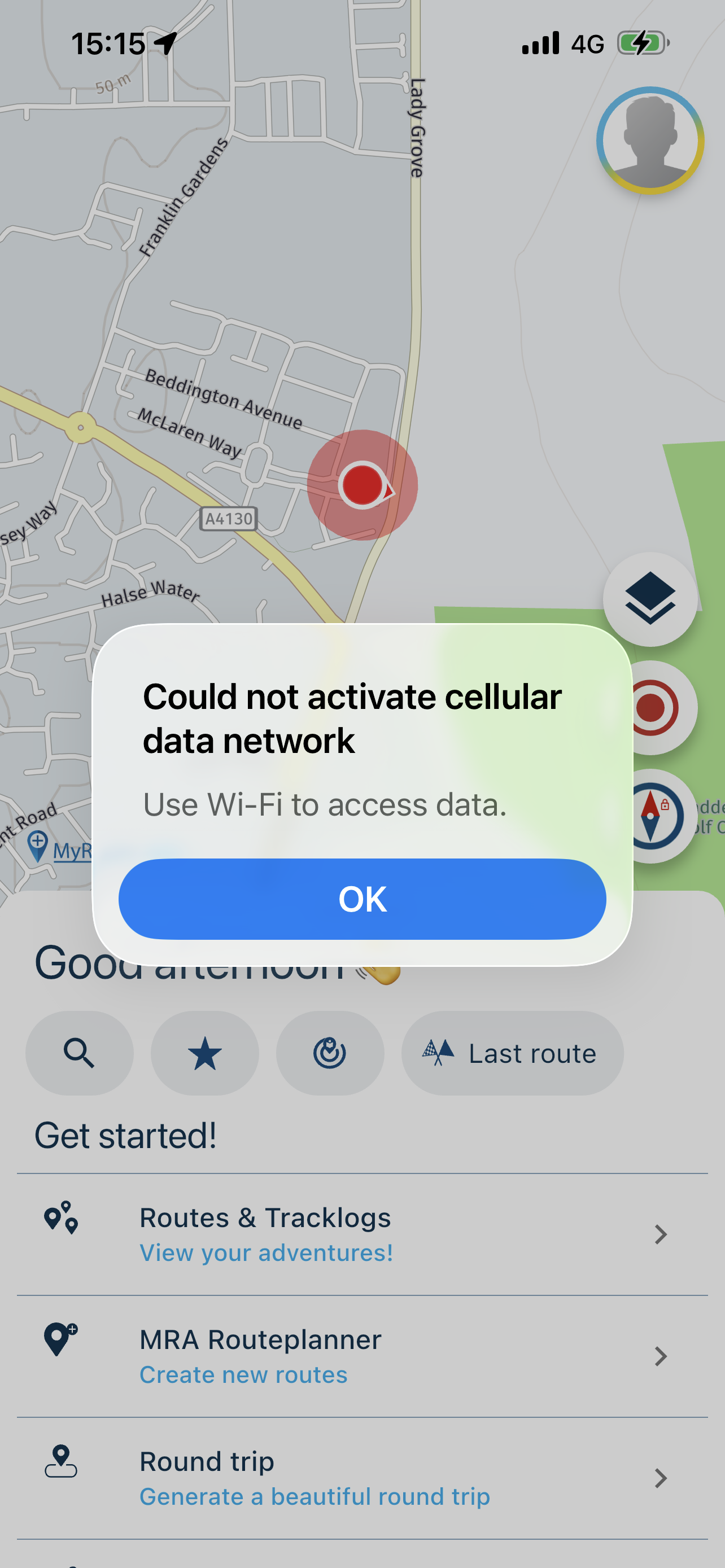
-

Thanks for posting!
1: this is your phone, not our app
 The notification has no relation to MyRoute-app, simply iOS that wants to tell you something.
2: interesting - I’d recommend going to audio setting, tap top right to play a sample and then use the volume buttons on your phone to increase the volume -

Take note TomTom, Garmin, Waze, Calimoto etc etc etc. the development team at MRA not only work on Christmas Day, they also answer customer questions

-
Hi,
I understand the iOS alert only appears when an app makes a foreground / blocking cellular data request and iOS cannot satisfy it.
Could you avoid foreground/blocking calls , degrading traffic/rerouting silently when data is unavailable? I believe google maps etc use a similar approach.
Regards,
-
Hi,
I understand the iOS alert only appears when an app makes a foreground / blocking cellular data request and iOS cannot satisfy it.
Could you avoid foreground/blocking calls , degrading traffic/rerouting silently when data is unavailable? I believe google maps etc use a similar approach.
Regards,
@F-Nick yes, we have that!
Enable the offline mode (navigation settings > functional) -
@F-Nick yes, we have that!
Enable the offline mode (navigation settings > functional)
@Corjan-Meijerink my goal here is to avoid touching the app while riding - which is the case with mainstream apps like googlemaps or waze.
Appreciate they have bigger budgets and this might be technically difficult. Just pointing out the limitation. Thanks
Hello! It looks like you're interested in this conversation, but you don't have an account yet.
Getting fed up of having to scroll through the same posts each visit? When you register for an account, you'll always come back to exactly where you were before, and choose to be notified of new replies (either via email, or push notification). You'll also be able to save bookmarks and upvote posts to show your appreciation to other community members.
With your input, this post could be even better 💗
Register Login-
06109
-
 0599
0599
-
 057
057
-
 110405
-
06135
-
0366
-
03128
-