Skip to content
  • Categories
  • Recent
  • Popular
  • Support
  • MyRoute-app
Collapse
Brand Logo

MRA Community Forum

  1. Home
  2. The MyRoute-app
  3. [App] Problems, Bugs and other Issues
  4. Offline Setup

Offline Setup

Scheduled Pinned Locked Moved [App] Problems, Bugs and other Issues
19 Posts 5 Posters 3.0k Views 3 Watching
  • Oldest to Newest
  • Newest to Oldest
  • Most Votes
Reply
  • Reply as topic
Log in to reply
This topic has been deleted. Only users with topic management privileges can see it.
  • Nigel Ralphson Nigel Ralphson

    Hi, I know this topic has been covered but I cant find anything which solves my issue.

    I have downloaded the relevant country and the route I have created. I have also gone into "Functional" and switched "Offline navigation" on.

    However, when I then select the route and press navigate it says " no internet connection - go offline". I click that and it says "offline navigation enabled - no route could be calculated using your offline map. To try again, we need to turn off the offline navigation" and gives me the option to go online.

    Hence, I am confused!!

    Where am I going wrong?

    Re: Offline

    Con Hennekens Offline
    Con Hennekens Offline
    Con Hennekens
    Alpha tester
    wrote on last edited by
    #4

    @Nigel-Ralphson, I think you are trying to start a track navigation instead of a route navigation. track navigation only works with an active internet connection.

    I am just an enthusiastic MRA user, and hope you will be one too!

    Most motorcycle problems are caused by the nut that connects the handlebar to the saddle.

    Check out RideSleepRepeat.eu, a biker community for sharing stays across Europe

    Nigel Ralphson 1 Reply Last reply
    0
    • Nigel Ralphson Nigel Ralphson

      Hi, I know this topic has been covered but I cant find anything which solves my issue.

      I have downloaded the relevant country and the route I have created. I have also gone into "Functional" and switched "Offline navigation" on.

      However, when I then select the route and press navigate it says " no internet connection - go offline". I click that and it says "offline navigation enabled - no route could be calculated using your offline map. To try again, we need to turn off the offline navigation" and gives me the option to go online.

      Hence, I am confused!!

      Where am I going wrong?

      Re: Offline

      Nigel Ralphson Offline
      Nigel Ralphson Offline
      Nigel Ralphson
      wrote on last edited by
      #5

      @Nigel-Ralphson thanks for your replies...unfortunately it's still not working.

      1 Reply Last reply
      0
      • Con Hennekens Con Hennekens

        @Nigel-Ralphson, I think you are trying to start a track navigation instead of a route navigation. track navigation only works with an active internet connection.

        Nigel Ralphson Offline
        Nigel Ralphson Offline
        Nigel Ralphson
        wrote on last edited by
        #6

        @Con-Hennekens Hi Con, yes that's correct. However, if I use the route option it ignores my waypoints and just sends me on the fastest route.

        Con Hennekens 1 Reply Last reply
        0
        • Nigel Ralphson Nigel Ralphson

          @Con-Hennekens Hi Con, yes that's correct. However, if I use the route option it ignores my waypoints and just sends me on the fastest route.

          Con Hennekens Offline
          Con Hennekens Offline
          Con Hennekens
          Alpha tester
          wrote on last edited by
          #7

          @Nigel-Ralphson, can you visualize that? Screenshots or screen recording? I have no idea what you are looking at. If you have waypoints in your route, I don't really see how Navigation would not use them...

          I am just an enthusiastic MRA user, and hope you will be one too!

          Most motorcycle problems are caused by the nut that connects the handlebar to the saddle.

          Check out RideSleepRepeat.eu, a biker community for sharing stays across Europe

          Nigel Ralphson 2 Replies Last reply
          0
          • Con Hennekens Con Hennekens

            @Nigel-Ralphson, can you visualize that? Screenshots or screen recording? I have no idea what you are looking at. If you have waypoints in your route, I don't really see how Navigation would not use them...

            Nigel Ralphson Offline
            Nigel Ralphson Offline
            Nigel Ralphson
            wrote on last edited by
            #8

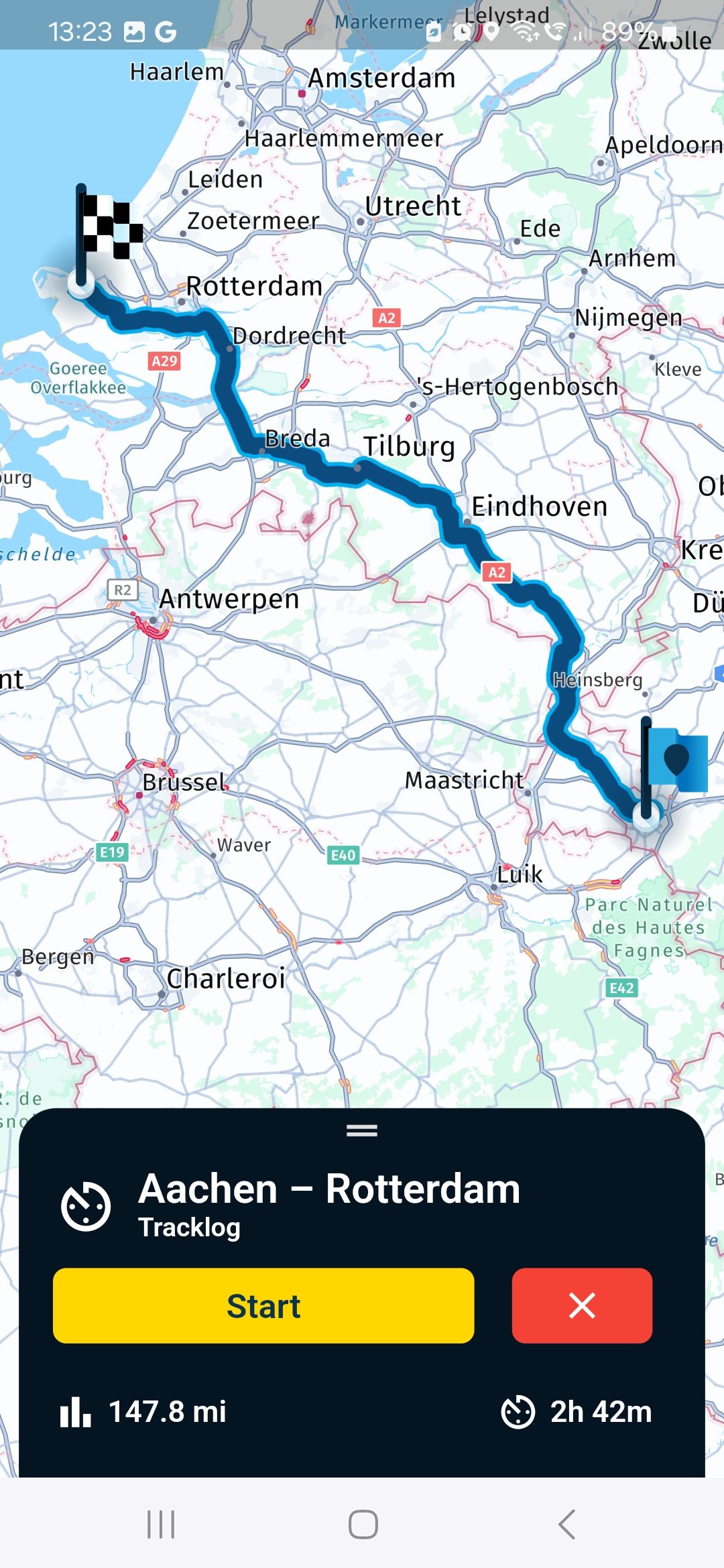
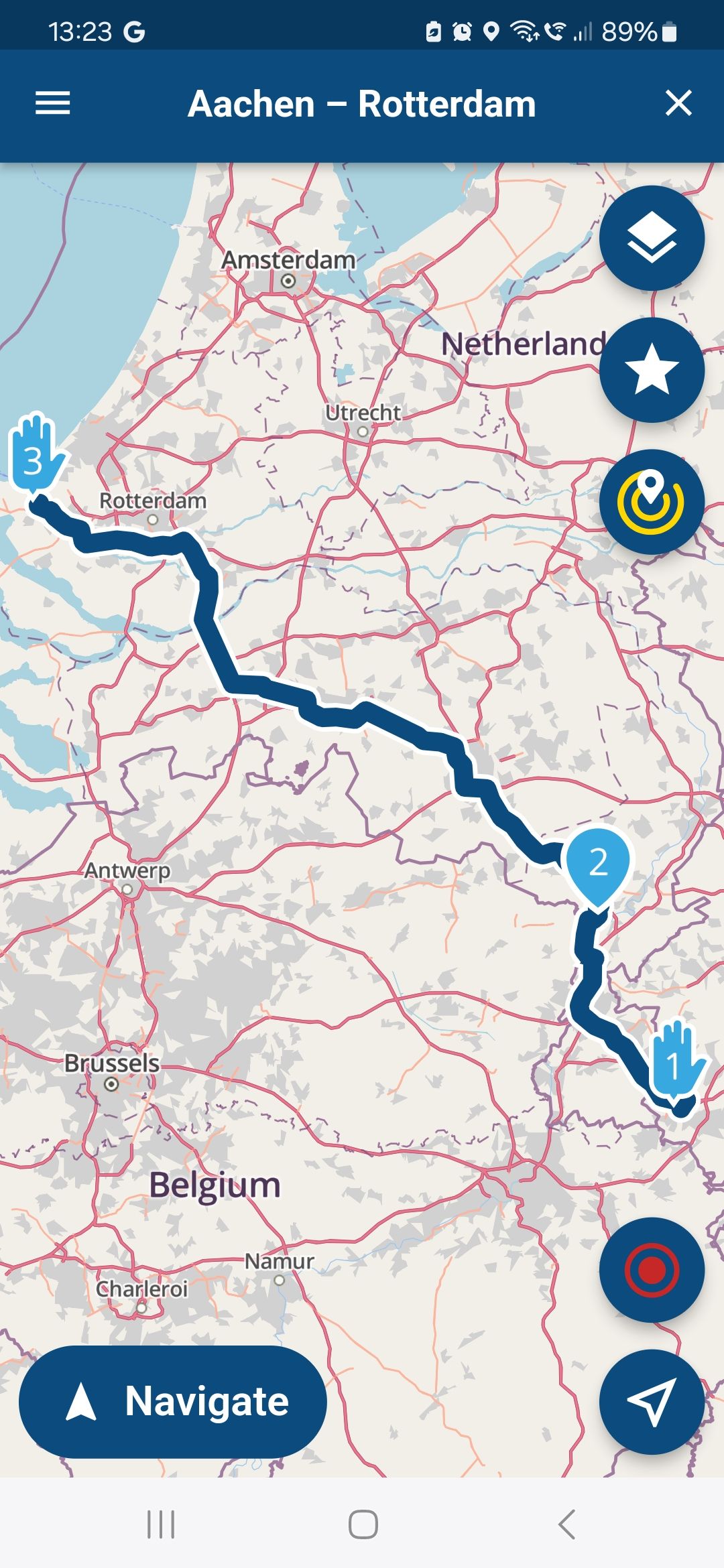
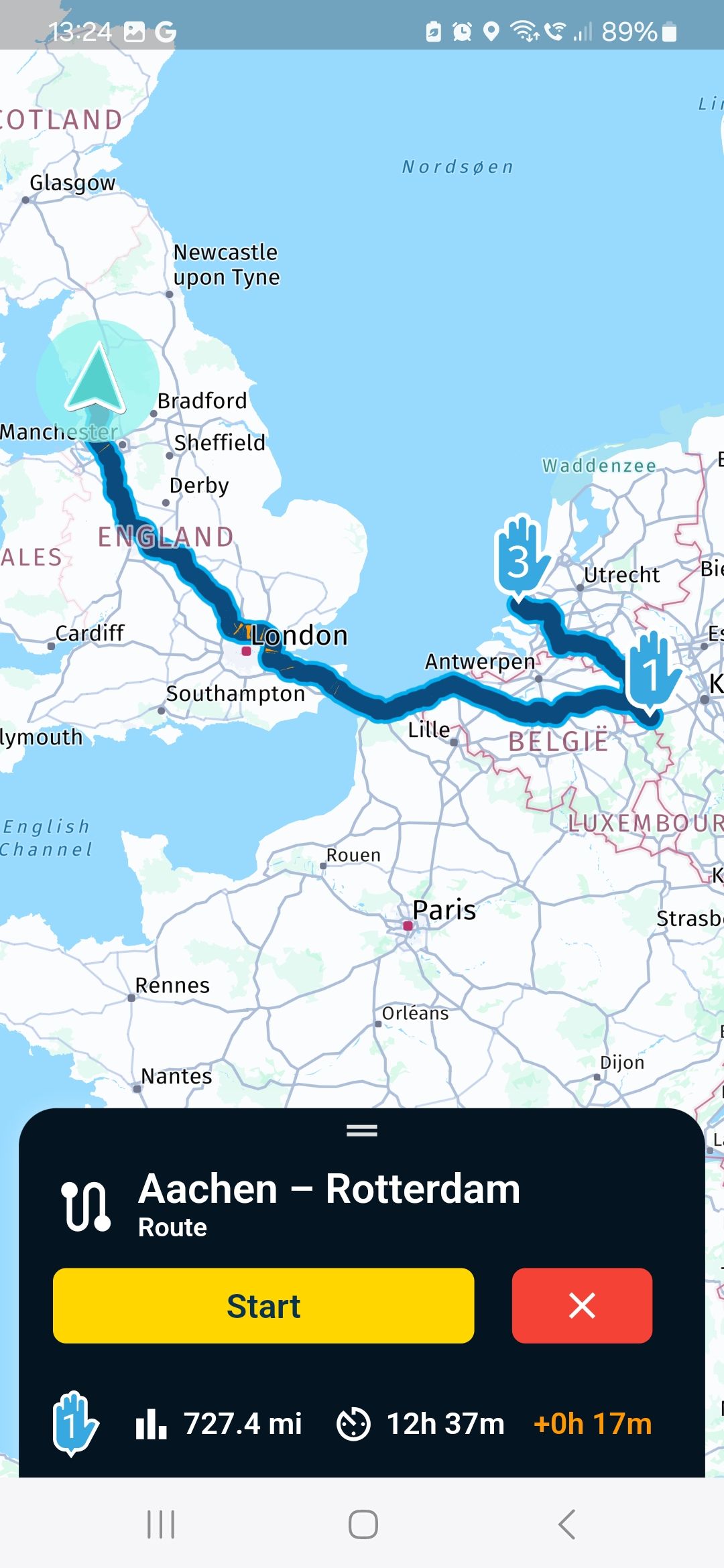
            @Con-Hennekens Screenshot_20240528_132344.jpg Screenshot_20240528_132329.jpg Screenshot_20240528_132404.jpg

            1 Reply Last reply
            0
            • Con Hennekens Con Hennekens

              @Nigel-Ralphson, can you visualize that? Screenshots or screen recording? I have no idea what you are looking at. If you have waypoints in your route, I don't really see how Navigation would not use them...

              Nigel Ralphson Offline
              Nigel Ralphson Offline
              Nigel Ralphson
              wrote on last edited by
              #9

              @Con-Hennekens Hi Con, please see pics. As you can see...if I click navigate and track it follows the route I've created. If I click route it comes up with a completely random route!

              1 Reply Last reply
              0
              • M. Schrijver Offline
                M. Schrijver Offline
                M. Schrijver
                Valued contributor
                wrote on last edited by
                #10

                No it does not. The route is only extended. From point 1 to point 3 the route is identical.
                The extra route to point 1 is from your current postion. You can disable it.

                A bit below the yellow "Start" button is an option. "Start from current location" Disable this and look at the result

                (I use MRA Next only on Android Auto. Every comment, suggestion, etc will be based on my usage with Android Auto)

                Nigel Ralphson 1 Reply Last reply
                0
                • M. Schrijver M. Schrijver

                  No it does not. The route is only extended. From point 1 to point 3 the route is identical.
                  The extra route to point 1 is from your current postion. You can disable it.

                  A bit below the yellow "Start" button is an option. "Start from current location" Disable this and look at the result

                  Nigel Ralphson Offline
                  Nigel Ralphson Offline
                  Nigel Ralphson
                  wrote on last edited by
                  #11

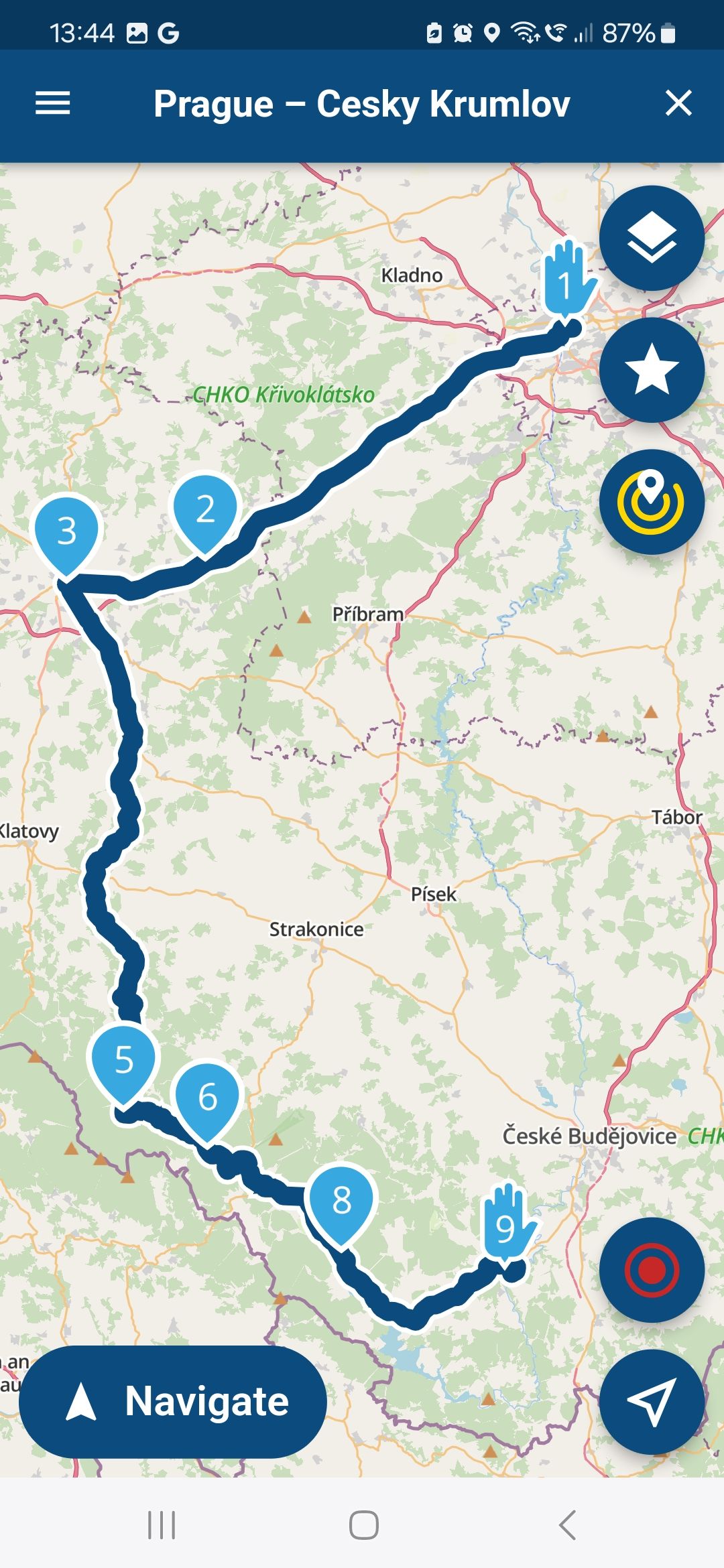
                  @M-Schrijver Ah I didnt see that as it disappears very quickly. However, as you can see below with a different example the routes arent the sameScreenshot_20240528_134455.jpg Screenshot_20240528_134407.jpg Screenshot_20240528_134427.jpg

                  Con Hennekens M. Schrijver 2 Replies Last reply
                  0
                  • Nigel Ralphson Nigel Ralphson

                    Hi, I know this topic has been covered but I cant find anything which solves my issue.

                    I have downloaded the relevant country and the route I have created. I have also gone into "Functional" and switched "Offline navigation" on.

                    However, when I then select the route and press navigate it says " no internet connection - go offline". I click that and it says "offline navigation enabled - no route could be calculated using your offline map. To try again, we need to turn off the offline navigation" and gives me the option to go online.

                    Hence, I am confused!!

                    Where am I going wrong?

                    Re: Offline

                    Hans van de Ven MR.MRA Offline
                    Hans van de Ven MR.MRA Offline
                    Hans van de Ven MR.MRA
                    Valued contributor
                    wrote on last edited by
                    #12

                    @Nigel-Ralphson

                    Download the route for off-line use. Then goto downloads and start the route by clicking on the file wich is the route you want to drive

                    Garmin Zumo XT3/XT2/XT/BMW Connected Ride Navigator/Tourstart/ MyRouteapp (The App)/...
                    Een dag niet gelachen is een dag niet geleefd / Een route is net zo goed als deze uitgezet is.

                    Nigel Ralphson 1 Reply Last reply
                    0
                    • Nigel Ralphson Nigel Ralphson

                      @M-Schrijver Ah I didnt see that as it disappears very quickly. However, as you can see below with a different example the routes arent the sameScreenshot_20240528_134455.jpg Screenshot_20240528_134407.jpg Screenshot_20240528_134427.jpg

                      Con Hennekens Offline
                      Con Hennekens Offline
                      Con Hennekens
                      Alpha tester
                      wrote on last edited by
                      #13

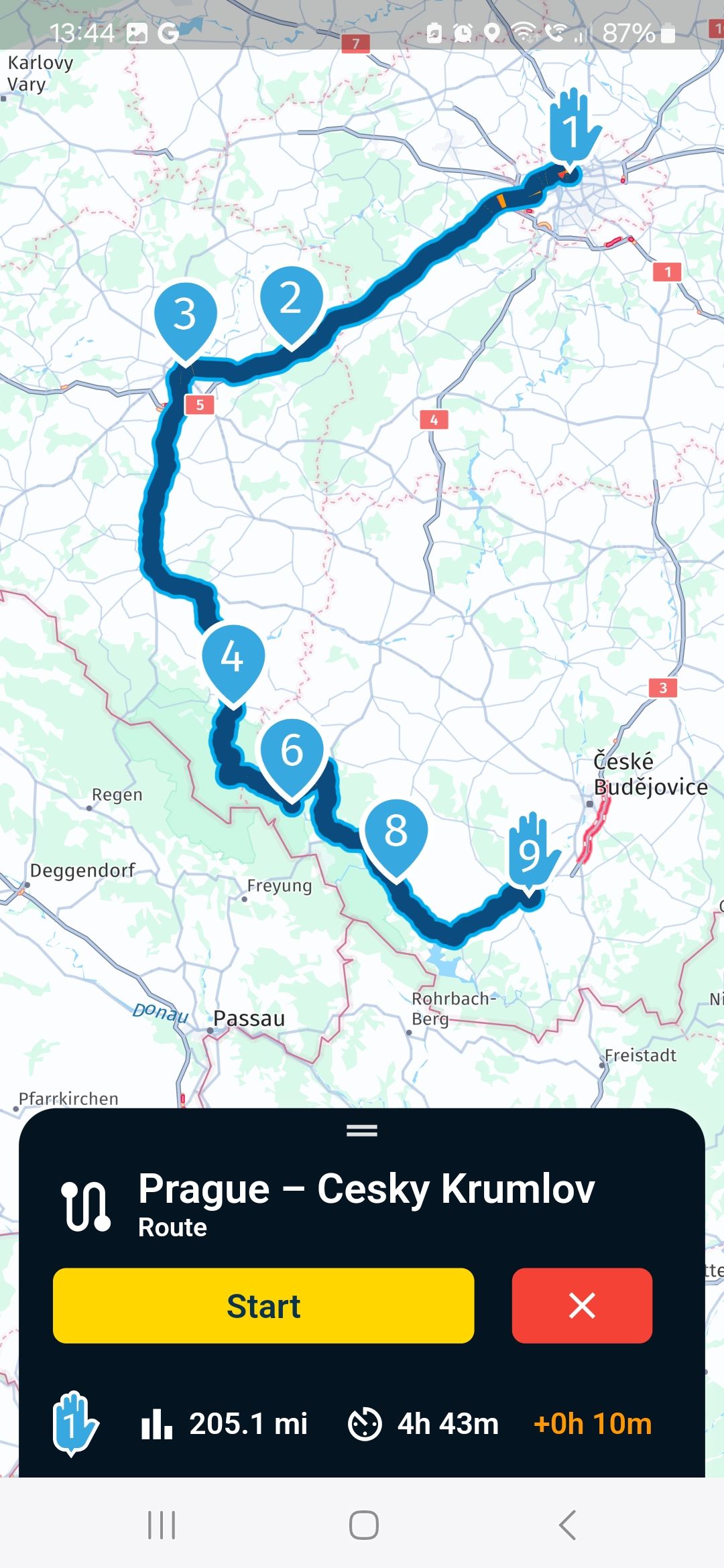
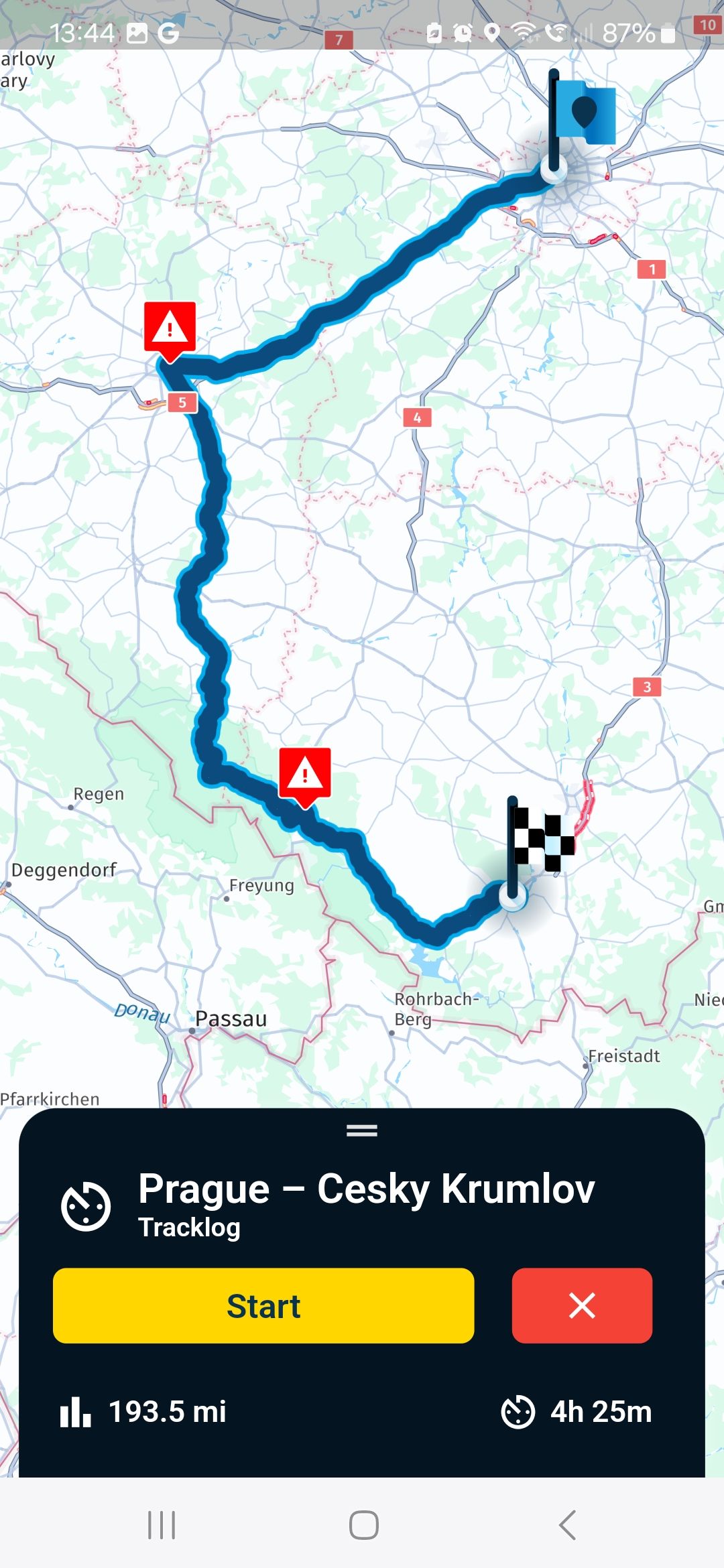
                      @Nigel-Ralphson, The last 3 pictures you posted:
                      Picture 1 is a route overview like you planned it in the planner
                      Picture 2 is the same route, but calculated for navigating with the HERE map AT THIS TIME (considering trafic information). This can be slightly different.
                      Picture 3 is a tracklog you recorded, which does not necessarily follow the route you planned.

                      I really see nothing out of the ordinary (or I completely miss your point 😉 )

                      I am just an enthusiastic MRA user, and hope you will be one too!

                      Most motorcycle problems are caused by the nut that connects the handlebar to the saddle.

                      Check out RideSleepRepeat.eu, a biker community for sharing stays across Europe

                      Nigel Ralphson 2 Replies Last reply
                      0
                      • Nigel Ralphson Nigel Ralphson

                        @M-Schrijver Ah I didnt see that as it disappears very quickly. However, as you can see below with a different example the routes arent the sameScreenshot_20240528_134455.jpg Screenshot_20240528_134407.jpg Screenshot_20240528_134427.jpg

                        M. Schrijver Offline
                        M. Schrijver Offline
                        M. Schrijver
                        Valued contributor
                        wrote on last edited by
                        #14

                        @Nigel-Ralphson
                        Two things to try and see some results.

                        Disable traffic-aware routing. When disabeling. The route in MRA Routeplanner and MRA Next could be the same.

                        Place more points between point 3 and 4. This way you force MRA Next more to follow the same route.

                        (I use MRA Next only on Android Auto. Every comment, suggestion, etc will be based on my usage with Android Auto)

                        Nigel Ralphson 1 Reply Last reply
                        0
                        • Hans van de Ven MR.MRA Hans van de Ven MR.MRA

                          @Nigel-Ralphson

                          Download the route for off-line use. Then goto downloads and start the route by clicking on the file wich is the route you want to drive

                          Nigel Ralphson Offline
                          Nigel Ralphson Offline
                          Nigel Ralphson
                          wrote on last edited by
                          #15

                          @Hans-van-de-Ven-MR-MRA thanks but done that

                          1 Reply Last reply
                          0
                          • Con Hennekens Con Hennekens

                            @Nigel-Ralphson, The last 3 pictures you posted:
                            Picture 1 is a route overview like you planned it in the planner
                            Picture 2 is the same route, but calculated for navigating with the HERE map AT THIS TIME (considering trafic information). This can be slightly different.
                            Picture 3 is a tracklog you recorded, which does not necessarily follow the route you planned.

                            I really see nothing out of the ordinary (or I completely miss your point 😉 )

                            Nigel Ralphson Offline
                            Nigel Ralphson Offline
                            Nigel Ralphson
                            wrote on last edited by
                            #16

                            @Con-Hennekens I havent done the route yet! On a test if I follow the track it follows my planned route but if i follow the route it deviates,

                            1 Reply Last reply
                            0
                            • M. Schrijver M. Schrijver

                              @Nigel-Ralphson
                              Two things to try and see some results.

                              Disable traffic-aware routing. When disabeling. The route in MRA Routeplanner and MRA Next could be the same.

                              Place more points between point 3 and 4. This way you force MRA Next more to follow the same route.

                              Nigel Ralphson Offline
                              Nigel Ralphson Offline
                              Nigel Ralphson
                              wrote on last edited by
                              #17

                              @M-Schrijver thanks I'll give it a go

                              1 Reply Last reply
                              0
                              • Con Hennekens Con Hennekens

                                @Nigel-Ralphson, The last 3 pictures you posted:
                                Picture 1 is a route overview like you planned it in the planner
                                Picture 2 is the same route, but calculated for navigating with the HERE map AT THIS TIME (considering trafic information). This can be slightly different.
                                Picture 3 is a tracklog you recorded, which does not necessarily follow the route you planned.

                                I really see nothing out of the ordinary (or I completely miss your point 😉 )

                                Nigel Ralphson Offline
                                Nigel Ralphson Offline
                                Nigel Ralphson
                                wrote on last edited by
                                #18

                                @Con-Hennekens Hi Con, I ran a route yesterday that I'd designed. My friend ran it in route mode and I ran it in track. The routes were completely different. The route mode just looked for the fastest point between waypoints whilst the track mode followed my prescribed route. 🤷‍♂️

                                Con Hennekens 1 Reply Last reply
                                0
                                • Nigel Ralphson Nigel Ralphson

                                  @Con-Hennekens Hi Con, I ran a route yesterday that I'd designed. My friend ran it in route mode and I ran it in track. The routes were completely different. The route mode just looked for the fastest point between waypoints whilst the track mode followed my prescribed route. 🤷‍♂️

                                  Con Hennekens Offline
                                  Con Hennekens Offline
                                  Con Hennekens
                                  Alpha tester
                                  wrote on last edited by Con Hennekens
                                  #19

                                  @Nigel-Ralphson, If you plan your route on the HERE map, differences while navigating can virtually only happen due to traffic. So if you did not encounter any traffic problems, it is a sign that you probably did not plan it on the HERE map, and that you have set way too less waypoints. You may share that route with us, so we can have a look. Without that, I don't see how we can be of further assistance.

                                  I am just an enthusiastic MRA user, and hope you will be one too!

                                  Most motorcycle problems are caused by the nut that connects the handlebar to the saddle.

                                  Check out RideSleepRepeat.eu, a biker community for sharing stays across Europe

                                  1 Reply Last reply
                                  0

                                  Hello! It looks like you're interested in this conversation, but you don't have an account yet.

                                  Getting fed up of having to scroll through the same posts each visit? When you register for an account, you'll always come back to exactly where you were before, and choose to be notified of new replies (either via email, or push notification). You'll also be able to save bookmarks and upvote posts to show your appreciation to other community members.

                                  With your input, this post could be even better 💗

                                  Register Login
                                  Reply
                                  • Reply as topic
                                  Log in to reply
                                  • Oldest to Newest
                                  • Newest to Oldest
                                  • Most Votes


                                  ACTIVE USERS
                                  M. Schrijver
                                  M. Schrijver
                                  Con Hennekens
                                  Con Hennekens
                                  Hans van de Ven MR.MRA
                                  Hans van de Ven MR.MRA
                                  RetiredWingMan
                                  RetiredWingMan
                                  Nigel Ralphson
                                  Nigel Ralphson
                                  POPULAR TOPICS
                                  • The compas direction on the elevation circle is wrong
                                    LennyO
                                    LennyO
                                    0
                                    40
                                    1.3k

                                  • Linker in MRA kleurt blauw (alles geselecteerd)
                                    LennyO
                                    LennyO
                                    0
                                    23
                                    480

                                  • New update 5.2.1
                                    M. Schrijver
                                    M. Schrijver
                                    16
                                    21
                                    875

                                  • Problem with Route Animate/Video maker
                                    Guzzist
                                    Guzzist
                                    0
                                    5
                                    86

                                  • Wegwerkzaamheden / Road works
                                    veghelvan 0
                                    veghelvan 0
                                    0
                                    5
                                    114

                                  • Points of interest
                                    Guzzist
                                    Guzzist
                                    0
                                    3
                                    59

                                  • Hiding home address / waypoint for shared routes
                                    Guzzist
                                    Guzzist
                                    0
                                    3
                                    37

                                  • die selbe Route/Strecke zurückfahren, wie vorgehen bei Generierung der Navi Daten
                                    Guzzist
                                    Guzzist
                                    0
                                    3
                                    33

                                  MY GROUPS
                                  • Login

                                  • Login or register to search.
                                  • First post
                                    Last post
                                  0
                                  • Categories
                                  • Recent
                                  • Popular
                                  • Support
                                  • MyRoute-app