Route Import
-

When I import an itn file to my Tom Tom rider550 I have a large number of routes to choose from to import Is there a way to clear some of these routes all I have is an option to select or de-select all of them. where are they stored ???
Bill -
When I import an itn file to my Tom Tom rider550 I have a large number of routes to choose from to import Is there a way to clear some of these routes all I have is an option to select or de-select all of them. where are they stored ???
Bill
Probably in TomTom MyDrive
-
When I import an itn file to my Tom Tom rider550 I have a large number of routes to choose from to import Is there a way to clear some of these routes all I have is an option to select or de-select all of them. where are they stored ???
Bill
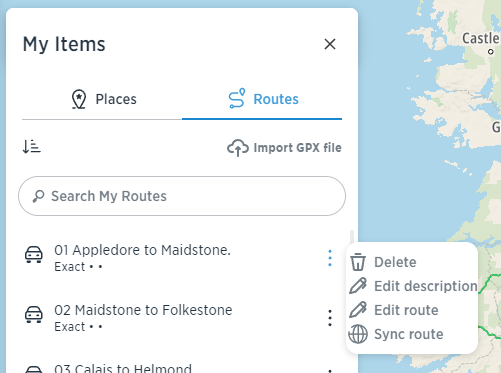
@Bill-Stephens @Hans-van-de-Ven-MRA-Master is correct. Go to MyDrive, login and click the 3 horizontal lines in the top left and select My items. With your list of routes showing click the 3 vertical dots and choose Delete. You can only delete these one at a time.
Going back to your original question, your latest .itn routes will be at the top of the list so you just need to select the ones you want to import. -
Probably in TomTom MyDrive
@Hans-van-de-Ven-MRA-Master
Cannot see them in Tom Tom MyDrive anywhere, they only appear on the tom tom rider screen where I can check which route I want to import -
@Hans-van-de-Ven-MRA-Master
Cannot see them in Tom Tom MyDrive anywhere, they only appear on the tom tom rider screen where I can check which route I want to import
@Bill-Stephens See my reply above.
Always willing to help if I can.
Triumph Tiger 1200 XRT called Tina.
MRA Navigation Next and SilverFox BJ8 -
@Bill-Stephens See my reply above.
@Nick-Carthew
Hi Nick
I understand how to delete routes in my drive its the list of routes to import that I would like to tidy up a bit as there are to many in there ( probably because I play around with routes a lot modifying them changing names & creating new routes ) idle hands and all that.
Bill -
@Nick-Carthew
Hi Nick
I understand how to delete routes in my drive its the list of routes to import that I would like to tidy up a bit as there are to many in there ( probably because I play around with routes a lot modifying them changing names & creating new routes ) idle hands and all that.
Bill
@Bill-Stephens These routes are in the pre memory of the Rider. Connect your Rider to a PC click Import routes on the Rider and take a look into the folder that's open now on your PC. Here you can delete everything you do not need.
Hardware
iPhone 12 pro (iOS 26.2.1)
iPad (7.Gen.) 18.7.3
Oukitel RT3 Pro (Andr. 14)
Wireless CarPlay mit (Elebest C650)
Wired CarPlay (SEAT Arona - 2021)
MRA Workshops in Deutsch sind hier zu finden -
@Bill-Stephens These routes are in the pre memory of the Rider. Connect your Rider to a PC click Import routes on the Rider and take a look into the folder that's open now on your PC. Here you can delete everything you do not need.
@Jörgen
Hi Jorgen
Thanks for that it did not work on my Mac tried it on a windows laptop and it worked fine.
thank you
Bill -
@Jörgen
Hi Jorgen
Thanks for that it did not work on my Mac tried it on a windows laptop and it worked fine.
thank you
Bill

Hello! It looks like you're interested in this conversation, but you don't have an account yet.
Getting fed up of having to scroll through the same posts each visit? When you register for an account, you'll always come back to exactly where you were before, and choose to be notified of new replies (either via email, or push notification). You'll also be able to save bookmarks and upvote posts to show your appreciation to other community members.
With your input, this post could be even better 💗
Register Login-
 020392
-
 4211.7k
-
 91057.5k
-
016571
-
013440
-
 0615
0615
-
 0436
0436
-
 039
039