Skip to content
  • Categories
  • Recent
  • Popular
  • Support
  • MyRoute-app
Collapse
Brand Logo

MRA Community Forum

  1. Home
  2. The MyRoute-app
  3. [App] Problems, Bugs and other Issues
  4. OFFLINE navigation issue

OFFLINE navigation issue

Scheduled Pinned Locked Moved [App] Problems, Bugs and other Issues
15 Posts 3 Posters 3.1k Views 1 Watching
  • Oldest to Newest
  • Newest to Oldest
  • Most Votes
Reply
  • Reply as topic
Log in to reply
This topic has been deleted. Only users with topic management privileges can see it.
  • RetiredWingMan RetiredWingMan

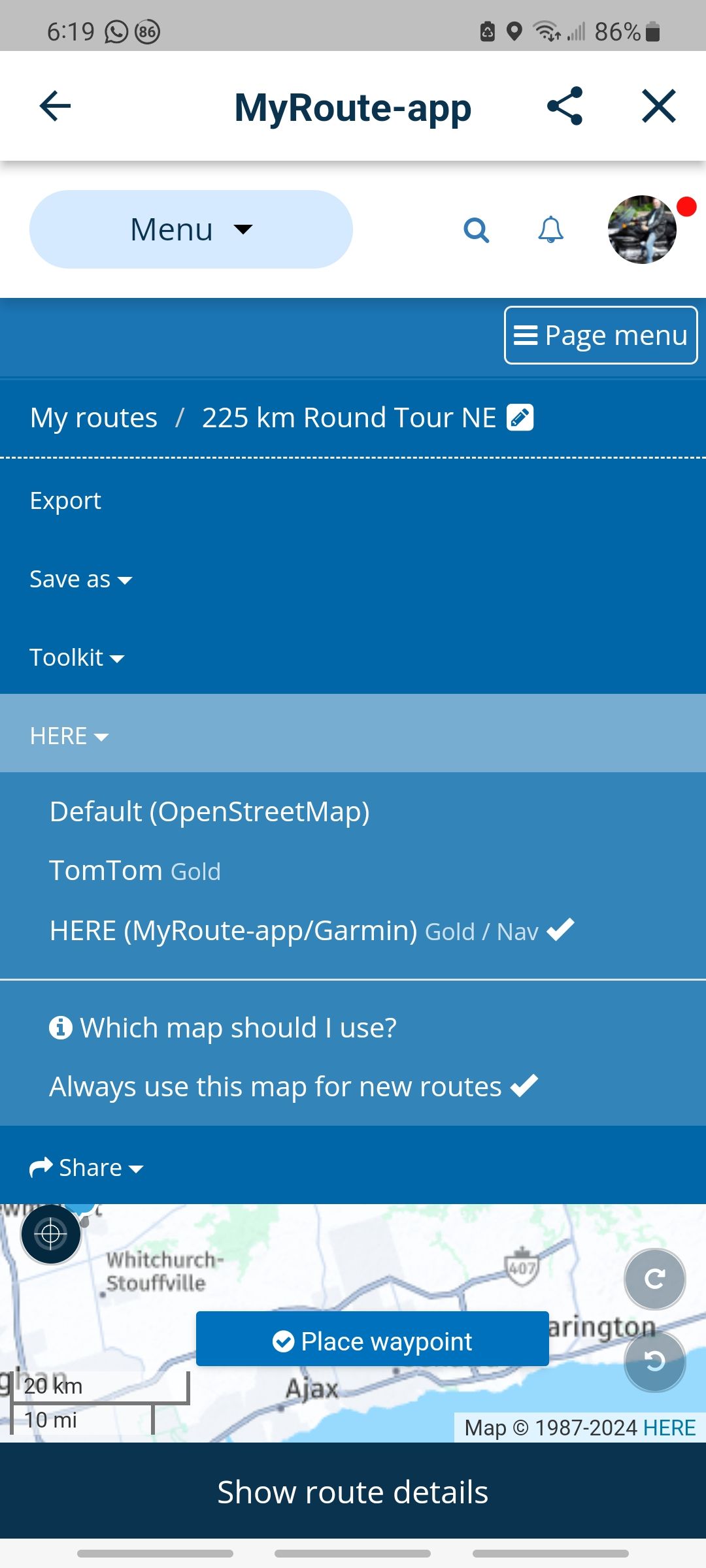
    @Lenny-O 1st, are you sure you used Here to plan the map and not just an overlay?
    Screenshot_20240225_181901.jpg

    LennyO Offline
    LennyO Offline
    LennyO
    RouteXpert
    wrote on last edited by
    #5

    @RetiredWingMan Yes, Sir! I am sure I am using HERE.

    Positive emotions are worth every penny ;)

    1 Reply Last reply
    0
    • RetiredWingMan RetiredWingMan

      @Lenny-O if you plan a route using tomtom or open maps and then try to navigate on Mra Next, you will get a warning message. How much the route may vary from the planned route depends on many things. To convert a route planned in open or tomtom to Here, open the route, change the planning card to Here and edit the map making a change of some sort. Next time you open the route the warning message should be gone.

      LennyO Offline
      LennyO Offline
      LennyO
      RouteXpert
      wrote on last edited by
      #6

      @RetiredWingMan said in OFFLINE navigation issue:

      ... To convert a route planned in open or tomtom to Here, open the route, change the planning card to Here and edit the map making a change of some sort. Next time you open the route the warning message should be gone.

      What you are saying sounds perfectly logical! I was thinking along the same lines and did just that.
      Yet, the problem still exists and strangely ONLY in the Offline Nav mode...

      Also, what seems illogical to me is WHY the Open Street Map is chosen as the default when creating a route, when the Nav requires HERE map for navigation...????

      Positive emotions are worth every penny ;)

      RetiredWingMan 1 Reply Last reply
      0
      • LennyO LennyO

        @RetiredWingMan said in OFFLINE navigation issue:

        ... To convert a route planned in open or tomtom to Here, open the route, change the planning card to Here and edit the map making a change of some sort. Next time you open the route the warning message should be gone.

        What you are saying sounds perfectly logical! I was thinking along the same lines and did just that.
        Yet, the problem still exists and strangely ONLY in the Offline Nav mode...

        Also, what seems illogical to me is WHY the Open Street Map is chosen as the default when creating a route, when the Nav requires HERE map for navigation...????

        RetiredWingMan Offline
        RetiredWingMan Offline
        RetiredWingMan
        Valued contributor
        wrote on last edited by RetiredWingMan
        #7

        @Lenny-O I think when you initially open the planner web site and log in you may not have a license that allows the Here maps. That is why it initially defaults to OpenStreetMap. You need to change the options so that it defaults to Here. Assuming you have one of the required licenses.

        2010 GL1800 Goldwing using Samsung Galaxy S20 5G Android 13.

        1 Reply Last reply
        1
        • LennyO Offline
          LennyO Offline
          LennyO
          RouteXpert
          wrote on last edited by
          #8

          @RetiredWingMan I have Gold membership with Navigation.
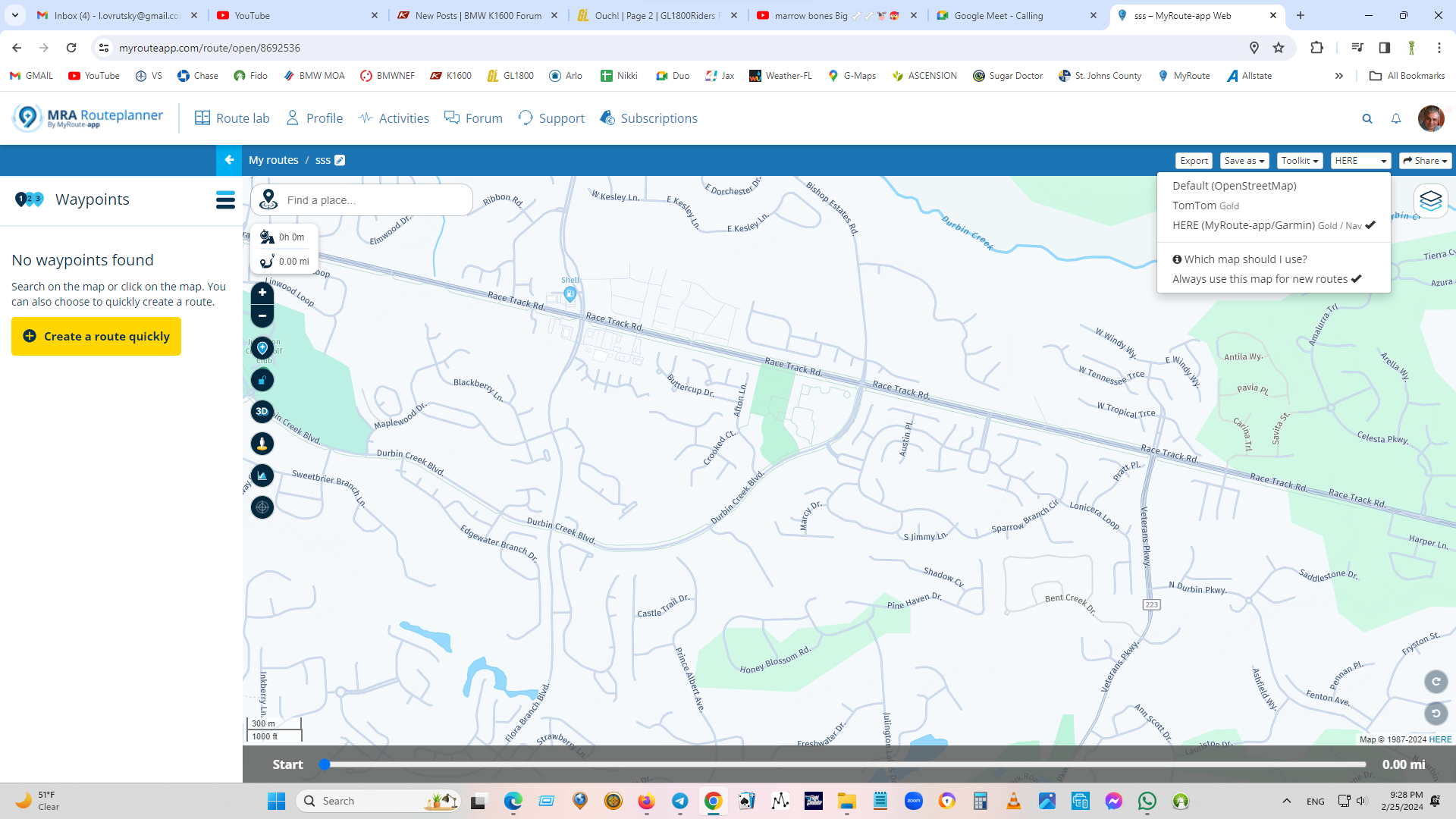
          550b95c3-d219-4396-ae85-3957815e4689-image.png

          Positive emotions are worth every penny ;)

          1 Reply Last reply
          0
          • Con Hennekens Offline
            Con Hennekens Offline
            Con Hennekens
            Alpha tester
            wrote on last edited by Con Hennekens
            #9

            @Lenny-O, I cannot reproduce this issue. Routes planned with HERE are opened offline just fine for me. Even when they are changed to HERE afterwards.

            1. Because in your downloaded route the change to HERE was apparently not yet present.
            2. The map used to plan the route is simply a parameter in the route data. The planner too opens a route with the map it was planned in.
            3. Nothing else then what you have been doing, AND making sure you redownload the route after it is changed. To be absolutely sure, delete the old file from the downloads folder before you redownload.
            4. Yes it is just a warning, but it does have teeth 😉 Many topics in divers navigation fora are about differences in routes in apps or devices based on different maps.

            I am just an enthusiastic MRA user, and hope you will be one too!

            Most motorcycle problems are caused by the nut that connects the handlebar to the saddle.

            Check out RideSleepRepeat.eu, a biker community for sharing stays across Europe

            LennyO 1 Reply Last reply
            1
            • Con Hennekens Con Hennekens

              @Lenny-O, I cannot reproduce this issue. Routes planned with HERE are opened offline just fine for me. Even when they are changed to HERE afterwards.

              1. Because in your downloaded route the change to HERE was apparently not yet present.
              2. The map used to plan the route is simply a parameter in the route data. The planner too opens a route with the map it was planned in.
              3. Nothing else then what you have been doing, AND making sure you redownload the route after it is changed. To be absolutely sure, delete the old file from the downloads folder before you redownload.
              4. Yes it is just a warning, but it does have teeth 😉 Many topics in divers navigation fora are about differences in routes in apps or devices based on different maps.
              LennyO Offline
              LennyO Offline
              LennyO
              RouteXpert
              wrote on last edited by LennyO
              #10

              @Con-Hennekens Thank you!
              I am re-installing the app, re-downloading all region maps, will create a brand new test-route, repeat all steps again and see what happens then....
              Question though, when you download your route into the Downloads folder, how many files do you see? One or two?
              Interestingly enough, after getting the "Map error" message, if I look into the Downloads folder, I see an extra file without the .gpx extension on it.
              What's that?

              P.S. After re-installing everything, the problem still exists.... DAMN!!!

              Positive emotions are worth every penny ;)

              Con Hennekens 1 Reply Last reply
              0
              • LennyO LennyO

                @Con-Hennekens Thank you!
                I am re-installing the app, re-downloading all region maps, will create a brand new test-route, repeat all steps again and see what happens then....
                Question though, when you download your route into the Downloads folder, how many files do you see? One or two?
                Interestingly enough, after getting the "Map error" message, if I look into the Downloads folder, I see an extra file without the .gpx extension on it.
                What's that?

                P.S. After re-installing everything, the problem still exists.... DAMN!!!

                Con Hennekens Offline
                Con Hennekens Offline
                Con Hennekens
                Alpha tester
                wrote on last edited by
                #11

                @Lenny-O said in OFFLINE navigation issue:

                Question though, when you download your route into the Downloads folder, how many files do you see?

                One route is just one file. It is probably not even a file, but an entry in a database, just like files are records in a database online as well. Can you post a screenshot of your downloads folder?

                I am just an enthusiastic MRA user, and hope you will be one too!

                Most motorcycle problems are caused by the nut that connects the handlebar to the saddle.

                Check out RideSleepRepeat.eu, a biker community for sharing stays across Europe

                LennyO 2 Replies Last reply
                1
                • Con Hennekens Con Hennekens

                  @Lenny-O said in OFFLINE navigation issue:

                  Question though, when you download your route into the Downloads folder, how many files do you see?

                  One route is just one file. It is probably not even a file, but an entry in a database, just like files are records in a database online as well. Can you post a screenshot of your downloads folder?

                  LennyO Offline
                  LennyO Offline
                  LennyO
                  RouteXpert
                  wrote on last edited by LennyO
                  #12

                  @Con-Hennekens !
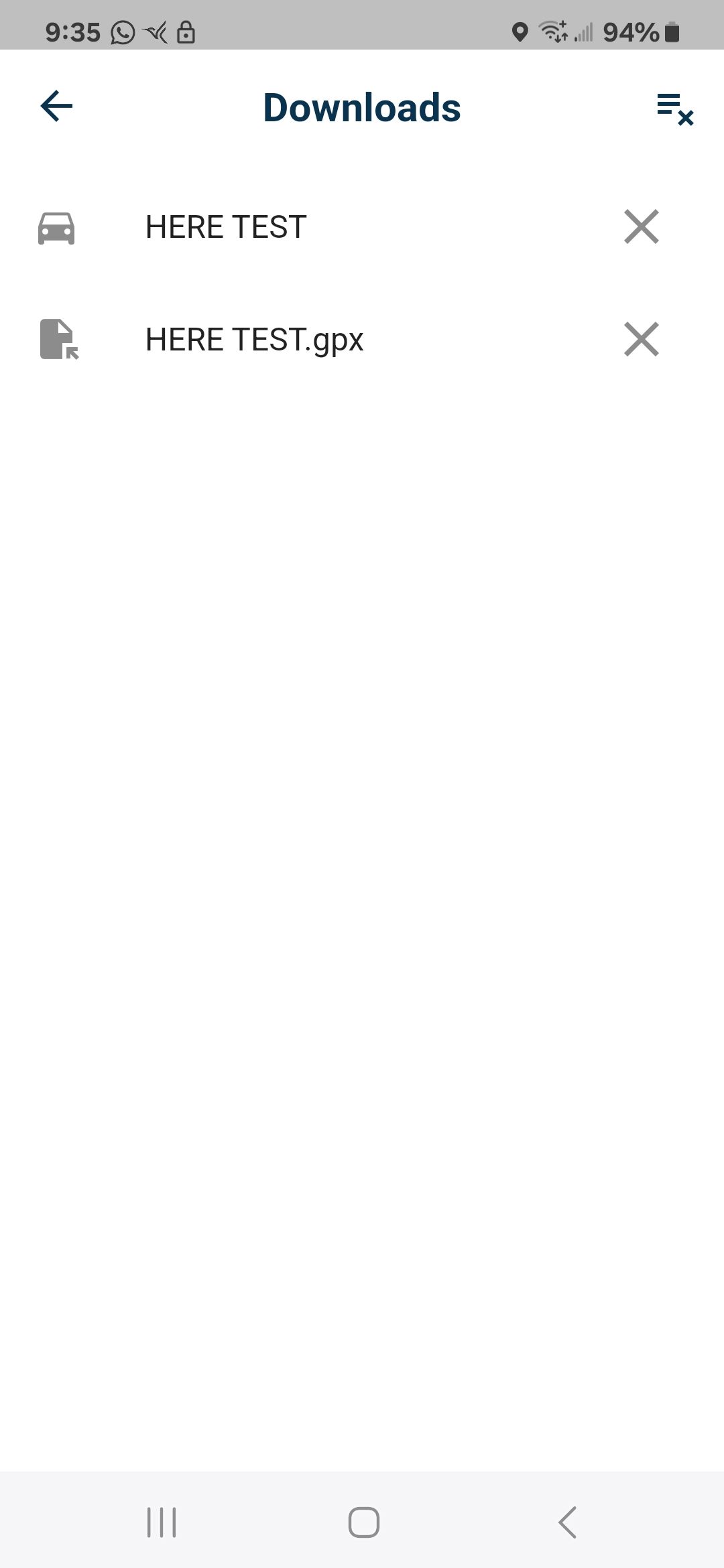
                  This is my new test-route I created for testing this issue.
                  This is before the app re-install...
                  [alt text](Screenshot_20240226_093532.jpg image url)
                  Positive emotions are worth every penny ;)

                  1 Reply Last reply
                  0
                  • Con Hennekens Con Hennekens

                    @Lenny-O said in OFFLINE navigation issue:

                    Question though, when you download your route into the Downloads folder, how many files do you see?

                    One route is just one file. It is probably not even a file, but an entry in a database, just like files are records in a database online as well. Can you post a screenshot of your downloads folder?

                    LennyO Offline
                    LennyO Offline
                    LennyO
                    RouteXpert
                    wrote on last edited by
                    #13

                    @Con-Hennekens Con,
                    THANK YOU for your help!!!
                    The issue has been resolved by the support team!!!
                    It was a self-induced error on my part!
                    I was downloading the Route incorrectly as a .gpx 1.1, where I needed to do this:
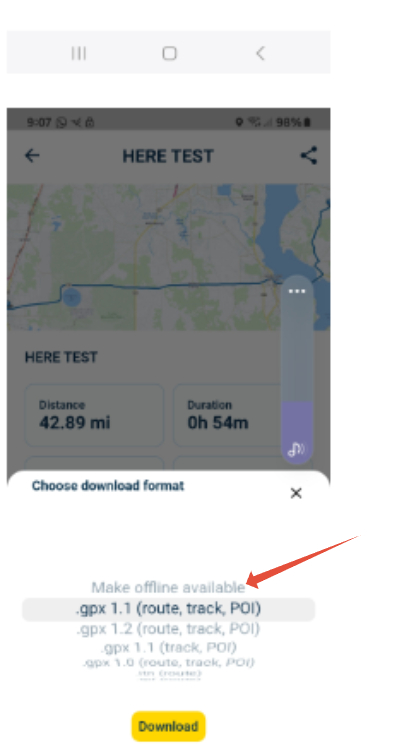
                    Correct-Download.png

                    Positive emotions are worth every penny ;)

                    Con Hennekens 1 Reply Last reply
                    0
                    • RetiredWingMan Offline
                      RetiredWingMan Offline
                      RetiredWingMan
                      Valued contributor
                      wrote on last edited by
                      #14

                      @Lenny-O glad to hear you got it sorted out.

                      2010 GL1800 Goldwing using Samsung Galaxy S20 5G Android 13.

                      1 Reply Last reply
                      1
                      • LennyO LennyO

                        @Con-Hennekens Con,
                        THANK YOU for your help!!!
                        The issue has been resolved by the support team!!!
                        It was a self-induced error on my part!
                        I was downloading the Route incorrectly as a .gpx 1.1, where I needed to do this:
                        Correct-Download.png

                        Con Hennekens Offline
                        Con Hennekens Offline
                        Con Hennekens
                        Alpha tester
                        wrote on last edited by
                        #15

                        @Lenny-O said in OFFLINE navigation issue:

                        I was downloading the Route incorrectly as a .gpx 1.1, where I needed to do this:

                        Yes, seeing the GPX file, that would have been my suggestion too 😉

                        THANK YOU for your help!!!

                        You're welcome, glad it was sorted.

                        I am just an enthusiastic MRA user, and hope you will be one too!

                        Most motorcycle problems are caused by the nut that connects the handlebar to the saddle.

                        Check out RideSleepRepeat.eu, a biker community for sharing stays across Europe

                        1 Reply Last reply
                        0

                        Hello! It looks like you're interested in this conversation, but you don't have an account yet.

                        Getting fed up of having to scroll through the same posts each visit? When you register for an account, you'll always come back to exactly where you were before, and choose to be notified of new replies (either via email, or push notification). You'll also be able to save bookmarks and upvote posts to show your appreciation to other community members.

                        With your input, this post could be even better 💗

                        Register Login
                        Reply
                        • Reply as topic
                        Log in to reply
                        • Oldest to Newest
                        • Newest to Oldest
                        • Most Votes


                        ACTIVE USERS
                        RetiredWingMan
                        RetiredWingMan
                        LennyO
                        LennyO
                        Con Hennekens
                        Con Hennekens
                        POPULAR TOPICS
                        • "The selected profile only works in the HERE / TomTom map"
                          Rob Verhoeff
                          Rob Verhoeff
                          0
                          19
                          286

                        • Google maps and Streetview
                          Stevedo 6 0
                          Stevedo 6 0
                          1
                          20
                          802

                        • Carpuride BMW unit stalling or restarting
                          siebo vd berg
                          siebo vd berg
                          0
                          17
                          532

                        • Transport modes?
                          John S Parry
                          John S Parry
                          0
                          3
                          75

                        • Sena 30K Headset with MESH and navigation instructions
                          Peter Zehentreiter
                          Peter Zehentreiter
                          0
                          2
                          15

                        • New Zealand Routes
                          Marinus van Deudekom
                          Marinus van Deudekom
                          1
                          2
                          23

                        • Navigation Route Line Colour
                          Rob Verhoeff
                          Rob Verhoeff
                          5
                          5
                          932

                        • Little issues, night mode in tunnel, recalculation
                          Hubert Thoring
                          Hubert Thoring
                          0
                          11
                          105

                        MY GROUPS
                        • Login

                        • Login or register to search.
                        • First post
                          Last post
                        0
                        • Categories
                        • Recent
                        • Popular
                        • Support
                        • MyRoute-app