Skip to content
  • Categories
  • Recent
  • Popular
  • Support
  • MyRoute-app
Collapse
Brand Logo

MRA Community Forum

  1. Home
  2. General Discussion
  3. Unpaved roads

Unpaved roads

Scheduled Pinned Locked Moved General Discussion
13 Posts 6 Posters 5.6k Views 2 Watching
  • Oldest to Newest
  • Newest to Oldest
  • Most Votes
Reply
  • Reply as topic
Log in to reply
This topic has been deleted. Only users with topic management privileges can see it.
  • Guzzist Offline
    Guzzist Offline
    Guzzist
    Valued contributor
    wrote on last edited by
    #4

    ...but if you are planning routes in Slovenia, be carefully. Because several National Roads (which are in well conditions in other Countries) - are somtimes unpaved in Slovenia!

    But because those are National Roads, those are not in dotted line in MRA; they are in typical colour for National (bigger) Roads.

    As Gold-Member, you may use Google-Satellite map and zoom in. Funny thing: often, Street View will give you perfect impression also for those unpaved roads...

    Nothing is impossible ;-)
    In past: GARMIN Zumo 210->GARMIN Zumo 395->GARMIN XT=> now: DMD T865-X + MyRoute-App, LocusMaps, OsmAnd.
    In past: GARMIN MapSource ->GARMIN BaseCamp->Tyre->Kurviger->Calimoto=> now: MRA-Routplanner.

    1 Reply Last reply
    0
    • Resler Hans-Jürg Offline
      Resler Hans-Jürg Offline
      Resler Hans-Jürg
      wrote on last edited by
      #5

      i was just on sunday on a route, planned it my self.. When I startet the route on TomTom (550) it told me that I will travel a part of unpaved route.

      Nick Carthew 1 Reply Last reply
      0
      • Resler Hans-Jürg Resler Hans-Jürg

        i was just on sunday on a route, planned it my self.. When I startet the route on TomTom (550) it told me that I will travel a part of unpaved route.

        Nick Carthew Online
        Nick Carthew Online
        Nick Carthew
        RouteXpert
        wrote on last edited by
        #6

        @Resler-Hans-Jürg When you plan a route, if you wish to avoid un-paved roads make sure you select ‘avoid un-paved roads’ in the toolkit.

        Always willing to help if I can.
        Triumph Tiger 1200 XRT called Tina.
        MRA Navigation Next and SilverFox BJ8

        Gary France Resler Hans-Jürg 2 Replies Last reply
        0
        • Phil o Phil o

          I am wondering if when viewing a map within MyRoute if there is a way to identify unpaved roads.
          I am aware that you can avoid unpaved roads in "Here" and "TomTom", but what if you place a waypoint on an unpaved road, do you get a warning? would it not let you place a waypoint on an unpaved road?

          Phil

          MyRoute-app community Offline
          MyRoute-app community Offline
          MyRoute-app community
          Administrator
          wrote on last edited by
          #7

          @Phil-o Hi Phil, as others have pointed out. This really depends on the situation and accuracy of the available data. As @Guzzist said a good workaround is to simply check using Google Streetview. Given that some poor Toyota Prius from Google Streetview has actually been able to scan that area of course.

          1 Reply Last reply
          0
          • Nick Carthew Nick Carthew

            @Resler-Hans-Jürg When you plan a route, if you wish to avoid un-paved roads make sure you select ‘avoid un-paved roads’ in the toolkit.

            Gary France Offline
            Gary France Offline
            Gary France
            wrote on last edited by
            #8

            @Nick-Carthew said in Unpaved roads:

            When you plan a route, if you wish to avoid un-paved roads make sure you select ‘avoid un-paved roads’ in the toolkit.

            Nick, I cannot see where you do that in the toolkit. Can you help out this MRA virgin and tell me exactly where you find those avoidances, because I cannot see them. I am still using the 14 day trial, so maybe I cannot see it until I pay for the upgrade?

            Nick Carthew 1 Reply Last reply
            0
            • Gary France Gary France

              @Nick-Carthew said in Unpaved roads:

              When you plan a route, if you wish to avoid un-paved roads make sure you select ‘avoid un-paved roads’ in the toolkit.

              Nick, I cannot see where you do that in the toolkit. Can you help out this MRA virgin and tell me exactly where you find those avoidances, because I cannot see them. I am still using the 14 day trial, so maybe I cannot see it until I pay for the upgrade?

              Nick Carthew Online
              Nick Carthew Online
              Nick Carthew
              RouteXpert
              wrote on last edited by
              #9

              @Gary-France This feature is only available when you're planning a route on either the TomTom or Here maps. Not available for Google or OpenStreet maps.

              Always willing to help if I can.
              Triumph Tiger 1200 XRT called Tina.
              MRA Navigation Next and SilverFox BJ8

              Gary France 1 Reply Last reply
              0
              • Guzzist Offline
                Guzzist Offline
                Guzzist
                Valued contributor
                wrote on last edited by
                #10

                @Gary-France
                Hi Gary, it may look a bit tricky, but my screenshots may help you:
                It's not enough, to select via icon in top right corner of map view the Google or Heere map:
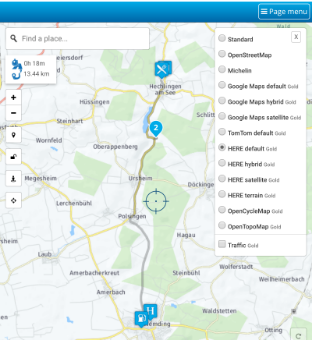
                Screenshot_20200225-221858.png

                You really need to select in menue "Toolkit" the right map (you will see different options in Google map than in Heere map):
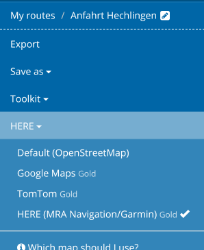
                Screenshot_20200225-221913.png

                Then, again in menue "Toolkit" you will now see routing options - and several extra options, if you open "Avoid". Here you can select "Unpaved roads":
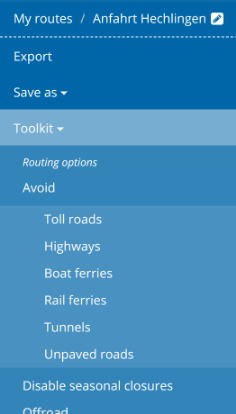
                Screenshot_20200225-221922.png

                Good luck

                Nothing is impossible ;-)
                In past: GARMIN Zumo 210->GARMIN Zumo 395->GARMIN XT=> now: DMD T865-X + MyRoute-App, LocusMaps, OsmAnd.
                In past: GARMIN MapSource ->GARMIN BaseCamp->Tyre->Kurviger->Calimoto=> now: MRA-Routplanner.

                Gary France 1 Reply Last reply
                0
                • Nick Carthew Nick Carthew

                  @Gary-France This feature is only available when you're planning a route on either the TomTom or Here maps. Not available for Google or OpenStreet maps.

                  Gary France Offline
                  Gary France Offline
                  Gary France
                  wrote on last edited by
                  #11

                  @Nick-Carthew Perfect, thanks for clearing that up.

                  1 Reply Last reply
                  1
                  • Guzzist Guzzist

                    @Gary-France
                    Hi Gary, it may look a bit tricky, but my screenshots may help you:
                    It's not enough, to select via icon in top right corner of map view the Google or Heere map:
                    Screenshot_20200225-221858.png

                    You really need to select in menue "Toolkit" the right map (you will see different options in Google map than in Heere map):
                    Screenshot_20200225-221913.png

                    Then, again in menue "Toolkit" you will now see routing options - and several extra options, if you open "Avoid". Here you can select "Unpaved roads":
                    Screenshot_20200225-221922.png

                    Good luck

                    Gary France Offline
                    Gary France Offline
                    Gary France
                    wrote on last edited by
                    #12

                    @Guzzist Many thanks for the advice. I understand it all now.

                    1 Reply Last reply
                    0
                    • Nick Carthew Nick Carthew

                      @Resler-Hans-Jürg When you plan a route, if you wish to avoid un-paved roads make sure you select ‘avoid un-paved roads’ in the toolkit.

                      Resler Hans-Jürg Offline
                      Resler Hans-Jürg Offline
                      Resler Hans-Jürg
                      wrote on last edited by
                      #13

                      @Nick-Carthew

                      avoid un^paved roads is all ways marked. But I put in fact a waypoint on a un-paved road. So TTR told me (d d is also to avoid un-paved roads) by the start I would come to a un-paved road, I ignored the message and had to ride the un-paved road. Never mind, is here in switzerland no hassel.

                      1 Reply Last reply
                      0

                      Hello! It looks like you're interested in this conversation, but you don't have an account yet.

                      Getting fed up of having to scroll through the same posts each visit? When you register for an account, you'll always come back to exactly where you were before, and choose to be notified of new replies (either via email, or push notification). You'll also be able to save bookmarks and upvote posts to show your appreciation to other community members.

                      With your input, this post could be even better 💗

                      Register Login
                      Reply
                      • Reply as topic
                      Log in to reply
                      • Oldest to Newest
                      • Newest to Oldest
                      • Most Votes


                      ACTIVE USERS
                      Nick Carthew
                      Nick Carthew
                      Guzzist
                      Guzzist
                      Gary France
                      Gary France
                      MyRoute-app community
                      MyRoute-app community
                      Resler Hans-Jürg
                      Resler Hans-Jürg
                      Phil o
                      Phil o
                      POPULAR TOPICS
                      • Paar onduidelijkheden.
                        Travellexxie
                        Travellexxie
                        1
                        16
                        158

                      • Er gaat hier iets mis melding
                        Travellexxie
                        Travellexxie
                        0
                        14
                        276

                      • Wegwerkzaamheden worden niet goed toegepast
                        Con Hennekens
                        Con Hennekens
                        0
                        7
                        109

                      • Giving folders its own color
                        Travellexxie
                        Travellexxie
                        0
                        8
                        190

                      • Route app reageert niet
                        Erik Schouten
                        Erik Schouten
                        0
                        4
                        42

                      • Vormingspunt, viapunt en Eindpunt op Carplay
                        Huibertus
                        Huibertus
                        0
                        3
                        26

                      • Blauwe routelijn lijft in Carplay wit
                        Corjan Meijerink
                        Corjan Meijerink
                        0
                        4
                        63

                      • New update 5.2 - Avoid roadblocks, persistent map items, POI management and share
                        M. Schrijver
                        M. Schrijver
                        28
                        61
                        7.0k

                      MY GROUPS
                      • Login

                      • Login or register to search.
                      • First post
                        Last post
                      0
                      • Categories
                      • Recent
                      • Popular
                      • Support
                      • MyRoute-app