Skip to content
  • Categories
  • Recent
  • Popular
  • Support
  • MyRoute-app
Collapse
Brand Logo

MRA Community Forum

  1. Home
  2. MyRoute-app Routeplanner
  3. [Web] Problems, Bugs and other Issues
  4. Route does not follow the actual Tom Tom map

Route does not follow the actual Tom Tom map
Scheduled Pinned Locked Moved [Web] Problems, Bugs and other Issues
13 Posts 4 Posters 3.4k Views 3 Watching
  • Oldest to Newest
  • Newest to Oldest
  • Most Votes
Reply
  • Reply as topic
Log in to reply
This topic has been deleted. Only users with topic management privileges can see it.
  • Kenneth de Miranda Offline
    Kenneth de Miranda Offline
    Kenneth de Miranda
    wrote on last edited by
    #1

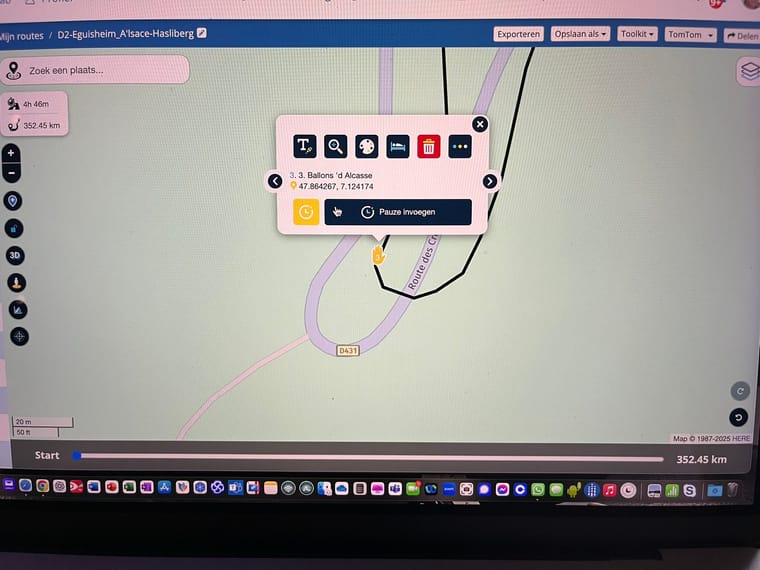
    Hi, Ive generated a few routes for an upcoming road trip. I'm using the web routeplanner in an Chrome browser on my MacBook Pro. Im using the TomTom Maps since ill be using the route on my BMW Connected Ride Navigator. Now i've notisced that some parts of the route does not follow the actual TomTom map. The RP's are correct, if i create a RP on the actual map road, the name of the road is corect but the plotted line remains off.

    Any ideas as to what is happening here? Thanks in advance!!
    82D831B9-F6FD-4CBD-8FDF-958DE39C37D2_1_102_o.jpeg

    Nick Carthew 1 Reply Last reply
    0
    • Kenneth de Miranda Kenneth de Miranda

      Hi, Ive generated a few routes for an upcoming road trip. I'm using the web routeplanner in an Chrome browser on my MacBook Pro. Im using the TomTom Maps since ill be using the route on my BMW Connected Ride Navigator. Now i've notisced that some parts of the route does not follow the actual TomTom map. The RP's are correct, if i create a RP on the actual map road, the name of the road is corect but the plotted line remains off.

      Any ideas as to what is happening here? Thanks in advance!!

      82D831B9-F6FD-4CBD-8FDF-958DE39C37D2_1_102_o.jpeg

      Nick Carthew Online
      Nick Carthew Online
      Nick Carthew
      RouteXpert
      wrote on last edited by
      #2

      @Kenneth-de-Miranda if you select the TomTom overlay map you will see the route line follows the road.
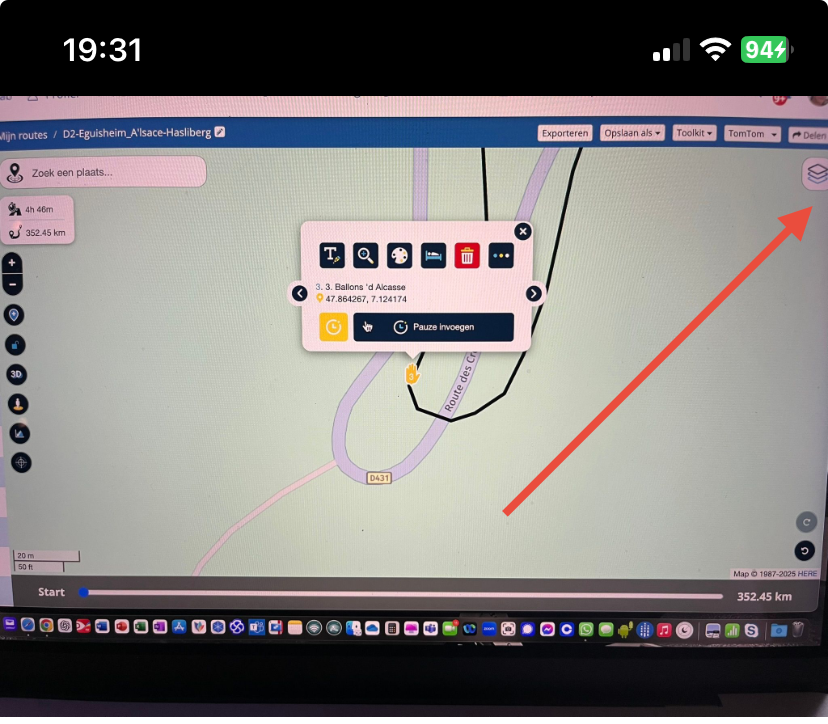
      23a2bd42-fa33-475f-acda-25925331ec85-image.png

      Always willing to help if I can.
      Triumph Tiger 1200 XRT called Tina.
      MRA Navigation Next and SilverFox BJ8

      1 Reply Last reply
      0
      • Kenneth de Miranda Offline
        Kenneth de Miranda Offline
        Kenneth de Miranda
        wrote on last edited by
        #3

        @Nick-Carthew Thanks!! So now i feel a bitlike an idiot πŸ™‚
        But how come, when i created the route and used the TomTom map it appearenly kees using the Here map... o wait...maybe because thats my standard Map? You can change that to TomTom correct? But thanks mate!!

        Nick Carthew 1 Reply Last reply
        0
        • Kenneth de Miranda Kenneth de Miranda

          @Nick-Carthew Thanks!! So now i feel a bitlike an idiot πŸ™‚
          But how come, when i created the route and used the TomTom map it appearenly kees using the Here map... o wait...maybe because thats my standard Map? You can change that to TomTom correct? But thanks mate!!

          Nick Carthew Online
          Nick Carthew Online
          Nick Carthew
          RouteXpert
          wrote on last edited by
          #4

          @Kenneth-de-Miranda Your planning map is the TomTom map. You can set that as your default planning map by clicking: Always use this map for new routes.
          The planning map is the map that makes all of the calculations.

          The overlay maps do not affect any route calculations. Think of the overlay maps as clear sheet with extra information that you lay over the planning map.
          The system will remember the last overlay maps as that you used.

          Always willing to help if I can.
          Triumph Tiger 1200 XRT called Tina.
          MRA Navigation Next and SilverFox BJ8

          1 Reply Last reply
          1
          • silberfuchs67 Offline
            silberfuchs67 Offline
            silberfuchs67
            wrote on last edited by
            #5

            May be I have the same issue. I am planning all my routes in the route planner with TomTom maps as I am also using the CRN. Opening the Navigation map the route uses Here Maps …. where do I have to change this?

            If you think everything is under control you are driving to slow!

            Nick Carthew 1 Reply Last reply
            0
            • silberfuchs67 silberfuchs67

              May be I have the same issue. I am planning all my routes in the route planner with TomTom maps as I am also using the CRN. Opening the Navigation map the route uses Here Maps …. where do I have to change this?

              Nick Carthew Online
              Nick Carthew Online
              Nick Carthew
              RouteXpert
              wrote on last edited by
              #6

              @silberfuchs67

              The planning maps are in the blue menu bar, if you do not see the blue bar, all of the same options can be seen after clicking Page menu.
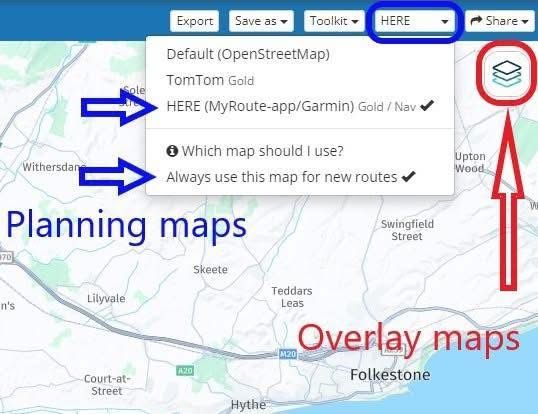
              4586f116-d21e-4ef5-bc07-363b2a8333d5-image.jpeg

              Always willing to help if I can.
              Triumph Tiger 1200 XRT called Tina.
              MRA Navigation Next and SilverFox BJ8

              1 Reply Last reply
              0
              • silberfuchs67 Offline
                silberfuchs67 Offline
                silberfuchs67
                wrote on last edited by silberfuchs67
                #7

                Hi Nick, thanks for your support. It seems that I had exactly this issue …. thanks!

                If you think everything is under control you are driving to slow!

                1 Reply Last reply
                0
                • silberfuchs67 Offline
                  silberfuchs67 Offline
                  silberfuchs67
                  wrote on last edited by
                  #8

                  I just understood that MRA Next has only Here maps to navigate. In case my routes are planned for BMW CRN the planning needs to be done with TomTom maps. If I want to use the Navigation App in parallel I would like to know how to handle this difference ? Thanks for the support.

                  If you think everything is under control you are driving to slow!

                  Nick Carthew Con Hennekens 2 Replies Last reply
                  0
                  • silberfuchs67 silberfuchs67

                    I just understood that MRA Next has only Here maps to navigate. In case my routes are planned for BMW CRN the planning needs to be done with TomTom maps. If I want to use the Navigation App in parallel I would like to know how to handle this difference ? Thanks for the support.

                    Nick Carthew Online
                    Nick Carthew Online
                    Nick Carthew
                    RouteXpert
                    wrote on last edited by
                    #9

                    @silberfuchs67 When planning your route using the planning map from TomTom, turn on the Compare route with HERE tool. This will show an additional green route line (the HERE route) place enough route points so that the green line from HERE follows the black TomTom line.
                    When you navigate this route with MRA Navigation Next, because it has not been planned on the HERE map, the app will navigate it as a track so you will need to be online.

                    Always willing to help if I can.
                    Triumph Tiger 1200 XRT called Tina.
                    MRA Navigation Next and SilverFox BJ8

                    1 Reply Last reply
                    0
                    • silberfuchs67 Offline
                      silberfuchs67 Offline
                      silberfuchs67
                      wrote on last edited by
                      #10

                      Hi @Nick-Carthew Thanks for explanation and your quick support!

                      If you think everything is under control you are driving to slow!

                      1 Reply Last reply
                      0
                      • silberfuchs67 silberfuchs67

                        I just understood that MRA Next has only Here maps to navigate. In case my routes are planned for BMW CRN the planning needs to be done with TomTom maps. If I want to use the Navigation App in parallel I would like to know how to handle this difference ? Thanks for the support.

                        Con Hennekens Offline
                        Con Hennekens Offline
                        Con Hennekens
                        Alpha tester
                        wrote on last edited by
                        #11

                        @silberfuchs67, What @Nick-Carthew says πŸ˜‰ . I just want to add, that after you equalled the routes with the compare tool, you can easily switch your route to the HERE map and navigate the route as rout (not as track). This makes no difference for TomTom users, since the routes are equal, and they usually import the route with a GPX.

                        I am just an enthusiastic MRA user, and hope you will be one too!

                        Most motorcycle problems are caused by the nut that connects the handlebar to the saddle.

                        Check out RideSleepRepeat.eu, a biker community for sharing stays across Europe

                        Nick Carthew 1 Reply Last reply
                        1
                        • Con Hennekens Con Hennekens

                          @silberfuchs67, What @Nick-Carthew says πŸ˜‰ . I just want to add, that after you equalled the routes with the compare tool, you can easily switch your route to the HERE map and navigate the route as rout (not as track). This makes no difference for TomTom users, since the routes are equal, and they usually import the route with a GPX.

                          Nick Carthew Online
                          Nick Carthew Online
                          Nick Carthew
                          RouteXpert
                          wrote on last edited by
                          #12

                          @Con-Hennekens A good point well made πŸ‘πŸΌ

                          Always willing to help if I can.
                          Triumph Tiger 1200 XRT called Tina.
                          MRA Navigation Next and SilverFox BJ8

                          1 Reply Last reply
                          0
                          • silberfuchs67 Offline
                            silberfuchs67 Offline
                            silberfuchs67
                            wrote on last edited by
                            #13

                            @Con-Hennekens Thanks for this great hint!

                            If you think everything is under control you are driving to slow!

                            1 Reply Last reply
                            0

                            Hello! It looks like you're interested in this conversation, but you don't have an account yet.

                            Getting fed up of having to scroll through the same posts each visit? When you register for an account, you'll always come back to exactly where you were before, and choose to be notified of new replies (either via email, or push notification). You'll also be able to save bookmarks and upvote posts to show your appreciation to other community members.

                            With your input, this post could be even better πŸ’—

                            Register Login
                            Reply
                            • Reply as topic
                            Log in to reply
                            • Oldest to Newest
                            • Newest to Oldest
                            • Most Votes


                            ACTIVE USERS
                            Nick Carthew
                            Nick Carthew
                            Con Hennekens
                            Con Hennekens
                            silberfuchs67
                            silberfuchs67
                            Kenneth de Miranda
                            Kenneth de Miranda
                            POPULAR TOPICS
                            • POI naming/text display
                              Guzzist
                              Guzzist
                              1
                              13
                              354

                            • Feature Request: Multi-Day Tour Planning Engine with Time, Rest & Routing Constraints
                              Michele Skipper
                              Michele Skipper
                              3
                              12
                              219

                            • Feature Request: Map Contrast & Road Visibility in Navigation⁠
                              Guzzist
                              Guzzist
                              1
                              4
                              85

                            • File informatie in Myrouteapp lijkt onbetrouwbaar
                              Marinus van Deudekom
                              Marinus van Deudekom
                              0
                              9
                              329

                            • NC500 glitch
                              Tenmill 0
                              Tenmill 0
                              0
                              3
                              69

                            • Mra app start niet door
                              0
                              1
                              3

                            • Suggestions regarding traffic information and route changes
                              1
                              1
                              20

                            • Scenic routing en rondrit generator
                              erik de laat
                              erik de laat
                              0
                              11
                              2.5k

                            MY GROUPS
                            • Login

                            • Login or register to search.
                            • First post
                              Last post
                            0
                            • Categories
                            • Recent
                            • Popular
                            • Support
                            • MyRoute-app