Skip to content
  • Categories
  • Recent
  • Popular
  • Support
  • MyRoute-app
Collapse
Brand Logo

MRA Community Forum

  1. Home
  2. The MyRoute-app
  3. [App] Suggestions and Discussion
  4. Remotek-One Exchange of experiences

Remotek-One Exchange of experiences
Scheduled Pinned Locked Moved [App] Suggestions and Discussion
93 Posts 11 Posters 29.0k Views 7 Watching
  • Oldest to Newest
  • Newest to Oldest
  • Most Votes
Reply
  • Reply as topic
Log in to reply
This topic has been deleted. Only users with topic management privileges can see it.
  • Hubert Thoringundefined Online
    Hubert Thoringundefined Online
    Hubert Thoring
    Valued contributor
    wrote last edited by Hubert Thoring
    #76

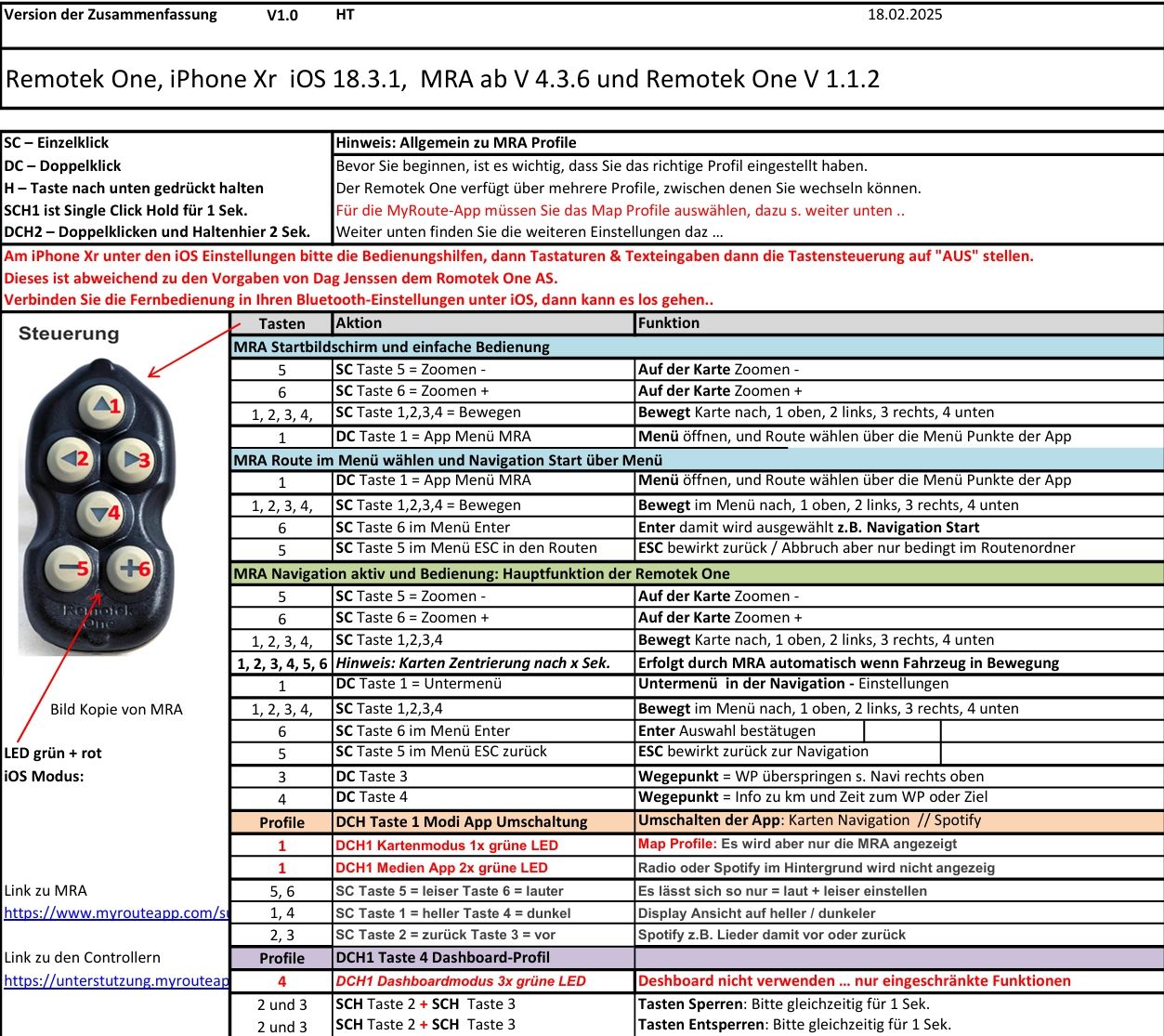
    Mit der V 2.1.0 sollte wieder mehr gehen was mit V 2.0 nicht ging … ich habe V1.1.2. damit geht das was da beschrieben ist,

    Ich nutze iOS !!!

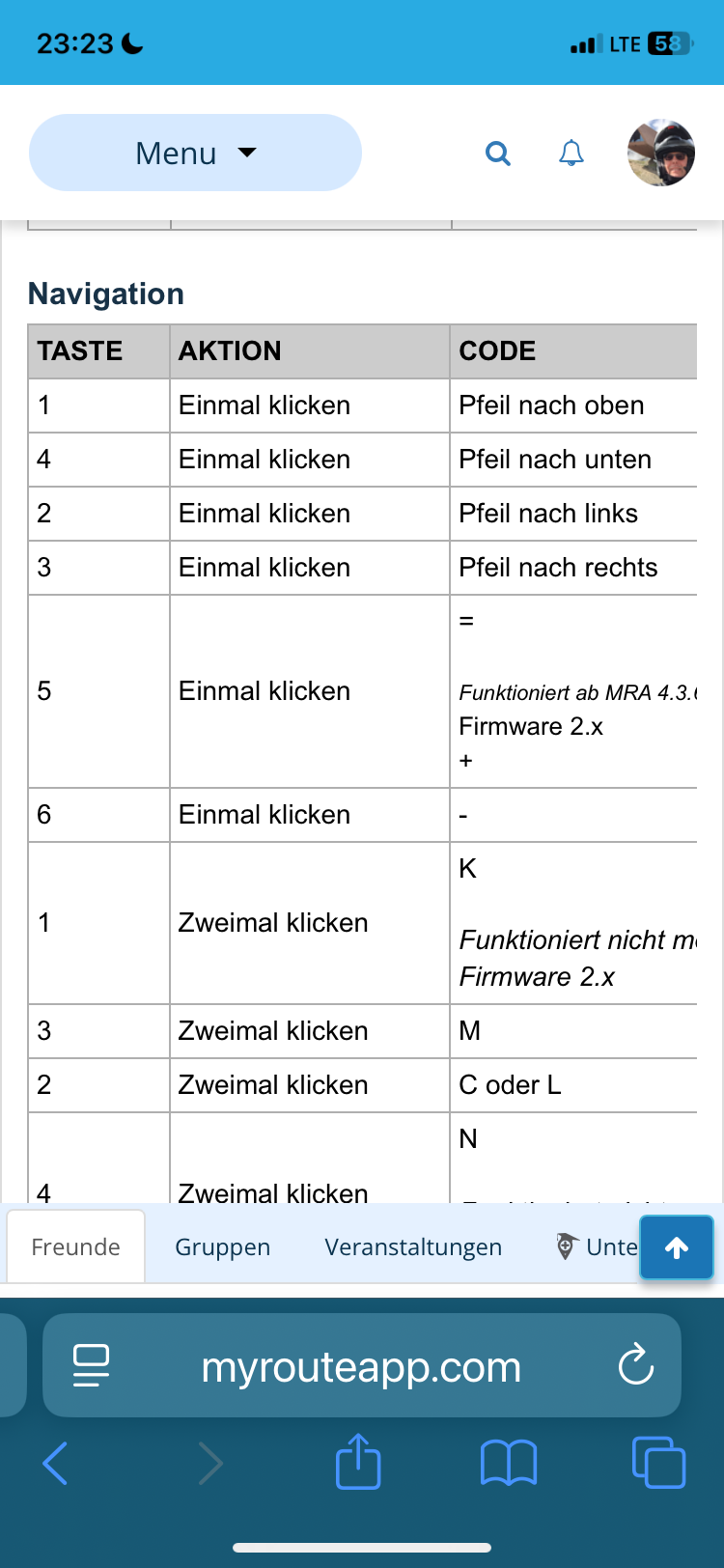
    Unter iOS muss man noch die Pfeiltasten bearbeiten, hast Du das gelesen was Dag zu den Systemen iOS und Android schreibt !!

    VG Hubert
    Beta Test "Next App" dazu die Hardware .
    iPad 9. Gen iOS 26.3.1a / iPhone 16e iOS 26.3.1a / iPhone Xr iOS 18.7.7 / PC mit MS Win11 /❗️MyRoute-App im Cradel und Remotek-One❗️ Info zu MRA & Remotek One

    1 Reply Last reply
    0
    • Hubert Thoringundefined Hubert Thoring

      Frage: nutzt du iOS oder Android…?

      ConiKostundefined Online
      ConiKostundefined Online
      ConiKost
      wrote last edited by
      #77

      @Hubert-Thoring said in Remotek-One Exchange of experiences:

      Frage: nutzt du iOS oder Android…?

      Da DMD, also Android 🙂

      @Hubert-Thoring said in Remotek-One Exchange of experiences:

      Handbuch : Link Klick

      Worauf willst du hinaus? Die Belegung an sich funktioniert ja korrekt.
      Hier mal ein Beispielvideo: https://www.youtube.com/shorts/5fDHaPIILVQ für Punkt 1) und 2) von mir.

      @Hubert-Thoring said in Remotek-One Exchange of experiences:

      Mit der V 2.1.0 sollte wieder mehr gehen was mit V 2.0 nicht ging … ich habe V1.1.2. damit geht das was da beschrieben ist,

      Ich nutze iOS !!!

      Unter iOS muss man noch die Pfeiltasten bearbeiten, hast Du das gelesen was Dag zu den Systemen iOS und Android schreibt !!

      Die Pfeiltasten funktionieren völlig korrekt! Daher kann es daran nicht liegen. Menü aufmachen und bestätigen funktioniert ja ansich alles.

      Shiny!

      1 Reply Last reply
      0
      • Hubert Thoringundefined Online
        Hubert Thoringundefined Online
        Hubert Thoring
        Valued contributor
        wrote last edited by Hubert Thoring
        #78

        Zum Video: das kenne ich genau so 😜

        @ConiKost

        Das wie im Video dargestellt wird wohl so mit keiner BT Tastatur und auch nicht mit dem WW gehen.

        @Corjan-Meijerink

        • Die MRA Menü Ebenen greifen nicht zusammen, ob man das noch nachträglich in einem MRA Update berücksichtigt glaube ich nicht.

        Ich nutze das gar nicht, das Navigieren und das Zoomen und WP überspringen ist ein muss und das funktioniert wunderbar mit der Remotek One.

        Die anderen Menü Eingaben macht man besser im stehen, ….

        VG Hubert
        Beta Test "Next App" dazu die Hardware .
        iPad 9. Gen iOS 26.3.1a / iPhone 16e iOS 26.3.1a / iPhone Xr iOS 18.7.7 / PC mit MS Win11 /❗️MyRoute-App im Cradel und Remotek-One❗️ Info zu MRA & Remotek One

        ConiKostundefined silberfuchs67undefined 2 Replies Last reply
        0
        • CD130undefined Offline
          CD130undefined Offline
          CD130
          Valued contributor
          wrote last edited by
          #79

          Here, everything works perfectly on iOS. I have the latest firmware installed on the Remotek-One, and I’ve only set the input settings to Remotek One within the MRA app. I haven’t changed anything within iOS itself.

          The adventure starts where the plans end | READY TO >> RACE 🧡

          silberfuchs67undefined 1 Reply Last reply
          0
          • Hubert Thoringundefined Hubert Thoring

            Zum Video: das kenne ich genau so 😜

            @ConiKost

            Das wie im Video dargestellt wird wohl so mit keiner BT Tastatur und auch nicht mit dem WW gehen.

            @Corjan-Meijerink

            • Die MRA Menü Ebenen greifen nicht zusammen, ob man das noch nachträglich in einem MRA Update berücksichtigt glaube ich nicht.

            Ich nutze das gar nicht, das Navigieren und das Zoomen und WP überspringen ist ein muss und das funktioniert wunderbar mit der Remotek One.

            Die anderen Menü Eingaben macht man besser im stehen, ….

            ConiKostundefined Online
            ConiKostundefined Online
            ConiKost
            wrote last edited by
            #80

            @Hubert-Thoring said in Remotek-One Exchange of experiences:

            Das wie im Video dargestellt wird wohl so mit keiner BT Tastatur und auch nicht mit dem WW gehen.

            Bezogen worauf? Auf die Nachfragemeldung?

            @Hubert-Thoring said in Remotek-One Exchange of experiences:

            Die MRA Menü Ebenen greifen nicht zusammen, ob man das noch nachträglich in einem MRA Update berücksichtigt glaube ich nicht.

            Naiv hätte ich erwartet, dass das mit sehr wenig Aufwand realisierbar sein sollte. (Was ich so aus der Entwicklung selbst kenne) (Bezogen auf die Nachfragemeldung wohl?)

            @CD130 said in Remotek-One Exchange of experiences:

            Here, everything works perfectly on iOS. I have the latest firmware installed on the Remotek-One, and I’ve only set the input settings to Remotek One within the MRA app. I haven’t changed anything within iOS itself.

            So you can type with Remotek One with virtual keyboard, but on iOS?

            Shiny!

            CD130undefined 1 Reply Last reply
            0
            • Hubert Thoringundefined Online
              Hubert Thoringundefined Online
              Hubert Thoring
              Valued contributor
              wrote last edited by
              #81

              @CD130 : du kommst aber bestimmt nicht zum eingeblendeten Menü „Nein / Navigieren „ um die Route fortzusetzen 🤔

              But you certainly won't get to the displayed menu "No / Navigate" to continue the route 🤔

              VG Hubert
              Beta Test "Next App" dazu die Hardware .
              iPad 9. Gen iOS 26.3.1a / iPhone 16e iOS 26.3.1a / iPhone Xr iOS 18.7.7 / PC mit MS Win11 /❗️MyRoute-App im Cradel und Remotek-One❗️ Info zu MRA & Remotek One

              1 Reply Last reply
              0
              • Hubert Thoringundefined Online
                Hubert Thoringundefined Online
                Hubert Thoring
                Valued contributor
                wrote last edited by
                #82

                iOS is confirmed with +

                I can't get into the additional displayed menu with the keyboard to answer the question to continue.

                VG Hubert
                Beta Test "Next App" dazu die Hardware .
                iPad 9. Gen iOS 26.3.1a / iPhone 16e iOS 26.3.1a / iPhone Xr iOS 18.7.7 / PC mit MS Win11 /❗️MyRoute-App im Cradel und Remotek-One❗️ Info zu MRA & Remotek One

                1 Reply Last reply
                0
                • ConiKostundefined ConiKost

                  @Hubert-Thoring said in Remotek-One Exchange of experiences:

                  Das wie im Video dargestellt wird wohl so mit keiner BT Tastatur und auch nicht mit dem WW gehen.

                  Bezogen worauf? Auf die Nachfragemeldung?

                  @Hubert-Thoring said in Remotek-One Exchange of experiences:

                  Die MRA Menü Ebenen greifen nicht zusammen, ob man das noch nachträglich in einem MRA Update berücksichtigt glaube ich nicht.

                  Naiv hätte ich erwartet, dass das mit sehr wenig Aufwand realisierbar sein sollte. (Was ich so aus der Entwicklung selbst kenne) (Bezogen auf die Nachfragemeldung wohl?)

                  @CD130 said in Remotek-One Exchange of experiences:

                  Here, everything works perfectly on iOS. I have the latest firmware installed on the Remotek-One, and I’ve only set the input settings to Remotek One within the MRA app. I haven’t changed anything within iOS itself.

                  So you can type with Remotek One with virtual keyboard, but on iOS?

                  CD130undefined Offline
                  CD130undefined Offline
                  CD130
                  Valued contributor
                  wrote last edited by
                  #83

                  @ConiKost I use the remote quite intensively and rarely experience this issue. That’s mainly due to the way I use it. I make sure the route is started before placing my phone in the mount, and any tasks that require typing I apparently do outside the range of the remote. Because of that, I don’t really run into this problem in practice, even though it does occur when I test for it.

                  Unfortunately, this is caused by iOS. As far as I know, there’s currently nothing that can be done about it.

                  The adventure starts where the plans end | READY TO >> RACE 🧡

                  ConiKostundefined 1 Reply Last reply
                  0
                  • CD130undefined CD130

                    @ConiKost I use the remote quite intensively and rarely experience this issue. That’s mainly due to the way I use it. I make sure the route is started before placing my phone in the mount, and any tasks that require typing I apparently do outside the range of the remote. Because of that, I don’t really run into this problem in practice, even though it does occur when I test for it.

                    Unfortunately, this is caused by iOS. As far as I know, there’s currently nothing that can be done about it.

                    ConiKostundefined Online
                    ConiKostundefined Online
                    ConiKost
                    wrote last edited by
                    #84

                    @CD130 said in Remotek-One Exchange of experiences:

                    Unfortunately, this is caused by iOS. As far as I know, there’s currently nothing that can be done about it.

                    Well, since keyboard does not work for me on Android with Remotek, this can't be an iOS only issue?

                    Shiny!

                    1 Reply Last reply
                    1
                    • CD130undefined CD130

                      Here, everything works perfectly on iOS. I have the latest firmware installed on the Remotek-One, and I’ve only set the input settings to Remotek One within the MRA app. I haven’t changed anything within iOS itself.

                      silberfuchs67undefined Offline
                      silberfuchs67undefined Offline
                      silberfuchs67
                      wrote last edited by
                      #85

                      @CD130 said in Remotek-One Exchange of experiences:

                      Here, everything works perfectly on iOS. I have the latest firmware installed on the Remotek-One, and I’ve only set the input settings to Remotek One within the MRA app. I haven’t changed anything within iOS itself.

                      This is exactly my experience, too.

                      If you think everything is under control you are driving to slow!

                      1 Reply Last reply
                      0
                      • Hubert Thoringundefined Hubert Thoring

                        Zum Video: das kenne ich genau so 😜

                        @ConiKost

                        Das wie im Video dargestellt wird wohl so mit keiner BT Tastatur und auch nicht mit dem WW gehen.

                        @Corjan-Meijerink

                        • Die MRA Menü Ebenen greifen nicht zusammen, ob man das noch nachträglich in einem MRA Update berücksichtigt glaube ich nicht.

                        Ich nutze das gar nicht, das Navigieren und das Zoomen und WP überspringen ist ein muss und das funktioniert wunderbar mit der Remotek One.

                        Die anderen Menü Eingaben macht man besser im stehen, ….

                        silberfuchs67undefined Offline
                        silberfuchs67undefined Offline
                        silberfuchs67
                        wrote last edited by
                        #86

                        @Hubert-Thoring said in Remotek-One Exchange of experiences:

                        Ich nutze das gar nicht, das Navigieren und das Zoomen und WP überspringen ist ein muss und das funktioniert wunderbar mit der Remotek One.

                        Korrekt - bisher funktioniert dies einwandfrei - auch auf dem DMD Device T665.

                        If you think everything is under control you are driving to slow!

                        ConiKostundefined 1 Reply Last reply
                        0
                        • Hubert Thoringundefined Online
                          Hubert Thoringundefined Online
                          Hubert Thoring
                          Valued contributor
                          wrote last edited by
                          #87

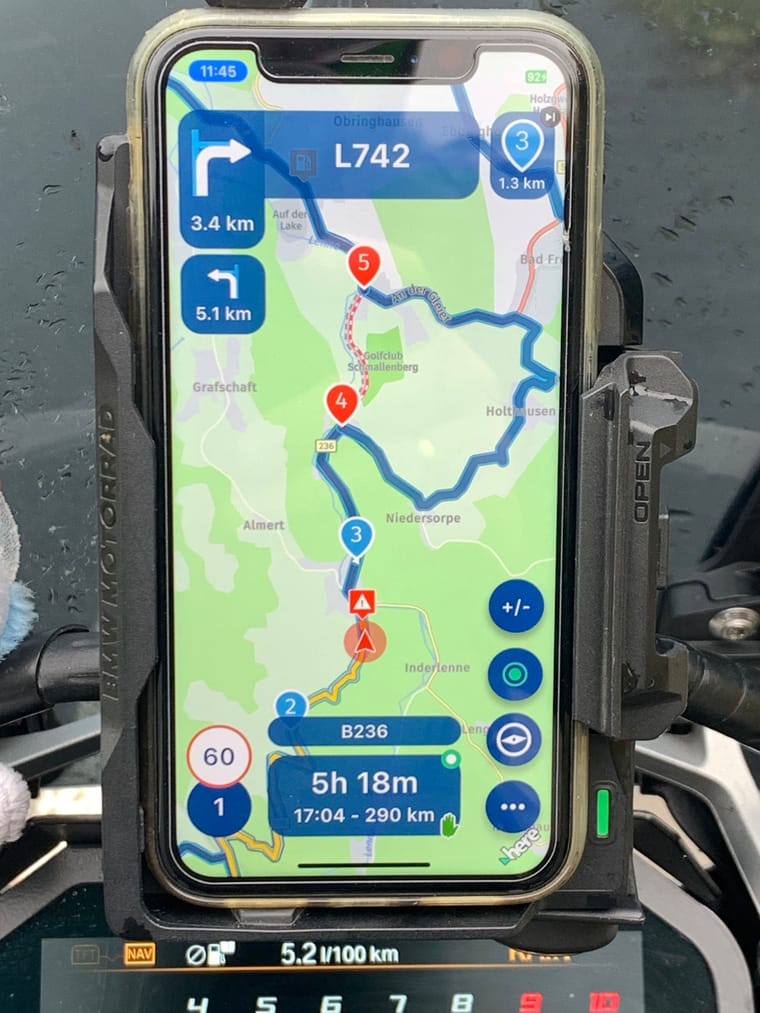
                          @Corjan-Meijerink : For info of the menus 1.) and 2.) s. Picture .

                          When applying, you can't get to the menu 2.) = Additional menu, because the operation by a WW or a BT keyboard like the Remotek One remain in the menu 1.) = Main menu

                          Can't that be changed?
                          IMG_7061.jpeg

                          VG Hubert
                          Beta Test "Next App" dazu die Hardware .
                          iPad 9. Gen iOS 26.3.1a / iPhone 16e iOS 26.3.1a / iPhone Xr iOS 18.7.7 / PC mit MS Win11 /❗️MyRoute-App im Cradel und Remotek-One❗️ Info zu MRA & Remotek One

                          1 Reply Last reply
                          1
                          • silberfuchs67undefined silberfuchs67

                            @Hubert-Thoring said in Remotek-One Exchange of experiences:

                            Ich nutze das gar nicht, das Navigieren und das Zoomen und WP überspringen ist ein muss und das funktioniert wunderbar mit der Remotek One.

                            Korrekt - bisher funktioniert dies einwandfrei - auch auf dem DMD Device T665.

                            ConiKostundefined Online
                            ConiKostundefined Online
                            ConiKost
                            wrote last edited by
                            #88

                            @silberfuchs67 said in Remotek-One Exchange of experiences:

                            Korrekt - bisher funktioniert dies einwandfrei - auch auf dem DMD Device T665.

                            Das tut mir auch alles super 🙂

                            @Corjan-Meijerink See Demo video in https://forum.myrouteapp.com/topic/7331/remotek-one-exchange-of-experiences/77?_=1775035025602

                            @Hubert-Thoring Damit ich das richtig verstehe: Die Tastatureingabe mit der Remotek One funktioniert unter iOS bei euch genauso wenig, ja?

                            Shiny!

                            1 Reply Last reply
                            0
                            • Hubert Thoringundefined Online
                              Hubert Thoringundefined Online
                              Hubert Thoring
                              Valued contributor
                              wrote last edited by
                              #89

                              @ConiKost
                              Sie funktioniert, ich komme nur nicht in Menü 2.) s. Bild weil es im Menü 1.) verbleibt.

                              Im Menü 1.) kann ich alles bedienen und über Pfeiltaste anwählen und mit + z.B. dann bestätigen …

                              IMG_7061.jpeg

                              VG Hubert
                              Beta Test "Next App" dazu die Hardware .
                              iPad 9. Gen iOS 26.3.1a / iPhone 16e iOS 26.3.1a / iPhone Xr iOS 18.7.7 / PC mit MS Win11 /❗️MyRoute-App im Cradel und Remotek-One❗️ Info zu MRA & Remotek One

                              ConiKostundefined 1 Reply Last reply
                              0
                              • Hubert Thoringundefined Hubert Thoring

                                @ConiKost
                                Sie funktioniert, ich komme nur nicht in Menü 2.) s. Bild weil es im Menü 1.) verbleibt.

                                Im Menü 1.) kann ich alles bedienen und über Pfeiltaste anwählen und mit + z.B. dann bestätigen …

                                IMG_7061.jpeg

                                ConiKostundefined Online
                                ConiKostundefined Online
                                ConiKost
                                wrote last edited by
                                #90

                                @Hubert-Thoring said in Remotek-One Exchange of experiences:

                                ie funktioniert, ich komme nur nicht in Menü 2.) s. Bild weil es im Menü 1.) verbleibt.

                                Also funktioniert 1) bei dir korrekt und beim Wechseln durch das Hauptmenü scrollt es mit?
                                Ich bezog mich aber mit der Tastatur auf 3), wenn man mit der Remotek was eingeben will.

                                Shiny!

                                1 Reply Last reply
                                0
                                • Hubert Thoringundefined Online
                                  Hubert Thoringundefined Online
                                  Hubert Thoring
                                  Valued contributor
                                  wrote last edited by
                                  #91

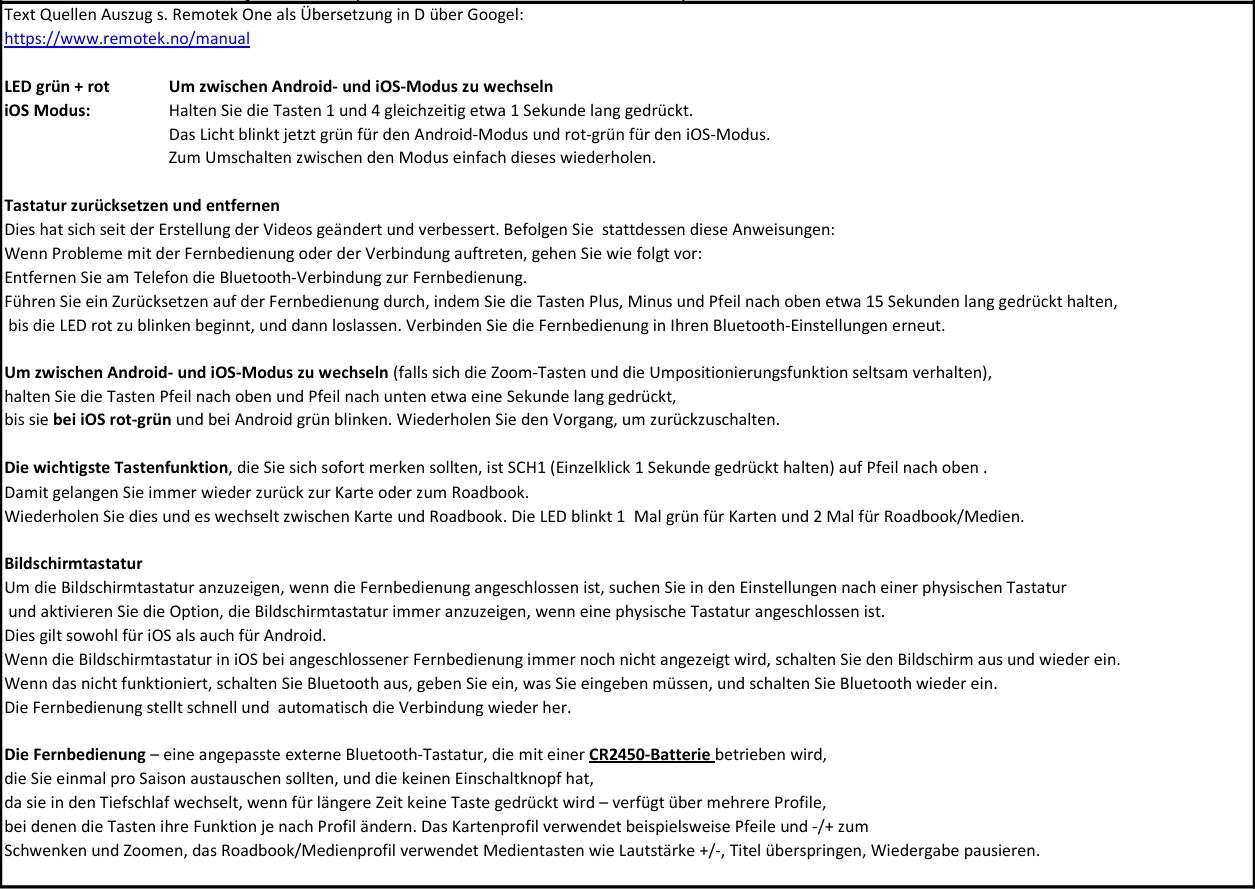
                                  Dann musst Du bzw. ich Bluetooth ausschalten, dann die Eingabe über das Handy und der Display Tastatur ausführen und dann wenn fertig Bluetooth wieder einschalten. Das wird bei iOS so beschrieben !

                                  VG Hubert
                                  Beta Test "Next App" dazu die Hardware .
                                  iPad 9. Gen iOS 26.3.1a / iPhone 16e iOS 26.3.1a / iPhone Xr iOS 18.7.7 / PC mit MS Win11 /❗️MyRoute-App im Cradel und Remotek-One❗️ Info zu MRA & Remotek One

                                  ConiKostundefined 1 Reply Last reply
                                  0
                                  • Hubert Thoringundefined Hubert Thoring

                                    Dann musst Du bzw. ich Bluetooth ausschalten, dann die Eingabe über das Handy und der Display Tastatur ausführen und dann wenn fertig Bluetooth wieder einschalten. Das wird bei iOS so beschrieben !

                                    ConiKostundefined Online
                                    ConiKostundefined Online
                                    ConiKost
                                    wrote last edited by
                                    #92

                                    @Hubert-Thoring said in Remotek-One Exchange of experiences:

                                    Dann musst Du bzw. ich Bluetooth ausschalten, dann die Eingabe über das Handy und der Display Tastatur ausführen und dann wenn fertig Bluetooth wieder einschalten. Das wird bei iOS so beschrieben !

                                    Reden wir aneinander vorbei? Wenn ich Bluetooth abschalten würde, geht nur noch per Touch. Per Touch kann ich die virtuelle Tastatur immer bedienen, egal ob die Remotek verbunden ist oder nicht. Das meine ich aber überhaupt nicht. Sondern per Pfeiltasten der Remotek die virtuelle Touch Tastatur bedienen mit der Remotek. Das soll ja laut Handbuch gehen und in der Remotek App habe ich dafür die Berechtigungen freigegeben?

                                    Shiny!

                                    1 Reply Last reply
                                    0
                                    • Hubert Thoringundefined Online
                                      Hubert Thoringundefined Online
                                      Hubert Thoring
                                      Valued contributor
                                      wrote last edited by
                                      #93

                                      Dann haben wir uns missverstanden, mach mal ein Foto davon … ‼️

                                      VG Hubert
                                      Beta Test "Next App" dazu die Hardware .
                                      iPad 9. Gen iOS 26.3.1a / iPhone 16e iOS 26.3.1a / iPhone Xr iOS 18.7.7 / PC mit MS Win11 /❗️MyRoute-App im Cradel und Remotek-One❗️ Info zu MRA & Remotek One

                                      1 Reply Last reply
                                      0
                                      Reply
                                      • Reply as topic
                                      Log in to reply
                                      • Oldest to Newest
                                      • Newest to Oldest
                                      • Most Votes


                                      • 1
                                      • 2
                                      • 3
                                      • 4
                                      • 5
                                      ACTIVE USERS
                                      Corjan Meijerinkundefined
                                      Corjan Meijerink
                                      Hubert Thoringundefined
                                      Hubert Thoring
                                      ConiKostundefined
                                      ConiKost
                                      silberfuchs67undefined
                                      silberfuchs67
                                      CD130undefined
                                      CD130
                                      Jörgenundefined
                                      Jörgen
                                      Guzzistundefined
                                      Guzzist
                                      Martin Wilckeundefined
                                      Martin Wilcke
                                      Huibertusundefined
                                      Huibertus
                                      Westerwald_Riderundefined
                                      Westerwald_Rider
                                      Lynchy67undefined
                                      Lynchy67
                                      POPULAR TOPICS
                                      • Remotek-One Exchange of experiences
                                        Hubert Thoringundefined
                                        Hubert Thoring
                                        0
                                        93
                                        29.0k

                                      • MyRoute-App on the TomTom Rider
                                        Marinus van Deudekomundefined
                                        Marinus van Deudekom
                                        2
                                        6
                                        80

                                      • Geen gespoken aan aanwijzingen bij de navigatie app
                                        Nomko Nomdenundefined
                                        Nomko Nomden
                                        0
                                        6
                                        62

                                      • Some routes opening slow and some fast
                                        Corjan Meijerinkundefined
                                        Corjan Meijerink
                                        0
                                        9
                                        267

                                      • How to navigate a track?
                                        b0hd1undefined
                                        b0hd1
                                        1
                                        26
                                        1.3k

                                      • Add existing POI to a route?
                                        Martin Wilckeundefined
                                        Martin Wilcke
                                        0
                                        5
                                        295

                                      • automatische upload naar explore.garmin.com
                                        Mzokkundefined
                                        Mzokk
                                        1
                                        6
                                        197

                                      • Invisible waypoints
                                        Nick Carthewundefined
                                        Nick Carthew
                                        0
                                        2
                                        19
                                      MY GROUPS
                                      • Login

                                      • Login or register to search.
                                      • First post
                                        Last post
                                      0
                                      • Categories
                                      • Recent
                                      • Popular
                                      • Support
                                      • MyRoute-app