Import route-track GPX 1.2 differs from original route
-

Hi,
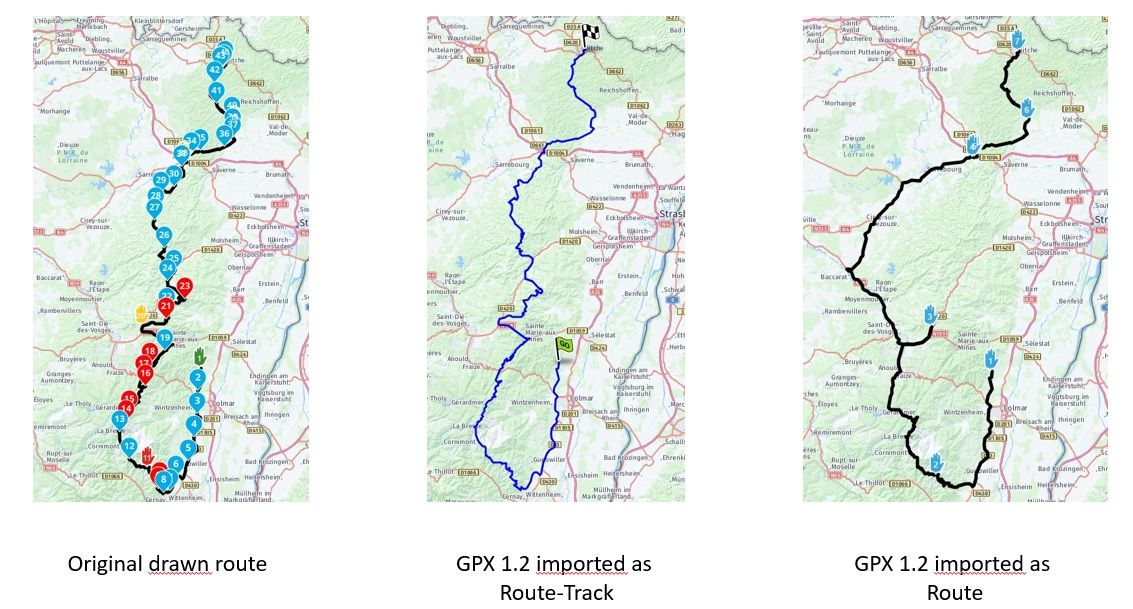
For display reasons only I want to hide the shapingpoints and see the via points only. Knowing that it is not possible to hide shapingpoints I did the following: Save as GPX 1.2 (Route, Track, POI) and import as route-track. When I look at the route it has many deviations to the original route. When I import as track the track is exactly equal to the original route. It only doesný the display the via points (obviously) but that is what I'm aiming at. what could be the reason that the import as a route gives so many deviations and as a route-track it is exactly the same as the original drawn route? I would like to use the route-import because what is displaed is exactly what I'm aiming at.
Greetings,
Richard
-
 Nick Carthew moved this topic from [Web] Problems, Bugs and other Issues on
-
Hi,
For display reasons only I want to hide the shapingpoints and see the via points only. Knowing that it is not possible to hide shapingpoints I did the following: Save as GPX 1.2 (Route, Track, POI) and import as route-track. When I look at the route it has many deviations to the original route. When I import as track the track is exactly equal to the original route. It only doesný the display the via points (obviously) but that is what I'm aiming at. what could be the reason that the import as a route gives so many deviations and as a route-track it is exactly the same as the original drawn route? I would like to use the route-import because what is displaed is exactly what I'm aiming at.
Greetings,
Richard

Hi @Richard-van-Erp-1 please share the url from the route here, so we can have a look. Make sure it is set to public
-
Hi,
For display reasons only I want to hide the shapingpoints and see the via points only. Knowing that it is not possible to hide shapingpoints I did the following: Save as GPX 1.2 (Route, Track, POI) and import as route-track. When I look at the route it has many deviations to the original route. When I import as track the track is exactly equal to the original route. It only doesný the display the via points (obviously) but that is what I'm aiming at. what could be the reason that the import as a route gives so many deviations and as a route-track it is exactly the same as the original drawn route? I would like to use the route-import because what is displaed is exactly what I'm aiming at.
Greetings,
Richard
If you save a route as gpx 1.2 you save a route track with via points.
If you then import it again and convert it to a route, you do indeed have a chance of deviations.
If you transfer your route as gpx 1.2 to your Zumo (the newer versions), you will only have the via points on your route. Then turn off the recalculation. -
Hi @Richard-van-Erp-1 please share the url from the route here, so we can have a look. Make sure it is set to public
@Hans-van-de-Ven-MRA-Master
Hi Hans,The URL to the original drawn route is ;
https://www.myrouteapp.com/nl/social/route/8053718?mode=share
I did not any conversion, only import the as GPX 1.2 saved route as a route. Or do you mean that importing as route that the conversion take place automatically?
Greetings,
RichardP.S.
I used one of your routes as inspiration for this route...;-) -
@Hans-van-de-Ven-MRA-Master
Hi Hans,The URL to the original drawn route is ;
https://www.myrouteapp.com/nl/social/route/8053718?mode=share
I did not any conversion, only import the as GPX 1.2 saved route as a route. Or do you mean that importing as route that the conversion take place automatically?
Greetings,
RichardP.S.
I used one of your routes as inspiration for this route...;-)
Thanks for using one of my routes as an example

The imported route is calculated, based on the formation and waypoints included in the route. Since there are no formation points in the gpx 1.2 route, the route is calculated based on the via points and that's what you seeBMW BMW Connected Ride Navigator/Garmin Zumo XT3/XT2/XT//Tourstart/ MyRouteapp (The App)/...
Een dag niet gelachen is een dag niet geleefd / Een route is net zo goed als deze uitgezet is. -
Thanks for using one of my routes as an example
The imported route is calculated, based on the formation and waypoints included in the route. Since there are no formation points in the gpx 1.2 route, the route is calculated based on the via points and that's what you see
@Hans-van-de-Ven-MRA-Master
Thanks Hans. Your explanation makes good sense.I originally thought that saving a route als GPX 1.2 was a track with via points, zo that when you again import it it is still a track with the via points shown. But it appears to be a calculated route with the via points.
-
@Hans-van-de-Ven-MRA-Master
Thanks Hans. Your explanation makes good sense.I originally thought that saving a route als GPX 1.2 was a track with via points, zo that when you again import it it is still a track with the via points shown. But it appears to be a calculated route with the via points.
If you import the gpx 1.2 in your Zumo then you only see the viapoints
Hello! It looks like you're interested in this conversation, but you don't have an account yet.
Getting fed up of having to scroll through the same posts each visit? When you register for an account, you'll always come back to exactly where you were before, and choose to be notified of new replies (either via email, or push notification). You'll also be able to save bookmarks and upvote posts to show your appreciation to other community members.
With your input, this post could be even better 💗
Register Login-
 01241
01241
-
0522
-
 912612.3k
-
038
-
 1321
1321
-
 033302
-
0425
-
0317