Differences between MyRoute-app and the Navigation app
-

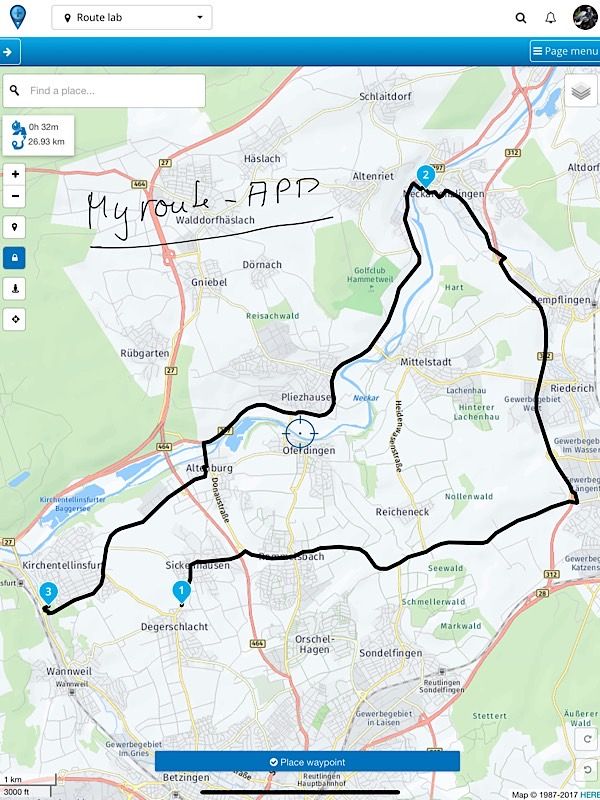
Recently I have planned a short route with MyRoute-app at my IPad. Then I opened the route with the navigation app and the route was identical with the planned route.
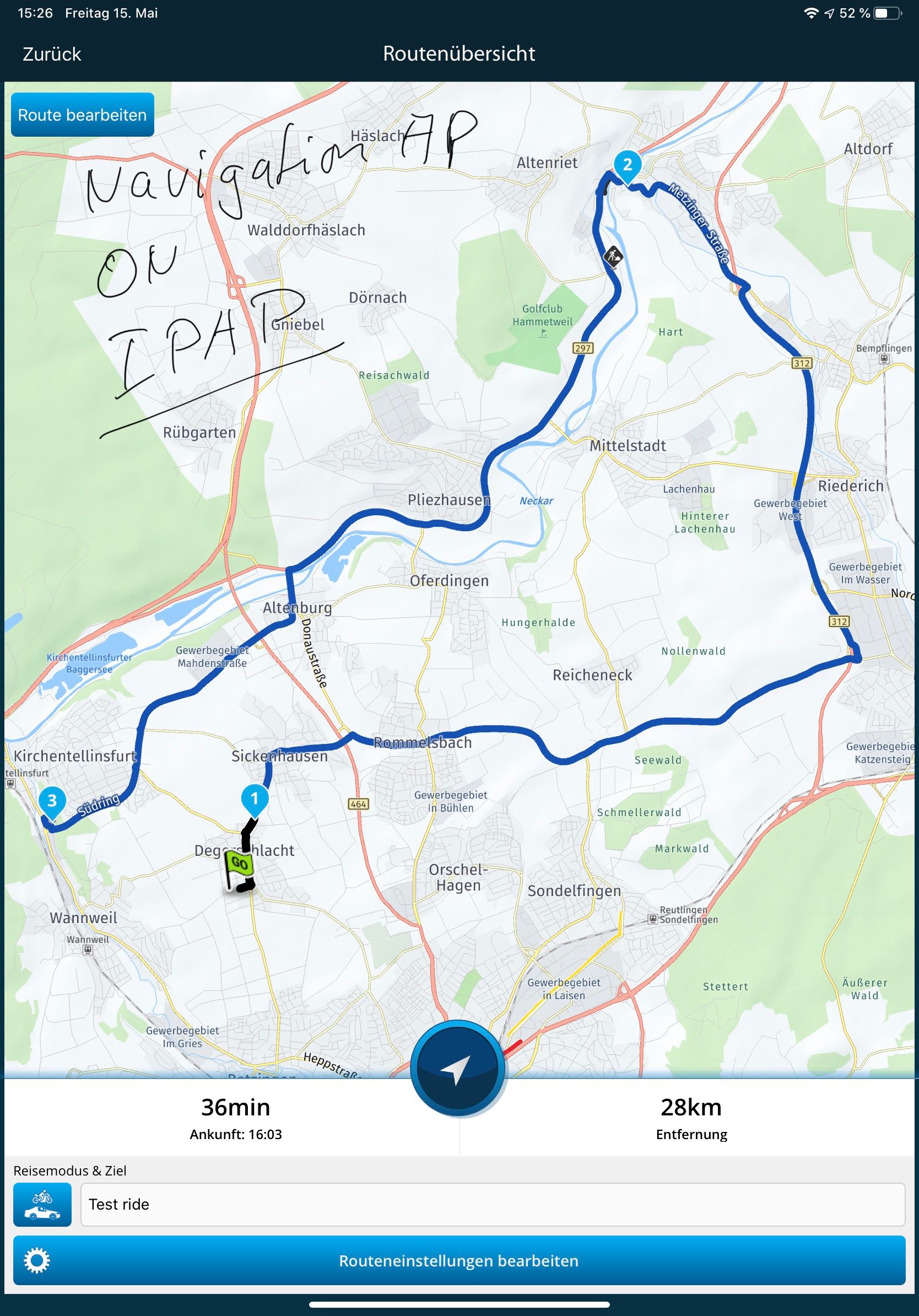
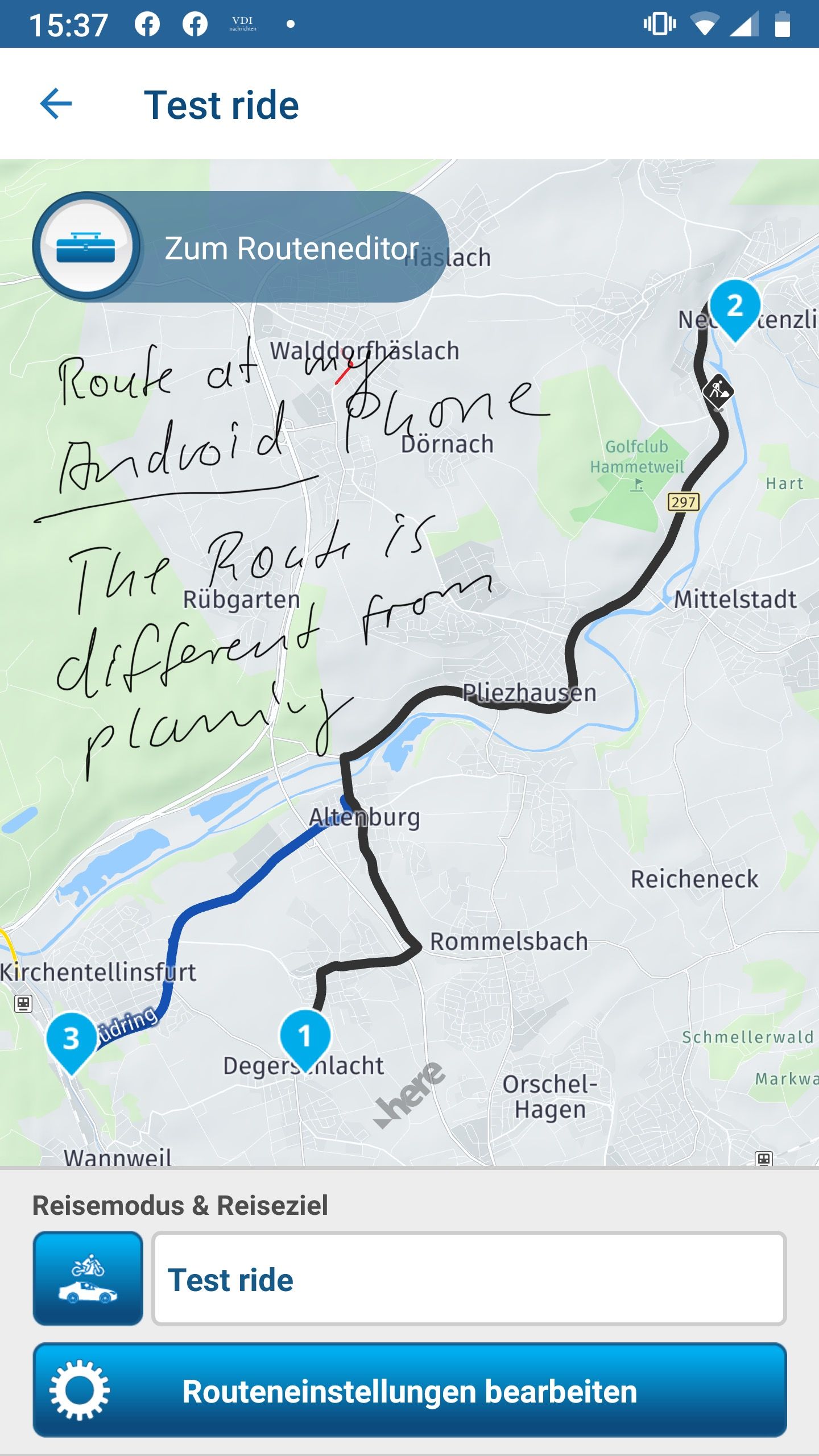
When I opened the Route in MyRoute-app at my Android phone everything is ok but in the navigation app there is a difference in the route.
The route is planned at the here map and the here map is installed at my IPad and my android phone as well. See the Screenshots below.
It seems to me that the route calculation within the navigation app at my android phone is based at the standard map and not at the Here map.
Here is the route for inspection.
https://www.myrouteapp.com/en/social/route/3006664?mode=share
Any thoughts?
-
Recently I have planned a short route with MyRoute-app at my IPad. Then I opened the route with the navigation app and the route was identical with the planned route.
When I opened the Route in MyRoute-app at my Android phone everything is ok but in the navigation app there is a difference in the route.
The route is planned at the here map and the here map is installed at my IPad and my android phone as well. See the Screenshots below.
It seems to me that the route calculation within the navigation app at my android phone is based at the standard map and not at the Here map.
Here is the route for inspection.
https://www.myrouteapp.com/en/social/route/3006664?mode=share
Any thoughts?

I forwarded it to the development team, thank you for reporting.

-
Hi Reinhard-32
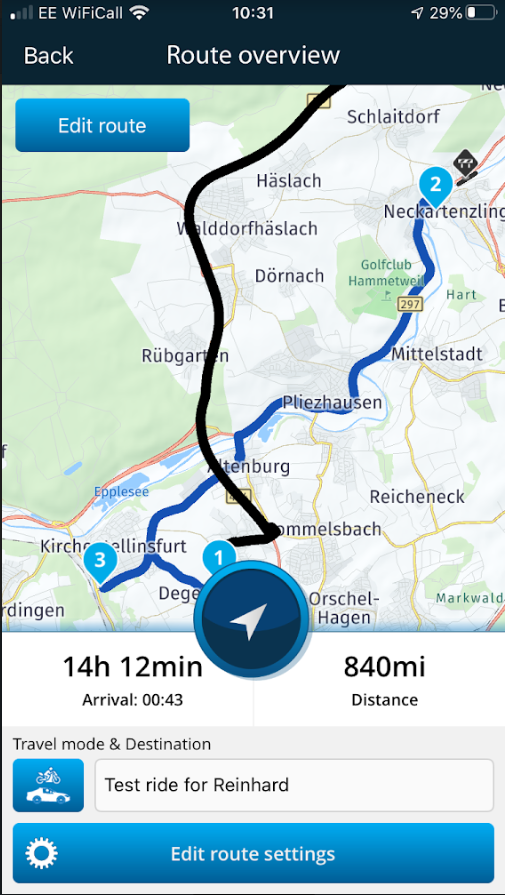
Inserting a couple more waypoints between 2 and 3 in the first screenshot would probably fix that in Navigation.
Steve.
You don’t stop riding when you get old, you get old when you stop riding.
-
Hi Reinhard-32
Inserting a couple more waypoints between 2 and 3 in the first screenshot would probably fix that in Navigation.
Steve.
@Steve-Lynch
Hi Steve, thanks for your suggestion. I know this option, but then I must check each planned route at my android phone. That’s not what I have expected from this software. I need the confidence that a planned route can be used without double checking at my mobile phone.
I think there is a bug in the android navigation app. -
@Steve-Lynch
Hi Steve, thanks for your suggestion. I know this option, but then I must check each planned route at my android phone. That’s not what I have expected from this software. I need the confidence that a planned route can be used without double checking at my mobile phone.
I think there is a bug in the android navigation app. This post is deleted!
 -
@Steve-Lynch
Hi Steve, thanks for your suggestion. I know this option, but then I must check each planned route at my android phone. That’s not what I have expected from this software. I need the confidence that a planned route can be used without double checking at my mobile phone.
I think there is a bug in the android navigation app.
@Reinhard-32 I agree with @Steve-Lynch and think you should add more route points.
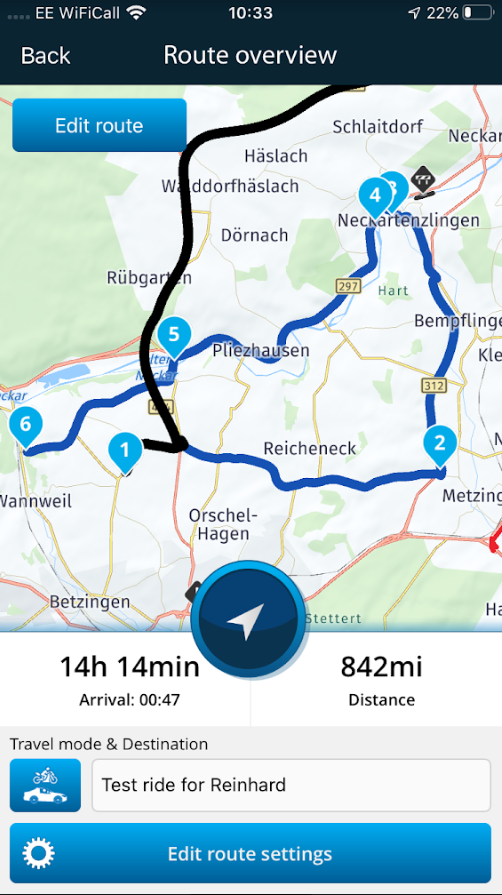
I have an iPhone and the same route was planned for me in MRA Nav (1st picture). I added 3 more RPs and the route was identical to MRA route planner ( 2nd picture).
I understand your point, that if you can see a route on the route planner, it should be the same for the navigation app. When a route contains many options for the MRA Nav to choose from, it’s better to add a few more RPs to guarantee you will follow your route.
-
Recently I have planned a short route with MyRoute-app at my IPad. Then I opened the route with the navigation app and the route was identical with the planned route.
When I opened the Route in MyRoute-app at my Android phone everything is ok but in the navigation app there is a difference in the route.
The route is planned at the here map and the here map is installed at my IPad and my android phone as well. See the Screenshots below.
It seems to me that the route calculation within the navigation app at my android phone is based at the standard map and not at the Here map.
Here is the route for inspection.
https://www.myrouteapp.com/en/social/route/3006664?mode=share
Any thoughts?
This is a route with only 3 waypoints. Both the website and the app recalculate the route every time from waypoint to waypoint. Due to circumstances, crowded roads, but also due to a small difference in coordinates, a different calculation can take place between route points 2 and 3.
BMW BMW Connected Ride Navigator/Garmin Zumo XT3/XT2/XT//Tourstart/ MyRouteapp (The App)/...
Een dag niet gelachen is een dag niet geleefd / Een route is net zo goed als deze uitgezet is. -
This is a route with only 3 waypoints. Both the website and the app recalculate the route every time from waypoint to waypoint. Due to circumstances, crowded roads, but also due to a small difference in coordinates, a different calculation can take place between route points 2 and 3.
@Hans-van-de-Ven-MRA-Master
Hans, thanks for your reply. It is very important to know this behavior. I was not aware about this.
To add some additional points is not a big deal. But without this knowledge when I share the route with my friends then I would be run in trouble and maybe I loosing some them.
Therefore this behavior should more pointed out in the intructions.
-
@Reinhard-32 I agree with @Steve-Lynch and think you should add more route points.
I have an iPhone and the same route was planned for me in MRA Nav (1st picture). I added 3 more RPs and the route was identical to MRA route planner ( 2nd picture).
I understand your point, that if you can see a route on the route planner, it should be the same for the navigation app. When a route contains many options for the MRA Nav to choose from, it’s better to add a few more RPs to guarantee you will follow your route.

@Nick-Carthew
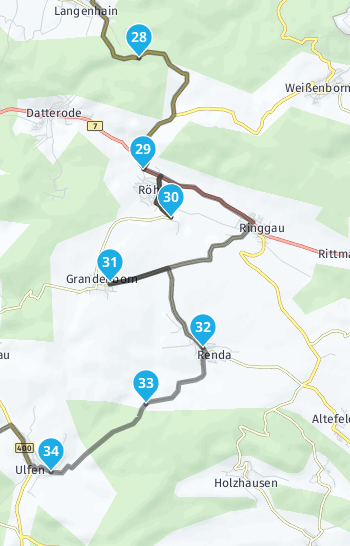
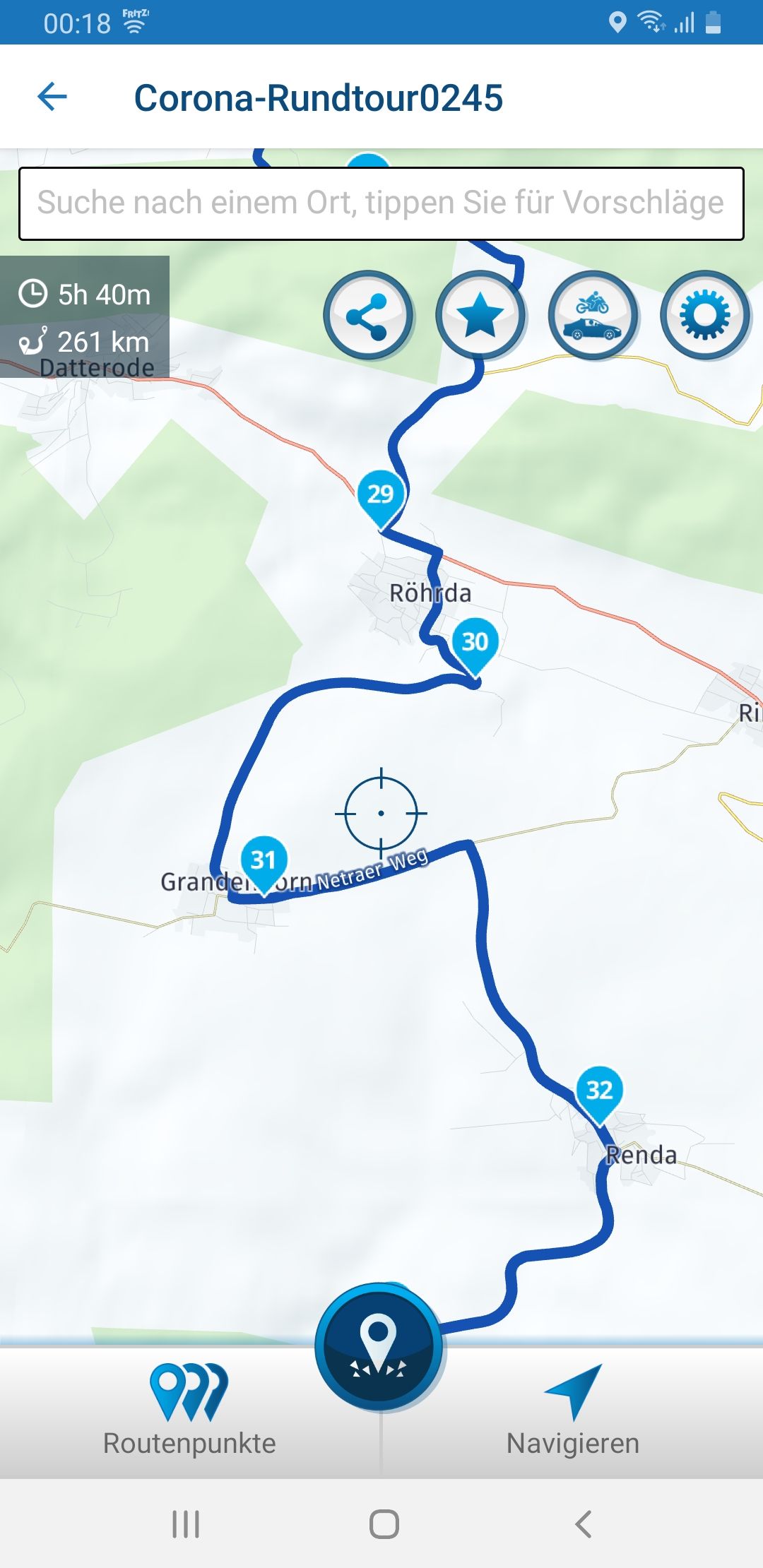
However, setting waypoints cannot be more than a temporary work-around. In the attached example, numerous waypoints are included in the planning. Nevertheless, the route is displayed differently in the navigation app (Android). See points 30 + 31.Even in this small section, the route in the app differs from the web application.
-
@Nick-Carthew
However, setting waypoints cannot be more than a temporary work-around. In the attached example, numerous waypoints are included in the planning. Nevertheless, the route is displayed differently in the navigation app (Android). See points 30 + 31.Even in this small section, the route in the app differs from the web application.

I had the same problem while testing the app. Route in MyrouteApp Web OK, in MyrouteApp navigation other route calculation. I planned with the Here map and navigated with an Android phone.
In the avoidances I have set "unpaved streets". When I deactivated this setting, the route was calculated correctly.
Perhaps the small side street in your route between points 30 and 31 is entered on the map as an unpaved street.
Another time it did not work for me with the deactivation of "unpaved road". Then I set the waypoint exactly in the middle of the section and then the route was calculated as desired.
The wrong route guidance can be corrected by adding or moving waypoints, but unfortunately the error can only be seen after calculation in the Naviagtions app. On a 7-day tour with long daily stages, it means an enormous amount of time to check and correct all routes in the navigation app.
This error must be corrected. The algorithm for route calculation must be the same as in MRA-Web so that the routes are 100% identical.
-
I had the same problem while testing the app. Route in MyrouteApp Web OK, in MyrouteApp navigation other route calculation. I planned with the Here map and navigated with an Android phone.
In the avoidances I have set "unpaved streets". When I deactivated this setting, the route was calculated correctly.
Perhaps the small side street in your route between points 30 and 31 is entered on the map as an unpaved street.
Another time it did not work for me with the deactivation of "unpaved road". Then I set the waypoint exactly in the middle of the section and then the route was calculated as desired.
The wrong route guidance can be corrected by adding or moving waypoints, but unfortunately the error can only be seen after calculation in the Naviagtions app. On a 7-day tour with long daily stages, it means an enormous amount of time to check and correct all routes in the navigation app.
This error must be corrected. The algorithm for route calculation must be the same as in MRA-Web so that the routes are 100% identical.
@Christian-Schrenk said in Differences between MyRoute-app and the Navigation app:
This error must be corrected. The algorithm for route calculation must be the same as in MRA-Web so that the routes are 100% identical.
I supporting this. The route in the navigation app must be 100% the same as the planned route.
-

I can go along with that 100%!
-

I think it is pretty clear that the error occurs because of unequal routing settings between MRA an Navigation. That is quite logical to happen. Instead of trying to fix this the routing way, it might be a good idea to have MRA routes add a settings section that define the routing-settings of a given route. When opening a route (whether in MRA or in Navigation) the routing settings can be set equal to the ones as defined in the route automatically. In other words: the routing settings become part of a route, instead of a stand-alone setting in an App. Acceptable for the "good-ideas-mailbox?
I am just an enthusiastic MRA user, and hope you will be one too!
Most motorcycle problems are caused by the nut that connects the handlebar to the saddle.
Check out RideSleepRepeat.eu, a biker community for sharing stays across Europe
-
I think it is pretty clear that the error occurs because of unequal routing settings between MRA an Navigation. That is quite logical to happen. Instead of trying to fix this the routing way, it might be a good idea to have MRA routes add a settings section that define the routing-settings of a given route. When opening a route (whether in MRA or in Navigation) the routing settings can be set equal to the ones as defined in the route automatically. In other words: the routing settings become part of a route, instead of a stand-alone setting in an App. Acceptable for the "good-ideas-mailbox?

@Con-Hennekens I find this an excellent suggestion!!
However, It would most likely only work when you stay within the MRA context, MRA Web and MRA Nav.
If you bring an MRA route to a GPS device then that device (or the company behind it) will be unable (or unwilling) to take these MRA settings into account. Garmin and TomTom for instance use different maps that sometimes deviate. you can't force Garmin to use a TomTom map or vice versa.
After this negativity
 (right or wrong) it would still be very good to have the route settings integrated in the route on MRA. Currently, changing a setting in MRA web can lead to quite large changes in an already completely prepared route.
It is not difficult, it is easy, it's a hobby
-
@Con-Hennekens I find this an excellent suggestion!!
However, It would most likely only work when you stay within the MRA context, MRA Web and MRA Nav.
If you bring an MRA route to a GPS device then that device (or the company behind it) will be unable (or unwilling) to take these MRA settings into account. Garmin and TomTom for instance use different maps that sometimes deviate. you can't force Garmin to use a TomTom map or vice versa.
After this negativity
(right or wrong) it would still be very good to have the route settings integrated in the route on MRA. Currently, changing a setting in MRA web can lead to quite large changes in an already completely prepared route.
@Drabslab said in Differences between MyRoute-app and the Navigation app:
If you bring an MRA route to a GPS device then that device (or the company behind it) will be unable (or unwilling) to take these MRA settings into account. Garmin and TomTom for instance use different maps that sometimes deviate. you can't force Garmin to use a TomTom map or vice versa.
If you use the 'compare with' tool from the gold toolkit and add enough route point markers, you can

-
@Drabslab said in Differences between MyRoute-app and the Navigation app:
If you bring an MRA route to a GPS device then that device (or the company behind it) will be unable (or unwilling) to take these MRA settings into account. Garmin and TomTom for instance use different maps that sometimes deviate. you can't force Garmin to use a TomTom map or vice versa.
If you use the 'compare with' tool from the gold toolkit and add enough route point markers, you can
@Nick-Carthew Unless I understood Con completely wrongly, you can't

If you make a route in MRA Web with the option "avoid highways" on and recalculate it without that option selected then you can get something completely different. The consequence is that when you look back at an old route and don't remember the settings you used at that time it can be a puzzle to get your intended route back.
Con suggested to store the settings used in MRA Web (for instance: "avoid highways", calculate route using HERE, ... whatever ) inside the route so that these settings could be recuperated when later on you would re-open the route for making changes, or when you transfer the route to the GPS Device. That would solve the problem I indicate above and it could probably also work between MRA Web and MRA Nav but not with e.g. TomTom because those devices will be unable to read that settings data.
On the other hand, I agree with you that sufficient waypoints forces any GPS device more or less into obedience.
And now, knowing you, you will come up with a simple solution for my problem that I haven't thought of.


-
@Nick-Carthew Unless I understood Con completely wrongly, you can't
If you make a route in MRA Web with the option "avoid highways" on and recalculate it without that option selected then you can get something completely different. The consequence is that when you look back at an old route and don't remember the settings you used at that time it can be a puzzle to get your intended route back.
Con suggested to store the settings used in MRA Web (for instance: "avoid highways", calculate route using HERE, ... whatever ) inside the route so that these settings could be recuperated when later on you would re-open the route for making changes, or when you transfer the route to the GPS Device. That would solve the problem I indicate above and it could probably also work between MRA Web and MRA Nav but not with e.g. TomTom because those devices will be unable to read that settings data.
On the other hand, I agree with you that sufficient waypoints forces any GPS device more or less into obedience.
And now, knowing you, you will come up with a simple solution for my problem that I haven't thought of.
@Drabslab I consider the tools within MRA for avoiding certain types of roads and the options within a GPS device for fastest or hilliness etc to be ok if you just want to make a quick route. If you are making a more complex route, I would have all of these settings turned off, the use of sufficient and strategically placed route points should be enough for most devices to follow your planned route. I do think it would be good for those that use these tools for their preference of these settings to be stored in MRA. The settings chosen for each route are stored for each individual route that you have in your library.
-
@Nick-Carthew Unless I understood Con completely wrongly, you can't
If you make a route in MRA Web with the option "avoid highways" on and recalculate it without that option selected then you can get something completely different. The consequence is that when you look back at an old route and don't remember the settings you used at that time it can be a puzzle to get your intended route back.
Con suggested to store the settings used in MRA Web (for instance: "avoid highways", calculate route using HERE, ... whatever ) inside the route so that these settings could be recuperated when later on you would re-open the route for making changes, or when you transfer the route to the GPS Device. That would solve the problem I indicate above and it could probably also work between MRA Web and MRA Nav but not with e.g. TomTom because those devices will be unable to read that settings data.
On the other hand, I agree with you that sufficient waypoints forces any GPS device more or less into obedience.
And now, knowing you, you will come up with a simple solution for my problem that I haven't thought of.
@Drabslab said in Differences between MyRoute-app and the Navigation app:
Con suggested to store the settings used in MRA Web (for instance: "avoid highways", calculate route using HERE, ... whatever ) inside the route so that these settings could be recuperated when later on you would re-open the route...
That is exactly what I wanted to suggest indeed. From an MRA point of view it is not that hard I presume. All different maps have their own settings concerning the changeable routing parameters (the toolkit options change with the map you choose). The problem is more to convince Garmin en TomTom to program their devices to take those route-settings out of the started route instead of the device config. Programming Navigation they have in their own hands
-
Thank you so much for the detailed explanation of the difference. But I have little confusion in the below post:
https://forum.myrouteapp.com/topic/458/on-the-hike-with-myroute-app-mobile-app/[1](https://apnpgc.org/netboom-mod-apk/)
Hopefully, someone will help me in this regard.
Hello! It looks like you're interested in this conversation, but you don't have an account yet.
Getting fed up of having to scroll through the same posts each visit? When you register for an account, you'll always come back to exactly where you were before, and choose to be notified of new replies (either via email, or push notification). You'll also be able to save bookmarks and upvote posts to show your appreciation to other community members.
With your input, this post could be even better 💗
Register Login-
 034213
-
 01153
01153
-
 2241367
-
0747
-
 1867
1867
-
0850
-
2649
-
 722291