Skip to content
  • Categories
  • Recent
  • Popular
  • Support
  • MyRoute-app
Collapse
Brand Logo

MRA Community Forum

  1. Home
  2. General Discussion
  3. Help for a Newbie

Help for a Newbie

Scheduled Pinned Locked Moved General Discussion
20 Posts 5 Posters 7.9k Views 3 Watching
  • Oldest to Newest
  • Newest to Oldest
  • Most Votes
Reply
  • Reply as topic
Log in to reply
This topic has been deleted. Only users with topic management privileges can see it.
  • Roger l Roger l

    Hi guys and thanks for the replies! I actually do have the Gold free trial. I also do have the app on my Samsung 7 cell. I have connected the GPS and my cell to my PC.

    So with that said...

    1. Using Export and opening the connector I only see the defaults in there such as the TomTom, Garmin, Interphone and BMW choices there. Should I see my actual cell phone there or my GPS if they are hooked up to the computer? I would love to try it on my phone.

    2. If I pick Garmin old 1.0 with that work with the 205? It says that it successfully pushed the map but then I don't know how to start the file and use it on the gps to drive.

    3. Would it help to get these questions to the MRB staff? If I can get some quick live support that may do the trick. I am pretty good with computers so it shouldn't take long.

    Thanks guys!
    Roger

    Nick Carthew Offline
    Nick Carthew Offline
    Nick Carthew
    RouteXpert
    wrote on last edited by
    #5

    @Roger-l
    You haven’t actually said if you have the MRA Navigation app or not, it is a separate app to the route planner and without it you cannot navigate using your phone. Once you have downloaded the MRA Navigation app it will sync with your MRA account and any routes that you have will be available to use to navigate using your phone.
    The home page interface looks like this:
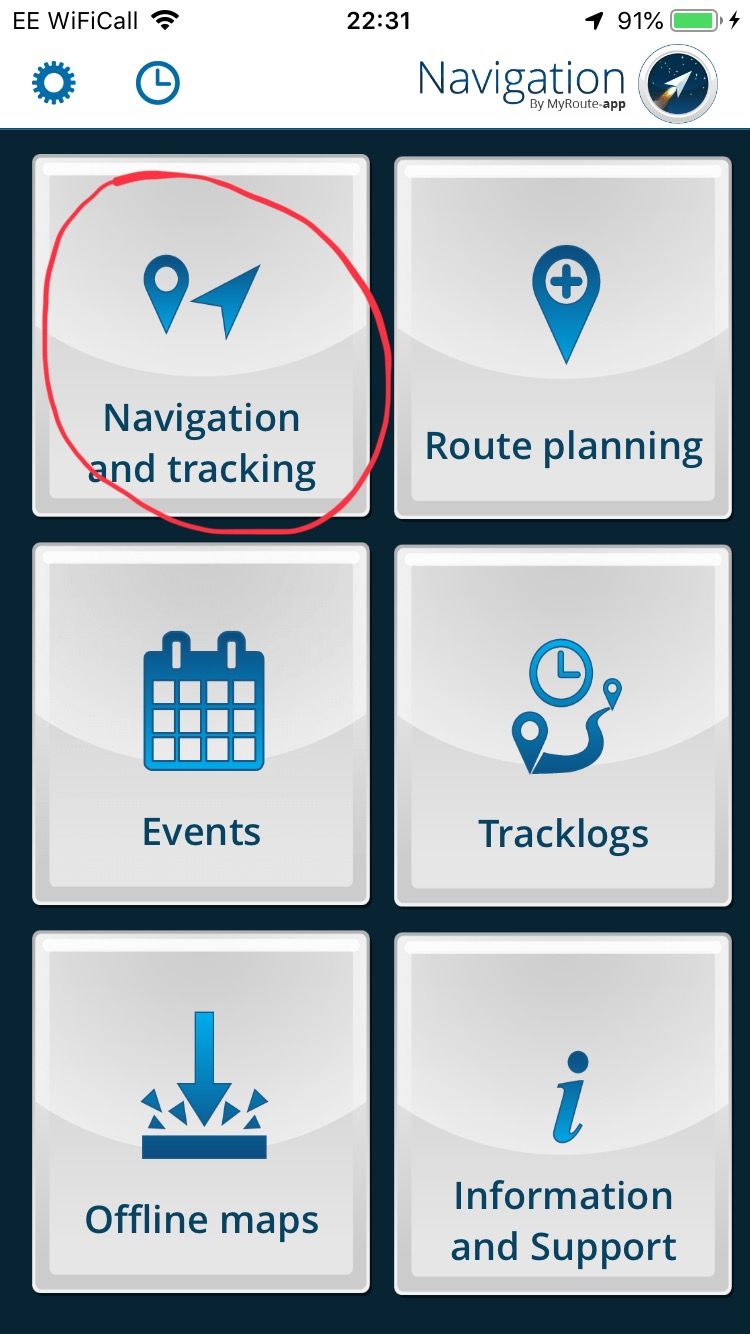
    8F019D4B-5887-47A2-B3BE-8ED15833DBD1.jpeg

    Always willing to help if I can.
    Triumph Tiger 1200 XRT called Tina.
    MRA Navigation Next and SilverFox BJ8

    1 Reply Last reply
    0
    • Roger l Offline
      Roger l Offline
      Roger l
      wrote on last edited by
      #6

      @Nick-Carthew-RouteXpert said in Help for a Newbie:

      will be available to use to navigate using your phone.

      Oh wow! Nick you're a life saver! I had no idea there were 2 apps. I never heard or saw that mentioned as 2 separate apps. I guess that should maybe be more clear. Having that mentioned in the tutorials early on would help a lot of people that are looking to possibly download and or purchase the app. Ok so I have it working on my phone so I will test tomorrow am on my way to work. I hope this works. I'll be happier than a kid on christmas ha ha.

      Thanks!
      Rog

      Nick Carthew MyRoute-app community 2 Replies Last reply
      1
      • Roger l Roger l

        @Nick-Carthew-RouteXpert said in Help for a Newbie:

        will be available to use to navigate using your phone.

        Oh wow! Nick you're a life saver! I had no idea there were 2 apps. I never heard or saw that mentioned as 2 separate apps. I guess that should maybe be more clear. Having that mentioned in the tutorials early on would help a lot of people that are looking to possibly download and or purchase the app. Ok so I have it working on my phone so I will test tomorrow am on my way to work. I hope this works. I'll be happier than a kid on christmas ha ha.

        Thanks!
        Rog

        Nick Carthew Offline
        Nick Carthew Offline
        Nick Carthew
        RouteXpert
        wrote on last edited by
        #7

        Good luck @Roger-l πŸ‘πŸΌ

        Always willing to help if I can.
        Triumph Tiger 1200 XRT called Tina.
        MRA Navigation Next and SilverFox BJ8

        1 Reply Last reply
        0
        • Roger l Roger l

          @Nick-Carthew-RouteXpert said in Help for a Newbie:

          will be available to use to navigate using your phone.

          Oh wow! Nick you're a life saver! I had no idea there were 2 apps. I never heard or saw that mentioned as 2 separate apps. I guess that should maybe be more clear. Having that mentioned in the tutorials early on would help a lot of people that are looking to possibly download and or purchase the app. Ok so I have it working on my phone so I will test tomorrow am on my way to work. I hope this works. I'll be happier than a kid on christmas ha ha.

          Thanks!
          Rog

          MyRoute-app community Offline
          MyRoute-app community Offline
          MyRoute-app community
          Administrator
          wrote on last edited by
          #8

          @Roger-l

          Can you tell me which tutorials specifically you read? Perhaps the staff can edit them to make it more clear. That said, I hope you have a lot of riding fun with the Navigation app! Feel free to share your experiences once your done πŸ˜‚

          1 Reply Last reply
          1
          • Roger l Offline
            Roger l Offline
            Roger l
            wrote on last edited by
            #9

            Hi Timo, I watched the 6 youtube videos with Serge. I thought those would be the best. They move pretty fast and cover a lot. I paused and went back several times. I may have missed some things but I tried not to. It's a lot of info to take in quick for sure. They are pretty good videos but I think they can focus better on the exact way to get it onto your phone. I think that would have helped a lot. Thank you both for the help once again!

            Roger

            MyRoute-app community 1 Reply Last reply
            1
            • Roger l Roger l

              Hi Timo, I watched the 6 youtube videos with Serge. I thought those would be the best. They move pretty fast and cover a lot. I paused and went back several times. I may have missed some things but I tried not to. It's a lot of info to take in quick for sure. They are pretty good videos but I think they can focus better on the exact way to get it onto your phone. I think that would have helped a lot. Thank you both for the help once again!

              Roger

              MyRoute-app community Offline
              MyRoute-app community Offline
              MyRoute-app community
              Administrator
              wrote on last edited by
              #10

              @Roger-l I'm glad to read that, Serge sometimes does move pretty fast, but the essence of those videos was also to cover everything from the start up. That said, in hindsight we might indeed have started off with "hey there, before we do anything else please note that there are two apps! Here's what they do". As these videos get updated relatively regularly I'll note this one down somewhere to add in.

              1 Reply Last reply
              0
              • Roger l Offline
                Roger l Offline
                Roger l
                wrote on last edited by
                #11

                @Timo-Martosatiman-MRA said in Help for a Newbie:

                ad to read that, Serge sometimes does move pretty fast

                Sounds Excellent, I'm sure that may help some others.

                1 Reply Last reply
                0
                • Roger l Offline
                  Roger l Offline
                  Roger l
                  wrote on last edited by
                  #12

                  Oh, One quick question. Can you drive a route that you have created in reverse if you want to follow the same route back?

                  Nick Carthew 1 Reply Last reply
                  0
                  • Roger l Roger l

                    Oh, One quick question. Can you drive a route that you have created in reverse if you want to follow the same route back?

                    Nick Carthew Offline
                    Nick Carthew Offline
                    Nick Carthew
                    RouteXpert
                    wrote on last edited by
                    #13

                    @Roger-l said in Help for a Newbie:

                    Oh, One quick question. Can you drive a route that you have created in reverse if you want to follow the same route back?

                    Hi @Roger-l with a gold membership yes. Always check routes that you reverse for one way streets, dual carriageways etc.

                    Always willing to help if I can.
                    Triumph Tiger 1200 XRT called Tina.
                    MRA Navigation Next and SilverFox BJ8

                    1 Reply Last reply
                    0
                    • D A Wakefield Offline
                      D A Wakefield Offline
                      D A Wakefield
                      wrote on last edited by
                      #14

                      Well I am glad I read this post as I also didn't know about a separate app to navigate using the phone.

                      1 Reply Last reply
                      1
                      • Giles Cooper Offline
                        Giles Cooper Offline
                        Giles Cooper
                        wrote on last edited by
                        #15

                        Most Garmin satnav support route map functionality.

                        I have a guide for getting a map onto a Garmin or tomtom on the club website I run.

                        Https://www.eatoc.org.uk/routes2.shtml

                        It was designed for absolute beginners hence the large number of photos

                        1 Reply Last reply
                        0
                        • D A Wakefield Offline
                          D A Wakefield Offline
                          D A Wakefield
                          wrote on last edited by
                          #16

                          I have bought All In One MyRoute app, thinking I get the ability to create routes and use either my Garmin or phone to navigate. Is this correct or do I also need to buy the Navigation app for my phone as well?

                          Giles Cooper Nick Carthew 2 Replies Last reply
                          0
                          • D A Wakefield D A Wakefield

                            I have bought All In One MyRoute app, thinking I get the ability to create routes and use either my Garmin or phone to navigate. Is this correct or do I also need to buy the Navigation app for my phone as well?

                            Giles Cooper Offline
                            Giles Cooper Offline
                            Giles Cooper
                            wrote on last edited by
                            #17

                            @D-A-Wakefield
                            No you don’t need to buy the navigation app, the link I posted above shows you how to get a route onto your Garmin satnav. I have used a Garmin 2598 with myrouteapp for the last 2 years until the rain killed it (open kit car and very bad weather so replaced it with a Nuvo 3xx series (waterproof)

                            1 Reply Last reply
                            1
                            • D A Wakefield D A Wakefield

                              I have bought All In One MyRoute app, thinking I get the ability to create routes and use either my Garmin or phone to navigate. Is this correct or do I also need to buy the Navigation app for my phone as well?

                              Nick Carthew Offline
                              Nick Carthew Offline
                              Nick Carthew
                              RouteXpert
                              wrote on last edited by
                              #18

                              @D-A-Wakefield said in Help for a Newbie:

                              I have bought All In One MyRoute app, thinking I get the ability to create routes and use either my Garmin or phone to navigate. Is this correct or do I also need to buy the Navigation app for my phone as well?

                              To navigate using your mobile phone, you will need to download MyRoute-app Navigation from Google Play or the Apple Store for iPhones.

                              Always willing to help if I can.
                              Triumph Tiger 1200 XRT called Tina.
                              MRA Navigation Next and SilverFox BJ8

                              1 Reply Last reply
                              0
                              • Roger l Offline
                                Roger l Offline
                                Roger l
                                wrote on last edited by
                                #19

                                Correct, The "Navigation" app is a 2nd app and it's free! I'm proud to say I know that now :). I am only using my Cell phone. My GPS looks to be too old and doesn't see the map after the connector pushes the map to it. So, I will just use the phone.
                                Anyway..... Any quick tips on how to run a Route in reverse on a call phone?

                                Nick Carthew 1 Reply Last reply
                                0
                                • Roger l Roger l

                                  Correct, The "Navigation" app is a 2nd app and it's free! I'm proud to say I know that now :). I am only using my Cell phone. My GPS looks to be too old and doesn't see the map after the connector pushes the map to it. So, I will just use the phone.
                                  Anyway..... Any quick tips on how to run a Route in reverse on a call phone?

                                  Nick Carthew Offline
                                  Nick Carthew Offline
                                  Nick Carthew
                                  RouteXpert
                                  wrote on last edited by Nick Carthew
                                  #20

                                  @Roger-l In the navigating app, from the first screen, choose Route Planning. Select the route that you would like to reverse. With that route open, select the drop down tool kit and choose reverse. Check your route before using it for route points that may now be on the wrong side of a dual lane or one way street. This is all easier to do on a PC or mac or even an iPad as the screens are that much bigger. The reversed route will be on your phone via the cloud if you use the PC to edit a route.

                                  Always willing to help if I can.
                                  Triumph Tiger 1200 XRT called Tina.
                                  MRA Navigation Next and SilverFox BJ8

                                  1 Reply Last reply
                                  0

                                  Hello! It looks like you're interested in this conversation, but you don't have an account yet.

                                  Getting fed up of having to scroll through the same posts each visit? When you register for an account, you'll always come back to exactly where you were before, and choose to be notified of new replies (either via email, or push notification). You'll also be able to save bookmarks and upvote posts to show your appreciation to other community members.

                                  With your input, this post could be even better πŸ’—

                                  Register Login
                                  Reply
                                  • Reply as topic
                                  Log in to reply
                                  • Oldest to Newest
                                  • Newest to Oldest
                                  • Most Votes


                                  ACTIVE USERS
                                  Nick Carthew
                                  Nick Carthew
                                  D A Wakefield
                                  D A Wakefield
                                  MyRoute-app community
                                  MyRoute-app community
                                  Giles Cooper
                                  Giles Cooper
                                  Roger l
                                  Roger l
                                  POPULAR TOPICS
                                  • Interesting behaviour on a pre-planned route that uses the same road in both directions
                                    paul69
                                    paul69
                                    0
                                    10
                                    28

                                  • Er gaat hier iets mis melding
                                    Travellexxie
                                    Travellexxie
                                    0
                                    22
                                    440

                                  • Onbegrijpelijke afslagen
                                    Travellexxie
                                    Travellexxie
                                    0
                                    5
                                    112

                                  • Giving folders its own color
                                    Travellexxie
                                    Travellexxie
                                    0
                                    13
                                    358

                                  • Stemgeluid sterker bij afspelen muziek
                                    superg
                                    superg
                                    0
                                    4
                                    50

                                  • GPX1.2 & Garmin Tread
                                    MTC-Zeilberg
                                    MTC-Zeilberg
                                    0
                                    4
                                    123

                                  • Vormingspunt, viapunt en Eindpunt op Carplay
                                    Huibertus
                                    Huibertus
                                    0
                                    7
                                    123

                                  • Bij route naar bestemming, weg afgesloten die gewoon open is.
                                    Marinus van Deudekom
                                    Marinus van Deudekom
                                    0
                                    2
                                    29

                                  MY GROUPS
                                  • Login

                                  • Login or register to search.
                                  • First post
                                    Last post
                                  0
                                  • Categories
                                  • Recent
                                  • Popular
                                  • Support
                                  • MyRoute-app