My current position in mobile MRA
-

Hello everyone,
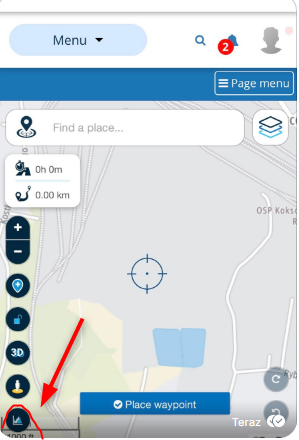
I tried recently to create a route for going by foot to specified point. As MRA needs to have two point to create a route I was obliged to point my current location and I had a problem with finding such option. The bottom of left panel is hidden and I can not make it visible, any trick to do it?
--
Regards
Staszek -
Hello everyone,
I tried recently to create a route for going by foot to specified point. As MRA needs to have two point to create a route I was obliged to point my current location and I had a problem with finding such option. The bottom of left panel is hidden and I can not make it visible, any trick to do it?

Hi @Stanisław Maybe your zoom settings need adjusting on your phone.
Always willing to help if I can.
Triumph Tiger 1200 XRT called Tina.
MRA Navigation Next and SilverFox BJ8 -
Hi @Stanisław Maybe your zoom settings need adjusting on your phone.
@Nick-Carthew As I know, I can only manage fonts - and I have it set bigger then standard setting. It should be correctly scaled by MRA in this case, try horizontal view - it is completely useless...
Edit - you are right, I have changed zoom setting to standard one and it works, anyway would be good to manage it somehow in both modes, I prefer bigger icons etc. -
This post is deleted!
-
This post is deleted!
Hello! It looks like you're interested in this conversation, but you don't have an account yet.
Getting fed up of having to scroll through the same posts each visit? When you register for an account, you'll always come back to exactly where you were before, and choose to be notified of new replies (either via email, or push notification). You'll also be able to save bookmarks and upvote posts to show your appreciation to other community members.
With your input, this post could be even better 💗
Register Login-
07142
-
 0536
0536
-
 0438
0438
-
 04124
04124
-
 0416
0416
-
 6323.1k
-
037
-
 1340
1340