Skip to content
  • Categories
  • Recent
  • Popular
  • Support
  • MyRoute-app
Collapse
Brand Logo

MRA Community Forum

  1. Home
  2. MRA Routeplanner Next Beta
  3. [Web-Beta] Suggestions and Discussions
  4. Navigating on NEX

Navigating on NEX

Scheduled Pinned Locked Moved [Web-Beta] Suggestions and Discussions
8 Posts 5 Posters 56 Views 3 Watching
  • Oldest to Newest
  • Newest to Oldest
  • Most Votes
Reply
  • Reply as topic
Log in to reply
This topic has been deleted. Only users with topic management privileges can see it.
  • Lluís Casals
    Lluís Casals
    Lluís Casals
    wrote last edited by
    #1

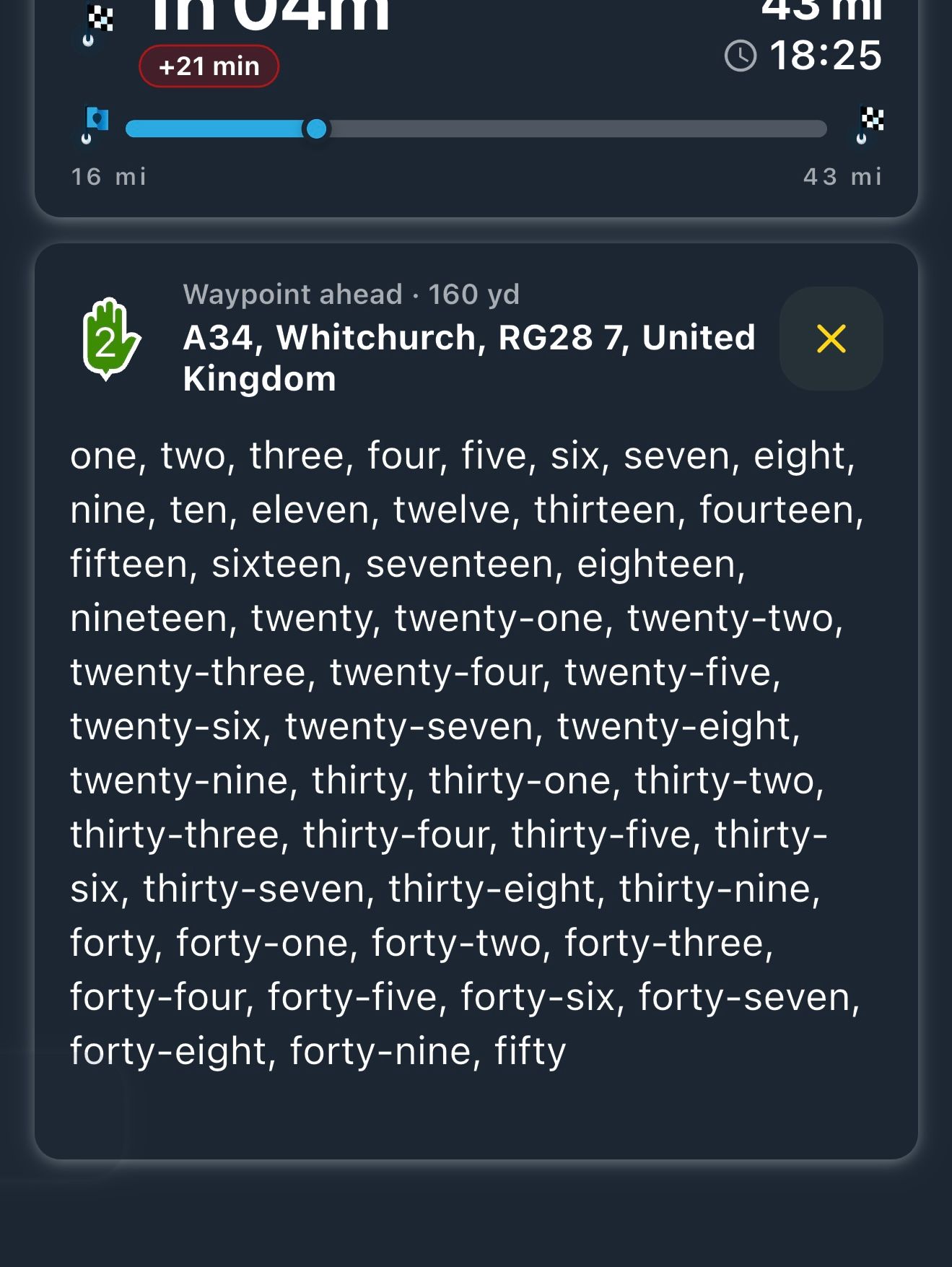
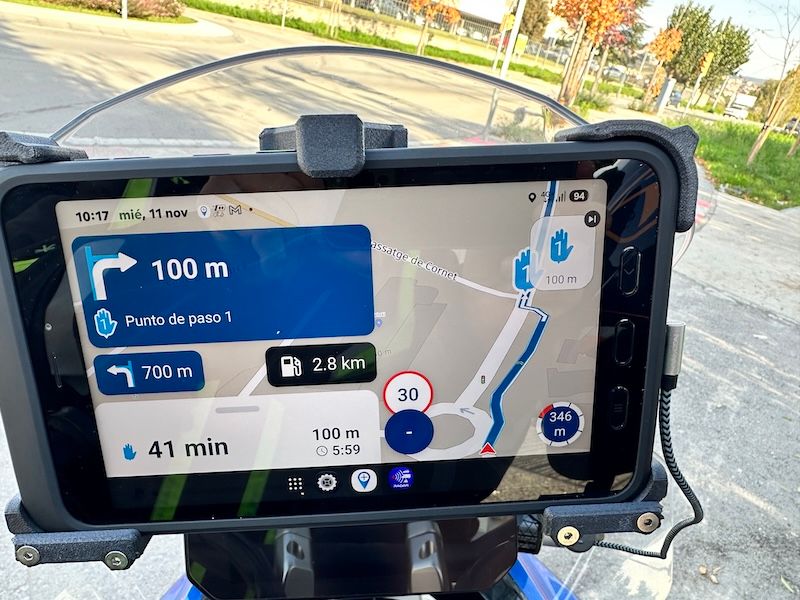
    IMG_8974.JPG

    First, I'd like to congratulate the developers on their excellent work.
    I'd like to suggest that in the NEX app, I'm navigating with an 8" Samsung A5 tablet. As you can see in the photo, the upper (blue) box indicating the next maneuver is excessively large for this purpose, as is the lower (white) box showing the remaining time. I think they significantly reduce the visibility of the route map and consequently make it appear smaller. Do you think these boxes could be reduced in size? Thank you for your attention and congratulations on MRA!

    Òscar 1 Reply Last reply
    1
    • Corjan Meijerink
      Corjan Meijerink
      Corjan Meijerink
      Developer
      wrote last edited by
      #2

      Thanks for the kind words!

      I can confirm this will be fixed in the upcoming update 🙂

      1 Reply Last reply
      2
      • Lluís Casals Lluís Casals

        IMG_8974.JPG

        First, I'd like to congratulate the developers on their excellent work.
        I'd like to suggest that in the NEX app, I'm navigating with an 8" Samsung A5 tablet. As you can see in the photo, the upper (blue) box indicating the next maneuver is excessively large for this purpose, as is the lower (white) box showing the remaining time. I think they significantly reduce the visibility of the route map and consequently make it appear smaller. Do you think these boxes could be reduced in size? Thank you for your attention and congratulations on MRA!

        Òscar
        Òscar
        Òscar
        wrote last edited by Òscar
        #3

        @Lluís-Casals Hi Lluis, on Sunday we noticed the same "problem" on Xavi's tablet. We fixed it by changing a couple of settings—specifically font size and resolution—in the "display" section on the tablet itself. Give that a try and see if it works for you!
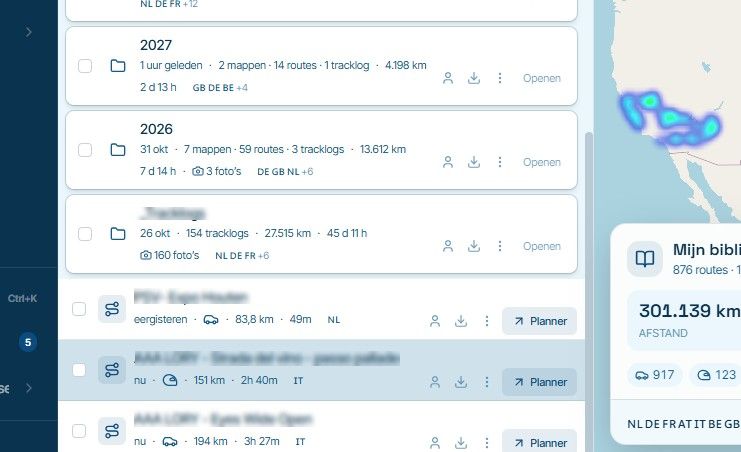
        Seeks: "tamaño y estilo de fuente" and "zoom de pantalla":
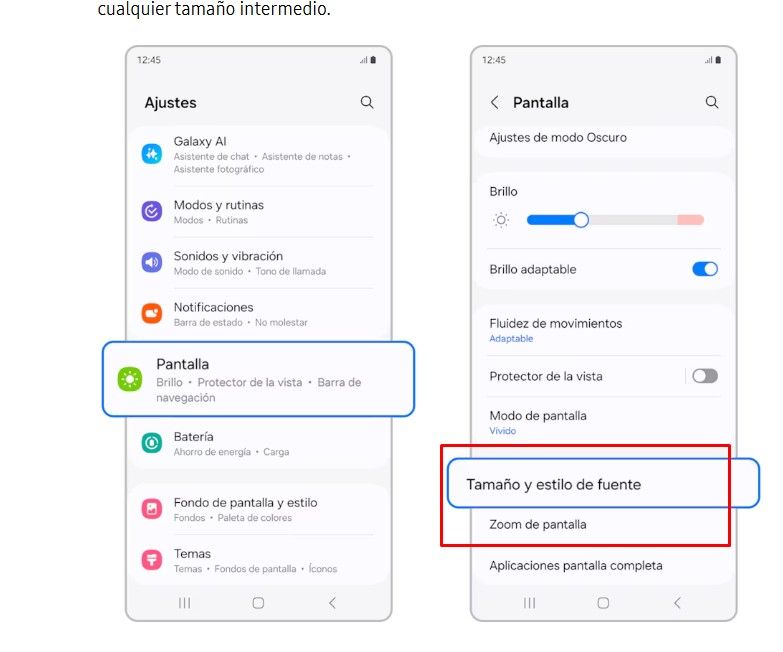
        image.jpeg

        Regards!

        Creator and administrator of the largest MRA groups.

        • https://t.me/MRa_by_b0hd1
        • https://www.myrouteapp.com/group/messages/7007
        • YouTube: @demco17
        • Ex-routexpert, current beta tester and MRA expert. Creator of tutorials, manuals, and MRA user trainer.
        1 Reply Last reply
        0
        • Lluís Casals
          Lluís Casals
          Lluís Casals
          wrote last edited by
          #4

          Thanks Corjan.

          Thanks Oscar, I'll try it.

          Cheers.

          1 Reply Last reply
          0
          • Lluís Casals
            Lluís Casals
            Lluís Casals
            wrote last edited by
            #5

            That's right, Oscar, it's not in "font size" and "display size".
            It's in "screen zoom".
            Solved!!!!!
            Regards
            Guzzist 1 Reply Last reply
            1
            • Lluís Casals Lluís Casals

              That's right, Oscar, it's not in "font size" and "display size".
              It's in "screen zoom".
              Solved!!!!!
              Regards

              Guzzist
              Guzzist
              Guzzist
              Valued contributor
              wrote last edited by
              #6

              @Lluís-Casals said:

              That's right, Oscar, it's not in "font size" and "display size".
              It's in "screen zoom".
              Solved!!!!!
              Regards

              ...hmmm - have the same issue - but at my device, there is no option "screen zoom" available 😑

              Nothing is impossible ;-)
              In past: GARMIN Zumo 210->GARMIN Zumo 395->GARMIN XT=> now: DMD T865-X + MyRoute-App, LocusMaps, OsmAnd.
              In past: GARMIN MapSource ->GARMIN BaseCamp->Tyre->Kurviger->Calimoto=> now: MRA-Routplanner.

              Marinus van Deudekom Òscar 2 Replies Last reply
              0
              • Guzzist Guzzist

                @Lluís-Casals said:

                That's right, Oscar, it's not in "font size" and "display size".
                It's in "screen zoom".
                Solved!!!!!
                Regards

                ...hmmm - have the same issue - but at my device, there is no option "screen zoom" available 😑
                Marinus van Deudekom
                Marinus van Deudekom
                Marinus van Deudekom
                RouteXpert
                wrote last edited by
                #7

                @Guzzist must be something in your settings because on my 250 km tour from yesterday I had zero problems with the T865X

                Honda Goldwing GL1500,
                Honda Silverwing GL 650
                DMD2 T865X 8 inch Android tablet using MRA next for navigation
                Garmin XT sold
                Samsung S24FE mounted on a Quadlock and using Android Auto in my car

                1 Reply Last reply
                0
                • Guzzist Guzzist

                  @Lluís-Casals said:

                  That's right, Oscar, it's not in "font size" and "display size".
                  It's in "screen zoom".
                  Solved!!!!!
                  Regards

                  ...hmmm - have the same issue - but at my device, there is no option "screen zoom" available 😑

                  Òscar
                  Òscar
                  Òscar
                  wrote last edited by
                  #8

                  @Guzzist There’s surely a place where you can adjust the font size, icon size, or something similar. That’s where you should try looking. Not all devices use the same names for these settings.

                  Regards

                  Creator and administrator of the largest MRA groups.

                  • https://t.me/MRa_by_b0hd1
                  • https://www.myrouteapp.com/group/messages/7007
                  • YouTube: @demco17
                  • Ex-routexpert, current beta tester and MRA expert. Creator of tutorials, manuals, and MRA user trainer.
                  1 Reply Last reply
                  0

                  Hello! It looks like you're interested in this conversation, but you don't have an account yet.

                  Getting fed up of having to scroll through the same posts each visit? When you register for an account, you'll always come back to exactly where you were before, and choose to be notified of new replies (either via email, or push notification). You'll also be able to save bookmarks and upvote posts to show your appreciation to other community members.

                  With your input, this post could be even better 💗

                  Register Login
                  Reply
                  • Reply as topic
                  Log in to reply
                  • Oldest to Newest
                  • Newest to Oldest
                  • Most Votes


                  ACTIVE USERS
                  Òscar
                  Òscar
                  Marinus van Deudekom
                  Marinus van Deudekom
                  Guzzist
                  Guzzist
                  Corjan Meijerink
                  Corjan Meijerink
                  Lluís Casals
                  Lluís Casals
                  POPULAR TOPICS
                  • How to export GPX files to Zumo XT without recalculation
                    John S Parry
                    John S Parry
                    2
                    51
                    3.2k

                  • Navigating on NEX
                    Òscar
                    Òscar
                    1
                    8
                    56

                  • Automatic optimization of an entire route to find the shortest route in terms of time or distance.
                    Reinhard Punz
                    Reinhard Punz
                    0
                    6
                    78

                  • Spoken notes are truncated
                    Nick Carthew
                    Nick Carthew
                    0
                    6
                    30

                  • problem exporting from iphone to zumo xt using garmin drive?
                    Nick Carthew
                    Nick Carthew
                    0
                    15
                    413

                  • Move pop up
                    CD130
                    CD130
                    0
                    3
                    31

                  • Update Garmin Drive voor Apple (en het werkt weer!)
                    Rob Veerman
                    Rob Veerman
                    1
                    3
                    72

                  • Website update - Best order, daylight on your ride, edit several waypoints at once and more
                    Anonymouse
                    Anonymouse
                    8
                    3
                    83

                  MY GROUPS
                  • Login

                  • Login or register to search.
                  • First post
                    Last post
                  0
                  • Categories
                  • Recent
                  • Popular
                  • Support
                  • MyRoute-app