Viewing waypoint detail in “foot” mode
-

To explore a city I create a walking route with waypoints. When I start the walk on my iPhone it gives me “Follow the line” mode instead of full navigation.
In that mode, during the walk I want to see what each waypoint is. Am I stopping here to see a museum, a church, a café, a view …
I can’t see how to get the detail of the waypoint to come up. Clicking on the waypoint does nothing; and there is no “view route details” menu or similar. Am I missing something?
-
To explore a city I create a walking route with waypoints. When I start the walk on my iPhone it gives me “Follow the line” mode instead of full navigation.
In that mode, during the walk I want to see what each waypoint is. Am I stopping here to see a museum, a church, a café, a view …
I can’t see how to get the detail of the waypoint to come up. Clicking on the waypoint does nothing; and there is no “view route details” menu or similar. Am I missing something?

@Anonymouse Walking and cycling routes are created based on the OSM map. Following the line is nothing more and nothing less than that. You don’t get any voice instructions, and you have to look at your screen yourself. No information appears automatically when passing a route point either. You need to click on the route point yourself to read any text you’ve entered in the notes field.
🏍️ BMW K1600GT-P (2013) | Nolan N100-5 with Sena 30K
📱 iOS on iPhone 13 & 16 (mounted on Quadlock or AliExpress extention on BMW-cradle)
🚙 Apple CarPlay in VW T-Roc
💻 Routelab on MacBook Air & iMac (Golden Gate & Ventura) -
@Anonymouse Walking and cycling routes are created based on the OSM map. Following the line is nothing more and nothing less than that. You don’t get any voice instructions, and you have to look at your screen yourself. No information appears automatically when passing a route point either. You need to click on the route point yourself to read any text you’ve entered in the notes field.
@Rob-Verhoeff said in Viewing waypoint detail in “foot” mode:
@Anonymouse You need to click on the route point yourself to read any text you’ve entered in the notes field.
Ah but that is my problem! Clicking on a route point does nothing. Not even the name of the point let along the text notes. And there is no menu (that I can find) to see the list of waypoints either.
Currently I’m running the route planner in parallel with the list of waypoints open, but that is dumb. I’d like to click on the next waypoint in the app while walking and see what it is.
-
@Rob-Verhoeff said in Viewing waypoint detail in “foot” mode:
@Anonymouse You need to click on the route point yourself to read any text you’ve entered in the notes field.
Ah but that is my problem! Clicking on a route point does nothing. Not even the name of the point let along the text notes. And there is no menu (that I can find) to see the list of waypoints either.
Currently I’m running the route planner in parallel with the list of waypoints open, but that is dumb. I’d like to click on the next waypoint in the app while walking and see what it is.
@Anonymouse said in Viewing waypoint detail in “foot” mode:
Clicking on a route point does nothing.
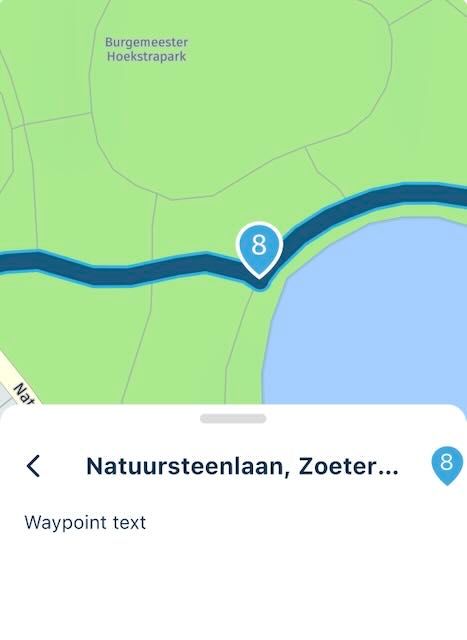
Correct — only the text you’ve entered in the notes field appears when you click on the waypoint itself. That works fine!
🏍️ BMW K1600GT-P (2013) | Nolan N100-5 with Sena 30K
📱 iOS on iPhone 13 & 16 (mounted on Quadlock or AliExpress extention on BMW-cradle)
🚙 Apple CarPlay in VW T-Roc
💻 Routelab on MacBook Air & iMac (Golden Gate & Ventura) -
@Anonymouse said in Viewing waypoint detail in “foot” mode:
Clicking on a route point does nothing.
Correct — only the text you’ve entered in the notes field appears when you click on the waypoint itself. That works fine!
@Rob-Verhoeff said in Viewing waypoint detail in “foot” mode:
@Anonymouse said in Viewing waypoint detail in “foot” mode:
Clicking on a route point does nothing.
Correct — only the text you’ve entered in the notes field appears when you click on the waypoint itself.
So on my iPhone nothing happens when I click on a waypoint while in “follow the line” mode UNLESS there is a notes field.
This looks like a bug. I would expect it to show the name (or address) of the waypoint even if there is no supplementary text. That way it would show “town hall”, “church of Santa Clara” etc.
Although even that is rather clumsy as it cuts off the text. It should really show the whole waypoint information when I click on a waypoint.
This is pretty important for any well-prepared exploratory walk in an interesting historic city.
-
@Rob-Verhoeff said in Viewing waypoint detail in “foot” mode:
@Anonymouse said in Viewing waypoint detail in “foot” mode:
Clicking on a route point does nothing.
Correct — only the text you’ve entered in the notes field appears when you click on the waypoint itself.
So on my iPhone nothing happens when I click on a waypoint while in “follow the line” mode UNLESS there is a notes field.
This looks like a bug. I would expect it to show the name (or address) of the waypoint even if there is no supplementary text. That way it would show “town hall”, “church of Santa Clara” etc.
Although even that is rather clumsy as it cuts off the text. It should really show the whole waypoint information when I click on a waypoint.
This is pretty important for any well-prepared exploratory walk in an interesting historic city.
@Anonymouse said in Viewing waypoint detail in “foot” mode:
So on my iPhone nothing happens when I click on a waypoint while in “follow the line” mode UNLESS there is a notes field.
Correct
This looks like a bug.
I think it's by design!
Although even that is rather clumsy as it cuts off the text. It should really show the whole waypoint information when I click on a waypoint.
This is pretty important for any well-prepared exploratory walk in an interesting historic city.
The only argument I can make is that walking and cycling have never been among the main purposes of the app — let alone something that was developed alongside it in the background! I also have no idea whether any further development will happen in that area. If you’re talking about walks in historic cities, there may be apps that are better suited for that purpose, though I don’t know of any myself.
-
@Rob-Verhoeff said in Viewing waypoint detail in “foot” mode:
@Anonymouse said in Viewing waypoint detail in “foot” mode:
Clicking on a route point does nothing.
Correct — only the text you’ve entered in the notes field appears when you click on the waypoint itself.
So on my iPhone nothing happens when I click on a waypoint while in “follow the line” mode UNLESS there is a notes field.
This looks like a bug. I would expect it to show the name (or address) of the waypoint even if there is no supplementary text. That way it would show “town hall”, “church of Santa Clara” etc.
Although even that is rather clumsy as it cuts off the text. It should really show the whole waypoint information when I click on a waypoint.
This is pretty important for any well-prepared exploratory walk in an interesting historic city.

@Anonymouse said in Viewing waypoint detail in “foot” mode:
This looks like a bug. I would expect it to show the name (or address) of the waypoint even if there is no supplementary text. That way it would show “town hall”, “church of Santa Clara” etc.
Although even that is rather clumsy as it cuts off the text. It should really show the whole waypoint information when I click on a waypoint.
This is pretty important for any well-prepared exploratory walk in an interesting historic city.
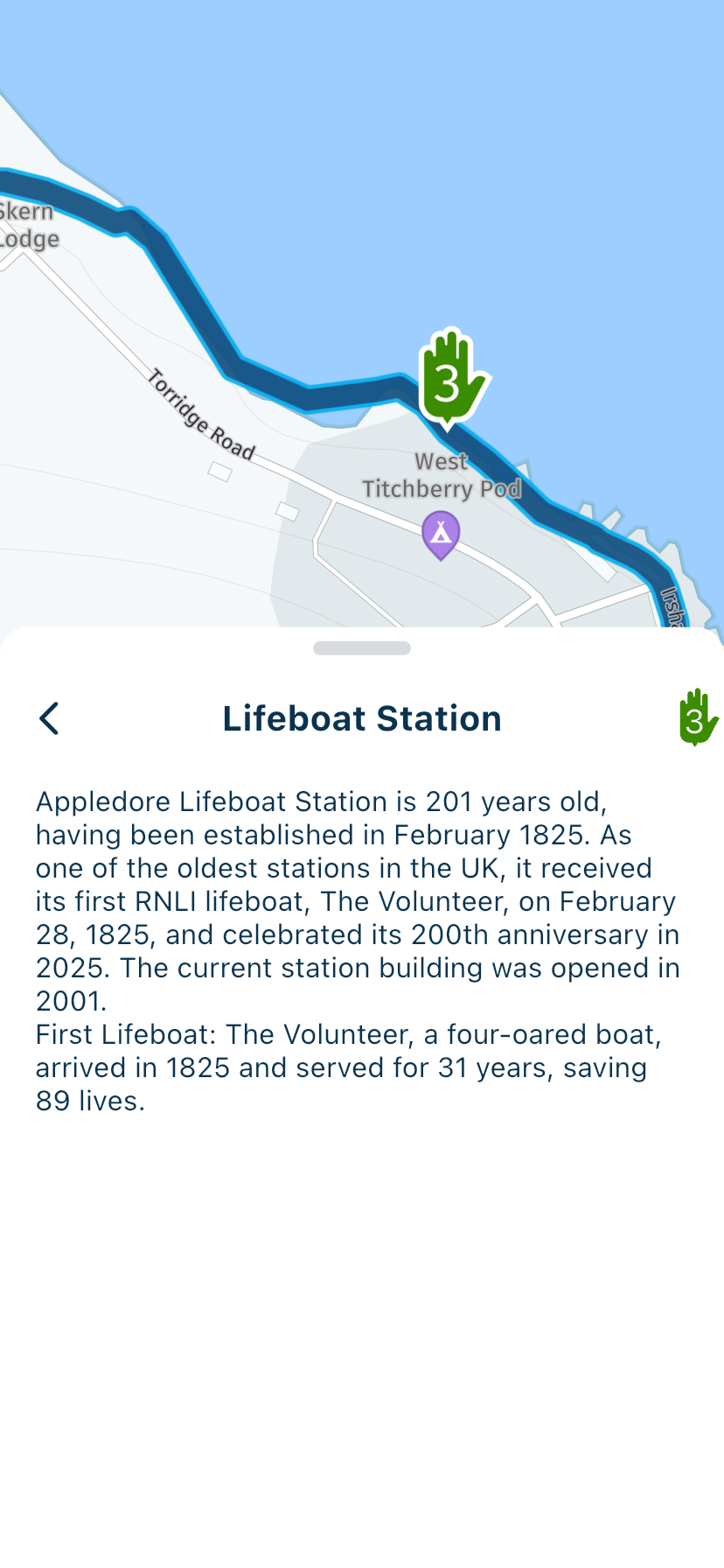
You only get out what you put in. If you prepare a route by adding information to the important route points then you’ll have a more pleasurable experience.
-
Yes of course I can put notes in but if it is a quick visit to a city and there is one each day I don’t always want to do all that work. If I select via points then the app should let me see their names.
As for whether it’s the best tool: actually Outdooractive is better for routing but they don’t show the waypoints at all - not even a dot on the path - so that’s even more useless for city walks!
Hello! It looks like you're interested in this conversation, but you don't have an account yet.
Getting fed up of having to scroll through the same posts each visit? When you register for an account, you'll always come back to exactly where you were before, and choose to be notified of new replies (either via email, or push notification). You'll also be able to save bookmarks and upvote posts to show your appreciation to other community members.
With your input, this post could be even better 💗
Register Login-
 0725
0725
-
 1422454
-
 0518
0518
-
1525
-
 0415
0415
-
1575
-
0422
-
07424