
Skip to content
  • Categories
  • Recent
  • Popular
  • Support
  • MyRoute-app
Collapse
Brand Logo

MRA Community Forum

  1. Home
  2. The MyRoute-app
  3. [App] Suggestions and Discussion
  4. Scrolling waypoint info

Scrolling waypoint info

Scheduled Pinned Locked Moved [App] Suggestions and Discussion
18 Posts 6 Posters 4.2k Views 4 Watching
  • Oldest to Newest
  • Newest to Oldest
  • Most Votes
Reply
  • Reply as topic
Log in to reply
This topic has been deleted. Only users with topic management privileges can see it.
  • Nick Elsom 0 Nick Elsom 0

    Hi Nick, I really like the feature you mention but I would love to see it all the time somehow rather than only when you're approaching it. Forgive me but I think its only at the top when your approaching? maybe see it on the bottom all the time below the waypoint/via/finish info. I sometimes don't know which waypoint is next only that I'm heading for one if that makes more sense?

    Nick Carthew Online
    Nick Carthew Online
    Nick Carthew
    RouteXpert
    wrote on last edited by
    #4

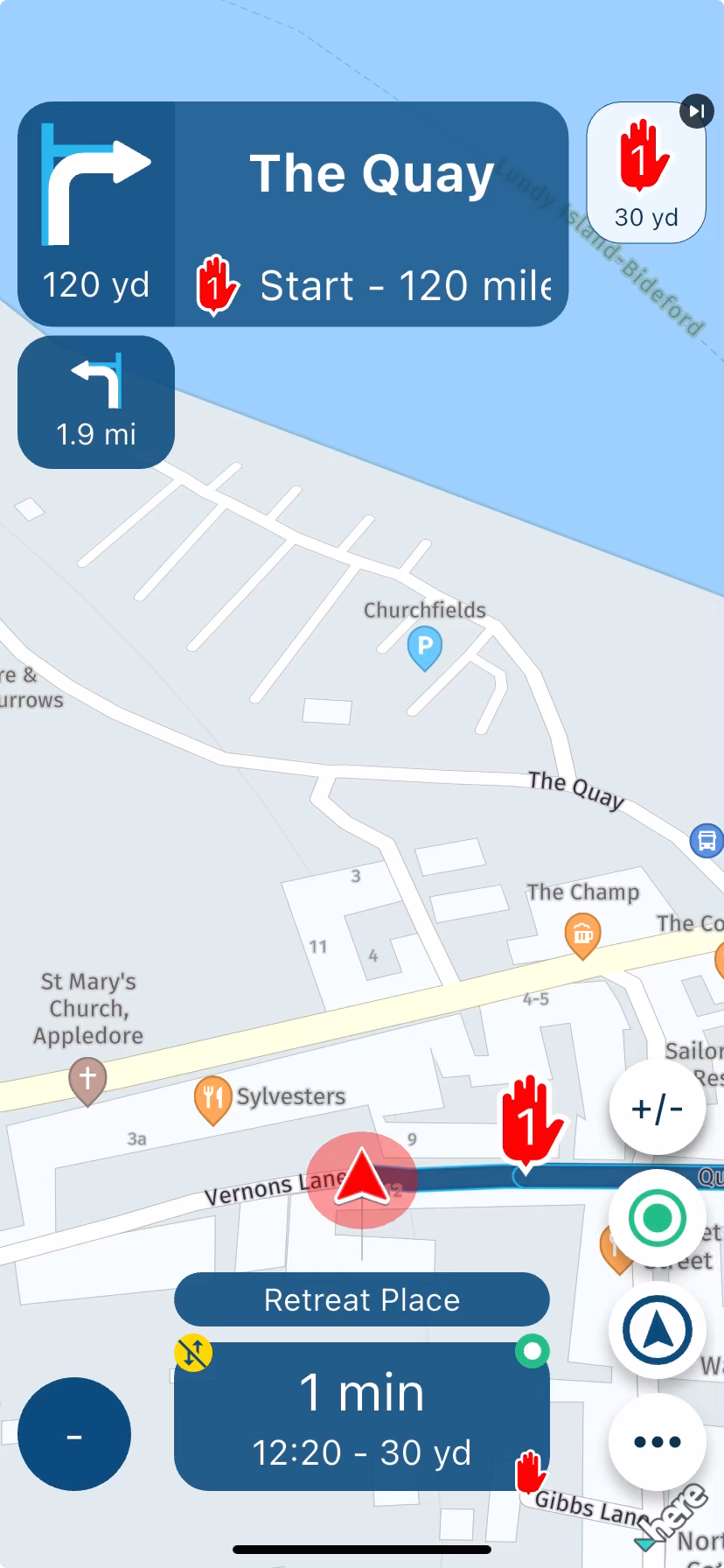
    @Nick-Elsom-0 The next waypoint is always visible as an icon in the top right of the screen if you have chosen to show it.
    The scrolling text for shaping points can be seen when you are 750 metres from it and via point text begins when you are 2km from it.
    005d4da5-7c27-4914-a08b-67a9fd417c41-image.png

    Always willing to help if I can.
    Triumph Tiger 1200 XRT called Tina.
    MRA Navigation Next and SilverFox BJ8

    Nick Elsom 0 Brian McG Andy W 3 Replies Last reply
    0
    • Nick Carthew Nick Carthew

      @Nick-Elsom-0 The next waypoint is always visible as an icon in the top right of the screen if you have chosen to show it.
      The scrolling text for shaping points can be seen when you are 750 metres from it and via point text begins when you are 2km from it.

      005d4da5-7c27-4914-a08b-67a9fd417c41-image.png

      Nick Elsom 0 Offline
      Nick Elsom 0 Offline
      Nick Elsom 0
      wrote on last edited by
      #5

      @Nick-Carthew Thanks, appreciate the info.

      1 Reply Last reply
      0
      • Nick Carthew Nick Carthew

        @Nick-Elsom-0 The next waypoint is always visible as an icon in the top right of the screen if you have chosen to show it.
        The scrolling text for shaping points can be seen when you are 750 metres from it and via point text begins when you are 2km from it.

        005d4da5-7c27-4914-a08b-67a9fd417c41-image.png

        Brian McG Away
        Brian McG Away
        Brian McG
        wrote on last edited by
        #6

        @Nick-Carthew I think what @Nick-Elsom-0 is after is the same as this, which although it got a few upvotes it got zero response, maybe it was too exact & on point πŸ˜‚

        BlackView BV7100, Android 12
        Navigate "Routes as Tracks" in Offline mode with Offline Maps
        No Wifi, no internet, no interruptions, works well

        Nick Elsom 0 1 Reply Last reply
        0
        • Brian McG Brian McG

          @Nick-Carthew I think what @Nick-Elsom-0 is after is the same as this, which although it got a few upvotes it got zero response, maybe it was too exact & on point πŸ˜‚

          Nick Elsom 0 Offline
          Nick Elsom 0 Offline
          Nick Elsom 0
          wrote on last edited by
          #7

          @Brian-McG Yes you are correct, Im looking to always see waypoint info.. I have various named waypoints and via points on my tours and don't always know which ones are coming next until the last minute as you say. I have found a way to see it now by clicking the three dots and selecting waypoints, the next waypoint is highlighted orange but I would much rather see it scrolling text on the nav view.

          Con Hennekens 1 Reply Last reply
          0
          • Nick Elsom 0 Nick Elsom 0

            @Brian-McG Yes you are correct, Im looking to always see waypoint info.. I have various named waypoints and via points on my tours and don't always know which ones are coming next until the last minute as you say. I have found a way to see it now by clicking the three dots and selecting waypoints, the next waypoint is highlighted orange but I would much rather see it scrolling text on the nav view.

            Con Hennekens Offline
            Con Hennekens Offline
            Con Hennekens
            Alpha tester
            wrote on last edited by
            #8

            @Nick-Elsom-0, scrolling text in general is a big distraction in traffic.

            I am just an enthusiastic MRA user, and hope you will be one too!

            Most motorcycle problems are caused by the nut that connects the handlebar to the saddle.

            Check out RideSleepRepeat.eu, a biker community for sharing stays across Europe

            Brian McG 1 Reply Last reply
            2
            • Con Hennekens Offline
              Con Hennekens Offline
              Con Hennekens
              Alpha tester
              wrote on last edited by
              #9

              @Brian-McG, you can downvote me, but it is a fact. You must keep looking at it to be able to read it. You see I care about your safety... πŸ˜‰

              I am just an enthusiastic MRA user, and hope you will be one too!

              Most motorcycle problems are caused by the nut that connects the handlebar to the saddle.

              Check out RideSleepRepeat.eu, a biker community for sharing stays across Europe

              1 Reply Last reply
              1
              • Con Hennekens Con Hennekens

                @Nick-Elsom-0, scrolling text in general is a big distraction in traffic.

                Brian McG Away
                Brian McG Away
                Brian McG
                wrote on last edited by
                #10

                @Con-Hennekens if scrolling text is such a bad idea why does MRA have it in the danger zone before the junction 😜

                As I state in the other thread it would be far safer to show the point information ALL the time as that is what has been requested in the settings,
                that way I can choose when to look at the information when I think it is safe to do so

                BlackView BV7100, Android 12
                Navigate "Routes as Tracks" in Offline mode with Offline Maps
                No Wifi, no internet, no interruptions, works well

                Con Hennekens 1 Reply Last reply
                0
                • Brian McG Brian McG

                  @Con-Hennekens if scrolling text is such a bad idea why does MRA have it in the danger zone before the junction 😜

                  As I state in the other thread it would be far safer to show the point information ALL the time as that is what has been requested in the settings,
                  that way I can choose when to look at the information when I think it is safe to do so

                  Con Hennekens Offline
                  Con Hennekens Offline
                  Con Hennekens
                  Alpha tester
                  wrote on last edited by
                  #11

                  @Brian-McG said in Scrolling waypoint info:

                  if scrolling text is such a bad idea why does MRA have it in the danger zone before the junction

                  I know, I am not in favor of that πŸ˜‰
                  I think sometimes people want too much information.

                  I am just an enthusiastic MRA user, and hope you will be one too!

                  Most motorcycle problems are caused by the nut that connects the handlebar to the saddle.

                  Check out RideSleepRepeat.eu, a biker community for sharing stays across Europe

                  1 Reply Last reply
                  0
                  • Con Hennekens Offline
                    Con Hennekens Offline
                    Con Hennekens
                    Alpha tester
                    wrote on last edited by
                    #12

                    @Brian-McG, for me, a great alternative is the name and note of a waypoint being voiced. It gives you information at the relevant time without the need of scrolling through information, and while keeping your eyes on the traffic. Does that not work for you?

                    I am just an enthusiastic MRA user, and hope you will be one too!

                    Most motorcycle problems are caused by the nut that connects the handlebar to the saddle.

                    Check out RideSleepRepeat.eu, a biker community for sharing stays across Europe

                    Brian McG 1 Reply Last reply
                    0
                    • Nick Elsom 0 Offline
                      Nick Elsom 0 Offline
                      Nick Elsom 0
                      wrote on last edited by
                      #13

                      I have the waypoint voiced and it's great but again it's all when you're arriving and not available on screen all the time. At least there is more than one person that would like to see it. πŸ˜‚

                      Rob Verhoeff 1 Reply Last reply
                      0
                      • Con Hennekens Con Hennekens

                        @Brian-McG, for me, a great alternative is the name and note of a waypoint being voiced. It gives you information at the relevant time without the need of scrolling through information, and while keeping your eyes on the traffic. Does that not work for you?

                        Brian McG Away
                        Brian McG Away
                        Brian McG
                        wrote on last edited by
                        #14

                        @Con-Hennekens Yes I also use voice instructions & have done for years as you know, like you say it enables to keep the eyes on the road

                        but we still disagree, voice instructions "at the relevant time" a discussion for a different thread πŸ˜‚

                        BlackView BV7100, Android 12
                        Navigate "Routes as Tracks" in Offline mode with Offline Maps
                        No Wifi, no internet, no interruptions, works well

                        Con Hennekens 1 Reply Last reply
                        0
                        • Andy W Andy W referenced this topic on
                        • Brian McG Brian McG

                          @Con-Hennekens Yes I also use voice instructions & have done for years as you know, like you say it enables to keep the eyes on the road

                          but we still disagree, voice instructions "at the relevant time" a discussion for a different thread πŸ˜‚

                          Con Hennekens Offline
                          Con Hennekens Offline
                          Con Hennekens
                          Alpha tester
                          wrote on last edited by
                          #15

                          @Brian-McG, I am glad we disagree every now and then, else it would be a boring discussion πŸ˜‰

                          I am just an enthusiastic MRA user, and hope you will be one too!

                          Most motorcycle problems are caused by the nut that connects the handlebar to the saddle.

                          Check out RideSleepRepeat.eu, a biker community for sharing stays across Europe

                          1 Reply Last reply
                          0
                          • Brian McG Brian McG referenced this topic on
                          • Nick Carthew Nick Carthew

                            @Nick-Elsom-0 The next waypoint is always visible as an icon in the top right of the screen if you have chosen to show it.
                            The scrolling text for shaping points can be seen when you are 750 metres from it and via point text begins when you are 2km from it.

                            005d4da5-7c27-4914-a08b-67a9fd417c41-image.png

                            Andy W Offline
                            Andy W Offline
                            Andy W
                            wrote on last edited by
                            #16

                            @Nick-Carthew said in Scrolling waypoint info:

                            The scrolling text for shaping points can be seen when you are 750 metres from it and via point text begins when you are 2km from it.

                            Hi @Nick-Carthew, I've had a scan through the manual now but didn't see these distances mentioned. Where does this info come from?

                            Nick Carthew 1 Reply Last reply
                            0
                            • Andy W Andy W

                              @Nick-Carthew said in Scrolling waypoint info:

                              The scrolling text for shaping points can be seen when you are 750 metres from it and via point text begins when you are 2km from it.

                              Hi @Nick-Carthew, I've had a scan through the manual now but didn't see these distances mentioned. Where does this info come from?

                              Nick Carthew Online
                              Nick Carthew Online
                              Nick Carthew
                              RouteXpert
                              wrote on last edited by
                              #17

                              @Andy-W said in Scrolling waypoint info:

                              @Nick-Carthew said in Scrolling waypoint info:

                              The scrolling text for shaping points can be seen when you are 750 metres from it and via point text begins when you are 2km from it.

                              Hi @Nick-Carthew, I've had a scan through the manual now but didn't see these distances mentioned. Where does this info come from?

                              God AKA Corjan
                              Also through experience 😊

                              Always willing to help if I can.
                              Triumph Tiger 1200 XRT called Tina.
                              MRA Navigation Next and SilverFox BJ8

                              1 Reply Last reply
                              1
                              • Nick Elsom 0 Nick Elsom 0

                                I have the waypoint voiced and it's great but again it's all when you're arriving and not available on screen all the time. At least there is more than one person that would like to see it. πŸ˜‚

                                Rob Verhoeff Offline
                                Rob Verhoeff Offline
                                Rob Verhoeff
                                Alpha tester
                                wrote on last edited by
                                #18

                                @Nick-Elsom-0 said in Scrolling waypoint info:

                                At least there is more than one person that would like to see it. πŸ˜‚

                                There are just as many people who see it the exact opposite way. Don’t get me wrong, it’s not because I share the same label as @Con-Hennekens, but simply because more moving elements within your field of view just mean more distraction. Unless you’re a fighter pilot or your name is Max Verstappen, you’ve got limited capacity left to take in and process extra information. Your suggestion would mean an additional toggle would need to be built in, so you could choose whether to have it switched on or off. I also know someone who practically explodes at the word β€œtoggle”... 😬 @Nick-Carthew calls him God πŸ˜‰

                                🏍️ BMW K1600GT-P (2013) | Nolan N100-5 with Sena 30K
                                πŸ“± iOS on iPhone 13 & 16 (mounted on Quadlock or AliExpress extention on BMW-cradle)
                                πŸš™ Apple CarPlay in VW T-Roc
                                πŸ’» Routelab on MacBook Air & iMac (Tahoe & Ventura)

                                1 Reply Last reply
                                3

                                Hello! It looks like you're interested in this conversation, but you don't have an account yet.

                                Getting fed up of having to scroll through the same posts each visit? When you register for an account, you'll always come back to exactly where you were before, and choose to be notified of new replies (either via email, or push notification). You'll also be able to save bookmarks and upvote posts to show your appreciation to other community members.

                                With your input, this post could be even better πŸ’—

                                Register Login
                                Reply
                                • Reply as topic
                                Log in to reply
                                • Oldest to Newest
                                • Newest to Oldest
                                • Most Votes


                                ACTIVE USERS
                                Rob Verhoeff
                                Rob Verhoeff
                                Nick Carthew
                                Nick Carthew
                                Brian McG
                                Brian McG
                                Con Hennekens
                                Con Hennekens
                                Andy W
                                Andy W
                                Nick Elsom 0
                                Nick Elsom 0
                                POPULAR TOPICS
                                • Carpuride scherm vast
                                  De Ploey Georges
                                  De Ploey Georges
                                  3
                                  28
                                  1.2k

                                • GPX Versions 1.1 vs 1.2 for Garmin Visually Explained
                                  smfollen 0
                                  smfollen 0
                                  7
                                  177
                                  14.1k

                                • How can I change the verbal navigation directions from male to female?
                                  Brian McG
                                  Brian McG
                                  0
                                  5
                                  37

                                • Linker in MRA kleurt blauw (alles geselecteerd)
                                  Travellexxie
                                  Travellexxie
                                  0
                                  13
                                  345

                                • Apple Carplay - navigatie instructies zichtbaar, maar kaart niet??
                                  Nick Carthew
                                  Nick Carthew
                                  0
                                  3
                                  26

                                • Camperroutes
                                  De Ploey Georges
                                  De Ploey Georges
                                  0
                                  4
                                  174

                                • Not a great route choice
                                  Marinus van Deudekom
                                  Marinus van Deudekom
                                  0
                                  2
                                  41

                                • Problem with Route Animate/Video maker
                                  0
                                  1
                                  2

                                MY GROUPS
                                • Login

                                • Login or register to search.
                                • First post
                                  Last post
                                0
                                • Categories
                                • Recent
                                • Popular
                                • Support
                                • MyRoute-app


