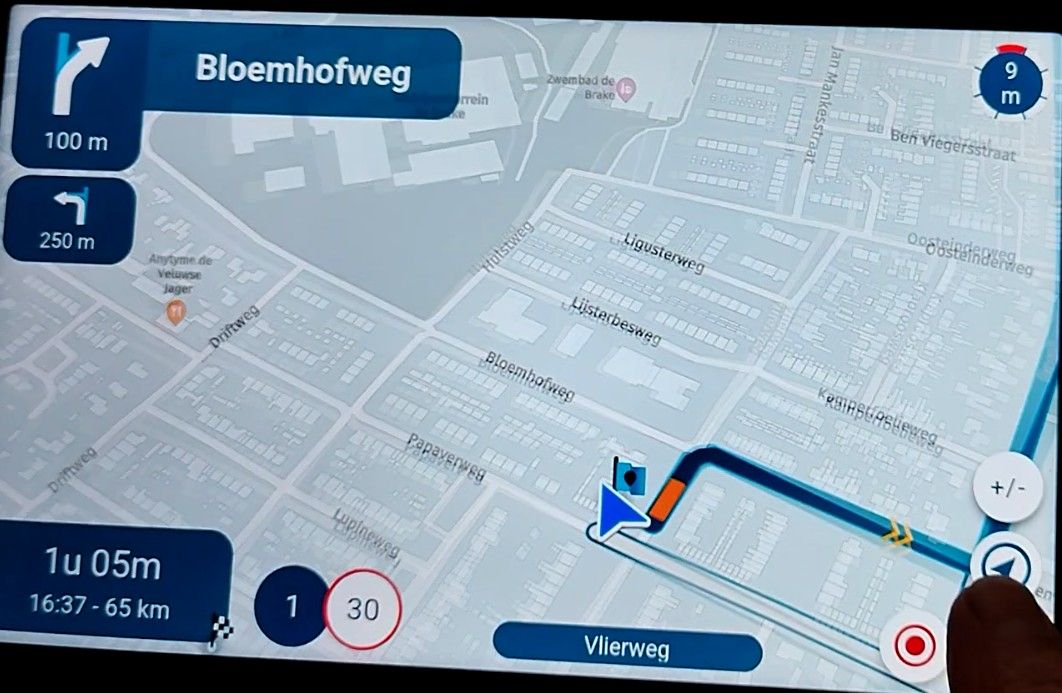
Map "spinning" when standing still
-

@Con-Hennekens
Thank you very much for your care. I know safety comes first. That's why I started the screen recording beforehand today. And I edited the video afterwards.
I had to stop at that point (at 38 seconds) because of oncoming traffic.
The direction of travel was clear here, but when you're standing at an intersection and the screen rotates like that, it's not clear.Anyway, just to demonstrate: https://youtu.be/t1NSoV13yYs
-

same here. more spinning with v5 when standing still. Android.
The app seams to think that i am moving. In the video I am standing still roughly where the flag is.https://drive.google.com/file/d/1-D0rNg9ln68wxD20lb55MHg3RJQ8ech-/view?usp=drivesdk
-
same here. more spinning with v5 when standing still. Android.
The app seams to think that i am moving. In the video I am standing still roughly where the flag is.https://drive.google.com/file/d/1-D0rNg9ln68wxD20lb55MHg3RJQ8ech-/view?usp=drivesdk

@Herman-Veldhuizen what version of the app are you using. In 433 it should have been solved
Honda Goldwing GL1500,
Honda Silverwing GL 650
DMD2 T865X 8 inch Android tablet using MRA next for navigation
Garmin XT sold
Samsung S24FE mounted on a Quadlock and using Android Auto in my car -
@Herman-Veldhuizen what version of the app are you using. In 433 it should have been solved

@Marinus-van-Deudekom that’s not true.
I’ll look into the subject for next update -

Ik heb samen met Hans een paar kleine testjes gedaan. Beide zitten we in onze woonkamer (ik zit stil in Wachtberg Duitsland, geen idee wat hij uithaalt, maar hij schijnt in Helmond te zitten
 ) hij met z'n iPhone 16 plus met IOS 26.1, ik met aan de ene kant van mijn bureau een Samsung Galaxy S22 Ultra met Android 16 en aan de andere kant een Samsung Tab Active4 Pro met Android 15.
Locatiegegevens bij alle drie op maximaal (Toegestaan bij gebruik App vs Altijd toestaan, gaf een gering verschil). Waar bij Hans de cursor stil bleef staan. Danste hij bij mij (op beide apparaten) door de hele buurt, met een verschil in locatie van ca 100 meter. Ik was (wonend op nummer 4) vnl. bij de buren van 10 op bezoek, volgens beide apparaten. Pas na ca. 1,5 minuut werd het hem duidelijk, dat ik toch echt op 4 zat, maar niet echt heel enthousiast.
Zou het dan toch een IOS vs Android/Samsung dingetje zijn, of is onze locatie zo duidelijk anders qua ontvangst?

Nu maar hopen, dat mijn robotstofzuiger mijn slaapkamer weet te vinden.

-
wat is zie is dat het vaak gebeurt als er 2 wegen naast elkaar liggen. dan springt de cursor heen en weer van de ene weg naar de andere en weer terug
-
@Marinus-van-Deudekom that’s not true.
I’ll look into the subject for next update
@Corjan-Meijerink oeps, ik dacht dat het al gefixed was
-
Hi, wenn Ihr in Niederländisch schreibt, brauche ich ja auch nicht meinen Text zu übersetzen und kann in Deutsch schreiben.

@Lex.Kloet.RX innerhalb eines Gebäudes ist das doch normal, der Satellitenempfang ist da zu schlecht.
Heute hat sich die Karte auch ein paar mal an einer Kreuzung gedreht, wenn man gerade steht, ist das doof, man weiß erstmal nicht in welche Richtung man fahren muss.
Hardware
iPhone 12 pro (iOS 26.2.1)
iPad (7.Gen.) 18.7.3
Oukitel RT3 Pro (Andr. 14)
Wireless CarPlay mit (Elebest C650)
Wired CarPlay (SEAT Arona - 2021)
MRA Workshops in Deutsch sind hier zu finden -
Hi, wenn Ihr in Niederländisch schreibt, brauche ich ja auch nicht meinen Text zu übersetzen und kann in Deutsch schreiben.
@Lex.Kloet.RX innerhalb eines Gebäudes ist das doch normal, der Satellitenempfang ist da zu schlecht.
Heute hat sich die Karte auch ein paar mal an einer Kreuzung gedreht, wenn man gerade steht, ist das doof, man weiß erstmal nicht in welche Richtung man fahren muss.
@Jörgen das ist mir bekannt, es ging mir um das verschiedene Verhalten. Aber ich habe das öfters, das bei mir bei Ampeln am Rad gedreht wird.


-
I've investigated the issue, found a possible cause and implemented changes in 5.0.2.
Will need some extensive beta testing on different devices but I'm hopeful the issue will be resolved

-

Wanneer ongeveer komt deze Beta (5.0.2) beschikbaar zodat ik eventueel wat kan plannen om te testen; Ik heb ook last van dit "spinning" als ik bij verkeerslichten of een kruising stil sta!
-
Expecting after the weekend but maybe I'll submit it tomorrow

Depending on the platform you are using it will also take another day or two before it's available. -

@Corjan-Meijerink Are more beta testers needed? I'd be willing to test a little, if it helps (my setup is noted in the footer: Android with two AA-devices).
-
I did see it on my normal navigation phone on a few trips. Today i use my daily phone, which i only use in the car for navigation (not on my bike). On this phone i saw the behaviour also
Both were running Android Auto.
On the bike it spins more than once on the same spot (but not constant) mostly back and forth. In the car mostly it spins only once. Just as soon as i stopped.Let's what the new version brings
-

This issue may simply be due to a weak GPS signal. I don’t think it’s related to MRA.
iPhone 15,
Carpuride W702 Pro
Sena 20S EVO headset
Harley Davidson Road King M8 -
This issue may simply be due to a weak GPS signal. I don’t think it’s related to MRA.
@Albert-van-den-Elsen my Guess is that it's the combination of some type of phones, mostly Android based and some AA/CP devices. I havent seen the issue at all.
-
Yeah, that’s the annoying thing of these issues. It’s definitely device related so some have it, others do not. GPS positioning and especially on Android devices is not always as accurate as you’d hope.
-
With my Samsung S22 Ultra, it is reproducibly a problem that occurs with MyRouteApp, but not with Google Maps: Sitting on my couch at home, phone laying on a table (i.e., not moving at all, not being touched), after I have opened MRA on the phone, the "view direction" (map orientation) changes several times for about 90 or 180 degrees, the movement pauses some seconds and then moves again. When it finally settles, it doesn't point in the actual direction the phone faces. Moving the phone after it has "settled", the map doesn't react any longer (map not moving). The compass needle symbol changes from "triangle shape" (map rotation follows phone) to a "strike-through compass needle" (?). No AA device involved at this point. This happens only with MRA, Google Maps doesn't show any problems, and another navigation app I had (but have uninstalled a few days ago), Magic Earth, didn't either show this problem. For me, it's clearly isolated with MRA, and while I may have seen an occasional map spin in earlier versions, it is now a constant problem (as soon as the device doesn't move) and, unfortunately, dramatically reduces the actual usefulness of the app for navigation. Phone is the same; the only thing that has changed is, there have been security/firmware updates by Samsung over the years.
-
It is also MRA related. Why?
At least on my phones, only MRA has this problem. Maybe Here is the cause. I don't know
But just like i wrote in other topics. There are other GPS related things which only occur in MRA and not in other navigation apps -

Some phone have not only GPS but also a hardware compass. These are able to "see" in which direction they are held. Phones that don't have a compass, extrapolate direction from movement. That gets very inaccurate while standing still. Then there are apps that that rely on location services only (I don't know if direction is taken from compass if available), and there are apps that have different methods of approaching hardware. It all is a little more complicated then one might think...
Hello! It looks like you're interested in this conversation, but you don't have an account yet.
Getting fed up of having to scroll through the same posts each visit? When you register for an account, you'll always come back to exactly where you were before, and choose to be notified of new replies (either via email, or push notification). You'll also be able to save bookmarks and upvote posts to show your appreciation to other community members.
With your input, this post could be even better 💗
Register Login










-
 0443.5k
-
025191
-
 010176
-
 039
039
-
16325
-
09191
-
0226
-
0230