Skip to content
  • Categories
  • Recent
  • Popular
  • Support
  • MyRoute-app
Collapse
Brand Logo

MRA Community Forum

  1. Home
  2. The MyRoute-app
  3. [App] Suggestions and Discussion
  4. Starting navigation in the middle o the programmed Route.

Starting navigation in the middle o the programmed Route.

Scheduled Pinned Locked Moved [App] Suggestions and Discussion
10 Posts 5 Posters 565 Views 3 Watching
  • Oldest to Newest
  • Newest to Oldest
  • Most Votes
Reply
  • Reply as topic
Log in to reply
This topic has been deleted. Only users with topic management privileges can see it.
  • Montorsi Paolo 0 Offline
    Montorsi Paolo 0 Offline
    Montorsi Paolo 0
    wrote on last edited by
    #1

    Just returned from a 5 days trip using only MRA Navigation app. And I am already a fan.

    One question: is it already possibile to start navigating in the middle of the route instead from the beginning?
    I haven't found the way.

    I had two real problem to solve:

    1. I accidentally interrupted the navigation in the middle of the route. So when I started the navigation again I did not find the way to skip the waypoints already visited .

    2. Due to the closure of a street I had to skip several waypoint in the middle of the running navigation.

    So, in the both of the cases, i had to park the motorbike, enter in the edit mode and modify the route.

    There is a diffent and quicker way to do that?

    Thanks
    Paolo

    Nick Carthew 1 Reply Last reply
    0
    • Montorsi Paolo 0 Montorsi Paolo 0

      Just returned from a 5 days trip using only MRA Navigation app. And I am already a fan.

      One question: is it already possibile to start navigating in the middle of the route instead from the beginning?
      I haven't found the way.

      I had two real problem to solve:

      1. I accidentally interrupted the navigation in the middle of the route. So when I started the navigation again I did not find the way to skip the waypoints already visited .

      2. Due to the closure of a street I had to skip several waypoint in the middle of the running navigation.

      So, in the both of the cases, i had to park the motorbike, enter in the edit mode and modify the route.

      There is a diffent and quicker way to do that?

      Thanks
      Paolo

      Nick Carthew Offline
      Nick Carthew Offline
      Nick Carthew
      RouteXpert
      wrote on last edited by
      #2

      @Montorsi-Paolo-0 Great to read that you are a fan. If you long press on any waypoint, all previous waypoints will be skipped so that navigation continues from the chosen waypoint. You can also use this method if you accidentally skip too many. Example, if you long pressed waypoint 7 but you are at waypoint 5, long press waypoint 5 to restore to your chosen waypoint.

      Always willing to help if I can.
      Triumph Tiger 1200 XRT called Tina.
      MRA Navigation Next and SilverFox BJ8

      Montorsi Paolo 0 1 Reply Last reply
      1
      • Hubert Thoring Offline
        Hubert Thoring Offline
        Hubert Thoring
        Valued contributor
        wrote on last edited by Hubert Thoring
        #3

        @montorsi-paolo-0 You also have the option to configure the navigation app so that, after a pause, it starts at the nearest waypoint relative to your starting point.

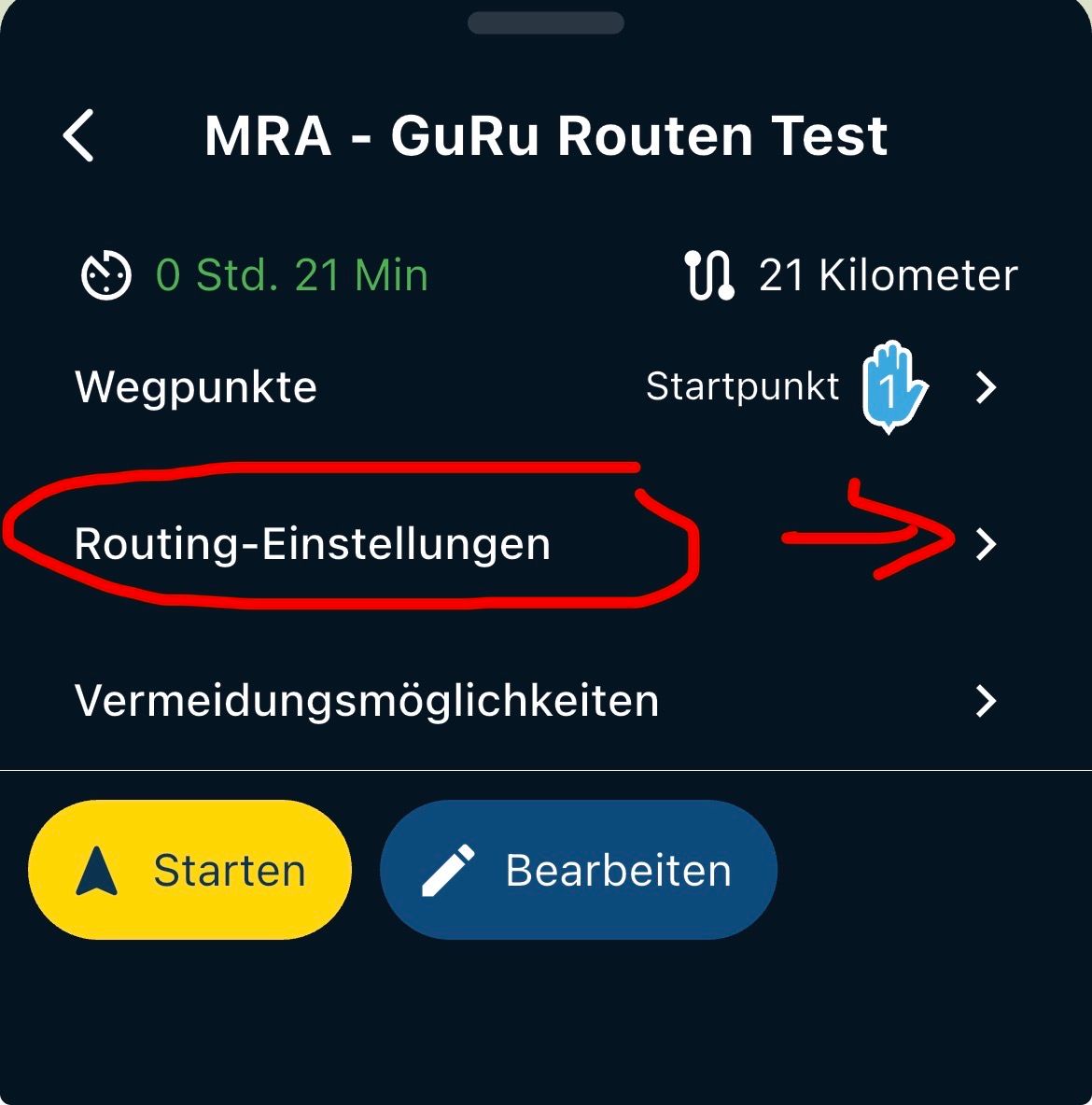
        Select the route and tap "Navigate," then choose "Routing Settings" from the menu and enable the "Start at nearest waypoint" option.
        IMG_9829.jpeg

        Good luck with that!

        What Nick wrote works too, of course—and it’s always visible on the map display at any time. ...

        VG Hubert
        Beta Test "Next App" dazu die Hardware .
        iPad 9. Gen iOS 26.5.2/ iPhone 16e iOS 26.5.2/ Navi iPhone Xr iOS 18.7.9 / PC mit MS Win11 /❗️MyRoute-App im Cradel und Remotek-One❗️ Info zu MRA & Remotek One

        richard 3v Montorsi Paolo 0 2 Replies Last reply
        0
        • Hubert Thoring Hubert Thoring

          @montorsi-paolo-0 You also have the option to configure the navigation app so that, after a pause, it starts at the nearest waypoint relative to your starting point.

          Select the route and tap "Navigate," then choose "Routing Settings" from the menu and enable the "Start at nearest waypoint" option.

          IMG_9829.jpeg

          Good luck with that!

          What Nick wrote works too, of course—and it’s always visible on the map display at any time. ...

          richard 3v Offline
          richard 3v Offline
          richard 3v
          wrote on last edited by richard 3v
          #4

          So what happens if the nearest waypoint is already behind you ??

          1 Reply Last reply
          0
          • Herman Veldhuizen Offline
            Herman Veldhuizen Offline
            Herman Veldhuizen
            wrote on last edited by
            #5

            you are probably navigating the route as track. the current behaviour in that scenario is indeed such that the navigation always starts at the first point.
            but you can click on a waypoint on the map or in the waypoint list and make that point the first target.
            if you navigate a route as route you can select the target waypoint before you start. by default the nearest is selected.

            1 Reply Last reply
            0
            • richard 3v Offline
              richard 3v Offline
              richard 3v
              wrote on last edited by
              #6

              Personally I never navigate a route as a track, always a route as a route.

              So in my case will the app try sending me back to where I've already been??

              Herman Veldhuizen 1 Reply Last reply
              0
              • richard 3v richard 3v

                Personally I never navigate a route as a track, always a route as a route.

                So in my case will the app try sending me back to where I've already been??

                Herman Veldhuizen Offline
                Herman Veldhuizen Offline
                Herman Veldhuizen
                wrote on last edited by
                #7

                @richard-3v yes that can happen

                1 Reply Last reply
                -1
                • richard 3v Offline
                  richard 3v Offline
                  richard 3v
                  wrote on last edited by
                  #8

                  @herman-veldhuizen
                  OK, thanks for the reply

                  1 Reply Last reply
                  0
                  • Nick Carthew Nick Carthew

                    @Montorsi-Paolo-0 Great to read that you are a fan. If you long press on any waypoint, all previous waypoints will be skipped so that navigation continues from the chosen waypoint. You can also use this method if you accidentally skip too many. Example, if you long pressed waypoint 7 but you are at waypoint 5, long press waypoint 5 to restore to your chosen waypoint.

                    Montorsi Paolo 0 Offline
                    Montorsi Paolo 0 Offline
                    Montorsi Paolo 0
                    wrote on last edited by
                    #9

                    @Nick-Carthew
                    Thanks
                    Work for me.

                    1 Reply Last reply
                    0
                    • Hubert Thoring Hubert Thoring

                      @montorsi-paolo-0 You also have the option to configure the navigation app so that, after a pause, it starts at the nearest waypoint relative to your starting point.

                      Select the route and tap "Navigate," then choose "Routing Settings" from the menu and enable the "Start at nearest waypoint" option.

                      IMG_9829.jpeg

                      Good luck with that!

                      What Nick wrote works too, of course—and it’s always visible on the map display at any time. ...

                      Montorsi Paolo 0 Offline
                      Montorsi Paolo 0 Offline
                      Montorsi Paolo 0
                      wrote on last edited by
                      #10

                      @Hubert-Thoring

                      The "Start at nearest waypoint" was already selected but the option "Use the actual position" it wasn't. Maybe this was the problem.

                      By the way, following your advice, I found also that is possible select the starting point by choosing a waypoint. My bad.

                      Thanks

                      1 Reply Last reply
                      0

                      Hello! It looks like you're interested in this conversation, but you don't have an account yet.

                      Getting fed up of having to scroll through the same posts each visit? When you register for an account, you'll always come back to exactly where you were before, and choose to be notified of new replies (either via email, or push notification). You'll also be able to save bookmarks and upvote posts to show your appreciation to other community members.

                      With your input, this post could be even better 💗

                      Register Login
                      Reply
                      • Reply as topic
                      Log in to reply
                      • Oldest to Newest
                      • Newest to Oldest
                      • Most Votes


                      ACTIVE USERS
                      Hubert Thoring
                      Hubert Thoring
                      Nick Carthew
                      Nick Carthew
                      richard 3v
                      richard 3v
                      Herman Veldhuizen
                      Herman Veldhuizen
                      Montorsi Paolo 0
                      Montorsi Paolo 0
                      POPULAR TOPICS
                      • HERE maps updates
                        John S Parry
                        John S Parry
                        0
                        7
                        154

                      • GPX Versions 1.1 vs 1.2 for Garmin Visually Explained
                        Mzokk
                        Mzokk
                        7
                        167
                        12.4k

                      • Auto skip many waypoints by itself while I was on route. [5.2.0 - 474]
                        paul69
                        paul69
                        0
                        35
                        1.4k

                      • Linker in MRA kleurt blauw (alles geselecteerd)
                        Alfred Schrittwieser
                        Alfred Schrittwieser
                        0
                        10
                        231

                      • The compas direction on the elevation circle is wrong
                        M. Schrijver
                        M. Schrijver
                        0
                        24
                        729

                      • Straatnamen worden uitgesproken
                        M. Schrijver
                        M. Schrijver
                        0
                        6
                        340

                      • Route maken in TomTom kaart en vervolgens met de app navigeren
                        Bruno 7
                        Bruno 7
                        0
                        6
                        167

                      MY GROUPS
                      • Login

                      • Login or register to search.
                      • First post
                        Last post
                      0
                      • Categories
                      • Recent
                      • Popular
                      • Support
                      • MyRoute-app