Skip to content
  • Categories
  • Recent
  • Popular
  • Support
  • MyRoute-app
Collapse
Brand Logo

MRA Community Forum

  1. Home
  2. The MyRoute-app
  3. [App] Suggestions and Discussion
  4. What exactly am I looking at?

What exactly am I looking at?
Scheduled Pinned Locked Moved [App] Suggestions and Discussion
5 Posts 3 Posters 478 Views 2 Watching
  • Oldest to Newest
  • Newest to Oldest
  • Most Votes
Reply
  • Reply as topic
Log in to reply
This topic has been deleted. Only users with topic management privileges can see it.
  • D Griffinundefined Offline
    D Griffinundefined Offline
    D Griffin
    wrote last edited by
    #1

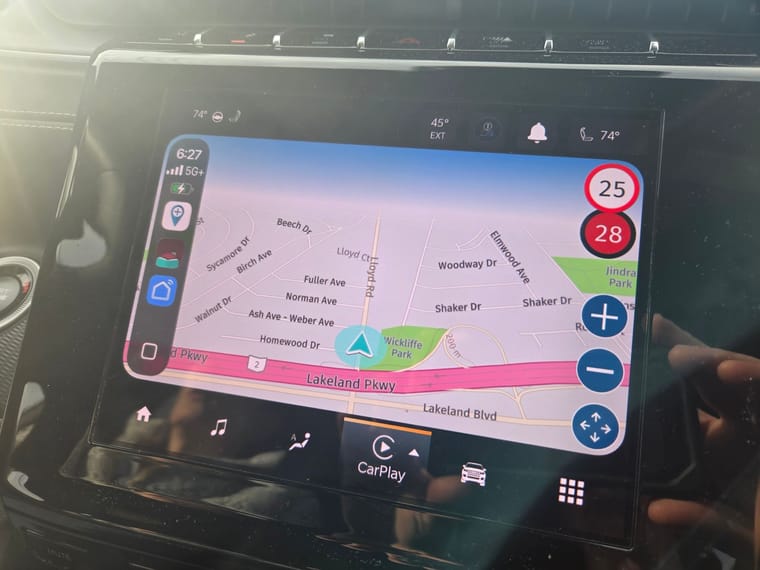
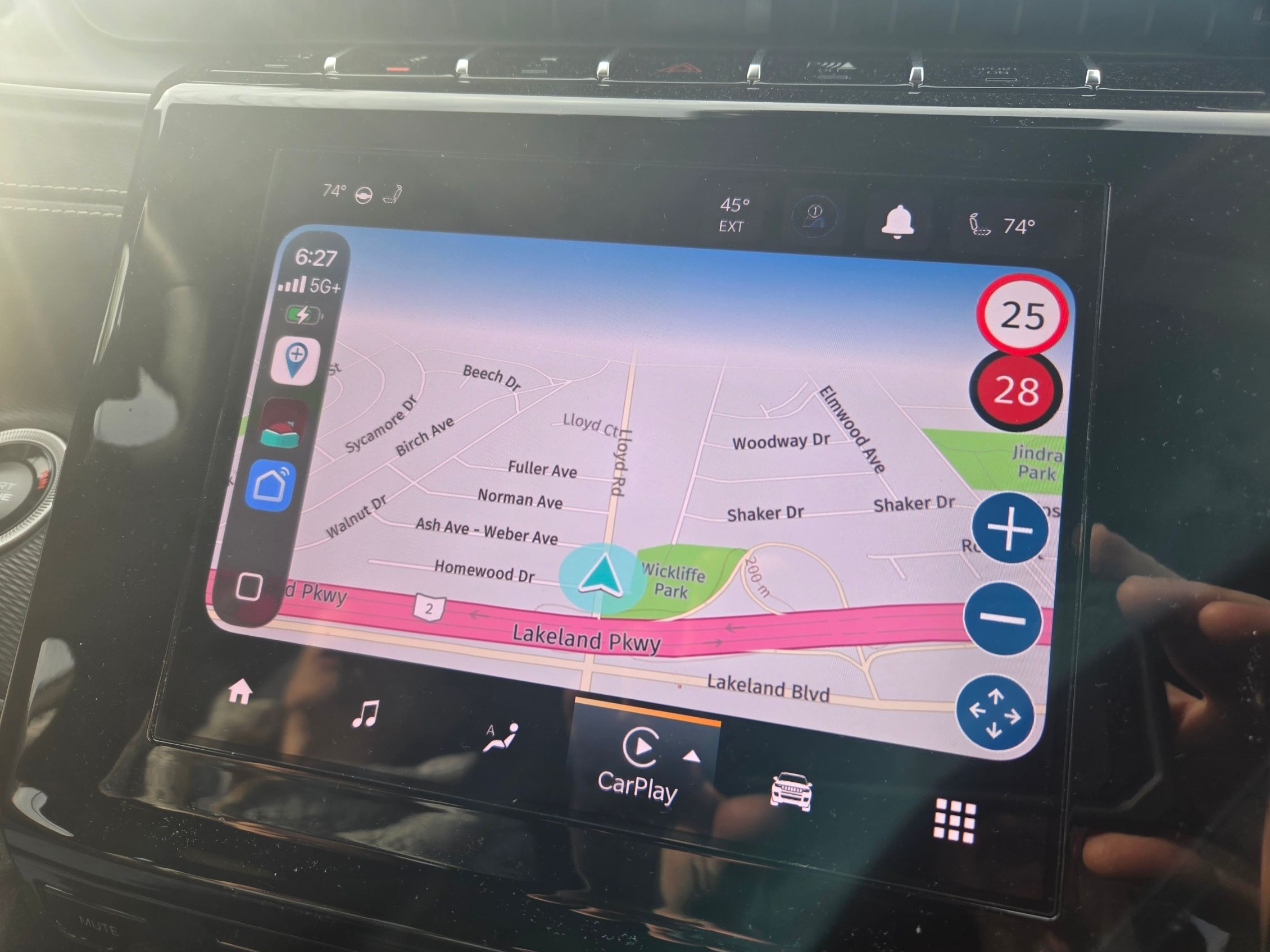
    We recently had to get new phones, I am an Android guy, she is an Apple girl! She now has an iPhone 17. Last night we went to dinner in her Jeep and I wanted to make sure the MRA app was installed correctly on her new phone and working. I put it on the screen of the Jeep and at the bottom right corner of the screen there was a "up-down-left-right" key pad. Is this something new? Is this an IPhone only thing? My Android does not have this. Also check out the screen, seems to be a cut off line on the top causing a 3/4 only screen. MRA has never done this before. Not sure if its a setting in the Jeep or something else. Thanks for the reply's....20260501_182715.jpg

    1 Reply Last reply
    0
    • Corjan Meijerinkundefined Corjan Meijerink moved this topic from [Web] Problems, Bugs and other Issues
    • D Griffinundefined Offline
      D Griffinundefined Offline
      D Griffin
      wrote last edited by
      #2

      HMMMMMMM!!!

      Nick Carthewundefined 1 Reply Last reply
      0
      • D Griffinundefined D Griffin

        HMMMMMMM!!!

        Nick Carthewundefined Offline
        Nick Carthewundefined Offline
        Nick Carthew
        RouteXpert
        wrote last edited by
        #3

        @D-Griffin Yes, AndroidAuto and CarPlay do have some differences, look at the manual for Navigation in the Support pages

        The blue you see is the sky, this is caused by the tilt correction setting. Tap the map styles icon on screen and select Map layer to adjust Tilt correction.

        Always willing to help if I can.
        Triumph Tiger 1200 XRT called Tina.
        MRA Navigation Next and SilverFox BJ8

        1 Reply Last reply
        1
        • Corjan Meijerinkundefined Offline
          Corjan Meijerinkundefined Offline
          Corjan Meijerink
          Developer
          wrote last edited by
          #4

          And the arrow icon bottom right is because this CP screen does not support dragging the map in combination with our app. Hence you can tap that button to open the "pan" interface 🙂

          In the Android Auto version you are using yourself you simply drag the map with your fingers.

          The blue is indeed the sky as @Nick-Carthew said. We guess the correct value based on your screen resolution but that is not always exactly right. Therefore we have a "tilt correction" setting.

          1 Reply Last reply
          1
          • D Griffinundefined Offline
            D Griffinundefined Offline
            D Griffin
            wrote last edited by
            #5

            Thank you guys....Great information...

            1 Reply Last reply
            0

            Hello! It looks like you're interested in this conversation, but you don't have an account yet.

            Getting fed up of having to scroll through the same posts each visit? When you register for an account, you'll always come back to exactly where you were before, and choose to be notified of new replies (either via email, or push notification). You'll also be able to save bookmarks and upvote posts to show your appreciation to other community members.

            With your input, this post could be even better 💗

            Register Login
            Reply
            • Reply as topic
            Log in to reply
            • Oldest to Newest
            • Newest to Oldest
            • Most Votes


            ACTIVE USERS
            D Griffinundefined
            D Griffin
            Corjan Meijerinkundefined
            Corjan Meijerink
            Nick Carthewundefined
            Nick Carthew
            POPULAR TOPICS
            • iPhone wordt veel te heet tijdens navigeren
              CD130undefined
              CD130
              1
              25
              468

            • Navigation stopped working during Tour
              Thomas Neumeyerundefined
              Thomas Neumeyer
              1
              55
              3.6k

            • Update to 5.1 during motor holidays
              Guzzistundefined
              Guzzist
              -2
              8
              113

            • 5.1 update lost speed up in the corner
              D Griffinundefined
              D Griffin
              0
              6
              139

            • kan niet inloggen vanwege teveel apparaten???
              Corjan Meijerinkundefined
              Corjan Meijerink
              0
              10
              171

            • Altitude Units
              Corjan Meijerinkundefined
              Corjan Meijerink
              0
              4
              76

            • Update 5.1 - CarPlay / Android Auto improvements and more!
              Bart De Medtsundefined
              Bart De Medts
              18
              88
              5.3k

            • DMD2, Chigee, Carpuride, Aooci, ...?
              Guzzistundefined
              Guzzist
              0
              9
              213

            MY GROUPS
            • Login

            • Login or register to search.
            • First post
              Last post
            0
            • Categories
            • Recent
            • Popular
            • Support
            • MyRoute-app