OSM error 403r
-

For the few that see the 403r error problem which is beleived to be caused by Bitdefender Anti-tracker software here is a fix for the Chrome browser, it may work in other browsers.
This fix was sent to us by one of our great customers. Many thanks Darren.1. Close all other browser tabs and open the MyRoute-app web page.
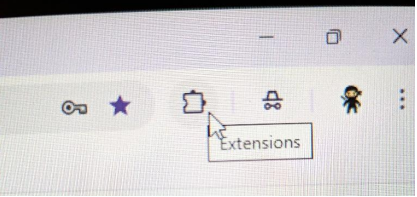
You do not have to be logged on just as long as the web page is open.2. Open the Extensions by clicking on the “Jigsaw” type icon in the top right-hand corner.
3. This will open an additional box allowing access to all extensions on your PC. Click on the
icon/label for the Bitdefender Anti-Tracker.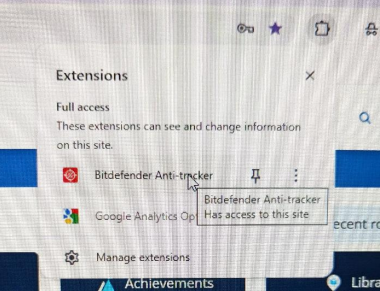
4. This will open an additional box that displays the various types for trackers that Bitdefender AntiTracker is blocking for whatever browser page you are currently on.
The example show in the screenshot below is for www.myrouteapp.com.If you are not on the MRA web page you will have to add the URL manually in the next stage.
Select and click on the gear Icon in the top right-hand corner to open the settings.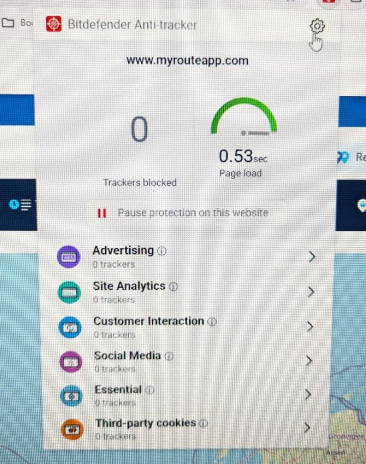
5. In the settings go to the heading “Exceptions” and click “Add current website to the list” (Fig 1).
This will automatically add the MyRoute-app URL (Fig 2).
Alternatively, you can enter the website URL manually in the box provided.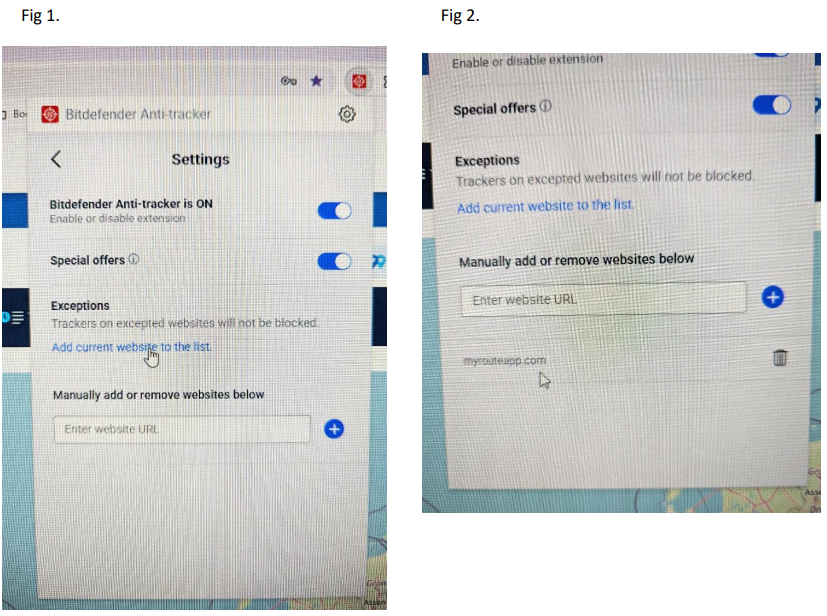
-
 a white mouse on the motorbike referenced this topic on
-
a white mouse on the motorbike referenced this topic on
-
 Corjan Meijerink referenced this topic on
Hello! It looks like you're interested in this conversation, but you don't have an account yet.
Getting fed up of having to scroll through the same posts each visit? When you register for an account, you'll always come back to exactly where you were before, and choose to be notified of new replies (either via email, or push notification). You'll also be able to save bookmarks and upvote posts to show your appreciation to other community members.
With your input, this post could be even better 💗
Register Login-
 0459
0459
-
 0420
0420
-
 0575
0575
-
 02118
02118
-