Android only update! (4.4.1)
-

Hi everyone!

An update is available shortly for Android only!
Still version 4.4.1 but now with build number 410
After the last update an unexpected layout issue occurred on newer Android phones causing some buttons to be hidden behind the button navigation bar of Android itself. Obviously that's quite annoying! Now it's solved again

That's it!
Any Alpha / Beta tester will also receive this update
No update for iOS -

Good news! Quick action.
-
Hi everyone!
An update is available shortly for Android only!
Still version 4.4.1 but now with build number 410After the last update an unexpected layout issue occurred on newer Android phones causing some buttons to be hidden behind the button navigation bar of Android itself. Obviously that's quite annoying! Now it's solved again
That's it!
Any Alpha / Beta tester will also receive this update
No update for iOS
@Corjan-Meijerink just updated to 410 in the Google Store
-

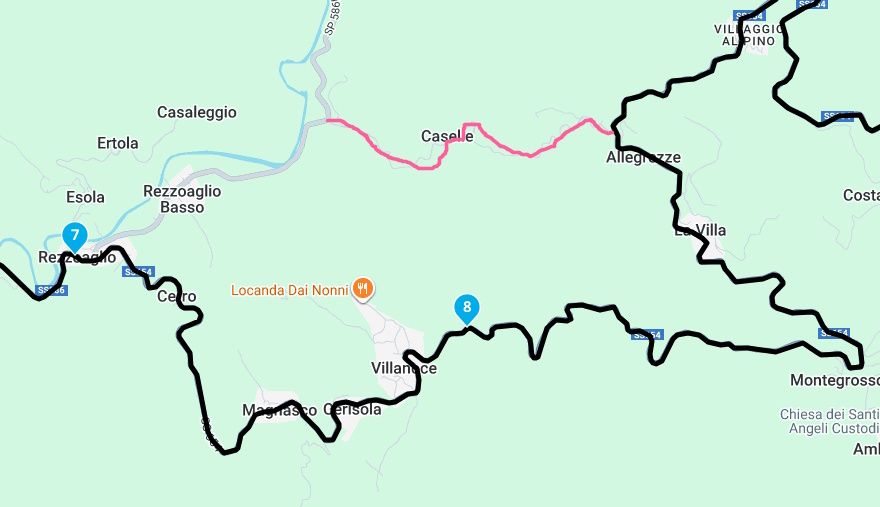
I tested the new app yesterday on a route of about 250km and disabled route recalculation. When I arrived in Rezzoaglio, instead of having me take the road I had traced, where there was also a waypoint (no. 8), it wanted to make me take a shortcut (red line), which although shorter is less beautiful to travel by motorbike. Knowing the road well, I took the road I intended to take. When I took the road I had chosen, all the information about how far I was from the destination, the next turns, etc. disappeared. However, the route to follow was clearly visible on the map but in white. Once I rejoined the road marked in red, all the information reappeared.
-
I tested the new app yesterday on a route of about 250km and disabled route recalculation. When I arrived in Rezzoaglio, instead of having me take the road I had traced, where there was also a waypoint (no. 8), it wanted to make me take a shortcut (red line), which although shorter is less beautiful to travel by motorbike. Knowing the road well, I took the road I intended to take. When I took the road I had chosen, all the information about how far I was from the destination, the next turns, etc. disappeared. However, the route to follow was clearly visible on the map but in white. Once I rejoined the road marked in red, all the information reappeared.
@ginogino that is exactly how it should work
-
@ginogino that is exactly how it should work
@Corjan-Meijerink said in Android only update! (4.4.1):
@ginogino that is exactly how it should work
No, that's how it should work if I hadn't placed a waypoint (n. 8 ) on the road I wanted to take, the app shouldn't arbitrarily choose a different route (unless there are road interruptions) from the one I chose. Otherwise, I might as well use Google Maps and let Google choose the road to take.
-
@Corjan-Meijerink said in Android only update! (4.4.1):
@ginogino that is exactly how it should work
No, that's how it should work if I hadn't placed a waypoint (n. 8 ) on the road I wanted to take, the app shouldn't arbitrarily choose a different route (unless there are road interruptions) from the one I chose. Otherwise, I might as well use Google Maps and let Google choose the road to take.
@ginogino of you share the url of the route and make shure its set to public maybe we can help you
-
I tested the new app yesterday on a route of about 250km and disabled route recalculation. When I arrived in Rezzoaglio, instead of having me take the road I had traced, where there was also a waypoint (no. 8), it wanted to make me take a shortcut (red line), which although shorter is less beautiful to travel by motorbike. Knowing the road well, I took the road I intended to take. When I took the road I had chosen, all the information about how far I was from the destination, the next turns, etc. disappeared. However, the route to follow was clearly visible on the map but in white. Once I rejoined the road marked in red, all the information reappeared.

@ginogino, My guess is that in Rezzoaglio you wandered off route and had the app recalculate a few times, after which it skips WP8, thinking it is unreachable. It then goes to WP9, for which the the red line is exactly the right way. In your example, what is the distance between Waypoints 7, 8 and 9? Maybe a bit too big. Skipping then can have a big impact too. You would have easily corrected that, by long-pressing WP8, which forces to recalculate from there.
-
@ginogino of you share the url of the route and make shure its set to public maybe we can help you
@Marinus-van-Deudekom said in Android only update! (4.4.1):
@ginogino of you share the url of the route and make shure its set to public maybe we can help you
-
@ginogino, My guess is that in Rezzoaglio you wandered off route and had the app recalculate a few times, after which it skips WP8, thinking it is unreachable. It then goes to WP9, for which the the red line is exactly the right way. In your example, what is the distance between Waypoints 7, 8 and 9? Maybe a bit too big. Skipping then can have a big impact too. You would have easily corrected that, by long-pressing WP8, which forces to recalculate from there.
@Con-Hennekens said in Android only update! (4.4.1):
@ginogino, My guess is that in Rezzoaglio you wandered off route and had the app recalculate a few times,
In Rezzoaglio, I didn't deviate from the route because when the app pointed me in the wrong direction, leading to waypoint 9 and skipping waypoint 8, knowing full well the route I had chosen to get to waypoint 9 via waypoint 8, I took the right direction for me, not for the app, which would have taken me to waypoint 8, then to waypoint 9, and then on.
I keep route recalculation disabled because there are no warnings (like "make a U-turn") if you take the wrong turn, and if the route is recalculated without me realizing it, I risk (as has already happened several times) taking too much distance or not taking the route I intended. -
@Con-Hennekens said in Android only update! (4.4.1):
@ginogino, My guess is that in Rezzoaglio you wandered off route and had the app recalculate a few times,
In Rezzoaglio, I didn't deviate from the route because when the app pointed me in the wrong direction, leading to waypoint 9 and skipping waypoint 8, knowing full well the route I had chosen to get to waypoint 9 via waypoint 8, I took the right direction for me, not for the app, which would have taken me to waypoint 8, then to waypoint 9, and then on.
I keep route recalculation disabled because there are no warnings (like "make a U-turn") if you take the wrong turn, and if the route is recalculated without me realizing it, I risk (as has already happened several times) taking too much distance or not taking the route I intended.
@ginogino said in Android only update! (4.4.1):
I had chosen to get to waypoint 9 via waypoint 8, I took the right direction for me, not for the app, which would have taken me to waypoint 8, then to waypoint 9, and then on.
Do you mean that you've kept on going on the route that you planned or did you like @Con-Hennekens stated diviate a bit in Rezzoaglio.
If I look at your route there should not have been any reason why the app would try to get you to skipp shapingpoint 8. No roadblocks or seasonal blocking.
I don't know why you would disable recalculation.
As I look at you route I would have put in more shapingpoints to prevent unexpected deviation of your route.
I would certainly put shapingpoint 7 a bit more in the direction of 8
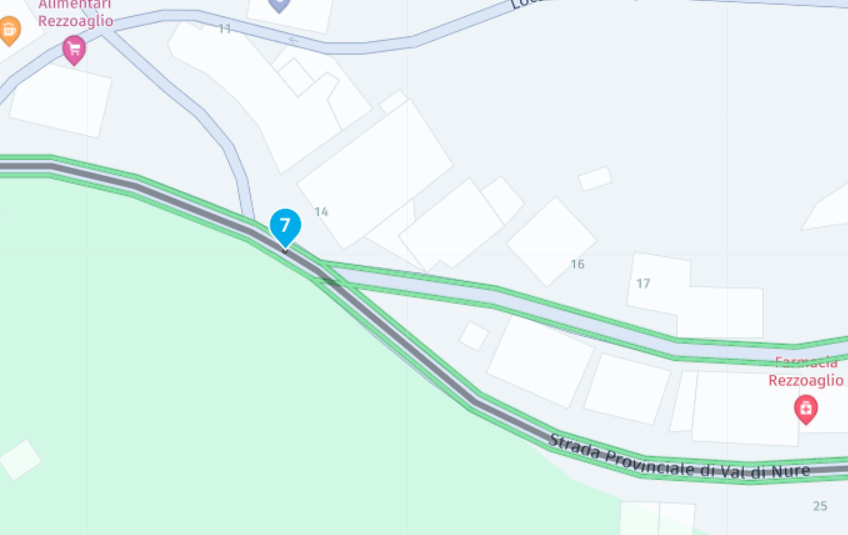
Now it's almost on the crossing where things went wrong for you.
Have you enabled the white original route in your settings. That way you can see when you're about to deviate from your route. -
@ginogino said in Android only update! (4.4.1):
I had chosen to get to waypoint 9 via waypoint 8, I took the right direction for me, not for the app, which would have taken me to waypoint 8, then to waypoint 9, and then on.
Do you mean that you've kept on going on the route that you planned or did you like @Con-Hennekens stated diviate a bit in Rezzoaglio.
If I look at your route there should not have been any reason why the app would try to get you to skipp shapingpoint 8. No roadblocks or seasonal blocking.
I don't know why you would disable recalculation.
As I look at you route I would have put in more shapingpoints to prevent unexpected deviation of your route.
I would certainly put shapingpoint 7 a bit more in the direction of 8
Now it's almost on the crossing where things went wrong for you.
Have you enabled the white original route in your settings. That way you can see when you're about to deviate from your route.
Do you mean that you've kept on going on the route that you planned
Yes, I continued on the route I had planned, which turned white, but the information about the next turns disappeared, I was not alone and I was unable to stop to take a photo of the display.
Have you enabled the white original route in your settings. That way you can see when you're about to deviate from your route.
In the options I don't seem to have found the possibility to change the color of the roads.
-
Do you mean that you've kept on going on the route that you planned
Yes, I continued on the route I had planned, which turned white, but the information about the next turns disappeared, I was not alone and I was unable to stop to take a photo of the display.
Have you enabled the white original route in your settings. That way you can see when you're about to deviate from your route.
In the options I don't seem to have found the possibility to change the color of the roads.
@ginogino maybe you can put in a service ticket and include the log file. By pressing long on the version number.
What you experienced shouldn't have happened -

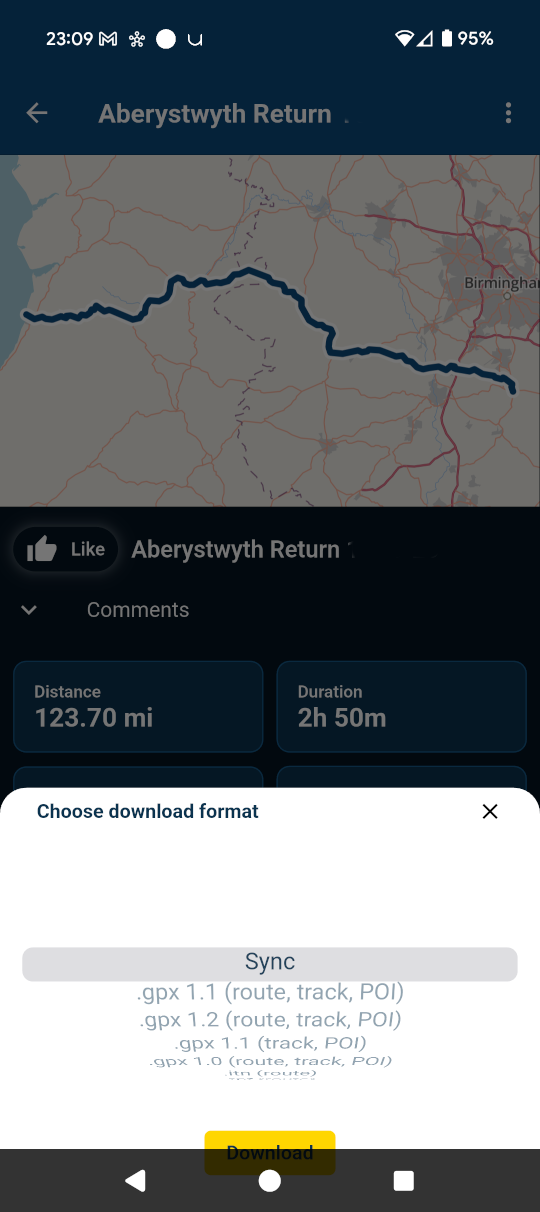
Still one minor layout problem left, Corjan - the sync screen.
Probably not worth a release, but worth a fix:
-
@ginogino maybe you can put in a service ticket and include the log file. By pressing long on the version number.
What you experienced shouldn't have happened
@Marinus-van-Deudekom said in Android only update! (4.4.1):
@ginogino maybe you can put in a service ticket and include the log file.
Thanks, I didn't know how to extract the log file. I'll open a ticket reporting the error.
-
@Marinus-van-Deudekom said in Android only update! (4.4.1):
@ginogino maybe you can put in a service ticket and include the log file.
Thanks, I didn't know how to extract the log file. I'll open a ticket reporting the error.
@ginogino, to be honest, if the app skipped to 9 and you still followed the original route to 8, there really is no error. Having no turn by turn instructions is what happens if you disable recalculation and leave the blue line. Of course you can ask why the app skipped 8. Could it be an accidental touch on the phone's display?
I am just an enthusiastic MRA user, and hope you will be one too!
Most motorcycle problems are caused by the nut that connects the handlebar to the saddle.
Check out RideSleepRepeat.eu, a biker community for sharing stays across Europe
-
@ginogino, to be honest, if the app skipped to 9 and you still followed the original route to 8, there really is no error. Having no turn by turn instructions is what happens if you disable recalculation and leave the blue line. Of course you can ask why the app skipped 8. Could it be an accidental touch on the phone's display?
@Con-Hennekens said in Android only update! (4.4.1):
@ginogino, to be honest, if the app skipped to 9 and you still followed the original route to 8, there really is no error.
There was no problem because I knew perfectly well the road I had selected when I planned the motorcycle tour, but instead I worry when I have to take roads that I don't know well or that I'm doing for the first time.
-
@ginogino said in Android only update! (4.4.1):
I had chosen to get to waypoint 9 via waypoint 8, I took the right direction for me, not for the app, which would have taken me to waypoint 8, then to waypoint 9, and then on.
Do you mean that you've kept on going on the route that you planned or did you like @Con-Hennekens stated diviate a bit in Rezzoaglio.
If I look at your route there should not have been any reason why the app would try to get you to skipp shapingpoint 8. No roadblocks or seasonal blocking.
I don't know why you would disable recalculation.
As I look at you route I would have put in more shapingpoints to prevent unexpected deviation of your route.
I would certainly put shapingpoint 7 a bit more in the direction of 8
Now it's almost on the crossing where things went wrong for you.
Have you enabled the white original route in your settings. That way you can see when you're about to deviate from your route.
@Marinus-van-Deudekom said in Android only update! (4.4.1):
I would certainly put shapingpoint 7 a bit more in the direction of 8
Exactly always ensure your waypoints are a good distance from a junction, intersection, roundabout or adjacent road. If you use the (expand) add waypoints option you have to check every single one.
I've also had MRA take me left onto a single track lane shortcut even though my friend's MRA was showing straight ahead which was the correct way.
I didn't have (show original route) turned on which would have helped but previously the white line (show original route) didn't follow the road correctly so I turned it off. Looks like it has been fixed now but I'll find out for sure on my trip on the 20th.
-
@Marinus-van-Deudekom said in Android only update! (4.4.1):
I would certainly put shapingpoint 7 a bit more in the direction of 8
Exactly always ensure your waypoints are a good distance from a junction, intersection, roundabout or adjacent road. If you use the (expand) add waypoints option you have to check every single one.
I've also had MRA take me left onto a single track lane shortcut even though my friend's MRA was showing straight ahead which was the correct way.
I didn't have (show original route) turned on which would have helped but previously the white line (show original route) didn't follow the road correctly so I turned it off. Looks like it has been fixed now but I'll find out for sure on my trip on the 20th.
@JP-d said in Android only update! (4.4.1):
If you use the (expand) add waypoints option you have to check every single one.
I used to use the "expand" function, until I realized it was introducing a lot of errors, and I haven't used it since.
-
@JP-d said in Android only update! (4.4.1):
If you use the (expand) add waypoints option you have to check every single one.
I used to use the "expand" function, until I realized it was introducing a lot of errors, and I haven't used it since.
@ginogino I would not use the expand waypoint function but simply add a couple manually

Hello! It looks like you're interested in this conversation, but you don't have an account yet.
Getting fed up of having to scroll through the same posts each visit? When you register for an account, you'll always come back to exactly where you were before, and choose to be notified of new replies (either via email, or push notification). You'll also be able to save bookmarks and upvote posts to show your appreciation to other community members.
With your input, this post could be even better 💗
Register Login

-
 01888
01888
-
 117130
-
015102
-
01186
-
 2749
2749
-
 0760
0760
-
0749
-
0749