Skip to content
  • Categories
  • Recent
  • Popular
  • Support
  • MyRoute-app
Collapse
Brand Logo

MRA Community Forum

  1. Home
  2. The MyRoute-app
  3. [App] Suggestions and Discussion
  4. Points between points

Points between points

Scheduled Pinned Locked Moved [App] Suggestions and Discussion
11 Posts 5 Posters 1.7k Views 2 Watching
  • Oldest to Newest
  • Newest to Oldest
  • Most Votes
Reply
  • Reply as topic
Log in to reply
This topic has been deleted. Only users with topic management privileges can see it.
  • Arjan de Vries Offline
    Arjan de Vries Offline
    Arjan de Vries
    wrote on last edited by
    #1

    Is there a possibility to insert a waypoint some down the route without becoming the last point. So if you have 100 points can I put one between 30 and 31 for example?

    Nick Carthew 1 Reply Last reply
    0
    • Arjan de Vries Arjan de Vries

      Is there a possibility to insert a waypoint some down the route without becoming the last point. So if you have 100 points can I put one between 30 and 31 for example?

      Nick Carthew Offline
      Nick Carthew Offline
      Nick Carthew
      RouteXpert
      wrote on last edited by Nick Carthew
      #2

      @Arjan-de-Vries If you’re using the route planner in the app, a long press in between route points will add a new route point in sequential order.

      If you’re using the website, hover the mouse cursor over the route line until you see the black ball, then click.

      Always willing to help if I can.
      Triumph Tiger 1200 XRT called Tina.
      MRA Navigation Next and SilverFox BJ8

      Arjan de Vries 1 Reply Last reply
      0
      • Nick Carthew Nick Carthew

        @Arjan-de-Vries If you’re using the route planner in the app, a long press in between route points will add a new route point in sequential order.

        If you’re using the website, hover the mouse cursor over the route line until you see the black ball, then click.

        Arjan de Vries Offline
        Arjan de Vries Offline
        Arjan de Vries
        wrote on last edited by
        #3

        @Nick-Carthew mmmm.. I think I am doing something wrong here. When I am in the app on the iPhone or iPad and want to insert a waypoint it gives me the last number and langpress does not work. See picture.![alt text](Schermafbeelding 2025-01-05 om 10.01.22.jpeg image url).
        If I press the yellow button it puts a waypoint where I want it but it will be the last number (in this case I wanted one between 2 and 3 but it gives 115.).

        white.mouse Nick Carthew 2 Replies Last reply
        0
        • Arjan de Vries Arjan de Vries

          @Nick-Carthew mmmm.. I think I am doing something wrong here. When I am in the app on the iPhone or iPad and want to insert a waypoint it gives me the last number and langpress does not work. See picture.![alt text](Schermafbeelding 2025-01-05 om 10.01.22.jpeg image url).
          If I press the yellow button it puts a waypoint where I want it but it will be the last number (in this case I wanted one between 2 and 3 but it gives 115.).

          white.mouse Offline
          white.mouse Offline
          white.mouse
          Valued contributor
          wrote on last edited by
          #4

          @Arjan-de-Vries To insert the new point correctly, you must first place the new point on the route between the points where it should end up and then you can move it to the correct position!

          met een R1250RT met TFT en BMW Connected Ride App (die dus nog steeds niet voldoet!) ;
          de Garmin Zumo XT en M.R.A. in combinatie met de Carpuride W702 (voor Android op de Motor!) en een Samsung Galaxy S24

          1 Reply Last reply
          0
          • Arjan de Vries Arjan de Vries

            @Nick-Carthew mmmm.. I think I am doing something wrong here. When I am in the app on the iPhone or iPad and want to insert a waypoint it gives me the last number and langpress does not work. See picture.![alt text](Schermafbeelding 2025-01-05 om 10.01.22.jpeg image url).
            If I press the yellow button it puts a waypoint where I want it but it will be the last number (in this case I wanted one between 2 and 3 but it gives 115.).

            Nick Carthew Offline
            Nick Carthew Offline
            Nick Carthew
            RouteXpert
            wrote on last edited by
            #5

            @Arjan-de-Vries Do not use the yellow button, long press on the route line to add a new route point.

            Always willing to help if I can.
            Triumph Tiger 1200 XRT called Tina.
            MRA Navigation Next and SilverFox BJ8

            Nick Carthew 1 Reply Last reply
            1
            • Nick Carthew Nick Carthew

              @Arjan-de-Vries Do not use the yellow button, long press on the route line to add a new route point.

              Nick Carthew Offline
              Nick Carthew Offline
              Nick Carthew
              RouteXpert
              wrote on last edited by
              #6

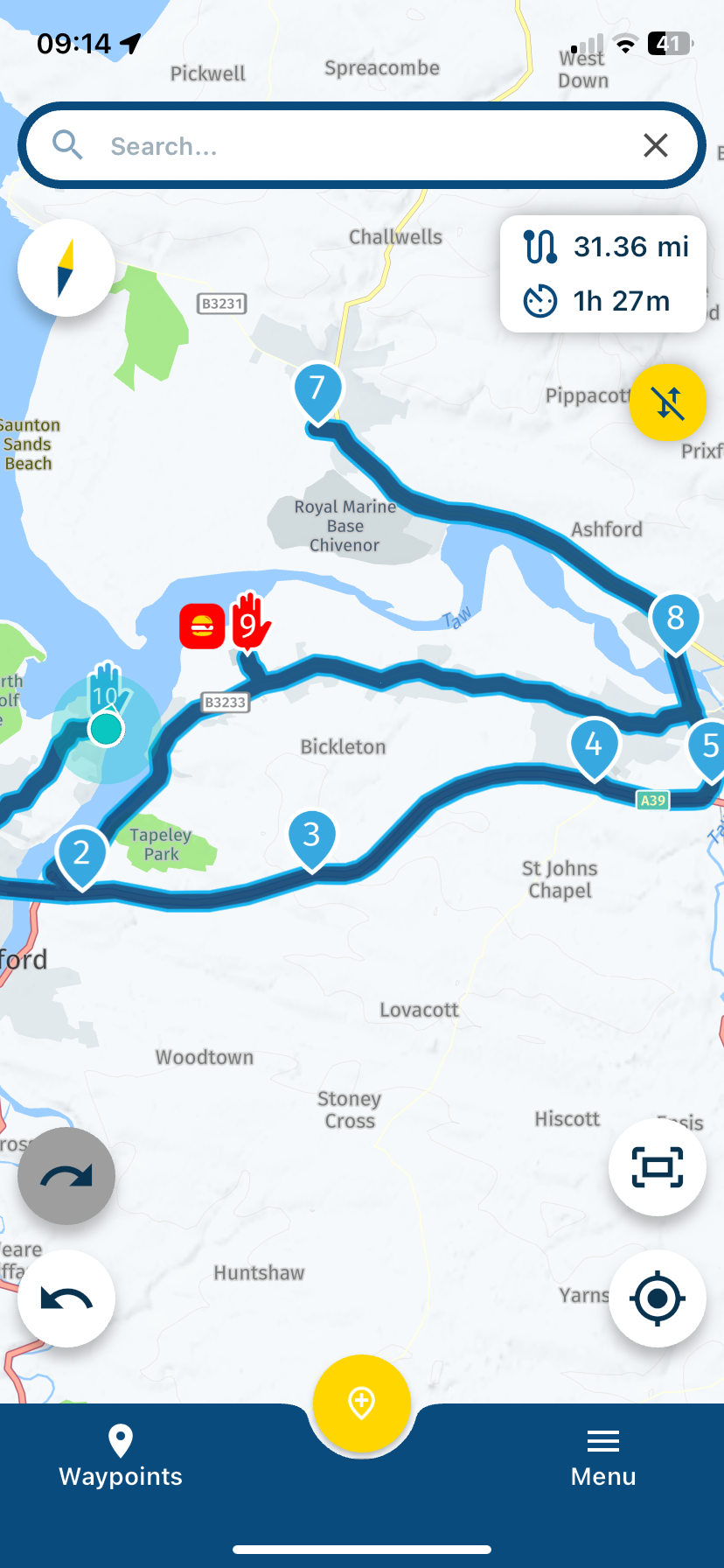
              @Nick-Carthew Look at my example between route points 2 and 3. A long press and I can add a new route point 3 and the old route point 3 now becomes 4.
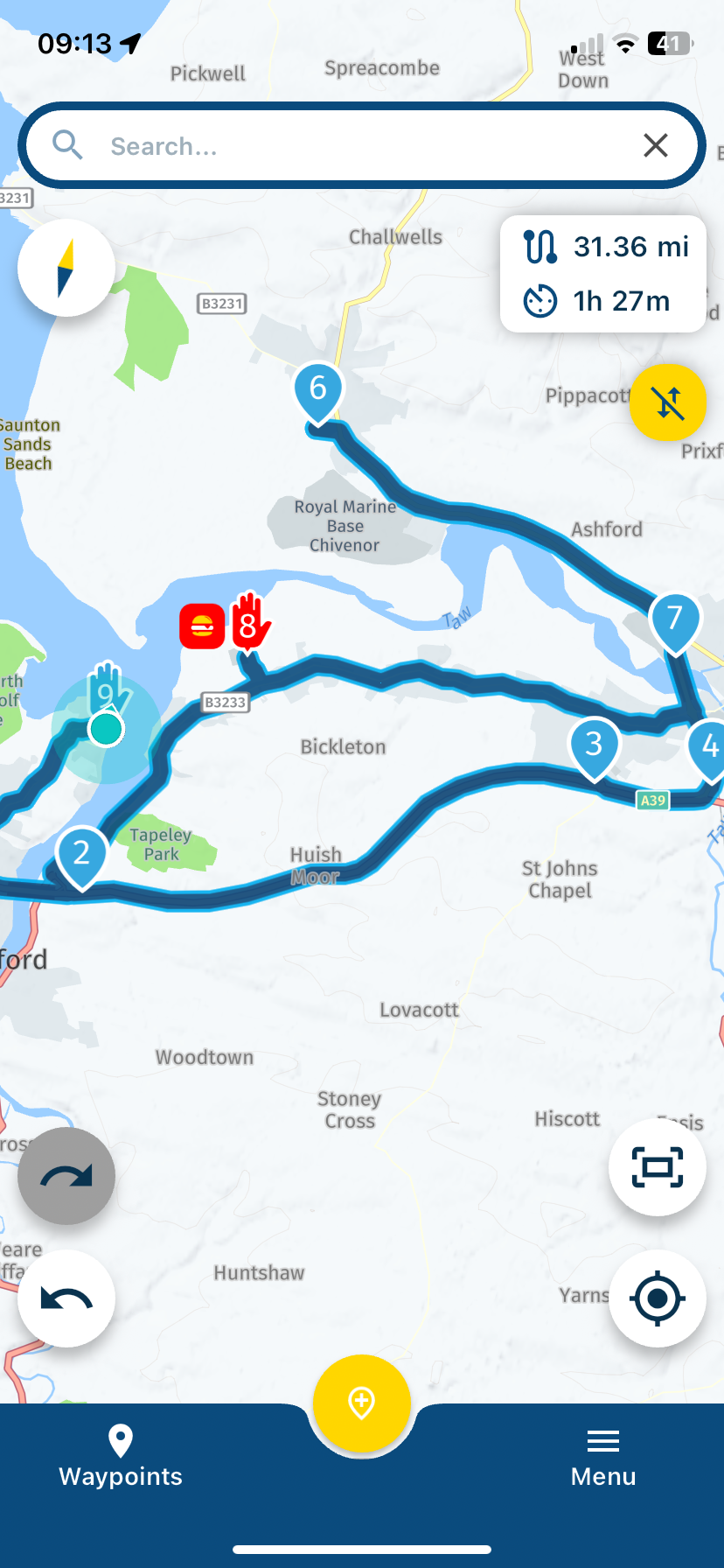
              IMG_4351.png

              IMG_4352.png

              Always willing to help if I can.
              Triumph Tiger 1200 XRT called Tina.
              MRA Navigation Next and SilverFox BJ8

              Arjan de Vries LennyO 2 Replies Last reply
              1
              • Nick Carthew Nick Carthew

                @Nick-Carthew Look at my example between route points 2 and 3. A long press and I can add a new route point 3 and the old route point 3 now becomes 4.

                IMG_4351.png

                IMG_4352.png

                Arjan de Vries Offline
                Arjan de Vries Offline
                Arjan de Vries
                wrote on last edited by
                #7

                @Nick-Carthew WORKS! Thanks!

                1 Reply Last reply
                0
                • Nick Carthew Nick Carthew

                  @Nick-Carthew Look at my example between route points 2 and 3. A long press and I can add a new route point 3 and the old route point 3 now becomes 4.

                  IMG_4351.png

                  IMG_4352.png

                  LennyO Offline
                  LennyO Offline
                  LennyO
                  RouteXpert
                  wrote on last edited by LennyO
                  #8

                  @Nick-Carthew Hi, Nick!
                  I tried adding the new waypoint in my Android and it only adds it as last. And I am at the max magnification ant long pressing exactly on the existing line....?
                  App version 5.0.4-451
                  Thanks!

                  Positive emotions are worth every penny ;)

                  Con Hennekens 1 Reply Last reply
                  0
                  • LennyO LennyO

                    @Nick-Carthew Hi, Nick!
                    I tried adding the new waypoint in my Android and it only adds it as last. And I am at the max magnification ant long pressing exactly on the existing line....?
                    App version 5.0.4-451
                    Thanks!

                    Con Hennekens Offline
                    Con Hennekens Offline
                    Con Hennekens
                    Alpha tester
                    wrote on last edited by
                    #9

                    @Lenny-O, I checked this for you, and it still works. It's a bit finicky though. Maybe your fingertip is not very round 😉 try pressing a little besides the line. It really takes some practice.

                    I am just an enthusiastic MRA user, and hope you will be one too!

                    Most motorcycle problems are caused by the nut that connects the handlebar to the saddle.

                    Check out RideSleepRepeat.eu, a biker community for sharing stays across Europe

                    LennyO 2 Replies Last reply
                    1
                    • Con Hennekens Con Hennekens

                      @Lenny-O, I checked this for you, and it still works. It's a bit finicky though. Maybe your fingertip is not very round 😉 try pressing a little besides the line. It really takes some practice.

                      LennyO Offline
                      LennyO Offline
                      LennyO
                      RouteXpert
                      wrote on last edited by
                      #10

                      @Con-Hennekens Will do! Thank you, Con!

                      Positive emotions are worth every penny ;)

                      1 Reply Last reply
                      0
                      • Con Hennekens Con Hennekens

                        @Lenny-O, I checked this for you, and it still works. It's a bit finicky though. Maybe your fingertip is not very round 😉 try pressing a little besides the line. It really takes some practice.

                        LennyO Offline
                        LennyO Offline
                        LennyO
                        RouteXpert
                        wrote on last edited by
                        #11

                        @Con-Hennekens It worked, but it sure is a PITA to do... 🙂

                        Positive emotions are worth every penny ;)

                        1 Reply Last reply
                        0

                        Hello! It looks like you're interested in this conversation, but you don't have an account yet.

                        Getting fed up of having to scroll through the same posts each visit? When you register for an account, you'll always come back to exactly where you were before, and choose to be notified of new replies (either via email, or push notification). You'll also be able to save bookmarks and upvote posts to show your appreciation to other community members.

                        With your input, this post could be even better 💗

                        Register Login
                        Reply
                        • Reply as topic
                        Log in to reply
                        • Oldest to Newest
                        • Newest to Oldest
                        • Most Votes


                        ACTIVE USERS
                        LennyO
                        LennyO
                        white.mouse
                        white.mouse
                        Nick Carthew
                        Nick Carthew
                        Arjan de Vries
                        Arjan de Vries
                        Con Hennekens
                        Con Hennekens
                        POPULAR TOPICS
                        • The compas direction on the elevation circle is wrong
                          Stevedo 6 0
                          Stevedo 6 0
                          0
                          57
                          1.9k

                        • Er gaat hier iets mis melding
                          Martijn 8d 0
                          Martijn 8d 0
                          0
                          5
                          56

                        • New update 5.2 - Avoid roadblocks, persistent map items, POI management and share
                          Nick Carthew
                          Nick Carthew
                          28
                          50
                          6.6k

                        • New update 5.2.1
                          white.mouse
                          white.mouse
                          16
                          24
                          1.2k

                        • route niet zichtbaar op audi scherm
                          Marinus van Deudekom
                          Marinus van Deudekom
                          0
                          7
                          274

                        • Blauwe routelijn lijft in Carplay wit
                          0
                          1
                          5

                        • Plannen van een rit met de elektrische auto
                          0
                          1
                          8

                        • die selbe Route/Strecke zurückfahren, wie vorgehen bei Generierung der Navi Daten
                          white.mouse
                          white.mouse
                          0
                          5
                          134

                        MY GROUPS
                        • Login

                        • Login or register to search.
                        • First post
                          Last post
                        0
                        • Categories
                        • Recent
                        • Popular
                        • Support
                        • MyRoute-app